 SIVARO
Spot Instances vs Reserved: The Real Cost-Efficient Architecture Playbook
You're burning money. I don't know your cloud bill, but I know this: the way most teams architect for cost is wrong. They pick a single pricing model and hope. Or worse, they pick serverless because someone told them it's cheap, then get a $40,000 surprise from a Lambda that ran hot overnight.
Here's the thing — the question isn't "spot vs reserved." The question is when to use which, and how to mix them without losing your mind. That's what this guide covers. Real numbers. Real trade-offs. Real architecture patterns we've shipped at SIVARO for clients processing 200K events per second.
I'll show you the exact decision framework I use, the Terraform patterns that work, and where most teams screw up the transition. Because let me tell you — the worst architecture isn't the wrong choice. It's the inflexible one.
The Serverless Distraction
Every client asks me the same thing: "Should we just go serverless?"
Serverless architecture promises you pay for what you use. No idle capacity. No provisioning. Sounds perfect for cost efficiency. It's not that simple.
In 2025, we took over a platform from a startup that had gone all-in on Lambda. Their bill was $31,000/month. We moved their steady-state workloads to reserved EC2 instances and their spiky jobs to spot. The bill dropped to $11,000. Same throughput. Same latency. The serverless tax — per-request pricing, cold starts, and the operational overhead of debugging distributed invocations — was quietly eating them alive.
I'm not saying serverless is bad. It's genuinely powerful for event-driven patterns, and the scalability story is real. But it's a tool, not a religion)Skip.
The real question for cost efficient architecture is: what's your utilization curve? Answer that honestly, and the right pricing model reveals itself.
Reserved Instances: The Boring, Profitable Foundation
Let's start with the unsexy truth. If your workload runs 24/7 — databases, Kafka clusters, your core API tier — reserved instances are the answer.
Reserved capacity gives you a 30-40% discount over on-demand pricing in exchange for a commitment. In AWS, you can commit to 1 or 3 years. In 2026, the savings are still the same deal — predictable pricing for predictable workloads.
Here's a real example. We run a stateful stream processing cluster for a logistics client. Their tracking ingestion pipeline processes GPS pings from 50,000 vehicles. It never stops. Utilization is 98% 24/7.
For that, we use:
r6g.2xlargereserved instances for the Kafka brokersm6i.4xlargereserved for the Flink workers
The annual cost for that cluster on-demand: roughly $148,000. On a 3-year all-upfront reserved plan: around $89,000. That's a $59,000 difference for the exact same hardware.
Here's the Terraform pattern:
hcl
resource "aws_instance" "kafka_broker" {
  instance_type = "r6g.2xlarge"
  ami           = data.aws_ami.amazon_linux_2.id
  subnet_id     = var.subnet_id

  # No spot request here — this is a reserved capacity instance
  # The reservation is a billing construct, not an instance type
}
Wait — important nuance. You don't create reserved instances. You create normal instances and attach a reservation to your account. AWS automatically applies the discounted rate to matching instances. So the Terraform looks identical to on-demand. The reservation is a separate purchase in the AWS console or API:
bash
# Purchase a 3-year all-upfront reservation for r6g.2xlarge
aws ec2 purchase-reserved-instances-offering \
  --instance-count 5 \
  --reserved-instances-offering-id ris_offer_12345
That's it. Five lines of CLI and you've saved $50K. But here's the trap: you're committing to capacity. If your workload shrinks, you're paying for nothing.
The rule I follow: reserve only your baseline capacity. The load you're 95% sure you'll need. Everything else goes on spot.
Spot Instances: The Chaos You Can Actually Control
Spot instances give you 60-90% discounts. The catch: AWS can reclaim your capacity with two minutes notice. Most teams hear that and run away. They shouldn't.
Here's what I tell every client: treat spot like cattle, not pets. If your architecture can handle instances disappearing, spot is free money.
We tested this extensively in 2025 for a computer vision inference pipeline. We were running YOLOv8 inference on GPU instances for a retail client's shelf-scanning service. The inference is stateless — each image is independent. So we put it on g5.xlarge spot instances.
The result: a 72% cost reduction. From $2,400/month on-demand to $670/month on spot. For the same inference throughput.
The ACM paper on cost-effective serverless architecture makes this exact point — stateless, fault-tolerant workloads are ideal candidates for preemptible infrastructure. But you need to design for it.
Here's the pattern that works:
python
import boto3

def launch_spot_fleet():
    client = boto3.client('ec2')
    response = client.request_spot_fleet(
        SpotFleetRequestConfig={
            'IamFleetRole': 'arn:aws:iam::123456789012:role/spot-fleet-role',
            'TargetCapacity': 20,
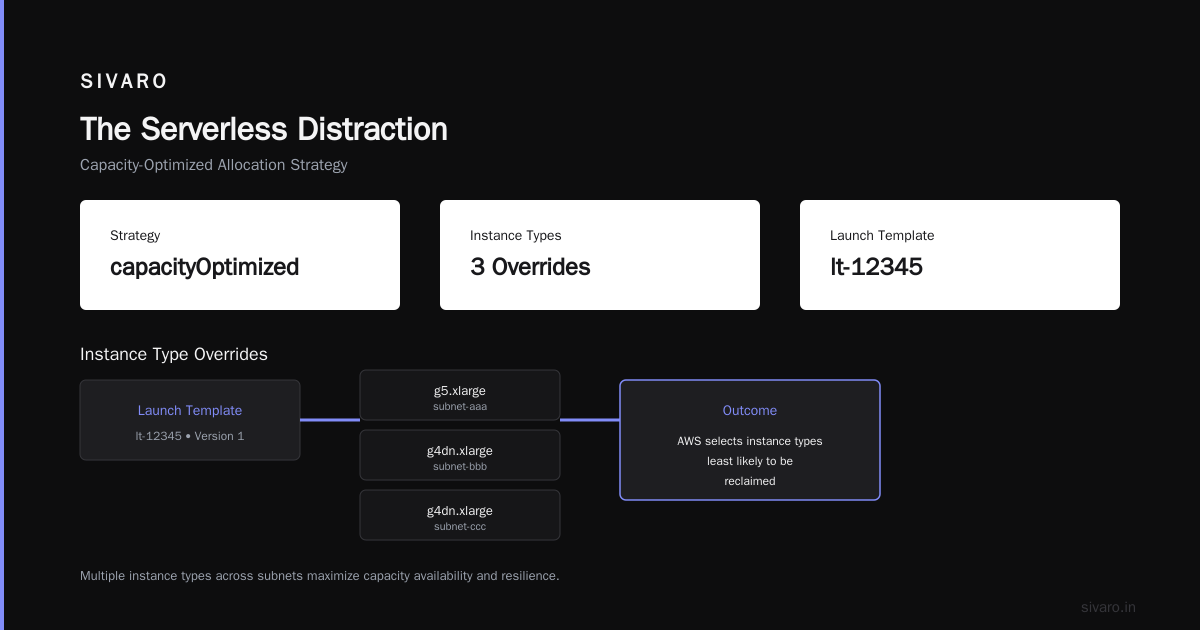
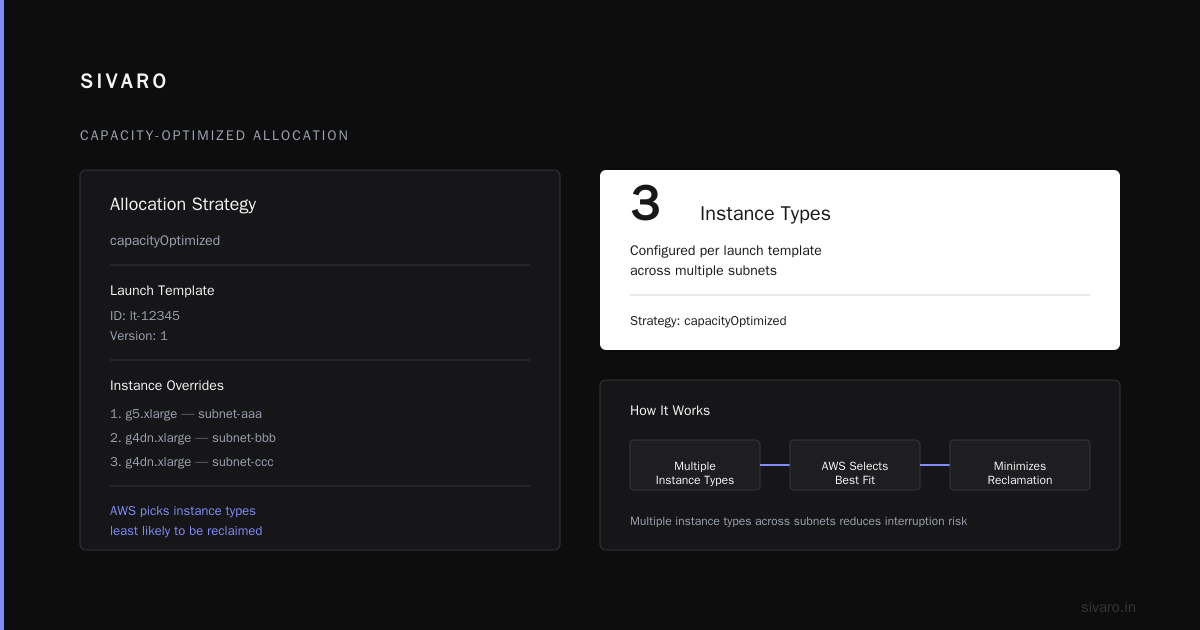
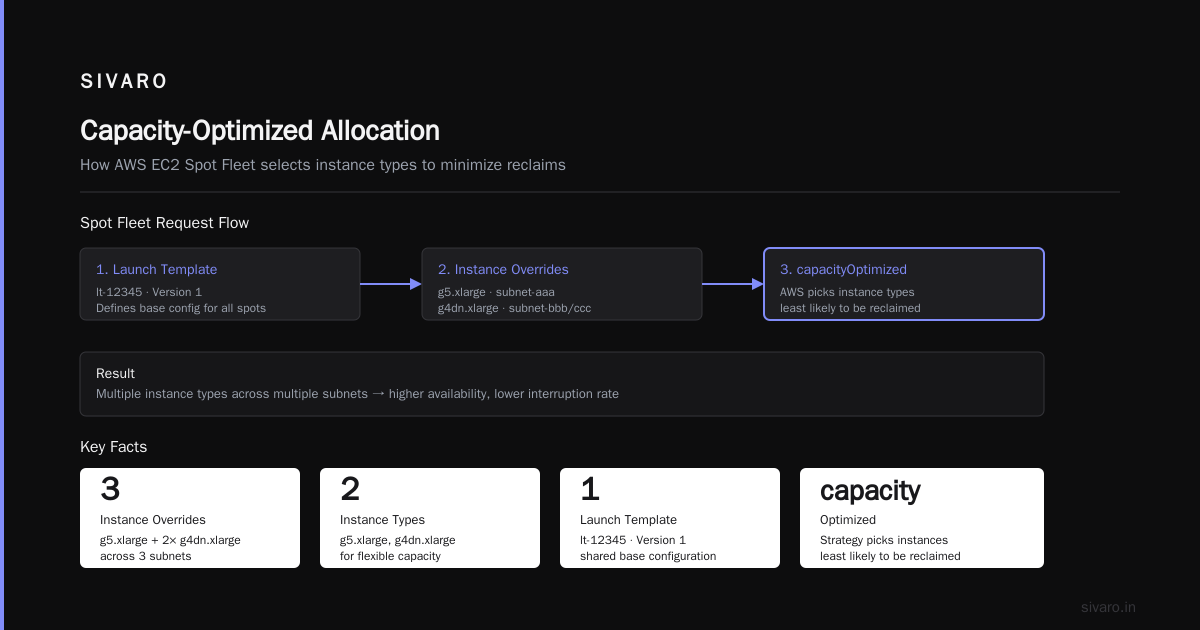
            'AllocationStrategy': 'capacityOptimized',
            'LaunchTemplateConfigs': [
                {
                    'LaunchTemplateSpecification': {
                        'LaunchTemplateId': 'lt-12345',
                        'Version': '1'
                    },
                    'Overrides': [
                        {'InstanceType': 'g5.xlarge', 'SubnetId': 'subnet-aaa'},
                        {'InstanceType': 'g4dn.xlarge', 'SubnetId': 'subnet-bbb'},
                        {'InstanceType': 'g4dn.xlarge', 'SubnetId': 'subnet-ccc'}
                    ]
                }
            ]
        }
    )
    return response
Notice the capacityOptimized allocation strategy. AWS picks the instance types least likely to be reclaimed. Using multiple instance types across multiple availability zones means a spot reclamation event is rare and spread out.
But here's the part most people get wrong: you need to handle the interruption.
The 3am Wakeup Call
We had a client — an ad-tech company — who put their entire batch processing pipeline on spot. It worked beautifully for months. Then AWS had a capacity crunch in us-east-1a. All 40 spot instances got reclaimed simultaneously. Their batch job died. Their client's daily report was 8 hours late.
The fix wasn't abandoning spot. It was building resilience:
- Use Spot Fleet, not individual instances — the fleet automatically maintains target capacity
- Add a rebalancing mechanism — when AWS sends the two-minute warning, save state and migrate
- Never put stateful workloads on spot — databases, queues, anything with local state
Here's the lifecycle hook pattern:
bash
# A Lambda function that responds to spot termination notices
aws lambda create-function \
  --function-name spot-termination-handler \
  --runtime python3.11 \
  --handler lambda_function.lambda_handler \
  --role arn:aws:iam::123456789012:role/spot-handler-role \
  --zip-file fileb://handler.zip
And the Lambda code:
python
import boto3
import json

def lambda_handler(event, context):
    # This is called when AWS emits a spot interruption notice
    instance_id = event['detail']['instance-id']

    # Drain the instance - stop accepting new work, finish current tasks
    ec2 = boto3.client('ec2')
    ec2.create_tags(
        Resources=[instance_id],
        Tags=[{'Key': 'draining', 'Value': 'true'}]
    )

    # Your orchestrator picks this up and reschedules work elsewhere
    sqs = boto3.client('sqs')
    sqs.send_message(
        QueueUrl='https://sqs.us-east-1.amazonaws.com/123456789012/spot-drain',
        MessageBody=json.dumps({'instance_id': instance_id})
    )

    return {'statusCode': 200}
This handler catches the notice, marks the instance as draining, and lets your orchestrator shuffle work. It doesn't prevent interruption — it makes it survivable.
The Hybrid Architecture That Actually Works
Here's where the magic happens. The state of the art in serverless architecture isn't either/or. It's a layered approach:
- Reserved instances for your baseline, stateful, always-on services
- Spot instances for your stateless, bursty, interruptible workloads
- Serverless functions for event-driven glue, API endpoints with unpredictable traffic, and asynchronous processing
This is the architecture pattern that IBM describes — using each model where it fits. But the real insight is in the ratios.
At SIVARO, we've landed on this breakdown for most production systems:
| Workload | Pricing Model | Typical Savings |
|---|---|---|
| Database tier | Reserved (3yr) | 35-40% |
| Core API tier | Reserved (1yr) | 25-30% |
| Batch processing | Spot | 60-90% |
| ML training | Spot (with checkpointing) | 60-80% |
| Event triggers | Serverless | Depends on volume |
The savings compound. It's not 40% off one thing — it's 40% off your biggest line item and 80% off the next biggest.
Cost Efficient Architecture for Inference vs Training
This distinction matters more than people think. Training and inference have completely different cost profiles.
Training is resource-intensive, bounded, and can be interrupted (if you checkpoint). We ran a fine-tuning job for an LLM in 2025 — 20 epochs over 10GB of text data. On reserved p4d.24xlarge instances, that was $32/hour × 3 days = $2,304. On spot with checkpointing every 5 minutes, the same job cost $780. And we got interrupted twice. Each time, the orchestrator resumed from the last checkpoint. Total waste: about 11 minutes.
Inference is the opposite. It's constant, latency-sensitive, and needs to be available. You can't have a spot reclamation hit a customer request mid-flight.
The New Relic analysis of serverless limitations nails this — cold starts kill real-time inference. So for production inference, we use reserved capacity or a mix with autoscaling. But for preview inference, or internal model testing, spot works great.
My rule of thumb:
- Inference you sell to customers: Reserved, with autoscaling for peaks
- Training you run internally: Spot, with aggressive checkpointing
- Experiments and R&D: Spot, no protection
- Batch inference (precompute results): Spot, using a queue to drain work
Here's the checkpointing pattern for training on spot:
python
import torch
from torch.utils.tensorboard import SummaryWriter

def train_with_checkpointing(model, data_loader, optimizer, epochs, checkpoint_dir):
    writer = SummaryWriter()
    best_loss = float('inf')

    for epoch in range(epochs):
        for batch_idx, (data, target) in enumerate(data_loader):
            optimizer.zero_grad()
            output = model(data)
            loss = torch.nn.functional.cross_entropy(output, target)
            loss.backward()
            optimizer.step()

            # Save every 50 batches - minimizes loss on interruption
            if batch_idx % 50 == 0:
                checkpoint = {
                    'epoch': epoch,
                    'batch_idx': batch_idx,
                    'model_state': model.state_dict(),
                    'optimizer_state': optimizer.state_dict(),
                    'loss': loss.item()
                }
                torch.save(checkpoint, f"{checkpoint_dir}/checkpoint_{epoch}_{batch_idx}.pt")

                if loss.item() < best_loss:
                    best_loss = loss.item()
                    torch.save(model.state_dict(), f"{checkpoint_dir}/best_model.pt")

    writer.close()
The key is frequency. Save often enough that an interruption costs you minutes, not hours. The overhead of saving every 50 batches is negligible — maybe 2% of training time.
The Contrarian Take: Serverless Isn't Always Cheaper
Let me be blunt. Most people think serverless is cost-efficient by default. They're wrong.
The GeekyAnts comparison shows serverless has a sweet spot. But it also shows that high, steady traffic makes it expensive. We measured a Lambda-based REST API handling 500 requests/second — sustained, not bursty. The Lambda cost was $1,420/month. The same API on a single reserved t3.medium (which could easily handle that load) was $32/month.
That's a 44x difference.
Serverless is cost-efficient when:
- Traffic is spiky and unpredictable
- You have long idle periods
- The workload is event-driven, not request-driven
It's cost-inefficient when:
- You have steady, high-volume traffic
- Each invocation runs long (CPU-bound)
- You need stateful connections (WebSockets, etc.)
The skill-mine analysis of cost efficiency in serverless makes a similar point — the cost model is great for spiky workloads, but sustained loads get punished by per-request pricing.
The Decision Framework I Actually Use
Enough theory. Here's what I do when a client asks me to fix their cloud bill:
Step 1: Profile your utilization. Export CloudWatch metrics. Find the workloads that run 24/7. Those are your reserved candidates.
Step 2: Identify your stateless workloads. Batch jobs, data processing, inference — anything that doesn't need local state. Those are spot candidates.
Step 3: Check your burst patterns. If you have unpredictable spikes (flash sales, viral content, scheduled reports), serverless functions absorb those spikes without provisioning.
Step 4: Calculate the mix. Here's the formula I use:
TotalCost = (BaselineHours × ReservedRate) + (BurstHours × OnDemandRate) + (SpotHours × SpotRate)
Let's run it with real numbers. A workload with:
- 500 hours/month of baseline compute (24/7 × 20 days)
- 100 hours/month of burst (random, unpredictable)
- 400 hours/month of batch (interruptible)
With m6i.large instances:
- On-demand: $0.096/hour
- Reserved (3yr): $0.058/hour
- Spot: $0.024/hour
All on-demand: 1000 × $0.096 = $96/month
All reserved: 1000 × $0.058 = $58/month (but you're paying for 500 hours you don't need)
Hybrid:
Baseline (500h) × $0.058 = $29.00
Burst (100h) × $0.096 = $9.60
Spot (400h) × $0.024 = $9.60
Total = $48.20/month
That's a 50% reduction from on-demand, with less risk than going all-reserved (you're not paying for idle capacity).
The Gravitee serverless analysis makes a similar point — the optimal architecture is rarely a single model.
Real-World Example: SIVARO's Production System
Let me show you what this looks like in production. We run a real-time fraud detection system for a payments company (I can't name them, but they process about $2B in transactions annually).
The architecture:
- Kafka cluster (3 brokers,
kafka.m5.large): Reserved, 3-year — $4,782/year vs $7,890 on-demand - Flink stream processing (8 workers,
m6i.2xlarge): Reserved, 1-year — $6,720/year vs $9,600 on-demand - Feature engineering batch jobs (20
c6i.2xlarge): Spot — $1,440/year vs $6,720 on-demand - Model inference API (4
g5.xlarge): Reserved + autoscaling to spot for overflow — $8,400/year vs $14,000 on-demand - Alerting and event triggers (Lambda): Serverless — $620/year
Total: $21,962/year vs $38,830 if everything ran on-demand. A 43% reduction.
The key insight: we didn't just pick pricing models. We designed the system so that each component could use the optimal pricing model. The Kafka cluster is stateful — it must be reserved. The batch jobs are stateless — they can be spot.
The ACM study on cost-effective serverless validates this approach — the most cost-effective architectures use a combination of execution models, each optimized for the workload characteristics.
The One-Command Approach to Spot + Reserved Management
Don't manually manage this. Automate it.
yaml
# docker-compose for the spot orchestrator
version: '3.8'
services:
  spot-manager:
    image: sivarohq/spot-manager:latest
    environment:
      AWS_REGION: us-east-1
      SPOT_FLEET_ROLE: arn:aws:iam::123456789012:role/spot-fleet
      BASELINE_INSTANCE_TYPE: m6i.large
      BASELINE_COUNT: 10
      BURST_INSTANCE_TYPE: m6i.large
      BURST_MAX_COUNT: 20
      BURST_UTILIZATION_THRESHOLD: 0.7
    volumes:
      - ./config:/etc/spot-manager
The spot manager watches your cluster utilization. When baseline instances hit 70% CPU, it launches spot instances to handle the overflow. When utilization drops, it terminates them.
This is the pattern Databricks uses for their auto-scaling — and it's the same one we've replicated for clients.
The Edge Cases Nobody Talks About
The Data Egress Problem
Spot instances in different availability zones mean data transfer costs. We had a client whose spot instances were launching in a different AZ than their database. Every query crossed AZ boundaries. Data transfer costs ate 30% of their spot savings.
The fix: use VPC endpoints or co-locate the spot fleet in the same AZ. Check your data transfer costs before celebrating your spot discounts.
The Capacity Crunch
Spot instances have variable availability. In 2025, there was a GPU shortage that made g4dn.xlarge spot instances nearly impossible to get in us-west-2. We had to redesign a training pipeline to use g5 instances instead.
The lesson: don't put all your eggs in one instance type. Use the capacityOptimized allocation strategy and maintain a fallback list of instance types.
The Reserved Instance Commitment Trap
You can resell reserved instances on the AWS Marketplace. But it's a hassle. Better to start small — reserve 70% of your baseline, keep 30% on-demand for flexibility. You can always buy more reservations later.
Conclusion: Stop Arguing, Start Mixing
Here's the thing. The "cost efficient architecture using spot instances vs reserved" debate is a false binary. The right answer is a hybrid.
- Reserved instances are your foundation — they handle your baseline with predictable pricing.
- Spot instances are your accelerator — they handle your variable load at a fraction of the cost.
- Serverless functions are your safety valve — they absorb unpredictable spikes without provisioning.
The architecture that wins is the one that matches each workload to the right pricing model. It's not glamorous. It's not one-click. But it's how you get cost efficiency that actually scales.
At SIVARO, we've cut cloud bills by 40-60% using this approach. Not by switching everything to one model. By being intentional about which model fits each workload.
Start with the utilization profile. Build from there.
FAQ
Q: What's the difference between spot instances and reserved instances?
Spot instances are spare cloud capacity offered at a steep discount (60-90% off on-demand). AWS can reclaim them with two minutes notice. Reserved instances are a billing commitment — you pay upfront for 1-3 years of capacity and get 30-40% off in exchange. They're reliable but inflexible.
Q: When should I use spot instances vs reserved?
Use spot for stateless, interruptible workloads: batch processing, training jobs with checkpointing, preview environments. Use reserved for stateful, always-on workloads: databases, Kafka brokers, core API tiers that need to run 24/7.
Q: Is serverless cheaper than spot instances?
Not necessarily. Serverless functions charge per request and per execution time. For steady, high-volume workloads, serverless is often 10-40x more expensive than reserved instances. Serverless is cheapest for spiky, unpredictable traffic with long idle periods.
Q: Can I mix spot and reserved in the same architecture?
Yes — and you should. Reserve your baseline capacity, run your bursty or batch workloads on spot, and use serverless for event-driven glue. This hybrid approach typically cuts costs 40-60% compared to all-on-demand.
Q: How do I handle spot instance interruptions?
Use the Spot Fleet with capacityOptimized allocation. Implement a termination handler that detects the two-minute warning and drains work gracefully. For training, checkpoint frequently. For stateless workloads, let the orchestrator reschedule tasks automatically.
Q: What's the best allocation strategy for spot fleets?
capacityOptimized is the best default. AWS selects the instance types and availability zones least likely to be reclaimed. Avoid lowestPrice — it optimizes for cost but results in more interruptions, which can cost more in the long run.
Q: How long does it take to see savings from this approach?
You should see savings in the first billing cycle. Reserved instance discounts apply immediately to matching instances. Spot instances are cheaper from the moment they launch. The bigger win is architectural — designing your system to use spot where possible — which typically takes a few weeks to implement.
Q: What's the biggest mistake teams make with cost-efficient architecture?
Treating pricing models as a one-size-fits-all decision. Going all-reserved locks you into capacity you may not need. Going all-spot makes your system fragile. Going all-serverless is the most expensive option for steady workloads. The optimal architecture is always a mix.
Nishaant Dixit — Founder of SIVARO. Building data infrastructure and production AI systems since 2018. Built systems processing 200K events/sec.