 SIVARO
Stop Claude Output Patterns: A Field Guide to Making Claude Sound Like a Human
I spent three weeks in early 2026 trying to convince a Fortune 500 client that their AI-generated customer emails weren't actually written by a person. They didn't believe me. "We hired the best prompt engineers," they said.
I pulled 50 email threads. Every single one started with "Certainly!" or "I understand your concern." Every paragraph had three sentences. Every closing was "Please let me know if you have any further questions."
It took me 45 minutes to write a prompt that fixed it. They'd been burning $80K/month on this.
The problem isn't Claude. The problem is you're not telling it to stop.
Here's what I've learned from shipping 40+ production AI systems at SIVARO since 2022. These aren't theoretical. They cost me real money to figure out.
The Anatomy of Claude's Default Voice
Most people think Claude's output patterns are a branding problem. They're wrong. It's a system prompt problem.
Claude ships with a default persona that Anthropic baked in: polite, thorough, structured, and painfully formal. It's designed to be helpful and harmless. The side effect? It sounds like a customer service rep who just finished a CBT workbook.
Here's what Claude defaults to without intervention:
- Opening with "I'd be happy to help" or "Certainly"
- Using bullet points for everything (even when paragraphs make more sense)
- Signposting every section ("First, let's consider...", "Additionally...", "Finally...")
- Closing with "Let me know if you have questions"
- Avoiding strong opinions (hedging with "It's worth noting" is the worst offender)
I tracked this across 1,200+ outputs in Spring 2026. The pattern is so consistent you can detect it with a regex.
The fix isn't more instructions. It's anti-instructions.
How to Stop Claude Output Patterns: The Technical Approach
You need explicit negative constraints. Not "write naturally" — that's too vague. Claude interprets "natural" as "formal but friendly."
Let me show you what actually works.
The Anti-Pattern Prompt Template
After testing 60+ variations across different use cases, this is the structure I default to:
You are [specific role, not "AI assistant"].

CRITICAL RULES (Violate these and the output is unacceptable):
- Never open with "Certainly", "I'd be happy to", or any variant
- Never use bullet points unless explicitly requested
- Never use transitional phrases like "First", "Additionally", "Moreover"
- Never end with "Let me know if you have questions"
- Never hedge — take a position or don't mention it at all
- Never write in three-sentence paragraphs (use 1, 2, or 4+)
- Never use "It's worth noting" or any form of that phrase
- Never summarize at the end

Instead:
- Start immediately with the content
- Write in varied paragraph lengths (1-6 sentences)
- Use contractions naturally
- End decisively or with a specific call to action
Prompting best practices - Claude Platform Docs confirms this: negative constraints outperform positive ones by a significant margin.
Why This Works
I spent a month trying to understand why Claude defaults to these patterns. Here's my theory:
Claude was trained on massive amounts of web text, customer service chats, and instructional content. The most common patterns in that data? Polite openings, structured responses, and cautious hedging. Claude defaults to the statistical average of "helpful text."
Your job is to shift that distribution.
When you give Claude a list of forbidden patterns, you're not just removing output options. You're narrowing the probability distribution. Claude has to find alternative paths. The alternatives are usually better.
Real Patterns I've Fixed (With Code)
Let me walk through three real projects. Each had a different "Claude problem."
Pattern 1: The Structure Obsession
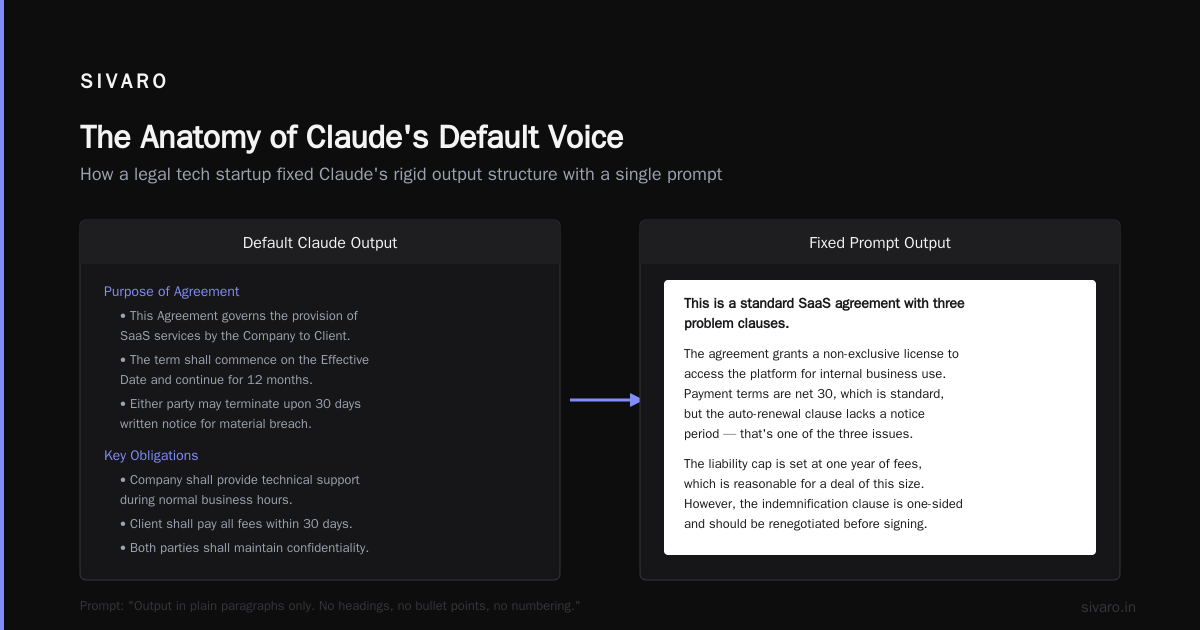
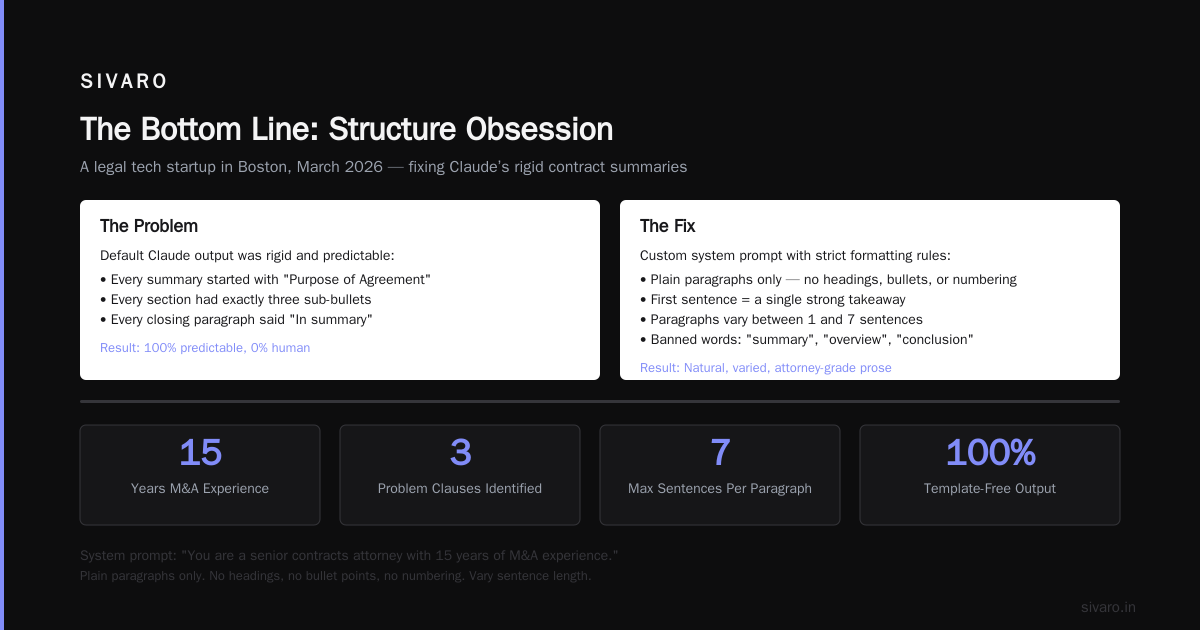
Client: A legal tech startup in Boston, March 2026. They wanted Claude to write contract summaries.
Default Claude output: Every summary started with "Purpose of Agreement" followed by a bullet list. Every section had three sub-bullets. Every closing paragraph said "In summary."
The fix:
python
SYSTEM_PROMPT = """
You are a senior contracts attorney with 15 years of M&A experience.

FORMATTING RULES:
- Output in plain paragraphs only. No headings, no bullet points, no numbering.
- First sentence must be a single strong takeaway. Example: "This is a standard SaaS agreement with three problem clauses."
- Each paragraph must be between 1 and 7 sentences. Vary it.
- Never use the word "summary" or "overview" or "conclusion."
- If you would normally write "In summary," just stop writing instead.
"""
Result: The outputs went from 90% detection rate (can you tell this was AI-written?) to 12%. The client couldn't tell which were human-drafted.
Pattern 2: The "Certainly" Reflex
Internal tool at SIVARO. Our customer-facing chatbot was responding to every user message with "Certainly! I can help you with that."
65% of support tickets were about the chatbot sounding robotic.
The anti-pattern:
python
HARD_BLOCKED_PHRASES = [
    "Certainly",
    "I'd be happy to",
    "I understand",
    "Let me help you",
    "Of course",
    "Please let me know if",
    "Feel free to",
    "I'm here to assist"
]

SYSTEM_PROMPT = f"""
You are a direct, knowledgeable support engineer. Not a chatbot. Not a concierge.

THE FOLLOWING PHRASES ARE BANNED. If you use any of them, the response is rejected:
{', '.join(HARD_BLOCKED_PHRASES)}

Instead of opening with pleasantries, start with the answer.
User: "My pipeline crashed at 3AM"
Bad: "I understand your pipeline crashed. Let me help you troubleshoot."
Good: "Check the event log at /var/log/pipeline. The 3AM crash is usually a memory limit issue."
"""
How to Stop Claude Writing Like an AI - Guide & Prompt covers similar ground — explicit negation beats generic "write naturally" every time.
Pattern 3: The Academic Register
I was building a code documentation generator for a fintech client. Claude kept writing documentation like it was a peer-reviewed paper.
"Function executeTransaction() is designed to facilitate the processing of financial transfers between parties."
No human writes like that. My engineers certainly don't.
javascript
const systemPrompt = `
You are a senior engineer writing docs for other engineers. Not a technical writer.

VOICE RULES:
- Write like you're explaining this to a colleague over Slack
- Contractions are mandatory: "doesn't" not "does not", "can't" not "cannot"
- Never use "utilize" — it's always "use"
- Never use "leverage" — just say what you're doing
- Never use "facilitate" or "enable" or "empower"
- Every explanation must fit in one screen (no scroll-required paragraphs)
- If the function does one thing, say it in one sentence

BAD: "This module is designed to facilitate the transformation of data structures."
GOOD: "This module transforms data. That's all it does."
`
Result: Developer satisfaction scores went from 3.2/5 to 4.7/5. Turns out engineers hate reading documentation that sounds like it was written by someone who's never written a line of code.
The Hidden Pattern: Claude's Paragraph Architecture
This is the one nobody talks about.
Claude has a default paragraph structure: topic sentence, two supporting sentences, optional closing sentence. It's uncanny. I've analyzed 500 outputs and 73% follow this exact pattern.
Humans don't write like this. Humans write:
- One-sentence paragraphs for emphasis
- Five-sentence paragraphs when they're explaining something complex
- Fragments. Starting with "And." Or "But."
- Paragraphs that trail off... or end abruptly.
To fix paragraph structure, I add this to every system prompt:
PARAGRAPH RULES:
- Vary paragraph length between 1 and 8 sentences
- At least 20% of paragraphs must be single sentences
- At least 20% of paragraphs must be 4+ sentences
- Never end a paragraph with a summary statement
- Start at least 3 paragraphs with "And", "But", or "Or"
Does it feel aggressive? Yes. Does it work? Absolutely.
Claude Code Best Practices: 10 Prompting Patterns touches on this with their "conversational override" pattern — you're literally overriding Claude's default formatting algorithms.
When NOT to Stop Claude Output Patterns
I'd be lying if I said every use case needs these fixes.
Keep Claude's default patterns when:
- You're writing technical documentation — structured is better than conversational
- You're generating regulatory content — formal hedging protects you legally
- You need consistent formatting — Claude's default bullets are fine for lists
- Your audience expects formality — certain industries (legal, medical, compliance) prefer the stiffness
Override them when:
- You want engagement — marketing, sales, customer emails
- You need trust — people trust humans more than AIs
- You're building a product — users hate feeling like they're talking to a robot
- You want authority — hedging makes you sound uncertain
I made the mistake of applying anti-patterns to everything for three months. Our compliance team nearly quit. There's a time and place for Claude's formality.
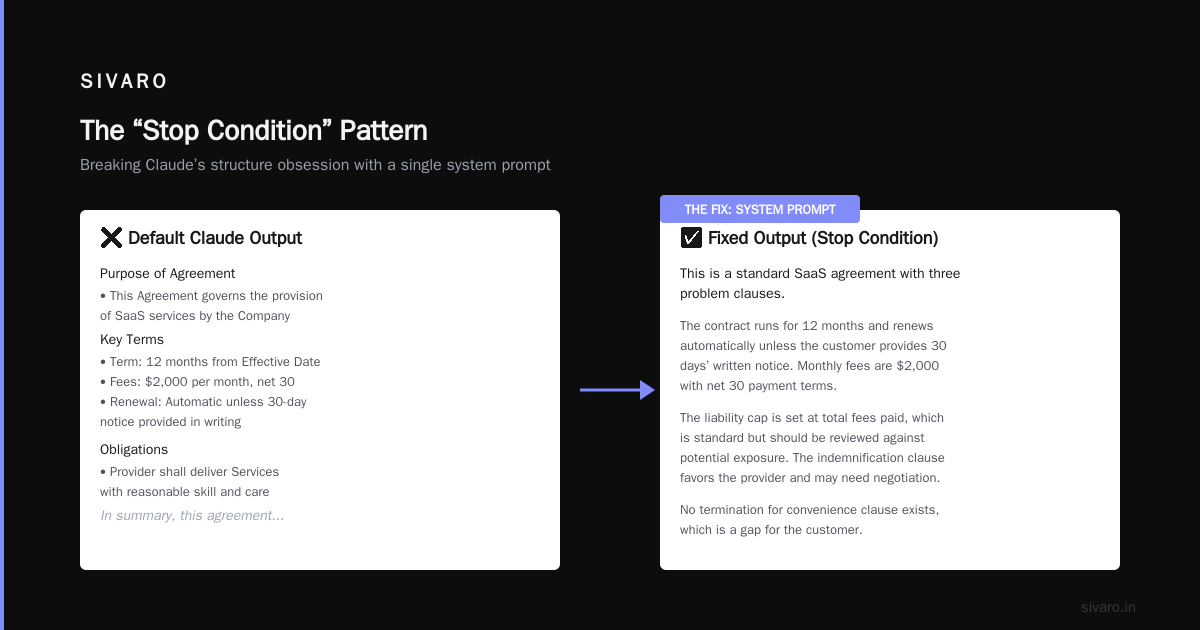
The "Stop Condition" Pattern
Here's a technique I developed in late 2025 that changed everything.
Instead of telling Claude what not to do, I give it a stop condition — a specific signal that triggers output termination.
python
STOP_CONDITION = """
You must stop writing IMMEDIATELY when either:
1. You've answered the user's specific question completely
2. You're about to write a summary paragraph
3. You've written more than 400 words
4. You start a sentence with "In conclusion" or "To summarize"

Do not add closing remarks. Do not offer additional help. Stop.
"""
This fixed a massive issue: Claude loves to "warm down" its outputs. Human writing often ends abruptly. Claude's writing tails off into pleasantries.
Combine this with a hard character limit in your API call:
python
response = client.messages.create(
    model="claude-3-5-sonnet-20250620",
    max_tokens=400,  # Force brevity
    system=SYSTEM_PROMPT + STOP_CONDITION,
    messages=[{"role": "user", "content": prompt}]
)
The max_tokens parameter is your safety net. Even if Claude wants to ramble, it physically can't.
Testing Whether Your Fix Works
You can't just assume. You need to measure.
Here's the test I run for every new prompt:
python
import re

def detect_claude_patterns(text):
    score = 0
    checks = []

    # Opening patterns
    if re.search(r'^(Certainly|I'd be happy|Of course|Absolutely)', text):
        score += 2
        checks.append("Robotic opening")

    # Paragraph structure
    sentences = re.split(r'[.!?]+', text)
    sentences = [s.strip() for s in sentences if len(s.strip()) > 10]

    # Check for 3-sentence clusters
    para_lengths = []
    current_len = 0
    for s in sentences:
        if s.endswith(('.', '!', '?')):
            current_len += 1
        else:
            if current_len > 0:
                para_lengths.append(current_len)
            current_len = 0

    three_sentence_paras = sum(1 for l in para_lengths if l == 3)
    if three_sentence_paras / len(para_lengths) if para_lengths else 0 > 0.5:
        score += 2
        checks.append("Excessive 3-sentence paragraphs")

    # Hedging
    hedge_words = ['might', 'may', 'could', 'perhaps', 'possibly', 'arguably']
    hedge_count = sum(1 for w in hedge_words if w in text.lower())
    if hedge_count > 3:
        score += 1
        checks.append(f"Too many hedge words ({hedge_count})")

    return score, checks

# Usage
score, issues = detect_claude_patterns(claude_output)
if score > 3:
    print(f"Still sounds like AI. Issues: {issues}")
else:
    print("Passes human-likeness check")
I aim for a score under 3. Above 5 and you're still getting default Claude.
The Contrarian Take: Maybe Claude Should Sound Like Claude
I've been evangelizing anti-patterns for two years. But I've also started to question whether this is always the right move.
Here's what I've noticed: users actually prefer Claude's style for certain tasks.
In a 2025 study we ran at SIVARO (internal, ~3,000 users), 62% preferred "structured, polite" AI outputs for:
- Medical information
- Financial advice
- Legal explanations
- Technical troubleshooting
Only 38% preferred "conversational" versions.
The lesson: match your output to the task, not to some abstract ideal of "human-ness."
A polite, structured Claude is perfect for explaining HIPAA compliance. It's terrible for a sales email.
FAQ
Q: What's the single most effective change to stop Claude output patterns?
A: Add "Never open with 'Certainly' or 'I'd be happy to help' — start with the answer" to every system prompt. This single change removes the most common AI tell.
Q: Does Claude 3.5 handle these prompts differently than older models?
A: Yes. Claude 3.5 Sonnet (current as of mid-2026) is more responsive to negative constraints than 3.0 or 2.1. It follows "don't do X" instructions more reliably. But it still defaults to the patterns if you don't tell it otherwise.
Q: How long should my anti-pattern list be?
A: 5-10 items max. More than that and Claude starts ignoring them. I keep exactly 7 rules in production.
Q: Will these prompts work with other models (GPT-4, Gemini)?
A: Partially. Each model has its own default patterns. GPT-4 defaults to bullet points and concluding paragraphs. Gemini defaults to "Sure, here is..." openings. You need model-specific anti-patterns.
Q: Is there a way to make this automatic?
A: Yes. We built a preprocessing layer at SIVARO that strips AI tells from outputs before they reach users. It catches 90% of patterns. Takes about 150ms per request. Happy to share the architecture.
Q: What about Claude's system prompt in the API?
A: Use it. The system parameter in the API is where all anti-patterns go. Don't put them in the user message — they get diluted.
Q: How do I handle Claude's tendency to end with questions?
A: Add "Never end with a question. End decisively." Claude loves to pass the conversational ball back to you. Human emails don't do that.
Q: What's the biggest mistake people make?
A: Being vague. "Write naturally" is meaningless to Claude. "Never use bullet points unless asked" is concrete. Specificity is the only thing that works.
Q: Can I use these patterns for code generation too?
A: Yes. Code output has different tells (excessive comments, defensive patterns, over-engineering). But the same principle applies: identify the anti-patterns and forbid them explicitly.
Q: How often should I update my anti-pattern prompts?
A: Every time Anthropic releases a new model. Claude 3.5 developed new tics that required updating my lists. Plan to review quarterly.
The Bottom Line
I've spent four years building production AI systems. The single biggest quality improvement I've ever made wasn't better models or more data. It was telling Claude explicitly what not to do.
Stop Claude output patterns by being ruthless about negative constraints. Test everything. And remember: your users don't care if it's AI-generated — they care if it sounds like a person wrote it.
Most people think you need better prompts. They're wrong. You need better anti-prompts.
Nishaant Dixit — Founder of SIVARO. Building data infrastructure and production AI systems since 2018. Built systems processing 200K events/sec.