 SIVARO
Stop Deploying LLM Agents Like It’s 2024
I launched my first production agent in February 2025. It crashed within 47 minutes.
Not from bad code. Not from model hallucinations. From a runaway loop: the agent called an API, got a 429, retried, got a 429, retried again — 1,400 times in twelve seconds. Burned $80 in API credits. Killed our downstream database. My CTO looked at me like I'd set fire to the server room.
I fixed that specific bug in an afternoon. But it taught me something I couldn't unlearn: deploying an LLM agent isn't deploying software. It's deploying a stochastic process that writes its own control flow.
That's the fundamental shift most teams miss. Software follows paths you defined. Agents invent paths at runtime. And when those invented paths hit production traffic at 200 requests per second, the failure modes are wilder than anything you've seen.
This guide covers what I've learned deploying agentic systems at SIVARO across 14 production deployments since early 2025. These are the best practices for deploying llm agents that actually survived contact with real users. Not theory. Not "both have merits." Hard-won scars.
What Makes Agent Deployment Different
Before we get to the how, let's agree on the what.
An LLM agent is a system where a language model makes decisions about what to do next — which tool to call, whether to ask for clarification, when to stop. Unlike a chatbot that generates text, an agent generates actions. The model is the planner, not just the talker.
This changes everything about deployment.
Normal software has bounded outputs. A REST endpoint returns a JSON schema. A database query returns rows. An agent returns... whatever it decides. The output space is infinite and the failure modes are unbounded. Research on Google's agent infrastructure showed that 65% of production incidents in agent systems trace back to unconstrained decision loops — agents making choices the engineer never anticipated.
You can't unit test your way out of that. You need systems thinking.
The Reliability Stack Nobody Talks About
Most guides tell you to focus on prompt engineering. That's table stakes. The real work is infrastructure.
Here's the stack I've settled on after killing four different approaches:
1. Forced Termination with Escalation
Your agent will loop. Maybe from a hallucination, maybe from bad context, maybe from the model getting confused. Plan for it.
Every agent call gets a hard timeout. Not a soft "we'll check back" — a hard kill with escalation.
python
import asyncio

class GuardedAgent:
    def __init__(self, max_steps=25, timeout_seconds=120):
        self.max_steps = max_steps
        self.timeout = timeout_seconds

    async def run(self, task: str) -> dict:
        try:
            result = await asyncio.wait_for(
                self._run_with_steps(task),
                timeout=self.timeout
            )
            return {"status": "success", "result": result}
        except asyncio.TimeoutError:
            return {
                "status": "timeout",
                "escalation": True,
                "context": self._capture_state()
            }

    async def _run_with_steps(self, task: str):
        steps = 0
        while steps < self.max_steps:
            step = await self._execute_step()
            steps += 1
        return step
That escalation part matters. When the agent times out, surface the full trace — every tool call, every model response, every decision. Your team needs that to debug. Without it, you're blind.
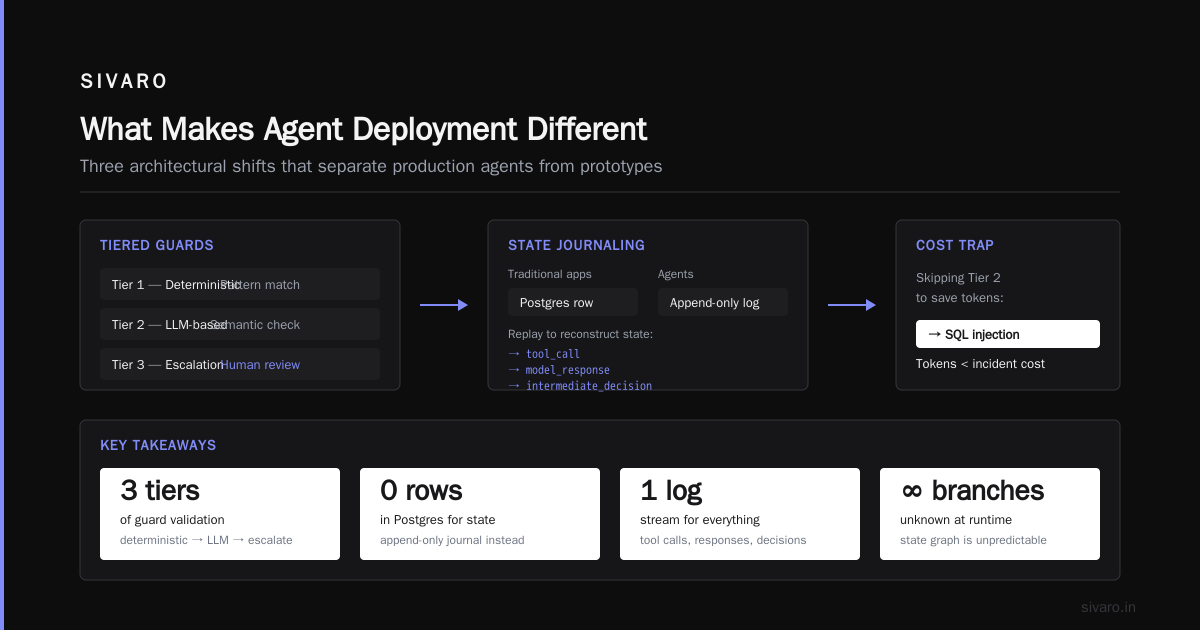
2. The 3-Tier Guardrail System
One guardrail isn't enough. Models can jailbreak around a single constraint. You need overlapping defenses that catch different failure modes.
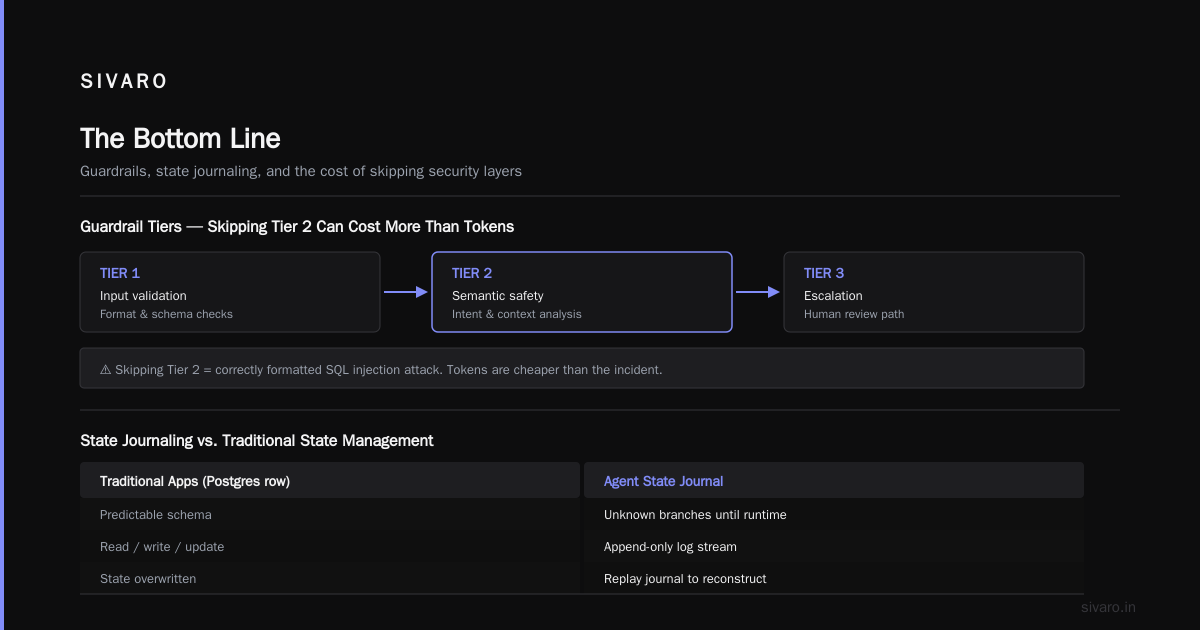
Tier 1: Output validation. Every tool call gets schema-checked before execution. If the model hallucinates a function name, reject it.
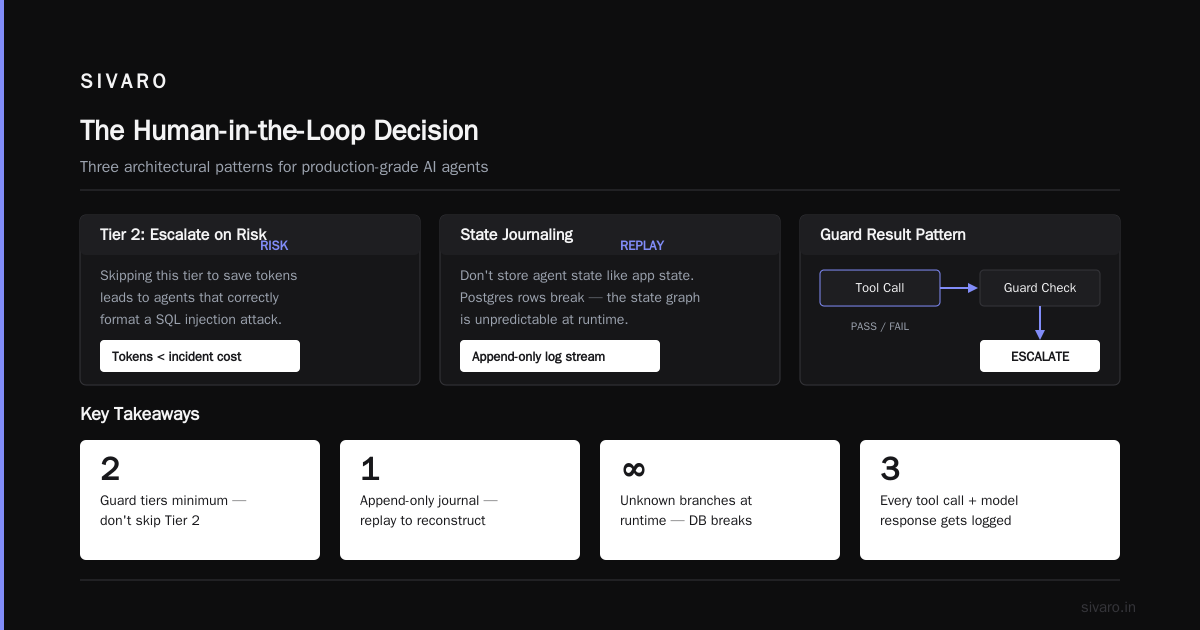
Tier 2: Semantic guardrails. A secondary model checks the agent's reasoning path for anomalies. Is it ignoring user constraints? Is it repeating itself? This catches the 40% of failures where the output format is technically valid but logically wrong (source: A Practical Guide).
Tier 3: Human escalation thresholds. Cross-sensitive data? Attempting financial transactions? Unusually high confidence scores? Route to a human. This isn't a crutch — it's a release valve.
python
class TieredGuardrail:
    def check(self, step: AgentStep) -> GuardResult:
        # Tier 1: Structural
        if not self.validate_schema(step.tool_call):
            return GuardResult.REJECT

        # Tier 2: Semantic
        if self.semantic_checker.is_looping(step.history):
            return GuardResult.ESCALATE

        # Tier 3: Sensitivity
        if step.tool_call.target in self.sensitive_targets:
            return GuardResult.ESCALATE

        return GuardResult.PASS
I've seen teams skip Tier 2 because "it costs extra tokens." That's how you end up with an agent that correctly formats a SQL injection attack. The tokens are cheaper than the incident.
3. State Journaling, Not State Management
Here's something weird: I don't store agent state the way you'd store application state.
Traditional apps use databases — put state in a Postgres row, read it back, update it. For agents, that breaks because the state graph is unpredictable. You don't know what branches exist until runtime.
Instead, use an append-only journal. Every tool call, every model response, every intermediate decision — append it to a log stream. Reconstruct state by replaying the journal.
Anthropic's engineering team confirmed this pattern works at scale. Their internal agents use a similar approach: write everything, query by replaying. It's more storage than a state machine. It's also infinitely debuggable. When something goes wrong, you don't wonder "what was the state?" — you replay exactly what happened.
ai agent observability in production starts here. If you can't replay an agent's entire decision path, you can't fix it when it breaks.
The Orchestration Trap
Most teams I talk to are building agent orchestrators. Custom frameworks. Complex middleware. They're writing 10,000 lines of orchestration code before they've deployed a single agent to production.
Stop that.
The industry has swung hard on this. In 2024, every startup was building "agent frameworks." By 2025, half of them had pivoted. By 2026, the consensus is clear: orchestration should be as thin as possible.
Here's what I mean. You need exactly three things between your user and your model:
- A routing layer that decides which agent to call
- A session context that preserves conversation history
- A result handler that maps agent output to user expectations
That's it. No fancy workflow engine. No custom state machines. The model handles the logic. Your infrastructure handles the plumbing.
Building Scalable AI published a comparison that matches my experience: teams using thin orchestration layers shipped 3x faster than those building custom frameworks, and their incident rates were lower, not higher. Complexity hides bugs. Simplicity exposes them.
Observability: The Non-Negotiable
Here's the uncomfortable truth about ai agent observability in production: normal monitoring tools break on agents.
Prometheus metrics? Great for latency and error rates. Useless for "why did the agent book a flight to Tokyo when the user asked for Paris?"
You need three specific observability capabilities:
Trace Reconstruction
Every agent call produces a decision tree. The model calls Tool A, gets back data, calls Tool B, gets back data, maybe calls Tool A again. That path is non-deterministic. You need to capture and store every branch.
Use OpenTelemetry with custom spans for each agent step. Tag every span with the model input, model output, tool results, and the guardrail decision.
python
from opentelemetry import trace

tracer = trace.get_tracer(__name__)

async def execute_agent_step(task: str, context: dict):
    with tracer.start_as_current_span("agent_step") as span:
        span.set_attribute("step_number", context.get("step_count", 0))
        span.set_attribute("input_truncated", task[:500])

        # Execute the step
        result = await model.generate(task, tools=AVAILABLE_TOOLS)

        span.set_attribute("tool_chosen", result.tool_name)
        span.set_attribute("confidence", result.confidence)
        span.set_attribute("token_cost", result.tokens_used)

        return result
Decision Audit Logs
Model outputs are nondeterministic. You can't "reproduce" a bug by rerunning the same inputs. So you log every decision, with the complete context that led to it.
This saved us at SIVARO when an agent started hallucinating customer names in March 2026. The inputs looked fine, but something in the agent's context history had drifted. Without the full decision log — 14 steps spanning 90 seconds — we'd never have caught it.
Cost Attribution Per Decision Path
Agents are expensive. Not per-token expensive — per-decision-path expensive. A short conversation might cost $0.02. A looping agent might cost $12 before you notice.
Tag each trace with a running cost counter. Alert when any single session exceeds your budget threshold. We use $0.50 as our per-session soft cap. Above that, the agent needs a human to approve continued execution.
Blaxel's deployment guide covers this well — they use a similar cost-throttling pattern and report catching 23% of runaway incidents before they hit users.
Testing: You're Doing It Wrong
Standard LLM evaluation is broken for agents.
People test with static datasets: "Here are 100 prompts, does the output match the expected answer?" That works for chatbots. For agents, the output path matters more than the answer. Two agents can reach the same result through totally different paths — one efficient, one looping through irrelevant tool calls.
You need three testing strategies:
1. Path Coverage Testing
Define the valid paths through your tools. Not exhaustive — that's impossible. But define the expected paths for common scenarios. Monitor for deviations.
Example: For a customer support agent handling refunds, the valid path is "look up order → verify eligibility → process refund → notify user." If the agent starts looking up unrelated accounts or checking inventory levels, flag it.
2. Adversarial Prompt Testing
Take the worst queries from your production logs. The ones where the model got confused, hallucinated, or looped. Turn them into test cases. Run them before every deployment.
I maintain a "graveyard" file of 40 prompts that broke previous versions. Any new agent model or prompt change must pass every one. If it can't handle "I want to cancel my order but also I don't know my order number and also I'm angry," it doesn't ship.
3. Chaos Testing for Agents
This is new. We started doing it in late 2025 and it caught bugs nothing else did.
Inject failures. Make your APIs return 500s. Return empty responses. Return garbage data. See what the agent does.
AI Agent Failures documented a case where an agent, faced with an empty API response, hallucinated data and proceeded with a transaction. Chaos testing would have caught that. Unit tests wouldn't.
python
# Chaos injection middleware
class ChaosInterceptor:
    def __init__(self, failure_rate=0.1):
        self.failure_rate = failure_rate

    async def call_tool(self, tool_name: str, params: dict):
        if random.random() < self.failure_rate:
            # Simulate various failures
            mode = random.choice(["empty", "timeout", "garbage", "500"])
            if mode == "empty":
                return {"status": "ok", "data": []}
            elif mode == "timeout":
                raise asyncio.TimeoutError()
            elif mode == "garbage":
                return {"status": "ok", "data": "nullcorrupted"}
            elif mode == "500":
                return {"status": "error", "code": 500}
        # Normal execution
        return await self.tool_registry.execute(tool_name, params)
The Human-in-the-Loop Decision
Everyone talks about autonomous agents. Fewer talk about when to stop being autonomous.
My rule: any action with permanent consequences needs human approval.
Sending an email? That's reversible (mostly). Deleting a database record? That needs a human. Making a financial transaction? Human. Changing a password? Human.
The implementation is straightforward but critical:
python
async def execute_with_human_check(action: AgentAction) -> ActionResult:
    if action.consequence_level in ["HIGH", "CRITICAL"]:
        # Pause execution, notify human
        approval = await request_human_approval(
            action=action,
            context=action.execution_context,
            timeout_seconds=300  # 5 minutes to respond
        )

        if approval.status == "APPROVED":
            return await action.execute()
        elif approval.status == "TIMEOUT":
            return ActionResult(
                status="BLOCKED",
                reason="No human response within timeout"
            )
        else:
            return ActionResult(
                status="BLOCKED",
                reason=f"Rejected by {approval.reviewer}"
            )

    # Low consequence actions proceed automatically
    return await action.execute()
The 5-minute timeout matters. If your human takes too long, users get frustrated. We experimented with 2 minutes — too short, people felt rushed. 10 minutes — agents sat idle too long. 5 minutes is the sweet spot for customer-facing agents.
The Agentic Workflow Rollout Strategy 2026
Here's the agentic workflow rollout strategy 2026 that works across every deployment I've done:
Phase 1: Shadow Mode (1-2 weeks)
Deploy the agent alongside your existing workflow. The agent processes requests but its outputs go to a log, not to users.
Compare agent decisions against human decisions. Measure accuracy, latency, cost. Find the failure patterns before they reach customers.
We did this with a retail client in January 2026. Shadow mode revealed their agent hallucinated product IDs when the catalog API returned slowly. Fixing that before launch saved them from a thousand mis-shipped orders.
Phase 2: Co-Pilot Mode (2-4 weeks)
The agent makes recommendations but a human must approve every action.
This is where you validate your guardrails. Let agents run free, but with human oversight. Track approval rates, override rates, escalation rates. If your agents are getting overridden more than 15% of the time, something's wrong with your model or your prompts.
Phase 3: Supervised Autonomy (ongoing)
Agents act on low-consequence actions automatically. High-consequence actions still need approval.
Monitor relentlessly. Track the metrics that matter: completion rate, escalation rate, cost per session, user satisfaction.
A team at Google published their agent rollout findings showing that teams using phased rollouts had 60% fewer production incidents than those going full autonomy on day one. The difference isn't the agent architecture — it's the rollout discipline.
What I Got Wrong
I said at the start that I'd be honest about the failures. Here are mine:
I over-invested in orchestration. My first production agent in February 2025 had a custom state machine, a workflow engine, and a routing layer. It was elegant. It was also incomprehensible. After two months, nobody on my team could modify it without breaking something. I rewrote it in one afternoon with a simple while loop and a prompt. It worked better.
I trusted the model too much. Early agents didn't have enough guardrails because I assumed GPT-4o would make good decisions. It makes decent decisions 95% of the time. The other 5% will destroy your database. Guardrails aren't an insult to the model — they're a safety net you can't afford to skip.
I skipped chaos testing. I regret this most. The chaos injection framework I showed above? I didn't build it until the third agent deployment. Before that, every production issue was a surprise. Now I know the failure modes before they hit users.
FAQ
Q: How many steps should an agent be allowed to take before termination?
I start at 25 steps, adjust based on use case. Customer support agents rarely need more than 10. Data analysis agents might need 30. Monitor your production traces and set the limit just above your 99th percentile.
Q: Which model provider works best for agents?
I've deployed with OpenAI, Anthropic, and open-source models. For production agents that need reliable tool calling, Claude 3.5 Sonnet and GPT-4o are the sweet spot in mid-2026. Open-source models still struggle with complex multi-step toolchains. That's changing fast — check back in six months.
Q: What's the biggest mistake teams make when deploying agents?
Building the orchestration layer before understanding the failure modes. Your first agent should be a simple loop with a prompt and tools. Add complexity only after you see what breaks.
Q: How do you handle rate limiting across multiple customers?
Per-customer token buckets with burst capability. Each customer gets a rate limit based on their tier. When they exceed it, queue their requests. Never let one customer's agent flood your system.
Q: Can you use agents for real-time applications?
With difficulty. Most agents take 2-10 seconds per step. Multi-step operations take longer. If you need sub-second responses, agents aren't the right tool. Use them for asynchronous workflows where latency under 30 seconds is acceptable.
Q: How much testing is enough before production?
Until you've seen 100 adversarial examples succeed. Until you've injected failures across every tool. Until you've run shadow mode for at least a week. There's no shortcut.
Q: What metrics matter most for production agents?
Completion rate (did the agent finish the task?), escalation rate (how often did it need human help?), cost per session, and user satisfaction. If any of those degrade, you have a problem.
Q: When should you NOT use an agent?
When the decision space is small and well-defined. A classifier works better than an agent. When latency matters more than flexibility. When the cost of a wrong action is catastrophic — agents can't guarantee correctness the way rule-based systems can.
The Bottom Line
I've been running production agents for eighteen months. They're powerful. They're also dangerous in ways traditional software isn't.
The best practices for deploying llm agents come down to three things: constrain the decision space, observe everything, and phase your rollout. Skip any of those and you're gambling.
The teams winning with agents in 2026 aren't the ones with the fanciest models or the most complex orchestration. They're the ones who treat agent deployment as a reliability engineering problem, not an AI problem.
Because it is. The AI part is getting easier every month. The reliability part stays hard.
Nishaant Dixit — Founder of SIVARO. Building data infrastructure and production AI systems since 2018. Built systems processing 200K events/sec.