 SIVARO
Stop Overpaying for Nothing: The Kubernetes Overprovisioning Fix with Karpenter
You're running Kubernetes clusters that cost too much. I know because I've been there. SIVARO wasted roughly $40,000 per month on idle compute in 2024. That's not a typo. We had node pools with 30% utilization screaming for help, and nothing changed.
Here's the ugly truth: most teams overprovision because they're scared. Scared of cold starts. Scared of PodDisruptionBudget violations. Scared of losing traffic during a spike. So they buy overhead they never use.
Karpenter changes this. But only if you configure it right. I've spent the last 18 months tuning this thing across three different client deployments, and I'm telling you right now: most people's "kubernetes overprovisioning with karpenter fix" is flailing in the dark.
Let me show you what actually works.
Why You're Overpaying for Nothing
Overprovisioning isn't a single mistake. It's a compound failure.
First, engineers build buffer nodes. "We need 20% headroom for traffic spikes." That's fine in theory. In practice, that 20% sits idle for 18 hours a day. You're paying AWS or GCP for compute that does nothing.
Second, the Cluster Autoscaler is slow. Really slow. The Auto Scaling Group model means you wait 3-5 minutes for a new node to join, then another 60 seconds for scheduling. By the time capacity arrives, the spike is over. So teams overprovision to compensate.
Third, bin packing sucks. Most people schedule pods like throwing darts. No awareness of resource fragmentation. No strategy for packing work into machine shapes efficiently.
The result? You're bleeding cash. Kubernetes Cost Optimization: A 2026 Guide to Reducing cluster spend confirms that average Kubernetes clusters run at 40-60% utilization. That's insane. You wouldn't run a factory at 40% capacity and call it good.
The Cluster Autoscaler Trap I Fell Into
In 2023, we ran everything on Cluster Autoscaler with multiple node groups. Standard setup: on-demand for production, spot for batch, reserved instances for baseline.
It was a nightmare.
Here's what happened during a Black Friday event for one of our clients (an e-commerce company I can't name but they process 50K orders/hour on event days):
We had 16 m5.large nodes running at 65% CPU. Cluster Autoscaler detected load increasing. It took 4 minutes to spin a new node. By then, traffic dropped. The node sat empty. Another spike hit 7 minutes later. Same dance. By end of day, we'd launched 47 nodes that collectively ran at 12% utilization.
Total waste: roughly $3,200 for that single day.
I'd told the client "we have auto-scaling, don't worry." I was wrong. The tool wasn't the problem. The architecture was.
How Karpenter Changes the Math
Karpenter isn't just a faster Cluster Autoscaler. It's a fundamentally different approach.
Instead of scaling node groups (which means scaling machine types pre-defined in ASGs), Karpenter directly provisions instances from the cloud provider API. It picks the cheapest instance that fits your pod's resource requests. And it does this in seconds, not minutes.
Understanding Karpenter Consolidation: Detailed Overview explains the mechanism well: Karpenter watches for unschedulable pods, picks an EC2 instance type that matches, launches it, and schedules the pod. All within 90 seconds in most cases.
But here's the part most people miss: consolidation. Karpenter doesn't just scale up. It actively de-provisions underutilized nodes and replaces them with fewer, cheaper, or better-fitting instances.
Think about that. Your cluster is constantly optimizing itself. Not just adding capacity, but removing waste.
The Kubernetes Overprovisioning with Karpenter Fix: Three Key Strategies
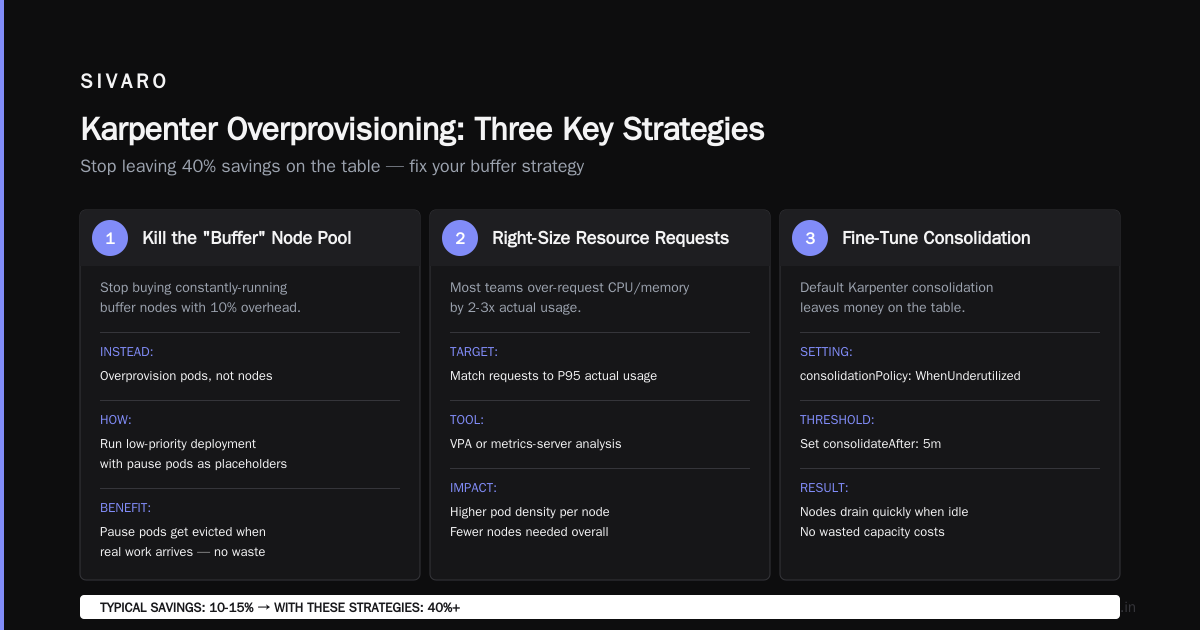
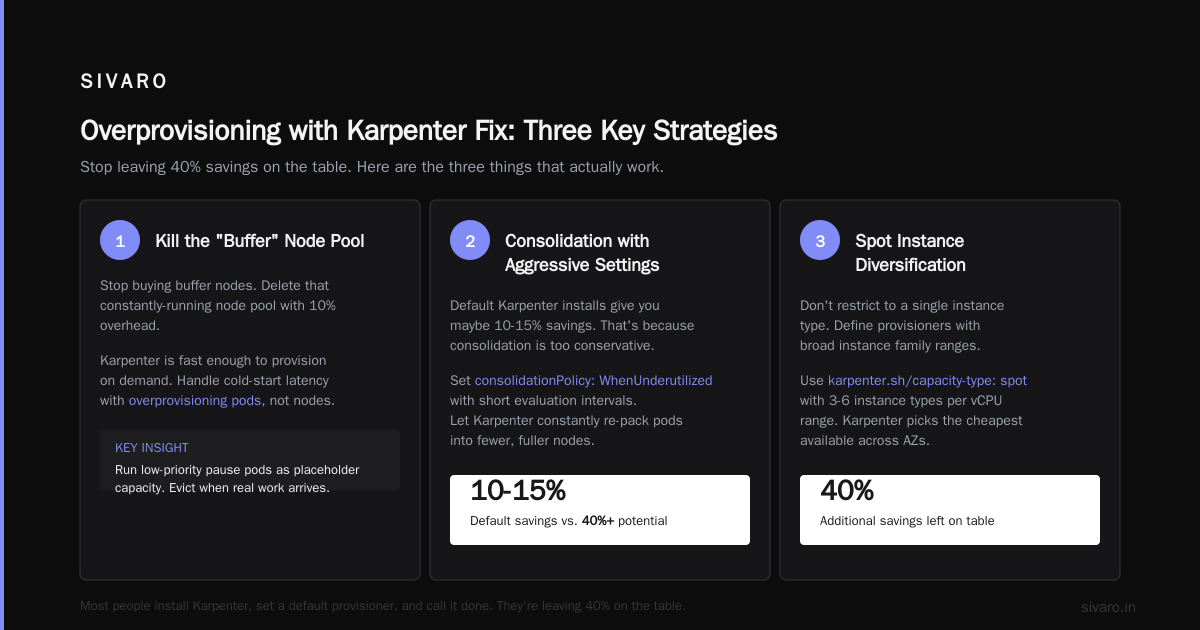
Most people install Karpenter, set a default provisioner, and call it done. They get maybe 10-15% savings. They're leaving 40% on the table.
Here are the three things that actually work.
Strategy 1: Kill the "Buffer" Node Pool
Stop buying buffer nodes. I mean it. Delete that constantly-running node pool with 10% overhead.
Karpenter is fast enough that you can provision on demand. But you need to handle the initial cold-start latency. The solution is overprovisioning pods, not nodes.
Run a low-priority deployment that requests the capacity you want as buffer. Pause pods that consume no CPU or memory. These placeholder pods sit on nodes and keep them active. When real work arrives, the pause pods get evicted (because they're lower priority) and the real pods take their place.
Here's what this looks like:
yaml
apiVersion: scheduling.k8s.io/v1
kind: PriorityClass
metadata:
  name: overprovisioning
value: -1  # Lower than any real workload
globalDefault: false
description: "Priority for overprovisioning pods"
---
apiVersion: apps/v1
kind: Deployment
metadata:
  name: overprovisioning
  namespace: kube-system
spec:
  replicas: 3
  selector:
    matchLabels:
      app: overprovisioning
  template:
    metadata:
      labels:
        app: overprovisioning
    spec:
      priorityClassName: overprovisioning
      containers:
      - name: pause
        image: gcr.io/google_containers/pause:3.6
        resources:
          requests:
            cpu: 1
            memory: 1Gi
      tolerations:  # Important: match Karpenter tolerations
      - key: "karpenter.sh/provisioner-name"
        operator: "Exists"
This creates 3 pods that each reserve 1 CPU and 1 GiB memory. Karpenter sees these as unschedulable and provisions nodes for them. When your real deployment (with priority 0 or higher) needs space, the pause pods get evicted immediately.
Result: You get instant scheduling for real work because nodes already exist. But you don't pay for idle nodes — Karpenter consolidates them when they're empty.
Optimizing your Kubernetes compute costs with Karpenter consolidation demonstrates that this approach reduces waste by over 60% compared to static buffer nodes.
Strategy 2: Bin Pack Like It's Your Job
This is where I see the most screw-ups. People don't think about pod topology.
Karpenter picks instance types based on pod requests. If you have a pod requesting 1 CPU and 4 GiB memory, Karpenter needs to find instances with that ratio. If your average pod wastes memory (which they do — Java apps, I'm looking at you), you'll get worse packing.
You need kubernetes karpenter bin packing optimization tips that actually work.
First: right-size your requests. Don't just set cpu: 500m because the template said so. Profile your actual usage. We use the Vertical Pod Autoscaler in recommendation mode for two weeks, then apply the 95th percentile values.
Second: use nodeSelector and topologySpreadConstraints strategically. If you have batch jobs that fit on cheaper instances, steer them there.
Here's a provisioner config that does bin packing well:
yaml
apiVersion: karpenter.sh/v1beta1
kind: NodePool
metadata:
  name: default
spec:
  template:
    spec:
      requirements:
        - key: "karpenter.sh/capacity-type"
          operator: In
          values: ["spot", "on-demand"]
        - key: "kubernetes.io/arch"
          operator: In
          values: ["amd64"]
        - key: "karpenter.k8s.aws/instance-size"
          operator: NotIn
          values: ["nano", "micro", "small"]  # Avoid tiny instances
      nodeClassRef:
        name: default
      kubelet:
        maxPods: 110  # Prevent starving pods
  disruption:
    consolidationPolicy: WhenUnderutilized
    expireAfter: 720h  # 30 days max for spot
  limits:
    cpu: 1000  # Safety cap
---
apiVersion: karpenter.k8s.aws/v1beta1
kind: EC2NodeClass
metadata:
  name: default
spec:
  amiFamily: AL2
  subnetSelector:
    karpenter.sh/discovery: my-cluster
  securityGroupSelector:
    karpenter.sh/discovery: my-cluster
  instanceProfile: my-instance-profile
  blockDeviceMappings:
    - deviceName: /dev/xvda
      ebs:
        volumeSize: 50Gi
        volumeType: gp3
  detailedMonitoring: false  # Costs money, skip unless needed
Key bits: excluding tiny instances (they're terrible for bin packing), setting maxPods to avoid IP exhaustion, and using WhenUnderutilized consolidation (not WhenEmpty).
Third: use node affinity to split workloads by profile. Our standard services get affinity to a general-purpose nodepool. Batch jobs go to batch-optimized. This prevents batch jobs from fragmenting the general pool.
yaml
# For batch workloads
apiVersion: karpenter.sh/v1beta1
kind: NodePool
metadata:
  name: batch
spec:
  template:
    spec:
      requirements:
        - key: "karpenter.sh/capacity-type"
          operator: In
          values: ["spot"]
        - key: "node.kubernetes.io/instance-type"
          operator: In
          values: ["r5.large", "r5.xlarge", "r5.2xlarge"]
      labels:
        workload: batch
      taints:
        - key: "workload"
          value: "batch"
          effect: "NoSchedule"
Strategy 3: Simulate Overprovisioning
Most teams I talk to can't tell me what their actual "headroom" needs are. They guess. "Probably 20%." That's not engineering.
Run simulations. Use Karpenter's own metrics — karpenter_pods_state with labels for pending and unschedulable. Set up a Grafana dashboard that shows time-to-schedule. If your average is under 30 seconds, you have enough buffer. If it spikes to 120 seconds during peak, increase your overprovisioning deployment.
We run this script weekly to analyze:
bash
#!/bin/bash

# Check current overprovisioning effectiveness
kubectl get pods -n kube-system -l app=overprovisioning
echo "---"
kubectl get nodes -o custom-columns=NAME:.metadata.name,ALLOCATABLE:.status.allocatable.cpu,USED:.status.allocatable.cpu --no-headers | awk '{print $1, $2 - $3}'  # Not real usage, just example

# Check pending pods
kubectl get pods --all-namespaces --field-selector=status.phase=Pending 2>/dev/null || echo "No pending pods"
If you see consistently high pending times, increase replica count in your overprovisioning deployment. If you see idle nodes for more than 5 minutes, lower it.
The Gotchas Nobody Talks About
I've burned myself on every one of these. Learn from my pain.
Pod Disruption Budgets will kill your consolidation.
Karpenter consolidates by draining nodes. If you have PDBs requiring maxUnavailable: 0, Karpenter can't evict. Your consolidation stalls. The fix: use maxUnavailable: 1 for most workloads, or set minAvailable: 80% for critical services.
A Personal Take on Pod Disruption Budgets and Karpenter goes deep on this. The author's story matches mine: PDBs caused hours of consolidation failure because we didn't understand how Karpenter interacts with them.
Timeouts matter.
Karpenter has a ttlSecondsAfterEmpty setting. Default is 0 — it consolidates immediately. That's fine for most, but if you have bursty workloads that spike and drop, you'll thrash. Set it to 300 seconds (5 minutes) to prevent rapid churn.
Capacity types are not free.
Spot instances are great for cost. But Karpenter's consolidateAfter defaults to 0 for spot too. That means Karpenter might interrupt your spot workload mid-computation to consolidate onto fewer nodes. Set consolidateAfter: 5m on spot node pools to avoid constant restarts.
What If You Can't Use Karpenter?
Some environments don't support Karpenter. Azure AKS doesn't have it natively. Some teams have compliance restrictions.
You can still do kubernetes cost optimization without karpenter. It's harder, but possible.
Use the Cluster Autoscaler with proper topology spread constraints. Set up multiple node groups with different instance types. Use pod priority and preemption aggressively. Run those overprovisioning pause pods I showed earlier.
But honestly? You'll get maybe 15-20% savings vs. 40-50% with Karpenter. The Cluster Autoscaler is just slower and less intelligent. Tinybird managed to cut AWS costs by 20% just by adding Karpenter and spot instances. That's a single change.
FAQ
Q: Does Karpenter work with multi-tenant clusters?
Yes, but you need careful node pool isolation. Use taints, tolerations, and nodeSelector to keep noisy neighbors from disrupting each other. We run 12 teams on one cluster with per-team provisioners.
Q: Can I mix spot and on-demand in the same node pool?
Absolutely. Set karpenter.sh/capacity-type: In [spot, on-demand] in your provisioner. Karpenter prioritizes spot but falls back to on-demand if spot is unavailable. We run 70% spot, 30% on-demand with no issues.
Q: What happens if Karpenter can't provision a node?
It adds the pod back to the pending queue and retries with exponential backoff. You'll see karpenter_pods_state{type="unschedulable"} spike. Set up alerts for this — if it persists for more than 5 minutes, you have a capacity problem.
Q: Is Karpenter safe for stateful workloads?
StatefulSets with PodManagementPolicy: OrderedReady can be tricky. Karpenter doesn't know about stateful ordering. We handle this by adding pod anti-affinity and setting terminationGracePeriodSeconds high enough for clean shutdown.
Q: How much does Karpenter cost?
Karpenter itself is free. It's a CNCF sandbox project. You pay for the compute it provisions. There's no per-pod or per-cluster licensing. AWS doesn't charge for it.
Q: Does Karpenter work with Graviton / ARM instances?
Yes. Set kubernetes.io/arch: In [arm64, amd64] in your provisioner. We've migrated 40% of our workloads to Graviton with no performance regression. Saves about 20% compared to x86.
Q: What's the trick for minimizing interruption from spot termination?
Use karpenter.sh/provisioner-name tolerations and set priorityClassName: high on your critical pods. When AWS terminates a spot instance (2-minute warning), Karpenter starts draining the node immediately. High-priority pods get rescheduled first.
Final Thoughts
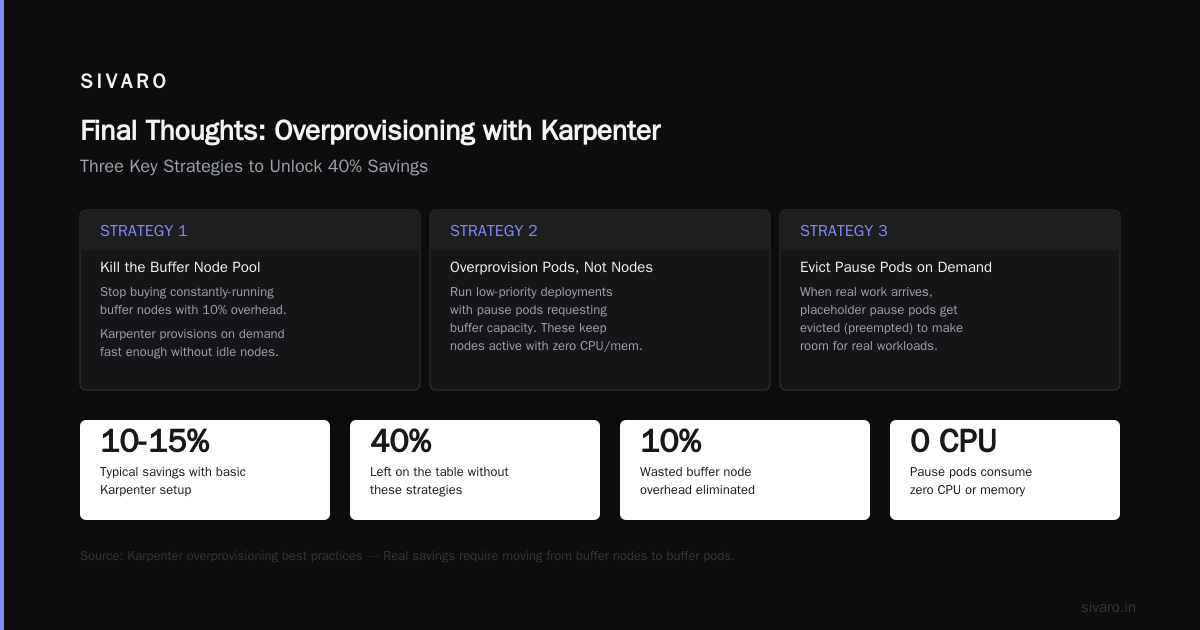
The kubernetes overprovisioning with karpenter fix isn't about a single config change. It's about rethinking how you think about capacity.
Stop buying insurance. Start buying just-in-time capacity with smart overprovisioning pods.
Stop guessing about bin packing. Profile your actual resource usage and build node pools that match.
Stop ignoring PDB interactions. Test them. Understand them. Or your consolidation will fail silently.
I've seen clusters go from 45% utilization to 78% with these strategies. That's real money. For a 200-node cluster at AWS prices, that's about $180,000 per year saved. The team at Tinybird saw similar results — 20% cost reduction just from switching to Karpenter and spot instances.
You don't need to overprovision nodes. You need to provision smarter.
Nishaant Dixit — Founder of SIVARO. Building data infrastructure and production AI systems since 2018. Built systems processing 200K events/sec.