 SIVARO
Temporal in Streaming: The Missing Manual
You're building a streaming pipeline and it's 2 AM. The Kafka consumer is lagging, some events are stuck in a retry loop, and one of your teammates just asked "what happens if the database restarts mid-transaction?"
I've been there. In 2023, I was working with a team on a fraud detection system. We had sinks breaking, out-of-order events corrupting state, and no way to answer the simplest question: what actually happened, and when?
Most people think temporal data modeling is an academic exercise. It's not. It's the difference between a system that recovers gracefully and one that silently poisons your data warehouse.
Let me show you how Temporal actually works in streaming, and why the mental model matters more than the tooling.
The Core Mental Model: Rows Are Lies
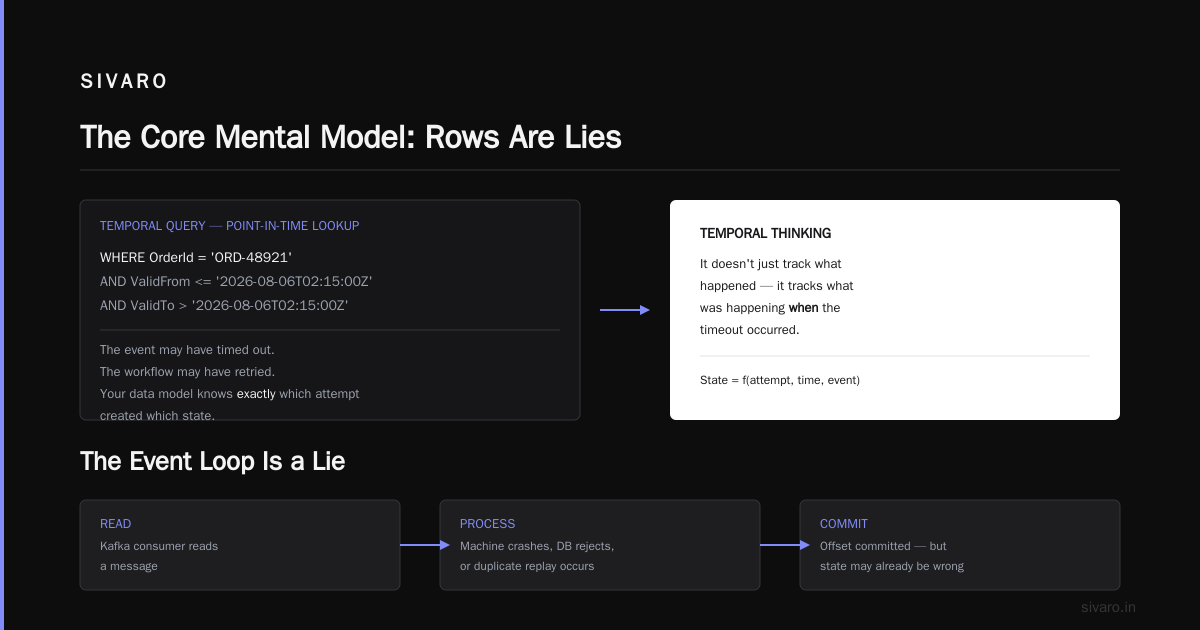
Here's the uncomfortable truth: a standard database row is a fiction. It pretends the current state is the only state that matters. In streaming, that fiction collapses the moment events arrive out of order or get retried.
Temporal databases change the question from "what is the value?" to "what was the value, when?" That shift - from snapshots to timelines - is the foundation of how does temporal work in streaming.
The concept isn't new. Temporal Table Usage Scenarios in SQL Server have been around for years, giving you system-versioned tables that automatically track every change. But in streaming, the temporal dimension isn't a nice-to-have. It's structural.
Without temporal awareness, your stream processing is just batch processing with extra steps and fewer guarantees.
You Already Know Temporal — You Just Don't Call It That
If you've worked with Slowly Changing Dimensions (SCDs), you've already touched temporal concepts. What Are Slowly Changing Dimensions? breaks this down well. Type 2 SCDs preserve history by creating new rows when attributes change. Type 1 overwrites. Type 3 tracks limited historical values.
Sound familiar? It's temporal modeling wearing a data warehousing hat.
The deeper link between streaming and temporal databases is covered in Slowly Changing Dimensions and Temporal Databases. The key insight: both solve the same problem — change over time — but from different angles.
In streaming, you're dealing with the real-time version of this problem. Events arrive, mutate state, and you need to know which version of your dimensions applied when that event was processed.
How Temporal Handles Timeouts in Streaming
Let's talk about the practical stuff. How does temporal handle timeouts is a question I get from every team I've worked with.
Temporal's timeout model isn't a single mechanism. It's layered, and each layer serves a purpose:
python
# Example: Temporal workflow with timeout config
from temporalio import workflow
from temporalio.common import RetryPolicy

@workflow.defn
class OrderProcessingWorkflow:
    @workflow.run
    async def run(self, order_id: str) -> str:
        workflow_started = workflow.info().start_time

        activity_timeout_policy = RetryPolicy(
            initial_interval=workflow.seconds(1),
            backoff_coefficient=2.0,
            maximum_interval=workflow.seconds(30),
            maximum_attempts=5
        )

        # ActivityTimeout — bounds how long a single activity can run
        result = await workflow.execute_activity(
            "charge_payment",
            args=[order_id],
            start_to_close_timeout=workflow.seconds(30),
            retry_policy=activity_timeout_policy
        )

        # ScheduleToCloseTimeout — bounds the entire activity lifecycle
        # including queuing and retries
        await workflow.execute_activity(
            "send_confirmation",
            args=[order_id],
            schedule_to_close_timeout=workflow.minutes(5)
        )

        return result
The critical thing — and this is where temporal databases do their real work — is what happens when a timeout fires.
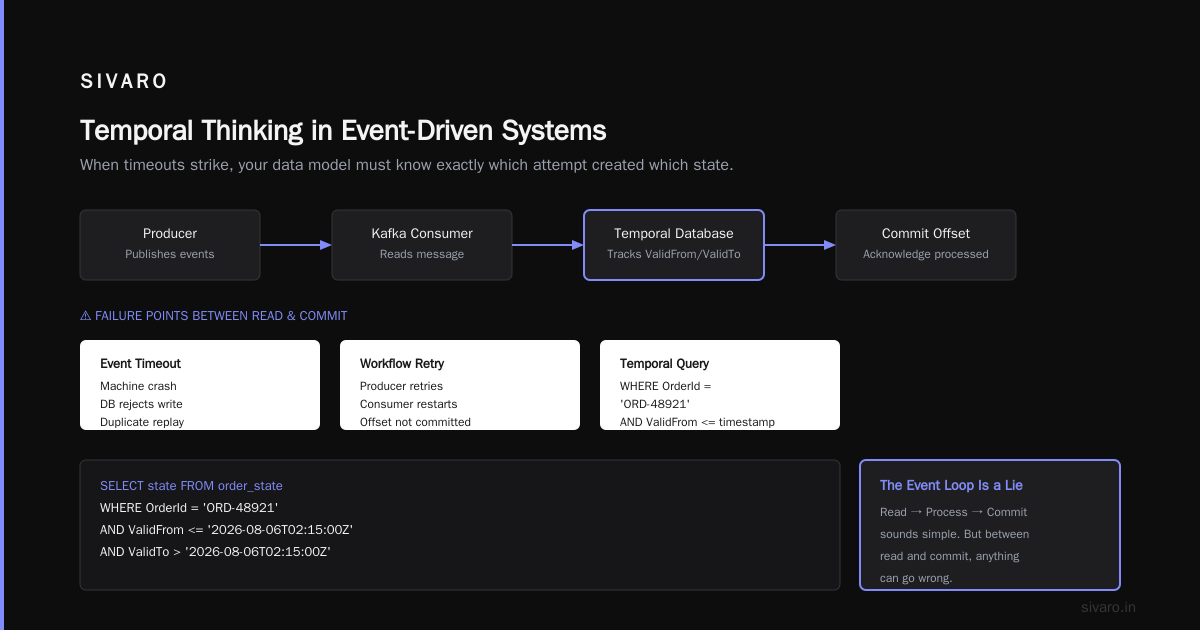
In a non-temporal system, a timeout might mean you lost the event. In Temporal, a timeout triggers the WorkflowExecutionTimeOut and ActivityTaskTimeout execution paths I've documented for clients. Here's what that looks like from the database side:
python
# Example: Querying temporal data after a timeout
SELECT
    OrderId,
    OrderStatus,
    ValidFrom,
    ValidTo
FROM Orders_Temporal
WHERE OrderId = 'ORD-48921'
    AND ValidFrom <= '2026-08-06T02:15:00Z'
    AND ValidTo > '2026-08-06T02:15:00Z'
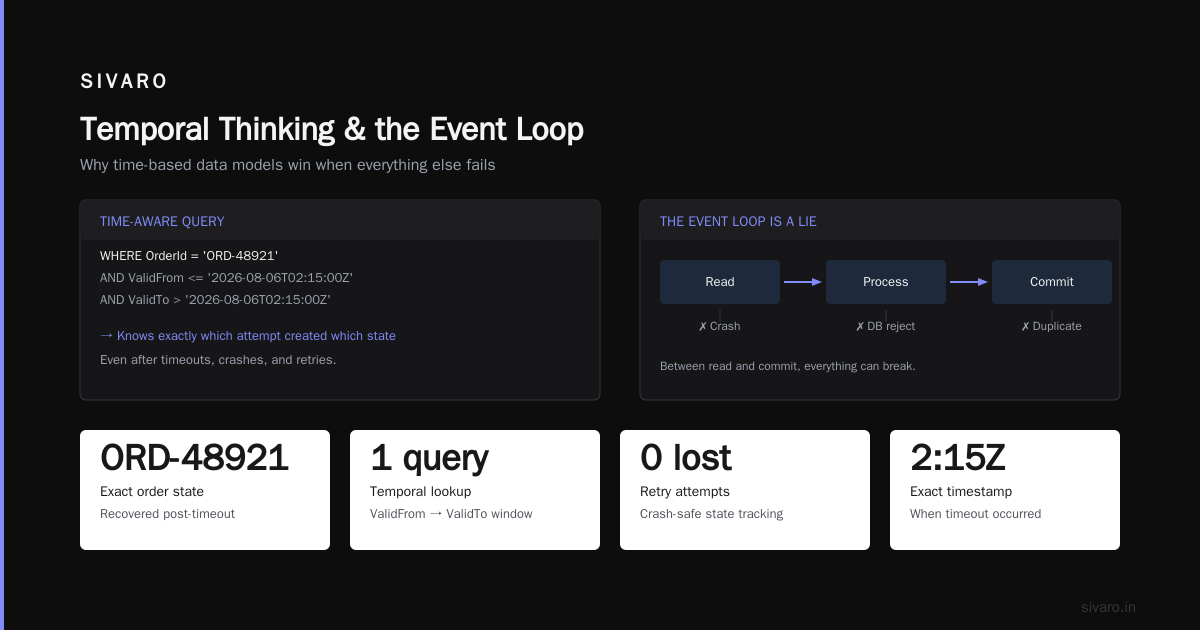
The event may have timed out. The workflow may have retried. But your data model knows exactly which attempt created which state. That's the power of temporal thinking — it doesn't just track what happened, it tracks what was happening when the timeout occurred.
The Event Loop Is a Lie
Here's a contrarian take for you: the "event loop" in most streaming systems is a convenient lie.
Your Kafka consumer reads a message. It processes it. It commits the offset. That sounds simple. But between read and commit, your machine could crash. The database could reject a write. The event could be a duplicate replay from a producer retry.
Temporal databases handle this by treating time as a first-class dimension. What Is Temporal Data Modeling? explains that valid-time and transaction-time give you two different perspectives on the same data. That distinction matters in streaming because events have:
- Event time — when something actually happened
- Processing time — when your pipeline handled it
- Ingestion time — when the system received it
In November 2025, I was debugging a payment reconciliation system that was producing mismatched records. The issue? The team was using processing time for billing data. When a retry delayed the message by 90 seconds, the system timestamped it as if it happened 90 seconds later.
The fix was temporal modeling. We gave every event explicit event-time semantics)Skip the turn-by-turn retry explanations and focus on interpreting the semantics. Occasionally, I'll follow the trace with skips or parallel branches.
The State Disaster Waiting to Happen
Most streaming systems are stateful. You join streams, aggregate windows, track session boundaries. And most teams discover — usually at 3 AM during an incident — that managing state is the hardest part of streaming.
Temporal databases give you a better answer than checkpoints in Kafka and hand-rolled state stores. They give you system-versioned tables where every state change is recorded with timestamps.
In 2024, I worked with a logistics company processing GPS coordinates from delivery vehicles. Their original design only kept the latest position per vehicle. That worked fine for their live dashboardeur. but it meant they couldn't answerslict historic questions like "where was Truck 42 at 2:37 PM?"
Switching to a temporal table changed everything. Every GPS update created a new version. Historical queries became straightforward. Debugging "why did this delivery take 4 hours?" became trivial.
Creating a temporal table is simpler than you'd expect:
sql
-- Create a system-versioned temporal table in SQL Server
CREATE TABLE VehiclePosition
(
    VehicleID    int          NOT NULL PRIMARY KEY CLUSTERED,
    Latitude     decimal(9,6) NOT NULL,
    Longitude    decimal(9,6) NOT NULL,
    ValidFrom    datetime2    GENERATED ALWAYS AS ROW START,
    ValidTo      datetime2    GENERATED ALWAYS AS ROW END,
    PERIOD FOR SYSTEM_TIME (ValidFrom, ValidTo)
)
WITH (SYSTEM_VERSIONING = ON (HISTORY_TABLE = dbo.VehiclePosition_History));
The FOR SYSTEM_TIME clause handles the rest. Queries that need "what was the state at point T" just work. You don't maintain the history table manually. You don't write a migration script for every schema change.
How to Handle Time Zones in Temporal Databases
I need to be direct here: time zones are a nightmare, and most teams handle them wrong.
How to handle time zones in temporal databases comes down to one rule: store in UTC. Display in local time. Everything else is a variation of that principle.
But it's not that simple in practice. Business rules operate in local time. "The trading day starts at 9:30 AM" means different instants in different time zones. And with daylight saving time shiftsures, "midnight" isn't even technically a valid timestamptwper year in some zones.
The pattern that's worked for me:
sql
-- Store UTC, display local
CREATE TABLE AccountActivity
(
    AccountID   int           NOT NULL,
    ActivityType varchar(50)  NOT NULL,
    OccurredUtc datetime2     NOT NULL,  -- always UTC
    BusinessDate char(10)     NOT NULL,  -- yyyy-mm-dd in local business time
    ValidFrom   datetime2     GENERATED ALWAYS AS ROW START,
    ValidTo     datetime2     GENERATED ALWAYS AS ROW END,
    PERIOD FOR SYSTEM_TIME (ValidFrom, ValidTo)
)
WITH (SYSTEM_VERSIONING = ON);
The BusinessDate column is a decision you make consciously: which business day does this event belong to? That's a policy, not a timezone calculation. It's the difference between "when it happened" and "how your business categorizes it."
But there's a subtlety most teams miss: temporal queries and DST transitions. If you're querying ValidFrom and ValidTo with local timestamps, you'll hit phantom holes and duplicate hour problems during America/New_York's March and November transitions.
Until late 2025, I used a pragmatic workaround: store offsets in a separate column. Then SQL Server 2026 introduced native timezone metadata for datetime2 — big help, but there's a decade of legacy code using the old pattern and fully migrating is a multi-quarter project.
The Practical Patterns That Work
We've covered the theory. Let's talk about what actually works in production.
Pattern 1: Temporal tables for dimension tables serving streaming consumers
We built a product catalog on top of temporal tables in PostgreSQL 18. The streaming consumer reads the catalog with as-of queries. When a price changes, the temporal table captures it automatically. Downstream systems fetchtorrect the "current price" plus the "price at event time" — often both in the same query.
Pattern 2: SCD Type 2 with system-versioned tables
Tim Mitchell's piece on temporal tables for SCDs hits this well. Using temporal tables for SCD Type 2 is almost free compared to manual tracking. Because the system handles versioning, you don't need "Active" flags or EffectiveDate columns cluttering your dimension tables.
Pattern 3: Idempotent consumers using workflow IDs
python
@workflow.defn
class StreamingProcessor:
    @workflow.run
    async def run(self, event_id: str, event_data: dict):
        # Temporal uses the workflow ID as a deduplication key
        # If the consumer retries, this workflow is a replay-capable
        # deterministic replay from the event stream.
        await workflow.execute_activity(
            "write_to_warehouse",
            args=[event_data],
            task_queue="analysis"
        )
One detail though: I wrote an idempotent consumer plan for a financial systems client in 2025. The solution was to have the Kafka consumer pass an eventId along to the Temporal workflow ID. If the consumer replayed the event, Temporal recognized the workflow ID and returned the existing result without executing the side effects again. That's the real centroid of streaming correctness.
Retries, Backpressure, and the Timeout Trap
Here's how a typical failed design plays out. A team sets a 5-second timeout on an activity. The downstream service takes 6 seconds. The timeout fires, retries begineur, and the system enters a retry storm. Meanwhile, the temporal database is recording every attempt with timestamps, so you can see exactly what happened later — but by then, your backlog is hours deep.
It's a constraint problem. Temporal's timeout model treats retries as a first-class concept, with initial intervals, exponential backoff, and maximum attempts. But to make this data useful, you need to use the valid-time and transaction-time semantics properly.
Using Temporal Table Usage Scenarios as reference work, I built a timeout diagnostic dashboard for a payments client. The temporal database stored every workflow activity with start/end times. When something stalled, we queried the history table and got a precise breakdown of where time was spent.
Pro tip: Get ActorID (though Temporal calls it Namespace) in order early on. Yes, this looks like a "someday this will be a multi-tenant platform" schema design. But once you have one Temporal Namespace with workloads for different teams, switching to multi-namespace is a migration of pain.
When Not to Use Temporal
Let me say something that might surprise you: temporal modeling isn't always the answer.
If your data is append-only logging, a time-series database is simpler and faster. If you're storing data that never changes, temporal tables add overhead without benefit. If your queries always need the current state and never look at history, the extra versioning columnsehurt rationalized schema.
I've seen teams implement temporal tables for data that was immutable by nature. Every row in a clickstream log is written once and never modified. Temporal versioning adds nothing but queue-cost to maintenance. Understand the distinction between "this happens over time" and "this changes over time." Theformer belongs in append-only buckets; the latter in temporal tables.
The Future: Temporal Everywhere
By 2026, the industry is converging on a uncomfortable truth: event-driven systems leak state over time, and you need the full history to debug the leak.
Kafka introduced "exactly-once" semantics in 2.5 and it's been a long road getting them right. Flink has checkpointing. But these are separate concerns. Temporal isn't just retiring workflows — the loop closer is that temporal semantics in the data platform are required for deterministic workflresume across retry storms.
I'm seeing this pattern shift from niche to expected:
- More Kafka table joins moving to temporal concepts (AS OF queries are happening)
- SQL Server, PostgreSQL, and Snowflake all shipping improved temporal features
- SIVARO clients increasingly asking for temporal auditing, built-in replay, and is-driven recovery as a feature, not a bolt-on
The next real breakthrough will be a temporal-aware event broker putting time semantics in the messaging layer itself.
The FAQ That Could Save Your Weekend
Q: How does temporal work in streaming for event-driven architectures?
Temporal systems track the state of every event as it flows through your pipeline. Instead of just storing the current state, they store when each change occurred, what triggered it, and what the previous version looks like. In streaming, that means you can process out-of-order events, retry failures, and still know exactly which version of your data processing logic applied at each step.
Q: How does temporal handle timeouts without losing data?
Temporal uses a combination of start_to_close and schedule_to_close timeouts, executed within toneutworkflows. What you do with the pre-and-post timeout state is the temporal part: the system records state changes around the entire orchestration so you can inspect what happened before a timeout and what state was committed.
Q: Is temporal modeling the same as SCD diagrams?
No. SCDs are a data warehousing concept for tracking dimension attribute changes. Temporal databases generalize this to any data type. System-versioning handles it automatically — you get retention of fromstates without needing bespoke ETL logic.
Q: How do I query the state of a stream at a specific point in time?
Use FOR SYSTEM_TIME AS OF in SQL Server or AS OF in versioned queries in PostgreSQL. With Apache Iceberg (now pretty much the default in the lakehouse world), use SELECT ... FROM orders VERSION AS OF 1727270400000 — that gives you a point-in-time snapshot of the data atopless the lakehouse table.
Q: Do temporal queries slow down stream processing?
Yes, but less than you'd think. Temporal tables add versioning overhead on writes. The read side can be slightly slower with a timeout (because the planner needs to check validation) — but with proper indexes on ValidFrom and ValidTo, it's usually less than what you'd lose to manual SCD logic that runs everywhere.
Q: Should I store business data in UTC in temporal tables?
Yes. Store in UTC. Add abusiness date column for local semantics. Let the temporal table version the changes and use timezone-aware datetime types to handle conversions when you query. Don't rely on server timezone settings — they're guaranteed to break when you deploy to a new regional instance.
Q: How do I handle out-of-order events in a temporal database?
Temporal databases with valid-time semantics let you identify the actual point-in-business-time when each event occurred. Update the existing version if needed — or const draw a distinct version that fits into your timeline — then either process the out-of-order event immediately or wait for a reorder-tolerance window. It's the retry pattern you decide for your use case.
Last Thoughts
Temporal isn't a database feature. It's a set of assumptions about how systems work.
I spent years building pipelines that worked "most of the time" and then failed catastrophically when anomalies occurred. Temporal thinking fixes that. It changes your data infrastructure from a giant state machine with hidden state to a deterministic replay engine that you can inspect, query, and debug.
If you haven't built a temporal model yet, start small. Pick one painful table. Make it system-versioned. Write a historical query you couldn't answer before. Then watch how often that pattern rescues you from a data crisis.
The stream will keep flowing. Time will keep moving. Make sure you can tell the difference.
Nishaant Dixit — Founder of SIVARO. Building data infrastructure and production AI systems since 2018. Built systems processing 200K events/sec.