 SIVARO
The 6 AI Agent Production Rollout Mistakes to Avoid
Look, I've been building production AI systems since 2018. SIVARO's first agentic workflow was a joke in hindsight—a glorified if-else chain with a ChatGPT wrapper. We've come a long way since then. But here's what I keep seeing in 2026: companies treating AI agents like they're just another microservice. They're not. And that misunderstanding is why 95% of AI agents in production are breaking down AIThinkerLab.
This article is about the ai agent production rollout mistakes to avoid. Not the theory. The real, messy, production-level stuff I've lived through and watched clients at SIVARO survive.
You're going to learn why your eval suite is lying to you, why tracing beats metrics, and why that agent you're proud of is about to get you a 2 AM phone call.
The "It Works in Staging" Delusion
At first I thought this was a testing problem. Turns out it's a data problem.
Every team I talk to has the same story. The agent performs beautifully in staging. They demo it to leadership. Everyone's impressed. Then it goes live, and within 48 hours it's doing something nobody expected—ordering the wrong SKU, inventing a refund policy, or hallucinating a security vulnerability.
The issue isn't that your agent is broken. It's that production data is messy in ways staging data never is.
In June 2026, I watched a fintech client's agent flag a legitimate million-dollar transaction as fraud three times in one day. Their staging environment had clean, labeled data. Production had typos in customer names, international phone formats the model had never seen, and date fields that sometimes came in as Unix timestamps.
Your evaluation suite needs production-like chaos. Not curated examples.
We've started building what we call "poison sets"—data deliberately designed to break agents. Misspelled entities. Malicious prompts. Conflicting instructions. We test agents against these before they ever hit production traffic. It catches more bugs than any automated evaluator we've built Kenility.
Mistake #1: No Observability Strategy from Day One
Here's a hard truth: if you're adding observability after your agent breaks, you're already too late.
The MELT framework—Metrics, Events, Logs, Traces—isn't just for traditional software anymore. It's the backbone of any serious agent deployment iEnable. But here's the thing most people get wrong: agent observability isn't the same as infrastructure observability.
You need to trace the reasoning, not just the calls.
python
# The WRONG way—just tracking API latency
def run_agent(query):
    start = time.time()
    result = agent.run(query)
    print(f"Agent took {time.time() - start:.2f}s")
    return result

# The RIGHT way—instrumenting the reasoning process
def run_agent(query):
    with tracer.start_as_current_span("agent.run") as span:
        span.set_attribute("query", query)
        span.set_attribute("prompt_version", "v2.3")

        result = agent.run(query)

        span.set_attribute("tool_calls", result.tool_calls)
        span.set_attribute("confidence", result.confidence_score)
        span.set_attribute("retries", result.retries)
        span.set_attribute("final_response_id", result.response_id)

        # Log the full reasoning trace for later inspection
        logger.debug("Agent trace", extra={"trace": result.reasoning_steps})

        return result
We tested this at SIVARO with a logistics client. Without tracing, an issue took 4 hours to debug. With full reasoning traces, the same class of issue took 20 minutes. That's not an incremental improvement. That's the difference between a bad day and a catastrophic week.
The StackAI guide makes a point I wish I'd learned earlier: "You can't observe what you can't define, and you can't fix what you can't observe" StackAI. Define your success criteria before you deploy. What does a "good" agent interaction look like? What's the acceptable error rate? What happens when the agent is uncertain?
Answer those before writing a single line of agent code.
Mistake #2: The Eval Suite That Lies
Most evaluation suites are built by the people who built the agent. Which means they're built to prove the agent works, not to find where it fails.
The result? Agents pass evals with flying colors and fail in production with embarrassing regularity.
We've moved away from single-number evaluation scores. A single score tells you nothing about where the agent fails. Instead, we use what we call "failure clustering"—grouping failures by root cause pattern, not just by symptom.
The numbers back this up. When you look at agents that have been in production for at least 30 days, the ones with robust evaluation frameworks have significantly lower incident rates AI Agents Plus. The companies that treat evals as a one-time checkbox before deployment are the ones hitting incidents weekly.
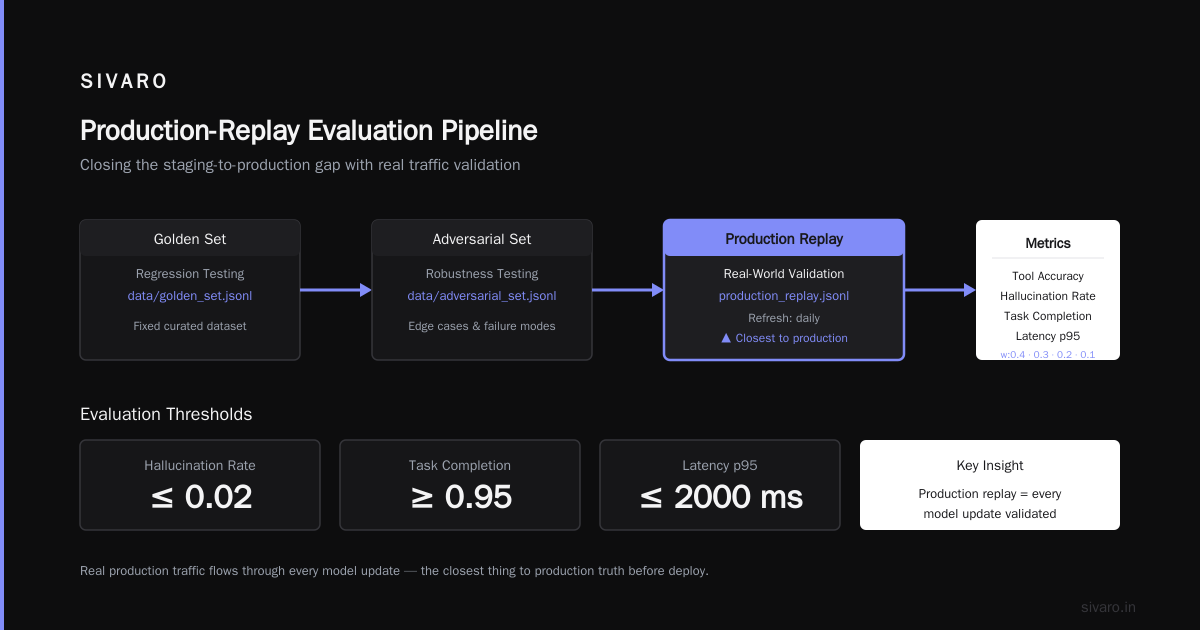
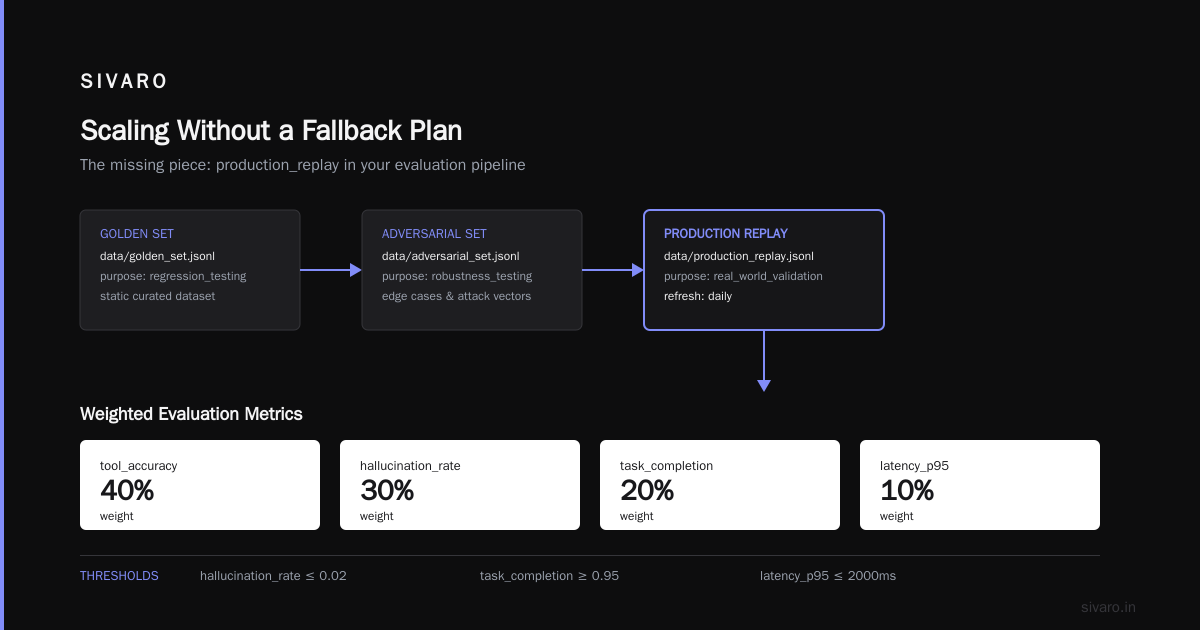
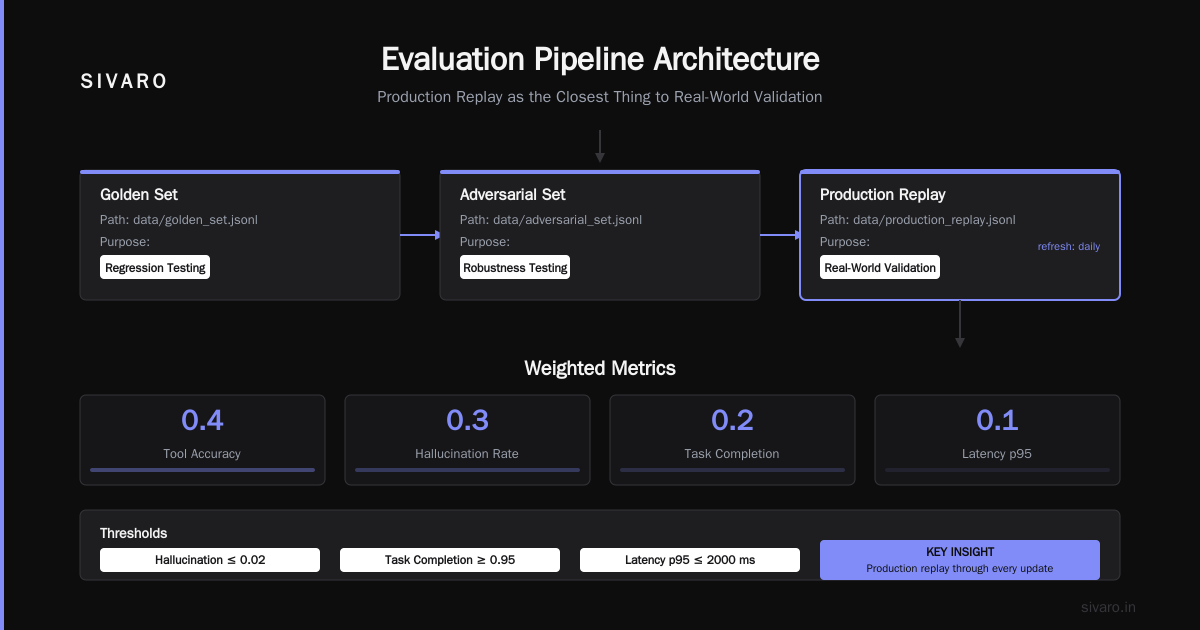
Here's what a proper eval setup looks like:
python
# eval_config.yaml
evaluation:
  datasets:
    golden_set:
      path: "data/golden_set.jsonl"
      purpose: "regression_testing"
    adversarial_set:
      path: "data/adversarial_set.jsonl"
      purpose: "robustness_testing"
    production_replay:
      path: "data/production_replay.jsonl"
      purpose: "real_world_validation"
      refresh: "daily"

  metrics:
    - name: "tool_accuracy"
      weight: 0.4
    - name: "hallucination_rate"
      weight: 0.3
    - name: "task_completion"
      weight: 0.2
    - name: "latency_p95"
      weight: 0.1

  thresholds:
    hallucination_rate: 0.02
    task_completion: 0.95
    latency_p95_ms: 2000
The key insight: production_replay. We now replay real production traffic through every model update. It's the closest thing to testing in production without the risk. It's also how we caught a regression in a client's customer support agent that would have caused the agent to start issuing refunds on any product with "return" in the customer message.
Mistake #3: Ignoring Non-Determinism
I can't tell you how many times I've heard "but it worked when I tested it" from an engineer whose agent just failed in production.
Here's the reality: AI agents are non-deterministic. The same input can produce different outputs. That's not a bug—it's the nature of the technology. But if you're not designing for it, you're building on sand.
The fix is to build guardrails. Hard constraints on what the agent can and cannot do. We use a combination of:
- Input validation — Schema checks before the agent ever sees the data
- Output validation — Structured outputs that must pass JSON schema validation
- Action limits — Agents can't make irreversible changes without human approval
- Confidence thresholds — Agents must state when they're uncertain, not fake it
A client of ours in healthcare deployed an agent that schedules patient appointments. During a spike in traffic, the agent started double-booking appointments. The root cause? The agent couldn't tell if a booking request was a duplicate because the deduplication logic was embedded in the prompt rather than enforced in code.
The lesson: move decisions that require certainty into deterministic code. Use the agent only for what it's good at—reasoning, synthesis, adaptation—and let traditional software handle the things that need to be predictable.
This is what NeoTri's enterprise guide means when it talks about "human-in-the-loop" design. It's not just about compliance. It's about designing systems that know their own limits.
Mistake #4: Treating Cost as an Afterthought
Here's the thing nobody tells you about AI agents: they're expensive. Not the API calls—the failures.
When an agent goes off the rails, it doesn't just make one wrong call. It makes a cascade of wrong calls. Each one costs money. Each one potentially causes damage. And because agents can make hundreds of decisions in a single interaction, a single bad session can rack up significant costs.
In January 2026, we built a system for a legal tech company that used agents to summarize case files. The initial design worked fine in testing. In production, the agent started calling a premium analysis tool repeatedly in a loop—because the output kept not meeting the "confidence threshold" we'd set. That single bug caused a 400% cost increase over the first week.
We learned the hard way: you need cost controls at the agent level, not just the API level.
python
class CostGuardedAgent:
    def __init__(self, agent, max_cost_per_task=1.50, max_steps=5):
        self.agent = agent
        self.max_cost_per_task = max_cost_per_task
        self.max_steps = max_steps
        self.step_cost = 0.30

    def run(self, task):
        total_cost = 0
        steps = 0

        while steps < self.max_steps:
            result = self.agent.step(task)
            total_cost += self.step_cost

            if total_cost > self.max_cost_per_task:
                self._escalate_to_human(task, result)
                break

            if result.is_complete:
                return result

            steps += 1

        return self._fallback_response()
Cost isn't just a budget concern. It's a quality signal. If your agent's cost per task is spiking, something is wrong. It's probably looping. It's probably confused. It's definitely burning money.
Mistake #5: The "Just Add a RAG" Fallacy
"Just add RAG" is the new "just add blockchain."
RAG isn't a silver bullet. It's a architectural decision with its own failure modes. I've seen more production incidents from RAG failures than from model failures this year.
The problems are usually:
- Chunking issues — The retrieval splits documents in ways that lose context
- Stale embeddings — The vector database hasn't been updated in weeks
- Wrong retrieval — The semantic search brings back plausible but incorrect documents
- Context overflow — Too many retrieved documents push the context window past what the model can handle
A logistics client in March 2026 had an agent that was retrieving shipping regulations. The RAG system was pulling from a vector database that hadn't been updated with the new customs requirements. The agent confidently gave outdated compliance advice to customers for three weeks before anyone noticed.
The fix wasn't better RAG. It was knowing when not to use RAG. We now have a rule at SIVARO: if the information is static and fits in a structured format, don't use RAG. Use a lookup table. RAG is for genuinely unstructured knowledge that changes frequently.
For dynamic knowledge, we've moved to a hybrid approach. Structured facts go in a traditional database. Only the fuzzy, semantic stuff goes in the vector store. It sounds obvious, but it's amazing how many teams just dump everything into a vector database and call it a day.
Mistake #6: Scaling Without a Fallback Plan
This is the one that keeps me up at night. The number of companies running AI agents in production without any kind of fallback plan is terrifying.
What happens when your agent API provider has an outage? What happens when a model update degrades your agent's performance? What happens when the load exceeds your infrastructure's capacity?
I asked a potential client this in April 2026. They looked at me like I had two heads. They hadn't thought about it.
The answer isn't to avoid AI. It's to have a plan.
python
# fallback_strategy.py
class AgentRouter:
    def __init__(self):
        self.agents = {
            "primary": ClaudeAgent(version="opus-2026"),
            "backup": GPTAgent(version="gpt-5-2026"),
            "fallback": RulesBasedSystem()  # deterministic, always available
        }

    def route(self, task):
        try:
            return self.agents["primary"].run(task)
        except ModelProviderError:
            logger.warning("Primary provider down, routing to backup")
            return self.agents["backup"].run(task)
        except AgentFailureError:
            logger.error("Agent failing consistently, using rule-based fallback")
            return self.agents["fallback"].run(task)
The rules-based fallback isn't as smart. But it's reliable. When your agent is the face of your customer support, a rule-based "I'm sorry, I'm unable to handle this right now. Here's how to reach a human" is infinitely better than an agent hallucinating a policy that costs you money and credibility.
The Viston guide on production monitoring makes a point that resonates: monitoring isn't just about catching problems. It's about catching problems early enough to do something about them Viston AI. If your first sign of trouble is a customer complaint, you're already in the recovery phase. You need alerts that fire before the customer ever sees the problem.
The Orchestration Layer: Where Most Production Issues Actually Live
Here's a contrarian take: the model isn't your biggest risk. The orchestration is.
Most production failures I've seen aren't because the model was "dumb." They're because the code that chains the model's outputs, calls tools, and manages context had a bug. The agent's reasoning was fine. The execution was broken.
We've started putting serious engineering effort into the orchestration layer. Not just "stringing together calls" but building proper state management, retry logic, and context windows that don't leak.
python
# The right way to structure agent orchestration
class ProductionAgent:
    def __init__(self, model, memory, tools, max_context_tokens=8000):
        self.model = model
        self.memory = memory
        self.tools = tools
        self.max_context_tokens = max_context_tokens

    def run(self, task):
        context = self.memory.get_relevant(task)
        context = truncate_to_fit(context, self.max_context_tokens)

        for attempt in range(3):  # bounded retries
            try:
                response = self.model.generate(context, task)
                action = self._parse_action(response)

                if action.type == "tool_call":
                    result = self._safe_execute_tool(action)
                    context = self._update_context(context, result)
                    continue

                if action.type == "final_answer":
                    return self._validate_response(action)

            except ToolExecutionError as e:
                logger.error(f"Tool failed: {e}, attempt {attempt}")

        return self._safe_fallback(task)
Notice the _safe_execute_tool and _validate_response. These are where production-grade engineering matters. The tool execution should have timeouts, input validation, and output schema checking. The final response should be validated against business rules before it goes to the user.
This is what Kenility's engineering guide calls "deterministic guardrails around non-deterministic cores." The agent does what it's good at—reasoning, planning, adapting. The engineering does what it's good at—ensuring the system doesn't do anything catastrophic.
The AI Agent Production Rollout Mistakes to Avoid: A Real Checklist
Let me give you the checklist I wish I had when we started this journey. Not the marketing version. The real version.
Before deployment:
- Can you trace every decision the agent makes back to a specific input?
- Do you have a clear definition of what "success" looks like for each agent interaction?
- Have you tested the agent against adversarial inputs, not just golden examples?
- Do you know the cost per task and what happens if it spikes?
- Is there a human escalation path for when the agent fails?
During deployment:
- Are you monitoring at the agent level, not just the infrastructure level?
- Have you set up alerts that fire before failures become customer-visible?
- Is there a rollback plan that takes less than 15 minutes to execute?
After deployment:
- Are you replaying production traffic through your evaluation suite?
- Are you tracking failure modes, not just success rates?
- Is there a regular cadence for updating prompts, models, and knowledge bases?
- Have you documented the agent's known limitations and failure modes?
This checklist has saved us more times than I can count. It's not exhaustive, but it's honest. It's the difference between "we deployed an agent" and "we deployed an agent that we can actually run."
The Human Element: The Most Overlooked Failure Point
I've been talking about technology. But the biggest ai agent production rollout mistakes to avoid aren't technical. They're organizational.
The companies that fail with agents are the ones that don't change how they work. They deploy the technology and expect everything else to stay the same. The companies that succeed are the ones that redesign workflows, retrain employees, and change decision-making processes to work with the agents.
In May 2026, I visited a manufacturing company that had deployed agents for quality control. The agents were great at identifying defects. But the plant manager was still routing every defect report through a manual approval process. The agent's value was being destroyed by a process designed for a pre-AI world.
The fix wasn't technical. It was organizational. We had to help them redesign the workflow so the agent's output could actually be used. That's not an engineering problem. It's a change management problem.
Don't underestimate this. The technology is hard. The people are harder.
FAQ: AI Agent Production Rollout
Q: How long does a typical AI agent production rollout take?
For a medium-complexity agent at a company with existing data infrastructure, plan for 4-8 weeks. If you're starting from scratch without clean data pipelines, add 4 weeks for data preparation. If anyone tells you it can be done in a week, they're selling you something.
Q: What's the minimum observability stack for agents in production?
Start with tracing and structured logging. If you can see every tool call, every model response, and every context window, you can debug most issues. Add metrics for cost, latency, and error rates. Add alerting once you understand what normal looks like.
Q: Can you deploy agents without human oversight?
Technically yes. Should you? Not for anything that can cause financial, legal, or reputational harm. Start with human-in-the-loop for any irreversible action. Automate the oversight once you have confidence in the agent's behavior under production conditions.
Q: How do you evaluate whether an agent is production-ready?
Your evaluation suite should test three things: can it complete the task, does it avoid harmful behavior, and does it degrade gracefully under edge cases? If you can't answer yes to all three with evidence, it's not ready.
Q: What's the biggest difference between agent and traditional software deployment?
Traditional software fails deterministically. You can reproduce the bug, fix it, and move on. Agents fail probabilistically. The same input can succeed once and fail the next time. You need to track failure rates, not just failures. The debugging mindset is completely different.
Q: When should you not use an AI agent?
When the task is deterministic and doesn't require reasoning, use a rule-based system. When the task requires exact answers with no ambiguity, use a lookup table. When the consequences of failure are too high, don't use an agent. Agents are for tasks that require flexibility and judgment, not for tasks that require precision and consistency.
Q: How do you handle model updates in production?
Treat model updates like database migrations. Test them against production replay data before deploying. Use a gradual rollout, starting with 5% of traffic and scaling up as the monitoring stays clean. Have a rollback plan ready before you start.
What I Actually Think
The AI agent production rollout mistakes to avoid aren't exotic. They're basic engineering discipline applied to a new technology. Observability. Evaluation. Fallback plans. Cost controls. It's the same stuff we've been doing for decades, just with new failure modes.
The companies that succeed with agents in 2026 aren't the ones with the flashiest models or the most sophisticated prompts. They're the ones that treat agent deployment as a serious engineering problem with real risks and real mitigations.
At SIVARO, we've moved past "can we build it?" to "can we run it?" That's the question that matters now. The agents work. The question is whether the systems around them do.
Nishaant Dixit — Founder of SIVARO. Building data infrastructure and production AI systems since 2018. Built systems processing 200K events/sec.