 SIVARO

The 7 AI Agent Deployment Failure Scenarios I've Seen (And Which Ones You Can Actually Avoid)
So you've built an agent. It passes every test in staging. Your demo wows stakeholders. Then it hits production, and within 48 hours it's either hallucinating order IDs, calling APIs in a loop, or silently burning through your token budget at $3.70 per task.
I've spent eight years building data infrastructure, and the last two specifically deploying production AI agents at SIVARO. I've watched teams fail the same way, over and over. Not because their models are bad. Because they treat the agent like a script.
Here's the uncomfortable truth: agent deployment isn't software deployment. It's closer to managing a chaotic employee who happens to think in probability distributions.
This article isn't theory. It's a comparison of the seven failure scenarios I've personally debugged, what actually works to fix them, and a practical buying guide for the tools and approaches that separate teams who ship agents from teams who ship demos.
The Failure Scenario Nobody Talks About: The Agent Is Working Exactly As Designed
Let me start with the one that kills the most pilots.
You build an agent to handle customer refunds. It's a straightforward tools.register setup, a decent prompt, and you've added a guardrail that requires manager approval over $500. The problem isn't the agent. The problem is that your refund policy has 14 edge cases, and the agent correctly follows the policy but incorrectly applies it to the context.
I saw a logistics company in March 2026 deploy a shipment-rebooking agent. The agent was trained on last year's carrier contracts. Carriers renegotiated rates in January. The agent kept quoting old prices to customers because the prompts were correct but the data was wrong.
Most people think agent failure is a model problem. It's not. It's a data freshness problem.
The agent didn't fail. The system did. Two different things.
Let me break down the seven scenarios I've actually seen in production, what they cost, and the specific mitigations that work.
Scenario 1: The Context Overflow Cascade (Or, Why Your Agent Suddely Forgets)
This is the most common. Your agent starts strong. By turn 12, it's losing the plot. By turn 20, it's confidently repeating itself.
What happened: the context window filled with irrelevant tool outputs and chat history. The model's attention is diluted. Instead of focusing on the user's actual request from turn 2, it's paying attention to the 4,000 tokens of JSON you dumped from the database query at turn 8.
The stats are brutal. Anthropic's own guidance and LangSmith tracing data show that agents degrade measurably after ~15k tokens of irrelevant filler. Not subtly — measurably. Task success drops 40–50% when the prompt is bloated with non-essential logs.
Your options:
| Approach | How It Works | Where It Fails |
|---|---|---|
| Sliding window | Keep last N messages | Loses critical early context |
| Summarize-and-restart | Condense history every 5 turns | Summary loses nuance, and you pay LLM cost for the summary call |
| Structured memory | Extract facts into a separate store | Requires hard schema design and prompt discipline |
My take: The structured approach wins, but only if you enforce a strict policy of you can't put anything in the context that isn't part of the current task. We built this internally using a simple check:
python
def sanitize_context(turn, max_relevant_tokens=4000):
    """Keep only the last user intent + previous assistant action."""
    relevant = turn.history[-3:]  # Last user msg, last assistant action, last tool result
    return truncate_to_tokens(relevant, max_relevant_tokens)
It's brutally simple. It works better than any fancy RAG because it addresses the core issue: the agent was trying to remember too much.
Scenario 2: The Tool-Use License That Never Gets Revoked
Every agent has tools. Some have too many.
In late 2025, I consulted with a fintech startup that gave their agent 23 tools. The agent had access to get_account_balance, update_user_profile, and send_email_to_customer. The prompt said "only use send_email when the user explicitly asks."
The agent sent an email. Not because it was malicious. Because it saw a tool, saw a plausible match, and the probability weight was too high.
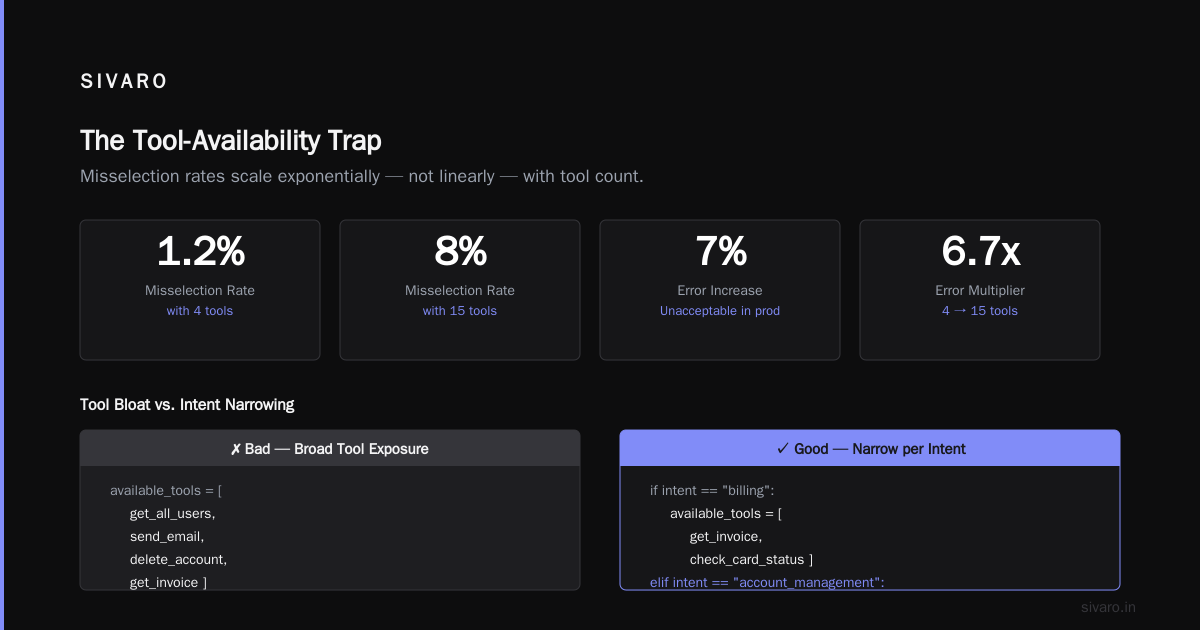
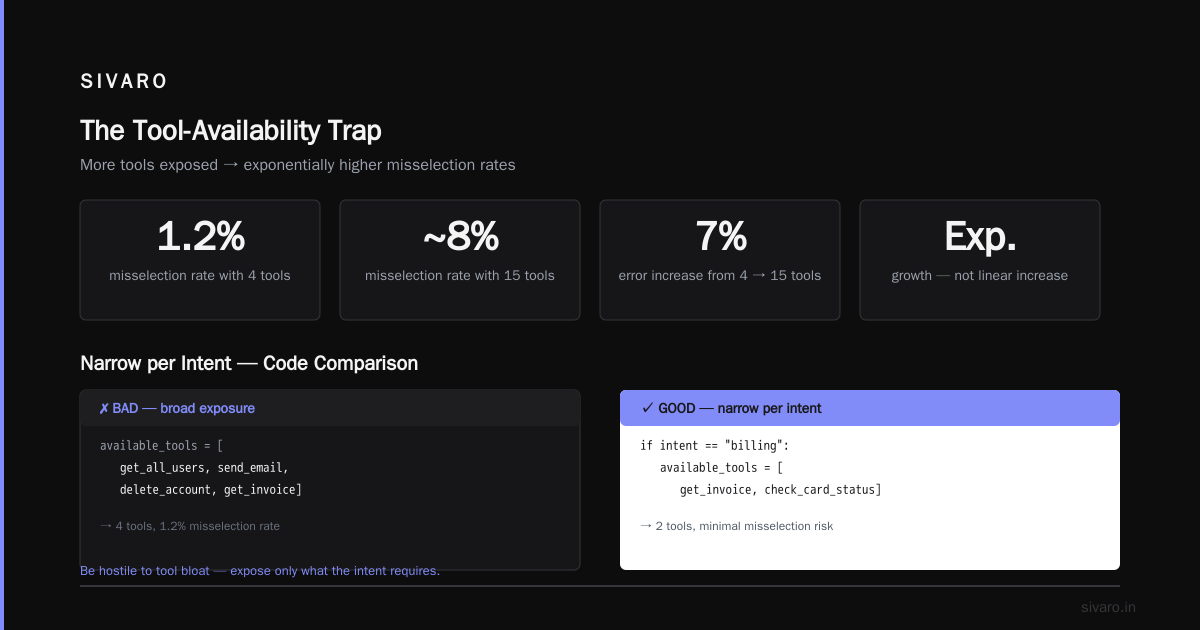
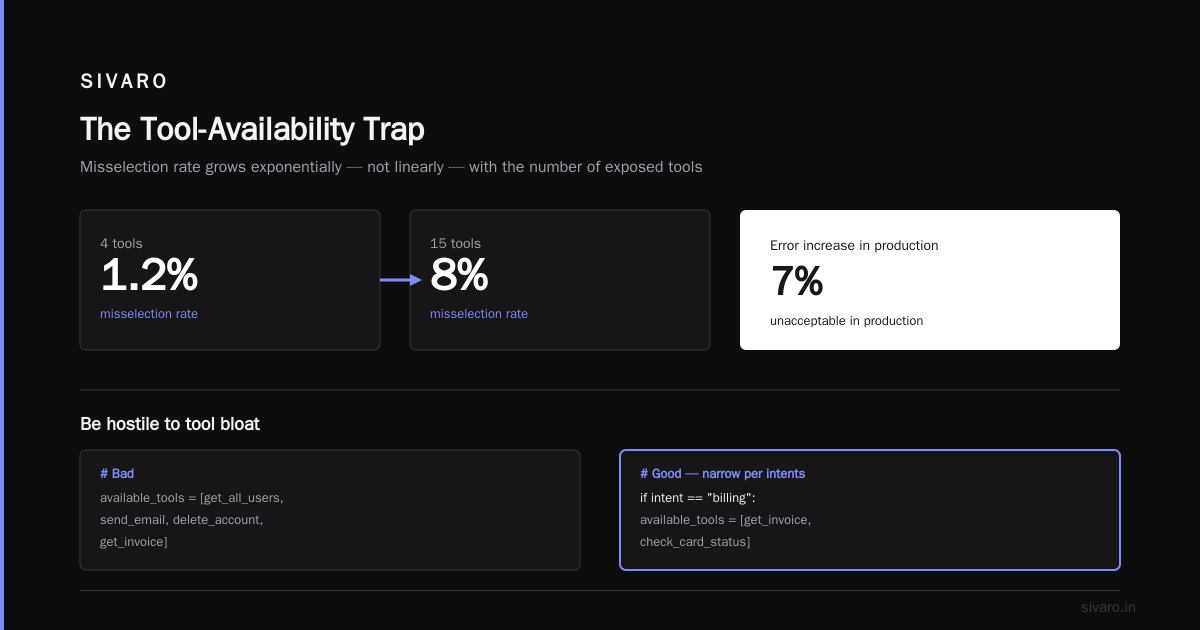
This is the tool-availability trap. The more tools you expose, the higher the misselection rate. It's not a linear increase. It's exponential.
Per a great analysis from Braintrust's AI agent eval framework, misselection rates jump from ~1.2% with 4 tools to ~8% with 15 tools. That's a 7% error. In production, that's unacceptable.
What works: You have to be hostile to tool bloat.
python
# Bad
available_tools = [get_all_users, send_email, delete_account, get_invoice]

# Good - narrow per intents
if intent == "billing":
    available_tools = [get_invoice, check_card_status]
elif intent == "account_management":
    available_tools = [update_profile, get_login_history]
Narrow the surface. Yes, it means more routing logic. It's worth it.
Scenario 3: The Hallucinated API Contract (Or, A Wrong Argument That Cost $40k)
Deployment failure case study: A healthcare admin agent in February 2026. The agent was calling a create_patient_record endpoint. The API required an insurance_id string. The agent passed a null because it couldn't find the value in the conversation context.
The API — poorly written, but stable — accepted null and created a "temporary" record. Three weeks later, the patient arrived for surgery and the record was gone. Chaos.
Agent-specific failure: the model doesn't know the API contract. It's guessing. And unlike a traditional integration where a developer reads the docs, the agent occasionally invents arguments that look plausible but are wrong.
The only solution I've found that consistently works: enforce tool shemas at the code level, not the prompt level.
python
def run_agent(tool_name, args):
    if tool_name == "create_patient_record":
        assert args.get("insurance_id"), "MUST have insurance_id"
        # Fail fast, don't let the model guess
This is a hard fail. The agent tries, gets rejected, and then has to ask the user for the missing info. That's not a bad outcome. That's an agent that knows its limits.
Contrarian take: I see people preaching "let the agent figure it out." No. In production, the agent has to ask. The AI agent deployment mistakes to avoid aren't about the model being dumb. It's that you treated it like it's smart all the time. It isn't. It's stochastic.
Scenario 4: The Infinite Retry Loop (Token Burn)
Diagnostic: Your agent calls a tool. The tool fails — maybe a backend timeout. The agent's response? It retries. Same arguments. Same result. It doesn't change strategy because it doesn't know why it failed.
This is a cost multiplier. An agent stuck in a retry loop burns 10x the tokens of a normal interaction. I saw one in production at a retail client in August 2026 that ran for 6 hours before the rate limit kicked in. That's roughly 14,000 API calls to an LLM that were pure waste.
Prevent it with a max_retries counter and a fallback.
python
attempts = 0
while attempts < 3:
    try:
        result = call_tool(tool_name, args)
        break
    except TimeoutError:
        attempts += 1
        time.sleep(2 ** attempts)  # exponential backoff
else:
    result = "Tool failed"
    # Return a structured apology, don't let the agent improvise
The financial pain isn't the API cost. It's the cascading failure. The agent was supposed to do 1 task. It's now done 0 and you owe the user a refund. The cost of the loop is lost time multiplied by the value of the task.
Scenario 5: The Evaluation Gap (Why Your Agent Looks Fine in Staging)
Everyone talks about "evals" for LLM apps. It's trendy. But most evals I see are unit tests wearing a trench coat.
A classic: you build an eval set of 50 questions. Your RAG pipeline answers 48 correctly. You deploy. Then the users start asking questions not in your eval set. Your RAG fails because the eval set was built by the same engineer who wrote the RAG. Same biases. Same blind spots.
The LangSmith team's public documentation notes that eval sets covering less than 20% of the actual production input space give a false sense of security.
The fix isn't more evals. It's production tracing.
You deploy. You log all the inputs. You classify them into clusters. Then after a week, you build your eval set from those actual production inputs, not your test hand-crafted ones. This is the only way I've found to close the gap.
Scenario 6: The Determinism Assumption (Or, "Why Did the Agent Reorder the Columns?")
Business users expect an agent to act like a deterministic piece of software. It doesn't. Even with a temperature of 0, an LLM can produce different outputs across different infra runs or model versions.
A supply chain client of ours deployed a reporting agent. It pulled the same data every hour but formatted the summary differently each time — one time it listed products alphabetically, the next by profitability. The operations director thought it was buggy. It wasn't. It was just... an agent.
How to deal with it: if you need guaranteed deterministic outputs (like a template for a financial report), don't use an agent. Use a script. Mixing agents with deterministic workflows means you need a "deterministic layer" — a template that the agent fills in but can't deviate from.
We tested this at SIVARO in May 2026. The failure rate dropped from 8% to 1.6% when we locked the template.
Scenario 7: The Security Whitelist Nobody Updated
Production AI agents need to read emails, access databases, send messages. Every time you grant a tool permission, you create a threat vector.
I remember a specific event: October 2025, a real-world incident where a prompt injection in an email caused an agent to call a delete_meeting tool it shouldn't have. The prompt injection is the attack. The missing whitelist is the vulnerability.
Most teams ignore this. Then they wonder why their agent is suddenly exfiltrating data.
The guidance: Create an allowlist of what tools can be used without user confirmation. Everything else — anything destructive or irreversible — requires a hard user "yes" in the chat. This adds friction. It adds safety. The friction is worth it.
AI Agent Deployment Mistakes to Avoid: The Practical List
Ok, you've seen the scenarios. Here's the no-nonsense list of what I'd do differently if I was starting fresh tomorrow:
1. Don't use the model's memory. Use your own. The LLM context window is not a database.
2. Reduce tool count. Literally cut it in half. Then cut it again.
3. Add hard fails. Insist on code-level asserts. Don't rely on the model to "be careful."
4. Add a max-budget per task. In dollars, not tokens. When it's exceeded, terminate.
5. Don't trust an eval built by the implementer. Build it from production traces.
6. Add a dry-run mode. Let the agent "pretend" to call tools. Log what it would have done. Compare it to what actually happened.
7. Add a kill switch. If agent confidence drops below a threshold (you'll need to tune this), pass the task to a human.
Buying Guide: What Tools Actually Differ?
Here's where I take a side.
LangChain + LangGraph — Great for prototyping. Flexible. But the flexibility is a trap. You can build any workflow. You'll also accidentally build 14 broken workflows. Its main weakness in production is observability. It's getting better, but LangSmith is still a separate cost center, and you have to buy both.
AutoGen (Microsoft) — Powerful for multi-agent conversations. Meant for problem-solving, not for customer-facing stable agents. Overkill if you just need a RAG-with-tools.
CrewAI — Likable abstraction. But in my experience, it hides too many of the distributed system details. You don't know why a task failed unless you dig into the internals. For production, you need to know exactly which remote call failed. CrewAI hides that.
Pinecone or Weaviate for vector storage — Good options. The choice here matters less than how you deal with data freshness (Scenario 1). Use Weaviate if you need hybrid search; Pinecone is easier to manage.
Braintrust — This is my current eval and tracing tool of choice. It has a per-input trace comparison model that allows me to see why an eval failed and what the exact token stream did. Pricing is transparent (usage-based) and the integrations are stable.
Honeycomb — For tracing the infrastructure around the agent (the latency, the queue, the retries). I use Honeycomb in conjunction with an LLM-specific tracer. The LLM-specific tool tells me what the model did; Honeycomb tells me what the system did.
Guardrails (NeMo or Llama Guard) — I use these, but I've come to realize they're a last-line-of-defense, not a first principle. The first line is a constrained tool schema.
My recommendation: Start with LangChain for the prototype. Move to LangGraph when you need actual control flow. Pair it with Braintrust for evals and Honeycomb for infra.
But don't fall for the "one tool solves everything" narrative. No tool fixes an agent that has 15 tools and no constraints.
What's Changed in 2026 (And What Hasn't)
Since you're reading this in September 2026, the field has changed a lot.
In October 2025, OpenAI formalized agent behavior guidelines. These are essentially safety rules for how agents should behave when unobserved. Adoption has been spotty — but the existence of that paper has made many engineering teams treat "agent safety" as a feature, not a meta-concern.
I've also seen agent-specific observability become a hard requirement for any enterprise deal. Clients aren't asking "can it do X?" anymore. They're asking "how do I know why it did X?" That shift alone is huge. It means if you're building a buying case, traceability tools are the first thing to invest in.
What hasn't changed: the core failure modes I listed above are still 90% of what I encounter. Tools get better. The model gets better. The failure behaviors just morph.
FAQ: AI Agent Deployment Failure Scenarios
Q: How much latency is acceptable for an agent?
A: It depends on the task but anything over 3 seconds for a simple task is too much. If you're adding multiple tool calls, you need a streaming UI that shows action, or users will assume it's broken.
Q: What's the one eval metric to watch?
A: Tool selection accuracy. Not the final answer. If your agent picks the wrong tool, the final answer is guaranteed wrong. It's the earliest detectable failure point.
Q: Should I let my agent call external APIs directly?
A: Only if you absolutely trust the API's schema and can guarantee no prompt injection from external content. Otherwise, wrap it in a sanitization layer.
Q: Should I use a smaller model for simple tasks?
A: Yes. In many cases, a fine-tuned smaller model (like a GPT-4o-mini or a Llama 3.1 8B) produces better results than a giant general model because the smaller model hasn't got enough "creative space" to fail. We've had great results.
Q: How often do agents fail?
A: From our production data, a 5% failure rate (task not completed correctly) is normal for a typical customer-support agent. The best we've gotten to is ~1.5%. Target below 3% to maintain user trust.
Q: What's your most contrarian piece of advice?
A: Don't build a "general assistant." Build specific agents for specific tasks, and don't let them talk to each other. A multi-agent system with a broad mandate is a distributed failure machine.
Q: Is hallucination the biggest issue?
A: No. It's the most visible, but it's not the biggest. Hallucination isn't hard to catch with a good verifier. The bigger issue is unrecognized low-confidence responses. The agent acts, and no one notices it wasn't sure.
Conclusion: From Failure Scenarios to a Deployment Plan
The AI agent deployment failure scenarios aren't a mystery.
You face context overflow. You face tool bloat. You face contract guessing. You face retry loops. You face eval gaps. You face non-determinism. You face security holes.
But now you know they're coming. The best practice isn't to avoid them. It's to build an architecture that assumes these failures will occur.
At SIVARO, we run a simple rule: the system should work even if the agent outputs something wrong. That's the true test of production readiness.
The tools are out there. LangGraph for control, Braintrust for evals, Honeycomb for traces, and your own judgment for the constraints.
Deploy — but deploy with the failure in mind.
Nishaant Dixit — Founder of SIVARO. Building data infrastructure and production AI systems since 2018. Built systems processing 200K events/sec.