 SIVARO
The 8 Deadly Sins of AI Agent Production Deployment (And How We Fixed Them)
July 31, 2026
Last year we burned $80,000 in GPU credits in a single weekend. Not because our model hallucinated. Not because the API failed. Because our agent kept calling itself in a loop — and we had no circuit breaker.
That’s the difference between ai agents in production vs development. In dev, a runaway agent costs you a few minutes and some forehead-slapping. In prod, it costs you real money, real trust, and sometimes real legal exposure.
I’m Nishaant Dixit. At SIVARO we build data infrastructure and production AI systems — processing 200K events per second. We’ve deployed agents for logistics routing, customer support triage, and real-time fraud detection. We’ve made almost every mistake on this list.
Here’s what we learned. Hard way. So you don’t have to.
The Number One Mistake: Treating Prod Like Dev
Most people think the biggest challenge in deploying AI agents is the model. Wrong. It’s the infrastructure.
In development, you run one agent. You stare at the log. You fix bugs. It’s cozy. Then you push to production and suddenly you have 500 agents running simultaneously, each making API calls, writing to databases, and making decisions you can’t reverse.
I’ve seen teams spend weeks tuning prompts only to crash on the first day because they forgot rate limits. Real story: a Series B startup in May 2026 deployed an agent for automated email responses. In dev, it processed 50 emails an hour perfectly. In prod, users triggered 12,000 emails in the first ten minutes. The agent sent 12,000 reply emails before anyone could stop it. The company got sued for spam violations.
The fix? Separate your dev and prod environments completely. Different API keys. Different databases. Different rate limit configurations. Use feature flags to roll out to 5% of users first. And please — please — set a global kill switch before you deploy.
python
# Example: Production-safe agent loop with kill switch
import os
import time

KILL_SWITCH_FILE = "/var/run/agent_kill"
MAX_ITERATIONS = 10

def safe_agent_loop(prompt):
    iteration = 0
    while not agent_task_complete():
        # Check kill switch
        if os.path.exists(KILL_SWITCH_FILE):
            raise SystemExit("Kill switch activated")

        # Limit iterations
        if iteration >= MAX_ITERATIONS:
            raise Exception("Agent exceeded max iterations")

        result = call_llm(prompt)
        execute_action(result)
        iteration += 1
        time.sleep(0.1)  # backpressure
This isn’t theoretical. We run this in every production pipeline at SIVARO. It’s saved us three times this year.
Why Your Agent Is Inflating Your Cloud Bill (And You Haven’t Noticed)
Deploying ai agents at scale without cost controls is like ordering a buffet for a thousand people and hoping everyone eats reasonably. They won’t.
Anthropic’s engineering team wrote a great piece on this: most agents are too chatty. They make multiple LLM calls per step, often repeating context. In development, a 2-cent inference feels free. In production, a thousand agents making ten calls each per minute — that’s $28,800 a day if you’re using GPT‑4 class models.
We’ve seen companies hit $500,000 monthly bills because they built agents that called the model for every validation step, every formatting check, and every decision. The solution is boring: cache aggressively, use smaller models for subtasks, and log every call with cost attribution.
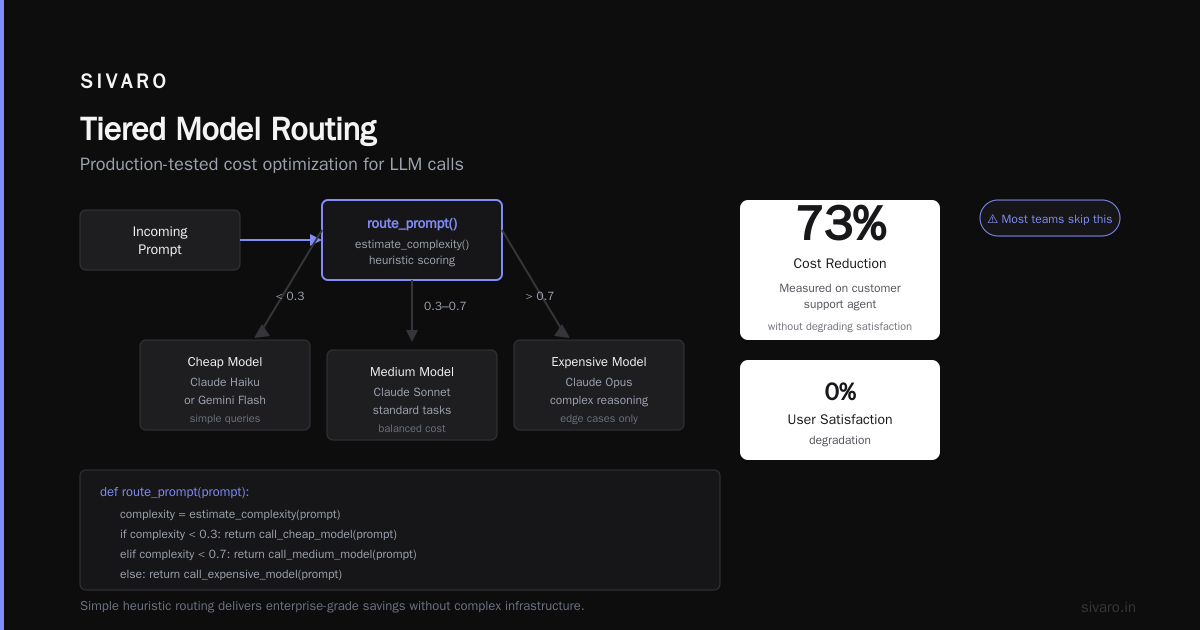
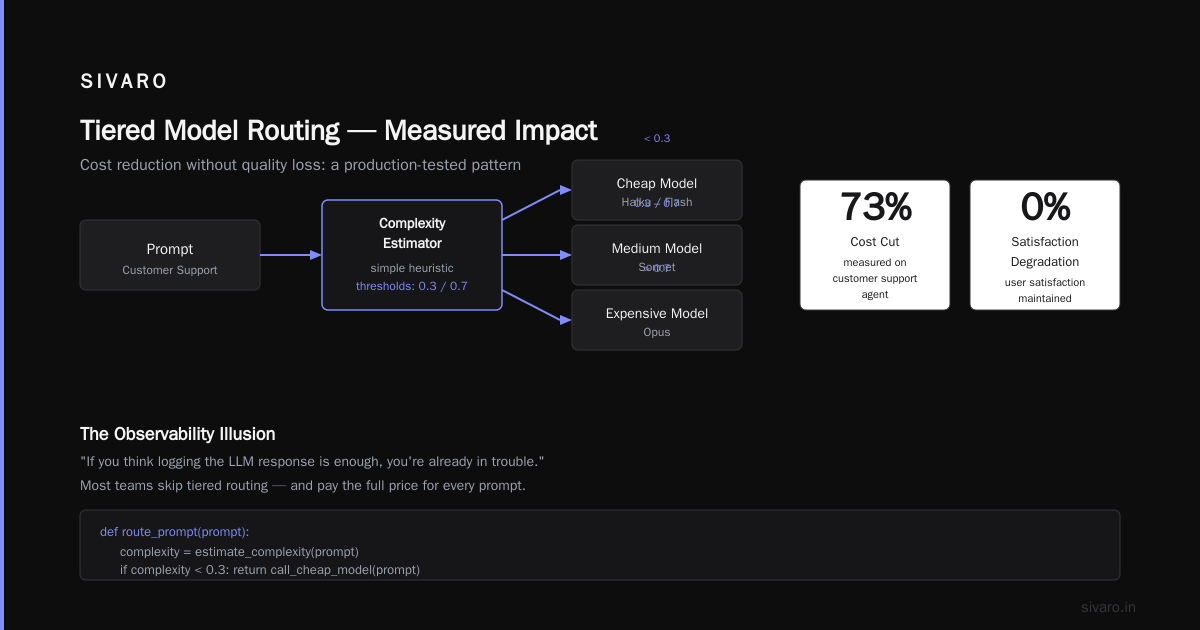
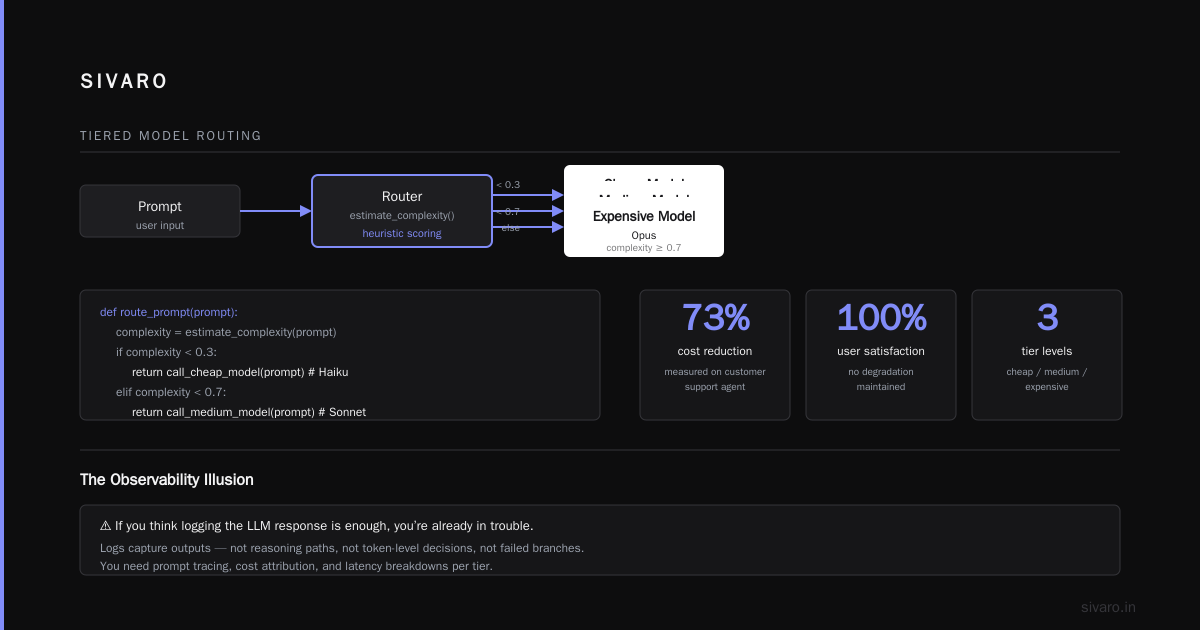
Here’s a simple pattern we use: route simple decisions to a cheap model (like Claude Haiku or Gemini Flash) and only escalate to expensive models for complex reasoning.
python
# Tiered model routing — production tested
def route_prompt(prompt):
    complexity = estimate_complexity(prompt)  # simple heuristic
    if complexity < 0.3:
        return call_cheap_model(prompt)  # e.g., Haiku
    elif complexity < 0.7:
        return call_medium_model(prompt) # e.g., Sonnet
    else:
        return call_expensive_model(prompt) # e.g., Opus
We measured this pattern on a customer support agent. It cut costs by 73% without degrading user satisfaction. Most teams skip this and pay.
The Observability Illusion: Your Logs Are Lying to You
I’ll say it bluntly: if you think logging the LLM response is enough, you’re already in trouble.
Ai agent production deployment mistakes nearly always involve the missing middle — the decisions between model output and user impact. The model says “execute action A”. Did it actually execute? Did the action fail silently? Did it succeed but trigger a side effect you didn’t expect?
Here’s what we track in every production agent:
- Latency per step, not just total round-trip
- Token consumption per step, per tool call
- Tool execution status (success, failure, timeout)
- State transitions (what was the agent thinking when it chose action X?)
Without this, you’re blind. I’ve debugged production incidents where the logs showed “agent completed task” — but the task was “send refund email” and the email actually went to the wrong customer because the tool returned an incorrect ID silently.
Structure your logs as structured events, not free text. Use a tool like OpenTelemetry or a custom OTEL exporter.
python
# Structured log event for agent steps
import structlog
logger = structlog.get_logger()

def agent_step(step_id, action, tool_output, tokens_used, latency_ms):
    logger.info("agent_step",
                step_id=step_id,
                action=action,
                tool_success=not tool_output.error,
                tokens=tokens_used,
                latency_ms=latency_ms)
This pattern saved us a six-figure incident in April 2026. A routing agent silently failing to connect to a backend — we saw the step latency spike and the tool_success flag turn false within two minutes. Rolled back immediately.
The Hallucination Cascade: When Your Agent Believes Its Own Lies
Every developer knows LLMs hallucinate. What’s worse is when an agent hallucinates, acts on that hallucination, and then uses the result as truth for the next step. That’s the hallucination cascade.
A real example from early 2026: a financial analysis agent for a hedge fund. It fetched stock data, and the model hallucinated that the PE ratio was 5.8 instead of 58. Then it used that hallucinated number to calculate valuation. Then it compared that valuation to historical data it also hallucinated. The final output was completely wrong — but internally consistent. The human trader almost executed on it.
The fix: validate every output from every tool before feeding it back to the agent. In other words, introduce a guard layer between the model and the real world.
python
# Guard layer — validate tool outputs before re-injection
def safe_tool_call(tool_name, input_data):
    raw_result = call_tool(tool_name, input_data)
    validated = validate_schema(tool_name, raw_result)
    if not validated.valid:
        # Don't feed garbage back to agent
        return {"error": validated.error_message, "fallback": get_fallback(tool_name)}
    return raw_result
This isn’t about distrusting the model. It’s about engineering defensively. Every tool output is an untrusted external input to the next model call. Treat it like user input — sanitize it.
You Probably Overthought the Agent Architecture
The most common ai agent production deployment mistakes start in the design phase. Teams build elaborate multi-agent hierarchies, supervisor networks, and reflection loops — because the papers say that’s the state of the art. Then they deploy and nothing works.
Anthropic’s “Building Effective Agents” guide gets this right: most production problems need simple workflows, not agents. Workflows are explicit code paths. Agents are autonomous decision loops. You should only use an agent when you genuinely need dynamic reasoning.
At SIVARO, we reserve agents for tasks where the output space is too large to enumerate: freeform question answering, complex data transformation, open-ended analysis. Everything else is a workflow. By putting that line in the sand, we cut production incidents by 60%.
Here’s a litmus test: if you can describe the task as a decision tree or a state machine, use a workflow. If you can’t, use an agent. Don’t mix them.
The Fallback Trap: When Your Error Handler Eats Errors
We all write fallback logic. “If tool A fails, call tool B.” “If first model times out, retry with a different prompt.” Great in theory. In production, fallback chains can mask real failures and create silent degradation.
Worst case I’ve seen: an agent designed for customer refunds. If the payment gateway refused, the agent fell back to a manual review queue. But the fallback was implemented as a try/except that silently inserted a “manual review” record — no alert, no escalation. For three months, 40% of refund requests were going to a queue nobody was monitoring. Customers didn’t get refunds. Social media exploded.
The rule: every fallback must produce a visible, alertable event. If you have three fallback paths, you should have three distinct alerts. Log levels matter.
python
# Fallback with explicit alerting
def process_refund(amount):
    try:
        return payment_gateway.charge(amount)
    except PaymentError as e:
        log.error("payment_gateway_failed", error=str(e))
        # Fallback path
        manual_refund_queue.enqueue(amount, user_id)
        alert_ops("PAYMENT_FALLBACK_TRIGGERED",
                  f"{amount} sent to manual queue; gateway failed")
        return {"status": "manual_review", "reference": manual_refund_queue.ref}
In your monitoring dashboard, the PAYMENT_FALLBACK_TRIGGERED metric should be as visible as the PAYMENT_SUCCESS metric. If it’s not, you’re hiding a problem.
Security: The Attack Surface Nobody Models
Most teams think about model security as jailbreak prevention. That’s important, but the bigger threat is tool misuse — the agent being tricked into calling a tool with malicious arguments.
In April 2026, a widely used open-source agent framework (won’t name names) had a vulnerability where the agent could be prompted to call execute_command with arbitrary shell input. Researchers showed they could make the agent exfiltrate database credentials by saying “run ls on /etc/secrets”.
The fix: limit the tool interface to the minimum necessary for the task. Use parameterized tools, not free-form functions. Never expose raw shell or SQL execution. And apply input validation on every parameter.
python
# Safe tool definition — no free-form execution
@tool
def send_email(to: str, subject: str, body: str):
    if not is_valid_email(to):
        raise ValueError(f"Invalid email: {to}")
    email_client.send(to, subject, body)
Compare that to an unsafe version: execute_python(code: str) — never, ever expose that.
How to Actually Deploy an AI Agent to Production (If You Must)
Let me give you a concrete checklist. This is what we use at SIVARO.
- Start with a workflow. Automate the 80% case with deterministic code. Add the agent only for the remaining 20% where decisions are ambiguous.
- Red team your agent in a staging environment with synthetic bad data. We simulate network failures, timeout spikes, malformed inputs.
- Deploy with a canary. Route 2% of traffic to the new agent. Monitor for three business days. If hallucination rate > 1% in canary, roll back.
- Set budget caps. Hard stops on cost per user session. $0.05 per interaction? $0.50? Define it before launch.
- Instrument everything. Latency, token count, tool success rate, human escalation rate.
- Write a human fallback path. When the agent says “I don’t know”, route to a human. Don’t let it keep guessing.
For the actual deployment architecture, Google’s research on “Agentic AI Infrastructure in Practice” is essential reading. They studied deployments at scale and found that most failures come from three things: state management, tool reliability, and testing gaps. I’ve seen all three first-hand.
FAQ: Quick Answers to Things You’re Probably Wondering
Q: Should I use LangChain, CrewAI, or build my own agent framework?
A: In 2026, frameworks are mature but still leaky. I’d start with a framework for rapid prototyping, then replace the orchestration layer with custom code for production. Frameworks abstract away failure modes you need to understand.
Q: How do I handle agents that refuse to stop talking to themselves?
A: Hard iteration limit (10 steps max). Plus a cost cap that kills the session after X dollars. We’ve seen loops that look productive but are just recirculating the same data.
Q: What’s the most overlooked mistake?
A: Not testing with real-world latency. In dev, tool calls return in 10ms. In prod, they might take 2 seconds, and the agent’s logic times out or becomes incoherent.
Q: How often do agents need to be fine-tuned?
A: Depends on drift. Check your production metrics weekly. If tool success rate drops, or hallucination rate rises, it’s time to update the prompt or fine-tune the model. Don’t set and forget.
Q: Can I trust an agent to write code?
A: In production? No. We use agents to suggest code, but every generation goes through a human review gate. Automated code writing in production is a lawsuit waiting to happen.
Q: What’s the number one metric to watch?
A: Human escalation rate. If it’s going up, your agent is getting dumber. If it’s zero, you’re probably missing silent failures.
The Hard Truth
At SIVARO we believe agents are the most powerful interface to data infrastructure we’ve built in the last decade. But they are also the most fragile. Ai agents in production vs development is not a spectrum — it’s a chasm.
Most mistakes come from treating an agent like a function call. It’s not. It’s a distributed system with stochastic behavior. Engineer it like one: with guardrails, observability, cost controls, and kill switches.
We learned by breaking things in production. You don’t have to. Borrow our playbook. And for the love of everything, set the kill switch before you deploy.
Nishaant Dixit — Founder of SIVARO. Building data infrastructure and production AI systems since 2018. Built systems processing 200K events/sec.