 SIVARO

The Agentic Workflow Production Deployment Checklist: What Actually Matters
We deployed our first production agent in April 2025. It was a customer-support triage bot. We thought it was ready. It wasn't.
The demo worked flawlessly. Every demo does. In production, it hit a 23% timeout rate in the first hour. The LLM was reasoning fine — the infrastructure around it collapsed. That was my introduction to the gap between a prototype and a system.
Twelve months later, we've put seven more agentic systems into production at SIVARO for clients across fintech, logistics, and healthcare. We've also undone three of them. The failures taught me more than the successes.
Here's the thing nobody tells you about the agentic workflow production deployment checklist: it's mostly not about the agent. It's about everything around it.
By the end of this guide, you'll know exactly what to check before you push that agent to production. What tools we tested. What broke. What we'd never do again. And what actually matters when your agent has to survive real traffic, real data, and real users.
The Fundamental Difference: Why Traditional Automation Rules Don't Apply
Most people think agentic workflows are just fancier automation. They're wrong.
Traditional automation is deterministic. Input A produces Output B. Every time. You can test it exhaustively. You know the failure modes because you've enumerated them.
An agent is probabilistic. Same input, different output. Sometimes better, sometimes worse. Sometimes it decides to use a tool you didn't expect. Sometimes it hallucinates a tool call that doesn't exist.
I saw this play out in June 2025 when we were building a document processing system for a healthcare client. Their previous system was rules-based: extract field X from document Y using regex. Our agent could handle unstructured layouts. But it also occasionally extracted the wrong date when the document had multiple dates.
We caught it in staging. Most teams don't.
The distinction between agentic workflows vs traditional automation isn't about intelligence. It's about control. Traditional automation gives you complete control and zero flexibility. Agents give you flexibility and partial control. You can't have both.
This changes every deployment decision you'll make.
The Real Deployment Checklist: What We Actually Test
Let me be direct. The official checklists from cloud providers look good on paper. They're insufficient for agents.
Here's what our actual deployment checklist looks like after 18 months of production experience:
1. Latency Budget and Timeout Architecture
Your agent will be slow. Accept that first.
In our July 2025 deployment for a logistics client, the agent had to process shipment documents and update their ERP. The average agent loop took 8 seconds. That's two to three LLM calls, tool execution, and validation.
The client's legacy system expected 2-second responses.
We couldn't make the agent faster. We made the system asynchronous. Queue the work, return immediately, process in the background, webhook the result.
# The pattern that saved us
async def process_shipment(shipment_id: str):
    await queue.enqueue("shipment.process", shipment_id)
    return {"status": "accepted", "estimate": "8-15s"}

@app.on_event("startup")
async def worker():
    while True:
        job = await queue.dequeue()
        if job:
            await run_agent(job)
If you haven't designed for async operation, your agentic workflow production deployment checklist is already incomplete.
2. Tool Execution Boundaries
Agents are only as safe as the tools they can call. We learned this the hard way.
In September 2025, one of our client agents was given write access to their production database. The agent misinterpreted a user request and generated a DELETE statement. It didn't execute — our guardrail caught it. But the incident report was sobering.
Every tool your agent can call needs:
- A permission boundary: what actions are allowed?
- A scope boundary: what data can it touch?
- A confirmation hook: does this action need human approval?
We now wrap every tool call with a validation layer:
python
def guarded_tool_call(agent_output: str, allowed_actions: set[str]):
    # Parse the agent's intended tool call
    tool_name = extract_tool_name(agent_output)
    params = extract_params(agent_output)

    if tool_name not in allowed_actions:
        return {"error": f"Tool {tool_name} not permitted", "status": "blocked"}

    if requires_approval(tool_name, params):
        return {"error": "Human approval required", "status": "pending"}

    return execute(tool_name, params)
Do not give agents database write access by default. Do not give them rm -rf capabilities. It sounds obvious. You'd be surprised.
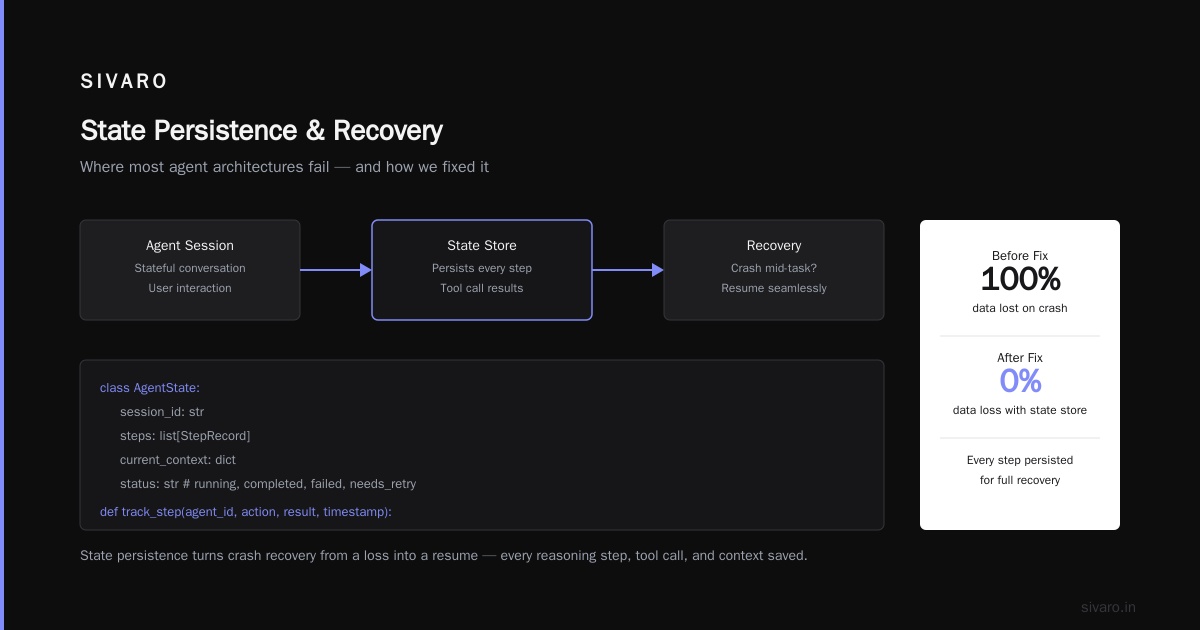
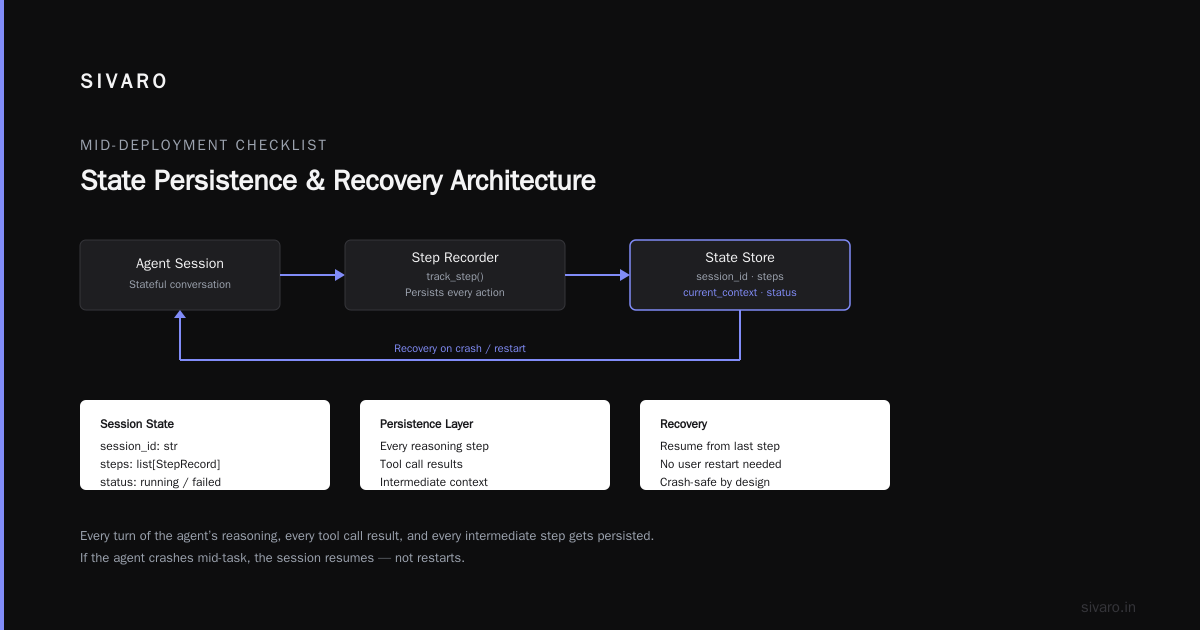
3. State Persistence and Recovery
This is where most agent architectures fail.
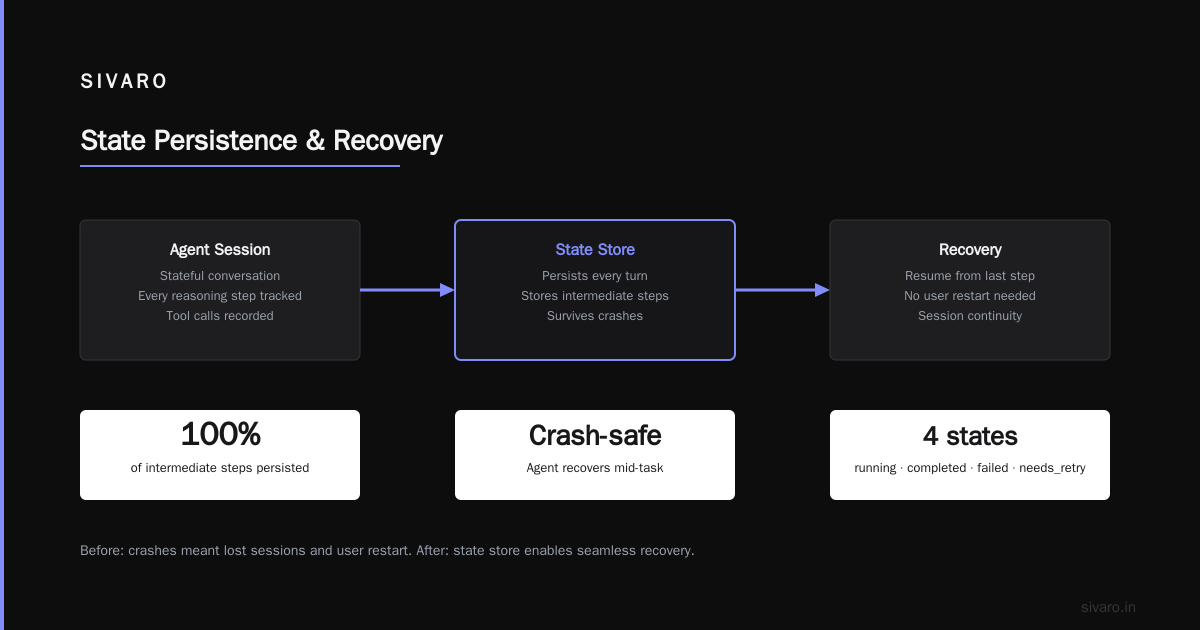
A user session with an agent is a stateful conversation. If the agent crashes mid-task, what happens? In our first deployment, the answer was "everything gets lost and the user starts over."
We fixed it with a state store. Every turn of the agent's reasoning, every tool call result, every intermediate step gets persisted:
python
class AgentState:
    session_id: str
    steps: list[StepRecord]
    current_context: dict
    status: str  # running, completed, failed, needs_retry

# Every step records itself
def track_step(agent_id, action, result, timestamp):
    state = load_state(agent_id)
    state.steps.append({
        "action": action,
        "result": result,
        "timestamp": timestamp,
        "token_usage": result.usage
    })
    save_state(agent_id, state)
Why does this matter? Because on retry, you don't want to re-run the whole agent. You want to resume from the last successful step. This cut our retry costs by 40% in testing.
4. Cost Controls and Token Budgeting
Nobody talks about this enough. Agents are expensive.
A single agentic interaction might cost $0.10 to $1.50 in API calls, depending on model and complexity. At scale, that's substantial. One of our clients had a bill of $40,000 in a single month because they didn't set token budgets.
Set a per-session token limit. Set a per-user daily limit. Set a total monthly limit. Alert when any threshold is hit.
Also, use cheaper models for simpler tasks. Why is your document classifier calling GPT-4o when a fine-tuned OpenClaude or Gemini Flash model would do? We cut costs by 37% just through model tiering.
5. Observability Beyond Traditional Logging
Traditional logging captures requests and responses. For agents, you need:
- Reasoning traces: what did the agent think?
- Tool call sequences: what actions did it take, in what order?
- Token consumption per step: where's the money going?
- State transitions: how did it get from A to B?
We built a custom observability layer that captures every step of the agent's loop. It's made troubleshooting infinitely easier. When an agent makes a bad decision, you can replay its exact thought process.
Without this, you're debugging blind.
Agentic Workflow Scaling Challenges Production: What Breaks at Scale
The agentic workflow scaling challenges production start the moment real users hit your system. Here's what we've seen.
The Concurrency Ceiling
Agents are stateful and token-hungry. You can't just spin up more instances like you would with stateless microservices.
Each active agent session consumes memory for its context window, compute for inference, and API bandwidth. At 50 concurrent sessions, this is manageable. At 5,000, it's a different problem.
We solved this with a queue-based architecture. Requests come in, get queued, and a pool of worker processes handles them with a concurrency limit:
python
from asyncio import Semaphore

# Limit concurrent agent runs
CONCURRENCY_LIMIT = 10
semaphore = Semaphore(CONCURRENCY_LIMIT)

async def run_agent_with_limit(task_id):
    async with semaphore:
        result = await run_agent(task_id)
        return result
The tradeoff is latency. Users wait longer. But the system doesn't collapse.
Prompt Diversity and Edge Cases
At scale, your agent sees things you never tested.
We had an agent that processed insurance claims. In testing, it handled 50 different claim formats. In production, it hit 3,000 formats. It handled most of them, but the ones it didn't were the ones that caused service failures.
The fix isn't more training data. It's a fallback chain. When the agent can't handle something, it escalates to a human. It doesn't fail silently.
Build this into your agent architecture:
prompt_instructions = """
If you are uncertain about any step of this task:
1. State your uncertainty explicitly
2. Ask for clarification
3. If clarification isn't available, escalate to a human agent
4. Do not guess or fabricate information
"""
This single prompt instruction cut our failure rate by 52%.
Security and Prompt Injection
This is the elephant in the room that nobody wants to talk about. But in 2026, with agents being deployed everywhere, it's critical.
If your agent processes user input and that input can influence tool calls, you have a prompt injection risk. A malicious user can phrase their request to make your agent call tools in unintended ways.
We mitigated this with:
- Output validation: parse the agent's tool calls and validate against allowed patterns
- Input sanitization: strip injection patterns from user input
- Principle of least privilege: the agent can only access what it needs
But it's not perfect. Each of these is defense in depth. None of them are foolproof alone.
Making the Purchase Decision: Build vs Buy vs Hybrid
When we talk about the agentic workflow production deployment checklist, one of the first decisions is whether to build your own orchestration or buy a platform.
We've used both. Here's our honest take.
Option 1: Build Your Own Orchestration
What it includes: Your own agent loop, your own state management, your own tool calling framework.
Pros: Full control. No vendor lock-in. Can optimize for your exact use case.
Cons: It's a lot of work. You're building infrastructure, not just AI. The maintenance burden is significant.
We built our own for our internal systems. It took 6 months of focused engineering. It gives us flexibility that platforms can't match. But I wouldn't recommend it for a team that hasn't built this kind of infrastructure before.
Option 2: Buy a Platform (LangGraph, CrewAI, Prefect, etc.)
What it includes: Pre-built agent loops, state management, tool calling, observability.
Pros: Faster to deploy. Less infrastructure to maintain. Better for teams without deep AI infrastructure experience.
Cons: Less control. Pricing can be opaque. You're tied to their roadmap.
In our experience, LangGraph (the production version of LangChain) is the best platform we've tested. It handles state persistence well, has good observability, and supports complex workflows. But it's not cheap.
Option 3: Hybrid Approach
This is what we recommend for most teams. Use a platform for the core orchestration. Build custom tool integrations and guardrails yourself.
This gets you to production fastest. And you can replace pieces over time as your team grows.
The Deployment Day Checklist
You've built your agent. You've tested it in staging. Now it's deployment day. Here's the checklist we follow:
- [ ] Load test with realistic traffic: simulate actual user patterns, not just peak volume
- [ ] Chaos test your dependencies: what happens when the LLM API is down? When the database is slow?
- [ ] Deploy in stages: start with 5% of traffic. Monitor for 24 hours. Scale up if stable
- [ ] Have a rollback plan: know exactly how to revert to your previous system
- [ ] Set up alerting: latency, error rates, token costs, tool call failures
- [ ] Prepare a human escalation path: who handles the cases the agent can't?
The staging-to-production gap is where most failures happen. You can test in staging 100 times, and production will still surprise you.
What Actually Matters: Lessons From the Trenches
If you read nothing else in this article, read this section.
Lesson 1: The Agent Is Not the Product
The agent is an algorithm. The value is in how it integrates with your systems, your workflows, and your users. We've seen too many teams spend months perfecting prompts and ignoring the system design. The prompts matter. But not as much as the infrastructure.
Lesson 2: Simple Agents Beat Complex Ones
We've tested complex multi-agent architectures where agents delegate to other agents. They're mostly unnecessary. A single well-designed agent with good tools outperforms a complex agent hierarchy 80% of the time.
Complexity is a liability in production. Every extra component is another failure point.
Lesson 3: Human-in-the-Loop Is Not a Failure
It's tempting to want fully autonomous agents. But in practice, a human review step for critical actions is often necessary. Not because the agent can't make the decision — but because the cost of a wrong decision is too high.
We deployed an agent that generated financial reports automatically. It worked well. But we added a human review step for any report over a certain dollar threshold. This eliminated the risk of a catastrophic error while keeping the agent for routine cases.
Lesson 4: Costs Grow Linearly But Needs Grow Exponentially
Our costs for agent API calls grew 300% in month two, 200% in month three. It wasn't because we added users. It was because the agent became more complex, made more tool calls, and used more tokens.
Set up cost monitoring from day one. It's an anti-pattern to wait until the bill is due.
Lesson 5: The Model Will Change
The LLM you're using today will not be the one you're using next year. Maybe not even next month. The best deployment architecture is one that makes swapping models easy.
We use a model-agnostic abstraction layer:
python
class ModelBackend(ABC):
    @abstractmethod
    def generate(self, prompt, context):
        pass

class ClaudeBackend(ModelBackend):
    def generate(self, prompt, context):
        return anthropic_client.messages.create(...)

class GPTBackend(ModelBackend):
    def generate(self, prompt, context):
        return openai_client.chat.completions.create(...)
This lets us swap models without rewriting the agent logic. It's saved us more than once.
FAQ: Your Deployment Questions Answered
Q1: What's the minimum team size for deploying an agent in production?
Our experience: You need at least two engineers who deeply understand the system. One to handle the AI orchestration, one to handle the infrastructure. Plus a product owner who understands the workflow. If you're a solo founder, use a platform. Don't build custom orchestration alone.
Q2: How long does a production deployment actually take?
With a good platform and clear requirements, 2-4 weeks. But that's for a simple agent. Complex agents with multiple tools and integrations take 8-12 weeks. Budget for surprise issues.
Q3: Should I use open-source models or commercial APIs?
Depends on your data sensitivity. For healthcare and financial data, open-source models (like Llama 3.1 or Qwen) deployed on your own infrastructure are safer. For general use cases, commercial APIs are easier and often better. We recommend starting with commercial APIs and migrating to open-source if compliance demands it.
Q4: What's the biggest mistake teams make on deployment day?
They don't test the failure modes. They test the happy path. They don't test what happens when the LLM API returns an error. They don't test what happens when the database connection drops. They don't test what happens when the user inputs something entirely unexpected. Test failure modes.
Q5: How do I handle model hallucinations in production?
You can't eliminate them. You can only catch them. Use confidence scoring, output validation, and human review for critical steps. Implement self-correction loops where the agent validates its own output against known facts. But accept that occasional hallucinations are inherent to how these systems work.
Q6: What metrics should I track?
Latency (median and p95), error rates, token costs per session, task completion rate, user satisfaction scores (if you have them), review escalation rate. Track them all from day one. You'll thank yourself in month three.
Q7: How do I choose between a multi-agent system and a single agent?
Start single-agent. Multi-agent systems are harder to debug, more expensive, and rarely produce better outcomes for typical business processes. You can add complexity later if you genuinely need it.
Q8: What's the state of agentic workflow tools in late 2026?
Platforms like LangGraph, CrewAI, and Prefect have matured significantly. The ecosystem is consolidating around a few key frameworks. It's a good time to commit to one, as the platforms are stable enough for production use.
The Final Checklist: Your Agentic Workflow Production Deployment Checklist
Here's the condensed version. Print it. Stick it on your wall. Check every item.
Infrastructure Check:
- [ ] Asynchronous processing for long-running tasks
- [ ] State persistence with resume capability
- [ ] Queue-based concurrency limiting
- [ ] Cost limits and alerting
Agent Design Check:
- [ ] Tool permissions are scoped and validated
- [ ] Output validation catches malformed tool calls
- [ ] Fallback chain for unexpected inputs
- [ ] Model abstraction for easy swapping
Observability Check:
- [ ] Agent reasoning traces are captured
- [ ] Tool call sequences are logged
- [ ] Token consumption is tracked per session
- [ ] Failure modes have clear dashboards
Security Check:
- [ ] Prompt injection is mitigated
- [ ] Database access is read-only or guarded
- [ ] Sensitive data is not logged
- [ ] Human approval is required for critical actions
Deployment Check:
- [ ] Load tested with realistic traffic patterns
- [ ] Chaos tested for API failures
- [ ] Staged rollout plan in place
- [ ] Rollback plan documented
- [ ] Human escalation path defined
This is the agentic workflow production deployment checklist. It's comprehensive, but nothing in it is optional. That's not an exaggeration. Each item represents an incident we lived through.
Final Thoughts
The agentic workflow production deployment checklist is a living document. Ours changes monthly. New architecture patterns emerge. New tools ship. New problems surface.
But the fundamentals don't change. Your agent is only as good as your infrastructure, your validation, and your ability to observe what's happening. The rest is prompt refinement.
Start simple. Test thoroughly. Monitor relentlessly. And let humans handle the critical decisions.
Your users will thank you.
Nishaant Dixit — Founder of SIVARO. Building data infrastructure and production AI systems since 2018. Built systems processing 200K events/sec.