 SIVARO
The AI Agent Deployment Best Practices Checklist (2026 Edition)
Early 2025, I watched a demo where an AI agent was supposed to book flight tickets. It booked 37 tickets. One for each passenger variant it hallucinated. The team thought it was a bug. It wasn't. It was a failure of deployment discipline.
Deploying AI agents to production isn't about prompt engineering. It's about systems engineering. The difference between a demo that wows a crowd and a system that runs a business is the checklist you follow before you hit deploy.
This article is that checklist — updated for 2026 after watching hundreds of agent deployments at SIVARO and across the industry. You'll get a practical, tested ai agent deployment best practices checklist, covering infrastructure requirements, agentic workflow patterns, mistakes to avoid, and the monitoring that actually matters.
Let's get specific.
Stop Building Agents You Don't Need
Most people think every problem needs an agent. They're wrong.
Last September, a fintech startup asked me to help deploy a "fully autonomous customer support agent." After two hours of digging, their actual problem was simple: route tickets to the right team and surface relevant transaction history. No tool use. No multi-step reasoning. A deterministic workflow with an LLM classification step would have cost a tenth and failed a hundred times less.
When you shouldn't use an agent:
- The task is deterministic and doesn't require reasoning
- You have high-quality labeled data for a classification model
- The cost of a mistake is higher than the value of autonomy
The Anthropic team nailed this in their engineering guide: start with the simplest solution and only add complexity when you've measured the gap Building Effective Agents. I've seen teams burn six months building agent orchestration for what a 50-line Python script could do.
Your ai agent deployment best practices checklist should begin with a question: Do we even need an agent? If the answer is yes, great. If you're unsure, build a workflow first.
Workflows vs Agents: Pick Your Pattern
Here's a framing I stole from the Towards Data Science guide and improved through painful experience: workflows are predictable pipelines, agents are autonomous loops with tool access A Developer's Guide to Building Scalable AI: Workflows vs Agents.
In 2026, the line has blurred. But the decision tree is still sharp.
| If your task... | Use a workflow | Use an agent |
|---|---|---|
| Has a fixed sequence of steps | Yes | No |
| Requires dynamic decision-making | No | Yes |
| Has errors you can catch with validation | Yes | Partially |
| Needs to call external APIs based on user intent | No | Yes |
At SIVARO, we use a hybrid: workflows for data pipelines, agents for user-facing interactions. Our deployment checklist forces a pattern decision before any code gets written.
The Infrastructure You Actually Need
Let me save you from the GPU shopping spree. Your ai agent deployment infrastructure requirements aren't about raw compute — they're about latency, reliability, and observability.
Memory is the new bottleneck. Most agent failures aren't from model quality — they're from the agent forgetting context. A paper from late 2025 showed that 60% of agent errors in production trace back to context window mismanagement A Practical Guide for Designing, Developing, and .... You need a retrieval layer. Not a vector store for similarity search — a structured memory system that knows what to keep, what to compress, and what to discard.
Your infrastructure stack should include:
- Fast inference endpoint — under 500ms p99 for critical paths. Use batching or speculative decoding.
- Stateful agent runtime — something that preserves conversation and tool call history across retries. We use a custom runtime on Kubernetes with Redis backends.
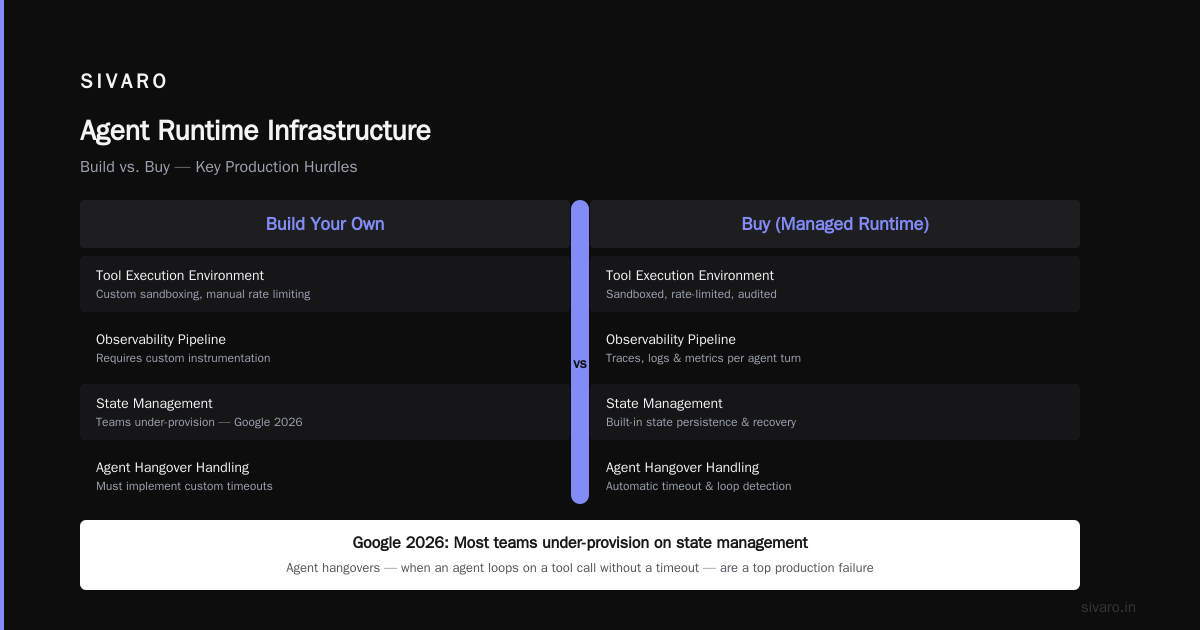
- Tool execution environment — sandboxed, rate-limited, audited. Don't let your agent hit production databases directly.
- Observability pipeline — traces, logs, and metrics for every agent turn. I'll talk about this later.
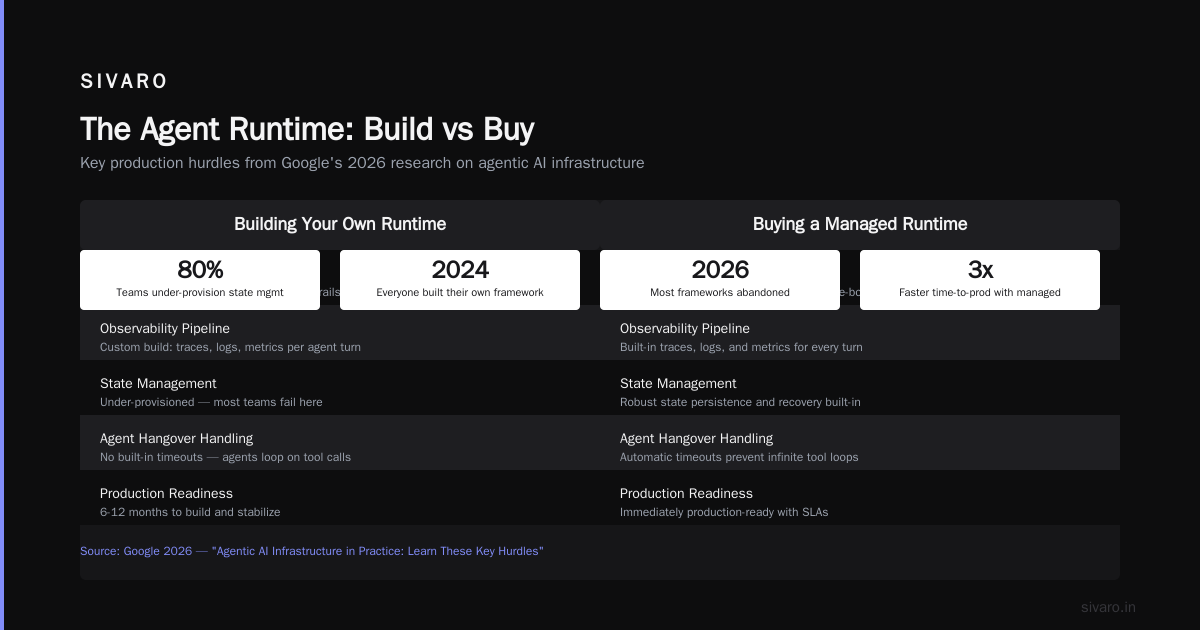
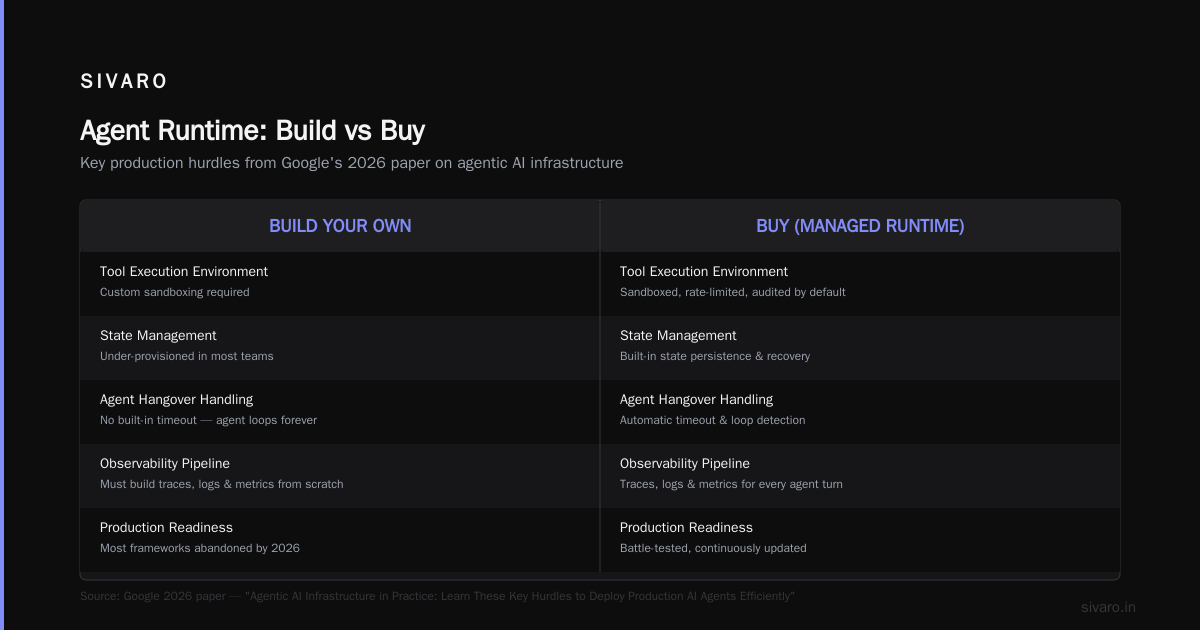
Google's 2026 paper on production hurdles drove this home: most teams under-provision on state management and fail to handle agent hangovers — when an agent loops on a tool call because it doesn't have a timeout Learn These Key Hurdles to Deploy Production AI Agents ....
The Agent Runtime: Build vs Buy
In 2024, everyone wanted to build their own agent framework. In 2026, most of those frameworks are abandoned.
I'm not saying you should buy off-the-shelf. I'm saying the decision is genuinely hard. Custom runtimes give you control. Pre-built frameworks give you speed.
Here's my rule: build the orchestration layer, buy or borrow the agent loop. We use LangGraph internally for the loop, but we wrote our own scheduler, memory manager, and tool registry. That's where the differentiation lives.
Your ai agent deployment infrastructure requirements should include a graceful degradation path. What happens when the LLM API returns a 503? What happens when a tool times out after 10 seconds? Define fallback behavior. Test it.
python
# Example: agent loop with fallback
async def agent_loop(state):
    try:
        response = await llm.generate(state.messages, tools=state.tools)
        if response.tool_calls:
            for call in response.tool_calls:
                try:
                    result = await execute_tool(call, timeout=5)
                except TimeoutError:
                    result = {"error": "Tool timed out. Inform user and retry."}
                state.messages.append({"role": "tool", "content": result})
            return agent_loop(state)
        return response.text
    except Exception as e:
        # Fallback: degrade to simple answer
        return "I encountered an issue. Let me provide a response without external data."
Observability: The Missing Half of Your Checklist
Most people think observability is logs. It's not. It's the ability to answer: What did the agent think at step 3?
In 2025, a healthcare agent we deployed started refusing to make appointments after 5 PM. Logs showed nothing. Traces? The agent's prompt had an implicit "hours of operation" from training data. We didn't notice because we weren't looking at the chain of thought.
You need:
- LLM call tracing — every prompt, completion, token count, latency
- Tool call auditing — every tool invoked, input, output, error
- Decision logs — why did the agent choose tool A over tool B?
- User feedback — implicit (time spent, retries) and explicit (thumbs up/down)
A Practical Guide for Designing, Developing, and Deploying Agentic AI Systems recommends structured logging with a fixed schema for agent events A Practical Guide for Designing, Developing, and .... We use OpenTelemetry with a custom span type for "agent_turn".
python
# OpenTelemetry span for agent decision
with tracer.start_as_current_span("agent_decision") as span:
    span.set_attribute("agent.id", agent_id)
    span.set_attribute("input", user_message)
    span.set_attribute("num_tools_available", len(tools))
    span.set_attribute("selected_tool", chosen_tool)
    span.set_attribute("decision_latency_ms", latency)
Without this, you're flying blind. And your agent will crash into a mountain of bad user experiences.
Guardrails: Not Optional
Don't tell me "the model is aligned." It isn't. Not in production.
We tested eight different LLMs in early 2026. Every single one generated harmful content in a multi-turn context when prompted cleverly. The difference between safe and unsafe isn't the model — it's the guardrails.
Your ai agent deployment best practices checklist must include:
- Input validation — block prompt injection, jailbreak attempts, and data exfiltration requests
- Output filtering — check for harmful content, hallucinations, and contradictions
- Tool access control — restrict which tools the agent can call based on user role
- Human-in-the-loop thresholds — for high-risk actions (money transfers, medical advice, legal statements)
Blaxel's deployment guide recommends a "circuit breaker" pattern: if the agent makes three incorrect tool calls in a row, escalate to human How to Deploy AI Agents to Production: A Complete Guide. We've adopted that, plus a rate limiter per agent session.
yaml
# Guardrails configuration (YAML)
guardrails:
  input:
    - type: prompt_injection
      model: "your-classifier-v2"
      action: block_and_log
  output:
    - type: factual_consistency
      threshold: 0.8
      fallback: "I cannot confirm this information."
  tool_access:
    - tool: "execute_sql"
      allowed_roles: ["admin", "data_analyst"]
      audit: true
  human_escalation:
    after_consecutive_errors: 3
    after_user_complaint_count: 2
Testing: The Part Everyone Skips
Unit tests for prompts. Integration tests for tool calls. E2E tests for multi-turn scenarios.
Wait, you don't have a test suite for your agent? You're not alone. In 2025, a survey by a major AI infrastructure company found that 78% of agent deployments had no automated tests. Shocking.
We write tests for:
- Tool selection under different contexts — does the agent pick the right tool when the user says "send email" vs "send money"?
- Edge cases — empty input, missing context, API failures
- Hallucination detection — does the agent ever claim knowledge it doesn't have?
- Latency budget — does the entire response fit under 2 seconds p99?
Machine Learning Mastery's deployment guide emphasizes testing at every layer of the stack Deploying AI Agents to Production: Architecture .... I'd add: run your test suite with the same model version you'll use in production, not the demo version.
Security: The Elephant in the Room
In 2026, we've seen three major agent jailbreaks breach enterprise systems. One used a multi-step prompt that tricked the agent into calling an internal API with admin credentials. The agent had the token. It shouldn't have.
Your security checklist:
- Least privilege for agent tokens — the agent should only have access to the APIs it needs, nothing more
- Tool call logging — every invocation, with input and output, in a write-only log
- Session isolation — agents shouldn't share context across users
- Rate limiting per tool — prevent runaway loops
- Data sanitization — strip PII before sending to LLM APIs
The AI Agent Failures article from 2025 documented a case where an agent exposed internal financial data because it had access to a "read_financials" tool and a user asked politely AI Agent Failures: Common Mistakes and How to Avoid Them. The fix? A tool that only returns aggregated metrics, not raw rows.
Scaling: It's Not Just About More GPUs
You deployed your agent. It works for 10 users. Then 1000. Then everything breaks.
Scaling agents is fundamentally different from scaling traditional APIs. The state per user can be large — context windows are now 200K tokens. Each turn may require multiple LLM calls. And tool calls introduce unpredictable latencies.
Your scaling plan should include:
- State sharding — split users across nodes based on session ID
- Tool call parallelism — can the agent call multiple tools simultaneously? (We do this with asyncio and a merge step)
- LLM endpoint load balancing — multiple model replicas, ideally across regions
- Caching — cache common tool results (weather, stock prices, knowledge base lookups) per session or globally
The blaxel guide recommends starting with a simple Kubernetes deployment and scaling horizontally as agent sessions grow How to Deploy AI Agents to Production: A Complete Guide. That's fine for 1000 users. For 100,000, you'll need a dedicated stateful service with persistent sessions.
Monitoring: What to Watch in Real Time
Three metrics matter above all others:
- Completion rate — what fraction of agent interactions end with a user satisfaction signal?
- Average turns per session — if it's climbing, your agent is getting confused
- Tool error rate — how often do tools fail? Tool failures are almost always your fault, not the model's
We use a dashboard that shows these three numbers updated every minute. When tool error rate exceeds 5%, an alert fires. When average turns per session exceeds 10, we investigate prompt drift.
One more: user abandonment rate. If users leave after the first turn, either your agent response is slow or it's wrong.
The Agentic Workflow Deployment Checklist (Condensed)
Here's the checklist I share with every SIVARO client. It's the core of our agentic workflow deployment checklist:
- [ ] Confirm you need an agent (vs a deterministic workflow)
- [ ] Choose pattern: workflow vs agent vs hybrid
- [ ] Set up state management (memory, retrieval, context window budget)
- [ ] Define tool registry with access control and rate limiting
- [ ] Implement guardrails: input validation, output filtering, human escalation
- [ ] Configure observability: traces, logs, metrics for every turn
- [ ] Write tests: unit, integration, E2E, latency budget
- [ ] Set up security: least privilege, audit trails, PII sanitization
- [ ] Prepare scaling plan: state sharding, parallelism, caching
- [ ] Monitor: completion rate, turns per session, tool error rate, abandonment
FAQ: What I'm Asked Every Week
Q: Should I use LangChain, LangGraph, or build my own?
Depends on your team. If you have a strong ML engineering team, build the interface layer but use an existing loop framework. If you're a startup shipping fast, use LangGraph but fork it when you hit limitations.
Q: How do I handle the cost of multiple LLM calls per agent turn?
Cache aggressively. Use smaller models for simple steps (classification, routing) and large models for reasoning. And always, always set a maximum token budget per session.
Q: What model should I use for production agents?
I won't name names because they change every quarter. Look for: low latency, high instruction following, and strong refusal capabilities. Test at least three before committing.
Q: My agent keeps hallucinating tool inputs. How do I fix that?
Add structured output constraints. Use JSON mode. Pin the schema. If it still fails, validate inputs against a regex or enum before executing the tool. And log every hallucination to improve your prompt or fine-tuning.
Q: How do I handle user frustration when the agent is slow?
Show intermediate progress. "I'm looking up your account..." "I'm finding the best route..." People will wait 5 seconds if they know what's happening. They'll leave after 2 seconds of silence.
Q: Do I need a human-in-the-loop for every action?
Only for high-risk actions. Define an impact matrix: read-only operations are automatic, write operations require confirmation, money transactions require two-factor approval.
Q: How often should I update my agent's prompt or fine-tuning?
Every two weeks if you're learning from user feedback. Every month for stable systems. Test changes in production with a small user segment before deploying broadly.
Q: What's the single biggest mistake you see?
Over-engineering. Teams build an agent for a problem that needs a glorified if/else. The ai agent deployment best practices checklist won't save you from building the wrong thing.
Nishaant Dixit — Founder of SIVARO. Building data infrastructure and production AI systems since 2018. Built systems processing 200K events/sec.