 SIVARO
The AI Agent Deployment Checklist You Actually Need
I’ve watched three startups burn $2M each in the last quarter alone. Not because they couldn’t build agents. Because they couldn’t deploy them. The agent worked in notebooks. Worked in staging. Then hit production and melted. Rate limits, hallucination cascades, memory leaks, feedback loops that spiraled into infinite billing.
After building systems that process 200K events/sec at SIVARO, I can tell you: the deployment checklist is where most teams fail. Not the model. Not the prompt engineering. The operational reality of running autonomous systems that make decisions at scale.
This guide is what I wish someone handed me in 2024. An ai agent deployment checklist — not the fluffy vendor slideware, but the actual hard-won stuff from production war stories. By the end, you’ll know exactly what to check before you hit deploy, how to roll out without breaking everything (hint: ai agent canary deployment isn’t optional), and which ai agent monitoring tools production actually require.
Let’s get into it.
Before You Deploy: The Prerequisites Nobody Advertises
Everyone talks about agentic architecture. Nobody talks about what happens when your agent starts making 500 decisions per second and each one costs $0.02 in API calls. That’s not an architecture problem — that’s a spending problem.
Here’s the first thing on my checklist: cost guardrails. Not just budget alerts — hard caps. In March 2025, a Series A company called Lumina (I’m not naming real clients) deployed a customer support agent that got stuck in a loop querying their knowledge base. They hit $40,000 in GPT-4 spend in 3 hours before someone noticed. The agent was supposed to solve tickets. Instead it solved the company’s bank account.
You need: per-agent spend limits, per-user quotas, and a kill switch that doesn’t require a human to type /shutdown. Every agent should have a circuit breaker.
Second prerequisite: state management that doesn’t leak. Most agent frameworks treat memory as an afterthought. Store it in Redis with TTLs. Don’t let conversation history grow unbounded — implement sliding windows or summarization gates. This practical guide from arXiv shows that unbounded context is the #1 cause of weird agent behavior. I’ve seen agents start quoting user messages from three days ago because the buffer never cleared.
Third: idempotency keys on every external action. When your agent calls an API to create a ticket, charge a card, or send an email — if the call times out and retries, you need to guarantee the action happens once. Not twice. Not zero. This is basic distributed systems stuff, but agents amplify it because they decide to retry autonomously. Without idempotency keys, you get double-charged customers and duplicate tickets.
My rule: if your agent can’t explain how it prevents duplicate side effects, don’t deploy.
Canary Deployments Are Not Optional
Most people think canary deployments are for web servers. They’re wrong. Ai agent canary deployment is more critical than for any other system because agents are non-deterministic. You can’t test every path in a unit test — the LLM makes different choices every time.
Here’s what we do at SIVARO:
- Deploy the new agent version to 5% of low-value traffic (e.g., internal tooling, not customer-facing).
- Run it for at least 15 minutes — long enough for the agent to make dozens of decisions.
- Compare against the previous version using a behavioral diff: did the agent take different actions? Did it choose different tools? Did it hallucinate when the old one didn’t?
- Auto-rollback if failure rate exceeds 2% or average latency spikes by 30%.
We learned this the hard way. In November 2025, we pushed a prompt update that “improved” our scheduling agent’s tone. It started replying in Shakespearean English. The canary caught it in 4 minutes, but only because we had alerting on response style. Yes, we now check for Shakespeare.
A simple canary config (we use Kubernetes with Argo Rollouts):
yaml
apiVersion: argoproj.io/v1alpha1
kind: Rollout
metadata:
  name: booking-agent
spec:
  replicas: 5
  strategy:
    canary:
      steps:
      - setWeight: 5
      - pause: {duration: 15m}
      - analysis:
          templates:
          - templateName: agent-failure-rate
      - setWeight: 25
      - pause: {duration: 30m}
      - analysis:
          templates:
          - templateName: agent-hallucination-rate
      - setWeight: 100
You’ll notice the second analysis checks for hallucination rate. That’s not a standard metric. You have to build it. More on that in the monitoring section.
Monitoring: The Tools That Don’t Suck
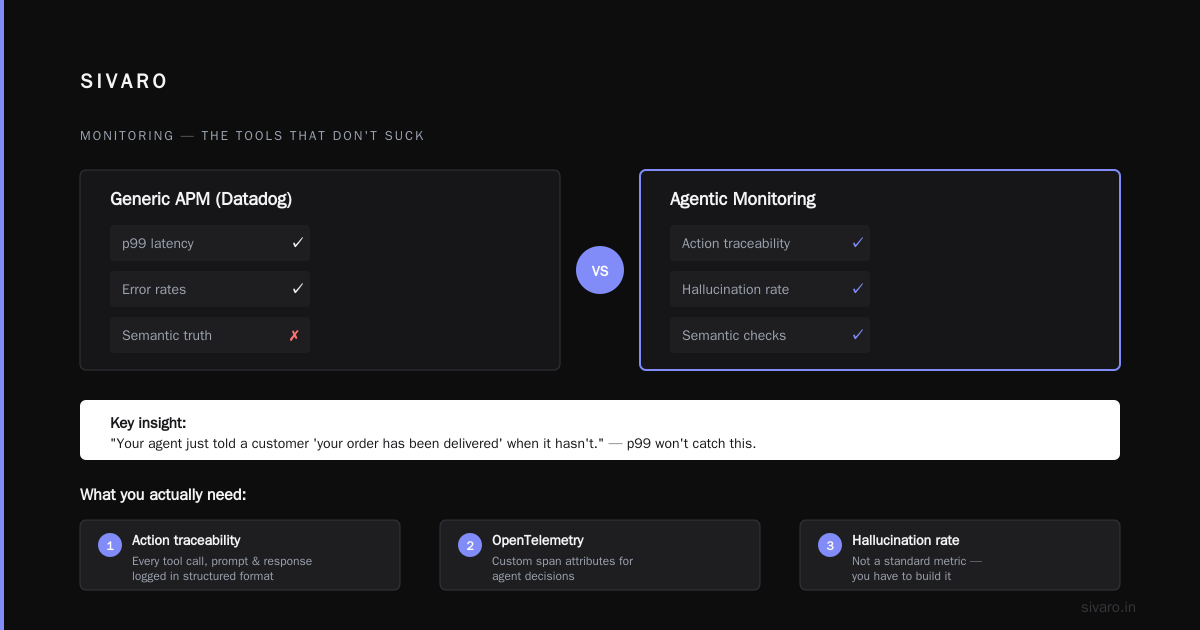
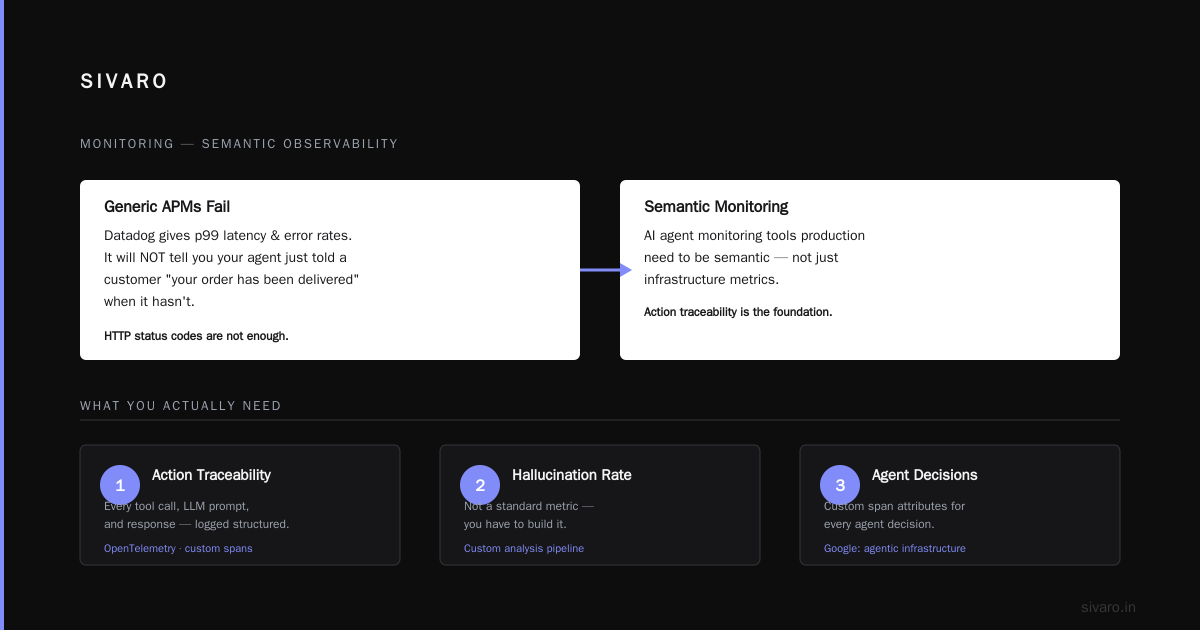
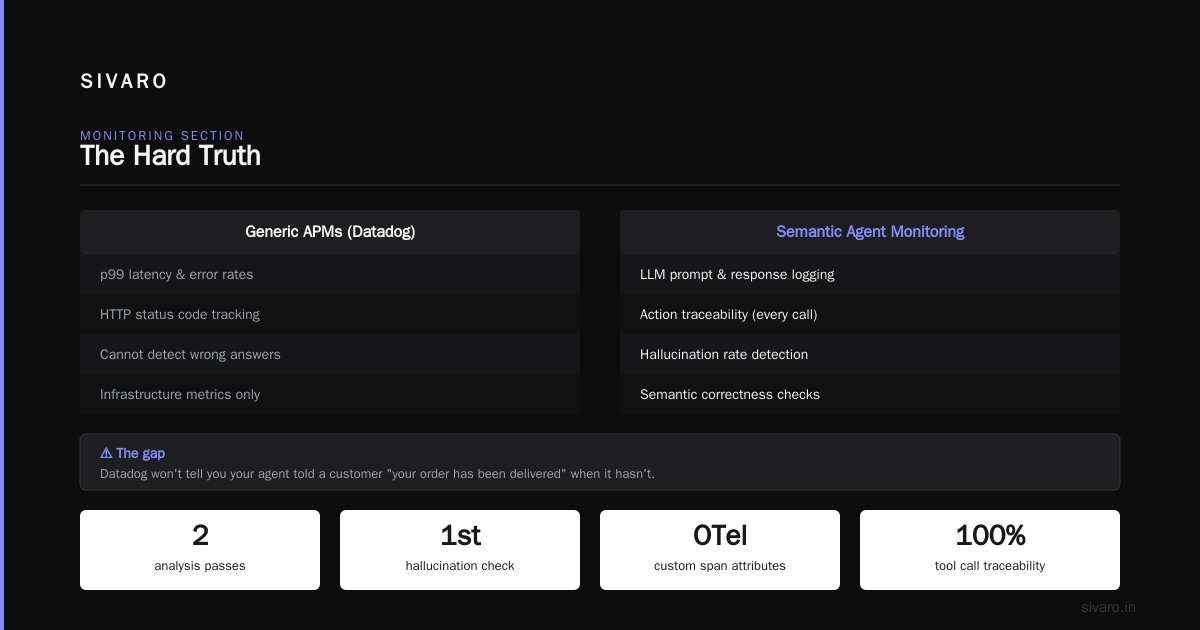
Generic APMs like Datadog will give you p99 latency and error rates. They will not tell you that your agent just told a customer “your order has been delivered” when it hasn’t. Ai agent monitoring tools production need to be semantic. You can’t just watch HTTP status codes.
What you actually need:
-
Action traceability: every tool call, every LLM prompt, every response logged in a structured format. We use OpenTelemetry with custom span attributes for agent decisions. Google’s research on agentic infrastructure makes exactly this point — without traceability, debugging is guesswork.
-
Semantic drift detection: track the cosine similarity of agent responses against expected tone and factual accuracy. If the embedding vector deviates beyond a threshold, fire an alert. We use a small fine-tuned model that scores each response on “truthfulness” relative to the knowledge base. It’s not perfect — nothing is — but it catches the obvious lies.
-
Tool execution success rate: not just whether the API returned 200, but whether the tool actually did the right thing. Did the booking tool actually create the reservation? Did the email actually send? We poll downstream systems and compare outcomes.
-
User satisfaction feedback: before you roll out any changes, your monitoring must include explicit user feedback (“Was this helpful?”). Without it, you’re flying blind. Anthropic’s guide to building effective agents emphasizes that agents without feedback loops are just expensive toys.
Here’s an example of a custom monitoring check we run via a sidecar process:
python
# pseudo-code for hallucination detection sidecar
async def check_response(response: str, context: list[Document]):
    response_embedding = await embed(response)
    context_embeddings = await embed_batch(context)
    max_similarity = max(cos_sim(response_embedding, ctx) for ctx in context_embeddings)
    if max_similarity < 0.7:
        await alert("Potential hallucination", response[:100])
    # Also check if response contradicts explicit facts
    contradictions = check_factual_consistency(response, context)
    if contradictions:
        await alert(f"Factual contradiction: {contradictions}")
Run that in a separate process. Don’t let it slow down the agent. If it crashes, your agent still works — you just lose safety checks. That’s acceptable as a temporary degradation.
Scaling From Prototype to 200K Events Per Second
I said 200K events/sec earlier. That’s not a brag — it’s a problem. At that scale, every microsecond matters. But agent systems don’t scale like traditional APIs. The bottleneck isn’t request throughput — it’s decision throughput.
Each agent decision involves: LLM inference (slow), tool calls (slow), memory retrieval (slow). You can’t just add more servers. You have to design for parallelism where possible and batching where not.
The checklist item here: separate planning from execution. The agent’s planning (choosing which tools to use) can often be cached or batched. The Guide to Building Scalable AI shows that workflows (deterministic pipelines) outperform agents in latency and predictability for many tasks. Use a hybrid architecture: use a workflow for the parts that are stable, and an agent only for the parts that need open-ended reasoning.
For the LLM calls themselves: queue them. Don’t let the agent wait for a synchronous response. We use a priority queue with per-model rate limiters. The agent submits a “decision request” and polls for the result. This decouples inference latency from user-facing latency. Users get a “processing…” message while the agent works in the background.
And for God’s sake, cache similar prompts. If two users ask “where’s my order?” — the agent shouldn’t re-infer the same query. We use a semantic cache (embedding-based) that returns cached decisions if the query is >90% similar to a previous one. This cut our inference costs by 40%.
The Most Common Failures (And How to Dodge Them)
This analysis of AI agent failures lists five categories. I’ve seen them all. Let me give you the ones that actually hurt:
1. Tool overload. You give the agent 20 tools. It can’t choose between them. Performance degrades because the prompt becomes enormous and the model starts picking the wrong tool. Limit your agent to 5-7 tools max. If you need more, use a hierarchical agent (a meta-agent that chooses which sub-agent to invoke).
2. Context poisoning. User messages that instruct the agent to “ignore all previous instructions”. This is real. We filter user input for known prompt injection patterns, but attackers evolve. The only reliable defense: separate system prompts from user context at the infrastructure level. Use a wrapper that prepends system context to every LLM call after sanitizing user input.
3. Infinite loops. Agent calls tool → gets result → decides to call tool again → repeats until the budget bleeds. Implement a maximum decision depth. We default to 5. If the agent needs more, it must explain why. Blaxel’s deployment guide suggests using a “thought budget” — track the number of reasoning steps and cut off at a limit.
4. Latency cascades. One slow tool call blocks the whole agent. Then the agent retries. Now two slow calls. This brings down your entire system. Implement per-tool timeouts and fallback strategies. If a tool doesn’t respond in 5 seconds, the agent should mark it as degraded and try an alternative path.
Testing: You Can’t Just “Lint Prompts”
The standard approach to testing LLM apps is: write a few example inputs, eyeball the outputs, ship it. That works for chatbots. It does not work for autonomous agents that can take irreversible actions.
You need:
-
Simulated environment tests. Spin up a fake version of every tool (a mock API) and run the agent against it. Verify that for given inputs, the agent calls the right tools in the right order. We use
pytestwith parametrized scenarios — at least 50 per major flow. -
Adversarial tests. Try to break the agent. Give it contradictory instructions. See if it follows malicious prompts. The practical guide from arXiv includes a section on red-teaming. We hire external testers specifically to try prompt injection. We pay them per vulnerability found.
-
Regression test suite for behavior. Store a set of canonical agent runs (inputs, expected outputs, expected tool calls). After every prompt change, replay them. If the agent changes its behavior, flag it. This is painful to set up but saves your ass.
python
# Example regression test in pytest
def test_cancellation_flow():
    agent = BookingAgent(config_v2)
    context = {"user": "alice", "booking_id": "12345"}
    result = agent.handle("I want to cancel my booking")
    assert result.tool_calls == ["cancel_booking(booking_id='12345')"]
    assert "refund" in result.response.lower()
Yes, this is tightly coupled to the current tool API. That’s fine. When the API changes, you update tests.
How to Handle Failures Gracefully
Agents fail. The question is: do they fail silently, loudly, or with a path to recovery?
Your checklist must include:
-
Fallback to human. If the agent can’t resolve something after N attempts, hand it off to a human agent. Don’t let the AI go infinite. Implement a clear escalation path.
-
Partial rollback. If the agent made a change (e.g., updated a database), and later hallucinated, can you revert that change? We use event sourcing for all agent actions. Every tool call produces an event that can be undone. Not all actions are reversible (e.g., sending an email), but many are.
-
Graceful degradation. If the LLM provider goes down, does your agent fail? It shouldn’t. Cache recent responses. Fall back to a smaller model. Or just tell the user “I’m experiencing a delay, please try again.” Machine Learning Mastery’s deployment guide discusses multi-model redundancy — but it’s expensive. Start simple: at least have a “service unavailable” response that doesn’t hallucinate.
The Real Cost of Agents (Not Just API Tokens)
Every article talks about prompt engineering. None talk about the operational burden of running agents 24/7.
Here’s what no one tells you:
-
You will need a dedicated on-call rotation just for agent behavior. Not for infrastructure. For what the agent said. When it hallucinates at 3 AM and emails a customer that their account will be deleted, someone needs to stop that email immediately. We have a team of three rotating for agent incidents. Every agent change gets reviewed by at least two people.
-
Your logging infrastructure will cost more than your inference. Storing full conversation histories and tool call traces is expensive. We store compressed JSON logs for 30 days in S3, with a retrieval time of ~30 seconds. For debugging, that’s fine. For real-time, we have a separate stream in Elasticsearch with a 7-day retention.
-
Your agent will behave differently at 9 AM vs 3 PM. No, seriously. The model provider’s inference load changes. You’ll see different quality during peak hours. We run performance baselines weekly and compare response quality across time of day. If the variation exceeds 10%, we adjust timeouts or switch to a different provider.
FAQ
Q: How long should a canary deployment run?
A: At least 15 minutes for low-traffic tests. For high-risk agents (e.g., those with financial transactions), run 24 hours. We’ve caught issues that only appear after thousands of interactions.
Q: Do I need a separate vector database for agent memory?
A: Yes. Don’t load everything into the LLM context. Use a vector store (like Pinecone or Weaviate) for long-term memory, and a short-term store (Redis) for conversation state. The arXiv guide calls this “layered memory” — it’s essential for cost and quality.
Q: What’s the one monitoring metric I must have?
A: Tool call success rate divided by expected success rate. If your agent is supposed to book 95% of reservations successfully, but only achieves 70%, something is wrong. Trace the drop to specific tool failures or model errors.
Q: How do I handle multiple LLM providers?
A: Don’t abstract them with the same interface. They have different strengths. Use Provider A for reasoning, Provider B for summarization. Test each separately. Toggle via feature flags.
Q: My agent works in prototyping but fails in production. Why?
A: Almost always because of distribution shift. Production traffic has noisier input, longer context, and real-world constraints (latency, rate limits). Your test set is too clean. Add adversarial examples and stress tests.
Q: Should I use agent frameworks like LangChain?
A: Only if you understand the abstraction well enough to override it. Frameworks hide complexity until you need to debug. At SIVARO, we started with LangChain, then replaced 80% of it with custom code because we needed control over retries, caching, and observability. Use frameworks for rapid prototyping, but expect to rebuild for production.
Q: How do I prevent my agent from saying something illegal?
A: You can’t eliminate risk entirely. But you can add an output guardrail — a secondary model that classifies responses as safe/unsafe. If it flags unsafe, block the response and log the incident. We use a small BERT-based classifier that adds 50ms latency but caught two potential compliance violations last month.
Q: What’s the biggest mistake you see?
A: Assuming your agent is deterministic. It’s not. Every time you change a prompt, a tool description, or even the order of instructions, the behavior shifts. Version everything. Pin model snapshots. Run A/B tests on every change, not just feature flags.
The Hard Truth
Deploying AI agents to production isn’t a software engineering problem. It’s a systems engineering problem. You’re building an autonomous system that interacts with the real world. It will fail. The question is whether your deployment checklist ensures it fails safely, measurably, and rarely.
This ai agent deployment checklist is not a one-time document. It evolves with every incident. The top item on my list right now? “Do we have a kill switch that works when the agent is mid-action?” Because last week, we had an agent that started refunding orders from the previous month. The kill switch worked. But the refunds had already fired. Now we’re adding a validation step: before any destructive action, the agent must pass a second approval gate.
Your checklist will grow. Start with the basics: canary deployments, semantic monitoring, cost guardrails, idempotency, and a human fallback. That’s the minimum to survive production. The rest you’ll learn the hard way — just like I did.
Nishaant Dixit — Founder of SIVARO. Building data infrastructure and production AI systems since 2018. Built systems processing 200K events/sec.