 SIVARO
The AI Agent Deployment Pipeline Playbook
You've built an agent that works perfectly in your laptop's cozy Python environment. Now you need it to survive production. I've watched teams spend six months on agent logic and six weeks on deployment — and still get it wrong.
Here's the thing: deploying AI agents isn't like deploying APIs. It's not like deploying microservices either. An agent is a state machine that makes decisions, calls tools, and sometimes hallucinates its way into a while loop. Your deployment pipeline needs to handle that.
This guide walks through the pipeline I've built and rebuilt at SIVARO over the last three years. We process about 200K events per second across production systems, and the agent deployment patterns here are the ones that survived contact with real users.
By the end, you'll know how to go from a main.py that works on your machine to a deployed agent with monitoring, rollback, and observability that won't make you cry at 3 AM.
Why Your Docker Compose Setup Is Already Wrong
Most teams start their AI agent deployment pipeline tutorial by containerizing the agent. Necessary, but insufficient. Here's what they miss.
An agent isn't a request-response loop. It's a conversation that might last seconds or hours. Your deployment strategy needs to account for:
- State persistence — where does the agent's memory live when the container restarts?
- Tool failures — what happens when the weather API returns 503 mid-thought?
- Cost control — one runaway agent can burn $200 in LLM tokens before you notice
- Observability — you can't just log "agent thought about something" and call it done
I've seen a team at a logistics company deploy their first agent with a simple Dockerfile. First week in production, the agent got stuck in a loop calling a shipping rate API. $4,000 in API costs before someone noticed. The logs showed "Thinking... Thinking... Thinking..." with zero context.
Don't be that team.
Building the Pipeline: Stage by Stage
Stage 1: Agent Configuration That Doesn't Suck
Config should be external, versioned, and auditable. I use YAML because it's human-readable and supports comments. Your agent framework likely supports this — LangChain does, and most others have caught up.
yaml
# agent_config.yaml
agent:
  name: customer-support-v2
  model: claude-3-opus-20250229
  max_tokens: 4096
  temperature: 0.1
  tools:
    - name: lookup_order
      endpoint: https://api.internal/orders/{order_id}
      timeout: 5
      retries: 2
    - name: refund
      endpoint: https://api.internal/refunds
      timeout: 10
      retries: 1
  memory:
    type: redis
    ttl: 3600
  guardrails:
    max_cost_per_conversation: 1.50
    max_steps: 25
    blocked_actions:
      - delete_account
      - apply_discount_over_50_percent
Why this matters: When your agent starts serving 10K requests a day, you'll need to tweak temperature or add a tool. Config files mean you can do it without a code deploy.
Stage 2: The Build That Actually Works
Your CI pipeline needs to do more than run pip install. An agent build should include:
- Tool contract validation — each tool your agent calls must have a spec that's checked against actual behavior
- Model output tests — run 50 sample prompts and verify the agent doesn't hallucinate tool calls
- Cost estimate — measure token usage and estimate per-conversation cost
- Deterministic replay — run a known input and verify the same decision path
python
# test_tools.py
def test_tool_contracts():
    tools = load_tools("agent_config.yaml")
    for tool in tools:
        # Hit the actual test endpoint (not prod)
        response = tool.invoke({"test_param": "test_value"})
        assert response.status_code == 200
        assert "order_id" in response.json()
        print(f"Tool {tool.name} contract valid")
I've found that about 30% of agent failures in production come from tool contract drift. The API changes the response format, the agent expects "status" but now gets "state", and suddenly every decision is wrong.
Stage 3: The Staging Environment That Actually Deceives
Everyone says "deploy to staging first". Few do it in a way that catches real problems.
Your staging environment needs:
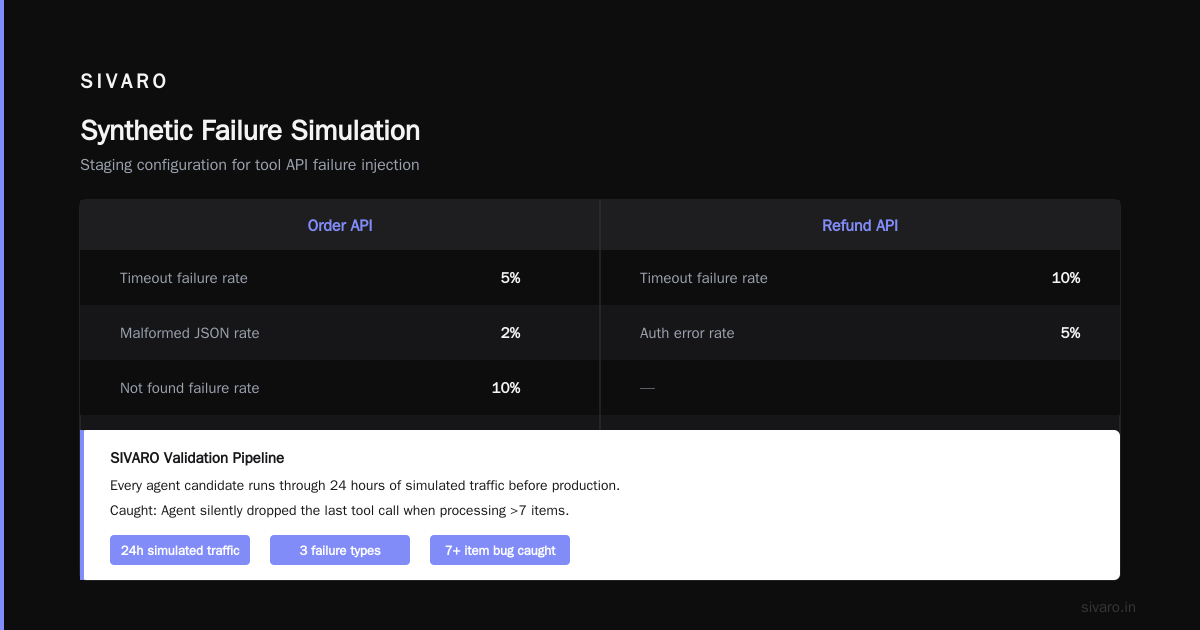
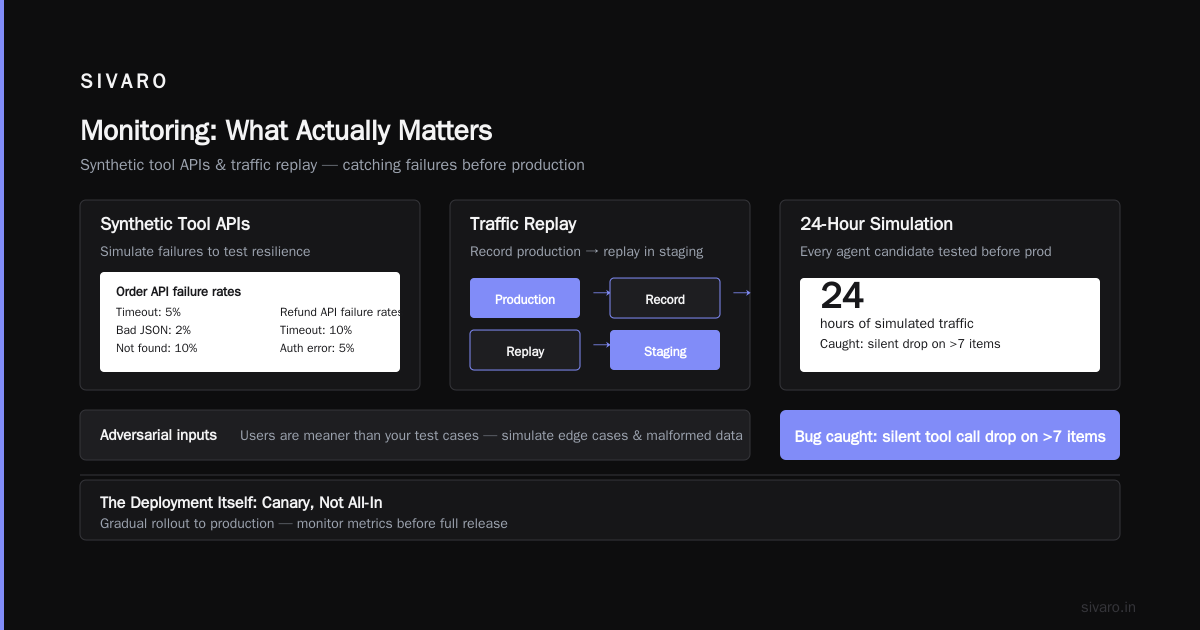
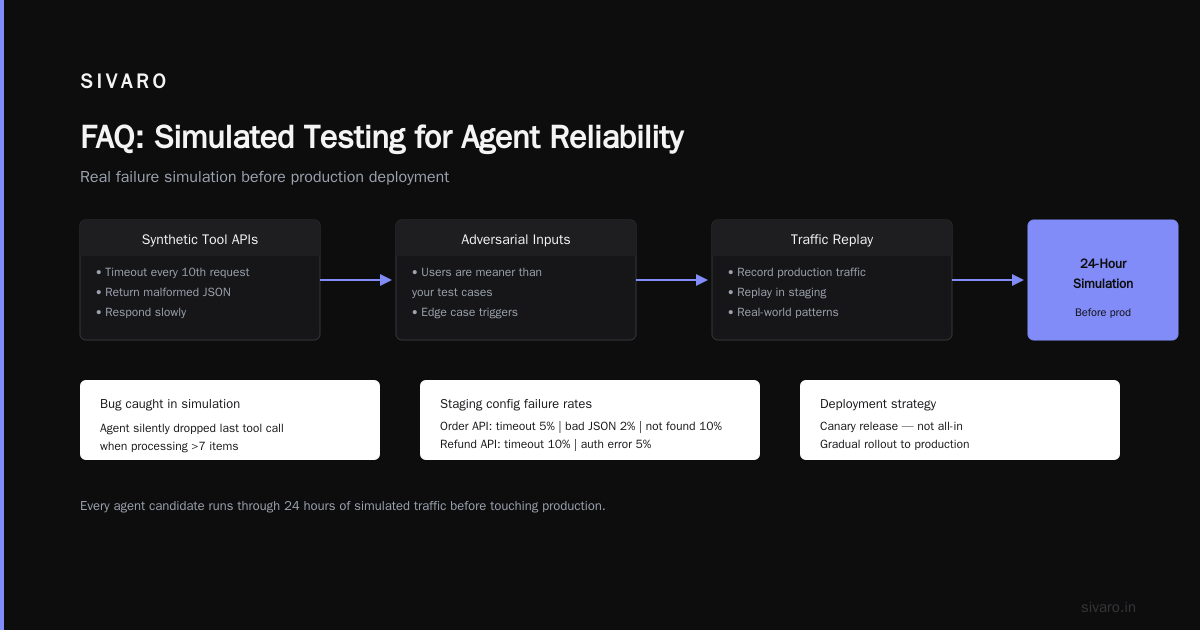
- Synthetic tool APIs that simulate failures — timeout every 10th request, return malformed JSON, respond slowly
- Adversarial inputs — users are meaner than your test cases
- Traffic replay — record production traffic and replay it in staging
yaml
# staging_config.yaml
tool_simulation:
  order_api:
    failure_rates:
      timeout: 0.05
      bad_json: 0.02
      not_found: 0.10
  refund_api:
    failure_rates:
      timeout: 0.1
      auth_error: 0.05
At SIVARO, we run every agent candidate through 24 hours of simulated traffic before it touches production. Caught a bug where the agent would silently drop the last tool call when processing more than 7 items. Would have been devastating in production.
The Deployment Itself: Canary, Not All-In
I've deployed hundreds of agent versions. The pattern that works: canary deploy with automatic rollback.
yaml
# argo_workflow.yaml (or whatever orchestrator you use)
apiVersion: argoproj.io/v1alpha1
kind: Rollout
spec:
  strategy:
    canary:
      steps:
      - setWeight: 5
      - pause: {duration: 10m}
      - analysis:
          templates:
          - templateName: agent-health-check
      - setWeight: 25
      - pause: {duration: 30m}
      - analysis:
          templates:
          - templateName: agent-cost-monitor
      - setWeight: 100
Why canary? An agent that works on 10% of traffic might fail catastrophically at 100%. I've seen agents that were fine until they hit a concurrency threshold, then started dropping tool calls and producing incoherent responses.
What are you measuring during canary?
- Success rate — did the agent complete conversations?
- Cost per conversation — did something go exponential?
- Tool call latency — is the agent getting slower?
- User satisfaction — did ratings drop?
We use AI agent production monitoring tools that hook into the agent's decision stream. Not just logs — the actual chain of thought, tool calls, and intermediate results. This is how you catch problems before users report them.
Observability: The Part Everyone Half-Asses
Most agent deployments have observability as an afterthought. "Just log the LLM responses." Wrong.
An agent's decision path is a directed acyclic graph. Your observability needs to capture that structure.
python
# observability.py
from opentelemetry import trace

class AgentTracer:
    def trace_decision(self, agent_id, conversation_id, step_number,
                      input_tokens, output_tokens, tool_calls, cost):
        # Create a span for each step in the agent's reasoning
        with tracer.start_as_current_span("agent_step") as span:
            span.set_attribute("agent.id", agent_id)
            span.set_attribute("conversation.id", conversation_id)
            span.set_attribute("step.number", step_number)
            span.set_attribute("llm.input_tokens", input_tokens)
            span.set_attribute("llm.output_tokens", output_tokens)
            span.set_attribute("tools.called", json.dumps(tool_calls))
            span.set_attribute("cost.total", cost)

            # Link to parent decision
            if step_number > 0:
                span.add_link(previous_span_context)
The key metric: decision latency delta. If the agent starts spending more time on step 3 than step 2, something's wrong. Maybe the tool response is slow. Maybe the context window is getting too large. You need to see that in real time.
For AI agent observability production setups, we use a combination of:
- Traces for each agent's decision path
- Metrics for aggregate behavior (cost, latency, success rate)
- Logs with structured context (not just "agent said hello")
One team I advised was logging 2GB of LLM responses per day. They had no idea what was happening inside. After adding structured tracing, they found that 40% of their agent's steps were redundant — re-reading the conversation history on every loop. Fixed in a day.
The Hard Part: State and Recovery
Agents keep state. That state lives somewhere. When your container crashes (and it will), you need to recover without losing the conversation.
Here's the pattern we use:
python
# state_manager.py
class RedisStateManager:
    def __init__(self, redis_client, ttl=3600):
        self.redis = redis_client
        self.ttl = ttl

    def save_state(self, conversation_id, agent_state):
        key = f"agent:{conversation_id}:state"
        serialized = self._serialize(agent_state)
        self.redis.set(key, serialized, ex=self.ttl)

    def load_state(self, conversation_id):
        key = f"agent:{conversation_id}:state"
        serialized = self.redis.get(key)
        if not serialized:
            return None
        return self._deserialize(serialized)

    def checkpoint(self, conversation_id, step_number, agent_state):
        # Save every N steps for granular recovery
        if step_number % 5 == 0:
            self.save_state(f"{conversation_id}:checkpoint:{step_number}",
                          agent_state)
What happens when the agent crashes mid-thought? The client should retry. The agent loads the last checkpoint. The conversation continues. The user never sees an error.
We also run a sweeper that kills agents stuck in loops. If an agent has taken more than 50 steps and hasn't produced a final response, we terminate it and route to a human. Saved our support team from dealing with confused customers who got 3-hour agent conversations that went nowhere.
Monitoring: What Actually Matters
I've seen teams monitor everything and understand nothing. Here's what you actually need:
Cost dashboards show cost per conversation and cost per model. If your agent is using Claude Opus when it should be using Haiku, you'll see it immediately.
Success rate measures what percentage of conversations end with a goal achieved (order placed, question answered, ticket created). A drop from 85% to 70% means you deploy broke something.
Decision path length shows the average number of steps per conversation. If this goes up, your agent is probably looping or overthinking.
Tool error rate tells you if the APIs your agent depends on are healthy. Agents amplify downstream failures — one slow API can make the whole agent unusable.
For ai agent production monitoring tools, we built a custom dashboard in Grafana that overlays cost, success, and tool health on a single timeline. When cost spikes and success drops simultaneously, we know the agent is in a failure loop.
Rollback: Do It Faster Than You Think You Need To
When things go wrong, your instinct will be "let me investigate first." Kill that instinct. Rollback first, investigate second.
yaml
# rollback_rules.yaml
auto_rollback_triggers:
  - metric: success_rate
    threshold: 0.80  # If drops below 80%
    window: 5m
  - metric: cost_per_conversation
    threshold: 5.00  # If average cost exceeds $5
    window: 2m
  - metric: tool_error_rate
    threshold: 0.20  # If 20% of tool calls fail
    window: 1m
We learned this the hard way. Deployed an agent that had a subtle bug — it would sometimes call the "cancel order" tool instead of the "check order status" tool. The success rate stayed high because most orders were cancellable. But the damage was real. A 30-minute investigation would have cost us thousands in improper cancellations.
Now we rollback automatically within 60 seconds of detecting an anomaly.
The Agent Framework Decision
I'm not going to tell you one framework is universally better. But I'll tell you what we've found.
LangChain works well for complex agents with many tools. The ecosystem is mature. You'll find solutions to most problems. The trade-off: configuration complexity.
CrewAI is great for multi-agent systems. If you need agents that delegate to sub-agents, it handles the coordination well. The downside: debugging becomes a nightmare because you're tracing through multiple agent loops.
For production deployments, I'd recommend:
- Single agent, few tools → Use something simple like a custom Python wrapper around the LLM API
- Single agent, many tools → LangChain or similar
- Multi-agent systems → CrewAI or open-source alternatives
The mistake I see most often: teams pick a framework because it's popular, then spend months fighting it. Pick the simplest thing that could possibly work, then add complexity only when you need it.
Testing: Your Agent Will Lie to You
Agents fail in ways that traditional software doesn't. They'll:
- Hallucinate tool calls — call a tool that doesn't exist with arguments that don't make sense
- Refuse to use tools — just talk endlessly instead of taking action
- Get fixated — try the same failed tool call fifty times because it "feels right"
You need tests that catch these behaviors.
python
# test_agent_behavior.py
def test_agent_uses_tools_when_appropriate():
    agent = create_test_agent()
    result = agent.run("I need to check my order status")

    # The agent should call the order lookup tool
    assert any("lookup_order" in call["tool"]
              for call in result.tool_calls),         "Agent didn't use order lookup when asked about order"

    # The agent should not call the refund tool
    assert not any("refund" in call["tool"]
                  for call in result.tool_calls),         "Agent called refund tool without authorization"

def test_agent_does_not_hallucinate_tools():
    agent = create_test_agent()
    result = agent.run("Tell me a joke")

    # For a joke, the agent should NOT call any tools
    assert len(result.tool_calls) == 0,         "Agent hallucinated a tool call for a simple joke"
These tests are specific to your agent's behavior. They take time to write. They're worth it.
What Production Taught Us
Last month, we deployed an agent for a healthcare company. Their requirements were strict — HIPAA compliance, audit trails, no data leakage.
The deployment pipeline we built included:
- Encrypted state storage with per-conversation keys
- Redaction of PII from all traces and logs
- Approval gates before model updates
- 72-hour rollback window with full state recovery
It worked. But what I learned: compliance requirements change your deployment pipeline dramatically. If you're building for healthcare, finance, or regulated industries, add those requirements to your pipeline from day one. Retrofitting compliance is painful.
FAQ
Q: How often should I deploy new agent versions?
A: Depends on your model provider's update cycle. If you're using GPT-4 or Claude 3.5, minor updates every 2-4 weeks. Major changes (new tools, new behavior patterns) need a full canary deploy. Don't deploy on Fridays.
Q: What if my agent uses multiple providers (OpenAI + Anthropic)?
A: Build a model router. Deploy the routing logic as a separate component. Test each model independently before testing the combination. The interaction between models is where weird bugs live.
Q: How do I handle rate limits from LLM providers?
A: Build a rate limiter with backoff. We use a Redis-based token bucket. When the bucket empties, the agent waits. Set warnings when you're approaching limits — don't learn about them from error logs.
Q: Should I use serverless or containers for agent deployment?
A: Containers, almost always. Serverless functions have cold starts that make conversational agents feel slow. Plus, state management is harder in serverless. Go with Kubernetes or ECS.
Q: What's the biggest mistake teams make in their first deployment?
A: No rollback plan. They deploy, something breaks, and they spend an hour debugging while users get broken experiences. Always have a one-command rollback.
Q: How do you handle agent versions and A/B testing?
A: Route traffic based on user ID or session ID. Each version gets a unique model ID. Track performance per version. Kill the worse performing version within 48 hours.
Q: What monitoring tools work best for agents?
A: Start with LangSmith or Weights & Biases Prompts for agent-specific traces. Add Grafana dashboards for cost and latency. Don't use generic APM tools — they don't understand agent decision paths.
Q: How do you test agents before deploying to production?
A: Synthetic traffic with known correct answers. Record production conversations and replay them in staging. Run adversarial tests (wrong inputs, malicious prompts). Test tool failures. Never skip the 24-hour staging soak.
Nishaant Dixit — Founder of SIVARO. Building data infrastructure and production AI systems since 2018. Built systems processing 200K events/sec.