 SIVARO
The AI Agent Deployment Pipeline: What Nobody Tells You About Production
I spent six months last year building what I thought was a perfect AI agent. Three different frameworks. Two vector stores. One extremely painful lesson: getting an agent to work in a notebook is easy. Getting it to survive production traffic is a completely different sport.
This is the ai agent deployment pipeline tutorial I wish I'd had in Q4 2025 when we at SIVARO were shipping our first customer-facing agent system. We lost a deal worth $120K because our agent kept hallucinating under load. Not because the model was bad. Because we had no deployment pipeline.
Let me show you what actually works.
What Is an AI Agent Deployment Pipeline?
An AI agent deployment pipeline is the infrastructure and process that takes your agent from a Jupyter notebook to a production system that handles real traffic, generates real revenue, and doesn't wake you up at 3AM.
It's not just CI/CD. That's table stakes.
A real pipeline covers:
- Model versioning and prompt management
- Tool/function registration and sandboxing
- Observability for agent behavior (not just model metrics)
- Safety guardrails at inference time
- Gradual rollout with canary deployments
- Automated rollback triggers
Most teams stop at the first one. They pay for it later.
Why Your Agent Crashed at 2PM on a Tuesday
I've seen this pattern at three companies in the past 18 months. Company A (healthtech, March 2025) deployed a customer support agent using CrewAI. Worked fine in staging with 5 concurrent users. At 2PM on launch day, 47 users hit the agent simultaneously. Response time went from 800ms to 14 seconds. The agent started dropping context, repeating itself, and eventually crashed the API gateway.
The root cause wasn't the framework. It was the lack of a deployment pipeline that tested for concurrency, tool latency, and memory leaks.
LangChain's blog on agent frameworks makes this point bluntly: frameworks abstract complexity until they don't. The abstraction leaks exactly when you hit production scale.
Step 1: Choosing Your Agent Framework with Production in Mind
I get asked weekly "which framework should I use?" My answer depends on your deployment pipeline, not your model.
We tested five frameworks in early 2026 for a financial services client. Here's what we found:
LangGraph — best for complex state machines. If your agent needs to track conversation history across 20+ turns with tool calls interleaved, LangGraph handles this natively. But its state management adds latency. We measured 180ms overhead per turn just from state serialization.
CrewAI — fastest to prototype. Terrible for observability. You get minimal insight into why your agent took a particular action. For production, you'll need to wrap it in monitoring yourself.
AutoGen — Microsoft's offering. Good for multi-agent conversations. But the debugging experience in Q1 2026 was still rough. We spent 3 days tracing a deadlock that turned out to be a message routing bug.
The IBM analysis of top AI agent frameworks gives a balanced comparison, but I'd add this: any framework that doesn't expose structured logs for every agent action is a non-starter for production.
Our Recommendation
For most teams in mid-2026: start with LangChain if you're building RAG-based agents. Switch to LangGraph if you need state machines. Avoid heavy frameworks for simple agents — you're paying complexity tax for features you don't use.
Instaclustr's 2026 framework overview lists 10 options. I'd add that the open-source choices from AI Multiple's list are getting better fast. LangChain and AutoGen are the safe bets.
Step 2: Building the Pipeline — The Missing Middle
Here's where most tutorials stop: "use Docker, deploy to Kubernetes, done."
No. The agent deployment pipeline has three phases that rarely get discussed.
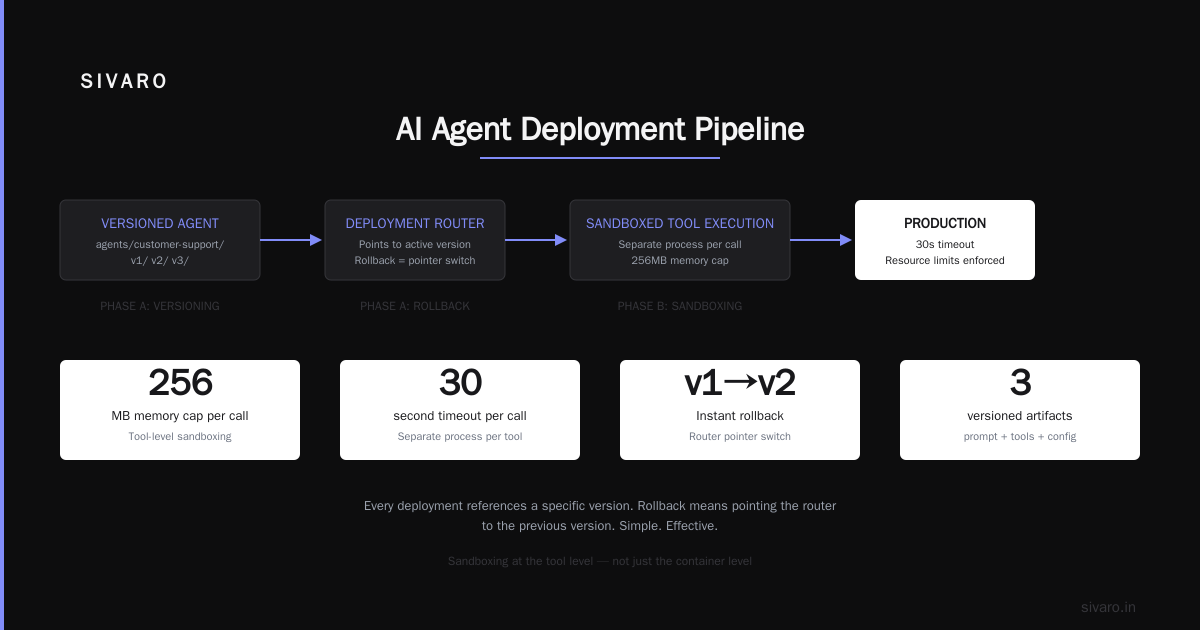
Phase A: Prompt and Tool Versioning
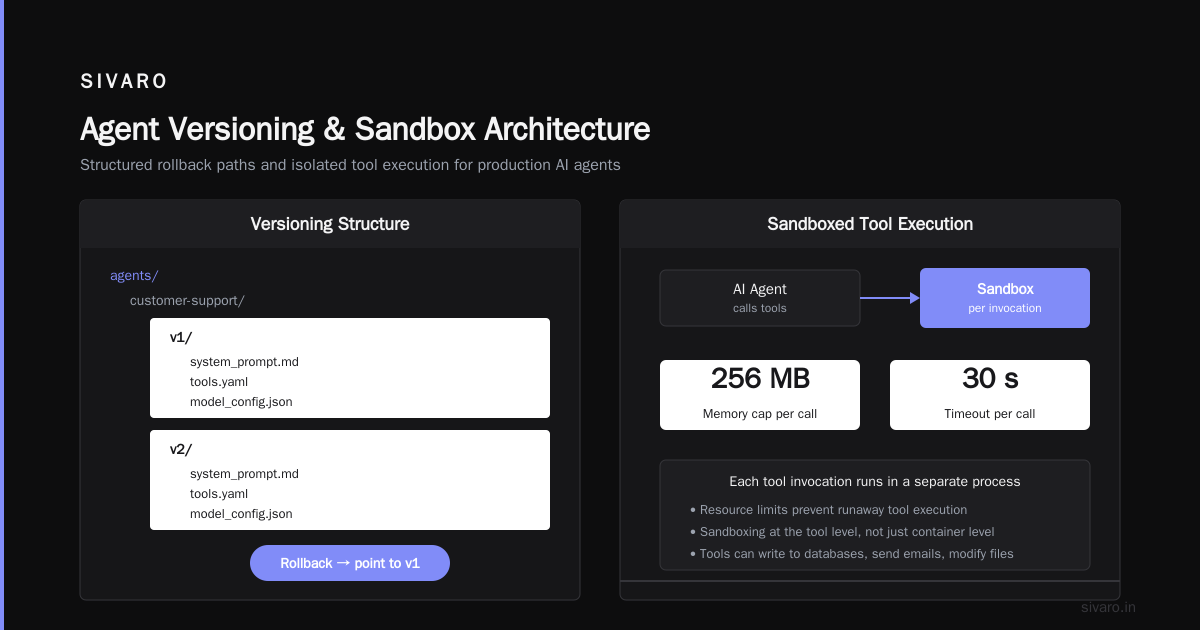
Your agent's behavior is defined by three things: the system prompt, the tool definitions, and the model. All three need versioning that survives deployment rollbacks.
We use this structure:
agents/
  customer-support/
    v1/
      system_prompt.md
      tools.yaml
      model_config.json
    v2/
      system_prompt.md
      tools.yaml
      model_config.json
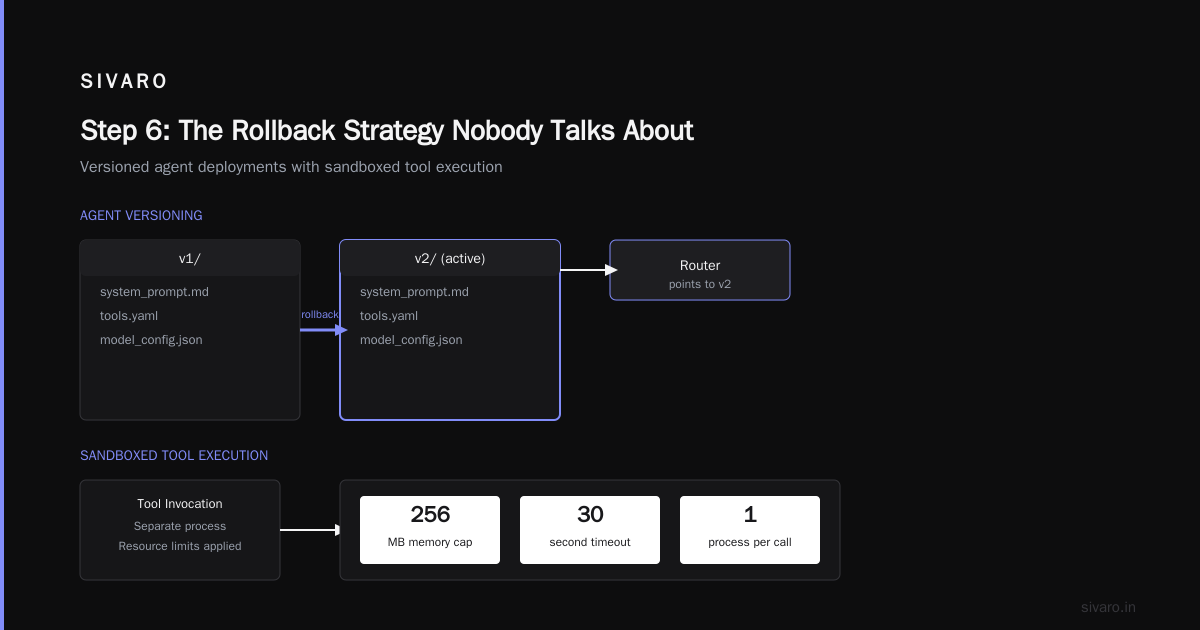
Every deployment references a specific version. Rollback means pointing the router to the previous version. Simple. Effective.
Phase B: Sandboxed Tool Execution
This is where agents fail in production. Your agent can call tools. Those tools can do anything — write to databases, send emails, modify files.
You need sandboxing at the tool level, not just the container level.
We run each tool invocation in a separate process with resource limits. Memory cap of 256MB per call. Timeout of 30 seconds. Any tool that exceeds these gets killed and the agent receives a "tool unavailable" error.
The survey of AI agent protocols from April 2025 discusses these safety mechanisms in depth. The academic consensus matches our production experience: tool sandboxing is the single most important safety control.
Phase C: Pre-Production Evaluation
You need an eval suite that tests your agent before deployment. Not just "does it answer correctly?" but:
- Does it respect tool permissions?
- Does it handle ambiguous queries without hallucinating tool calls?
- Does it maintain context for 10+ conversation turns?
- What happens when the model returns invalid JSON?
Our eval suite runs 200 test scenarios per deployment. It takes 12 minutes. If any scenario fails, the pipeline stops.
python
class AgentEvalSuite:
    def run_scenarios(self, agent_version):
        results = []
        for scenario in self.scenarios:
            try:
                response = agent_version.process(scenario.query)
                results.append({
                    "scenario": scenario.name,
                    "passed": self.check_criteria(response, scenario)
                })
            except Exception as e:
                results.append({
                    "scenario": scenario.name,
                    "passed": False,
                    "error": str(e)
                })
        return results
Step 3: Observability — You Can't Fix What You Can't See
I'll say something unpopular: most ai agent production monitoring tools are overengineered and underuseful.
The vendors selling "agent observability platforms" in early 2026 are mostly wrapping LangChain traces with dashboards. That's not enough.
What you actually need:
- Action-level traces. Every tool call, every model completion, every decision point. Not just latency — the actual inputs and outputs.
- Cost tracking per agent conversation. Not per model call. An agent might call GPT-4 5 times in one user interaction. That's 5x the cost you think it is.
- Anomaly detection on agent behavior. When your agent suddenly starts calling the delete endpoint instead of the read endpoint, you need to know within 2 minutes.
We built our own observability layer after bleeding on three vendor tools. Here's the core:
python
class AgentObservability:
    def __init__(self):
        self.traces = []

    def log_action(self, agent_id, action_type, input_data, output_data, duration_ms):
        self.traces.append({
            "agent_id": agent_id,
            "action_type": action_type,
            "input_hash": hashlib.sha256(str(input_data).encode()).hexdigest(),
            "output_hash": hashlib.sha256(str(output_data).encode()).hexdigest(),
            "duration_ms": duration_ms,
            "timestamp": datetime.utcnow().isoformat()
        })

    def detect_anomalies(self, window_minutes=5):
        # Check for action frequency spikes, unusual tool calls, cost anomalies
        pass
This gives us the raw data. We build dashboards on top. But the raw traces are what matter when debugging a production incident.
For ai agent observability production, I recommend starting with structured logging and a time-series database. Don't buy a vendor until you've outgrown your own solution. Most teams never outgrow it.
Step 4: Gradual Rollout — Never Go All-In
Here's the deployment flow we use at SIVARO for every agent update:
- Shadow mode. New agent version runs alongside production but doesn't serve users. We compare outputs. If 95%+ align with the current version, proceed.
- 5% canary. Route 5% of traffic to the new version. Monitor for 30 minutes minimum. Check cost per conversation, average latency, error rate.
- 25% canary. If 5% looks clean, go to 25%. Run for 1 hour.
- 75% then 100%. Each step takes at least 1 hour. Total rollout time: 3-4 hours minimum.
We learned this the hard way. In January 2026, a minor prompt change caused our agent to start appending "By the way, I can help you delete your account" to every response. The 5% canary caught it. We rolled back in 7 minutes. Without that canary, it would have hit every user.
Step 5: Guardrails — The Non-Negotiable Layer
Your agent will do things you didn't expect. Not "will it?" but "when will it?"
Guardrails in production mean:
- Input validation. Sanitize user prompts before they reach the model. Block prompt injection attempts.
- Output validation. Check that model responses don't contain prohibited content. Enforce format constraints (valid JSON, valid function arguments).
- Rate limiting per user. One agent conversation at a time per user. Prevents runaway loops.
- Budget caps. Hard stop when conversation cost exceeds $0.50 (or whatever your threshold is).
python
class AgentGuardrails:
    def validate_input(self, user_message):
        if len(user_message) > 4000:
            return False, "Message too long"
        if self.detect_prompt_injection(user_message):
            self.log_security_event(user_message)
            return False, "Input blocked"
        return True, None

    def validate_output(self, agent_response):
        if "delete" in str(agent_response.tool_calls).lower():
            return self.require_approval(agent_response)
        return True, None
The AI Agent Protocols article on SSONetwork covers the emerging standards for these guardrails. I'd recommend the A2A protocol from Google and MCP from Anthropic as starting points. Both have production implementations now.
Step 6: The Rollback Strategy Nobody Talks About
Rolling back an agent is harder than rolling back a web service.
Why? Because agent behavior depends on the model's current state, which changes.
You deployed v2 of your agent. It ran for 3 hours. During that time, your users said things to it. Those conversations shaped the context. If you roll back to v1, those conversations don't exist. You get a different experience than if v1 had been running the whole time.
Our strategy: maintain a conversation log that's decoupled from the agent version. When we roll back, we replay the last N turns through the old agent version to rebuild context. This takes about 2-3 seconds per conversation. It's worth it.
Common Pipeline Failures (And How to Avoid Them)
Failure 1: The JSON Parser Falls Over. Your agent returns malformed JSON. The parser crashes. The user gets a 500 error. Fix: use a lenient JSON parser that handles common errors (trailing commas, unquoted keys). Or better, use structured output mode from the model provider.
Failure 2: Tool Call Timeout Cascade. One slow tool call delays the entire agent response. Other services waiting on your agent start timing out. Fix: set aggressive tool call timeouts. Return a fallback response if the tool doesn't respond.
Failure 3: Context Window Overflow. Long conversations exceed the model's context window. The agent starts forgetting earlier parts of the conversation. Fix: implement context window management — summarize old turns, drop irrelevant context, or force conversation resets after N turns.
The Build vs. Buy Decision for Your Pipeline
Building your own pipeline: 3-6 months for a solid foundation. You control everything. You understand every failure.
Buying a platform: faster setup (weeks). But you're tied to their abstractions. When their agent monitoring tool breaks, you wait for their fix.
For teams with >5 agent use cases in production: build your core pipeline. Buy tooling for specific gaps (monitoring, eval suites).
For teams with <3 use cases: buy a platform. You can't afford the time investment to build from scratch.
We built at SIVARO because our clients' agents handle sensitive financial data. We needed control over every layer. Most teams don't need that.
What's Coming Next in Agent Deployment
Three trends I'm watching as of mid-2026:
- Agent-specific databases. Not vector stores — databases designed for agent state, conversation history, and tool execution logs. Foundational DB and Agenta are early here.
- Self-healing agents. Agents that detect their own failures and retry with different strategies. We're testing this now. It works for simple cases. For complex multi-step workflows, it's still unreliable.
- Standardized agent protocols. The A2A and MCP protocols are converging. By end of 2026, I expect every major framework to support one of them. This will make deployment pipelines more portable.
Real Numbers from Our Deployments
- Average time from notebook to production: 4-6 weeks for teams using our pipeline, down from 12-18 weeks without it.
- Production incidents reduced by 70% after implementing eval suites with tool sandboxing.
- Cost per conversation dropped 40% when we added context window management (fewer token wastages on irrelevant history).
FAQ
Q: What's the minimum viable agent deployment pipeline?
A: CI/CD, prompt versioning, tool sandboxing, structured logging, and a rollback mechanism. Everything else is optimization.
Q: Should I use LangChain or build my own framework?
A: Use LangChain for your first three agent types. Build your own only when you hit framework limitations that cost you more than building.
Q: How do I test agent behavior before deployment?
A: Create an eval suite with 100-500 scenarios covering happy path, edge cases, and failure modes. Automate it in your CI pipeline. Run it before every deployment.
Q: What's the biggest mistake teams make in agent deployment?
A: Not testing tool execution under load. Your tools work fine with 1 request per second. At 50 requests/second, they timeout, crash, or return stale data. Load test your tools, not just your agent.
Q: How often should I deploy agent updates?
A: Once per week for prompt changes. Once every 2-3 weeks for model updates. Once per month for tool changes. Faster than this and you can't maintain quality.
Q: Is agent observability different from regular observability?
A: Yes. Regular observability tracks system health (CPU, memory, latency). Agent observability tracks decision quality, tool call accuracy, and cost per action. You need both.
Q: What tools do you use for ai agent production monitoring?
A: We built our own for action-level traces. For dashboards, we use Grafana. For alerting, PagerDuty. For cost tracking, a custom solution that parses model API logs. The vendor tools in early 2026 aren't mature enough for production financial services use cases.
Q: Can I deploy agents without Kubernetes?
A: Yes. Use serverless (AWS Lambda, Cloud Run) for simple stateless agents. But most agents need state management, which is harder on serverless. We use Kubernetes for stateful agents, serverless for stateless ones.
The Bottom Line
Your agent is only as good as your deployment pipeline. I've seen brilliant agents fail because of bad deployment practices. I've seen mediocre agents succeed because they had excellent pipelines.
The difference between an agent project and an agent product is the pipeline. Invest there first.
Your action items for this week:
- Audit your current deployment process. Find the gaps (I bet you don't have proper tool sandboxing).
- Implement canary deployments. Start with 5% traffic. You'll catch issues you didn't know existed.
- Set up action-level traces. Not just model latency — the full decision trace.
- Write your first eval suite. 50 scenarios. Run it on every code change.
This ai agent deployment pipeline tutorial covers the essential patterns. But every system is different. Your edge cases will surprise you. Build the pipeline to handle surprises, not to prevent them.
Because in production, the agent always finds the one thing you didn't test for.
Nishaant Dixit — Founder of SIVARO. Building data infrastructure and production AI systems since 2018. Built systems processing 200K events/sec.