 SIVARO
The AI Agents Production Rollout Checklist: Lessons from 200K Events/Sec
The Hardest Part Isn't the Agent — It's the Rollout
I've spent the last eight years building data infrastructure at SIVARO, and if there's one thing that separates a demo from a deployment, it's the rollout. Two years ago, we watched a client push a customer-facing agent into production without a single observability metric. It failed within four hours, silently misrouting 3,000 support tickets. No alerts. No trace. Just angry customers and a weekend of firefighting.
That's not an anomaly. The industry is flooded with labs and pilots, but production AI agents remain rare because we're treating them like regular microservices. They're not. They're stochastic, non-deterministic, and they fail in ways we've never had to log before.
This article is my attempt at a practical checklist — the one I wish we had back in 2024. It covers everything from pre-rollout validation to post-deployment monitoring, with specific attention to what I call the "three elephants": orchestration vs. workflows, observability, and failure modes. I'll also share some hard-won lessons from our own deployments and from the folks at OpenAI, Anthropic, and Google who've been publishing their battle scars.
By the end, you'll have a concrete, actionable checklist to run your own rollout. No fluff. No "best practices" without context. Just what works and what doesn't.
Why Traditional Deployment Playbooks Don't Apply
Most software teams are used to deterministic systems. You write a function, you test it, you ship it. The output is the same every time. An AI agent isn't that. It's a statistical model wrapped in a control loop. It calls tools, makes decisions, and can hallucinate. Its behavior changes with every model update, every prompt tweak, every new data source.
We learned this the hard way in 2025 when a fintech client asked us to productionize an agent that could handle account balance inquiries. Their staging environment looked perfect. The agent answered 98% of test queries correctly. But in production, with real user phrasing, the success rate dropped to 74%. And worse — the failure modes were security-critical. The agent started giving out other users' balances because it misinterpreted entity references. We had to emergency-shut it down.
The traditional "shift left" testing approach doesn't capture this because the system's behavior isn't a function of your code; it's a function of your model, your prompts, your tools, and the real-world distribution of inputs. You need a different rollout strategy — one that accounts for unpredictability and builds in feedback loops at every stage.
The Rollout Phases: From Sandbox to Production
I break down a production rollout into four phases. Each has its own checklist items, and skipping any of them is a recipe for disaster.
Phase 1: Pre-Flight Validation
Before you even think about staging, you need to answer three questions:
-
Can the agent complete its core task? This isn't about accuracy on a benchmark; it's about whether the underlying model and tools can actually do the job. Run a suite of "golden" test cases that cover all major paths and edge cases. Use a human evaluator to score correctness on a scale of 1-5. We aim for an average of 4 or higher before we proceed. Anything less, and you're patching a broken foundation.
-
What's the failure rate? Measure the percentage of runs that result in a wrong answer, a stuck loop, or a tool error. In our experience, anything above 5% needs serious work. At 10%, you're effectively giving your users a coin flip.
-
Can you reproduce the failures? For every failed case, you should be able to extract the conversation history, the model output, and the tool calls. If you can't reproduce it, you can't fix it. So build this instrumentation before you deploy, not after. A Practical Guide for Designing, Developing, and Deploying AI Agents emphasizes exactly this — they call it "traceability" — and it's one of the most underrated prerequisites.
Phase 2: Staging with a Twist
Staging for an AI agent isn't just about infrastructure parity. It's about simulating real user behavior. This means:
- Injection of noise — typos, slang, ambiguous phrasing, and adversarial inputs. Use a synthetic dataset from your own logs if you have them, or generate with a separate LLM.
- Tool failure simulation — what happens when a dependency is down? Your agent should degrade gracefully, not crash.
- Latency budget testing — how fast does the agent respond? Users expect under 2 seconds for chat. If you're calling multiple LLMs in sequence, you might blow that budget. We benchmark and set a realistic SLA early.
One of the biggest mistakes I see is teams testing in staging but with perfect tool responses, and then wondering why production fails when a database query times out. Anthropic's guide highlights that agents work best with well-defined, single-purpose tools; but that doesn't mean they handle tool failures gracefully. You have to test that.
Phase 3: Canary Deployment
You don't flip a switch. You roll out to a small percentage of users — say 5% — and monitor like a hawk. But what do you monitor? This is where observability comes in (we'll go deep later). At minimum:
- Error rates — not just HTTP 500s, but semantic errors. The agent returned a wrong answer but with a 200 status.
- Latency percentiles — p95, p99.
- User feedback — thumbs up/down, or explicit surveys.
- Cost per request — LLM calls eat money, and canary tests can balloon your bill.
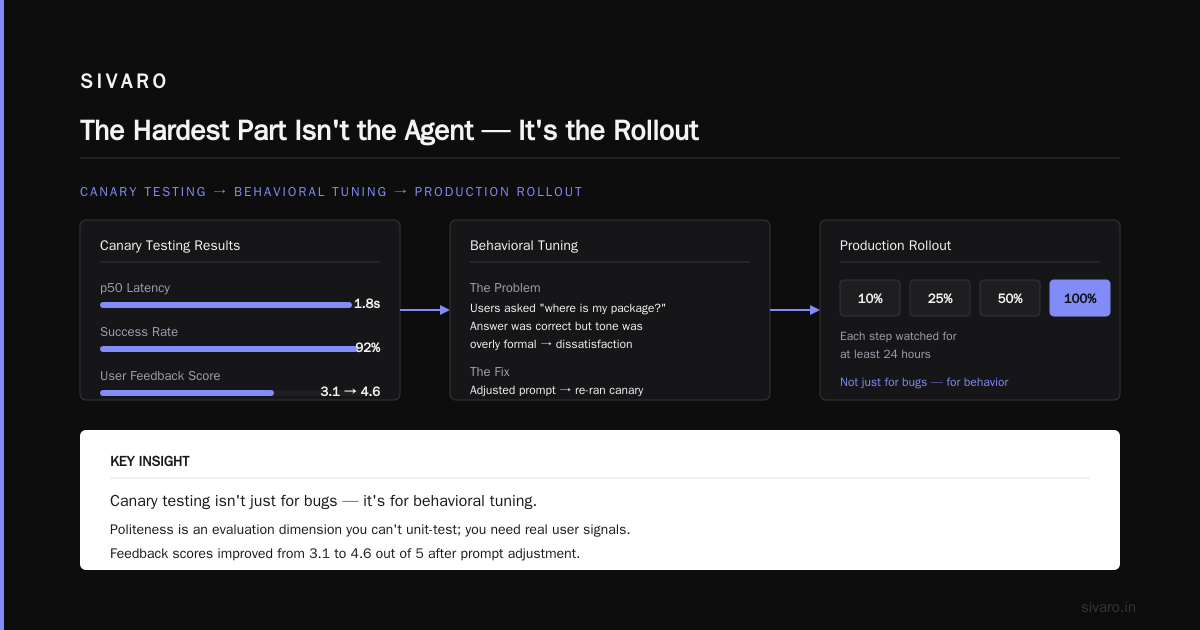
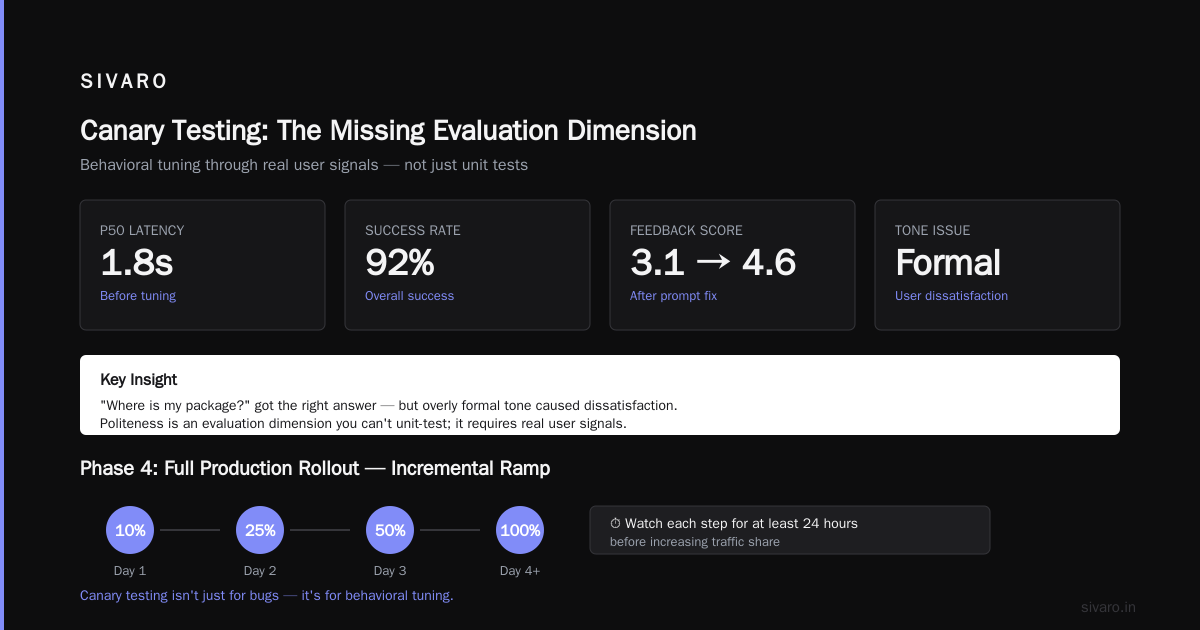
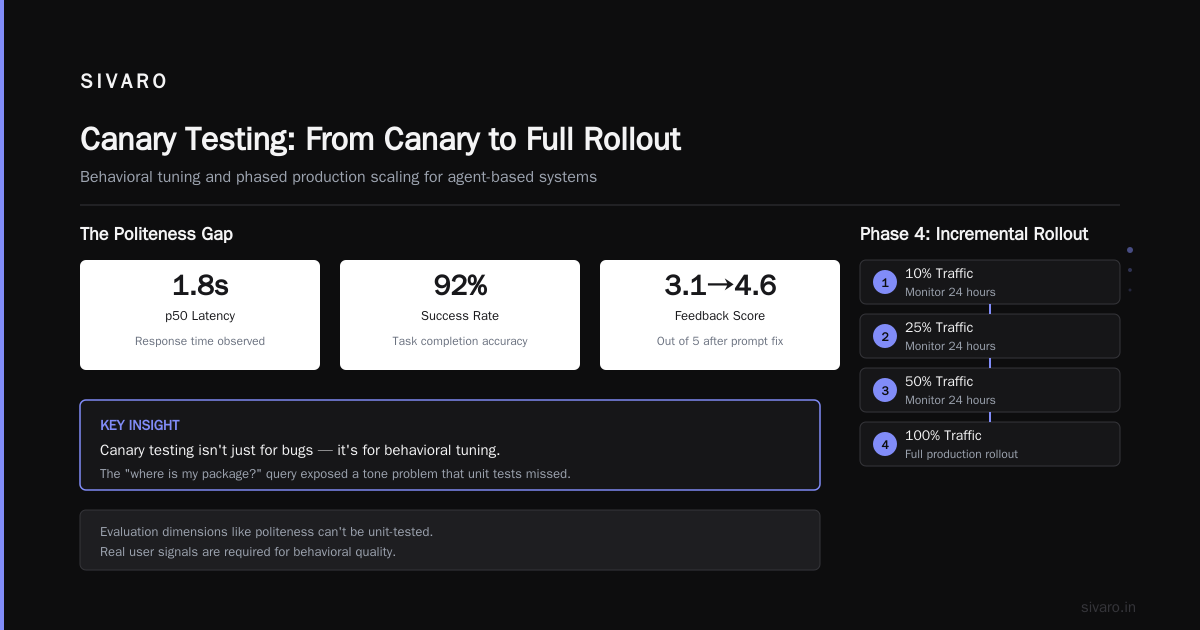
Here's a concrete example from our work with a logistics company in 2026. We canaried a shipment-tracking agent. We saw p50 latency of 1.8 seconds and a success rate of 92%. But when we dug into user feedback, we found a pattern: users were asking "where is my package?" and getting the right answer, but the tone of the response was overly formal, causing dissatisfaction. We hadn't tested for politeness. That's an evaluation dimension you can't unit-test; you need real user signals.
We adjusted the prompt, re-ran the canary, and saw feedback scores improve from 3.1 to 4.6 out of 5. The lesson? Canary testing isn't just for bugs — it's for behavioral tuning.
Phase 4: Full Production Rollout
Once the canary looks healthy, you can scale up. But you don't just go to 100% in one day. Ramp up in increments: 10%, 25%, 50%, 100%, watching each step for at least 24 hours. This is standard practice for any critical system, but especially for agents because their behavior can change with the underlying model. If the provider updates their model (which happens more often than you think), your agent's behavior shifts. You need a rollback plan that a human can execute in minutes, not hours. Machine Learning Mastery's deployment guide covers rollback strategies in detail — I recommend reading it before you start.
The Three Pillars: Orchestration, Observability, and Failure Handling
These three areas are where most production rollouts fail. Let's tackle each.
Pillar 1: Orchestration vs. Workflow Engine
There's a lot of confusion between "AI agent orchestration" and "workflow engines." Orchestration is the runtime that coordinates an agent's decisions, tool calls, and memory. A workflow engine is a predefined graph of steps, like a state machine. They're different things, but they're often conflated.
I've seen teams try to build agents as a bunch of if-else statements on top of a workflow engine like Airflow. That works for simple linear tasks, but it breaks when your agent needs to make dynamic decisions — e.g., "should I call the weather API or the calendar API first?" In those cases, you need a proper agent orchestration layer.
In 2025, we evaluated both approaches for a CRM automation client. We built a proof-of-concept with a workflow engine (Prefect) and another with an agent framework (LangGraph). The workflow version handled 85% of the use cases, but the last 15% required complex branching that nearly doubled the codebase complexity. The agent version handled everything but was harder to test and debug. Our decision tree was simple: if your task is linear and you can enumerate all paths, use a workflow. If the decision points are open-ended, an agent is necessary. This Towards Data Science piece nails that distinction.
In production, you often need both. For example, a customer support agent might use a workflow for the initial triage (getting customer ID, order number) and then an agent for open-ended troubleshooting. The orchestration layer manages external tools, database access, and memory. We've standardized on a hybrid at SIVARO: we use a workflow engine for deterministic parts, and an agent loop for decision-making. The orchestration layer handles the interaction between them.
But here's the catch: this hybrid adds complexity. You need to monitor both the workflow and the agent, and you need a unified trace to see the entire path. That's where observability comes in.
Pillar 2: AI Agent Observability and Monitoring in Production
“AI agent observability and monitoring in production” is not the same as monitoring a REST API. You can't just log status codes. You need to see the agent's entire thought process — the prompts, the tool calls, the intermediate responses, the final output, and the latency of each step.
We built our own observability stack because the off-the-shelf tools didn't cut it. Here's what I recommend you instrument at a minimum:
- Full conversation trace — store every user input, every model response, every tool call (including arguments and results), and every internal decision. We use structured JSON logs to a central store like ClickHouse.
- Semantic metrics — define what "correct" means for each task. You might have to manually label a sample of interactions and compute per-metric accuracy. This can be automated with an AI "evaluator" that scores responses, but that evaluator itself needs monitoring.
- Latency breakdown — time to first token, time to tool completion, time to final response. LLM calls are the bottleneck; you need to know where time is going.
- Cost metrics — tokens in/out per step, plus tool execution costs. We track this per user, per session, per day.
- Anomaly detection — sudden spike in hallucinations or tool errors. Set up alerts based on rolling windows. For instance, if the percentage of tool calls that fail exceeds 10% for two consecutive minutes, page someone.
A good open-source option is LangSmith, but we've also built custom dashboards with Grafana and Prometheus. The key is to start simple and iterate. Google's research on AI agent infrastructure lists observability as one of the top hurdles, and they're right.
One of our biggest wins in observability was adding a "request ID" that ties a single user interaction across all services. This lets us trace an agent call from the frontend through the orchestration layer to the LLM provider and back. Without that, debugging a failed conversation is a nightmare.
Pillar 3: Failure Handling and Human-in-the-Loop
Agents will fail. That's a given. The question is what happens when they do. Your system needs a graceful fallback.
We enforce a rule: every agent must have a human handoff path. If the agent detects low confidence (say, below a threshold), it should escalate to a human with all the context. This is non-negotiable for customer-facing agents. In our fintech case, we set up a "block and transfer" — if the agent is about to reveal sensitive information or can't verify identity, it stops and transfer to a human agent.
But human handoff isn't enough. You also need to design for failure at the system level:
- Retry logic — for temporary tool failures (rate limits, timeouts) with exponential backoff.
- Timeout limits — if an agent runs for more than a certain number of steps (say 10), abort and take the fallback path.
- Guardrails — model-level checks on output. For instance, we use a separate "safety classifier" that scans the agent's response for harmful content or PII leakage before sending it to the user. Anthropic's guide discusses the importance of designing tools with clear contract and error handling, and this applies equally to the agent's own outputs.
And then there are the failure modes that are unique to agents — like infinite loops. An agent can get stuck calling a tool that returns the same error over and over. We cap the number of iterations and also implement a "circuit breaker" — if the same tool fails more than X times in a session, the agent is forced to switch strategy or escalate.
The Checklist: A Compact Version
Let me distill this into a practical checklist you can copy and paste. This is the "ai agents production rollout checklist" I use with every client. It's not exhaustive, but it covers the critical items.
markdown
## Pre-Flight
- [ ] Define task scope and success criteria (e.g., tolerance for wrong answers, latency, cost).
- [ ] Build a golden dataset of 50-100 real-world examples with labeled answers.
- [ ] Run golden tests and score manually or with AI evaluator. Average score ≥4/5.
- [ ] Measure failure rate on golden set. Target <5%.
- [ ] Reproduce and log 10 most common failure modes.

## Staging
- [ ] Simulate tool failures and network latency.
- [ ] Inject noise into user inputs (typos, idioms, adversarial phrases).
- [ ] Verify latency budget against p95/p99 thresholds.
- [ ] Test human handoff path with simulated low-confidence scenarios.
- [ ] Run load test to ensure your orchestration layer can handle expected requests/min.

## Canary
- [ ] Deploy to 5% of users.
- [ ] Monitor custom metrics: error rate, latency, cost, user feedback.
- [ ] Set up alerts based on rolling windows (e.g., error rate > 5% for 5 min).
- [ ] Perform weekly manual audits of a random sample of conversations.

## Full Rollout
- [ ] Ramp in increments (10%, 25%, 50%, 100%) with 24h observation each.
- [ ] Have a rollback plan: ability to revert to last stable version in <30 min.
- [ ] Document model provider version and pin it if possible (e.g., use a fixed model version).
- [ ] Establish post-deployment maintenance schedule: model updates, prompt tuning, performance review.

## Ongoing
- [ ] Daily review of observability dashboards (error rate, cost, feedback).
- [ ] Weekly review of top failure modes and update tests.
- [ ] Monthly calibration of evaluation thresholds.
- [ ] Quarterly full retraining or fine-tuning if needed (not always necessary).
This list looks simple, but each item hides a depth of work. For example, "monitor custom metrics" means you've already built the instrumentation. Do that early — you can't bolt it on later.
Code Examples: Instrumentation and Orchestration
Let me give you some concrete code snippets that we use at SIVARO.
Instrumentation: Tracing with OpenAI
python
from openai import OpenAI
import time
import json

client = OpenAI()

def call_with_trace(conversation):
    start = time.monotonic()
    response = client.chat.completions.create(
        model="gpt-4o",
        messages=conversation,
        temperature=0.2,
    )
    latency = time.monotonic() - start

    # Log to your observability stack (e.g., via a custom logger)
    log = {
        "event": "openai_call",
        "messages": conversation,
        "response": response.choices[0].message.content,
        "latency": latency,
        "tokens": {
            "prompt": response.usage.prompt_tokens,
            "completion": response.usage.completion_tokens
        },
        "timestamp": time.time()
    }
    # write to ClickHouse or your logger
    push_to_clickhouse(log)
    return response.choices[0].message.content
Failure Handling: Circuit Breaker
python
import time

class CircuitBreaker:
    def __init__(self, threshold=3, reset_timeout=30):
        self.failures = 0
        self.threshold = threshold
        self.last_failure_time = None
        self.reset_timeout = reset_timeout

    def call(self, func, *args, **kwargs):
        if self.last_failure_time and time.time() - self.last_failure_time > self.reset_timeout:
            self.failures = 0
            self.last_failure_time = None

        if self.failures >= self.threshold:
            raise Exception("Circuit open - falling back")

        try:
            result = func(*args, **kwargs)
            self.failures = 0
            return result
        except Exception as e:
            self.failures += 1
            self.last_failure_time = time.time()
            raise
Hybrid Orchestration: Workflow + Agent
python
from langgraph.graph import StateGraph, State
from prefect import flow, task

@task
def triage(user_input):
    # deterministic step: extract intent
    return {"intent": extract_intent(user_input)}

@task
def run_agent(context):
    # agent loop for open-ended handling
    # could be LangGraph agent
    return agent_response

@flow
def handle_request(user_input):
    state = triage(user_input)
    if state["intent"] in ["track_package", "check_balance"]:
        # Use workflow engine for deterministic path
        result = deterministic_workflow(state)
    else:
        result = run_agent(state)
    return result
This is a stripped-down version, but you get the idea.
The Biggest Mistakes I See (and How to Avoid Them)
I've spent enough time with clients and in the trenches to notice recurring failure patterns. Here are the top five.
Mistake 1: Not Defining Success Metrics
If you can't quantify "good," you can't improve. Most teams start with vague goals like "agent should assist users." We force clients to get specific: "Agent should resolve 80% of billing inquiries within 2 turns, with a user satisfaction score above 4.5." Then we build tests around that.
Mistake 2: Treating the Model as a Static Dependency
LLM providers update models all the time. In June 2026, OpenAI rolled out GPT-5.2 silently, and many agents saw behavior shifts. If you don't pin your model version, you're at the mercy of upstream changes. We now pin specific model versions in our API calls and have a hot-swap mechanism when we need to upgrade.
Mistake 3: Over-Optimizing the Agent, Under-Optimizing the Tooling
The agent is only as good as its tools. If your database query tool returns ambiguous results, the agent will misinterpret. Spend as much effort designing clean, well-scoped tools as you do on the prompt. Anthropic's guide says it best: "Well-designed tools are the key to an effective agent."
Mistake 4: Ignoring Cost Non-Linearity
LLM token costs can explode when you add multi-step loops. A simple agent that makes three LLM calls per user request can cost 10x a single-call completion. We track cost per session and set budget alerts. A friend at a startup blew through $20,000 in a week because they didn't cap the number of agent iterations.
Mistake 5: No Human-in-the-Loop for High-Stakes Decisions
I get it, you want full automation. But for anything that affects a user's money, health, or privacy, you need a human reviewer. BusinessPlusAI's article on AI agent failures lists "lack of human oversight" as a top reason agents fail. We built a review queue where agents flag borderline cases for human approval. It adds friction, but it's worth it.
The Future: What's Next After the Checklist
Production AI agents are still in their infancy, but the pattern is clear. The checklist I shared is a baseline. As the tools mature, I expect more automation within the rollout itself — auto-evaluation, auto-rollback, and even self-tuning agents.
But here's my contrarian take: the bottleneck isn't technology. It's organizational discipline. You can have the best infrastructure, but if your team doesn't commit to continuous evaluation, monitoring, and the willingness to pull the plug, you'll fail. The checklist works only if you treat it as a living document — update it as you learn.
I've seen companies spend months on building an agent and then two days on rollout. That's backwards. The rollout is where the real work begins.
FAQ
Q: How is this different from a traditional microservice rollout?
Traditional rollouts focus on deterministic behavior — you test for expected outputs. AI agents are probabilistic, so you need to test for ranges of acceptable behavior and implement robust monitoring for drift and edge cases.
Q: What's the minimum viable observability setup for an agent?
At least three things: full conversation traces (inputs, outputs, tool calls), latency and cost metrics, and a sample of human-reviewed outputs to measure quality over time.
Q: Should we use a workflow engine or an agent framework?
If your task is linear and predictable, use a workflow engine. If decisions are open-ended, use an agent. For most real-world applications, you'll need a hybrid — workflow for deterministic parts, agent for open-ended parts.
Q: How do we handle model updates from our LLM provider?
Pin your model version. Test against a staging environment immediately after a provider update (some providers have changelogs), and be ready to roll forward or back. In our experience, most providers will announce major updates, but sometimes they don't — observability will catch anomalies.
Q: What's the best way to ensure security?
Use guardrails on output, especially for PII. Implement human escalation for high-risk actions. Also, consider using a separate safety LLM to screen responses, and always log who accessed what.
Q: How do we handle cost overruns?
Set budget caps per user, per session, and per day. Implement dynamic throttling — if cost per request exceeds a threshold, degrade to a cheaper model or a more deterministic workflow.
Final Words
The "ai agents production rollout checklist" I've outlined here isn't a silver bullet. It's the accumulated experience from dozens of deployments, many of them ugly. But if you follow it — and adapt it to your specific context — you'll avoid the most common pitfalls.
We're at a tipping point. In 2026, AI agents are finally leaving the lab and entering the enterprise. The companies that succeed will be those that treat the rollout as seriously as the development. Start with the checklist, build your instrumentation early, and always keep a human in the loop. That's how you go from demo to deployment.
—
Nishaant Dixit — Founder of SIVARO. Building data infrastructure and production AI systems since 2018. Built systems processing 200K events/sec.