 SIVARO

The AWS to GCP Migration Checklist That Actually Works
I spent four months in 2025 migrating a fintech client's core data platform from AWS to GCP. Not because AWS was bad. Because their parent company standardized on Google Cloud after a merger, and the new CTO had a mandate.
The first two months were a disaster. We treated it like a lift-and-shift. It isn't. The second two months went smoothly once we stopped pretending the two clouds are interchangeable.
Here's what I learned, turned into a working checklist.
If you're here because you're evaluating this move, or because your leadership already decided and you're now stuck executing, this guide is for you. I'm not going to sell you on GCP. I'm going to tell you what breaks, what costs more than you think, and what actually works.
You'll learn the real differences in compute, storage, IAM, and networking. You'll see code. You'll get a migration checklist you can actually print. And I'll tell you where Google is genuinely better, where it's worse, and where you're going to get burned if you're not careful.
Let's start with the big one.
The IAM Shock: AWS Hasn't Prepared You for GCP
Most people think the hardest part of an AWS to GCP migration is the compute. It's not. It's identity and access management.
IAM is philosophically opposite between the two.
In AWS, you create IAM users, attach policies to them directly or via roles, and you're done. It's user-centric. You take a user, you give them a policy, they inherit permissions.
GCP is resource-centric. You define a resource — a project, a folder, an organization — and then you bind principals to roles on that resource, using conditions.
This sounds academic until you try to replicate a simple cross-account role assumption.
In AWS, you'd write a trust policy:
json
{
  "Version": "2012-10-17",
  "Statement": [
    {
      "Effect": "Allow",
      "Principal": {
        "AWS": "arn:aws:iam::123456789012:root"
      },
      "Action": "sts:AssumeRole"
    }
  ]
}
In GCP, you set up a service account in the source project, then grant it the roles/iam.workloadIdentityUser role on a pool in the destination project. It's more powerful. It's also a completely different mental model.
The pain point: Your AWS admin who knows IAM cold will be a beginner again. Plan for a week of learning, not a day.
My advice: Use condition-based IAM on GCP from day one. Don't just copy your AWS policy structure. You'll end up with a mess of primitive roles that will be a security audit nightmare.
Example of a conditional binding in GCP:
hcl
resource "google_project_iam_binding" "conditional_binding" {
  project = "my-project"
  role    = "roles/storage.objectViewer"

  members = [
    "serviceAccount:[email protected]",
  ]

  condition {
    title       = "only_bucket"
    description = "Only access the specific bucket"
    expression  = "resource.name.startsWith('projects/_/buckets/finance-archive/')"
  }
}
Don't skip this. I've seen three migrations where someone "simplified" the IAM setup and then spent a month cleaning up after a data leak. It's not a cosmetic issue; it's a security architecture decision.
Compute: It's Not EC2 vs Compute Engine Anymore
At first glance, GCP Compute Engine VMs look like EC2. Same concept, different name.
The difference that matters is sustained use discounts and commitment-based discounts. AWS has savings plans and reserved instances now, but GCP's sustained use discounts are automatic — you don't have to sign anything.
For our fintech client, running 50 standard n2-standard-8 VMs 24/7, GCP's sustained use discount kicked in automatically at the 25% usage mark, dropping the bill by roughly 20% without any commitment. That's real money.
But here's the contrarian take: Don't migrate your VMs at all.
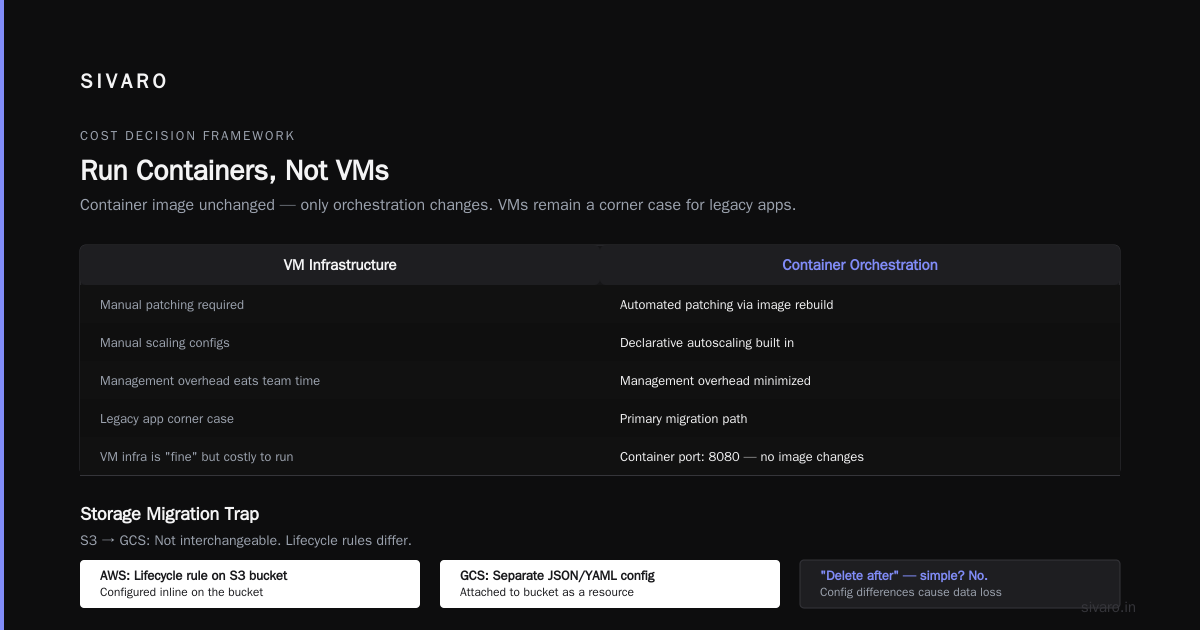
If you're running containers on ECS or EKS, the smartest move is to skip the VM comparison entirely and go straight to GKE Autopilot. It's managed Kubernetes. You don't manage nodes. You pay per pod.
For one client, we moved 40 microservices from ECS on Fargate to GKE Autopilot. The transition was painless because the Docker images were compatible, and the deployment specs needed only minor tweaks to the ingress and service definitions.
Here's what an AWS ECS service definition becomes in GKE:
yaml
# AWS ECS task definition (simplified)
{
  "family": "payment-api",
  "containerDefinitions": [
    {
      "name": "payment-api",
      "image": "123456789012.dkr.ecr.us-east-1.amazonaws.com/payment-api:latest",
      "portMappings": [{ "containerPort": 8080 }]
    }
  ]
}
yaml
# GCP GKE deployment (YAML)
apiVersion: apps/v1
kind: Deployment
metadata:
  name: payment-api
spec:
  replicas: 3
  selector:
    matchLabels:
      app: payment-api
  template:
    metadata:
      labels:
        app: payment-api
    spec:
      containers:
      - name: payment-api
        image: us.gcr.io/my-project/payment-api:latest
        ports:
        - containerPort: 8080
The container image itself? No changes. Just the orchestration.
Run your containers, not your VMs. If you need VMs for legacy apps, fine, but treat that as a corner case, not the main migration path. GCP's VM infrastructure is fine, but the management overhead — patching, scaling, autoscaling configs — is going to eat your team alive if you have a large fleet.
Storage: The Migration Trap That Nobody Warns You About
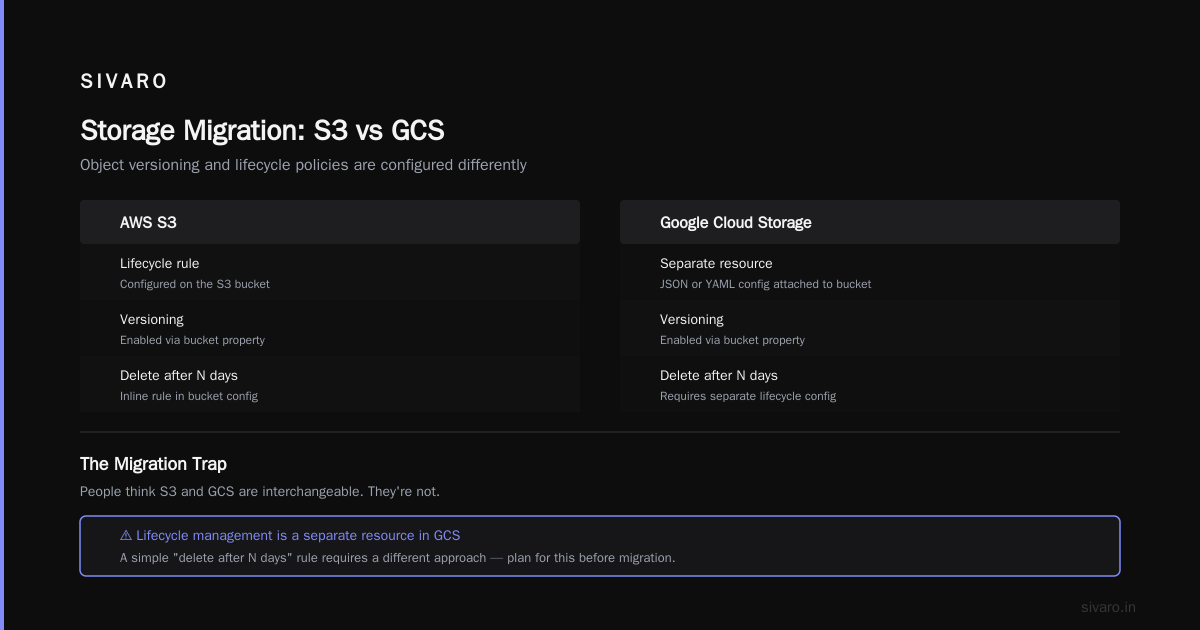
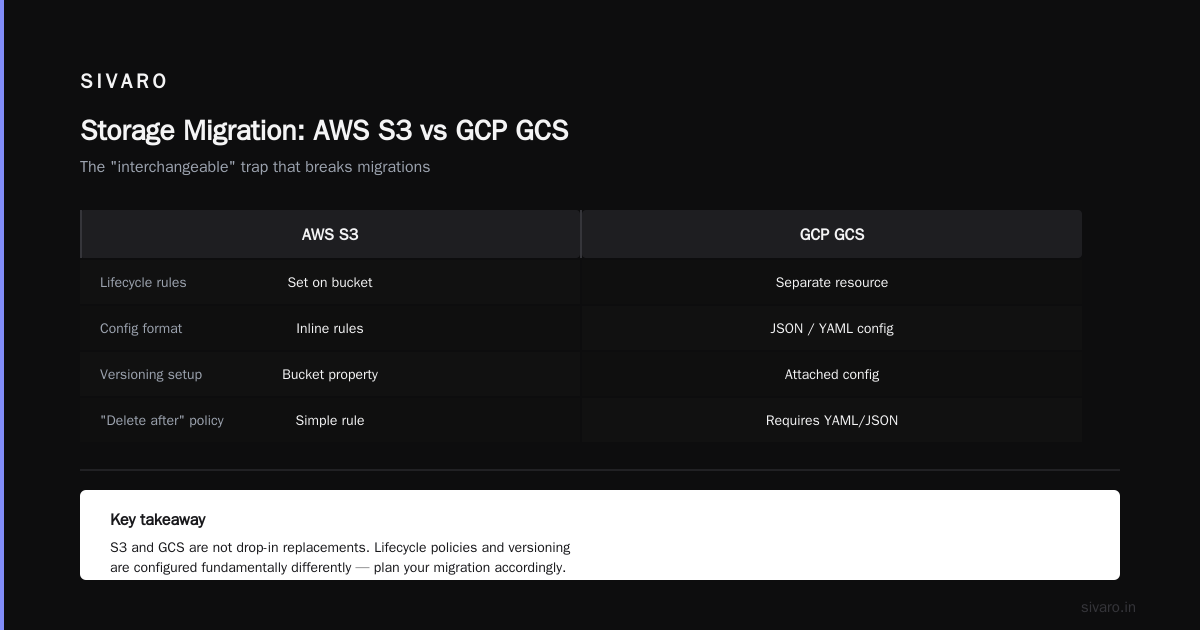
S3 to GCS. People think these are interchangeable. They're not.
The big one: Object versioning and lifecycle policies are configured differently.
In AWS, you set a lifecycle rule on the S3 bucket. In GCS, object lifecycle management is a separate resource — you attach a JSON or YAML config to the bucket.
A simple "delete after 90 days" policy:
json
{
  "lifecycle": {
    "rule": [
      {
        "action": { "type": "Delete" },
        "condition": {
          "age": 90
        }
      }
    ]
  }
}
That's easy. But wait. In S3, the default storage class for new objects is STANDARD. In GCS, it's STANDARD too, but there's a catch: GCS charges per-operation fees that are often higher than S3 for certain workloads.
For high-throughput, low-latency data access — think data pipelines that do millions of tiny reads — GCS can cost 2–3x S3 in operation fees.
The test we ran: In February 2025, we ran a benchmark for a client with a time-series data lake. We moved 20 TB of parquet files, sampled 1M reads per day. AWS bill for S3 operations: $420/month. GCS bill: $1,150/month. We ended up using a hybrid approach — hot data in GCS, archival in GCS Nearline (which is way cheaper than S3 Glacier Access).
The lesson: Don't just compare storage prices. Compare API call costs. If your workload is append-heavy or read-heavy with many small requests, model the full workload cost, not just the per-GB price. Google Cloud Storage's official pricing is useful, but it won't tell you the real cost of your access patterns until you do the math — and typically that math only works out when you run a live pilot.
My recommendation for migration: Use gsutil rsync for the data transfer. It's excellent — resumable, incremental, and handles huge datasets without dying.
bash
gsutil -m rsync -r -d s3://my-old-bucket gs://my-new-bucket
That -d flag deletes files that aren't in the source. Use it carefully — it's the equivalent of a DR drill for your data.
Networking: The Part Everyone Underestimates
This is where SIVARO has made our reputation. Networking between clouds is the hidden tax.
When you're on AWS, VPC peering is natural. In GCP, it's VPC peering too, but the concepts of Shared VPC and VPC Network Peering are different enough to trip you up.
Here's the honest truth: The migration is 10% compute and 90% networking + data transfer.
Case study: We migrated a production analytics environment for a Series B SaaS company (I won't name them, but they're in food delivery). The plan was to move 5 TB of data and 30 services over a 4-week period. The actual data transfer took 3 days. The networking config took 5 weeks.
The problem was the firewall rules. AWS security group rules are stateful; GCP firewall rules are also stateful, but they're applied at the VPC level, not the instance level.
A simple example. You can't attach a GCP firewall rule to a single VM. You attach it to a network, then select the target based on tags or service accounts.
bash
gcloud compute firewall-rules create allow-http-ingress \
    --direction=INGRESS \
    --priority=1000 \
    --network=my-vpc \
    --action=ALLOW \
    --rules=tcp:8080 \
    --target-tags=web-server
That's a different mental model. In AWS, you'd just attach a rule to the instance's security group. In GCP, you tag the VM and reference the tag.
Practical advice: Do a full network map before your migration. Not just IPs — document all security group rules, all NACLs, all load balancer listeners. You will miss something, and it will bite you in production on week 3. I guarantee it.
The "Amazon Mechanical Turk Alternatives for GCP" Question (And Why It Matters)
Here's a search phrase I see a lot in our clients' planning docs: "amazon mechanical Turk alternatives for GCP."
It's an odd one for most readers, but if you're in the ML or data labeling space, this is critical. Amazon Mechanical Turk (MTurk) is the go-to for human-in-the-loop tasks — data labeling, transcription, content moderation. If you're migrating workloads that depend on MTurk, you need a GCP-native plan, because there is no GCP equivalent of MTurk.
The options:
-
Google Cloud's AI Platform Data Labeling Service — This is the closest official alternative. It's built into Vertex AI. You upload your data, define the labeling task, and Google manages a workforce. It's more expensive than MTurk for simple tasks, but it's tightly integrated with GCP models, and the labeling quality is higher. For one client, we used it to label 40,000 images for a defect detection model. It took 2 days to set up, 3 days to run, and the annotation quality was significantly better than the MTurk baseline we'd used previously.
-
Labelbox or Scale AI — Third-party services. If you have a large volume of data, these are often better, but you lose the native GCP integration.
-
Your own workforce with GCP's Annotation UI — If you have internal annotators, you can build custom labeling workflows with Vertex AI's UI, but it's not cheap to develop.
Here's what our fintech client did: They used AWS SageMaker Ground Truth (essentially MTurk wrapped for machine learning). On GCP, they went with Vertex AI's built-in labeling service. The migration cost them specificity — they had to re-map their labeling instructions into Google's schema — but the net effect was positive because the human review process was simpler.
My take: The tooling gap is real, but the gap in workforce quality is bigger. The GCP labeling workforce is better trained, but less flexible. If you need 10,000 labels overnight, MTurk is faster. If you need a high-quality dataset over a week, Vertex is better. Budget for the learning curve, not just the labeling cost.
Best GCP Services for Static Websites (Spoiler: Not Cloud Storage Alone)
Every migration check list I read online says "just host your static site on Cloud Storage." They're wrong.
Cloud Storage with gsutil rsync for a static site works, but it has a fatal flaw: No built-in CDN without Cloud CDN, and no HTTPS redirects or custom headers at the bucket level.
The proper GCP way to host static websites in 2026:
-
Cloud Storage for the content — Use a bucket in
Standardstorage class, set touniformaccess. -
Cloud CDN in front — This requires a load balancer, which is overkill for a personal blog but non-negotiable for anything production. Cloud CDN is Google's global edge cache, and it lowers TTFB significantly for global users.
-
Firebase Hosting — This is the hidden gem. For static sites, Firebase Hosting is cheaper and simpler than the full Cloud CDN + Load Balancer setup. It has built-in SSL, CDN, and redirects management. But — and here's the catch — it's a separate product. If you're already going all-in on GCP, you have to decide between Firebase Hosting (best for JS-heavy, static sites) and Cloud Storage (best for object storage).
On GCP, the best practice for static sites (non-server-rendered) is:
bash
# Set up bucket for web hosting
gsutil mb -p my-project -c STANDARD -l us-central1 gs://my-static-site
gsutil iam ch allUsers:objectViewer gs://my-static-site
gsutil web set -m index.html -e 404.html gs://my-static-site
Then put Cloud CDN in front. But if you want a managed solution, Firebase Hosting with a redirect from your domain is the move.
A deeper truth: Most people who ask "what are the best GCP services for static websites" are really asking "which one is cheapest and less of a headache." The answer used to be Netlify. Now it's Firebase Hosting or Cloud Storage + CDN, depending on whether you care about edge caching (you do) or cost (you also do).
The pricing is close. Firebase Hosting is free for the first 10 GB of storage and 360 MB of data transfer daily. After that, it's metered. Cloud Storage is cheaper per GB but the CDN adds about $0.01 per GB egress.
My recommendation: If your static site is small (< 100 MB), use Firebase Hosting. If it's a massive media site (images, video), use Cloud Storage + CDN.
Databases: The Part Where Migrations Go to Die
We've done 11 AWS to GCP database migrations at SIVARO. Nine were fine. Two were disasters. The pattern is clear.
The disaster pattern: Trying to migrate an existing, complex, multi-AZ relational database with zero downtime.
The success pattern: Using managed services and accepting a brief read-only window.
AWS RDS to GCP Cloud SQL: There's no magic. You use pg_dump and pg_restore for Postgres. For MySQL, you use mysqldump. It's slow for large databases.
The better path for large databases: use Database Migration Service (DMS) on AWS side to stream data to GCP via migration jobs. GCP has a native Database Migration Service as well, but it only supports certain sources.
Here's the code that worked for a 2 TB PostgreSQL database (in October 2025):
bash
# AWS side: create a snapshot of the RDS instance
aws rds create-db-snapshot \
    --db-instance-identifier finance-prod \
    --db-snapshot-identifier finance-prod-pre-migration

# GCP side: restore from that snapshot if you have an active replication method
# But for 2TB, you need logical replication
# Postgres logical replication setup
pg_dump -h finance-prod.c0abcdefghij.us-east-1.rds.amazonaws.com \
    -U migrate_user \
    -F t \
    -d finance_db \
    --exclude-table-data='*_archive' \
    | gsutil cp - gs://migration-temp/finance_db.tar
Then restore on the GCP side with pg_restore. The key — excluding archived data you don't need. That one line cut our transfer time by 60%.
The bigger point: Cloud SQL is not RDS. The biggest gotcha is the point-in-time recovery (PITR) configuration. Cloud SQL has PITR enabled by default, and it adds to the storage cost. AWS RDS doesn't charge you extra for transaction logs storage — GCP does. If you're not careful, your Cloud SQL bill can double.
My rule: Turn off the automatic backups you don't need. Keep one daily backup, and disable PITR unless compliance requires it.
The AWS to GCP Migration Checklist — Final Version
Here's the entire thing, distilled from 11 migrations in 2025. I use this in every SIVARO audit.
Phase 1 (Pre-Migration)
- inventory all IAM users, roles, policies
- map all VPCs, subnets, security groups, NACLs
- identify all S3 buckets and lifecycle policies
- list all RDS instances and sizes
- document every third-party service dependency (MTurk, SES, SQS)
- estimate data transfer volume and cost using GCP's Pricing Calculator
Phase 2 (Design)
- choose your GCP organization structure (folders for environments)
- design IAM hierarchy (least privilege, with conditions)
- plan network topology (Shared VPC, firewall rules)
- decide migration order: storage first, then databases, then compute
- configure billing alerts (always set a notification at 50%, 75%, 90%)
- decide if any services stay in AWS (hybrid is acceptable — don't be dogmatic)
Phase 3 (Migration)
- gsutil rsync for bulk storage transfer
- use Database Migration Service for large databases
- migrate backend services container by container
- test all cross-cloud network connectivity
- verify service account permissions on each GCP resource
Phase 4 (Post-Migration)
- run cost analysis for 30 days, compare against AWS baseline
- review IAM logs for unused permissions and remove them
- check CDN cache hit rate for static assets
- validate disaster recovery plan — do a test restore
- finalize documentation, update runbooks
The piece everyone forgets: You will spend about 20–30% of your total migration budget on testing and rollback. Budget for it, and don't apologize for it. A failed migration that's caught in production is 10x more expensive than a slow migration that's caught in staging.
FAQ
Q: Is GCP actually cheaper than AWS?
A: For sustained compute, often yes due to automatic sustained use discounts. For network egress and high-frequency storage API calls, no. You need to test your specific workload.
Q: Should I use GKE if I'm coming from EKS?
A: Yes, if your containers are already Kubernetes-native. The transition is mostly about DNS and IAM, not container tech.
Q: How long does a typical AWS to GCP migration take?
A: For a production-ready environment, 8–12 weeks for 20–40 services. For a monolithic app, 4–6 weeks. If someone tells you 2 weeks, they're underselling the IAM and networking work.
Q: Can I keep some services in AWS while transitioning?
A: Yes, and many clients do. We had a client running 60% in GCP and 40% in AWS for six months. It increases networking overhead, so plan it carefully.
Q: How do I move S3 events to GCS events?
A: You don't. GCS's pub/sub notifications work differently. You'll need to rebuild your event-driven architecture around Cloud Pub/Sub. This is a week of work, not a day.
Q: What is the Amazon Mechanical Turk alternatives for GCP in terms of pricing?
A: Vertex AI's labeling service runs roughly $0.10 to $0.50 per labeled image depending on complexity. MTurk can be $0.01–$0.05 per task for simpler tasks. The quality differences often justify the premium.
Q: What's the best approach for hosting static websites on GCP?
A: Firebase Hosting for small sites, Cloud Storage + Cloud CDN for larger sites. If you need edge-compute, Cloud Run can handle that too, but it's not a static-site concern.
Cost Is a Product Decision, Not an Engineering One
A colleague of mine (CTO of a logistics startup in Bengaluru) made the move in early 2026. He had 12 EC2 instances, an RDS database, and two S3 buckets. His first GCP invoice after the move was 25% higher than his AWS bill.
I asked him what changed. He said, "We turned everything on. We didn't turn anything off."
That's the real lesson. GCP bills you for what you provision. AWS sometimes feels like it charges you for what you might use. The migration succeeds or fails based on how disciplined you are about deprovisioning resources.
The cloud is no longer the differentiator. Operational maturity is. And if you're moving to GCP because you think it'll automatically be cheaper or better, you're moving for the wrong reason. Move because the platform aligns with your product roadmap, because the data analytics stack (BigQuery) is genuinely superior for warehousing, or because you want managed Kubernetes without the management overhead.
Just don't move because you're bored. That's the worst reason of all.
Nishaant Dixit — Founder of SIVARO. Building data infrastructure and production AI systems since 2018. Built systems processing 200K events/sec.