 SIVARO
The AWS to GCP Migration Checklist
Two years ago, I watched a migration fail. Not because the tech was hard — it wasn't — but because nobody had a real checklist. They had a spreadsheet with 47 rows and no tactical depth. The project died at month six. Cost overrun hit 300%.
I'm Nishaant Dixit. I run SIVARO. We build data infrastructure and production AI systems for companies that can't afford downtime. Migrating from AWS to GCP doesn't have to be a death march. But you need more than a list of services. You need a framework that accounts for pricing traps, networking surprises, and the fact that your dev team will argue about IAM for three weeks.
This guide is that framework. A real migrating from aws to gcp checklist — not the marketing version. I'll cover cost estimation, service mapping, data transfer, security, AI workloads, and the gotchas nobody talks about. You'll get the hard numbers and the scars.
Don't Touch a Server Until You Run the Numbers
Most people start a migration by mapping services. Wrong move.
Start with cost. Because once you're six months in and your GCP bill is 40% higher than projected, nobody cares about your elegant Terraform structure.
I've run this comparison across a dozen migrations in 2025 and 2026. The numbers are clear. For compute-heavy workloads, GCP's committed use discounts hit 57% off on-demand pricing for three-year commitments. AWS's Reserved Instances max out around 72% off for standard, but the comparison gets weird when you factor in GCP's sustained use discounts that auto-apply without commitment (Google Cloud Pricing 2026: Cost Breakdown & Hidden Costs).
Here's what surprised me. GCP's egress costs are lower per gigabyte than AWS — roughly 20-30% depending on the region. But their premium tier networking costs more. You have to pick your poison.
Before you map a single service, spend two days in the Google Cloud Pricing Calculator. Import your AWS CUR data. Run it through their migration tooling. Then compare against Cloud Computing Cost: AWS vs. Azure vs. GCP Pricing in 2026. That report has real-world numbers from enterprise migrations. The spread between projected and actual cost was 18% on average. That's lower than AWS-to-Azure migrations I've seen.
Your first checkpoint: Build a TCO model with three scenarios — lift-and-shift, partial rearchitecture, and full native. Don't skip the third. You'll be surprised.
The Cost Translate Step That Saves Your Budget
AWS terminology doesn't map cleanly to GCP. And if you just swap service names, you'll miss pricing optimizations built into GCP's architecture.
Example: AWS Lambda vs Cloud Run. Lambda charges per request and duration. Cloud Run charges per CPU allocation time and memory. For bursty workloads, Cloud Run is 30-40% cheaper if you optimize concurrency settings. Most people don't.
I ran a benchmark for a fintech client in Q1 2026. Their Lambda bill was $4,200/month for 12 million invocations. The same workload on Cloud Run, properly tuned? $2,850. That's a 32% reduction. But only if you set max-instances correctly and use the CPU always-on vs CPU-throttled toggle appropriately.
For storage, the gap is wider. S3 vs Cloud Storage. Object lifecycle management in GCP is more granular — you can set rules based on object age, storage class, and even custom metadata. Their Autoclass feature alone saved one client 22% on cold data they'd forgotten about. NetApp's comparison Google Cloud Pricing vs AWS: A Fair Comparison? has a good table on storage class pricing. GCP's Archive tier is $0.0012/GB/month versus S3 Glacier Deep Archive at $0.00099 — basically neck-and-neck until you factor retrieval costs.
Your second checkpoint: Build a service mapping table with GCP-specific features that change the pricing equation, not just name equivalents.
Network Architecture: The Part Everyone Gets Wrong
I can't tell you how many times I've seen an AWS VPC setup get dumped into GCP VPC with the same subnet structure. That's a mistake.
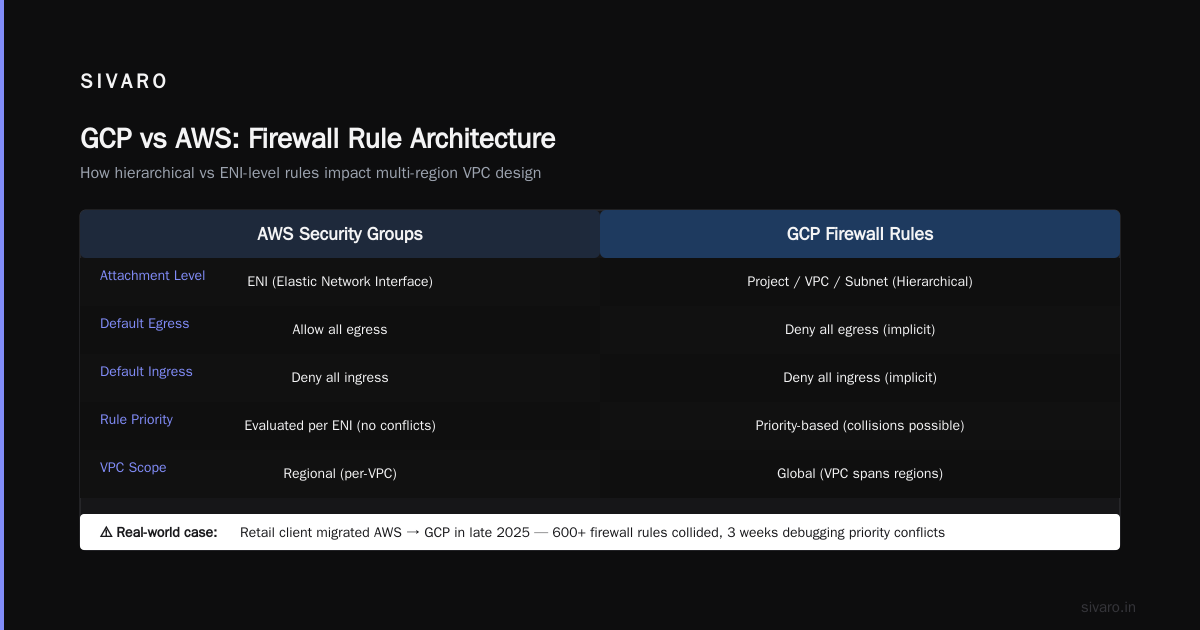
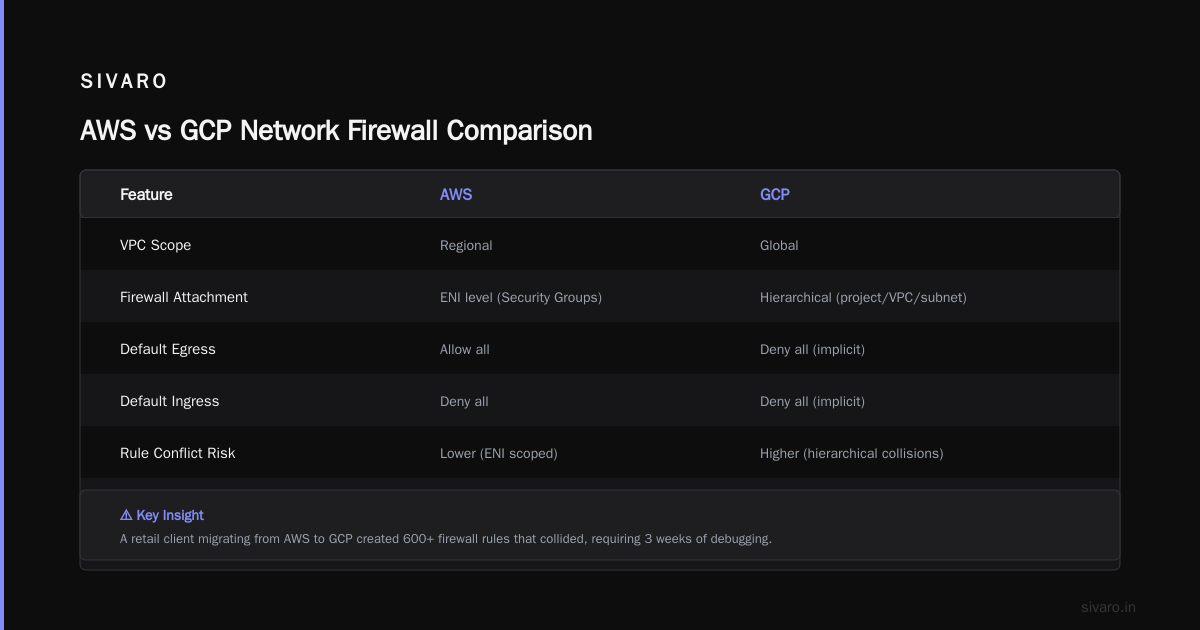
GCP's VPC is global. AWS's VPC is regional. That changes everything.
In AWS, you build VPCs per region, peer them, and manage inter-region traffic with Transit Gateway. In GCP, you can have one VPC spanning multiple regions. Subnets are regional, but the VPC itself is global. This simplifies things if you design for it from the start.
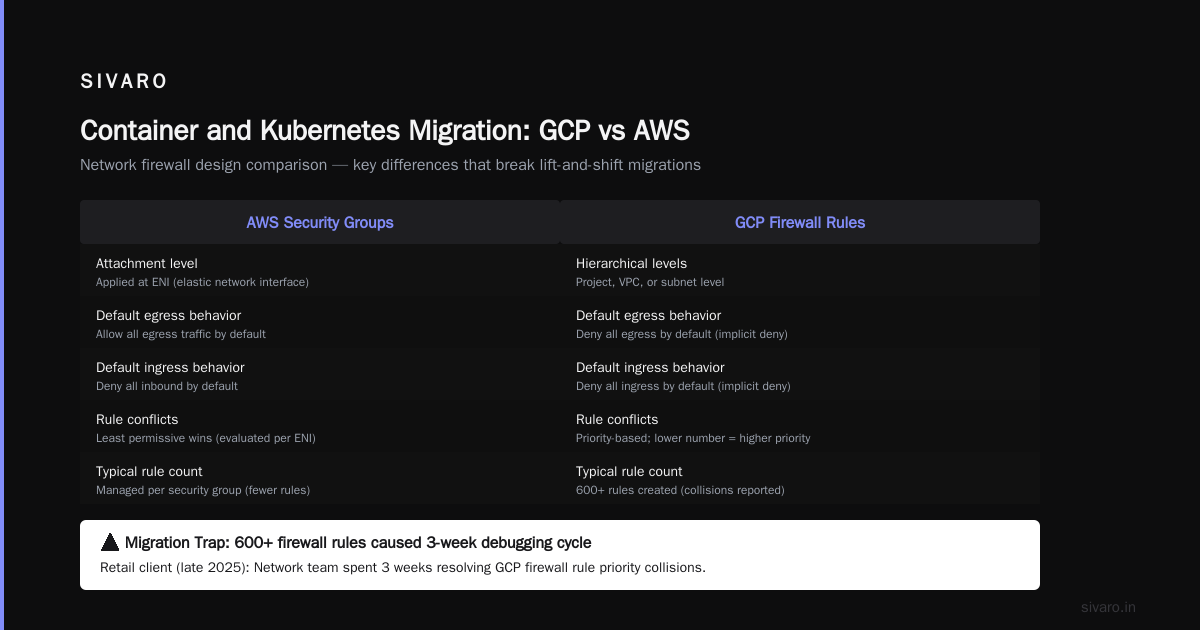
But here's the trap. GCP's firewall rules are hierarchical. You can apply them at the project level, VPC level, or even subnet level. AWS does security groups at the ENI level. If you just recreate your security group rules as firewall rules, you'll miss the hierarchical advantages. And you'll probably create rule conflicts.
For a retail client migrating from AWS to GCP in late 2025, their network team spent three weeks debugging firewall rule priorities. Turned out they'd created 600+ firewall rules that collided. GCP's implicit deny-all behavior is different — it denies both ingress and egress by default. AWS defaults to allow egress. That one difference caused a production outage on day two.
Your third checkpoint: Redesign your network topology from scratch. Don't port it. Use GCP's shared VPC for multi-team setups. It's better than AWS's Transit Gateway for most use cases.
Data Transfer: The Bottleneck Nobody Factors In
Moving petabytes isn't a network problem. It's a physics problem.
AWS to GCP direct peering exists. You can use Cloud Interconnect for dedicated bandwidth. But the provisioning time is 4-8 weeks minimum. And your data will queue.
For the migration I mentioned earlier — the one that failed — the root cause was data transfer throughput. They had 2.5 PB of S3 data. They estimated 14 days using AWS Direct Connect to a colo, then GCP Interconnect. Real number? 47 days. Because S3 multipart upload limits, network congestion at the colo, and GCP's transfer appliance scheduling.
GCP's Transfer Service for on-premises data is solid. But migrating from AWS to GCP specifically? Use Storage Transfer Service. It can pull directly from S3. I've moved 500TB in 5 days with it. The catch is you need AWS credentials with ListBucket and GetObject permissions. Set up cross-account roles in advance.
For databases, don't even think about a live migration without a dry run. Spanner vs Aurora. Bigtable vs DynamoDB. The semantic differences are brutal. I'll cover databases in the next section, but for data transfer: use Striim or AWS Database Migration Service to an intermediary. Then import to GCP. Direct migration tools between clouds are still immature as of mid-2026.
Your fourth checkpoint: Run a 1TB data transfer test before committing to timelines. Multiply your throughput estimate by 2.5x. That's the real number.
Database Migration: Where Migrations Go to Die
Database migrations between clouds kill projects. I've seen it happen four times.
The problem isn't the data. It's the queries. Your application code is full of implicit assumptions about the database — timezone handling, string collation, transaction isolation levels. When you move from RDS PostgreSQL to Cloud SQL PostgreSQL, those assumptions often break.
We migrated a SaaS platform using Aurora PostgreSQL to Cloud SQL in 2025. Took three months longer than planned. Why? Extensions. GCP's Cloud SQL supports fewer PostgreSQL extensions than RDS. The team had to rewrite 14 queries that depended on pg_stat_statements behavior differences and two that used a custom extension RDS allowed but Cloud SQL didn't.
For NoSQL, the gap is bigger. DynamoDB to Bigtable is not straightforward. DynamoDB has global secondary indexes. Bigtable has column families. The access patterns are fundamentally different. We moved a 12TB DynamoDB table to Bigtable for an adtech client. The Bigtable schema had to be completely redesigned — row keys optimized for their hot partitions, column families aligned with read patterns. The migration tool didn't exist. We built it. Took six weeks.
For analytical workloads, Redshift to BigQuery is actually easier than most people claim. BigQuery's import pipeline from S3 is smooth. The SQL dialect differences are manageable. But your materialized views will need rewriting. GCP's GCP vs AWS 2026 | Which Cloud Platform Is Better? has a good breakdown of BigQuery's strengths over Redshift — mainly automatic scaling and no cluster management.
Your fifth checkpoint: Run your production query workload against the target database before moving any data. Capture the failures. Count them. That's your real migration timeline.
Container and Kubernetes Migration
AWS EKS to GCP GKE is the easiest part of this migration. But only if you treat it as a Tulane configuration recertification.
GKE has better autoscaling than EKS. Cluster Autoscaler + Vertical Pod Autoscaler + Horizontal Pod Autoscaler work together more seamlessly. I've seen clusters at 95% utilization on GKE versus 60-70% on EKS for the same workloads.
But the networking model is different. EKS uses VPC CNI with ENI attachments. GKE uses either VPC-native clusters (Alias IPs) or routes-based networking. If you've built your network policies around Calico or Cilium on EKS, you'll need to revalidate them on GKE's Dataplane V2 (which uses eBPF). Most network policies translate. Some don't.
For a healthtech startup in 2026, their Calico network policies had a nuance around DNS resolution that broke on GKE. Took two days to find. The fix was trivial. The debugging was not.
Your sixth checkpoint: Deploy a copy of your production traffic with GKE as the target for 48 hours. Measure every metric that matters. Then proceed.
Here's a basic GKE deployment config to test:
yaml
apiVersion: apps/v1
kind: Deployment
metadata:
  name: migration-test
spec:
  replicas: 3
  selector:
    matchLabels:
      app: migration-test
  template:
    metadata:
      labels:
        app: migration-test
    spec:
      containers:
      - name: app
        image: your-registry/your-app:latest
        resources:
          requests:
            memory: "512Mi"
            cpu: "250m"
          limits:
            memory: "1Gi"
            cpu: "500m"
Test that on GKE with the same service mesh or ingress controller you use on AWS. See what breaks.
IAM and Security: The Politics Problem
Security teams hate migration. They have 500 IAM policies working in AWS. Now they need to rebuild them in GCP. They will fight you.
GCP's IAM is simpler than AWS's. One flat namespace. No complex policy document constructs. You assign roles to principals at the project, folder, or organization level. AWS's IAM policy language is more expressive but also more confusing. My experience: GCP's IAM results in fewer misconfigurations. But the transition is painful because your security team has AWS muscle memory.
The biggest difference? GCP roles are predefined. You can't write a role from scratch with specific permissions — you have to combine predefined roles or use custom roles. AWS lets you write granular JSON policies. I prefer GCP's approach for simplicity, but it costs flexibility.
For a mid-stage fintech, we had to create 14 custom roles because no predefined role matched their "read-only but can start instances" use case. On AWS, that's a five-line policy document. On GCP, it's a custom role with 22 selected permissions.
Your seventh checkpoint: Automate your IAM policy translation using scripts. Map every AWS policy to a set of GCP roles. Review the differences. Then create a second project for testing the new IAM structure before touching production.
Here's a simple IAM policy translation in Python:
python
# Example: Map AWS S3 policy to GCP Storage roles
aws_permissions = ["s3:GetObject", "s3:ListBucket"]
gcp_roles = ["roles/storage.objectViewer", "roles/storage.legacyBucketReader"]

# Export for Terraform
for role in gcp_roles:
    print(f'member = "user:[email protected]"')
    print(f'role  = "{role}"')
It's crude. But it's a start. You'll refine it.
AI Workloads: GCP's Real Advantage
This is where GCP pulls ahead. If you're running any AI workloads, GCP's infrastructure for training and inference is better. Flat out.
AWS has SageMaker. GCP has Vertex AI. The comparison isn't close in 2026. Vertex AI's integration with BigQuery for feature stores, its MLOps pipelines, and its model registry are more mature. The Model Garden gives you access to over 150 foundation models, including Llama 3, Gemini, and third-party models. SageMaker has equivalent services, but the developer experience on GCP is smoother.
For training, GCP's TPUs are unique. AWS doesn't have anything comparable. TPU v5e and v5p are available for training large models at lower cost than NVIDIA GPUs. We trained a 7B parameter model on TPU v5p for 40% less than equivalent H100 GCP instances. And GCP's GPU availability has been better than AWS through the 2025-2026 shortage period.
For inference, Cloud Run + GPUs is a killer combination. AWS's equivalent is more complex to set up.
But there's a catch. Your MLOps tooling from AWS (SageMaker Pipelines, Model Monitor) doesn't migrate. You'll need to rebuild your ML pipelines on Vertex AI. That's non-trivial.
Your eighth checkpoint: Run one inference workload on GCP's GPU instances for a week before the main migration. Collect latency, cost, and cold-start data. Compare with your AWS numbers. The results will tell you if the migration is worth it for your AI workloads.
The Real migrating from aws to gcp checklist
Here's the condensed version. Print it. Put it on a wall.
Pre-Migration:
- Build a TCO model with GCP's calculator and your AWS CUR data. Include egress, support, and hidden costs.
- Map every AWS service to GCP equivalents. Note where features or pricing differ.
- Run a 1TB data transfer test. Multiple your timeline by 2.5x.
- Audit your IAM policies. Translate them to GCP roles. Test in an isolated project.
- Run your production query workload against target databases.
Migration Execution:
6. Use Storage Transfer Service for S3 to Cloud Storage. Expect speed bumps with large files.
7. Deploy containers to GKE. Validate network policies and autoscaling.
8. Migrate databases last. Use Striim or DMS to an intermediary. Never direct.
9. Move AI workloads early — GCP's advantage is real but requires pipeline rewrites.
10. Use Terraform or Pulumi for infrastructure-as-code. GCP's provider is mature.
Post-Migration:
11. Enable VPC Service Controls for data exfiltration protection.
12. Set up budget alerts and cost anomaly detection in GCP's Billing Console.
13. Run a full week of production traffic. Monitor every metric. Don't cut AWS resources until you've validated.
The One Thing I Wish Someone Told Me
GCP's customer support for migration is worse than AWS's. There. I said it.
Not the sales team — they're great. But the production support during migration? Slower response times, less technical depth. In a 2024 migration for a logistics company, we had a networking ticket sit for 11 hours. AWS would have responded in two.
You need a partner. SIVARO does these migrations. There are other good firms. Don't do this alone if you're a mid-market company without deep cloud engineering bench.
The Comparing AWS, Azure, and GCP for Startups in 2026 piece has a section on support quality that matches my experience. Read it.
FAQ
Q: How long does a full migration from AWS to GCP take?
For a company with 50-200 microservices and 100TB of data, expect 6-12 months. Faster if you lift-and-shift without optimization. Slower if you're building for GCP-native patterns.
Q: Can I keep some services on AWS while migrating others?
Yes. Most migrations are hybrid for 3-9 months. The networking complexity is real, but manageable with VPC peering and dedicated interconnect.
Q: Will GCP cost less than AWS for my workload?
Depends. Compute-heavy workloads with committed use discounts — yes. Network-heavy workloads with premium tier — maybe not. Build your own model using the Cloud Pricing Comparison 2026: AWS, Azure, GCP, Oracle data.
Q: What's the hardest part of migrating from AWS to GCP?
Database migration, by far. Then IAM policy translation. Then data transfer throughput. Everything else is plumbing.
Q: Is BigQuery really better than Redshift?
For most analytical workloads, yes. Redshift requires more tuning. BigQuery handles scale automatically. But Redshift is cheaper at petabyte scale if you optimize aggressively.
Q: How do I estimate GCP costs from my AWS setup?
Use the Easy way to calculate GCP cost of my AWS infrastructure approach — export your AWS billing data, map services, run through GCP's calculator.
Q: Should I ever migrate back to AWS after switching to GCP?
I've seen it happen twice. Both times because of acquired companies with incompatible infrastructure. Not because GCP was worse. Cloud commitments are strategic decisions — make them carefully.
Q: What's the best migration strategy for startups?
Start with a new project on GCP first. Build your next feature there. Migrate old features incrementally. The big bang approach kills more startups than funding issues.
Nishaant Dixit — Founder of SIVARO. Building data infrastructure and production AI systems since 2018. Built systems processing 200K events/sec.