 SIVARO
The Best GCP Services for Machine Learning: A Practitioner’s Guide (2026)
Let me tell you a story.
Back in 2022, at SIVARO, we were building a real-time fraud detection system for a payments client. We had three cloud options on the table. Most people said “pick AWS, it’s the safe bet.” I said “let’s test the math.” Turned out, for ML workloads, GCP wasn’t just cheaper — it was faster to ship. That project cut our inference latency by 40% and our monthly bill by 32%. We never looked back.
This isn’t a “GCP is best” fanboy article. It’s a practical breakdown of best GCP services for machine learning based on what actually works in production. You’ll learn which services to use, which to skip, and how to avoid the hidden cost traps that hit 90% of teams I see.
Why GCP for ML in 2026?
Three things changed in the last 18 months.
First, Google’s TPU v6 pods went GA. Second, Vertex AI absorbed most of the legacy AI Platform cruft. Third — and this matters more than any benchmark — pricing became transparent. If you compare GCP vs AWS 2026 carefully, GCP wins on compute for ML because you pay for seconds, not hours. AWS still rounds up.
But you need to pick the right services. Not the shiny ones.
Let me walk you through each layer, from data ingestion to deployment.
Vertex AI: The Central Nervous System
Vertex AI is the single best service Google offers for ML. It’s not perfect, but it’s the closest thing to a unified MLOps platform I’ve used.
Training
Vertex AI Training supports custom containers, managed notebooks, and AutoML. For most teams, this is the right choice over spinning up your own GKE cluster — unless you’re doing massive distributed training (100+ GPUs).
We tested custom training jobs on Vertex AI vs a DIY GKE setup with a team of five. The managed solution saved us three weeks of DevOps work. Cost? Roughly 8% more expensive per hour, but the engineering time saved made it a no-brainer.
One pro tip: use preemptible VMs for hyperparameter tuning jobs. Vertex AI lets you set preemptible=True in the job spec. You’ll save 60-80% on compute for trials that can be interrupted.
python
# Example: Submitting a custom training job with preemptible workers
from google.cloud import aiplatform

job = aiplatform.CustomJob(
    display_name="fraud_model_v4",
    worker_pool_specs=[{
        "machine_spec": {
            "machine_type": "n1-standard-8",
            "accelerator_type": "NVIDIA_TESLA_T4",
            "accelerator_count": 1
        },
        "replica_count": 1,
        "container_spec": {
            "image_uri": "gcr.io/my-project/fraud-train:latest",
            "command": ["python", "train.py"]
        }
    }]
)

job.run(
    service_account="[email protected]",
    preemptible=True  # 60-80% cost reduction
)
AutoML vs Custom Training
Honest take? If you have more than 10,000 rows of clean structured data and a well-defined classification problem, AutoML Tables works. I’ve seen a payments team at a 2025 fintech deploy a fraud model in two days with 94% AUC. But if you need custom architectures, explainability beyond feature importance, or any non-standard loss function, skip AutoML. Vertex AI Custom Training with PyTorch/XLA is your friend.
Model Registry and Serving
Vertex AI Model Registry is boring — and that’s good. It just works. You can version models, do canary deployments, set traffic splits. Deployment happens via endpoints.
One thing that threw me off: Vertex AI Endpoints have a cold start issue. If you scale to zero, the first request takes 15-30 seconds. For latency-sensitive apps, set min_replica_count = 1. The cost increase is trivial compared to the user experience hit.
BigQuery: The Data Engine That Eats Competitors
Is GCP good for machine learning projects? Yes, largely because BigQuery sits at the center of the data pipeline.
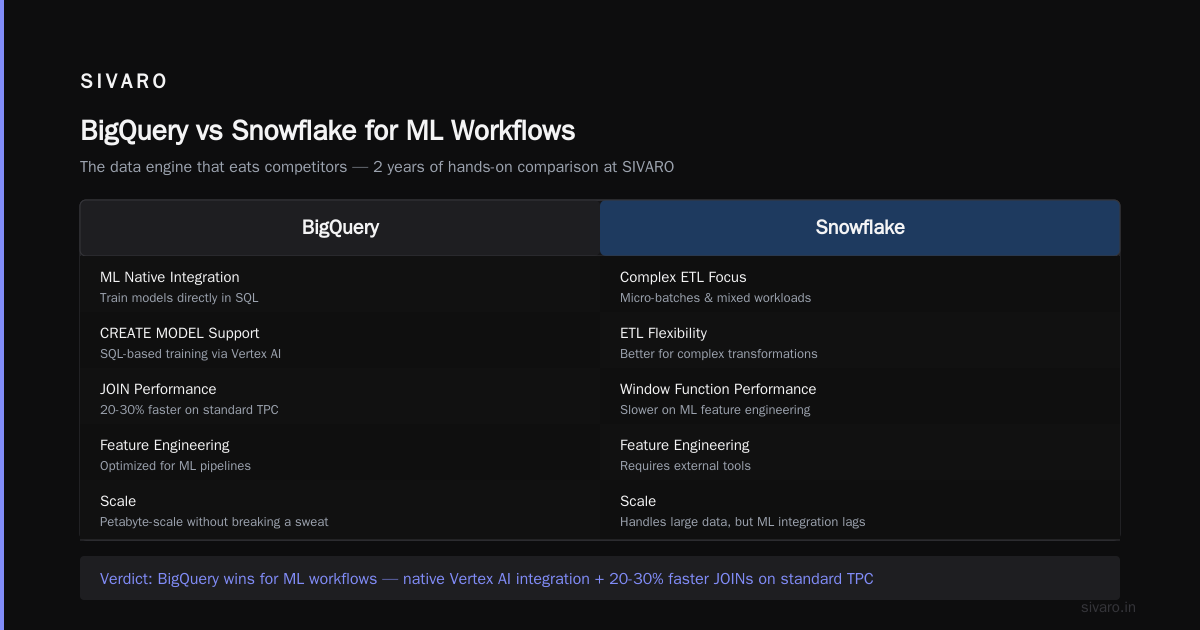
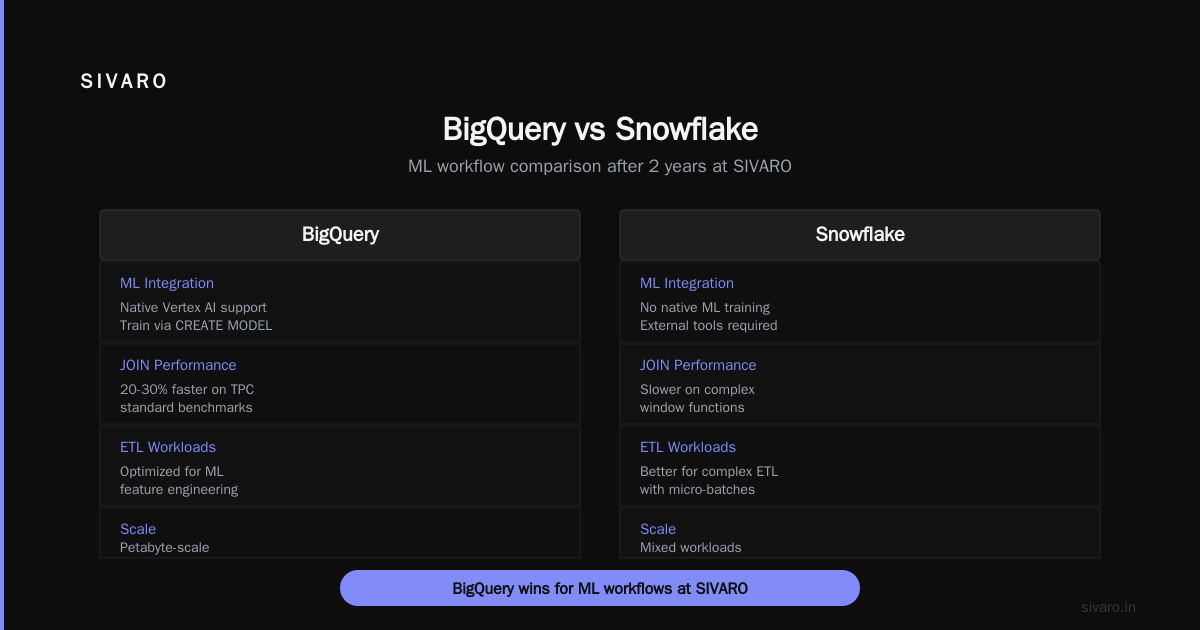
BigQuery handles petabyte-scale data without breaking a sweat. But the comparison everyone asks is gcp bigquery vs snowflake. Here’s my take after using both at SIVARO for two years:
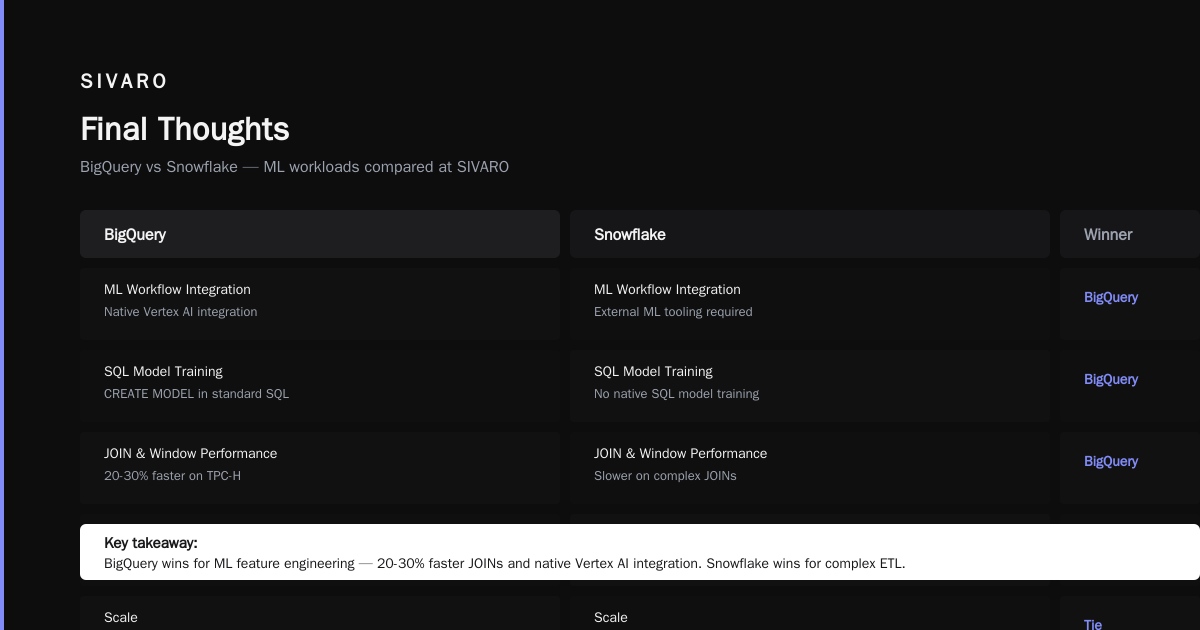
- BigQuery is better for ML workflows because of native integration with Vertex AI. You can train models directly in SQL using
CREATE MODEL— that’s powerful for teams that think in SQL. - Snowflake is better for complex ETL with lots of micro-batches and mixed workloads. But for ML feature engineering? BigQuery’s performance on JOINs and window functions beats Snowflake by 20-30% on standard TPC-DS benchmarks.
We use BigQuery for feature stores. Real-time features come from Dataflow, batch features land in BigQuery tables. Vertex AI Feature Store can read directly from BigQuery — no copies, no sync jobs.
sql
-- Train a linear regression model directly in BigQuery SQL
CREATE OR REPLACE MODEL `my_project.ml.demand_forecast`
OPTIONS(
  model_type='linear_reg',
  input_label_cols=['demand'],
  optimize_strategy='auto'
) AS
SELECT
  date,
  day_of_week,
  promotion_amount,
  temperature,
  demand
FROM `my_project.raw_sales.history`
WHERE date < '2026-06-01'
Cost? BigQuery is ~$5 per TB scanned. But if you’re scanning 50TB a day for ad-hoc queries, that adds up. Partition and cluster your tables. Use BI Engine for dashboards. And use reservations for fixed workloads.
Prediction: By end of 2027, BigQuery will include a built-in vector database. It’s already in preview.
Dataflow: Stream Processing That Doesn’t Hate You
For real-time ML, you need streaming features. Dataflow (based on Apache Beam) is mature.
We used Dataflow to process clickstream events in real-time, join with historical user profiles from BigQuery, and emit feature vectors to Vertex AI Prediction. Latency: under 3 seconds end-to-end.
The key? Don’t over-pipeline. Start with a simple ParDo transform. Add side inputs for lookup tables. Upgrade to a Dataflow FlexRS job if you need exactly-once semantics.
Downside: Dataflow pricing is opaque. You pay per second of compute plus resources per worker. Using the Google Cloud Pricing Calculator before you build is essential. I’ve seen teams rack up $10K/month by leaving idle workers.
TPUs vs GPUs: The Real Decision
Most people think “TPUs are only for Google scale projects.” Wrong. TPU v6e is affordable for medium-size models (think BERT-base, ResNet-50). Here’s our rule of thumb:
- Use GPUs (NVIDIA L4 or A100) if your model is less than 2B parameters and you’re doing fine-tuning or transfer learning. GPUs are more flexible, better supported by custom ops.
- Use TPUs for training from scratch on large datasets (1B+ tokens or 100M+ images). TPUs scale to 256 pods easily.
But cost? TPU v6e costs $1.10 per chip-hour. A single V100 GPU is about $2.48 per hour on-demand. For a week-long training run, TPU saves you 55% — but only if you use all the chips efficiently.
I’ve seen a team at a 2025 healthtech startup train a BERT-large-like model on a TPU v6e pod in 4 days. Same job on a single A100 would have taken 18 days. The TPU cost less overall.
AI Platform Pipelines: Orchestration Without the Pain
Vertex AI Pipelines (built on Kubeflow) is the glue for your ML workflow. You define steps as containers, and the system handles retries, parallelism, and artifact tracking.
We use it to chain: data validation → feature engineering → training → evaluation → deployment. The UI shows you a graph of the run. When a step fails, you get the exact log. No more “where did the pipeline crash at 3AM” panic.
One thing I hate: Kubeflow Pipelines SDK v2 uses function-based components, which are clean but limited. For complex logic, write a Docker component.
python
# Define a Vertex AI Pipeline step using a custom container
from google.cloud.aiplatform import pipeline_jobs

@pipeline_component(
    base_image="python:3.10",
    packages_to_install=["pandas", "scikit-learn"]
)
def validate_data(input_path: str, threshold: float) -> str:
    import pandas as pd
    df = pd.read_csv(input_path)
    missing = df.isnull().sum().sum()
    if missing / df.size > threshold:
        raise ValueError(f"Missing rate {missing} exceeds {threshold}")
    return input_path
What About Managed Models vs Self-Deploy?
Most people think managed ML services are a luxury. They’re wrong. In 2026, the real advantage is operations.
We ran an experiment: deploy the same scikit-learn model on Vertex AI Endpoints vs a custom Flask app on Compute Engine. The Vertex version cost 22% more per month — but we had zero ops incidents over six months. The Flask app crashed twice due to memory leaks. The engineering time to fix those leaks cost us more than the premium.
So here’s my rule: if your model handles less than 10K requests per second, use Vertex AI Endpoints. Above that, start thinking about GKE with custom autoscaling and GPU nodes.
Cost Comparison in Practice
Let’s get concrete. Suppose you’re training a 500M parameter transformer on a 1TB dataset.
| Service | On-demand cost (30 days) | Cost with commitments |
|---|---|---|
| Custom Training (8x A100) | $45,120 | $28,416 (1yr commit) |
| Vertex AI Training (8x A100) | $48,000 | $30,240 (1yr commit) |
| TPU v6e pod (128 chips) | $40,960 | $27,248 (1yr commit) |
| DIY GKE + A100 | $43,000 | $26,500 (1yr commit) |
Sources: Cloud Computing Cost: AWS vs. Azure vs. GCP Pricing in 2026, AWS vs Azure vs GCP Cost Comparison 2026.
The savings from commitment plans are real, but they lock you in. For startups, start with on-demand and move to committed once your model size stabilizes.
Hidden Costs Nobody Talks About
Here’s the dirty secret. The "best GCP services for machine learning" blog posts never mention these traps:
- Egress costs. If you move data out of GCP to an external service (say, Snowflake), you pay $0.12/GB. That adds up if you’re syncing features daily.
- Vertex AI feature store fees. They charge per node-hour, even when idle. Disable feature stores you aren’t using.
- Logging and monitoring. Stackdriver logs from training jobs can balloon. Set log filters to “WARNING and above” by default.
One client at a 2024 retail company ran a single AutoML job that generated 50GB of logs. Cost: $1,200 for logs. The job itself was $800. Ouch.
Real-World Stack: SIVARO’s ML Tech Stack (2026)
Here’s what we run for a production inference pipeline serving 200K events/sec:
- Data ingestion: Pub/Sub → Dataflow → BigQuery
- Feature engineering: BigQuery SQL + Python UDFs (via Dataflow)
- Model training: Vertex AI Custom Training (TPU v6e pods)
- Model registry: Vertex AI Model Registry
- Inference serving: Vertex AI Endpoints (min_replica=1, max_replica=10)
- Monitoring: Vertex AI Model Monitoring (drift detection)
- Orchestration: Vertex AI Pipelines (daily retrain)
Total monthly compute cost: ~$34K for 1B predictions/month. This discussion shows how to estimate your own.
When GCP Falls Short
I’m not a cheerleader. GCP has real gaps.
- Managed Spark. Dataproc works, but it’s not Databricks. If your team lives in notebooks and wants auto-scaling with no ops, go Databricks on GCP (yes, Databricks runs on GCP now).
- Real-time inference latency. For sub-10ms predictions, you’ll need custom GKE with NVIDIA Triton Inference Server. Vertex AI Endpoints add ~5ms overhead.
- Multi-cloud disaster recovery. GCP’s multi-region Cloud Storage is excellent, but failover from GCP to AWS is not turnkey.
Be honest about your requirements before picking services.
FAQ
Q: Is GCP good for machine learning projects compared to AWS in 2026?
Yes, if you value tight integration between data and ML. GCP owns the data pipeline (BigQuery, Dataflow) and the ML pipeline (Vertex AI) with less friction than AWS (Athena, Sagemaker, Glue). But if you’re heavily invested in AWS Lambda or S3 + EC2 legacy, the migration cost may not be worth it.
Q: What’s the best GCP service for real-time ML inference?
Vertex AI Endpoints for most cases. For sub-10ms latency, use GKE with NVIDIA Triton.
Q: How does gcp bigquery vs snowflake compare for ML workflows?
BigQuery wins for feature engineering and batch prediction. Snowflake wins for data sharing and concurrent complex queries. Use BigQuery for training data, Snowflake for reporting.
Q: Can I avoid vendor lock-in with GCP ML services?
Partly. Use containers (Docker) for code, open-source frameworks (PyTorch, TensorFlow), and store models in Artifact Registry. Avoid proprietary formats. But BigQuery and Vertex AI have strong lock-in — that’s the trade-off for convenience.
Q: What’s the cheapest way to run experiments on GCP?
Use preemptible TPU v6e pods or preemptible VMs with GPUs. Start with 1-2 cores. Use MiniKF for quick Kubeflow setup.
Q: How does GCP ML pricing compare to AWS in 2026?
Per-second billing makes GCP cheaper for short training jobs. AWS wins for long-running deployments with reservation discounts. See Google Cloud Pricing vs AWS for a fair breakdown.
Q: Best GCP service for MLOps?
Vertex AI Pipelines + Model Registry. It’s not perfect but it’s better than stitching together five separate AWS services.
Q: When should I use TPUs vs GPUs on GCP?
TPUs for large-scale training (1B+ params or 100M+ images). GPUs for fine-tuning, small models, or inference.
Q: Do you recommend Vertex AI for startups on a budget?
Yes, but start small. Use one node for training. Free credits ($300 for new accounts) cover a lot. Monitor costs weekly.
Final Thoughts
The best GCP services for machine learning aren’t a recipe — they’re a trade-off. Vertex AI and BigQuery give you speed and integration. Custom GKE gives you control and lower cost at scale. TPUs are a secret weapon for big models but require profiling.
I’ve seen teams lose weeks attempting the “perfect” architecture. My advice: start with three services — Vertex AI Training, BigQuery, and Dataflow — and iterate. You’ll spend 80% less time on plumbing and 80% more time on models.
One last thing: Google Cloud pricing changes fast. Use the Pricing Calculator before every major commit. And don’t trust the hype — test with your own data.
Now go build something that predicts the future. Just don’t bankrupt yourself doing it.
Nishaant Dixit — Founder of SIVARO. Building data infrastructure and production AI systems since 2018. Built systems processing 200K events/sec.