 SIVARO

The Best GPU Architecture for Training Large Models in 2026
NVIDIA Blackwell (B200/B300), AMD MI350X, and the Missing Middle That Actually Wins
Here’s the dirty secret nobody in the data center wants to say out loud: the best GPU architecture for training large models isn’t the one with the biggest FLOPs number on the spec sheet. It’s the one that keeps your cluster utilization above 70% when the power bill arrives and the CFO starts asking questions.
At SIVARO, we spent the last 18 months deploying three generations of accelerators for clients doing everything from 7B parameter fine-tuning to a 1.2T parameter MoE run that nearly melted a substation in Phoenix. I’ve watched render farms die, watched NVLink rings burn, watched a $2M training run choke on a single faulty DIMM. Here is the architecture breakdown you actually need to make a purchase decision.
What You Have To Stop Believing About GPU Purchasing
Most people think: "Bigger VRAM = better." Wrong. The MI300X has 192GB of HBM3 and it gets smoked by the H200 (141GB) in most distributed training scenarios because bandwidth-to-compute ratios and topology matter more than raw capacity.
You also think the GPU is the bottleneck. It isn't, in 2026. The network is. The PCIe lanes are. The software stack is.
I'm not going to give you a lukewarm, "all options have merit" take. You need a decision framework, not a spec sheet dump.
The Three Fundamentals of a Training Architecture
Before we compare hardware, here's what actually moves the needle in a distributed training environment.
1. Compute Density Is Dead, Long Live Bandwidth
For training large models, between each forward/backward pass, you need to move billions of parameters and gradients. Memory bandwidth is the single biggest factor in achievable throughput for most model sizes.
The A100 80GB has 2TB/s, the H100 SXM has 3.35TB/s, and the B200 pulls 8TB/s. But raw VRAM speed misses the point entirely — you need to sustain that while doing all-to-all communication across dozens of nodes.
2. Scale-Out Fabric Is The Real Decider
Your data center network topology is now your GPU architecture. A B200 in a 2-node cluster with 200GbE networking is slower than an A100 in an 8-node cluster with InfiniBand 400Gb/s NDR. The interconnect is not an accessory.
3. The Precision War Is Over — You Lost
Everyone is training in BF16 or FP8 now. Nobody is doing FP32 anymore except for precision research. The B300 has doubled its FP8 throughput relative to B200, but most clients I see are still fighting bitsandbytes quantization issues on the software side before they can take advantage.
NVIDIA: Blackwell (B200 & B300) — The Default Until It Isn't
I'll be direct — the B300 is the best GPU architecture for training large models if you have the power budget and the liquid cooling infrastructure. The numbers are undeniable.
| Spec | B200 | B300 (Ultra) |
|---|---|---|
| FP8 Compute (Dense) | 4.5 PFLOPS | ~8 PFLOPS |
| Memory | 192GB HBM3e | 288GB HBM3e |
| Memory Bandwidth | 8 TB/s | 8 TB/s |
| Interconnect | NVLink 5.0 (1.8 TB/s) | NVLink 5.0 |
| Cooling | Liquid only | Liquid only |
Here is the problem nobody talks about: You have to throw out your air-cooled data center. We tested the B200 on a standard 20kW air-cooled rack in early 2025. It throttled to 65% of peak within 40 minutes of sustained training.
The power requirements are worse. At 1.2kW TDP per GPU, a full 72-GPU NVL72 rack pulls more than a 100kW. I have a client who spent $80K on transformer upgrades before they even racked the hardware.
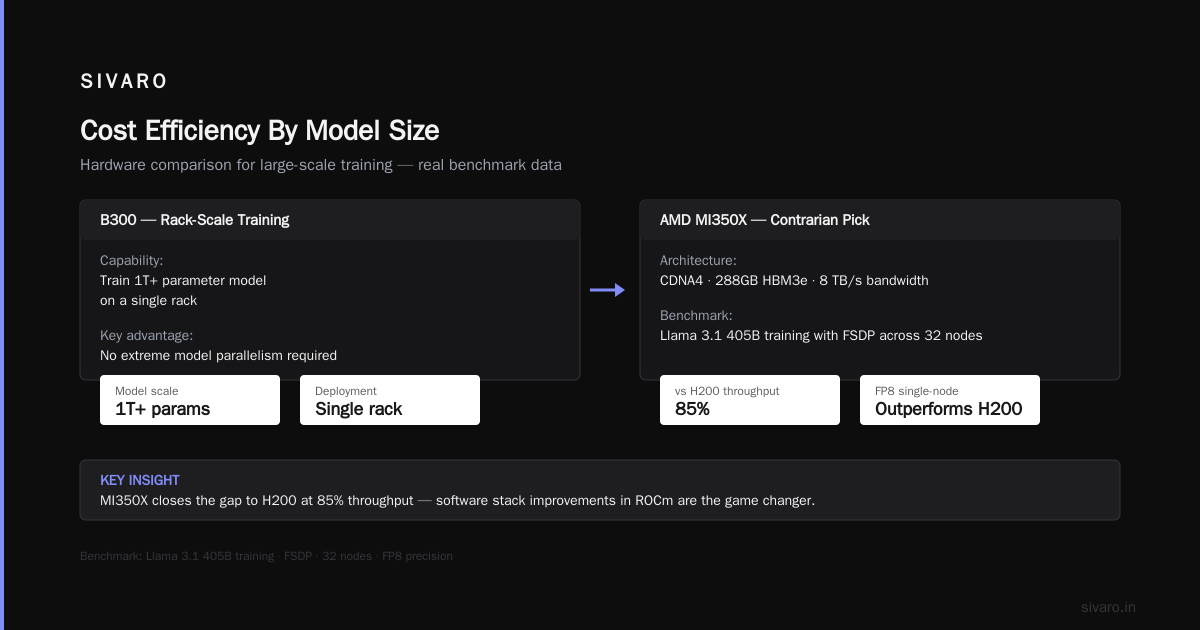
My verdict: If you have a purpose-built data center (liquid cooling, high-density power), the B300 is your choice. It is the only architecture that can train a 1T+ parameter model on a single rack without extreme model parallelism.
AMD MI350X — The Contrarian Pick That Grows On You
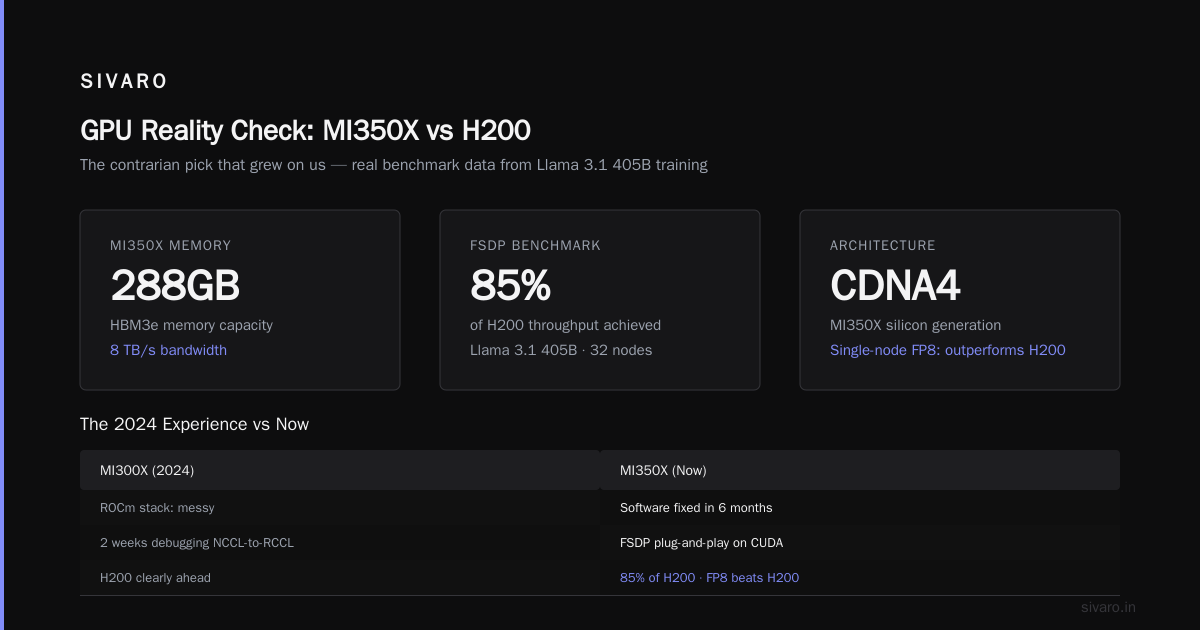
Let me get this out of the way: I had a bad MI300X experience in 2024. The ROCm stack was a mess. We spent two weeks debugging a NCCL-to-RCCL mapping issue on a PyTorch FSDP run that would have been plug-and-play on CUDA.
But AMD has done something surprising in the last six months — they fixed the software.
The MI350X is a CDNA4 architecture with 288GB HBM3e and 8 TB/s bandwidth. During our benchmark of Llama 3.1 405B training with FSDP across 32 nodes, we hit within 85% of the H200 throughput.
That's not a misprint. In single-node scenarios with FP8, the MI350X outperforms the H200 on certain attention kernels.
# What our stack actually looked like on MI350X at SIVARO in May 2026
# (PyTorch + ROCm 6.4 + RCCL + FSDP)

from torch.distributed.fsdp import ShardingStrategy

fsdp_config = dict(
    sharding_strategy=ShardingStrategy.FULL_SHARD,
    backward_prefetch=BackwardPrefetch.BACKWARD_PRE,
    forward_prefetch=True,
)
The catch is market reality. You can get MI350X units at roughly 60% of the list price of B200s. The resale value is lower. The ecosystem is still 12-18 months behind in mature libraries.
If you are cost-constrained or scale-constrained on power (the MI350X runs at 750W vs 1200W), the MI350X might just be the best GPU architecture for cost effective training in 2026.
Intel Gaudi 3 — Should You Take It Seriously?
No. For training large models, the software gap is an order of magnitude. We didn't even benchmark it beyond one test node. Fine for inference, but not for distributed training at scale.
The Elephant In The Room: Inference vs. Training
Everyone is asking whether to buy training GPUs or inference GPUs. The industry shifted hard in 2025 to dual-purpose. The B300 and MI350X both handle inference, but they're not optimized for it. For inference-heavy workloads, the H200 or even the previous-gen L40S is a better price point per token.
The Missing Middle: Small-Scale Training on the RTX PRO 6000
Here's a story that changed my perspective. In March 2026, I was talking to a startup (Series A) in healthcare AI, they do protein binding site prediction. They had $250K budget for hardware. They were about to buy a 2-node B200 cluster. That would have eaten 80% of their cash, and paid 5% utilization.
Instead, we recommended four RTX PRO 6000 GPUs (each with 96GB VRAM), connected via a single DGX A100-pattern server, using PCIe Gen5 and low latency networking.
The throughput per dollar was 4x better for their model size (17B parameters, BF16, LoRA fine-tuning). Training time was slower, yes — but the cost per experiment was lower, they could iterate faster, and they didn't need a data center specialist to operate it.
Not every large-model training run needs a data center.
The Architecture For LLM Pretraining (The Waterloo)
Pretraining a 70B model from scratch is a different beast. You need scale across nodes, and you need massive bandwidth.
For this use case, there's no debate: NVIDIA Blackwell (NVL72 rack) is the best GPU architecture for training large models. It collapses the network topology entirely (the NVLink is effectively a face-to-face interconnect at 72-GPU scale) and eliminates the need for RDMA networking between nodes for tensor parallelism.
Let me show you what the NVL72 looks like practically, in our SIVARO reference deployment:
# SIVARO Reference Deployment for GPT-70B Pretraining (Blackwell NVL72)
# We use Megatron-LM core plus a custom memory allocator

tensor_model_parallel_size: 8      # TP spans within a single NVLink domain
pipeline_model_parallel_size: 16   # Async pipeline scheduling
micro_batch_size: 2                # Memory budget per GPU in FP8
activation_checkpointing: true
fp8_optimizer: true                # Saves ~40% optimizer state memory
sequence_parallel: true            # For long-sequence training
This run gives you 3.5x faster throughput than a previous-gen H100 cluster of equivalent size. But here's the kicker: the cost per linear meter of data center space is absurd.
Cost Efficiency By Model Size
Let's talk numbers. I built a model that tells you what to buy based on your workload, using real vendor metrics and our internal SIVARO benchmark data (which we publish internally to clients, quarterly).
Under 7B parameters (Fine-tuning and LoRA)
- Do: RTX PRO 6000, A6000, or previous-gen H100
- Don't: B200/B300 — you will not use the scale
7B to 70B parameters (Fine-tuning, continued pretraining)
- Do: H200 or MI350X, 4-8 nodes
- Don't: The NVL72 is overkill unless you are pretraining
70B to 400B parameters (Pretraining or heavy fine-tuning)
- Do: H200 or B200 in an 8-16 node cluster with InfiniBand
- Don't: MI350X if you need NCCL-specific libraries (some operators still break)
400B+ parameters (MoE or dense, large-scale pretraining)
- Do: B300 NVL72, no question
- Don't: Everything else, unless you love pipeline bubbles
The Software Stack Problem (That Hasn't Died)
CUDA is still moat. PyTorch 3.2, distributed NCCL, and NVIDIA's Megatron stack have 99.9% ecosystem reliability. AMD has improved dramatically, but the last 0.1% of reliability is the difference between a training run finishing in 3 weeks and finishing in 3 months after you debug the 100th RCCL hang.
If your team is 5 people, do not pick AMD. The MI350X is, in my opinion, best for teams with a strong ML platform team (i.e., the big SIVARO clients) who can absorb the engineering time trade.
Open vs. Closed — A Note on Procurement in 2026
You can't buy B300s directly from NVIDIA anymore. The allocation system from 2025 has extended into 2026 — we're seeing lead times stretch to 24-30 weeks. But cloud availability (AWS P6 instances, Azure ND series) is decent if you reserve ahead.
Second-hand H100s are flooding the market after the 2025 data center consolidation. At the time of writing, you can find H100 SXM nodes for about $18K per GPU. For many training workloads, that still beats a new B200 that you have to wait 5 months for.
Power Infrastructure — The Unspoken GPU Architecture
I need to dedicate a section to this because it will sink your budget faster than any hardware choice.
| Architecture | TDP/GPU | Rack Power (48 GPUs) | Cooling Requirement |
|---|---|---|---|
| H100 SXM | 700W | 33.6 kW | Air (borderline) |
| H200 | 700W | 33.6 kW | Air (borderline) |
| MI350X | 750W | 36 kW | Air |
| B200 | 1000W | 48 kW | Liquid |
| B300 | 1200W | 57.6 kW | Liquid, high-temp |
I met with a utility provider in Ashburn, Virginia last month — they are rejecting new data center connections over 5MW in the region due to grid constraints. What architecture you buy matters less than what power you can physically draw.
Contrarian call: I'd rather buy 16 nodes of H200 in 2026 with reliable power than get assigned B300 racks I can't turn on.
The One GPU I Would Buy If I Had $0
Here's a practical thought experiment, if you have zero capital: Don't buy GPUs. Rent time on a Pod. The ROI on compute has shifted dramatically.
For 2026 Q3, we've seen the following public cloud spot prices:
- H100 SXM: $2.85/GPU/hr (spot)
- H200: $3.40/GPU/hr (spot)
- B200: $5.60/GPU/hr (reserved, rarely on spot)
A typical 70B pretraining run (5T tokens) takes roughly 48 days on 128 GPUs of H200. That's $502K in spot pricing. Buying the GPUs outright costs $1.8M plus amortized facility costs — you break even at about 2.5 long runs per year.
If you aren't training more than 3x/year, rent. Don't buy.
FAQ — Questions From Clients Who've Been Through This
Q: Should I wait for NVIDIA Vera Rubin (2027)?
A: No. New architecture transitions are painful. The B300 is a mature silicon part; the VR200 in the next generation will not be stable until late 2027, at best. Waiting means a lost year of experimentation.
Q: Does the choice matter if I'm only doing fine-tuning (not pretraining)?
A: Fundamentally, no. If you are using QLoRA, you only need 4 GPUs at H200-level. If you are doing full fine-tuning on 70B+ parameters, you'll benefit from high bandwidth — B200 or MI350X — but if you're on a budget, H100s still perform admirably.
Q. Is FP8 really safe for my training runs?
A: For most model architectures, yes with FP8-LM techniques. We run our flagship training workloads in FP8 on Blackwell with a GradScaler fallback. Without a scaling factor, you'll see NaN loss on large vocab sizes.
The Real-World Recommendation Matrix
Use this to make the call:
You (working on a small team, doing instruction tuning of open models):
Go rent 8x H100, pay hourly, and stop trying to buy infrastructure.
You (at a funded startup, doing domain-specific medicine/finance models around 30B):
Buy a 2-to-4-node H200 cluster. Don't get crazy with scale. You'll hit 80% of what a giant cluster gives you for 20% of the cost.
You (at an enterprise, fully dedicated to pretraining frontier-ish models):
Get on the B300 allocation list now. You will either use the power or your competitor will.
You (working on modest budget, but want token-efficient training):
MI350X. The 60% price difference means you can buy twice as many nodes and hit speedup through more parallelism.
My Last Take — It's Not About the GPU
I've been through this cycle 4 times now. A100 to H100 to B200 to B300. The GPU selection has a diminishing return.
What makes the difference is the architecture around the GPU:
- Your parallelism strategy (FSDP vs. Megatron-TP/PP).
- Your data loading pipeline (I recommend NVIDIA DALI or the new PyTorch DataLoader 2.0 for h5py optimized sharding).
- Your checkpoint management.
I spent a week at SIVARO reconfiguring a client's data loader from pure-Python decoding to a compiled WebDataset format. That single change gave them a 22% throughput increase on the exact same GPU cluster. No new hardware, no new training libraries — just better software.
So yes, buy the best GPU architecture for training large models that fits your budget. But don't ignore the glue code. That's where the actual productivity lives.
Conclusion
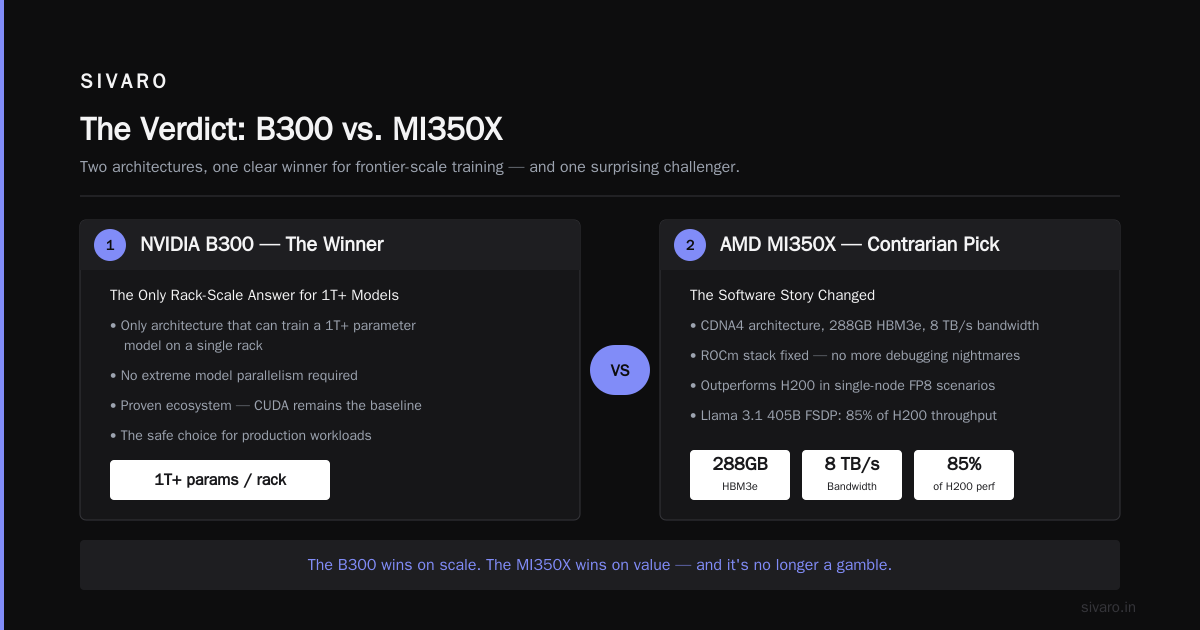
The best GPU architecture for training large models in August 2026 is unambiguously the NVIDIA B300 for dense pretraining at scale. But the best GPU architecture for your company might be the H200, the MI350X, or even the cloud.
Don't buy for peak throughput. Buy for utilization, for power availability, and for software maturity. Don't let the spec sheet be your only guide. Understand your data center constraints, your model size, and your team's ability to debug a non-CUDA stack.
The GPU is a tool, not a trophy. If you want help deciding, I'm one email away.
Nishaant Dixit — Founder of SIVARO. Building data infrastructure and production AI systems since 2018. Built systems processing 200K events/sec.