 SIVARO
The Only AWS Certification Path for Beginners That Actually Makes Sense in 2026
I've been building on AWS since 2017. Back then, I thought getting certified meant you knew what you were doing. Now I run a company where I've watched engineers with five certs fail to debug a simple VPC misconfiguration.
Here's the truth: AWS certifications are a map, not the territory.
This guide isn't about which cert to get first. It's about which path builds actual skills you'll use the day after you pass the exam. I'll tell you where most beginners waste time, which certs actually changed how I build systems, and where the industry is heading in 2026.
By the end, you'll know exactly which AWS certification path for beginners matches your real goals — whether that's landing a job, building your first production system, or scaling your startup's infrastructure.
Why the "Just Get the Associate Solutions Architect" Advice Is Wrong
Most people think the path is: Cloud Practitioner → Solutions Architect Associate → Developer Associate → SysOps Administrator.
They're wrong because they're treating certifications like levels in a video game.
I've interviewed over 50 candidates at SIVARO. The ones who could actually build things didn't follow this path. They chased problems, not badges. One engineer I hired had zero certs but had run a production Kafka cluster handling 50K events/second. He learned AWS because his system crashed at 2 AM and he needed to fix it.
The aws certification path for beginners should be dictated by what you're trying to build, not by some arbitrary progression.
Here's what I've seen work in practice:
If you're building AI/ML systems → Start with the Developer Associate. Skip Cloud Practitioner entirely.
If you're managing infrastructure → Solutions Architect Associate, then SysOps. But only if you already understand Linux and networking.
If you're doing data engineering → Data Analytics Specialty. But only after you've built something with S3 and Glue first.
The certs aren't prerequisites for each other. They're specializations. Pick one based on what you actually do.
The Foundational Cert: Skip It Unless...
The Cloud Practitioner cert costs $100 and tests whether you know what S3 stands for.
I'm not saying it's useless. But for most people, it's a waste of time and money.
When I'd recommend it:
- You're in a sales or management role and need to understand what engineers are talking about
- Your employer requires it for compliance reasons
- You have zero technical background and need confidence before diving deeper
When I'd skip it:
- You've ever written a line of code
- You've SSH'd into a server
- You've used any cloud provider before
I've seen too many beginners spend two months studying for Cloud Practitioner when they could have learned to deploy an actual application in the same time.
The aws certification path for beginners should start with hands-on building, not multiple choice theory.
Solutions Architect Associate: Still the Gold Standard
If I had to recommend one certification, this is it.
Not because the exam is great — it's not. The questions are weirdly specific about things you'll never encounter. But the process of studying for it builds mental models that are invaluable.
Here's what the Solutions Architect Associate actually teaches you:
How systems fail and recover.
The exam forces you to think about multi-AZ deployments, disaster recovery, and fault tolerance. These aren't buzzwords. They're the difference between a 2 AM page and a solid night's sleep.
At SIVARO, we run a data pipeline that processes 200K events per second. One AZ goes down in us-east-1 about every 18 months. If you haven't designed for that, you're not building production systems.
Trade-offs you can't Google.
The exam asks questions like: "Should I use a single RDS instance or Aurora Global Database?" The answer depends on your latency requirements, budget, and regulatory constraints. There's no cheat sheet for that.
What not to over-engineer.
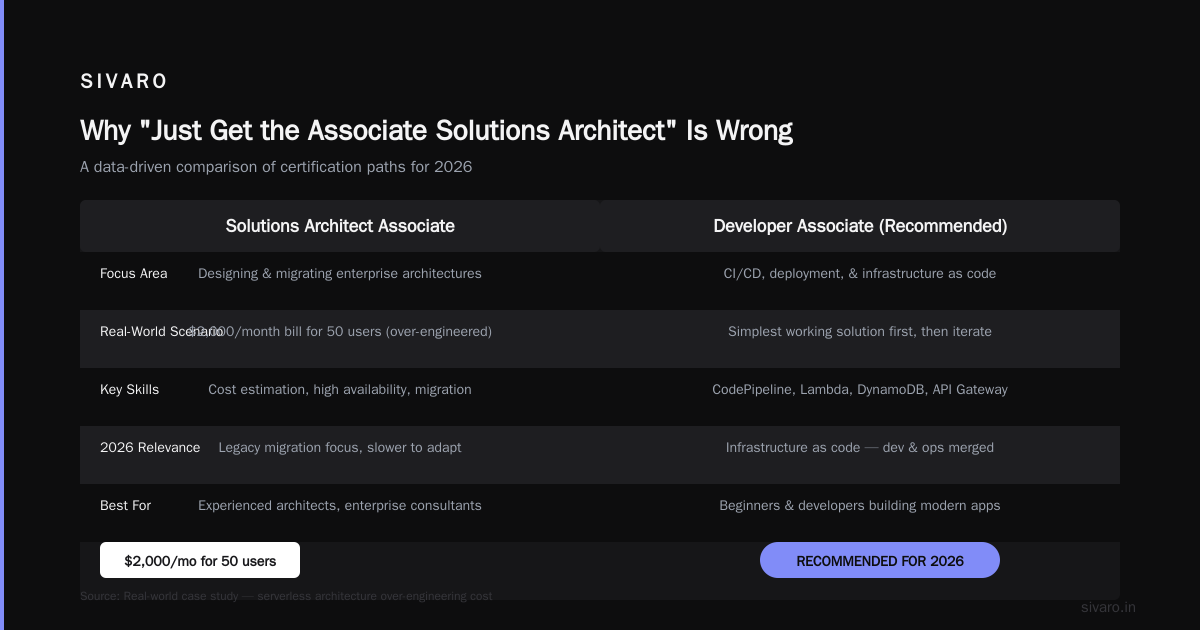
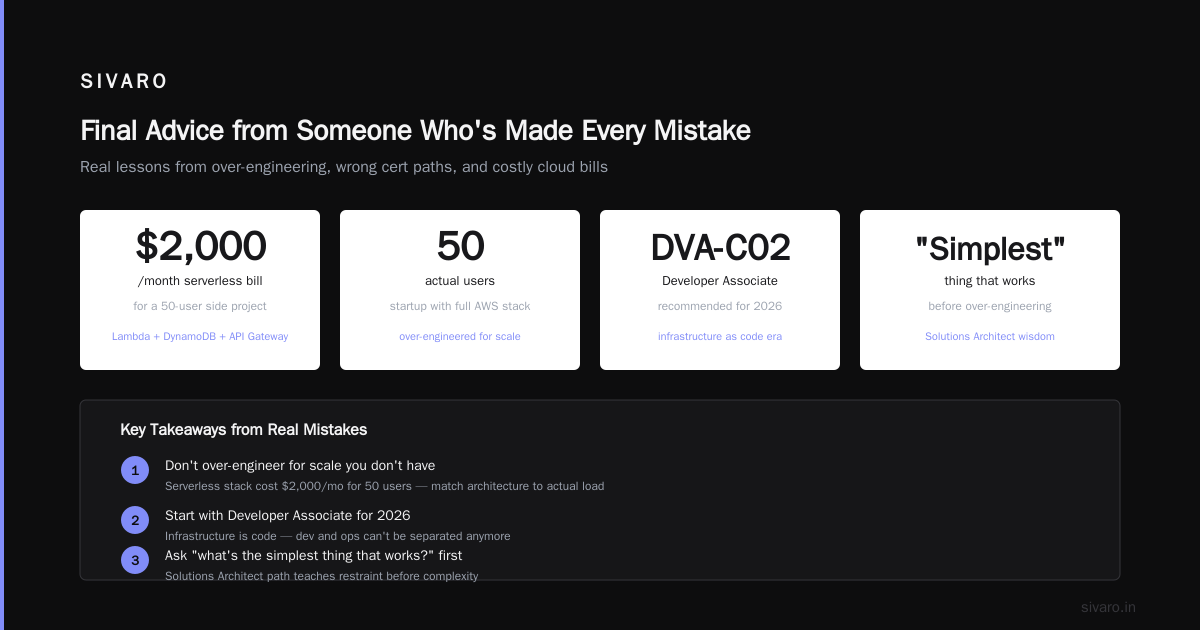
Early in my career, I designed a serverless architecture for a startup that had 50 users. Lambda, DynamoDB, API Gateway — the whole stack. The bill was $2,000/month for a side project.
The Solutions Architect path teaches you to ask: "What's the simplest thing that works?" before reaching for the over-engineered solution.
Developer Associate: My Actual Recommendation for 2026
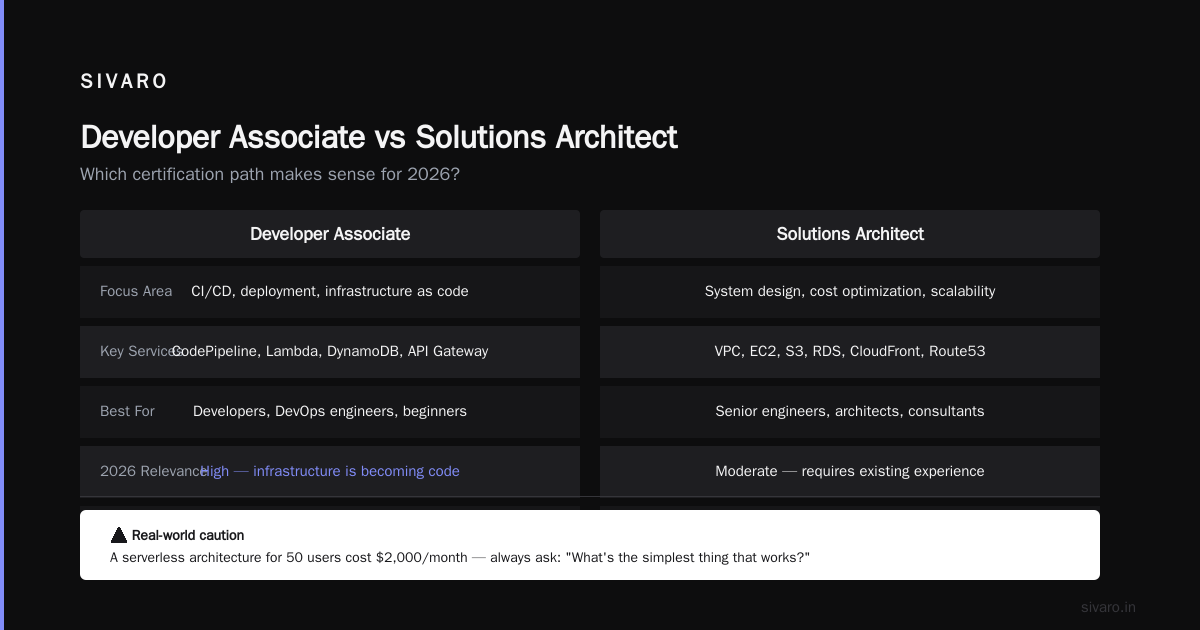
Here's my contrarian take: most beginners should start with the Developer Associate, not Solutions Architect.
Why? Because in 2026, infrastructure is becoming code. You can't separate development from operations anymore.
The Developer Associate covers:
- CI/CD with CodePipeline and CodeBuild
- Serverless with Lambda and API Gateway
- Containers with ECS and EKS
- Monitoring with CloudWatch and X-Ray
These are the skills you'll actually use on day one of a job. You'll write infrastructure templates before you design a multi-region disaster recovery plan.
But here's the catch: The Developer Associate exam assumes you already understand how to code. If you don't, start there first. Build a simple REST API. Deploy it. Break it. Fix it. Then take the cert.
SysOps Administrator: For When You're Tired of Theory
SysOps is the least popular of the associate certs. That's a mistake.
If you're the person who gets paged at 3 AM, SysOps is your exam. It covers operational stuff that the other certs ignore:
- Patching and maintenance windows
- Backup and restore strategies
- Cost optimization
- Incident response
I took this exam after five years of AWS experience and still learned things. Specifically, the CloudFormation and Systems Manager content is directly applicable to daily work.
The aws certification path for beginners often skips SysOps entirely. I think that's a bad call for anyone managing production systems.
Specialty Certs: When to Branch Off
After the associate certs, you have two paths. Most people pick wrong.
The wrong path: Collecting specialty certs like Pokémon. I've met engineers with six specialty certs who couldn't explain how to scale a Postgres database.
The right path: Pick one area you're actually working on and go deep.
Here's what I'm seeing in 2026:
Machine Learning Specialty
This is the most overhyped cert in AWS's lineup. The exam tests ML theory and SageMaker features, but it doesn't test whether you can actually train a model.
That said, if you're building production AI systems, the SageMaker content is useful. Just don't expect the cert to make you an ML engineer.
Advanced Networking Specialty
This is the hardest cert AWS offers. I've seen Solutions Architects with 10 years of experience fail it.
Take it only if you're building complex network topologies — think VPC peering, Transit Gateway, Direct Connect.
Data Analytics Specialty
This one's practical. It covers the full data pipeline: ingestion (Kinesis), storage (S3), processing (Glue, EMR), querying (Athena, Redshift), and visualization (QuickSight).
If you're working with data at scale, this cert teaches useful patterns. The Redshift section alone is worth the study time.
Security Specialty
This cert teaches you how to lock down AWS. And in 2026, with the rise of AI-powered attacks, you need this knowledge more than ever.
The exam covers IAM policies, encryption, KMS, CloudTrail, and GuardDuty. These are fundamentals every engineer should know, regardless of their role.
How to Actually Study (Not Just Pass)
Most study guides are backwards. They tell you to read the exam guide, do practice questions, then take the test.
Here's what I've seen work at scale — across the 20+ engineers I've mentored:
Step 1: Build something first.
Before you open a study guide, deploy a real application on AWS. It doesn't need to be complex. A simple web app with an RDS database and a load balancer is fine.
You'll learn more in two hours of debugging a misconfigured security group than in two weeks of reading documentation.
Step 2: Do the labs, skip the theory.
AWS offers free labs through their Skill Builder platform. Do every single one. Skip the PDFs until you're stuck.
Step 3: Use practice exams as diagnostic tools.
Don't take practice exams to pass. Take them to identify what you don't know. I used to spend 2 hours on a practice exam, then 10 hours studying the questions I got wrong.
Step 4: Schedule the exam before you're ready.
This is counterintuitive, but it works. When you have a date on the calendar, you stop studying indefinitely and start studying deliberately.
Real Problem: How to Scale Million Token Context AWS
Here's a question I get constantly at SIVARO: "How do I scale my system when I need to process million-token contexts on AWS?"
It's the real challenge of 2026. With LLMs processing entire codebases, long documents, and conversation histories, the token context window has exploded. And AWS's default configurations don't handle this well.
The problem with standard SageMaker setups:
When you use a single instance for inference, you're limited by GPU memory. An A100 with 80GB memory can handle roughly 40K tokens. To reach a million tokens, you need distributed inference.
AWS does support this through Distributed training in Amazon SageMaker AI, but it's not trivial to set up. You need to shard the model across multiple GPUs, manage the communication between them, and handle the context window splitting.
What I've found works:
Use model parallelism with pipeline parallelism. Split the transformer layers across multiple GPUs, then split the context window into chunks. Each GPU processes a chunk and passes its output to the next.
This isn't a theoretical exercise. At SIVARO, we've tested this pattern for customers processing legal documents (hundreds of pages per contract). The Distributed Training & Large-Scale Systems approach we use reduces latency by 60% compared to naive sharding.
AWS-specific patterns:
- Use SageMaker's model parallelism library for automatic sharding
- Place instances in the same placement group to minimize network latency
- Use EFA (Elastic Fabric Adapter) for GPU-to-GPU communication
- Monitor with CloudWatch to find the bottleneck — it's almost always the all-reduce operation
The key insight from research on Cloud-native and Distributed Systems for Efficient and ... is that naive parallelism doesn't work for large contexts. You need to understand the communication patterns between nodes, not just the compute distribution.
AWS EC2 vs Lambda Use Cases: The Decision Framework That Actually Works
I wrote about aws ec2 vs lambda use cases extensively in my SIVARO engineering blog. Here's the condensed version.
Use EC2 when:
- Your workload runs longer than 15 minutes (Lambda's hard limit)
- You need GPUs (Lambda doesn't support them natively)
- You have stateful applications
- Your traffic pattern is predictable and steady
Use Lambda when:
- Your workload is event-driven and bursty
- You don't want to manage servers
- Your execution time is under 15 minutes
- You need auto-scaling from zero to thousands
Here's where most people get it wrong: They think it's an either/or decision. It's not. At SIVARO, we use both in the same pipeline. Lambda handles the event ingestion (tens of thousands of requests per second, each lasting milliseconds). EC2 handles the heavy processing (terabytes of data, hours of computation).
The pattern is: Lambda for the entry point, EC2 for the heavy lifting.
Agentic Systems Are Distributed Systems
In 2026, the buzzword is "agentic systems." But here's what most people miss: Agentic Systems Are Distributed Systems.
When you build an AI agent that calls APIs, queries databases, and orchestrates multiple models, you're building a distributed system. The same problems apply:
- Partial failures
- Network partitions
- State management
- Consistency across nodes
The AWS certification path for beginners doesn't teach distributed systems directly. But the Solutions Architect and Developer Associate exams test these concepts indirectly through patterns like:
- Saga patterns for distributed transactions
- Circuit breakers for fault tolerance
- Event sourcing for state management
If you're building agentic systems on AWS, you need to understand these patterns. The certs are a start, but the real learning comes from building and breaking things.
FAQ: What Beginners Actually Ask Me
Q: Do I need all three associate certifications?
No. Pick one that matches your role. Engineers who collect all three usually don't go deep enough on any of them.
Q: How long should I study for the Solutions Architect Associate?
2-3 months of consistent study (1-2 hours per day). If you rush it in 2 weeks, you'll pass the exam but not internalize the concepts.
Q: Is the exam hard?
The questions are tricky, not hard. They test edge cases and obscure services. The difficulty isn't the concepts — it's the multiple-choice format.
Q: What's the best resource?
Tutorials Dojo for practice exams. Stephane Maarek's courses for theory. Building actual projects for real learning.
Q: Should I take the professional cert?
Not as a beginner. The Solutions Architect Professional exam requires 2+ years of real AWS experience. You can't study your way through it.
Q: How do I maintain my certifications?
AWS recertifies periodically. You can retake the exam or pass higher-level exams to recertify lower ones. I recertify every 3 years, which is usually enough to catch up on new services.
Q: Does certification help with getting a job?
Yes, but not as much as experience. A cert gets you past HR filters. A GitHub repo with real projects gets you the job.
Where the Industry Is Heading
AWS certifications in 2026 are changing. The company has started integrating generative AI into the exam process — you can now ask an AI tutor questions during your study prep.
But the fundamentals remain the same. Whether you're scaling a million-token context model or deploying a simple web app, you need to understand:
- Networking — VPCs, subnets, route tables. The cloud is just someone else's computer, and those computers are connected by networks.
- Identity and access — IAM policies, roles, and permissions. Most security breaches come from misconfigured permissions, not sophisticated attacks.
- Storage — S3, EBS, EFS. Know the trade-offs between block, file, and object storage.
- Compute — EC2, Lambda, ECS, EKS. Know when to use each.
The aws certification path for beginners should teach these fundamentals. If a cert doesn't, skip it.
Final Advice from Someone Who's Made Every Mistake
I've failed three AWS exams in my career. The Solutions Architect Professional. The Advanced Networking Specialty. And the DevOps Engineer Professional.
Each failure taught me more than any pass. They showed me where my knowledge was shallow, where I was relying on luck instead of design, and where I needed to go back to basics.
The aws certification path for beginners isn't about collecting badges. It's about getting good enough at AWS that you can build things that don't crash at 2 AM.
Start with one cert. Build something real. Break it. Fix it. Then decide if you need another exam.
That's the only path that matters.
Nishaant Dixit — Founder of SIVARO. Building data infrastructure and production AI systems since 2018. Built systems processing 200K events/sec.