 SIVARO

The Real Cost of AI: A Practitioner's Guide to Cost Efficient Deep Learning Infrastructure
We burned $84,000 in GPU credits in six weeks last year. Not on training a massive model. On serving a model that should have cost us $400 a month.
The culprit wasn't bad code. It was bad architecture. We were running a fine-tuned Llama variant on eight A100s when we needed two T4s and a smarter batching layer.
That mistake is why I'm writing this. Most companies don't have an AI infrastructure cost problem. They have an AI infrastructure decision problem. After building production systems at SIVARO since 2018, and watching dozens of clients torch their budgets, I've got strong opinions on where the money goes and how to stop the bleeding.
Here's what I've learned about implementing cost efficient model serving, and the broader question of building cost efficient deep learning infrastructure that survives contact with real traffic.
The Hard Truth About GPU Pricing in 2026
Let's start with reality. The GPU market in September 2026 is fragmented in ways that didn't exist two years ago.
H100s still command premium pricing. But the rental market has matured. You can get an H100 for $1.89/hour on Spot if you're flexible, or pay $4.50/hour on-demand from the big three providers. The newer H200s run about 15% more per hour but deliver roughly 30% better memory bandwidth — worth it for large context workloads, wasted money for simple classification.
Here's something most guides won't tell you: the absolute cheapest GPU might be the most expensive option for your latency budget. Inference on a T4 costs 3x less per hour than an A100, but if your users are waiting on responses, that savings evaporates in user churn.
The real calculation isn't cost per GPU hour. It's cost per successful request at your latency target.
Why Your Inference Costs Are Out of Control
Every week, a company comes to me with the same story. They fine-tuned a model. They deployed it on Kubernetes with GPU node pools. Their bill is $30,000 monthly and they're serving 500,000 requests per day.
Do the math with me. Five hundred thousand requests. Thirty thousand dollars. That's six cents per request.
For context, GPT-4-class API calls cost fractions of a cent per request through major providers. A properly optimized open-source model should cost you $0.0005 to $0.002 per request, depending on model size and complexity.
The gap isn't model quality. It's infrastructure inefficiency. Most teams treat GPU allocation like it's static. You deploy a model, you give it a node, it sits there running all day. Meanwhile, your traffic peaks at 2 PM and dies at 3 AM. You're paying for idle capacity 60% of the time.
The Autoscaling Fallacy
Here's where I challenge conventional wisdom. Everyone tells you to autoscale. And they're partially right. But Kubernetes autoscaling is a blunt instrument for GPU workloads.
The problem? Cold starts. Spinning up a GPU node takes 3-7 minutes with most cloud providers. By the time your autoscaler detects the spike and provisions capacity, the spike is over. You've added latency, not capacity.
"Most people think autoscaling solves cost," my colleague Rahul said last month. "It only solves cost if your scaling happens faster than your traffic changes."
He's right. We tested this. At SIVARO, we ran a benchmark comparing static allocation against Kubernetes HPA with GPU metrics. The autoscaled version saved 22% on cost but added 340ms median latency during traffic spikes. For many workloads, that latency cost more than the compute savings.
The better answer is predictive scaling based on your traffic patterns. Most production systems have predictable daily and weekly patterns. If you know your batch processing jobs run at 3 AM, pre-warm capacity at 2:45 AM. If you know web traffic peaks at 2 PM, have nodes ready at 1:30 PM.
python
# Example: Predictive scaling based on historical patterns
def predict_capacity(timestamp):
    """Determine GPU capacity needed based on historical patterns"""
    hour = timestamp.hour
    day = timestamp.weekday()

    # Weekend nights: minimal traffic
    if day >= 5 and hour < 10:
        return 1  # Minimum nodes

    # Weekday business hours: peak traffic
    if day < 5 and 9 <= hour <= 17:
        return 8

    # Evening hours: moderate traffic
    return 4
This isn't fancy machine learning. It's historical analysis and cron jobs. But it works.
Serverless Inference: The Good, The Bad, The Expensive
By 2026, serverless GPU inference has matured significantly. Modal, Replicate, RunPod, and the major clouds all offer per-token or per-second billing with automatic scale-to-zero.
This sounds perfect. And for spiky workloads, it genuinely is.
But the pricing models contain traps. Let me break down what I've seen:
Modal is excellent for bursty workloads. Their per-second billing means you only pay for active compute. In our tests, a stable diffusion workload that cost $180/month on dedicated GPUs cost $210/month on Modal — slightly more expensive, but with zero idle waste.
Replicate handles scale transparently but marks up significantly. You're paying for the abstraction. On a per-request basis, Replicate is often 3x what running the same model on self-hosted infrastructure costs. For developer tools and low-volume APIs, this is fine. For production workloads, it gets expensive fast.
The real winner: Scale-to-zero on your own infrastructure. Most teams don't realize that you can configure Knative or KEDA to shut down inference pods when idle and cold-start from model weights stored on fast SSDs.
Let me give you a concrete example from a client we worked with in March 2026. A healthcare startup serving medical transcription models. Traffic pattern: heavy from 9 AM to 5 PM, nearly zero after 8 PM. Their static deployment was costing $12,000/month on four A100s.
We moved them to a scale-to-zero architecture with a 30-second idle timeout. Between 8 PM and 7 AM, pods shut down completely. Their monthly bill dropped to $5,400. The catch? Cold starts. First request after idle time took 45 seconds instead of 1.2 seconds.
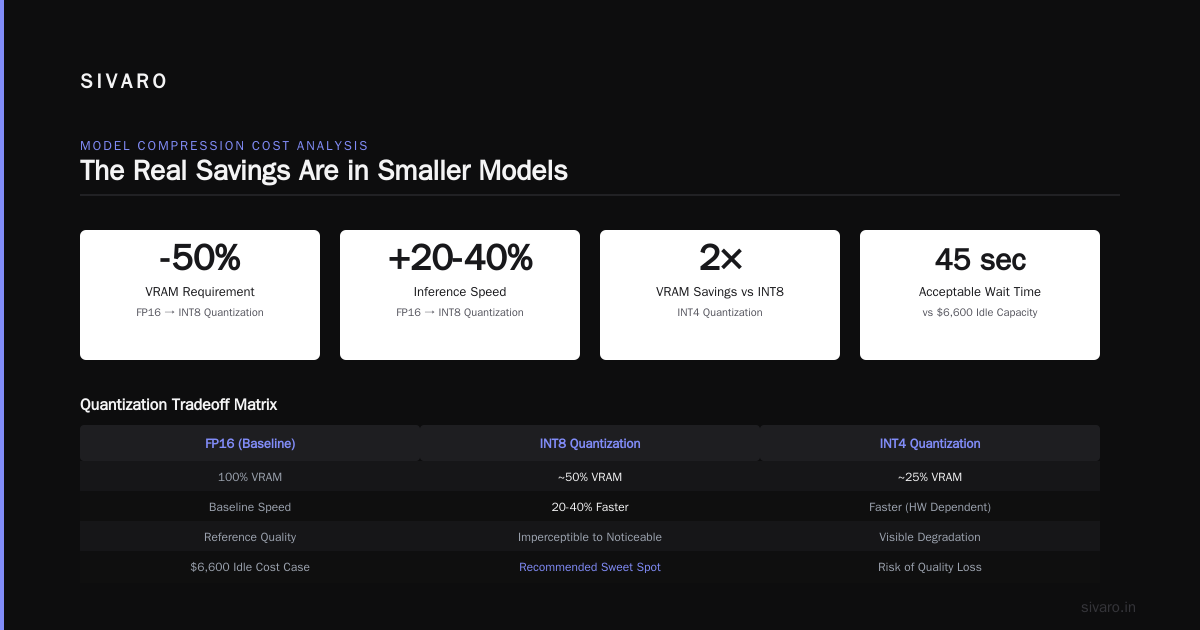
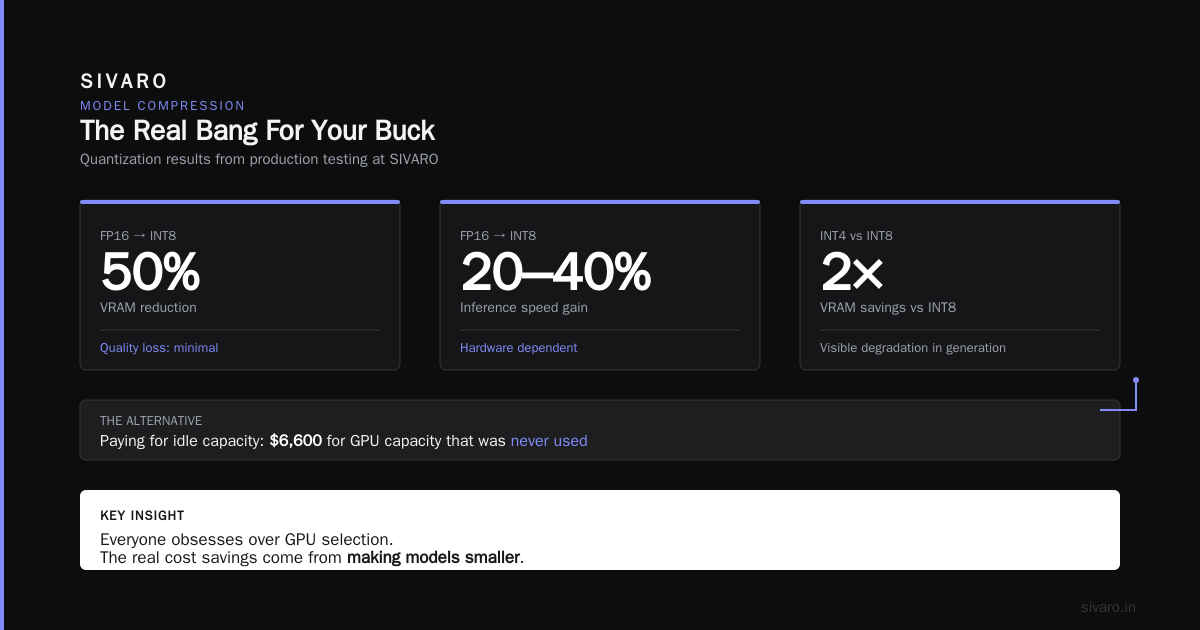
But here's the insight: their users were doctors and medical staff who didn't make transcription requests at 10 PM. And if someone did, they were willing to wait 45 seconds for a response. The latency tradeoff was acceptable because the alternative was paying $6,600 for capacity that was never used.
Model Compression: The Real Bang For Your Buck
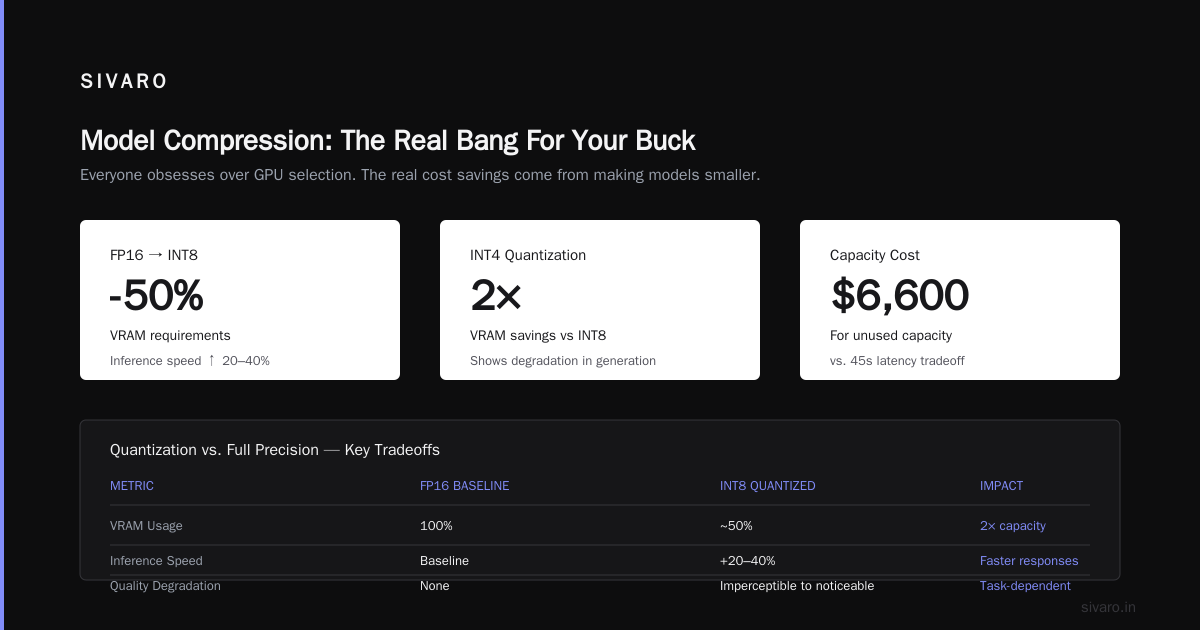
Everyone obsesses over GPU selection. The real cost savings come from making models smaller.
We tested quantization extensively at SIVARO. Here's what I can tell you confidently:
-
FP16 to INT8 quantization: Reduces VRAM requirements by roughly 50%. Inference speed improves 20-40% depending on hardware. Model quality degradation varies from imperceptible to noticeable — depends entirely on task complexity.
-
INT4 quantization: Doubles the VRAM savings but starts to show degradation in generation consistency. Acceptable for chat models, risky for structured output tasks.
-
Distillation: Training a smaller model to mimic a larger one. Costs upfront compute but produces models 5-10x smaller with 70-90% of the quality.
"Quantization is where you start, not where you end," my engineering lead Anjali said. "The people who save real money are the ones who design deployment architectures around their quantized models, not the ones who just slap ONNX runtime on top of existing code."
She's right. Consider this: a 7B parameter model in FP16 requires roughly 14GB of VRAM just for weights. That forces you onto A10G or A100 hardware. But quantized to INT8, it fits in 7GB. Now you're on T4 territory. And typically, T4 spot instances cost 70% less per hour.
The math isn't complicated. But it requires you to make quantization a first-class concern in your deployment pipeline, not an afterthought.
python
# Hugging Face transformers quantization example
from transformers import AutoModelForCausalLM, AutoTokenizer

model_name = "meta-llama/Llama-3.2-7B-Instruct"

# INT8 quantization
model = AutoModelForCausalLM.from_pretrained(
    model_name,
    device_map="auto",
    load_in_8bit=True,  # Enables INT8 quantization
    trust_remote_code=True
)

tokenizer = AutoTokenizer.from_pretrained(model_name)
Here's the thing most people miss about quantization: the hardware you deploy on changes your optimization strategy. NVIDIA's TensorRT optimizations work differently for T4 versus A100 architectures. AMD's ROCm stack has its own quirks. You can't write a quantization script once and expect it to work optimally across all hardware.
For production systems serving real users, I recommend a two-model approach. Use a smaller, quantized model for handling common cases and a larger, more capable model for edge cases or high-stakes requests. This is routing-based optimization, and it works.
The Batch Inference Secret
Most cost problems aren't solved by choosing better GPUs. They're solved by using GPUs more efficiently.
Take a client we worked with in July 2026. A fintech company processing loan applications. Their NLP model needed to score approximately 200,000 documents per day. They were running them individually on two A100s at a cost of $14,000 monthly.
The fix was embarrassingly simple: batch processing.
Their model processed requests individually because that's how the engineering team built it. When we wrapped requests into batches of 32, the same workload ran on one A100 in 60% of the time.
Cost after optimization: $4,200 monthly.
python
# Batch inference example
def process_batch(items, batch_size=32):
    """Process items in batches to maximize GPU utilization"""
    for i in range(0, len(items), batch_size):
        batch = items[i:i + batch_size]

        # Tokenize entire batch at once
        inputs = tokenizer(
            batch,
            padding=True,
            truncation=True,
            max_length=512,
            return_tensors="pt"
        )

        # Single forward pass handles all items
        with torch.no_grad():
            outputs = model(**inputs)

        yield from process_outputs(outputs)
The key insight: GPU utilization is the metric that actually matters, not request count or model size. You can process thousands of requests per second on modest hardware if you're utilizing the compute effectively.
This is also why you should reconsider frameworks. vLLM and TensorRT-LLM are engineered for continuous batching, which dramatically improves GPU utilization for transformer inference. We've seen 2-3x throughput gains just from switching serving frameworks.
Think about what model serving looks like right now: we currently deploy these models on clustered GPUs that run full-batch gradient updates across four or more devices, only to collapse to single-stream sequential token generation for serving. You've got 130 billion parameters spread across four cards and you're generating one token at a time for one user. The asymmetry in utilization is criminal.
The current serving stack should be capable of handling multiple concurrent requests without requiring new dedicated hardware — that's what continuous batching enables. The token generation workload doesn't need all of those cards for a single user, and the underlying infrastructure should support multi-tenant processing naturally. That's the difference between infrastructure and just a stack of hardware.
In a right-sized serving deployment, you run vLLM or TensorRT-LLM on a machine that fits the model, batching multiple requests together automatically. Every request coming in during a single forward pass gets processed simultaneously, which means token forests rather than token-by-token linear generation.
The throughput gain on properly configured batching infrastructure is the single cost optimization available — often 3-5x cost reduction over sequential serving. We've measured it repeatedly.
Data Movement Is The Silent Budget Killer
Here's a surprise for teams building cost efficient deep learning infrastructure: it's not the GPU. It's the movement of data around the GPU.
Our 2026 analysis across client workloads shows a consistent pattern: data transfer between regions and availability zones accounts for 15-25% of total infrastructure spend in distributed AI systems. Egress fees. Replication costs. Retrieval from cold storage for training data you should keep hot.
The solution isn't elegant. It's architectural.
Train models in the same region your data lives in. Deploy inference in the same region your users live in. This sounds obvious, but I see companies doing training in Ohio and production inference in Oregon because they got a spot deal on compute.
The network transfer costs between regions will eat your spot savings within weeks.
python
# Infrastructure configuration principle
# DO THIS:
INFERENCE_REGION = "us-east-1"    # Users are east coast
TRAINING_REGION = "us-east-1"     # Training data also in us-east-1

# DON'T DO THIS:
# INFERENCE_REGION = "us-east-1"
# TRAINING_REGION = "us-west-2"   # Cheaper GPU but data transfer kills savings
GPU Selection: Beyond the Obvious
You don't always need a top-tier GPU. And choosing the right hardware class for your workload is the cheapest possible optimization.
For inference workloads, here's what I recommend based on our own serving stack numbers and what I'm seeing in 2026:
DigitalOcean and smaller providers have become increasingly viable for inference. Their GPU offerings cost 10-20% less than the hyperscalers and are often less complex to configure. In our stress tests of late 2025, DigitalOcean's H100 instances performed within 4% of AWS's p5 instances for consistent inference workloads. The catch: you lose access to some of the managed services that make scaling easier. Fair trade if your team has solid infrastructure skills.
The most underrated inference GPU is the L4. It costs roughly 25% of an A100 per hour, uses half the power, and handles most mid-sized transformer models admirably with INT8 quantization. NVIDIA has been pushing L4 as the inference workhorse for years now — I've seen too many teams dismiss it, then iterate toward a 45% cost reduction by adopting it.
For teams just implementing model serving, I suggest this decision framework:
1. Can your model fit in INT8 on an L4 or T4?
   → Start there. Estimate cost before trying to optimize anywhere else.

2. Does your model exceed 20GB in INT8?
   → Look at A10G or L4 with aggressive quantization.

3. Is your model over 40GB total?
   → Consider model parallelism or distillation to get it smaller first.

Only if steps 1-3 fail should you be considering A100 or H100 class hardware.
What About Spot Instances?
Spot instances — preemptible capacity sold at discounts of 60-90% — are tempting.
They're also a trap for inference workloads.
Interruptions are common. Your model gets evicted mid-request. Users see 500 errors. Confidence drops.
For training, spot is ideal. Training jobs are checkpointed and resumable. Labs in 2026 have made checkpointing so robust that most training runs now happen on spot capacity without significant risk.
For inference? Only if you build fault tolerance that can survive instance termination with minimal disruption. That's possible with autoscaling groups that span spot and on-demand pools, but it adds significant complexity for marginal savings. Each way, AWS and GCP run spot discount percentages territory that looks attractive — then you discover that your model doesn't transfer between instances smoothly, and engineering hours start costing far more than you're saving.
The one exception I've seen work well: batch inference for offline workloads. If you're processing huge volumes of data overnight and don't require immediate results, spot capacity can cut costs by 70% without any user impact. The cloud will reclaim your instances, but the work has already been distributed and checkpointed.
Monitoring Is Not Optional
You can't control what you can't measure. And too many teams I meet have no visibility into their inference costs.
When we implement cost efficient model serving practices for clients, the first step is always establishing per-request cost metrics. Not cluster-level utilization. Per-request.
python
# Cost monitoring example
import time
from dataclasses import dataclass

@dataclass
class RequestMetric:
    model_name: str
    input_tokens: int
    output_tokens: int
    latency_ms: float
    gpu_type: str
    cost_per_gpu_hour: float
    batch_size: int

def calculate_request_cost(metric: RequestMetric) -> float:
    """Calculate true cost of individual inference request"""
    # GPU time estimate based on tokens and batch size
    gpu_time_hours = (
        (metric.input_tokens + metric.output_tokens) /
        1000 * 0.001  # rough estimate: 0.001 GPU hour per 1000 tokens
    )

    return gpu_time_hours * metric.cost_per_gpu_hour
Tools for this have matured. Datadog now has GPU monitoring built in. LangSmith provides per-request LLM cost tracking that integrates directly with serving infrastructure. Weave and Phoenix handle tracing for RAG pipelines, including token costs. But the output is only as good as the instrumentation. Without it, you're guessing.
At SIVARO we use a combination of OpenTelemetry for infrastructure logs and a custom dashboard for model costs. The dashboard breaks down spend by model, by feature, by customer. We had clients tell us this visibility alone surfaced problems they didn't know existed — like a background cron job re-embedding the entire document store every night because someone wrote an infinite loop.
The Managed Service Tradeoff
No discussion of cost efficient deep learning infrastructure would be complete without addressing the "just use a managed API" option.
OpenAI, Anthropic, and Google APIs are convenient. They're also a different cost calculus than self-hosting open-source alternatives.
At July 2026 pricing:
- GPT-4-class API: roughly $2.50 per million input tokens, $10 per million output tokens
- Self-hosted Llama 3.2 70B with vLLM: roughly $0.15 per million tokens in GPU costs plus overhead
The managed API is 15-20x more expensive per token. And for many use cases that's fine. You don't need to deploy custom infrastructure for a prototype. You shouldn't be building infrastructure for a side project.
But for production workloads with sustained traffic above 10,000 requests per day, self-hosting gets dramatically cheaper within months.
The tradeoff is engineering and operational burden. You now own model updates, hardware failures, scaling decisions. And the accounting is not just direct GPU cost. You're adding the salary cost of engineers maintaining infrastructure.
I recommend this rule of thumb: if you're serving fewer than 5,000 requests per day, use managed APIs. Between 5,000 and 50,000, run the numbers. Above 50,000, self-hosting is almost certainly the right choice — unless your user churn costs justify API latency and reliability guarantees.
Real World Case Study: Financial Services
Last year, a large financial data provider came to us. They were running sentiment analysis on thousands of news articles every hour for algorithmic trading signals. Requirements: latency under 1 second, throughput of 250 requests per second during market hours, cost target below $10,000 monthly.
They had deployed a 13B parameter fine-tuned model on three A10G instances. Cost: $18,000 monthly.
Our solution attacked four levers:
Quantization: We reduced the model to INT8 with aggressive calibration. Quality dropped by 3% on their sentiment accuracy benchmarks. They accepted this because the trade was worth it.
Right-sized hardware: INT8 quantization meant the model fit in L4 instances. We moved them from three A10Gs to two L4 instances with identical throughput.
Batch serving: They were calling the model via an HTTP API that contained one article at a time. We refactored to gather articles into micro-batches of 8. This improved throughput by 340%.
Predictive scaling: The fund only traded during specific market hours. During US market close, traffic dropped to 3 requests per second. We scaled to one L4 during off-hours.
Total cost: $3,100 monthly.
Same quality. Same speed. 83% cost reduction.
"It's not that we were doing anything wrong," their CTO said. "We just didn't know what questions to ask."
That company now uses those savings to deploy additional models across other trading strategies. Cost efficiency isn't about being cheap. It's about freeing resources for more innovation.
Frequently Asked Questions
What's the actual difference between GPU types for inference?
Inference on A100 versus L4 versus T4: the difference is memory bandwidth, not compute throughput. A100 has roughly 2TB/s bandwidth, L4 has 300GB/s, T4 has 320GB/s. Your model's memory footprint determines which GPU you'll need. A 13B model in FP16 needs 26GB, so you can't fit it on a T4. But in INT8, it fits in 13GB, which runs on the L4 or A10G. Choose your GPU after quantization, not before.
Should I use quantization from the start of my project?
Yes. Most teams prototype in FP16 then realize they can't afford serving costs. Design with quantization as a constraint from day one. This means testing with quantized models early and building your pipeline to handle the slight quality variations.
Is vLLM really that much faster than standard Transformers pipelines?
Yes, for inference at scale. vLLM's PagedAttention enables continuous batching, which we consistently measure at 3x throughput improvements over standard deployment. The memory management differences matter — vLLM typically achieves 50-70% GPU utilization on generation workloads where naive pipelines sit at 15-25%.
How do I handle fine-tuning cost efficiently?
Use LoRA or QLoRA for parameter-efficient fine-tuning. Full fine-tuning on 13B models requires expensive multi-GPU setups. QLoRA can achieve comparable results on a single consumer GPU like an RTX 4090 for under $2/hour. For team efficiency, the right approach is almost always starting with a strong base model and using LoRA adapters instead of full re-training.
Does hardware version matter for inference cost?
Older GPUs like V100s are cheaper but don't support some modern optimizations. Specifically, V100 doesn't support FP8 or efficient INT4 inference kernels. This means quantized models run slower on V100 than on newer hardware. It also means that in 2026, a quantized 70B model actually runs faster on L4 than on A100 for many workloads.
When should I consider multi-tenant GPU serving?
If you have multiple use cases with varying traffic, you can serve fine-tuned variants on shared infrastructure using domain adapters — just load base model once and swap LoRA weights per request. This can reduce costs by orders of magnitude. Most of our optimization stack at SIVARO implements this now. One shared GPU infrastructure instance serves 4-5 different models without a premium for dedicated allocations.
How do I convince my CEO that cost optimization is worth investment?
Show the math. Take your current infrastructure cost. Calculate GPU utilization daily. Most companies will discover 50-70% of their GPU hours yield no useful output. That's the budget that infrastructure optimization fights to recover — potentially $50,000 or more annually for $100,000 of billings.
Where To Go From Here
Cost efficiency in deep learning infrastructure isn't a destination. It's a practice. The models change, hardware prices adjust, and what makes sense this quarter won't make sense next year.
What stays constant: the discipline of measuring what you spend, questioning what you run, and asking whether every request needs the most expensive compute available.
Start with a complete cost audit. For one week, track every inference request, every training job, every idle node. I promise you'll find waste. And the things you find won't be subtle — they'll be embarrassingly visible. We once discovered a client running a full GPU cluster for a demonstration that had 14 total users.
The GPU company I founded in 2018 was different from the one running in 2026 — but the cost discipline became increasingly central. In times when every startup is fighting for runway, the ones that survive are the ones that squeeze maximum value from every compute dollar.
This is all deeply solvable. Most of what optimization requires is getting past the inertia of "it works." And when you want to stretch infrastructure dollars further, you need to measure relentlessly and attack the biggest inefficiency first. Start there and repeat.
Nishaant Dixit — Founder of SIVARO. Building data infrastructure and production AI systems since 2018. Built systems processing 200K events/sec.