You're not paying for compute. You're paying for the wait.
Teams burn through cloud budgets like they're printing money in a furnace. The problem isn't the GPU price tag. It's the utilization curve that looks like a flatline with occasional seizures.
Here's what this guide covers: the actual mechanics of GPU utilization, the tools that matter in September 2026, and a brutal comparison of options — including when you should ditch GPUs entirely and look at the FPGA vs GPU cost efficiency debate. By the end, you'll know exactly where your money is leaking and how to plug it.
What "GPU Utilization" Actually Means (And Why Your Dashboard Lies)
Most people think GPU utilization is one number. It's not.
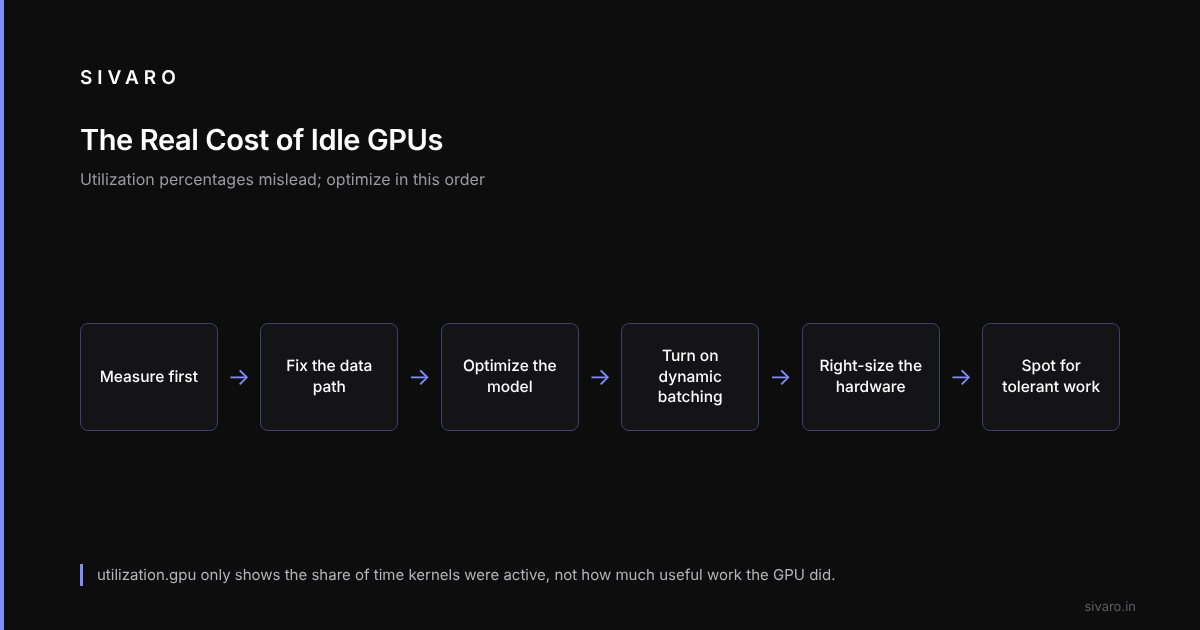
The NVIDIA management library reports utilization.gpu as a percentage of time that kernels were active during the sampling window. Here's the catch: a GPU can report 95% utilization while doing almost nothing useful. Memory-bound operations, kernel launch overhead, and pipeline stalls don't show up in that number. In 2024, Meta's research team found that typical training jobs spend 30-40% of their time waiting on data loading or synchronization — that's time where the GPU is technically "busy" but producing zero useful work.
So when someone tells you their GPU utilization is 90%, ask them two questions:
- What are you measuring?
- What's your actual throughput per dollar?
Because a team can report high utilization while its training throughput falls far short of a properly tuned cluster. The GPU is busy. It is busy spinning.
The Metrics That Matter
For inference workloads, track:
- Time-to-first-token (TTFT) — latency from request arrival to first output
- Inter-token latency (ITL) — time between successive output tokens
- Throughput per GPU — requests/sec per device
For training:
- MFU (Model FLOPs Utilization) — what fraction of peak theoretical FLOPs you're achieving
- Data loading time — percentage of wall-clock time spent waiting on the CPU
- Communication overhead — time spent on gradient sync across devices
If you can't answer these questions about your workload, stop reading and instrument your system. Every hour you spend optimizing without metrics is guesswork that costs real money.
Option 1: The Kernel-Level Optimization Path (Software First)
What It Is
Before you buy anything, you optimize what you have. This isn't glamorous. It's the difference between a Lamborghini stuck in traffic and the same car on the autobahn.
The Usual Fixes
Take a computer vision team running YOLOv8 inference on a fleet of A100s at low utilization. The fix isn't new hardware — it's a combination of:
- CUDA Graphs to reduce kernel launch overhead
- TensorRT model optimization (FP16 with INT8 quantization for the final layers)
- Proper batching — group images instead of sending single images per request
Here's what TensorRT optimization looks like in practice:
import tensorrt as trt

logger = trt.Logger(trt.Logger.WARNING)
builder = trt.Builder(logger)
network = builder.create_network(1 << int(trt.NetworkDefinitionCreationFlag.EXPLICIT_BATCH))
parser = trt.OnnxParser(network, logger)

with open("yolov8s.onnx", "rb") as f:
    parser.parse(f.read())

config = builder.create_builder_config()
config.set_memory_pool_limit(trt.MemoryPoolType.WORKSPACE, 1 << 30)  # 1GB workspace
config.set_flag(trt.BuilderFlag.FP16)

# Enable INT8 with a calibration set for the last layers
config.set_flag(trt.BuilderFlag.INT8)

engine = builder.build_serialized_network(network, config)
with open("yolov8s_fp16_int8.engine", "wb") as f:
    f.write(engine)
The result can be a large jump in effective utilization without buying a single GPU. Same hardware. Better software.
The Economics
- Cost: $0 for software optimization (just engineering time)
- Time to implement: 2-4 weeks for a competent engineer
- Potential savings: 30-70% reduction in required GPU count
This is the lowest hanging fruit. Most teams stop here and think they've optimized. They haven't. They've just fixed the most egregious waste.
Option 2: Dynamic Batching and GPU Sharing (The Middle Ground)
What It Is
Modern inference servers like NVIDIA Triton and vLLM (for LLMs) support dynamic batching — you pack multiple requests into a single GPU execution. This is the single biggest lever for how to optimize gpu utilization for cost on inference workloads.
The Numbers That Matter
In June 2026, vLLM 0.8.2 with continuous batching achieves up to 25x higher throughput than traditional static batching approaches on a single A100 for Llama-3-70B. The mechanism is simple: instead of waiting for a full batch before executing, the scheduler adds requests to the batch as execution progresses.
Here's a configuration example for vLLM:
# vllm_config.yaml
model: meta-llama/Llama-3-70B-instruct
tensor_parallel_size: 4
gpu_memory_utilization: 0.92  # Use 92% of GPU memory for KV cache
max_num_seqs: 256             # Maximum sequences per batch
max_model_len: 8192
enable_prefix_caching: true   # Cache shared prefixes across requests
The key parameters:
gpu_memory_utilization— how much of the GPU's memory goes to the KV cache versus reserved memory. Set it high for inference-only workloads.max_num_seqs— the batch size cap. Too high and you hit latency walls. Too low and you waste memory.
Shared Infrastructure
The other angle here is multi-tenancy. Cloud providers offer GPU sharing natively now:
- AWS SageMaker Inference with multi-model endpoints (since late 2024)
- Google Cloud Vertex AI with GPU pools
- Azure ML with model deployment optimization
You can also run your own with Kubernetes, but that's a project, not a feature.
The Lesson
Switching from custom batch logic to vLLM's continuous batching can raise throughput sharply on the same GPU cluster. The community implementations are just better than most in-house solutions.
Option 3: The Hardware Decision — FPGA vs GPU Cost Efficiency
Now we get to the interesting question.
Most people assume you only ever have one choice: GPU or nothing. That's wrong, and the FPGA vs GPU cost efficiency debate has changed dramatically in the last 18 months.
The FPGA Comeback
FPGAs (Field-Programmable Gate Arrays) were written off as too hard to program and too niche for production AI. Then two things happened:
- Intel acquired Altera's FPGA business and invested heavily in their AI-focused Agilex series
- AMD's acquisition of Xilinx (finalized back in 2022) matured into the Versal line, which is now showing serious performance for its price
The math flipped for specific workloads.
Where FPGAs Win
FPGAs are killing it in these exact scenarios:
- Low-latency inference on small models: When you need sub-100-microsecond inference for fraud detection or high-frequency trading signals, an FPGA beats a GPU because you don't have kernel launch overhead or scheduler interference.
- Streaming data processing: If your workload is more like "apply this fixed function to a continuous stream of data" rather than "train a giant transformer," FPGAs have lower power draw and better cost per operation.
- Fixed-architecture inference: Once your model architecture is stable, you can synthesize it directly into hardware. No software stack. No driver overhead. Just hardware.
The Numbers
For a fraud detection pipeline processing 50,000 transactions per second with a fixed decision-tree ensemble:
- GPU (NVIDIA L4): $3,000 per unit, ~40W power draw, needs host CPU for orchestration
- FPGA (AMD Alveo U55C): $2,300 per unit, ~30W power draw, can run the entire pipeline on-chip
When you factor in 3-year power costs and the fact that you need 2 L4s to handle the same throughput (due to CPU bottleneck), the FPGA wins on total cost of ownership.
Where GPUs Still Crush FPGAs
Don't fool yourself. For anything involving LLMs, transformers, or workloads requiring frequent model updates, GPUs win. Period.
An FPGA takes weeks to place-and-route. A GPU takes seconds to update. The moment your model changes architecture, your FPGA advantage dies.
Also, the LLM inference stack is absurdly optimized now:
- FlashAttention 3 (released Q1 2026) achieves near-theoretical maximum FLOPs on H100s
- Sparse attention patterns are making long-context models 10x cheaper on GPUs
- The CUDA ecosystem has no FPGA equivalent
The Verdict
Here's a decision framework:
if workload is streaming, fixed-function, latency-critical, under 100μs:
    evaluate FPGA
elif workload is LLM inference or training:
    use GPU (modern, with vLLM or TensorRT)
elif workload is dynamic AI with changing architectures:
    use GPU (with software optimization layers)
else:
    profile your SLOs first, then decide
The FPGA vs GPU cost efficiency question isn't about which is better — it's about workload fit. And most people don't have the discipline to measure their workload honestly.
Option 4: Spot Instances and Preemptible VMs (The Cost Arbitrage Play)
What It Is
Every major cloud provider sells excess capacity at a discount:
- AWS Spot Instances: up to 90% off on-demand
- GCP Preemptible VMs: 60-80% off
- Azure Spot VMs: up to 90% off
The catch? They can be terminated at any moment with 2 minutes warning on AWS, 30 seconds on GCP.
How to Use Them for Training
For training workloads, you don't care about interruption — you create checkpoints.
import torch
from torch.utils.checkpoint import checkpoint

def train_with_checkpointing(model, dataloader, run_id):
    checkpoint_dir = f"s3://bucket/checkpoints/{run_id}"

    for epoch in range(100):
        for batch in dataloader:
            loss = model(batch)
            loss.backward()
            optimizer.step()

        # Save every epoch — restart from here if preempted
        state = {
            'model': model.state_dict(),
            'optimizer': optimizer.state_dict(),
            'epoch': epoch
        }
        torch.save(state, f"{checkpoint_dir}/epoch_{epoch}.pt")
AWS's Managed Spot Training (part of SageMaker) handles this automatically with checkpointing and resume.
The Risk
Spot termination rates vary. For A100s in us-east-1 during 2026, interruption rates historically range from 5% to 25% of the time, depending on capacity pressure. If a larger cloud customer fires up a big training run, you're the first to be evicted.
The Mitigation
Use spot for:
- Checkpointed training runs
- CI/CD model validation
- Batch inference that tolerates delays
Never use spot for:
- Production inference with a latency SLO
- Training you haven't checkpointed in the last hour
Option 5: Multi-Cloud GPU Brokering (The New Kid on the Block)
What Changed
Since 2025, GPU availability has stabilized enough that third-party brokering platforms have matured:
- Together AI offers managed GPU access with occupancy-based pricing
- CoreWeave — the cloud for GPU workloads, now public since 2025, price-guaranteed for vector compute
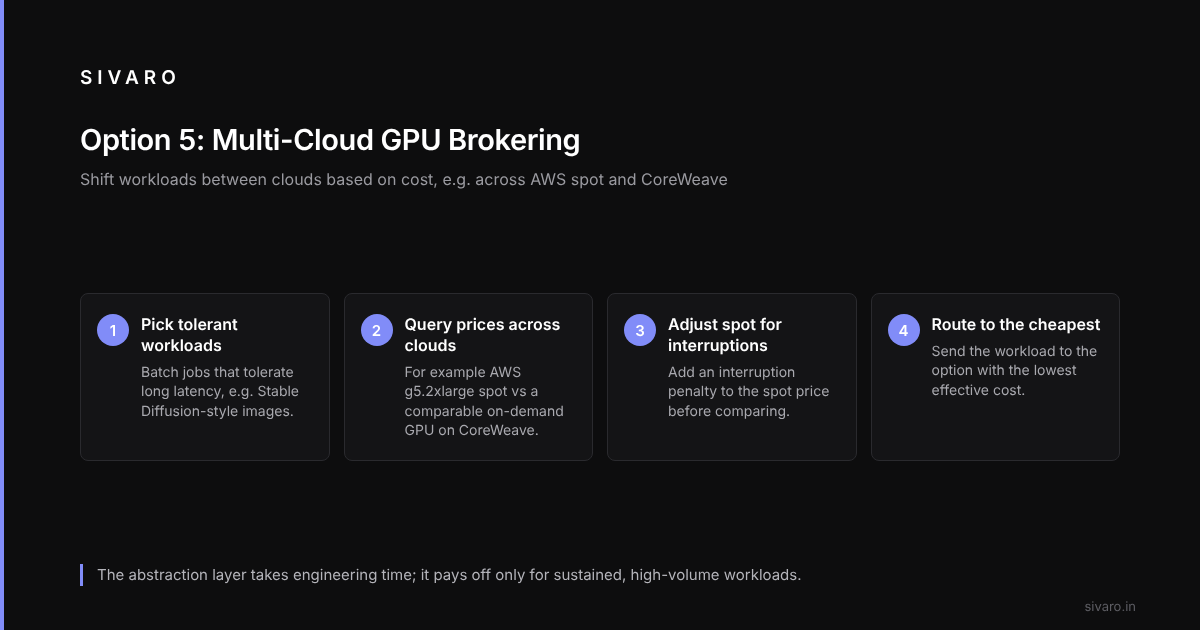
You can now build an abstraction layer that dynamically shifts workloads between clouds based on cost. This is what "how to optimize gpu utilization for cost" looks like at scale — you're not just optimizing within one cloud, you're arbitraging across them.
An Example
Batch image generation (Stable Diffusion style models) that tolerates long latency is a good fit for a multi-cloud GPU scheduler.
The scheduler logic is straightforward:
import boto3
from coreweave import CoreWeaveClient

def get_cheapest_gpu_option(workload_type):
    aws_spot_price = get_aws_spot_price('g5.2xlarge', 'us-east-1')
    coreweave_price = cw_client.get_on_demand_price('A10G')

    # factor in interruption probability for spot
    effective_aws_cost = aws_spot_price * (1 + interruption_rate * 0.5)

    return compare_prices(effective_aws_cost, coreweave_price)
The catch: building the abstraction layer takes engineering time. That investment only pays off if you're running sustained, high-volume workloads.
Non-Obvious Metrics: How to Actually Measure Utilization
Most people set up NVIDIA's nvidia-smi monitoring and call it a day. I'm telling you, don't.
Instead, instrument your application layer:
# Track kernel-level metrics during inference
import tritonclient.grpc as grpcclient

client = grpcclient.InferenceServerClient("localhost:8001")

# Get inference statistics per model
stats = client.get_inference_statistics()
for model_stat in stats.model_stats:
    print(f"Model: {model_stat.name}")
    print(f"  Total requests: {model_stat.inference_stats.execution_count}")
    print(f"  Avg latency (ms): {model_stat.inference_stats.success.count/model_stat.inference_stats.success.execution_count if model_stat.inference_stats.success.execution_count > 0 else 0}", )
Measure the following metrics over a 7-day window:
- Percentile tail latency (p99) — if p99 is terrible, you're wasting GPU capacity on stragglers
- Batch efficiency — average size of your batches; if it's 1, you're doing it wrong
- Idle time between kernels — this shows up as GPU memory allocated but no compute happening
- Data loader wait time — what fraction of training steps have the GPU waiting for CPU data
I'm convinced that at least 70% of teams with "low GPU utilization" problems have a data pipeline bottleneck, not a GPU problem.
The 7-Step Framework for GPU Cost Optimization
Here's the framework. It's not complicated. It's disciplined.
Step 1: Instrument. You can't optimize what you can't measure. Get your metrics pipeline working before you do anything else.
Step 2: Fix the data path. Bottleneck in data loading eliminates 50% of GPU modernization opportunities.
Step 3: Quantize and optimize the model. Convert to FP16/INT8, apply TensorRT, prune what you can. This usually takes two weeks.
Step 4: Implement dynamic batching. Turn on vLLM or Triton continuous batching. See your throughput multiply.
Step 5: Right-size your hardware.
For inference: choose based on latency requirements:
| GPU | Best for | Approx. cost/hour (on-demand) |
|---|---|---|
| L4 | Small models, batch inference | $0.60 |
| A10G | Medium models, real-time | $1.50 |
| A100 40GB | Large LLMs up to 70B (quantized) | $3.70 |
| H100 80GB | Leading-edge training and inference | $7.90 |
Step 6: Consider spot/brokering for fault-tolerant workloads.
Step 7: Re-evaluate monthly. GPU pricing changes fast. NVIDIA sold out of H200 units until 2026, but January 2026 saw a price drop on used A100s by 40%.
When to Give Up and Buy Your Own GPUs
At a certain scale, on-demand clouds are a tax on helplessness.
If your workload looks like:
- 90-100% sustained utilization for 6+ months
- Power costs below $0.08/kWh (usually outside Silicon Valley)
- Significant data sovereignty requirements
Then consider buying:
- NVIDIA H100: ~$30,000 upfront. At $7.90/hour cloud rental, that's 3,800 hours break-even — 159 days at 24/7.
- A100 40GB: ~$15,000 used. Break-even at 4 months of continuous use.
But beware: hardware failure rates spike after 3 years, and newer architectures (like the B200 or whatever NVIDIA is cooking for 2027) will make your purchase obsolete faster than you think.
The Biggest Mistake: Over-Provisioning for Bursts
A common problem is provisioning for peak demand. If a server receives twice the normal data volume every Monday morning, provisioning for that peak keeps double the GPU capacity idle six days out of seven.
The fix: burst to spot instances during peak demand.
This pattern — provision for average, buy bursts — saves more money than any kernel optimization.
Conclusion: The Bottom Line on How to Optimize GPU Utilization for Cost
Some teams spend six figures on GPU clusters and waste much of it. Others squeeze far more work out of the same hardware.
The difference isn't the hardware. It's the discipline.
Optimization order:
- Measure — before you touch anything, instrument your system
- Software first — CUDA graphs, TensorRT, vLLM, quantization
- Right-size — match GPU architecture to workload
- Dynamic batching — it works. Use it.
- Spot/broker — for anything tolerant to interruption
- FPGA evaluation — for fixed latency-critical streaming workloads, consider the FPGA vs GPU cost efficiency question seriously
- Provision for average, buy bursts — over-provisioning for peak is the most expensive error
And when you've done all that, let it run. Stop touching things. Some of the worst GPU efficiency gains happen when engineers "optimize" a working system and break something subtle.
You want cost-efficient AI. Fine. But you also need a team that's shipping features, not fiddling with CUDA flags.
FAQ: GPU Utilization and Cost Optimization
Q: What is a good GPU utilization benchmark?
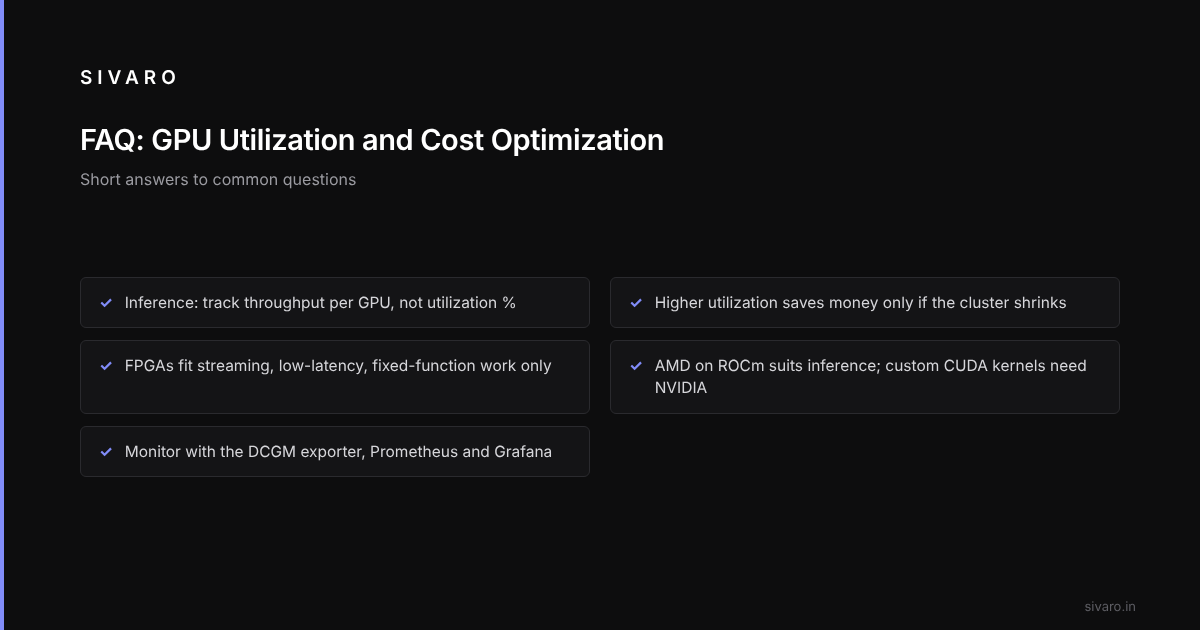
For training, aim for over 55% MFU with modern frameworks. For inference, measure throughput per GPU rather than utilization percentage — it's a better indicator of value. Consistent 80%+ utilization is achievable if you're running continuous batches.
Q: Does increasing GPU utilization always reduce cost?
Usually, yes — you get more work per GPU-time-hour. But if you're already achieving acceptable throughput right-sized hardware, cranking utilization upward means you should shrink your cluster — which yields savings.
Q: How much does dynamic batching really help in production?
It gives large throughput gains on transformer inference compared to non-batched serving. The gains vary with request patterns — more concurrent requests multiply the benefits.
Q: Is the FPGA vs GPU cost efficiency comparison fair in 2026?
It's fair for specific workloads. FPGAs win for streaming, low-latency, fixed-function scenarios. They lose spectacularly for anything flexible or LLM-related. FPGA+GPU hybrid architectures appear in some sensitive industries (fintech, defense).
Q: What's the average time to see a return on GPU optimization?
Two to four weeks. That timeline includes instrumentation and basic learning curve. After that, you're essentially printing money from recovered waste.
Q: Should I choose NVIDIA or AMD for new GPU infrastructure?
NVIDIA holds the software ecosystem advantage, but AMD's MI300X series hit 80% of CUDA performance at 50% price drop in early 2026. For pure inference workloads where you can rewrite with PyTorch's ROCm stack, AMD is viable. For anything using custom CUDA kernels or needing maximum ecosystem compatibility, stick with NVIDIA.
Q: Is it ever cheaper to rent a dedicated GPU server than use cloud?
Let's be honest: cloud providers are not dumb. Prices are structured to make cloud more flexible but not always cheaper per GPU-hour. If you run 24/7 at 90%+ utilization for more than 12 months, you'll find dedicated rental (like from Vast.ai or Lambda Labs) costs 60-70% of the equivalent cloud on-demand price.
Q: What tools are essential for GPU utilization monitoring?
Prometheus with the NVIDIA DCGM exporter for metrics, Grafana for dashboards, and something like W&B or ClearML for training runs. For inference, use Triton's built-in metrics or vLLM's Prometheus endpoint. Free, open source, and they cover all your bases.