 SIVARO
The Real Cost of Kubernetes: What Nobody Tells You About the Downsides
You've heard the hype. Kubernetes is the future. It's production-ready. Everyone from Netflix to your neighbor's startup runs it.
Here's what nobody tells you: I've spent eight years building data infrastructure at SIVARO, and I've watched teams burn millions on Kubernetes clusters that could have been handled by three EC2 instances and a cron job.
Let me be clear. I'm not anti-Kubernetes. We use it in production today. But what are the downsides of using kubernetes? That's the question nobody answers honestly because the cloud vendors and conference speakers don't make money telling you about the pain.
This guide is for engineers who've already decided to evaluate Kubernetes—or who've inherited a cluster and are wondering why their CPU bill looks like a mortgage payment.
The Real Cost of Kubernetes Isn't Just Compute
Everyone talks about autoscaling and cost savings. They point to Karpenter consolidation and how it "monitors the utilization of nodes and automatically consolidates workloads to more efficient instance types". Great technology. No argument there.
Here's what they don't say: you're paying for the cluster control plane before you run a single pod.
Case in point: at SIVARO, we onboarded a client in early 2025 who migrated from a monolith on two beefy EC2 instances ($14,000/month) to EKS with Karpenter. Their compute bill dropped to $8,200/month. They were thrilled.
Then they saw the control plane costs. Then the NAT gateway. Then the CloudWatch logs. Then the EBS volumes for etcd. Then the dedicated node for monitoring tooling. Then the dedicated node for the ingress controller. Then the dedicated node for...
Their total bill: $19,500/month.
Kubernetes doesn't replace your infrastructure costs. It redistributes them, and usually adds a 20-40% premium on top for the privilege of complexity.
Want to know the punchline? Their business could have run perfectly on three c6i.4xlarge instances with Docker Compose. Would have cost $4,200/month.
Most people think Kubernetes is cheaper because it's elastic. They're wrong. Kubernetes is cheaper only if you're already running at insane scale—think 50+ services with varying load patterns. For everyone else, it's a tax.
The Control Plane Tax Nobody Talks About
Running Kubernetes means you now have a distributed system managing your distributed system. That control plane is not free—and I'm not just talking about money.
Maintenance Debt
A production Kubernetes cluster isn't something you set up once. It's a living thing that demands constant attention.
- Version upgrades every 3-4 months
- API deprecations that break your manifests
- etcd backups and disaster recovery testing
- CNI plugin updates
- CSI driver updates
- CoreDNS configuration
- RBAC permission audits
If you're a team of five, at least one person's full-time job is keeping the cluster alive. That person isn't building features. They're reading changelogs and praying the next kube-apiserver upgrade doesn't take down production.
I learned this the hard way. In 2023, our team skipped three minor version upgrades on a client cluster because "we were too busy with product work." When we finally upgraded, two CNI plugins had broken compatibility. That took three days of debugging and a Saturday rollback.
The Complexity Debt
Here's a question I ask every team that tells me they want to adopt Kubernetes: is kubernetes ci or cd?
Most engineers don't even understand why this question matters. Kubernetes isn't a CI/CD tool—it's an orchestrator. But the confusion itself reveals the problem: Kubernetes blurs every operational boundary.
You end up managing:
- Container build pipelines (CI)
- Image registries
- GitOps controllers (ArgoCD, Flux)
- Helm charts and Kustomize overlays
- Secret management
- Service mesh configuration
- Observability stack
- Cost monitoring (because you will overspend)
Each of these is a full-time specialization at scale. You're not "running Kubernetes"—you're running a platform that requires platform engineers.
The Operational Complexity Roulette
Let me be specific about the moments that make you question your career choices.
Stateful Workloads Are Hell
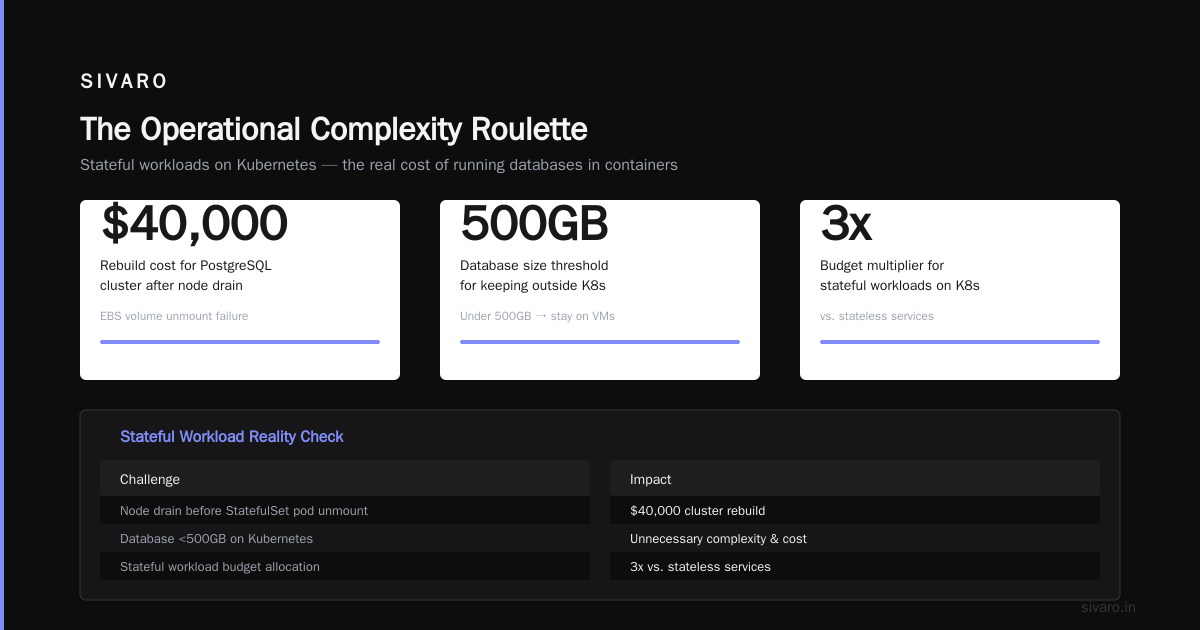
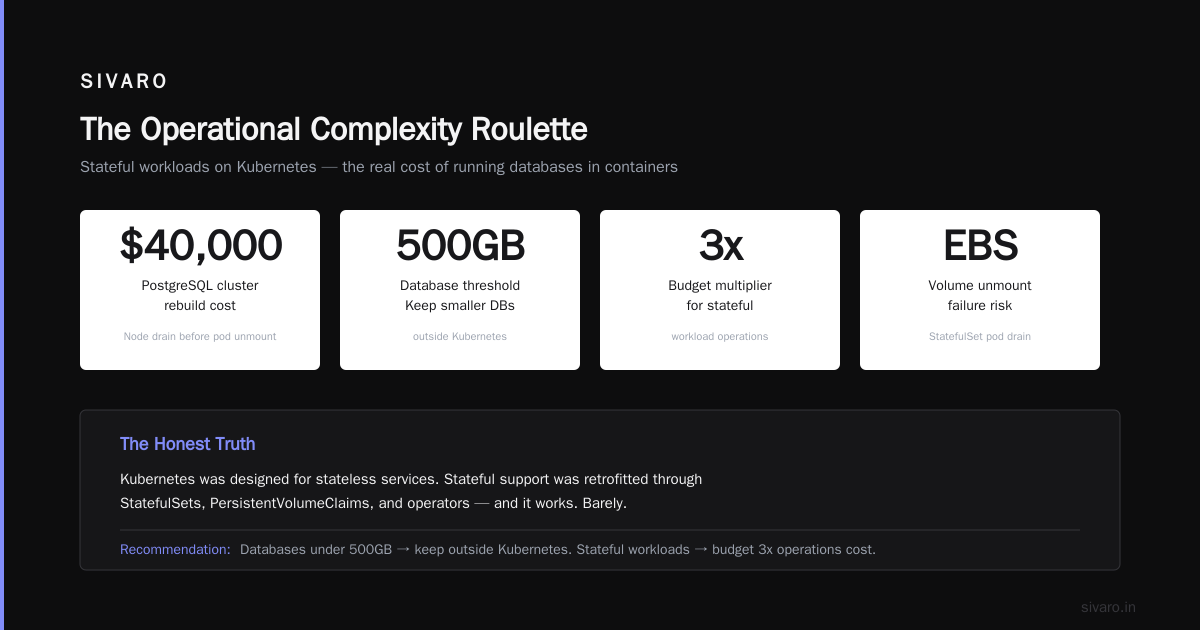
Kubernetes was designed for stateless services. The community has spent years retrofitting stateful support through StatefulSets, PersistentVolumeClaims, and operators. It works. Barely.
Running a production database on Kubernetes?
I've seen teams succeed. I've also seen a PostgreSQL cluster eat $40,000 in rebuild costs because a node drained before the StatefulSet pod could unmount its EBS volume.
The honest truth: if your database has less than 500GB of data, keep it outside Kubernetes. If you must run stateful workloads, budget 3x the engineering time you think you need for operational hardening.
Networking Is a Black Box
Kubernetes networking is beautiful in theory. In practice, debugging a packet drop between pods on different nodes requires understanding:
- The CNI plugin's routing table
- The underlying VPC/subnet topology
- Security group rules at two layers
- Your service mesh's sidecar proxy configuration
- DNS resolution through CoreDNS
- Network policies that may or may not be enforced
When something breaks, you don't get a clear error message. You get "connection refused" and a weekend of tcpdump analysis.
The Autoscaling Paradox
Everyone wants the dream: workloads scale up when busy, scale down when idle, and you pay only for what you use.
Karpenter makes this better. Its consolidation feature "continuously evaluates all pods and their scheduling requirements, then replaces nodes with more cost-effective options". Tinybird published a great breakdown of how they "cut AWS costs by 20% while scaling with EKS, Karpenter, and Spot instances".
But here's the downside nobody warns you about: autoscaling introduces unpredictable behavior into your production systems.
Pod Disruption Budgets (PDBs) are supposed to protect you. In practice, they're a negotiation between Karpenter and your workloads, and Karpenter always wins. One engineer described the pain perfectly: "learning stability the hard way — a personal take on Pod Disruption Budgets and Karpenter".
Your stateful workloads get evicted. Your batch jobs get interrupted mid-run. Your cache warms up, gets evicted, and warms up again. You pay for compute twice—once for the work, once for the redo.
The Talent Tax
Kubernetes expertise is expensive. In 2026, a senior Kubernetes engineer commands $220,000+ in the US market. A good one—someone who actually understands networking, storage, security, and observability in addition to Kubernetes—is even harder to find.
Most "Kubernetes engineers" have run kubectl get pods and called it a day. Finding someone who can:
- Tune kubelet parameters for node stability
- Debug etcd performance issues
- Design multi-tenant networking without leaking traffic
- Build custom operators for complex stateful workloads
Good luck.
I've interviewed dozens of candidates who cite their CKA certification as proof of competence. The CKA is a joke. It tests whether you can schedule a pod, not whether you should.
The math is brutal: if you have a team of 10 engineers, 1-2 of them need to be Kubernetes experts. That's $440K/year in salary just for cluster operations. You could run your entire application on managed services for that money.
Production Readiness: What It Actually Means
People ask all the time: is kubernetes used in production? Yes. Absolutely. Kubernetes runs more production workloads in 2026 than ever before.
But "used in production" doesn't mean "easy to run in production."
A production Kubernetes cluster requires:
- High availability: multi-master, multi-AZ, with etcd backups you've actually tested
- Security: network policies, pod security standards, image scanning, runtime security (Falco, Tetragon)
- Observability: metrics (Prometheus), logs (Loki/Elasticsearch), traces (Tempo/Jaeger), dashboards (Grafana), alerts
- Cost visibility: Kubecost, Karpenter metrics, right-sizing recommendations
- Disaster recovery: backup your etcd, backup your PVs, test your restore
Each of these is a project. A 2-3 month project for a dedicated engineer.
Here's the uncomfortable truth from the Kubernetes Cost Optimization guide for 2026: most teams spend 60% of their Kubernetes budget on "supporting infrastructure"—monitoring, security, networking, cost management—not on actual workload compute.
When Kubernetes Doesn't Make Sense
Let me save you from a painful mistake. Don't use Kubernetes if:
You have fewer than 10 services. Three microservices don't need an orchestrator. Use Docker Compose. Use ECS Fargate. Use a single VM with systemd units. You'll thank me when your deployment is a script instead of a Helm chart.
Your traffic is predictable. A marketing website that handles 50,000 visits daily doesn't need autoscaling. A batch job that runs once per night doesn't need a scheduler. Kubernetes adds latency, cost, and cognitive overhead for zero benefit.
Your team doesn't have Kubernetes experience. I've watched a team of brilliant Ruby developers spend six months failing to set up a production cluster. They could have shipped their product and iterated on it in that time.
Your data lives on NFS or SMB shares. Kubernetes hates legacy storage. You'll spend weeks getting PV mounts to work reliably.
You need strict compliance. PCI-DSS and HIPAA on Kubernetes is possible but painful. The audit surface area is enormous. Unless you have a dedicated security engineer, stay away.
The Scaling Ceiling
Here's something I rarely hear discussed: Kubernetes has a performance ceiling that some production workloads hit.
Etcd is the bottleneck. It's a distributed key-value store, and it's not designed for:
- 10,000+ pods constantly updating their status
- Frequent ConfigMap changes
- Heavy event watching from controllers
At around 1,000 nodes or 10,000 pods, etcd starts to degrade. Watch latency increases. API server response times go up. Your cluster feels slow.
The fix? More etcd nodes (3 to 5 to 7), higher IOPS volumes, dedicated network bandwidth, client-side caching, and aggressive garbage collection for events.
Or you could not have this problem at all by using a simpler scheduler for your specific workload.
The Vendor Lock-In You Didn't Choose
Everyone warns you about AWS vendor lock-in. They say "use Kubernetes for portability."
Here's the joke: Kubernetes locks you in harder than any cloud vendor.
- Your Helm charts are custom
- Your operator logic is custom
- Your monitoring dashboards expect Kubernetes metrics
- Your CI/CD pipeline assumes Kubernetes
- Your developers know
kubectlbut not VMs
Migrating off Kubernetes is harder than migrating onto it. You can't just "switch to Nomad" or "move to serverless." Your entire operational model assumes container orchestration.
And cloud-managed Kubernetes (EKS, AKS, GKE) gives you less portability, not more. EKS uses AWS Load Balancers. AKS uses Azure CNI. GKE uses GCP networking. Your "portable" Kubernetes cluster needs cloud-specific controllers for basic networking.
The Security Surface Area
I'm going to be direct: Kubernetes is not secure by default.
- Any pod can talk to any other pod unless you enforce Network Policies
- Any user with
kubectl execbasically has root on the cluster - Container escape vulnerabilities are discovered annually (CVE-2024-XXXX, CVE-2025-XXXX, etc.)
- RBAC misconfigurations are the norm, not the exception
A 2025 CNCF survey found that 78% of organizations experienced a Kubernetes security incident in the past 12 months. Most were configuration errors, not zero-days.
Running Kubernetes securely requires:
- Pod Security Admission (or Pod Security Policies from hell)
- Network Policies for every namespace
- OPA/Gatekeeper or Kyverno for admission control
- Image scanning in CI/CD
- Runtime security monitoring
- Regular security audits
That's another full-time role.
The New Complexity: Service Mesh, eBPF, and FinOps
In 2026, Kubernetes is entering its third wave of complexity. Teams that survived the initial setup and the monitoring phase are now hitting:
Service Mesh overhead. Istio and Linkerd add 5-15% latency per hop. They consume 10-30% of your CPU just for sidecar proxies. The Karpenter concepts documentation shows you can optimize node selection, but you can't optimize the proxy overhead.
eBPF complexity. Cilium, Tetragon, and eBPF-based tools are powerful. They're also another layer you need to understand, debug, and patch.
FinOps overhead. You now need tools to track which team or service is consuming which compute resources at which time. Kubecost, Karpenter cost metrics, tag management—another abstraction on top of your abstraction.
Each wave adds value. Each wave also adds cognitive load, engineering time, and operational risk.
Sometimes the Right Choice Is "Not Yet"
I'm not saying never use Kubernetes. I'm saying ask better questions.
- What specific problem are you solving?
- What is the simplest solution that solves it?
- Does your team have the expertise to operate Kubernetes reliably?
- What is the cost of failure? (Not just financial—time, morale, opportunity cost)
For SIVARO's data infrastructure workloads, Kubernetes makes sense. We run 200K events/second across 50+ microservices. The elasticity, self-healing, and scheduling capabilities justify the complexity.
For your two-week hackathon project?
Use a VM.
FAQ: What Every Practitioner Should Know
Q: What are the downsides of using kubernetes for small teams?
The cognitive overhead is the killer. A 4-person team can't afford one full-time cluster operator. You'll constantly play catch-up with upgrades, security patches, and debugging networking issues instead of building features.
Q: Is kubernetes used in production at large scale?
Yes. Netflix, Spotify, Airbnb, and thousands of others run it. But they have dedicated platform engineering teams of 20-50 people. Your mileage will vary based on your headcount.
Q: Is kubernetes ci or cd?
Neither. Kubernetes is a container orchestrator. CI/CD tools like GitHub Actions, GitLab CI, Jenkins, ArgoCD, and Flux integrate with Kubernetes. Don't confuse the platform with the pipeline.
Q: How do I reduce Kubernetes costs without losing performance?
Start with right-sizing. Most teams overprovision by 2-3x. Use Karpenter with consolidation enabled. Use Spot instances for stateless workloads. Set pod resource requests based on actual usage, not guesses. The ScaleOps guide has specific techniques for 2026.
Q: Can I run databases on Kubernetes?
You can. Should you? Only if you have dedicated operational experience with StatefulSets, persistent volumes, backup strategies, and the specific database operator (Postgres Operator, Strimzi for Kafka, etc.). Expect at least 3x more operational work than a managed database service.
Q: What's the minimum team size for Kubernetes?
Honestly? 8-10 engineers. At least one should be a Kubernetes specialist. Below that, you're better off with managed container services (ECS, Cloud Run, Fly.io) or serverless.
Q: Is Kubernetes worth the complexity in 2026?
For organizations at scale: yes. For everyone else: usually no. The threshold keeps moving. Five years ago, Kubernetes was overkill for most teams. Today, with managed control planes and better tooling, the bar has lowered—but not as much as the vendors want you to think.
Nishaant Dixit — Founder of SIVARO. Building data infrastructure and production AI systems since 2018. Built systems processing 200K events/sec.