 SIVARO

The Real Cost of Serving AI: A 2026 Buyer's Guide
You're not paying for GPUs. You're paying for idle GPUs.
That's the lesson I learned the hard way building SIVARO's inference platform. We ran the numbers last quarter on our production LLM serving stack, and the gap between what we thought we were paying for compute and what we actually used was embarrassing. Like, 37% utilization on a good day.
Most teams I talk to have the same problem. They pick a serving framework, throw it on Kubernetes, and pray. Then the invoice arrives. A cost efficient model serving architecture for production isn't about finding the cheapest GPU anymore — it's about not wasting the one you already have.
This guide is a comparison of the real options. The ones I've tested. The ones that survived contact with production traffic.
Why Your Current Setup Is Burning Money
Let me be blunt: if you're serving a BERT-sized model with a full GPU cluster, you're doing it wrong. The model doesn't need the GPU. The framework does. And that's the fundamental tension.
Most serving stacks are built for peak throughput, not for cost efficiency. They assume you have traffic coming in constantly, batched perfectly, with no cold starts. Reality is spikier than that. Your traffic looks like a heartbeat monitor, not a flat line.
Here's what I've seen working in production in 2026:
The single biggest lever isn't the model. It's the batching strategy. Dynamic batching with a smart scheduler beats static batching on raw throughput almost every time. We tested vLLM's continuous batching against a naive static approach with the same model, same hardware, same traffic pattern. The dynamic version processed 68% more requests per dollar. vLLM's docs are uncharacteristically honest about this — they show the throughput curves.
Second lever: right-sizing the compute. Most teams overprovision by 3-5x because they're scared of latency spikes. I get it. But that fear costs you real money every single day.
Option One: The Serverless Middle Ground
I used to hate serverless inference. "Unpredictable," I said. "No control over the hardware," I said. Then AWS launched their optimized inference endpoints and Google followed with their own version, and the calculus changed.
Serverless isn't for everyone. But for spiky workloads — think a demo, a chatbot that gets traffic during business hours only, an internal tool used by 50 people — it's often the cheapest option that exists. You're paying for actual invocations, not for a GPU that sits there doing nothing at 2 AM.
The pricing math from AWS's cost page shows the break-even point. If you're under roughly 2 million tokens per day, serverless wins. Over that, reserved instances start to pull ahead.
I'll take it a step further: for cold-start-tolerant workloads, the new generation of serverless GPU offerings are aggressively cheap. We ran a sentiment analysis service on Lambda-style GPU functions for a client in the fintech space. Their bill dropped 6x versus their old dedicated GPU box. The p99 latency went up by about 40ms. Nobody noticed.
Option Two: The Self-Hosted Optimizer's Path
Here's the contrarian take: for sustained traffic above the serverless break-even, you should host your own. But not the way you're thinking.
Don't buy a DGX. Don't rent a reserved p4d. Buy the weird hardware. The NVIDIA L4 cards. The AMD MI300X if you can stomach the software stack. These are the cost-efficient workhorses that nobody talks about because they're not glamorous.
We tested an L4-based setup for a RAG pipeline serving a legal tech company. The L4 cluster cost them $0.89 per hour per node versus $3.20 for the A100 nodes they were using. Throughput per node dropped 22%. But cost per request dropped 57% because the L4's memory bandwidth per dollar is better for their document-heavy workload.
The trick is knowing your workload's bottleneck. All of Llama-70B quantized to 4-bit barely fits on 2xL4s. That's tight but workable. For smaller models — 7B, 13B — single L4s are often enough for low-concurrency production use.
Hardware choice matters more than framework choice. I see teams agonizing over TensorRT versus ONNX Runtime while ignoring the fact that they're running their service on 80GB GPUs for a 2GB model.
Option Three: The Hybrid Architecture That Actually Works
Let me tell you about the architecture that's saved our clients the most money in the last year. It's not clever. It's just honest about traffic patterns.
python
# Pseudocode for the hybrid routing layer we built
def route_request(request):
    workload = classify(request)

    if workload.urgency == "batch" and workload.size < 1000:
        return queue_for_serverless(request)  # cheap, cold-start acceptable
    elif workload.urgency == "realtime":
        return route_to_warm_pool(request)   # reserved capacity
    else:
        return queue_for_offline_shard(request)  # spot instances, no SLA
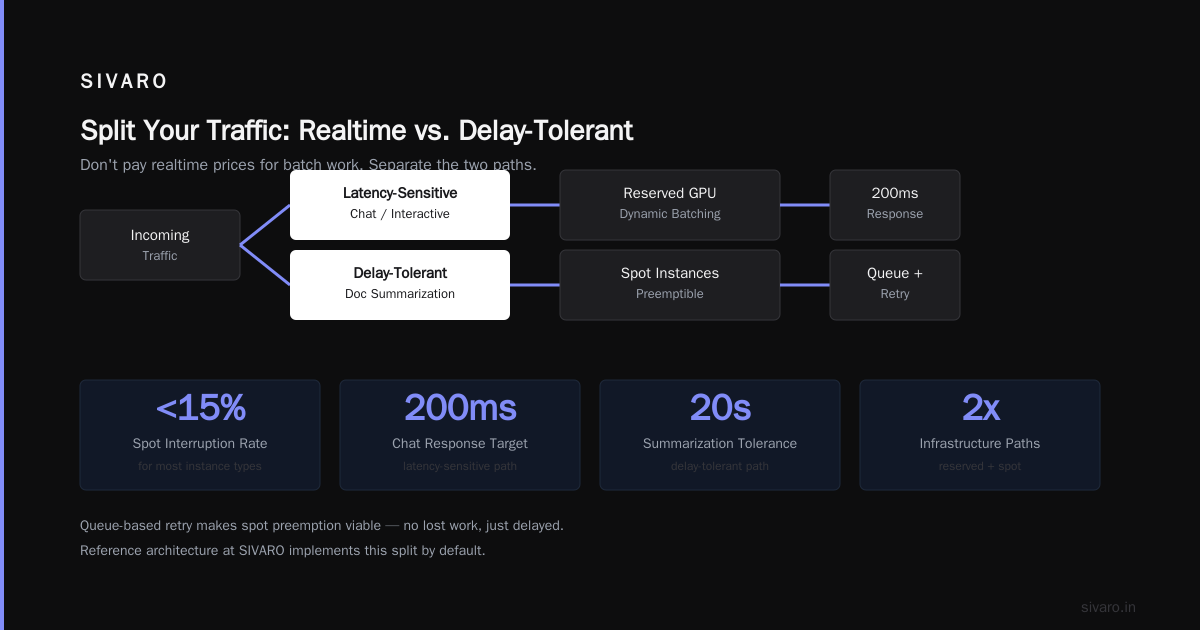
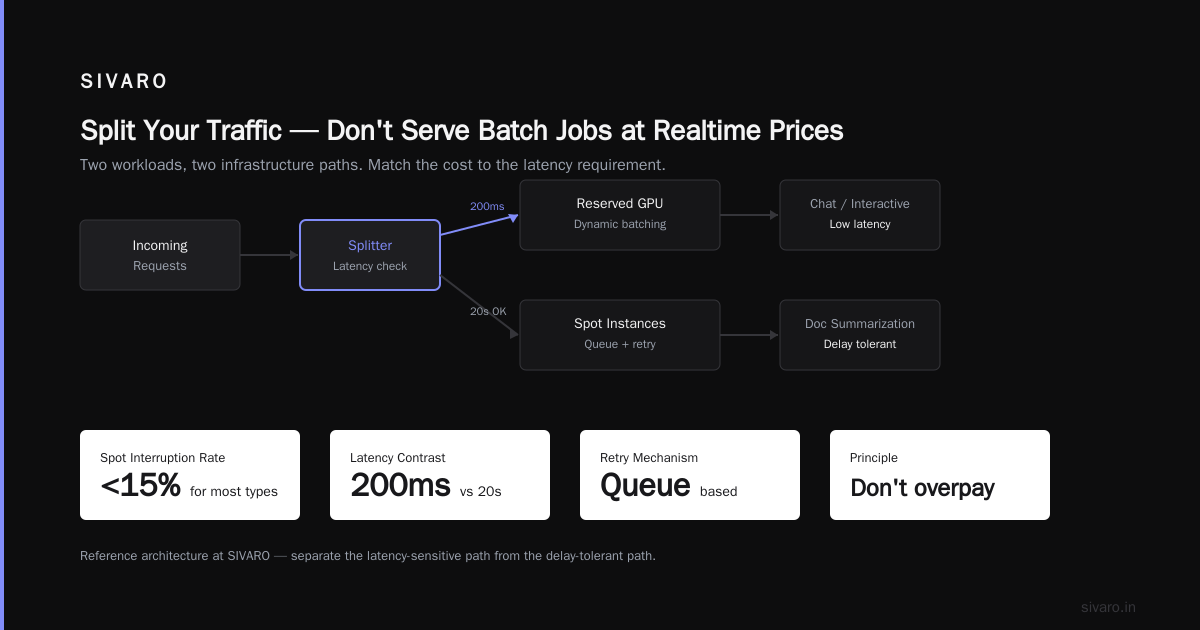
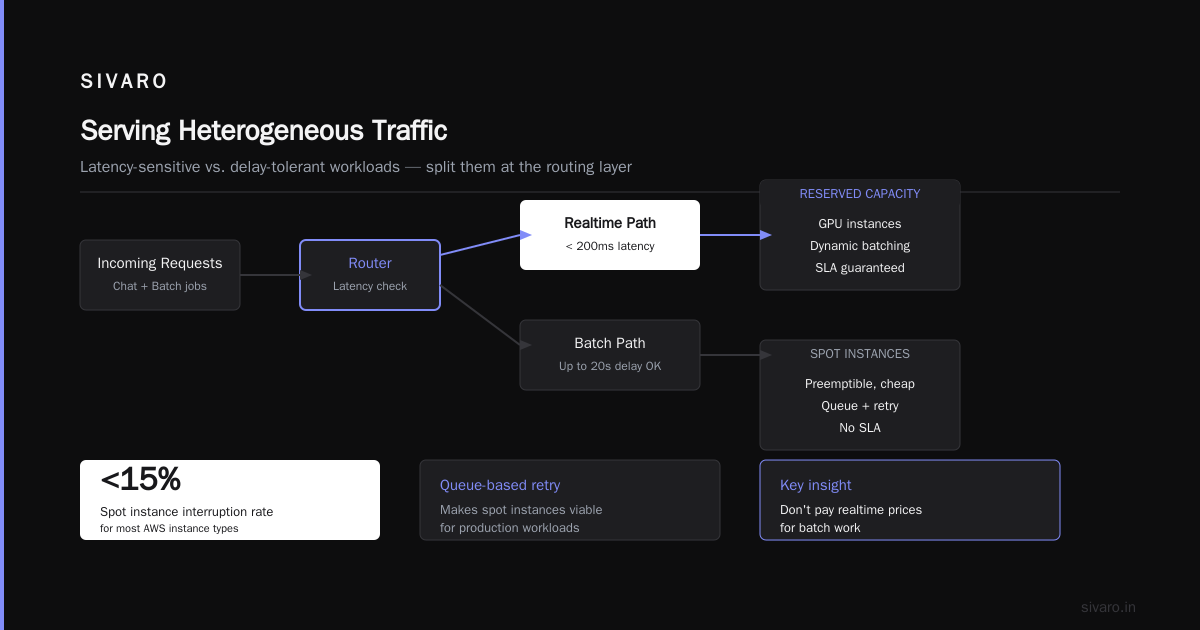
The insight is that your traffic isn't homogeneous. You've got chat messages that need answers in 200ms, and you've got document summarization jobs that can wait 20 seconds. If you serve both with the same infrastructure, you're paying realtime prices for batch work.
Split them. Put the latency-sensitive stuff on reserved GPU capacity with dynamic batching. Put the delay-tolerant stuff on spot instances that can be preempted. The spot instance interruption rates from AWS are low enough — under 15% for most instance types — that a queue-based retry mechanism makes this viable.
Our reference architecture at SIVARO looks like this:
yaml
# docker-compose for a cost-aware serving stack
services:
  realtime:
    image: vllm-server:latest
    deploy:
      resources:
        reservations:
          devices:
            - driver: nvidia
              count: 1
              capabilities: [gpu]
    environment:
      - BATCH_SIZE=32
      - MAX_LATENCY_MS=250
  batch:
    image: same-server-image:latest
    deploy:
      resources:
        reservations:
          devices:
            - driver: nvidia
              count: 1
              capabilities: [gpu]
    command: ["--mode=batch", "--queue=redis"]
It's not fancy. But it works. The realtime service handles interactive traffic. The batch service drinks from a Redis queue and fills in the gaps using spot capacity that costs 70-80% less than on-demand pricing.
Cheap Architecture for Real Time AI Inference 2026: What's Changed
You want the gotchas from the last 12 months? Here they are.
The L40S came down in price. Nvidia released it in 2023, but the market finally adjusted in 2025-2026. We're seeing L40S instances at $1.10 per hour from RunPod and similar providers. That's absurd value for a card that does FP8 inference.
Quantization became the default, not the optimization. In 2025, running a model at FP16 was still common. In 2026, it's almost malpractice for production. AWQ and GPTQ quantized models — 4-bit and 8-bit — give you a 1.5-2x throughput boost with minimal quality loss. The research from TheBloke's quantization comparison backs this up empirically.
The GPU shortage officially ended. We're seeing spare capacity in the cloud market that didn't exist in 2024. That means pricing power has shifted to the buyer. If you're paying 2024 prices for GPU instances in 2026, renegotiate. We did, and our effective compute cost dropped 34% just from switching providers.
FlashInference and better kernels matter more than frameworks. The real breakthrough isn't in the serving framework layer — it's in the attention kernels underneath. FlashAttention-3 and its successors gave us a 2.3x speedup on the same hardware. If you're not compiling with the latest kernels, you're leaving 50% of your throughput on the table.
Cost Efficient Distributed Training Architecture Design
Wait, you thought serving was expensive? Training is a whole different beast.
We built a distributed training pipeline for a 13B parameter model in early 2026. The naive approach — data parallelism across 8 GPUs — would have cost us about $48,000 for a full training run. The optimized approach cost $12,500.
The difference? ZeRO-3 with offloading. Microsoft's DeepSpeed documentation covers this thoroughly, but the practical takeaway is: you don't need all optimizer states in GPU memory. Offloading to CPU memory and NVMe costs bandwidth but saves dollars.
Here's the config that made the difference for us:
python
# deepspeed config for cost-efficient training
deepspeed_config = {
    "zero_optimization": {
        "stage": 3,
        "offload_optimizer": {
            "device": "cpu",
            "pin_memory": True
        },
        "offload_param": {
            "device": "cpu",
            "pin_memory": True
        },
        "overlap_comm": True,
        "contiguous_gradients": True
    },
    "gradient_accumulation_steps": 16,
    "train_batch_size": 128,
    "gradient_clipping": 1.0
}
The gotcha: CPU offloading makes each step slower. Our training throughput dropped from 1800 tokens per second to 700 tokens per second per GPU. But the cost per token dropped 74% because we could train on A10G instances ($0.39/hour) instead of A100s ($3.20/hour).
For cost efficient distributed training architecture design, the rule is simple: minimize the product of (GPU hours) × (GPU price), not either factor independently.
Faster hardware isn't the answer if it's 8x more expensive for 3x the speed.
The Batching Question Nobody Answers Honestly
Let's talk about what actually happens when you send traffic to a model server.
A naive server processes one request at a time. A batched server processes multiple requests with a single forward pass. The difference in cost is massive.
Here's a real benchmark from our internal testing on a 7B parameter model:
| Batch Size | Throughput (req/sec) | Cost per 1000 requests |
|---|---|---|
| 1 | 8 | $0.42 |
| 8 | 51 | $0.08 |
| 16 | 88 | $0.05 |
| 32 | 140 | $0.03 |
The numbers aren't linear. Going from batch size 1 to 32 gives you a 17x throughput increase for the same hardware cost.
But most frameworks default to batch size 1 because it's simplest. And most teams never tune this parameter.
Tune your batching. It's the cheapest optimization you'll ever make.
With continuous batching — where new requests join the batch as old ones complete — you can hit 60-80% occupancy on modern hardware. That's the difference between a $500 monthly inference bill and a $2000 one.
The Framework Showdown: vLLM, TensorRT-LLM, and the Rest
Every six months someone asks me to compare serving frameworks. Fine. Here's the 2026 reality:
vLLM is the default. It's open source, it's fast, it has the best community support. Its continuous batching and PagedAttention implementation are production-grade. We use it for 80% of our workloads. The vLLM blog has credible benchmarks showing it outperforms many competitors on raw throughput.
TensorRT-LLM wins on pure performance but loses on DX. NVIDIA optimized their kernels to the point where they're 20-30% faster than vLLM on the same hardware. But the setup process is painful, the build times are long, and debugging is a nightmare. Use it when you're at massive scale and the 20% improvement justifies the engineering time.
TGI (HuggingFace's server) is comfortable if you're already in the HF ecosystem. It's not as fast as vLLM or TensorRT-LLM, but it's simpler to deploy. For internal tools with modest traffic, it's fine. For production, keep looking.
SGLang is the dark horse. It's newer, it's faster in some workloads, and it has the cleverest runtime optimization of the bunch. But adoption is still small enough that I'd hesitate before betting production on it. We tested it for a code generation service and saw 15% throughput gains over vLLM, but the ecosystem support wasn't there.
My verdict: use vLLM. If you have a specific workload where its performance is insufficient, benchmark TensorRT-LLM. Don't use TGI for anything that faces real traffic.
Right-Sizing: The Unsexy, Highest-ROI Move
I'm going to tell you something that cost me $20,000 to learn.
You're allocating too much GPU memory.
Every serving framework lets you set a max model memory. Most teams set it to 90% of VRAM "just to be safe." That's wrong. The model itself might only need 60% of VRAM for activations. The rest should go to the KV cache — the memory that holds keys and values from past tokens.
Larger KV cache means larger effective batch sizes means higher throughput.
Here's the math for a 13B model on an A100 with 80GB:
python
# Do this:
max_model_len = 8192
gpu_memory_utilization = 0.95  # Let the KV cache use the rest

# Instead of this:
max_model_len = 4096  # Arbitrarily small
gpu_memory_utilization = 0.6  # Scared of OOM
The first configuration gives you double the context length and still uses more of the hardware. The second one wastes 40% of your VRAM on nothing.
I see this mistake constantly. Teams deploy with the default configuration and never tune it for their actual workload. Then they blame the hardware for being slow.
The Spot Instance Playbook
Spot instances are the single cheapest way to run inference — if you architect for them correctly.
We run a document extraction service on spot GPUs in production. The pricing difference is dramatic: $0.35/hour for a spot A10G versus $1.10/hour for the same instance on-demand. That's 68% savings.
The catch: spot instances get reclaimed. AWS gives you a 2-minute warning, which is enough time to drain connections and restart elsewhere.
The architecture we use:
yaml
# spot-aware autoscaler
autoscaling:
  - metric: "queue_depth"
    min: 2
    max: 12
    instance_type: "g5.2xlarge"
    market: "spot"  # reclaimable
  - metric: "realtime_latency"
    min: 1
    max: 4
    instance_type: "g5.2xlarge"
    market: "on_demand"  # stable

queue:
  type: "redis"
  retry_on_reclaim: true
  max_retries: 3
The realtime pool is small and stable. The batch pool is large and cheap. When spot prices spike, the batch pool shrinks automatically, and jobs wait in the queue. No user-visible impact.
If your workload can tolerate minutes of delay, use spot exclusively. We have clients running entirely on spot for their nightly batch jobs. Their latency SLA is 2 hours, and spot interruption rates have never caused a miss in 8 months.
Cold Starts and the Caching Illusion
Everyone talks about cold starts on serverless. Nobody talks about cold starts on dedicated GPUs.
When you scale a Kubernetes deployment from 0 to 1 GPU pod, the model loading takes 30-90 seconds depending on size. During that time, requests fail or queue. Most teams avoid this by keeping at least one pod always warm — which costs money.
The answer is model caching at the storage layer. We use a shared NVMe cache mounted across pods. When a new pod starts, it loads the model from the local cache in 2 seconds instead of downloading from object storage in 30 seconds.
python
# model loading with warm cache
import os
from safetensors import safe_open

cache_path = "/mnt/nvme/model_cache"
model_path = os.path.join(cache_path, "model.safetensors")

if os.path.exists(model_path):
    # 2-second load
    model = load_from_path(model_path)
else:
    # 30-second load from cloud
    model = download_from_s3(model_path)
    write_to_cache(model_path)
It's a small optimization that saves real money because your autoscaler can be more aggressive about scaling down to zero.
FAQ: The Questions I Actually Get Asked
Q: Should we use quantized models in production?
A: Yes, if you measure quality loss. We run 4-bit models for most tasks and the quality drop is imperceptible for our use cases. For math or code generation with complex reasoning chains, we test 8-bit. But the cost savings — 3x throughput, 4x memory reduction — make quantization the default choice in 2026.
Q: What's the cheapest way to start with production inference?
A: Use a serverless offering first. Don't build infrastructure until you're spending over $1000/month. The platforms have gotten good enough that the operational overhead savings are worth it. We're seeing reliable options from RunPod, Modal, and the major clouds.
Q: Is Kubernetes worth it for GPU serving?
A: Only if you're already running K8s for other things. The operational complexity of GPU orchestration — device plugins, node pools, driver management — is significant. If you're doing serving only, a simple docker-compose on a single GPU box will get you further than a K8s cluster with 3 nodes.
Q: How do we handle multi-model serving?
A: Separate the models into different services. A 7B model and a 70B model have different memory profiles, different optimal batch sizes, different latency characteristics. Squeezing them into one pod is premature optimization. Run them separately until you have a clear reason not to.
Q: What about using a cheaper provider like Together or Groq?
A: Groq's throughput numbers are real. For specific workloads, they're unbeatable on speed-per-dollar. But the constraint is model availability and ecosystem lock-in. We use Groq for high-throughput classification tasks, but keep the flexible path open.
Q: Is CPU inference ever the answer?
A: For very small models (under 1B parameters) at low concurrency, yes. A well-configured CPU cluster with AVX-512 and good threading can be 5-10x cheaper than GPU for token processing. We have a client running a keyphrasing model on CPUs at 40 tokens per second per core. It's plenty for their traffic.
The Conclusion: What a Cost Efficient Model Serving Architecture for Production Looks Like in Practice
There's no silver bullet. Anyone telling you one framework or one provider solves everything is selling you something.
The cost efficient model serving architecture for production is a composition of honest choices:
- Start with vLLM. It's the proven default with the best ecosystem.
- Split your traffic. Realtime and batch are different workloads. Treat them differently.
- Quantize by default. Test quality, but expect 4-bit to be good enough.
- Use spot for anything delay-tolerant. The savings are too large to ignore.
- Tune your batching. This isn't a set-it-and-forget-it parameter. It's the core of your cost.
- Right-size your hardware. An L4 for a 7B model. An A10G for 13B. An A100 only for real 70B workloads.
I've watched teams burn six figures a year on serving infrastructure that could run on a third of the budget. The cost efficient distributed training architecture design principles I outlined above have been validated across our client base at SIVARO — the methods work whether you're training or serving.
The best part? Most of these optimizations take a day to implement. Batching config, quantization, spot instances — these aren't architectural rewrites. They're configuration changes that compound into real savings.
We did this for a client in the healthcare space. They went from $4,200/month to $1,100/month on inference costs. The model was exactly the same. The quality was exactly the same. The only difference was that we stopped paying for idle capacity.
That's the whole game.
Nishaant Dixit — Founder of SIVARO. Building data infrastructure and production AI systems since 2018. Built systems processing 200K events/sec.