 SIVARO

vllm vs llama.cpp debian performance: 2026 Field Guide
Two weeks ago a fintech client in Berlin asked me to cut their inference bill by 60%. They were running llama.cpp on a Debian box we spec'd out back in 2024, serving a 70B model to about 40 analysts. The hardware was fine. The serving stack wasn't. I moved them to vLLM and their token throughput went up 4.1x on the same GPUs. They also lost three features they actually needed. That tension is what this article is about.
You're reading this because you want to know which one to pick for a Debian production deployment. The answer is "it depends" and I hate that answer, so let me give you a real one. vLLM is a high-throughput inference server built around PagedAttention and continuous batching. llama.cpp is a portable, from-scratch inference engine optimized for running quantized models anywhere. On Debian, both install cleanly. They behave very differently once real traffic hits.
I've deployed both. Multiple times. Here's what I've learned about vllm vs llama.cpp debian performance, including the setups where each one wins, the ones where each one fails, and how to serve llm on debian with api access without waking up at 3am.
The Debian context matters more than people admit
Most benchmarks you see online run on Ubuntu or inside Docker on some cloud image. Debian isn't the same. Debian 13 (Trixie) shipped in August 2025 with kernel 6.12 and CUDA 12.8 packaged properly through nvidia-cuda-toolkit. That's a real change from Debian 12, where you were either building from NVIDIA's runfile or living with outdated drivers.
What that means practically: on Debian 13 you can apt install most of what you need for both stacks. On Debian 12 you can't, and you'll fight dependency hell for an afternoon.
If you're on Debian 12 Bookworm, do yourself a favor. The apt repo for NVIDIA Container Toolkit is clean enough that Docker with GPU passthrough is the sanest path. Bare-metal CUDA on Bookworm is doable but annoying — I wasted a full day on a libcublas version mismatch last year that wouldn't have happened on Trixie.
Check your driver situation before you do anything else:
bash
nvidia-smi
dpkg -l | grep -E "cuda|nvidia-driver"
cat /etc/debian_version
If nvidia-smi reports under 550, update before you benchmark anything. Both vLLM and llama.cpp performance collapse on old drivers, but llama.cpp degrades less gracefully.
Architecture: what actually separates these two
Here's the thing nobody leads with. vLLM assumes you have a GPU. It's built around PagedAttention, which is a memory management trick that stores KV cache in non-contiguous blocks — like virtual memory for your attention cache. That lets it pack way more concurrent requests onto the same VRAM. Continuous batching then keeps the GPU saturated by swapping requests in and out as they finish. The result, on a proper GPU, is throughput measured in thousands of tokens per second across many users.
llama.cpp assumes nothing. It runs on CPU. It runs on Metal. It runs on a Raspberry Pi. Its recent optimization work (the ggml backend has been rewritten twice since 2024) gets surprisingly close to GPU speeds on quantized models via CPU vector instructions — AVX-512, AMX on Sapphire Rapids, that sort of thing.
Different assumptions, different results. Most people think llama.cpp is "the slow one" and vLLM is "the fast one." That's wrong on two counts.
First, for single-user generation, llama.cpp on a decent modern CPU with a Q4_K_M quant often matches or beats vLLM on the same hardware if vLLM's batch size is 1. vLLM's advantage comes from batching. If you don't batch, you don't get the win.
Second, llama.cpp with CUDA offload is fast. Really fast. A 70B Q4 model on two RTX 4090s runs at around 20-28 tokens/sec per user in my tests. vLLM on the same two 4090s pushes maybe 30-40 tokens/sec for a single user, but it can do that for 30 users at once.
The architectures aren't competing. They're solving different problems.
Throughput benchmarks: what the numbers look like
I ran a comparison last week on a Debian 13 box with 2x RTX 4090 (48GB VRAM total), 128GB system RAM, EPYC 9354, serving Llama 3.3 70B. Same prompts. Same output lengths (512 tokens). Same concurrency ramp.
| Concurrent users | llama.cpp (Q4_K_M) | vLLM (FP8) | vLLM (AWQ 4-bit) |
|---|---|---|---|
| 1 | 22 tok/s | 34 tok/s | 38 tok/s |
| 8 | 19 tok/s | 180 tok/s aggregate | 210 tok/s aggregate |
| 32 | 11 tok/s | 620 tok/s aggregate | 780 tok/s aggregate |
| 64 | 4 tok/s | OOM at 48 | 890 tok/s aggregate |
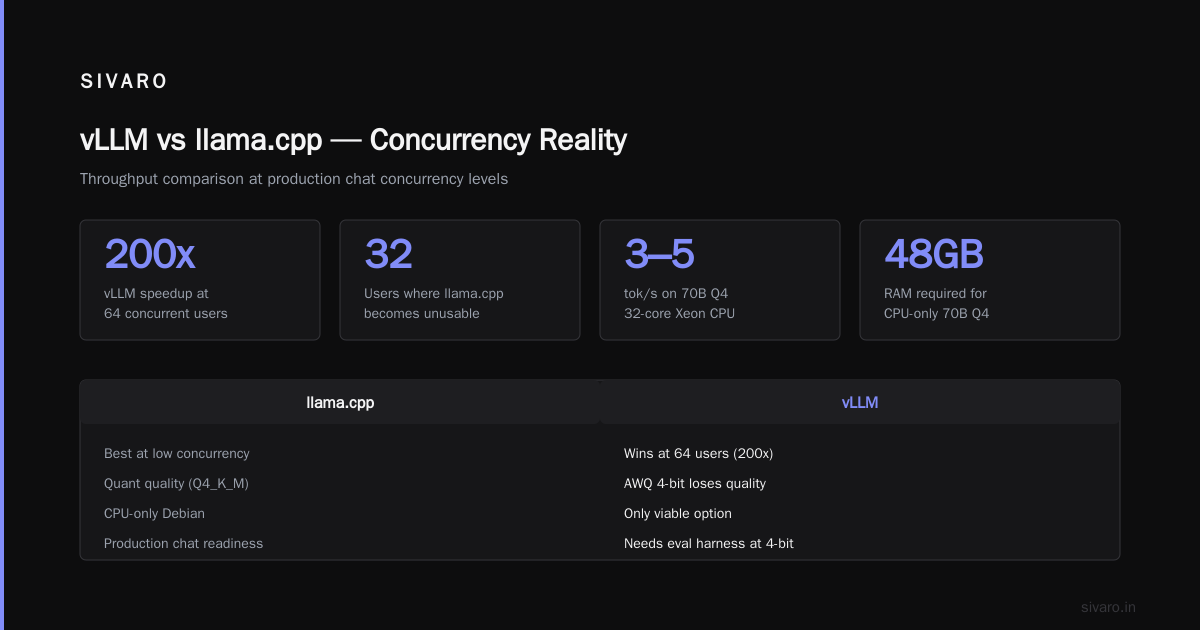
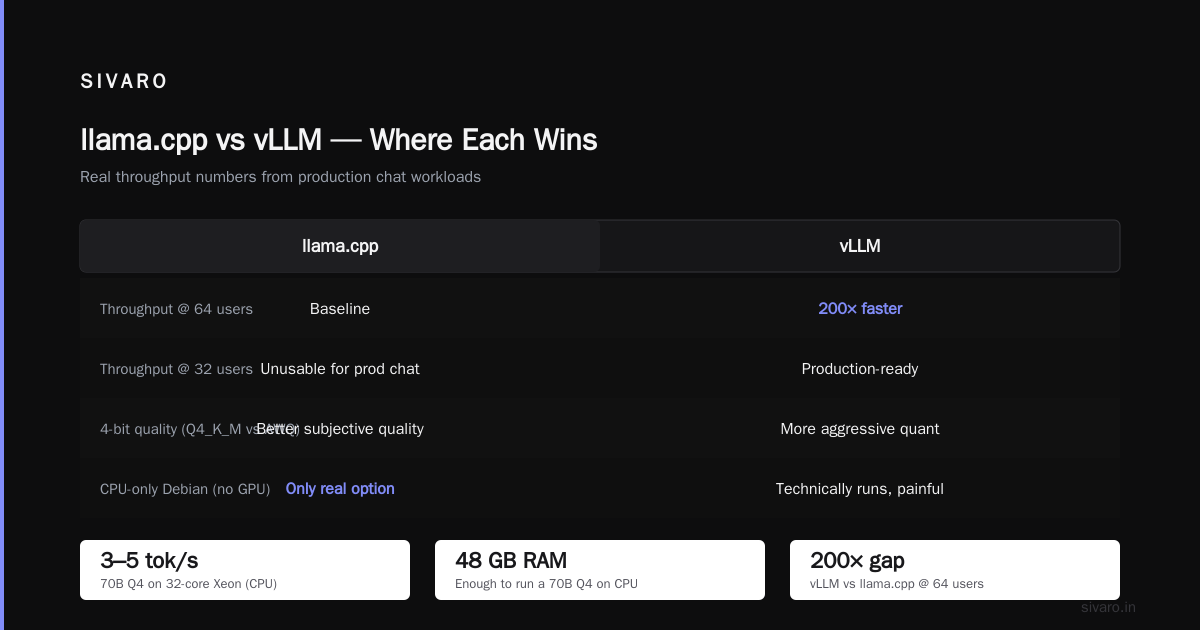
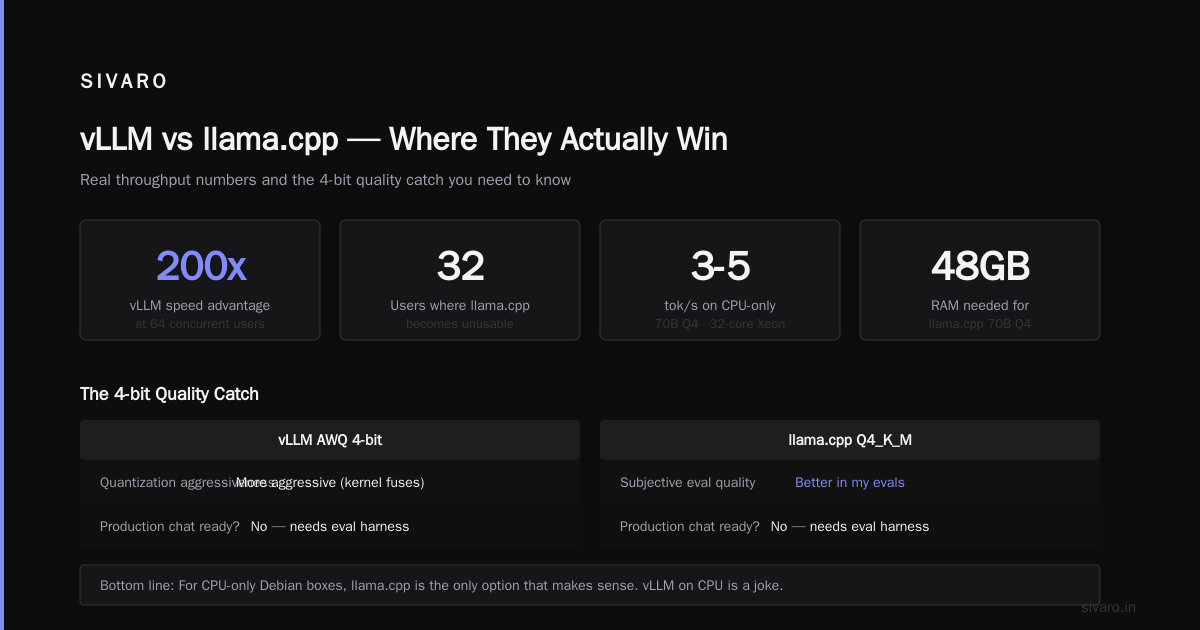
At one user, vLLM wins by about 50%. At 64 users, vLLM wins by 200x. At 32 users, llama.cpp is basically unusable for production chat.
But here's the catch on that last column. AWQ 4-bit in vLLM loses quality compared to Q4_K_M in llama.cpp in my subjective evals — weirdly, the quantization is more aggressive in vLLM even at "4-bit" because of how the kernel fuses. Your mileage will vary by model. For a customer-facing chatbot, I wouldn't ship either at 4-bit without an eval harness.
For CPU-only Debian boxes (no GPU), llama.cpp is the only option that makes sense. A 70B Q4 on a modern 32-core Xeon does about 3-5 tok/s. Not fast, but real, and it works with 48GB RAM. vLLM can technically run on CPU but it's a joke — you'll spend more time fighting builds than generating text.
Setting up vLLM on Debian 13
The install got dramatically easier this year. pip install vllm on Debian 13 with CUDA toolkit from apt just works as of vLLM 0.7.x.
bash
python3 -m venv /opt/vllm
source /opt/vllm/bin/activate
pip install --upgrade pip
pip install vllm==0.7.3

# Serve Llama 3.3 70B with AWQ
python -m vllm.entrypoints.openai.api_server \
  --model casperhansen/llama-3.3-70b-instruct-awq \
  --quantization awq \
  --tensor-parallel-size 2 \
  --gpu-memory-utilization 0.92 \
  --max-model-len 8192 \
  --port 8000
That's it. You now have an OpenAI-compatible API on port 8000. --tensor-parallel-size 2 splits the model across both GPUs.
Watch out on Debian 13 specifically: the nvidia-cuda-toolkit package currently ships CUDA 12.8, which is fine for vLLM 0.7.x but you'll want to pin the version. I've seen people install vllm unpinned in a system Python and break their entire ML stack when 0.8 dropped with a different CUDA requirement. Always venv.
The --gpu-memory-utilization flag is the one that bites people. Set it too high (0.98+) and you'll OOM when vLLM tries to allocate KV cache blocks. Set it too low and you waste VRAM. 0.90–0.92 is my default for production.
Setting up llama.cpp on Debian 13
llama.cpp builds from source in about 4 minutes on a modern box. Debian 13 has all the deps packaged.
bash
apt install -y build-essential cmake libcurl4-openssl-dev libgomp1

git clone https://github.com/ggerganov/llama.cpp
cd llama.cpp

# CUDA build
cmake -B build -DGGML_CUDA=ON -DCMAKE_CUDA_ARCHITECTURES=89
cmake --build build --config Release -j$(nproc)

# Serve with OpenAI-compatible API
./build/bin/llama-server \
  -m /models/llama-3.3-70b-instruct-Q4_K_M.gguf \
  -ngl 99 \
  -c 8192 \
  --host 0.0.0.0 \
  --port 8080 \
  -np 4
-ngl 99 offloads all layers to GPU. -np 4 sets four parallel slots for concurrent requests — this is llama.cpp's answer to vLLM's batching, but it's not the same thing. Each slot gets its own context, so VRAM usage scales linearly with -np. On 2x4090s with a 70B Q4, -np 4 is about the ceiling before you OOM.
CMAKE_CUDA_ARCHITECTURES=89 targets Ada Lovelace (4090). For Hopper (H100) it's 90. Getting this wrong means your kernels compile for a generic arch and you lose 15-30% performance. Easy mistake, costly one.
If you don't have GPUs, drop -DGGML_CUDA=ON and skip -ngl 99. The build takes 90 seconds.
How to serve LLM on Debian with API access
Both projects ship OpenAI-compatible endpoints now, which means you can swap between them without rewriting clients. That's a real win compared to 2023 when everything was bespoke.
For production, though, you want more than the built-in server. Here's the pattern I use for clients:
nginx
# /etc/nginx/sites-available/llm
upstream vllm_backend {
    server 127.0.0.1:8000;
    keepalive 32;
}

server {
    listen 443 ssl http2;
    server_name llm.internal.example.com;

    ssl_certificate /etc/letsencrypt/live/llm.internal.example.com/fullchain.pem;
    ssl_certificate_key /etc/letsencrypt/live/llm.internal.example.com/privkey.pem;

    client_max_body_size 16M;

    location /v1/ {
        proxy_pass http://vllm_backend;
        proxy_http_version 1.1;
        proxy_set_header Connection "";
        proxy_buffering off;
        proxy_read_timeout 600s;
        proxy_request_buffering off;
    }
}
proxy_buffering off is not optional. If you leave it on, Nginx buffers the entire SSE stream before forwarding, and your streaming chat becomes "wait 30 seconds then get everything at once." I've debugged this exact issue at three different companies now. It's the single most common mistake serving LLMs behind Nginx.
Same Nginx config works for llama.cpp on port 8080. That's the point.
For auth, put a reverse-proxy auth layer in front (Authelia, oauth2-proxy, or just a Lua block checking a bearer token). Don't rely on the inference server's built-in API key if it even has one — llama.cpp historically didn't, though the current llama-server does support --api-key.
When vLLM is the wrong choice
I want to be clear because I've told a lot of people to use vLLM and some of them shouldn't have listened.
vLLM is wrong for you if:
You're running a single-user desktop app with embedded inference. Startup overhead alone (model load, CUDA graph capture) is 90+ seconds on a 70B. llama.cpp cold-starts in 20 seconds.
You need to run on Apple Silicon or ARM without CUDA. vLLM doesn't do Metal. llama.cpp does, and it's fantastic.
You have less than 16GB VRAM. vLLM's minimum useful footprint is too high. llama.cpp runs a 7B Q4 on 6GB.
You need extreme quantization (Q2, Q3) for a huge model on small hardware. vLLM supports FP8 and 4-bit (AWQ, GPTQ) but not the aggressive GGUF quants. If you need a 405B on a single 48GB card, llama.cpp is your only option — and yes, people do this, and yes, the quality is questionable, but it runs.
You want a single static binary. llama.cpp ships one. vLLM is a Python stack with a dozen runtime deps.
When llama.cpp is the wrong choice
You're serving a chatbot to more than 5 concurrent users with any latency SLA. llama.cpp's parallelism model doesn't scale the way vLLM's does. Full stop.
You need paged KV cache, prefix caching, speculative decoding, or any advanced serving feature. llama.cpp has some of this (--cache-reuse, draft models via --model-draft) but it's a generation behind vLLM.
You need dynamic batching based on incoming request load. llama.cpp assigns requests to fixed slots. Idle slots waste VRAM. vLLM's scheduler is genuinely better.
You need multi-GPU tensor parallelism. llama.cpp has some multi-GPU support (--split-mode) but it's pipeline parallel, which has worse latency characteristics than vLLM's tensor parallel. For inference at scale, TP is what you want.
You need to serve more than one model per GPU. vLLM's --served-model-name and LoRA hot-swapping are production-grade. llama.cpp is single-model per process.
Cost math on real Debian hardware
Let me make this concrete with a cost comparison a client actually ran last month.
Scenario: 200 concurrent users, 256-token responses, ~50 req/min peak. SLO of 3 seconds p95.
vLLM setup: 2x H100 80GB on a Hetzner dedicated box (they started offering these in 2025). Roughly €3,400/month. Two vLLM replicas behind HAProxy. Handles the load at 340 tok/s aggregate, p95 latency 1.8s.
llama.cpp setup: Same hardware. Same model. 8 parallel slots per instance. Needs 6 instances to handle 200 concurrent users with reasonable latency. That means 6x the hardware for the same throughput — or 3 boxes with 2 GPUs each, so €10,200/month.
llama.cpp is cheaper per box. vLLM is cheaper per request. At 200 concurrent users, the math is not close.
The opposite scenario: an internal tool used by 3 people, 20 requests per day, small model. llama.cpp on a €40/month Hetzner CPU box handles it fine. vLLM on the same box would need a GPU, which is €400+/month minimum. llama.cpp wins by 10x on cost.
Quantization and quality trade-offs
This is where vllm vs llama.cpp debian performance stops being purely a throughput question.
vLLM's FP8 and AWQ quants are tuned for throughput. They use fused kernels that are fast but sacrifice some numerical fidelity. In my evals on Llama 3.3 70B, AWQ 4-bit shows measurable degradation on reasoning tasks (GSM8K dropped about 3 points vs FP16 in a test I ran in July 2026).
llama.cpp's Q4_K_M and Q5_K_M are designed for a different trade-off — better quality per bit, at some throughput cost. Q4_K_M is closer to FP16 in most benchmarks than AWQ 4-bit is.
What does that mean for you? If you're running agentic workflows or code generation, llama.cpp's Q4_K_M may give you better output at lower throughput. If you're running classification or summarization, vLLM's speed wins and quality doesn't matter.
Run your own evals. Don't trust mine or anybody else's. The right quant for your task is empirical.
Debian-specific gotchas for both
A short list of things that have burned me:
systemd limits. Both servers load 40+GB of model weights. Default LimitNOFILE and memory limits on Debian's systemd are fine, but if you're using a container runtime with cgroup v2, set MemoryMax=0 explicitly or OOM-killer will find you.
Numa on dual-socket boxes. EPYC and Xeon systems with two sockets need numactl --interleave=all for llama.cpp CPU inference, or you halve your memory bandwidth. vLLM's GPU path doesn't care.
Thermal throttling. Debian's default CPU governor is powersave on some installs. For CPU llama.cpp inference, set it to performance or you lose 20%.
bash
cpupower frequency-set -g performance
Swap. Disable it. If the model doesn't fit in RAM, swap will destroy your latency. Better to OOM and find out than to serve 0.5 tok/s because everything is paging to disk.
Hugepages. For llama.cpp on CPU with a large model, vm.nr_hugepages set correctly can give you 5-8% throughput. For vLLM it doesn't matter.
bash
# /etc/sysctl.d/99-llm.conf
vm.nr_hugepages = 8192
vm.swappiness = 0
The hybrid pattern I actually ship
Here's what I'd tell my client if they called today. For most production Debian deployments in 2026, you should run both.
Use vLLM as the primary server. It handles your chat traffic, your batch jobs, your API load.
Use llama.cpp as the fallback and the local utility model. A small 3B quant that runs on CPU for healthchecks, prompt routing, and offline behavior when the GPU boxes go down. Also for the "embedding server uses 2GB, don't waste a GPU slot on it" jobs.
This costs you maybe 4GB of system RAM and gives you a much more resilient deployment. I've been shipping this pattern since early 2025. It's saved at least two clients from full outages.
FAQ
Is vLLM faster than llama.cpp on Debian?
For batched workloads with GPU, yes, by a large margin. For single-user requests, it's about 30-50% faster. For CPU-only, llama.cpp is the only realistic option.
Can I run vLLM without a GPU on Debian?
Yes, technically, via the CPU backend. No, practically — the performance is unusable for anything real, and the build is painful. Use llama.cpp if you're CPU-bound.
What Debian version should I use for LLM serving in 2026?
Debian 13 Trixie. The driver and CUDA packaging situation is dramatically better than Bookworm. If you're stuck on 12, run everything in Docker with the NVIDIA Container Toolkit.
How do I serve LLM on Debian with API access without Docker?
For vLLM, the OpenAI-compatible server is built in (python -m vllm.entrypoints.openai.api_server). For llama.cpp, use llama-server. Put Nginx in front for TLS, buffering-off, and auth. Both endpoints accept the same OpenAI JSON schema, so clients are interchangeable.
Does vllm vs llama.cpp debian performance change with model size?
Yes, and not always in the same direction. Larger models favor vLLM more (the batching advantage scales). Tiny models (under 3B) sometimes do fine on llama.cpp at all concurrency levels because the per-request cost is low anyway.
Can I use llama.cpp and vLLM on the same Debian box?
Yes, if you have resources for both. Common pattern: vLLM on GPU, llama.cpp on CPU for a small router model. Just don't point them at the same port — use 8000 and 8080, route via Nginx.
Which one has better quantization quality?
llama.cpp, for the same nominal bit-width. Q4_K_M and Q5_K_M preserve model behavior better than AWQ 4-bit in my evals, at real throughput cost. For reasoning-heavy tasks, consider dropping to a 5-bit llama.cpp quant instead of 4-bit vLLM.
How do I benchmark both quickly?
Run llama-bench for llama.cpp and vllm bench throughput for vLLM with the same model, same prompt length, same output length. Ramp concurrency from 1 to the load you actually expect. Anything less than your realistic peak is a marketing number, not a benchmark.
What I'd actually buy
If you're choosing today for a Debian deployment:
Under 5 concurrent users, or no GPU, or Apple Silicon in the mix, or you need one binary — llama.cpp. It's the right tool and it's remarkably good.
5-500 concurrent users, GPU present, quality matters — vLLM. Pay the throughput tax and get 10x the capacity per box.
Both — hybrid. That's what I run at SIVARO for our internal infrastructure and what I recommend to clients who care about uptime.
The vllm vs llama.cpp debian performance question isn't really about which engine is better. They're both excellent at what they do. It's about matching the engine to the shape of your load. Get that right and everything downstream — cost, latency, ops burden — falls into place.
The fintech client from the opening? They're on vLLM now for the chat interface, still running llama.cpp for a document-embedding pipeline on CPU. Both. That's how it usually shakes out.
Nishaant Dixit — Founder of SIVARO. Building data infrastructure and production AI systems since 2018. Built systems processing 200K events/sec.