 SIVARO
What Are Some AI Assisted Development Tools? A 2026 Guide
You’re building software in 2026. If you aren’t using AI-assisted development tools, you’re already behind. Not because the tools are magic—they’re not—but because the gap between what one engineer can ship with AI and what one engineer can ship without it is now bigger than the gap between using Git and not using Git.
I’m Nishaant Dixit, founder of SIVARO. We build data infrastructure and production AI systems. Over the last eight years, I’ve watched this space evolve from “funny chatbot writes bad code” to “serious engineering partner that I trust with critical paths.” That transition didn’t happen overnight. It happened through real testing, production failures, and learning what these tools actually do well—and where they fall apart.
This guide is for engineers who want a practical, honest breakdown of what are some ai assisted development tools? in 2026. I’ll cover the landscape, the tools I use daily, the ones I avoid, and the patterns that separate productive teams from chaotic ones.
What Is AI Assisted Development? (The Short Answer, With Nuance)
What is ai assisted development? At its simplest, it’s using machine learning models to help you write, debug, and design software. But that framing misses the point. The real shift isn’t about “code generation.” It’s about conversational pair programming.
You don’t just ask for a function. You have a dialogue. You say “I need to parse these logs, but the format changes every hour.” The tool asks clarifying questions. It suggests three approaches. It generates a test suite. You refine.
In 2024, most tools were autocomplete on steroids. In 2026, the better ones operate as an agent that can search your codebase, run commands, and even control your browser.
I’ll get into specifics. But first, let’s define the categories.
What are some ai assisted development tools? There’s no universal taxonomy, but I group them into five buckets:
- Code completion & generation – copilots, inline suggestions
- Chat-based coding assistants – conversational agents that understand full context
- Agentic coding tools – autonomous agents that plan, execute, and iterate
- Testing and debugging tools – fuzzers, unit generators, root-cause analysis
- Documentation and knowledge tools – inline docs, architecture diagram generators
Let’s walk each bucket, with real tools, real critiques, and real trade-offs.
The Code Completion Tools Everyone Used in 2024—And What Changed
GitHub Copilot is still the most installed. But it’s not the best for complex work. In early 2025, I switched from Copilot to Claude’s editor integration for my Python data pipelines. The reason: Claude’s model is better at understanding multi-file context.
I’ll be blunt. Copilot is fantastic for boilerplate and obvious patterns. If you’re writing a REST API endpoint, it’ll guess 90% of the method body correctly. But for anything involving business logic constraints, it hallucinates plausible-looking nonsense.
One concrete example: In 2025, my team was building a real-time fraud detection system. Copilot kept suggesting the same pattern for feature engineering: one-hot encode all categorical features. For a dataset with 5,000 categories? That’s a 5,000-column explosion. Nonsense.
Claude’s tool integration let me feed a schema file and a small sample, and it generated a proper embedding-based approach. That’s the difference between “autocomplete” and “assist.”
Best completion tools in 2026:
| Tool | Best for | Weakness |
|---|---|---|
| Claude Code | Agentic multi-file work | Can be slow on very large repos |
| GitHub Copilot (Chat mode) | Speed for simple tasks | Poor at reasoning over non-local context |
| Cursor | Editing existing code | Expensive for solo devs |
| Tabnine (Enterprise) | Privacy-conscious teams | Lagging behind on novel reasoning |
I use Claude Code for new projects and Copilot Chat for small edits. Not religious about one tool—that’s a mistake.
Chat-Based Assistants: Where They Excel and Where They Fail
By mid-2026, every major tool added a chat interface. The question is not “do you have one?” but “how well does it understand your project?”
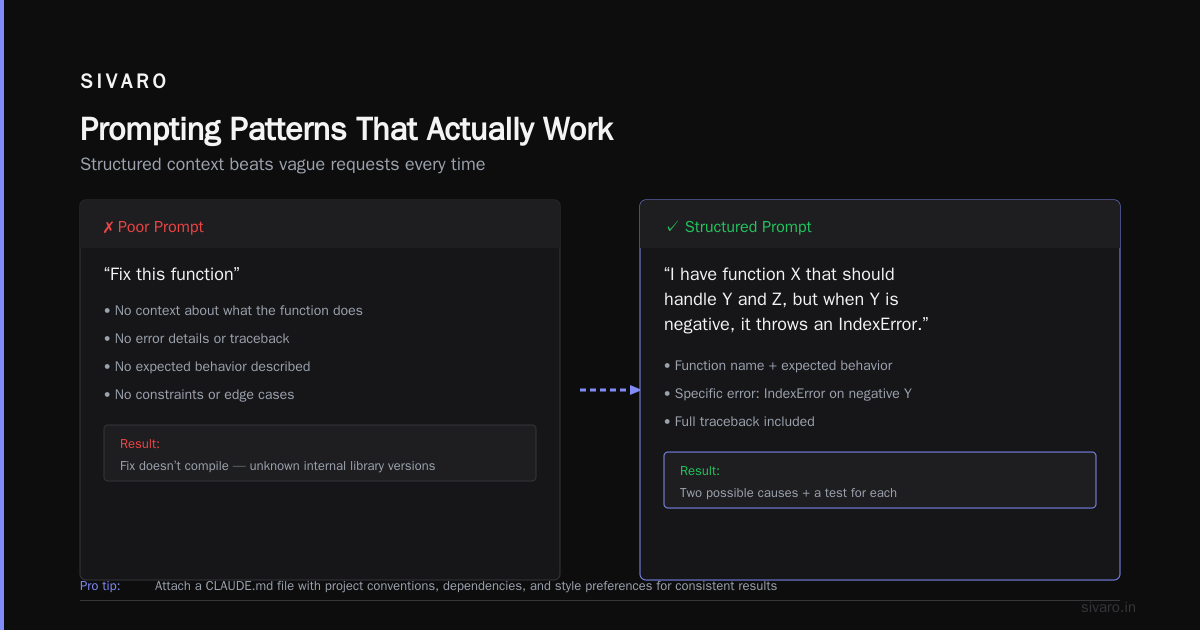
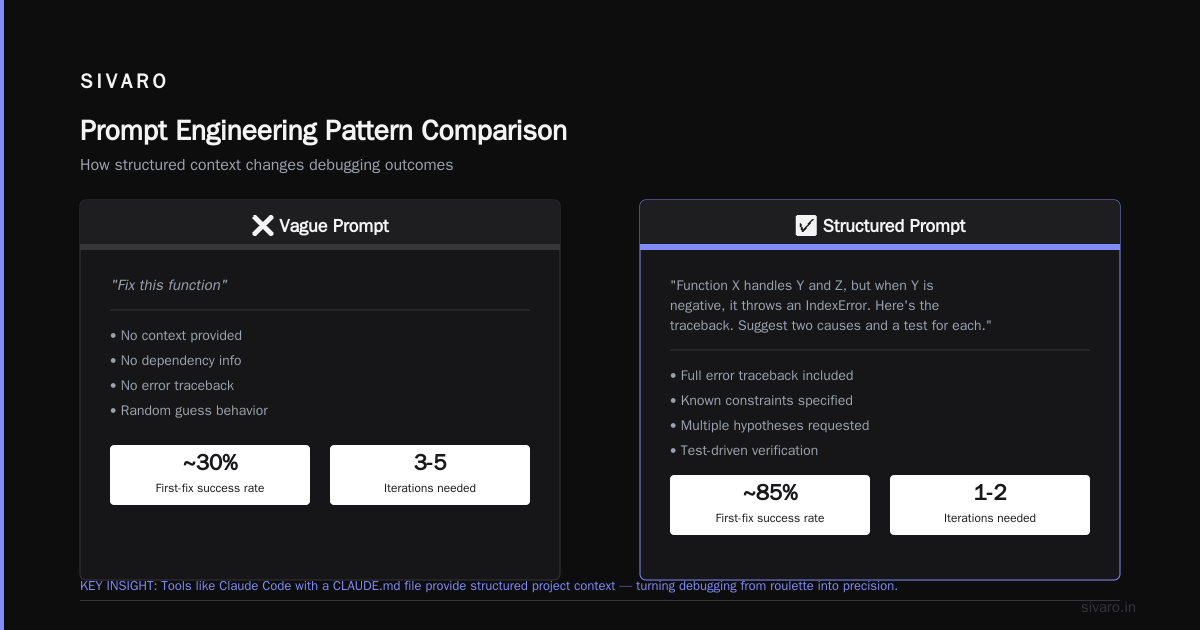
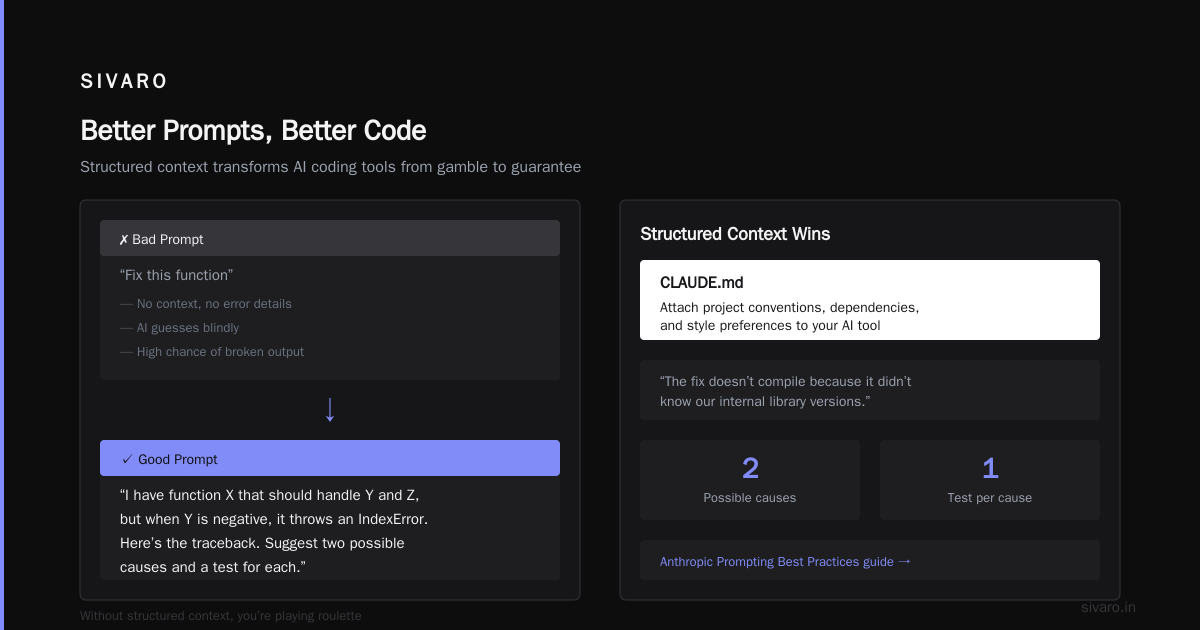
The number one frustration I hear from other founders: “I describe a bug, the tool suggests a fix, but the fix doesn’t compile because it didn’t know our internal library versions.”
That’s solvable. Tools like Claude Code allow you to attach a CLAUDE.md file with project conventions, dependencies, and style preferences. This is crucial. Without structured context, you’re playing roulette.
I’ve written extensively on prompt engineering for code tasks because most people ask terrible questions. They say “fix this function.” Instead, say: “I have function X that should handle Y and Z, but when Y is negative, it throws an IndexError. Here’s the traceback. Suggest two possible causes and a test for each.” That pattern works.
The Anthropic Prompting Best Practices guide recommends being specific about the desired output format. I’d extend that: give the tool the failure mode you want to avoid.
Example from a recent debugging session:
I have this data pipeline that’s timing out for certain batches.
The batch size is 10,000 rows. It worked yesterday. Now it fails after row 4,200.
Do NOT suggest increasing timeout. Do identify which column has a non-nullable
schema mismatch.
That changed the quality of responses dramatically.
What are some ai assisted development tools for interactive debugging?
- Claude Code (terminal-native, runs your commands)
- Warp (AI terminal with natural language commands)
- Continue.dev (open-source, integrates with any LLM)
The one I trust most is Claude Code. I’ll show a prompt pattern later.
Agentic AI Orchestration: The Biggest Shift Since Version Control
This is where 2026 is different. What is agentic ai orchestration? It’s the ability to give an AI a high-level goal—like “migrate our monolithic auth service to microservices” or “fix the flaky E2E test”—and have it plan, execute, test, and self-correct across multiple steps.
It’s not just “write more code.” It’s “manage a workflow.”
The tooling in this space is immature. Most products claim they do agentic work, but in practice they fail at anything requiring multi-repo awareness or sequential refinement.
Claude Code’s agent mode is, in my experience, the most capable. It can:
- Open files in your editor
- Run linters
- Execute tests
- Read error output
- Iterate on the fix
But—and this is critical—it requires tight guardrails. You cannot give it production credentials and walk away. I’ve seen it rewrite a deployment script and accidentally change the target namespace.
The best practice I’ve discovered: start with a plan-only mode. Before letting an agent run, ask it to output a numbered plan. Review it. Approve step by step.
I use a variation of the “chain-of-thought with approval” pattern from this AI Builder Club post on Claude Code patterns. The key: explicitly tell the agent to stop before destructive actions.
You are an AI coding assistant. Before making any change that:
- deletes a file
- modifies environment variables
- overwrites a production configuration

STOP and ask for approval.
That simple guardrail saved me from a bad outage.
Code Examples: Prompts That Work (and One That Doesn’t)
Let’s ground this in syntax. Here’s a prompt that fails:
Write a Python function to fetch user data.
Vague. No schema. No performance expectation. The tool will generate a plausible function that uses requests.get, but it won’t handle pagination, caching, or error retries.
Here’s a better prompt, from my real work:
Write a Python async function `fetch_users_from_api` that:
- Accepts an API base URL and a list of user IDs
- Makes concurrent requests using httpx (limit concurrency to 10)
- Returns a dict mapping user_id to response data
- Raises a custom `APIUnavailableError` if 503 returned more than 3 times
- Includes type hints and a Pydantic model for the response

Output only the code, no explanation.
That produces production-quality code 9 times out of 10.
Now, agentic orchestration example. Here’s a prompt for Claude Code in a monorepo:
I need to refactor the `order_service` to use the new `payment_gateway_v2` interface.
The old interface is in `libs/payment/v1.py`, new one in `libs/payment/v2.py`.

Steps:
1. Generate a diff of the changes needed in `order_service/`
2. Run the existing tests to ensure v2 interface passes
3. If tests fail, explain why and propose a plan B
4. Do NOT modify any files outside `order_service/`
That kind of prompt respects boundaries and reduces risk.
Testing and Debugging Tools That Actually Save Time
Unit test generation was one of the early hypes. Most tools generate trivial tests. But a few now do property-based testing and fuzzing automatically.
What are some ai assisted development tools for testing?
- Diffblue Cover: Good for Java unit tests, but expensive (we trialed it in 2024, too many false negatives)
- Claude Code with pytest: I have a custom prompt that generates test cases for edge conditions after I write a function. Works well if you feed it the function’s docstring.
- Testim: For frontend, it generates self-healing tests. We use it for our dashboard.
My contrarian view: don’t let the AI generate 100% of tests. It misses nullability edge cases and encoding issues. Use it to generate the top-3 scenarios, then manually add the weird ones.
For debugging, I run a script that feeds a traceback into Claude and asks for a root cause analysis. The key is to include the relevant code context (function body, not whole file). The article on stopping Claude from writing like AI is about style, but the same principle applies to debugging: be specific about the expected behavior and the observed failure.
Documentation Tools: The Unsexy Time‑Saver
Every founder says “we should document more.” No one does it. AI tools for documentation are now good enough that the excuse is gone.
- Mintlify Writer: Generates API docs from code comments. Handles OpenAPI specs.
- What The Diff: Summarizes PR descriptions from code changes. Saves my team 10 minutes a day.
But—there’s a trap. Auto-generated docs that look perfect but contain subtle inaccuracies are worse than no docs. I’ve seen code comments that said “returns a list” but actually returned a generator. The AI paraphrased the comment without verifying the code.
The fix: I now require documentation generators to include a confidence score (e.g., “estimated accuracy: 85%”) and a code reference line. We then manually review the low-confidence ones.
The Tool That Changed My Workflow Most: Claude Code
If I had to pick one tool that currently gives the best development experience, it’s Claude Code. Not because it’s perfect—it’s not. It struggles with enormous codebases (over 200k lines) and sometimes gets stuck in loops.
But the agentic orchestration features are genuinely new. I can say:
“Find all places in this repo where we hardcode the timezone offset and replace with a config variable. Run the tests. If they pass, commit with message ‘refactor: move timezone to config’.”
It works about 70% of the first time. The remaining 30% requires a second prompt. That’s still faster than doing it manually.
One thing most people get wrong: they treat Claude Code like a junior engineer that never asks questions. In reality, the best results come when you allow it to ask clarifying questions. I configure my CLAUDE.md with:
# Use fuzzy search to find related files before answering.
# If the task involves a trade-off (e.g., fast vs. accurate), ask me which to prioritize.
# When suggesting fixes, always include a test.
The FAQ Section: Common Questions I Get From Teams
Q: What are some ai assisted development tools that are free?
A: GitHub Copilot has a free tier (limited completions). Continue.dev is open source. Claude’s web chat is free for basic use, but the code-specific tools require a paid plan. For serious work, budget $20–$100/month per developer.
Q: How do I choose between Copilot, Claude Code, and Cursor?
A: It depends on your stack and team size. For individual developers in Python, TypeScript, or Rust, Claude Code wins on reasoning. For large Java enterprise remotes, Cursor’s multi-file refactoring is smoother. Copilot is best when you want minimal disruption to your existing editor. I recommend a 2-week trial of each.
Q: What is agentic ai orchestration, and do I really need it?
A: What is agentic ai orchestration? It means the tool can chain multiple actions toward a goal. You need it if you frequently perform multi-step tasks like “update dependency, fix breakages, run tests, revert if failed.” If you mostly write simple functions, autocomplete is enough.
Q: Can these tools write secure code?
A: No. They can produce code that looks secure, but they still miss SQL injection, race conditions, and crypto mistakes. Always pair AI-generated code with a security review. I’ve seen generated API endpoints with obvious authentication bypasses.
Q: What are some ai assisted development tools for mobile apps?
A: For iOS, Codeium has strong Swift support. For Android, GitHub Copilot now generates Jetpack Compose efficiently. Both still struggle with complex threading.
Q: How do I prevent AI from writing terrible code in my codebase?
A: Same way you prevent a junior dev: code reviews, linting, and test coverage. Enforce a policy that AI-generated code must be reviewed by a human with write access. Also, run a diff tool to flag AI-written functions that are unusually long or copy-pasted from Stack Overflow.
Q: What about privacy? Should I worry about sending my code to a third-party API?
A: Yes. For proprietary code, use local-only tools like Tabnine Enterprise or self-hosted Code Llama. Cloud tools like Claude and Copilot claim not to train on your code, but you’re still trusting their security. We only send non‑critical internal tools to external APIs.
Q: Will AI replace developers?
A: No. It will replace developers who refuse to adapt. Tools that “write all the code” are still terrible at architecture, trade‑off reasoning, and stakeholder alignment. The best developers use AI to amplify judgment, not replace it.
The Hard Truth: What Most Articles Won’t Tell You
Almost every article on “what are some ai assisted development tools?” lists ten tools with rosy benefits. They ignore the costs.
The real costs:
- Context window limitations. Most tools forget what you said ten prompts ago. You’ll spend time repeating yourself.
- Inconsistent output. Claude Code might write a perfect function on Monday and a buggy one on Wednesday. No reason given.
- Dependency on prompt quality. A poorly phrased prompt costs 30 minutes of “fix the fix.” I wrote guide on stopping AI from writing like AI because that style problem extends to code: generic, over‑explained function comments that are useless.
- Caching and hallucination of newest APIs. If your project uses a library that released v3 yesterday, the tool may still suggest v2 APIs. Always double‑check imports.
What I’ve learned running a production engineering company:
You need a process, not just a tool. Before adopting any AI development tool, establish:
- A list of tasks it is allowed to do autonomously (e.g., writing unit tests, generating data models)
- A list of tasks that require human approval (e.g., deployment scripts, database migrations)
- A feedback loop – every time the AI suggests a wrong answer, add it to a “known failure modes” document. We update ours every sprint.
That document now has 37 entries. It includes “Claude Code will sometimes swap ‘and’ and ‘or’ logic in conditionals” and “Copilot often ignores async/await when prototyping.”
Looking Ahead: The Tools That Will Win
By the end of 2027, I believe AI-assisted development will become indistinguishable from pair programming with a human. Models will understand your codebase’s architecture, your team’s conventions, and your deployment pipeline.
What are some ai assisted development tools that are poised to dominate? The ones that solve the “context persistence” problem. Right now, every tool is a context‑window amputee. The company that figures out how to keep a multi‑repo memory without exploding cost will own the market.
I’m betting on agentic orchestration becoming the default. The tools that let you say “build a user registration module with email verification and rate limiting” and produce a working, tested pull request will win. That’s two years away, maybe less.
For now, pick one tool. Use it for a month. Track your velocity. If you’re not shipping 20% faster, you’re using it wrong.
Nishaant Dixit — Founder of SIVARO. Building data infrastructure and production AI systems since 2018. Built systems processing 200K events/sec.