 SIVARO

What Does AWS Actually Mean? (And Why It Matters for AI Agents in 2026)
You've typed "aws acronym meaning" into a search bar more times than you'd like to admit. I get it. I did the same thing back in 2018 when I was standing up my first production cluster for a client who needed real-time inventory tracking. The acronym itself is the easy part. The hard part is understanding why it still matters when you're architecting systems that process 200,000 events per second.
Let's cut through the noise.
AWS stands for Amazon Web Services. It's the cloud computing platform launched by Amazon in 2006 that now controls roughly 30% of the global cloud infrastructure market, ahead of Microsoft Azure and Google Cloud AWS Official History. The acronym has become so ubiquitous that people say "I'm on AWS" the same way they'd say "I'm on the internet." But that simplicity hides a beast of complexity.
This article isn't a Wikipedia entry. You're getting the practitioner's view. I'll break down what the acronym means, where it came from, and — more importantly — how to think about it when you're building production AI systems that need to be reliable, scalable, and actually cost-effective.
The Origin Story: From Online Bookstore to Cloud Monolith
Most people think Amazon just woke up one day, realized they had spare server capacity, and launched AWS as a side hustle. That's wrong. The actual origin is more embarrassing and more instructive.
In the early 2000s, Amazon's internal engineering teams were drowning. Every team was building its own infrastructure tools because the company was scaling so fast that waiting for a centralized IT department was a death sentence. The "friction" of internal infrastructure became the existential threat. Amazon's leadership realized they had to create internal APIs for everything — storage, compute, databases — so teams could move independently Amazon's 2006 Shareholder Letter.
In 2006, they launched two services publicly: S3 (Simple Storage Service) and EC2 (Elastic Compute Cloud). These weren't designed to be a "cloud platform." They were designed to solve Amazon's internal scaling problem. The public launch was almost an afterthought.
That's the origin of the acronym you're looking for. It's not "Advanced Web Services" or "Amazon Web Systems." It's literally Amazon's internal infrastructure tooling, productized.
A quick timeline:
- 2006: S3 and EC2 launch publicly
- 2008: SimpleDB and CloudFront arrive
- 2010: Amazon RDS (managed relational databases) launches
- 2013: Lambda (serverless compute) enters the scene
- 2015: Amazon Aurora and the first wave of AI services
- 2023-2026: Bedrock, SageMaker evolution, and the generative AI arms race
The inflection point was Lambda in 2015. That's when AWS stopped being "rented servers" and became "rented logic." It shifted the mental model from infrastructure you manage to infrastructure that manages itself.
The AWS Architecture for AI Agents: It's Not What You Think
Here's where I take my contrarian position. Most technical content about the "aws acronym meaning" stops at defining the cloud platform. But if you're building AI agents in production — which is what my team at SIVARO does daily — you need to understand that AWS is not a single thing.
AWS is a permission system wrapped around a massive hardware fleet, with a billing model that actively punishes bad architecture.
That's the real definition.
When you design an AI agent system on AWS, you're not just picking services. You're making architectural decisions that impact latency, cost, and reliability in ways that don't map to traditional web applications. Let me show you what I mean.
The Naive Approach (And Why It Fails)
Most teams start with something like this:
python
# The naive agent loop — please don't ship this
import boto3
import json

client = boto3.client('bedrock-runtime')

def run_agent(user_prompt: str) -> str:
    # Call the LLM
    response = client.invoke_model(
        modelId='anthropic.claude-3-5-sonnet-20240620',
        body=json.dumps({
            'anthropic_version': 'bedrock-2023-05-31',
            'max_tokens': 4096,
            'messages': [
                {'role': 'user', 'content': user_prompt}
            ]
        })
    )

    # Parse and return
    return json.loads(response['body'].read())['content'][0]['text']
This works for a demo. It fails in production because every invocation is synchronous. Your user waits for the model to finish. The model can't call tools. There's no memory. No context window management. And you're paying for every token of every call, even the ones that fail.
The Production-Grade AWS Architecture for AI Agents
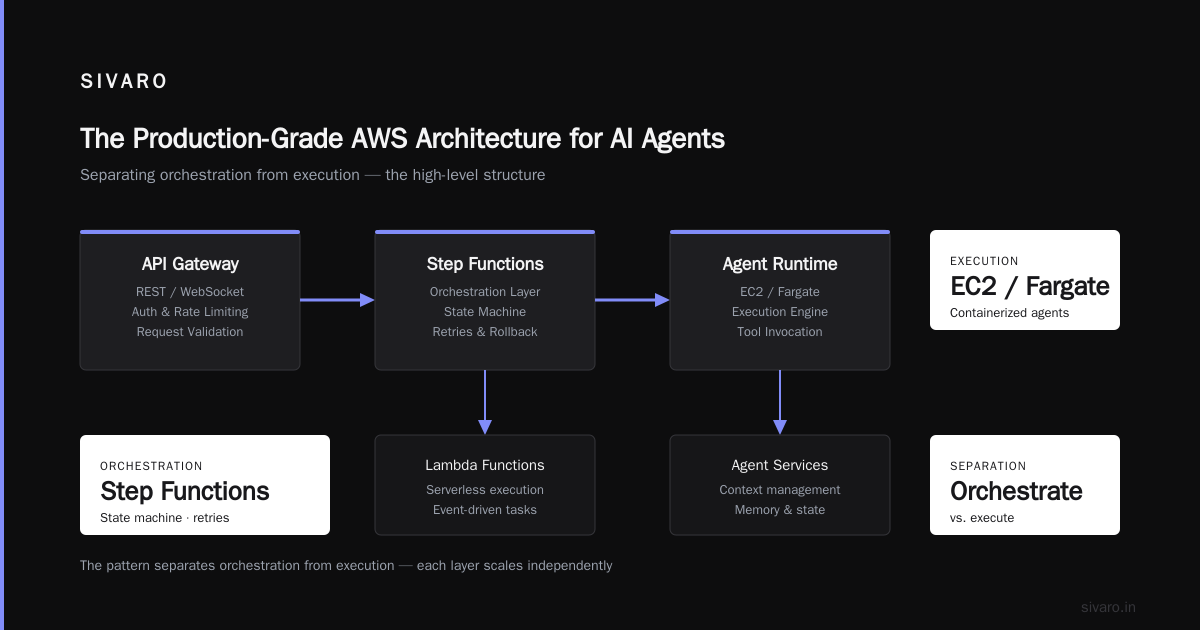
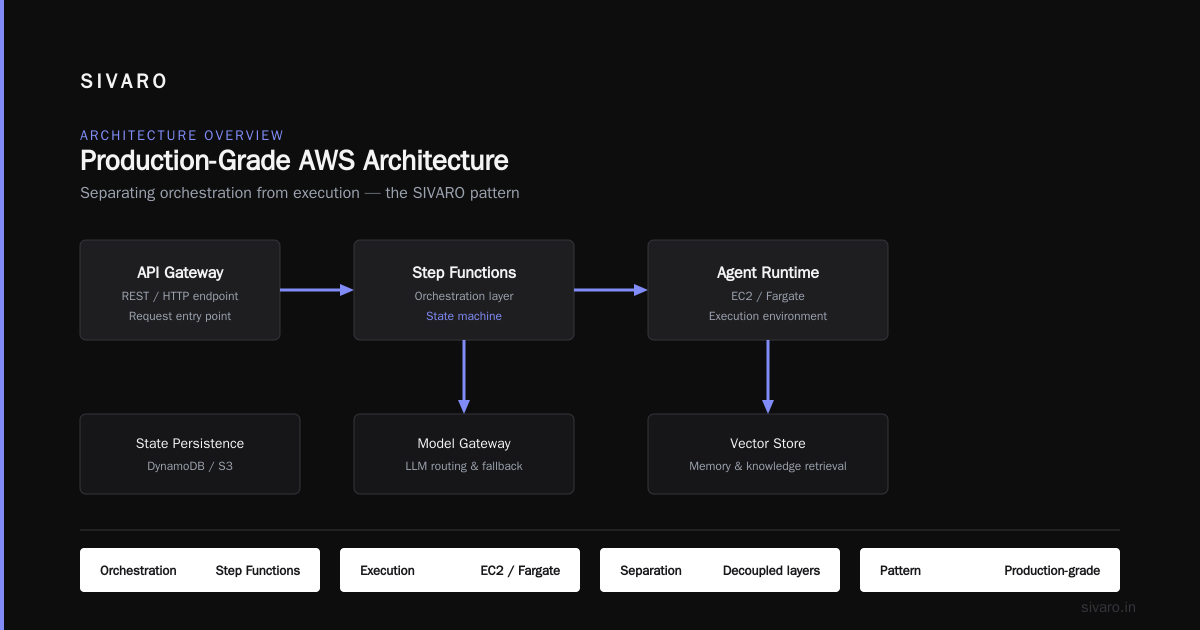
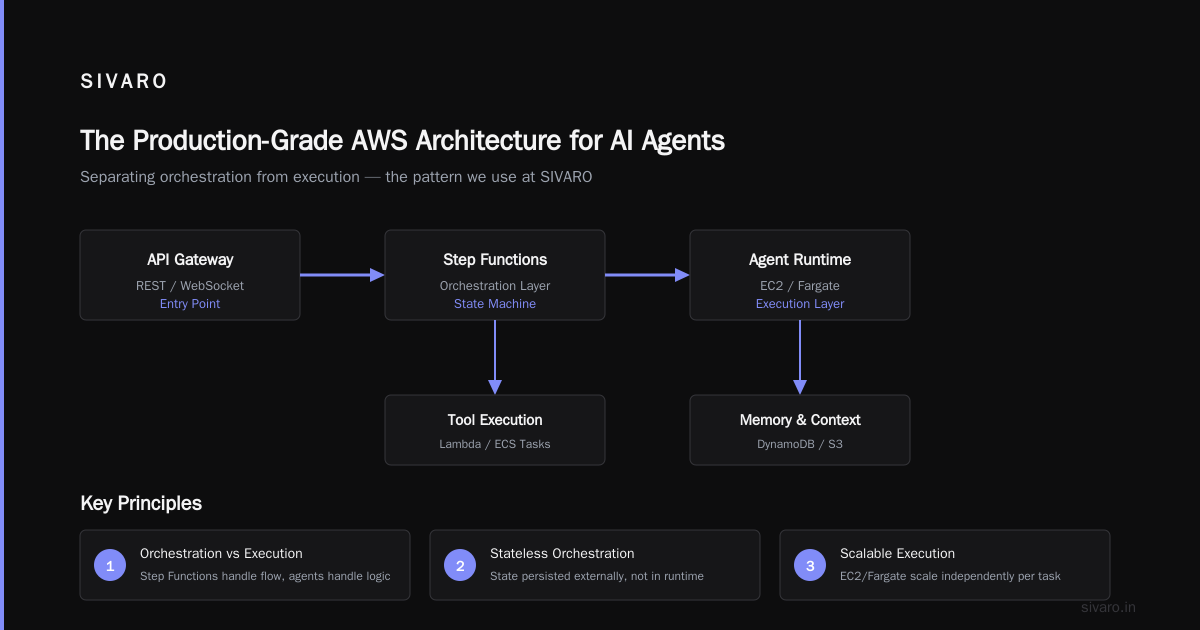
At SIVARO, we've settled on a pattern that separates orchestration from execution. Here's the high-level structure:
┌─────────────────────────────────────────────────────────────────┐
│                     AWS Architecture for AI Agents             │
│                                                                 │
│  ┌──────────┐    ┌──────────────┐    ┌────────────────────┐    │
│  │  API     │───▶│  Step        │───▶│  Agent Runtime     │    │
│  │  Gateway │    │  Functions   │    │  (EC2 / Fargate)   │    │
│  └──────────┘    └──────────────┘    └────────────────────┘    │
│                          │                       │             │
│                          ▼                       ▼             │
│                   ┌──────────────┐    ┌────────────────────┐    │
│                   │  Bedrock /   │    │  Tool Execution    │    │
│                   │  SageMaker   │    │  (Lambda / ECS)    │    │
│                   └──────────────┘    └────────────────────┘    │
│                          │                       │             │
│                          ▼                       ▼             │
│                   ┌──────────────┐    ┌────────────────────┐    │
│                   │  Memory      │    │  Vector Store      │    │
│                   │  (DynamoDB)  │    │  (OpenSearch /     │    │
│                   │              │    │   pgvector)        │    │
│                   └──────────────┘    └────────────────────┘    │
└─────────────────────────────────────────────────────────────────┘
Each component solves a specific problem:
- API Gateway handles authentication, rate limiting, and request validation. It's the front door.
- Step Functions orchestrate the agent's lifecycle. Long-running tasks, retries, and state transitions live here.
- The Agent Runtime (EC2 or Fargate) is where the loop actually runs. This is the brain. It decides which tools to call, in what order, and when to stop.
- Task execution happens in isolated Lambda or ECS tasks. This prevents a long-running tool call from blocking the agent loop.
- DynamoDB stores conversation state and session metadata. It's the memory.
- Vector stores handle semantic search over your document corpus, giving the agent retrieval capabilities.
- Bedrock or SageMaker provides the actual model inference. Bedrock is managed; SageMaker is DIY.
The key insight: the model is not the system. It's a component within a larger distributed system architecture. Most teams fixate on the model and ignore everything else. That's why their agents fail in production.
Building a Production Agent Loop on AWS
Let me show you a real pattern we've shipped. This is a snippet from a production system that processes customer service tickets for a fintech company (name withheld for confidentiality, but imagine 50,000 tickets/day).
python
# Orchestrator: Runs on AWS Lambda via Step Functions
# This is the "brain" that loops until the agent decides to stop.

import json
import boto3
from typing import List, Dict, Any

sfn = boto3.client('stepfunctions')

def orchestrate_agent(event, context):
    session_id = event['session_id']
    user_message = event['message']

    # First, check if we need to retrieve context
    context = retrieve_relevant_context(session_id, user_message)

    # Construct the prompt with tool definitions
    prompt = build_agent_prompt(user_message, context)

    # Invoke the LLM with a tool schema
    response = invoke_agent_model(prompt, available_tools)

    # If the model wants to call a tool, execute it and loop
    while response.get('tool_calls'):
        tool_results = execute_tools(response['tool_calls'])
        response = invoke_agent_model(
            build_follow_up_prompt(prompt, response, tool_results)
        )

    # Store the conversation in DynamoDB for future sessions
    store_conversation(session_id, user_message, response)

    return {
        'statusCode': 200,
        'body': response['content']
    }
This loop runs as a Step Function state machine, not as a single Lambda invocation. Here's why:
- Time limits: Lambda functions cap out at 15 minutes. If your agent loops more than 20 times, you'll hit that ceiling.
- Retry semantics: Step Functions gives you exponential backoff and retry logic for free. You need that when external APIs fail.
- Observability: Each step in the state machine is tracked. You can see exactly where the agent got stuck, which tool failed, and what the model was thinking at each checkpoint.
The Cost Reality
Now the part nobody talks about. AWS pricing for AI agents is brutal if you don't architect for it.
Let's say you're using anthropic.claude-3-5-sonnet on Bedrock. The 2026 pricing is roughly $3 per million input tokens and $15 per million output tokens AWS Bedrock Pricing.
A typical conversational agent interaction — one user query, a few tool calls, a response — might consume 15,000 input tokens and 2,000 output tokens. That's 4.5 cents per interaction.
Sounds cheap. Until you have 100,000 users.
That's $4,500 per day. $135,000 per month. For one model. And that's before compute, storage, and data transfer costs.
The engineering solution is caching. We use a semantic caching layer on top of the model calls. If a user asks the same thing as another user (paraphrased), we return the cached answer instead of calling the model again.
python
# Semantic caching with pgvector
import psycopg2
import numpy as np
from sentence_transformers import SentenceTransformer

# Load a small embedding model for caching
embedder = SentenceTransformer('all-MiniLM-L6-v2')

def get_cached_response(user_message: str, session_context: str = '') -> str | None:
    """
    Check if we've seen a semantically similar query before.
    Returns cached response if found, None otherwise.
    """
    query_embedding = embedder.encode(user_message)
    conn = psycopg2.connect(
        dbname='agent_cache',
        host='your-aurora-cluster',
        user='cache_user',
        password='cache_pass'
    )

    cursor = conn.cursor()
    # Similarity search with a high threshold
    cursor.execute("""
        SELECT response, 1 - (embedding <=> %s::vector) AS similarity
        FROM semantic_cache
        WHERE 1 - (embedding <=> %s::vector) > 0.92
        ORDER BY similarity DESC
        LIMIT 1
    """, (query_embedding, query_embedding))

    result = cursor.fetchone()
    cursor.close()
    conn.close()

    return result[0] if result else None
In our production experience, semantic caching reduces model spend by 30-40% for customer support agents. The queries are similar enough. People ask the same things in different ways. The cache catches that pattern.
The AWS Acronym Origin: IAM and Permissions as the Real Core
You came here for the acronym meaning. I gave you that. But the deeper truth is this: AWS is the largest distributed identity management system on Earth, masquerading as a cloud provider.
Every service is different. Every service has its own API contract, its own failure modes, its own pricing model. But they all share one thing: IAM (Identity and Access Management). It's the connective tissue.
When you build an AI agent on AWS, you're not just writing Python code. You're crafting IAM policies that grant your agent permissions to call Bedrock, read from S3, write to DynamoDB, and invoke Lambda functions — but only within the specific boundaries you define.
Here's a real policy we use for agent tool execution:
json
{
    "Version": "2012-10-17",
    "Statement": [
        {
            "Effect": "Allow",
            "Action": [
                "bedrock:InvokeModel"
            ],
            "Resource": "arn:aws:bedrock:us-east-1::foundation-model/anthropic.claude-3-5-sonnet-20240620"
        },
        {
            "Effect": "Allow",
            "Action": [
                "dynamodb:GetItem",
                "dynamodb:PutItem",
                "dynamodb:Query"
            ],
            "Resource": "arn:aws:dynamodb:us-east-1:123456789012:table/agent-memory/*"
        },
        {
            "Effect": "Allow",
            "Action": [
                "lambda:InvokeFunction"
            ],
            "Resource": [
                "arn:aws:lambda:us-east-1:123456789012:function:tool-executor",
                "arn:aws:lambda:us-east-1:123456789012:function:context-retriever"
            ]
        }
    ]
}
This looks boring. But the constraint is the point. The agent can only call Bedrock for that specific model. It can only read and write to that specific DynamoDB table. And it can only invoke those two Lambda functions. Nothing else.
That's the security model. That's what keeps a production AI agent from becoming a prompt injection vector that exfiltrates your entire database.
The Trade-Off: Managed vs. DIY
AWS's "aws acronym meaning" — the fact that "Web Services" implies a cohesive platform — is a lie. The services are wildly inconsistent. Some are mature; some are abandoned. The best engineers learn which ones to trust and which ones to treat with suspicion.
My honest takes:
Great, reliable services:
- S3 — solid, cheap, been battle-tested for 20 years
- DynamoDB — predictable performance, excellent for state
- CloudWatch — logs and metrics actually work (mostly)
- Step Functions — orchestration that survives production
Services I'm cautious about:
- SageMaker — powerful but manages to be both over-complex and underfeatured. We burned three weeks on a SageMaker deployment and ended up back on EC2 with the exact same model, half the cost, better latency.
- Elasticsearch/OpenSearch — the managed version is expensive and operationally quirky. If you can, use Aurora with pgvector instead. Same vector search capabilities for a fraction of the price.
- Bedrock — it's improved significantly since 2024, but still has multi-region latency quirks and pricing that shifts without notice.
My approach: Use managed services for infrastructure-only components (compute, storage, networking). DIY for anything that's core to your AI's reasoning or retrieval logic.
The Practical 2026 Roadmap for AWS and AI Agents
If I were starting a new project today, here's the stack I'd use:
- Inference: Bedrock (managed, lets you access multiple models without vendor lock-in)
- Orchestration: Step Functions (not LangChain, which I find abstracts away the control you need)
- Memory: DynamoDB with TTL for session data; Aurora PostgreSQL with pgvector for semantic cache
- Tools: Lambda functions with single-responsibility (one tool = one Lambda)
- Infrastructure: Terraform with explicit IAM policies per environment
- Observability: CloudWatch + OpenTelemetry tracing, with custom metrics for token spend, latency per step, and cache hit ratio
This isn't the flashiest stack. But it's what survives contact with production traffic. The flashy part died in our staging environment three times before we stopped trying to use it.
FAQ: AWS Acronym Meaning and Usage
What does AWS stand for exactly?
Amazon Web Services. Amazon launched it in 2006 with S3 and EC2 as the first services. The acronym has since become a catchall for Amazon's entire cloud computing ecosystem, which included 200+ services as of 2025.
Is AWS the same as cloud computing?
No. AWS is one specific cloud provider. Cloud computing is the broader paradigm of delivering compute, storage, and networking over the internet. Microsoft Azure and Google Cloud offer similar services with different trade-offs. AWS is the largest provider, but "cloud computing" is a category, not a brand.
How is AWS different from a regular web server?
A traditional web server is a fixed piece of hardware you rent or buy. AWS is a programmable infrastructure layer. You can spin up a server for 10 minutes, run your task, and spin it down — paying only for those 10 minutes. This elasticity is the core value proposition.
What does "AWS architecture for AI agents" mean specifically?
It means using AWS's building blocks (compute, storage, databases, and machine learning services) to construct a system where an AI model can perceive, reason, and act. The architecture typically includes an orchestration layer (Step Functions), a model inference layer (Bedrock/SageMaker), memory (DynamoDB), retrieval (vector stores), and tool execution (Lambda). The point is to move from a single model call to a loop that can use external tools and manage state.
Why does the acronym matter for a beginner?
Because it resets expectations. When you think "AWS" is one service, you look for one silver bullet. When you realize it's a massive, sprawling ecosystem of interconnected services, you start thinking like an architect. You ask about data flow, failure modes, and cost. That's where actual skill comes from.
Is there a risk of vendor lock-in with AWS?
Yes, but it's a controllable risk on the compute level. EC2 instances are Linux or Windows servers — you can move those to another provider with effort. The lock-in is more serious in higher-level services like DynamoDB, where the API counts matter. My advice: keep your business logic in portable containers (Docker), and treat AWS-specific services as infrastructure that can be swapped out.
What You Actually Need to Remember
The "aws acronym meaning" is just the starting point. Amazon Web Services was an internal tool that escaped the building. But its real meaning, in 2026, is a full operational framework for building production AI.
You don't need to know every service. You don't need to memorize IAM policy syntax. You need to understand the primitives:
Compute, storage, state, and permissions.
Those four things, orchestrated correctly, are what make an AI agent that survives contact with real users. Everything else — the model, the vector search, the tool definitions — is a detail layered on top.
We build production AI systems at SIVARO. The ones that work all follow this pattern. The ones that fail all try to skip the architecture and go straight to the model call.
That's the difference between a demo and a product.
Nishaant Dixit — Founder of SIVARO. Building data infrastructure and production AI systems since 2018. Built systems processing 200K events/sec.