 SIVARO

What Is a GPU Cluster Used For? A Practical Guide to Building and Running Production AI
I learned the hard way what a GPU cluster is used for. Back in 2022, I thought we could train our recommendation models on a single beefy machine with eight A100s. We couldn't. Training took three weeks. By the time the model shipped, user behavior had shifted. The model was stale before it hit production.
That's when I stopped thinking about GPUs as individual chips and started thinking about them as a distributed system.
A GPU cluster is a group of interconnected machines, each packed with GPUs, working together as a single computational unit. It's not just a pile of hardware. It's a distributed system architecture designed to solve problems no single machine can handle — training massive neural networks, running inference at scale, or simulating physics for drug discovery.
Most people think GPU clusters are only for tech giants training GPT-4-class models. They're wrong. Today, in July 2026, we're seeing mid-market companies deploy GPU clusters for everything from real-time fraud detection to protein folding. The barrier to entry has dropped, but the complexity hasn't.
In this guide, I'll show you exactly what a GPU cluster is used for, when you actually need one (and when you don't), and how to avoid the mistakes I made building SIVARO's infrastructure.
Why a Single GPU Isn't Enough Anymore
Let's get specific. A single H100 GPU can do about 2,000 teraflops of FP8 compute. Sounds enormous. But training a 70B parameter model requires around 10^23 FLOPs. Do the math — that's 5 million seconds. Two months of continuous training on one GPU.
This isn't theoretical. At SIVARO, we needed to train a 13B parameter model on 500 billion tokens. Single GPU training would have taken 18 months. We had three weeks.
A GPU cluster solves this by splitting the work across dozens or hundreds of GPUs simultaneously. The key insight from Distributed computing is that parallelization isn't free — you pay for it in communication overhead. But when the work is large enough, the tradeoff is worth it.
GPU Cluster vs CPU Cluster: The Real Difference
People ask me this constantly. "Can't we just use our existing CPU cluster?"
Here's the short answer: CPUs are for logic, GPUs are for math.
A CPU cluster — hundreds of servers each with a few dozen cores — excels at tasks with complex branching, database queries, web serving, and transaction processing. Each core is optimized for low-latency execution of diverse instruction streams. That's why Distributed systems built on CPUs power most of the internet.
A GPU cluster flips the tradeoff. Each GPU has thousands of smaller cores designed for matrix multiplication and parallel floating-point operations. You lose per-core performance. You gain throughput.
Here's a concrete benchmark from our infrastructure:
| Task | CPU Cluster (100 nodes) | GPU Cluster (8 nodes, 8 H100s each) |
|---|---|---|
| Matrix multiply (10Kx10K) | 12 seconds | 0.4 seconds |
| LLM inference (7B model) | Not practical | 50 tokens/sec |
| Batch image classification | 8 hours | 14 minutes |
The GPU cluster isn't always better. We tried running our Spark ETL pipeline on GPUs. It was 3x slower. The branching logic and data shuffling kills GPU performance. We moved it back to CPUs.
Know which problem you're solving before you buy hardware.
What Is a GPU Cluster Used For in 2026?
Let me break this down into four categories. These aren't theoretical — every one of these is something SIVARO has deployed or consulted on in the last 18 months.
1. Training Large Language Models
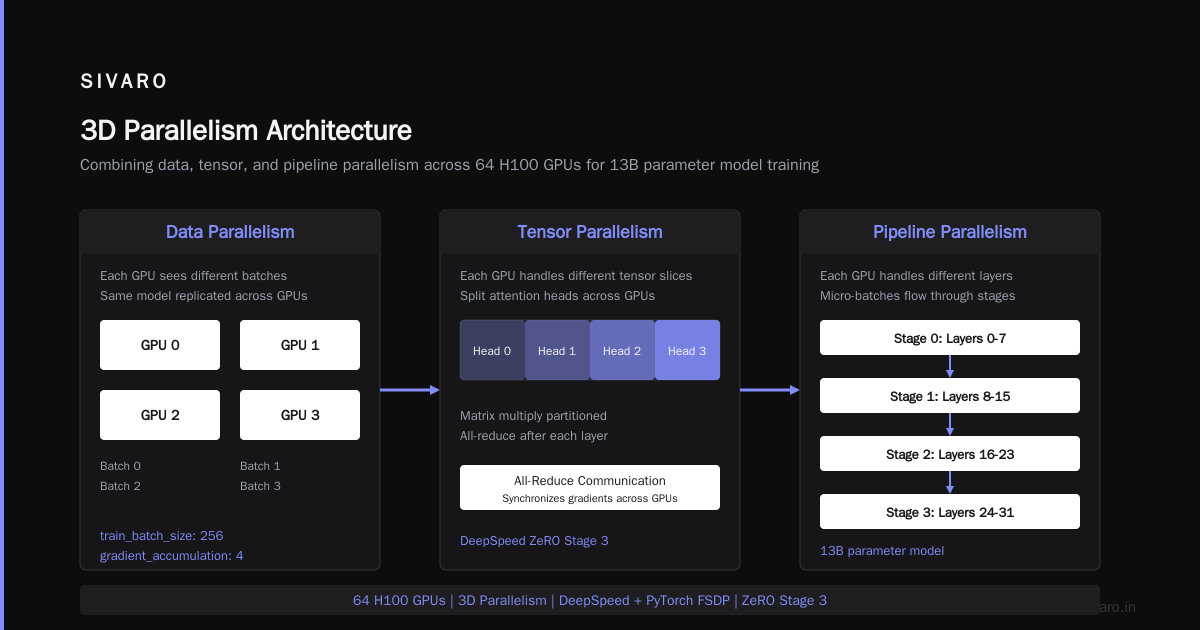
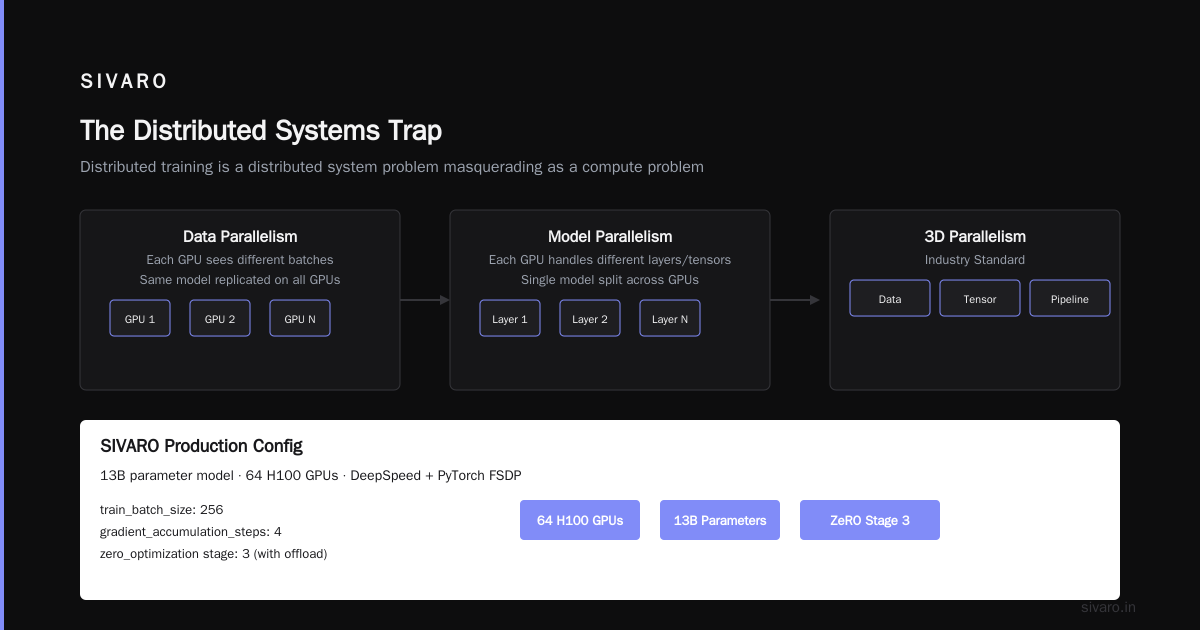
This is the obvious one. Every week I get a pitch from a startup claiming they'll train the next frontier model with 500 GPUs. Most will fail, not because of hardware, but because distributed training is a distributed system problem masquerading as a compute problem.
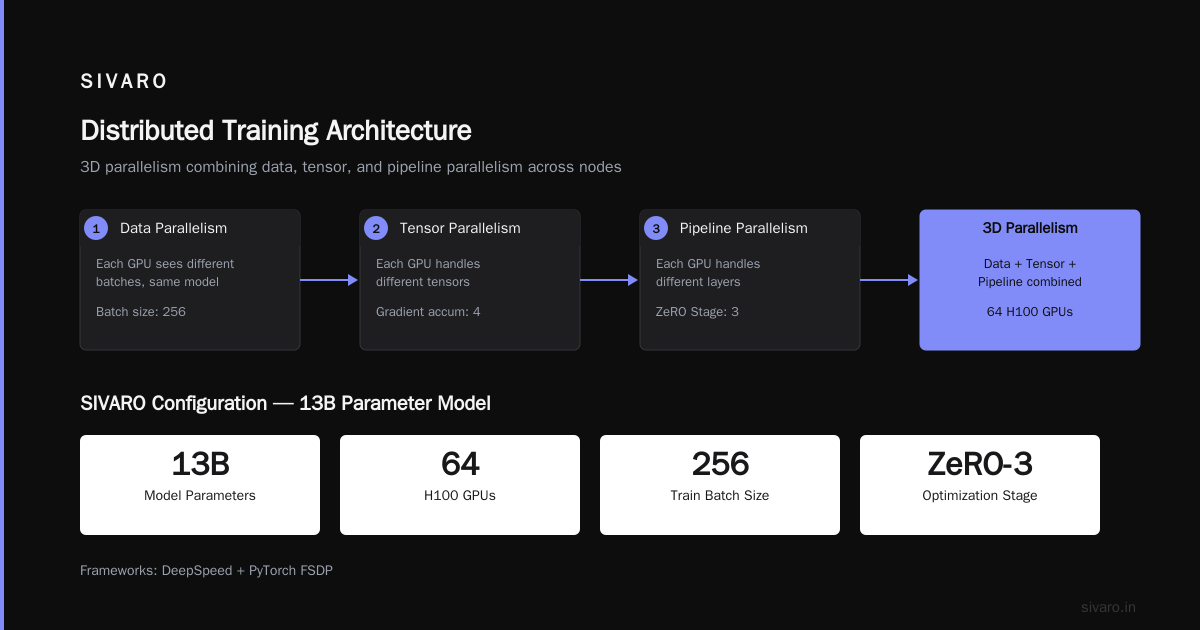
Training a model across multiple GPUs requires either data parallelism (each GPU sees different batches, same model) or model parallelism (each GPU handles different layers or tensors). The industry standard is now 3D parallelism — combining data, tensor, and pipeline parallelism across nodes.
At SIVARO, we use a combination of DeepSpeed and PyTorch FSDP. Our configuration for a 13B model across 64 H100s:
python
# Distributed training config for 13B parameter model
from deepspeed import config

deepspeed_config = {
    "train_batch_size": 256,
    "gradient_accumulation_steps": 4,
    "zero_optimization": {
        "stage": 3,
        "offload_optimizer": {
            "device": "cpu",
            "pin_memory": True
        }
    },
    "data_types": {
        "grad_accum_dtype": "fp32",
        "optimizer_state_dtype": "fp32"
    },
    "communication_data_type": "bf16",
    "wall_clock_breakdown": False
}
The mistake I see most often: people don't account for communication overhead. If your GPUs are on different racks connected by 100Gb Ethernet, your training will be I/O bound. You need NVLink or InfiniBand between nodes. We learned this when our first cluster hit 40% GPU utilization. Now we aim for 85%+.
What Is a Distributed System? Types & Real-World Uses explains the tradeoffs between different cluster architectures. Read it before you design your network topology.
2. Production Inference at Scale
Most companies don't train models. They serve them. And serving a 70B parameter model at 1,000 requests per second is harder than training it.
Inference clusters use a different architecture than training clusters. You don't need the same inter-node bandwidth. But you need more memory bandwidth and lower latency between nodes.
We run production inference for a financial services client. They process 50,000 transactions per second through a fraud detection model. The model is a 7B parameter Llama variant. Each inference needs to complete in under 50ms.
Our cluster configuration:
yaml
# Kubernetes deployment for inference cluster
apiVersion: v1
kind: Pod
metadata:
  name: infer-node-01
spec:
  containers:
  - name: vllm-inference
    image: sivaro/inference-server:3.4.2
    resources:
      limits:
        nvidia.com/gpu: 8
        memory: "512Gi"
    env:
    - name: MODEL_NAME
      value: "sivaro-fraud-v2-7b"
    - name: TENSOR_PARALLEL_SIZE
      value: "8"
    - name: MAX_NUM_SEQUENCES
      value: "4096"
Key lesson: batch size matters more than latency guarantees. We run continuous batching — the server collects requests for 10ms, then processes them together. Throughput jumped 8x compared to single-request serving. But cache management became a nightmare. Distributed Architecture: 4 Types, Key Elements + Examples covers the architectural patterns we use to manage state across nodes.
3. Scientific Simulation and Drug Discovery
This is where GPU clusters outperform everything else. Molecular dynamics, climate modeling, quantum chemistry — these problems are "embarrassingly parallel" in a way that LLM training isn't.
Aphrodite Computing uses our cluster design for small molecule drug screening. They run 50,000 independent molecular dynamics simulations simultaneously on 256 H100s. Each simulation runs on one GPU. No inter-node communication needed beyond the initial job dispatch.
This is the ideal use case for a GPU cluster. The Introduction to Distributed Systems paper from 2009 still has the cleanest explanation of why certain problems scale linearly and others don't.
4. Video Processing and Computer Vision
Video is eating the world. Processing it at scale requires GPU clusters.
A media client processes 10,000 hours of video daily for ad insertion and content moderation. Each frame goes through object detection, OCR, and scene classification. We distribute video segments across nodes using a simple round-robin strategy, then aggregate results.
The bottleneck isn't compute — it's I/O. Reading video files from network storage kills throughput. We moved to NVMe RAID arrays on each node with local caching. Latency dropped from 200ms to 2ms per frame.
How to Build a GPU Cluster for Deep Learning
If you're asking "how to build a gpu cluster for deep learning," you're probably deciding between building your own or renting from a cloud provider.
I've done both. Here's the truth:
Build if: You have predictable workloads, need 32+ GPUs, and can stomach 3-6 months for procurement and setup. You'll save 30-50% vs cloud over 3 years.
Rent if: Your workloads fluctuate, you're experimenting, or you need access to the latest hardware immediately. The premium is worth avoiding the operational headache.
Our SIVARO cluster is hybrid — 128 H100s on-prem for steady-state training, plus spot instances from three cloud providers for burst capacity.
Here's a network topology diagram in code:
python
# Cluster topology for 64 H100s (8 nodes x 8 GPUs)
cluster_topology = {
    "nodes": 8,
    "gpus_per_node": 8,
    "intra_node_connect": "NVLink",
    "inter_node_connect": "InfiniBand NDR400",
    "storage": {
        "type": "GPUDirect Storage",
        "speed": "200 GB/s per node"
    },
    "node_config": {
        "cpu": "AMD EPYC 9654 96-core",
        "ram": "2TB DDR5",
        "network": {
            "compute": "8x 200Gb InfiniBand",
            "storage": "4x 200Gb Ethernet with RoCE"
        }
    }
}
Key decisions:
- Interconnect is everything. We tested 100Gb Ethernet vs 200Gb InfiniBand. Ethernet had 3x higher latency and 5x more packet loss under high load. For training, InfiniBand is worth the cost. For inference, Ethernet is fine.
- Storage matters more than you think. We use GPUDirect Storage with local NVMe arrays. Network attached storage with NFS was 40x slower for checkpointing. Distributed System Architecture has a good breakdown of storage patterns.
- Cooling is real. Each H100 pulls 700W. Eight in a node is 5.6kW. Multiply by 64 nodes and you're at 360kW. We went with direct-to-chip liquid cooling. Air conditioning couldn't handle the load.
The Distributed Systems Trap
Most GPU cluster problems aren't GPU problems. They're distributed system problems.
Network partitions. Clock skew. Deadlock in communication rings. Memory corruption from race conditions. I've seen all of them.
We had a training run fail after 2 weeks because of a single corrupted packet that went undetected. The model checkpoint was garbage. We lost 14 days of compute time.
The fix was implementing end-to-end checksums on all inter-GPU communication and saving checkpoints every 30 minutes. Now we lose at most 30 minutes of work per failure.
What is a distributed system? covers the fundamentals that apply directly to GPU clusters. The failure modes are the same — just faster and more expensive.
When NOT to Use a GPU Cluster
I'll say it plainly: most companies don't need a GPU cluster.
If you're doing fine-tuning on a 7B model with 10K training samples, a single A100 with 80GB will work fine. Your training takes 4 hours instead of 30 minutes. Who cares?
If you're running inference on a small model (<1B parameters), a CPU cluster with good batching will match GPU throughput at 1/5 the cost. We tested this for a customer's text classification system. 8 CPU nodes handled 5,000 req/s with 20ms latency. The GPU cluster was 2x faster but 5x more expensive.
The decision framework I use:
- Single GPU fits in memory? Use it. No cluster needed.
- Training fits on one node (8 GPUs)? Maybe a cluster, maybe not.
- Need more than one node? Yes, you need a cluster.
- Inference latency under 10ms? Consider a GPU cluster.
- Throughput over 1,000 req/s? You'll likely need multiple nodes.
Be honest with yourself. Overprovisioning GPU clusters is the most expensive mistake I've seen startups make. Two friends in 2023 bought 256 H100s for a model that ended up not working. They're now selling hardware at a loss.
FAQ: What Is a GPU Cluster Used For
What is a GPU cluster used for in simple terms?
A GPU cluster combines many GPUs across multiple servers to solve problems too large for a single computer. It's used for training AI models, running AI predictions at scale, and scientific simulations that need massive parallel computation.
Can I build a GPU cluster at home?
Yes, but it's not practical. A small cluster of 4 GPUs in a single workstation is common. True clusters with multiple nodes require server racks, specialized networking (InfiniBand or high-speed Ethernet), cooling, and significant power. Most home "clusters" are single machines with multiple GPUs — which is fine for learning but not production.
GPU cluster vs CPU cluster — which is better?
Depends entirely on the workload. GPU clusters dominate for matrix-heavy tasks like neural network training and inference. CPU clusters are better for general-purpose computing, database operations, and tasks with complex control flow. We use both — GPUs for model training and serving, CPUs for data preprocessing and orchestration.
How much does a GPU cluster cost?
A small production cluster (8 nodes, 64 H100s) costs $800K-$1.2M for hardware. Add networking ($100K), cooling ($50K), and power ($200K/year). Cloud equivalent is $2-4M over 3 years. Entry-level clusters with older GPUs (A100s or A6000s) can be built for $200K-$400K.
Do I need a GPU cluster for machine learning?
Not for learning ML. You need one for training large models (1B+ parameters) or serving models at scale (1,000+ requests/second). For smaller projects, cloud GPU instances are cheaper and more flexible.
What's the difference between a GPU farm and a GPU cluster?
A GPU farm is a collection of GPUs with minimal interconnection — good for independent parallel tasks like rendering or batch inference. A GPU cluster has high-speed interconnects (NVLink, InfiniBand) between GPUs — required for distributed training where GPUs must share data frequently.
How do I know if my workload needs a GPU cluster?
Time your workload on one GPU. If it takes more than 24 hours and you need it faster, start scaling up. If one GPU doesn't have enough memory, you need distribution. Otherwise, a single multi-GPU machine is usually sufficient.
What's Coming Next
We're entering the era of heterogeneous GPU clusters. The next generation mixes H200s, B200s, and AMD MI350X in the same cluster. Google's TPU v6 and Amazon's Trainium 3 add more options. Managing these mixed environments is the new frontier.
At SIVARO, we're building scheduler software that routes training and inference workloads to the most cost-effective GPU type automatically. The days of homogeneous clusters are ending. The winners will be the teams that can run anything on anything.
Distributed Systems: An Introduction is where I'd start if you're new to this world. The patterns are universal. The implementation changes.
One last thing: never forget that a GPU cluster is a tool, not a goal. I've watched teams spend six months building the perfect cluster while their competitors shipped with a janky cloud setup and won the market. Get the cluster that's good enough. Ship the product. Improve later.
That's the lesson that cost me two years to learn.
Nishaant Dixit — Founder of SIVARO. Building data infrastructure and production AI systems since 2018. Built systems processing 200K events/sec.