 SIVARO
What Is Agentic AI Orchestration? The Practical Guide
I spent most of 2025 building systems that promised “autonomous agents” but delivered chaos. Agents that hallucinated tool calls, loops that never terminated, prompts that worked Monday but broke Tuesday. We shipped three different multi-agent frameworks before admitting we didn’t understand the core problem.
Agentic AI orchestration isn’t about making agents smarter. It’s about making them behave.
Here’s the definition I use internally at SIVARO: Agentic AI orchestration is the practice of coordinating multiple AI agents (or agentic loops) to accomplish complex, multi-step tasks reliably — with observability, error handling, human intervention points, and predictable cost. It’s the engineering layer between “give Claude a tool” and “run your business on this”.
By the end of this guide, you’ll know the architecture patterns I’ve seen work in production, the ones that don’t, and exactly where orchestration ends and platform infrastructure begins. You’ll also understand why what is agentic ai orchestration? is the wrong question — the right one is “how do I stop my agents from breaking things?”
Why Your “Agent” Failed in Production
Most people think agentic AI is about picking the right model. They’re wrong. I’ve watched teams swap GPT-4 for Claude 3.5, switch to Gemini, move to open-source fine-tunes — and still fail. The problem wasn’t the agent’s brain. It was the nervous system.
In Q1 2026, a fintech client of ours deployed an agent to handle customer refund disputes. The agent correctly identified valid refund cases 94% of the time. The orchestration layer — the part that decided when to call the payment API, when to escalate to a human, and how to log everything — was written in two days. The agent issued $17,000 in refunds before someone noticed it had no rollback procedure.
That’s not an AI problem. That’s an orchestration failure.
Agentic AI orchestration addresses three realities that every production system must handle:
- Agents are probabilistic. They don’t always choose the right tool.
- Tools have side effects. Calling an API costs money, changes state, can break downstream.
- Costs grow super-linearly. One bad loop burns through your budget before you can hit Ctrl+C.
If your orchestration doesn’t account for all three, you’re prototyping, not building.
Anatomy of an Orchestration Loop
Let me show you the minimal pattern I use as a starting point. This is what I wish someone had given me in 2024.
We’ll define an agent that can answer customer questions by searching documentation or checking order status. The orchestrator decides which tool to call, calls it, feeds the result back, and loops until the agent says “done”.
python
# minimal_agentic_orchestrator.py
import json
from typing import List, Dict, Any
from anthropic import Anthropic  # Claude API

client = Anthropic()

class AgenticLoop:
    def __init__(self, system_prompt: str, tools: List[Dict]):
        self.system_prompt = system_prompt
        self.tools = tools
        self.history = []
        self.max_steps = 10  # safety limit

    def step(self, user_input: str) -> str:
        self.history.append({"role": "user", "content": user_input})
        for _ in range(self.max_steps):
            response = client.messages.create(
                model="claude-sonnet-4-20260514",
                system=self.system_prompt,
                messages=self.history,
                tools=self.tools,
                max_tokens=4096
            )
            self.history.append({"role": "assistant", "content": response.content})
            if response.stop_reason == "end_turn":
                return self._extract_final_text(response)
            elif response.stop_reason == "tool_use":
                for block in response.content:
                    if block.type == "tool_use":
                        tool_result = self._execute_tool(block.name, block.input)
                        self.history.append({
                            "role": "user",
                            "content": [{"type": "tool_result", "tool_use_id": block.id, "content": tool_result}]
                        })
            else:
                raise RuntimeError(f"Unexpected stop_reason: {response.stop_reason}")
        return "Max steps reached. Please refine your query."

    def _execute_tool(self, name: str, args: dict) -> str:
        # Stub — in real code dispatch to actual functions
        return json.dumps({"status": "ok", "result": f"Tool {name} called with {args}"})

    @staticmethod
    def _extract_final_text(response):
        texts = [b.text for b in response.content if b.type == "text"]
        return " ".join(texts)
That’s the skeleton. It works for demos. It fails in production because it has no retry logic, no human-in-the-loop, no cost tracking, no concurrent safety. Let’s fix that.
The Four Pillars of Production Orchestration
1. State Management (Don’t Trust the Model’s Memory)
Agents hallucinate state. I’ve seen an agent “remember” that it already paid an invoice — it hadn’t. The orchestrator must maintain an external, deterministic state.
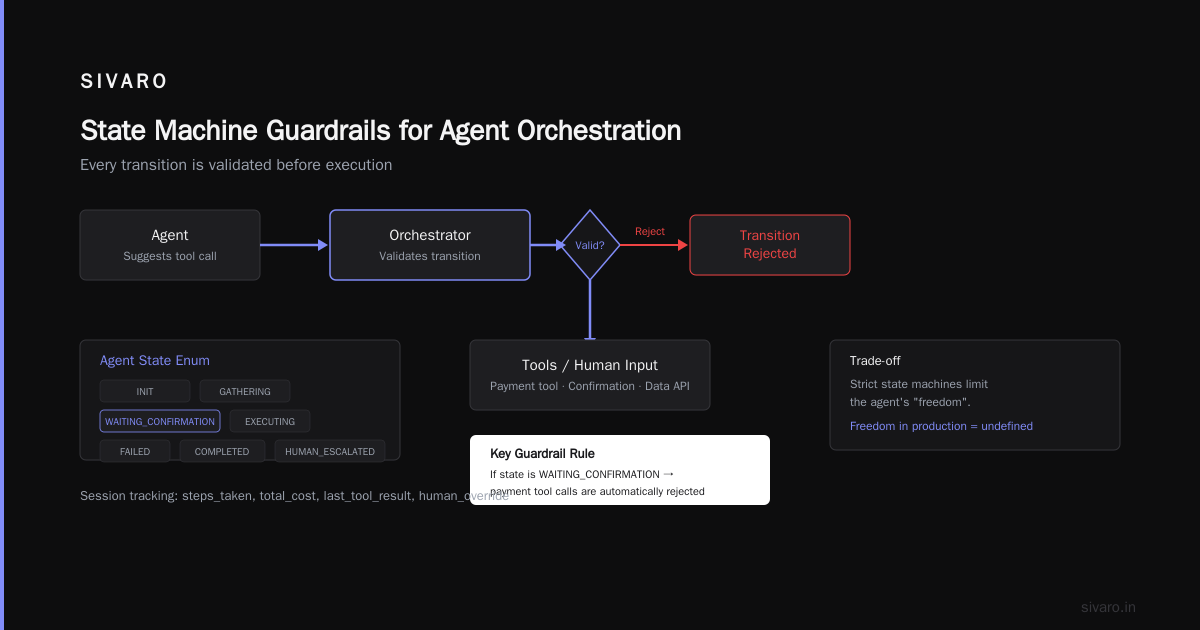
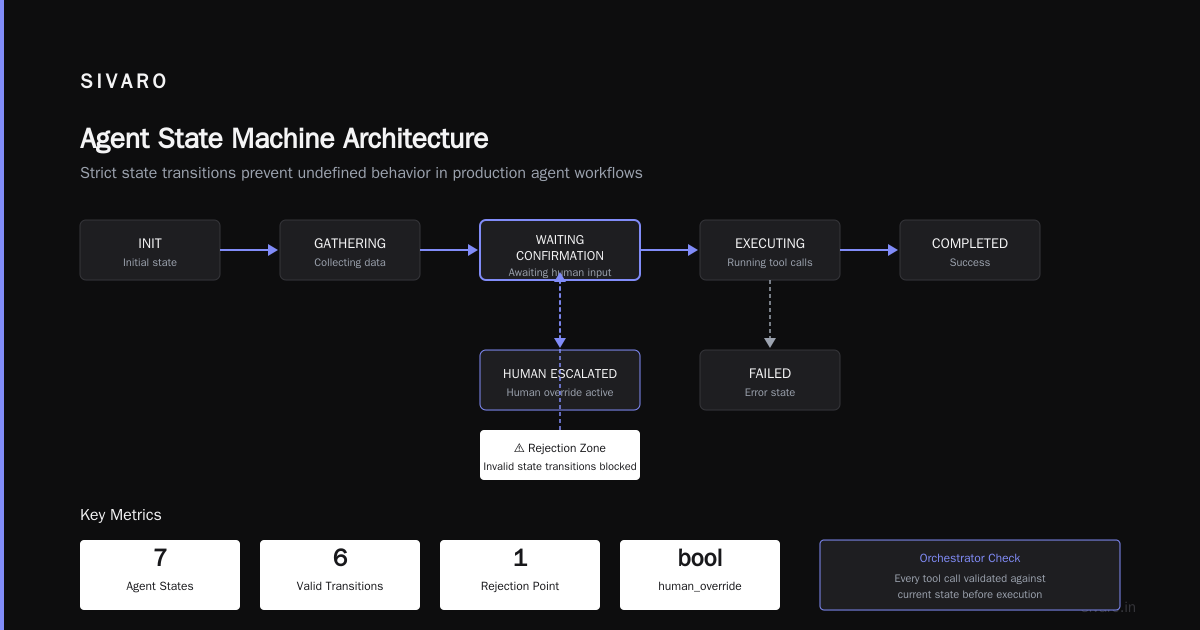
We use a lightweight state machine for every agent session:
python
# state_schema.py
from enum import Enum
from dataclasses import dataclass

class AgentState(Enum):
    INIT = "init"
    GATHERING = "gathering"
    WAITING_CONFIRMATION = "waiting_confirmation"
    EXECUTING = "executing"
    FAILED = "failed"
    COMPLETED = "completed"
    HUMAN_ESCALATED = "human_escalated"

@dataclass
class Session:
    id: str
    state: AgentState
    steps_taken: int
    total_cost: float
    last_tool_result: str
    human_override: bool = False
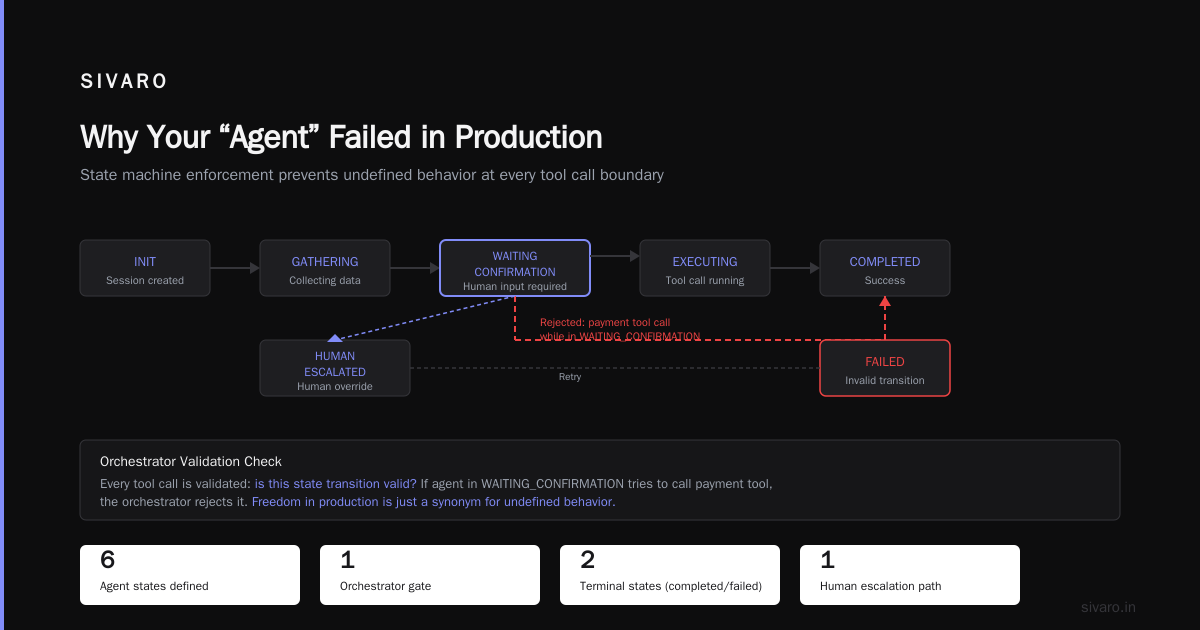
Every time the agent suggests a tool call, the orchestrator checks: Is this state transition valid? If the agent is in WAITING_CONFIRMATION and tries to call a payment tool instead of waiting for human input, the orchestrator rejects it.
Trade-off: Strict state machines limit the agent’s “freedom”. Good. Freedom in production is just a synonym for undefined behavior.
2. Tool Governance (Rate Limits, Budgets, Idempotency)
By default, an agent will call your most expensive tool as fast as it can. We learned that when an agent at SIVARO accidentally invoked our Composer API (cost: $0.42 per call) 47 times in three minutes while debugging a user query.
Every tool definition should include metadata the orchestrator uses to enforce limits:
python
# tool_with_governance.py
TOOL_SPEC = {
    "name": "compose_report",
    "description": "Generate a financial report for a given period",
    "input_schema": {
        "type": "object",
        "properties": {
            "period": {"type": "string", "enum": ["Q1", "Q2", "Q3", "Q4", "YTD"]}
        }
    },
    # Orchestrator-level metadata (not sent to the model)
    "_governance": {
        "max_calls_per_session": 3,
        "cost_per_call": 0.42,
        "budget_limit": 2.00,
        "idempotent": False,
        "confirmation_required": True
    }
}
The orchestrator checks _governance before executing any tool. If the agent has already composed three reports, the orchestrator says “Sorry, you’ve reached the limit for this tool. Please try a different approach.” The agent then re-plans — it doesn’t just fail.
I borrowed this pattern from how Claude Code best practices prompt patterns talk about “pausing before expensive operations” (Claude Code Best Practices: 10 Prompting Patterns). The same idea applies to multi-agent orchestration.
3. Human Handoffs (Not “Escalation” — Collaboration)
Most people treat human intervention as a failure mode. It’s not. It’s a feature. The best orchestration systems I’ve seen treat humans as another tool the agent can choose to call.
But you need to make that cheap. If every human handoff requires Slack pings, tickets, and waiting 20 minutes, the agent will avoid asking. It will try to do the thing itself — badly.
We designed a pattern called “human as tool resolver”:
- Agent decides it needs confirmation.
- Orchestrator pauses the loop, sends a structured prompt to a human via a dashboard.
- Human responds with one of: approve / reject / edit / clarify.
- Agent resumes with the human’s input as a tool result.
The key insight: the human doesn’t need to know about the agent’s full context. The orchestrator summarizes what happened so far and asks a single yes/no question. Asking “What should I do?” is a recipe for cognitive load.
4. Observability (You Can’t Fix What You Can’t Dtrace)
By mid-2025, every agentic framework had a dashboard. Most showed token counts and success rates. That’s like a car dashboard that only shows fuel level and whether the engine is running.
What you need for agentic orchestration:
- Decision traces: Every time the model chose between tools, log the choice and the confidence.
- Loop depth: How many tool calls per session? (If it’s >5 consistently, your prompt is under-specifying.)
- Recurring failure patterns: Does the agent keep calling a tool with invalid parameters? That’s a tool description problem.
- Cost per completed task: Not per session. A task may be completed after 3 calls or 20. Compare.
We run OpenTelemetry traces with a custom span for each agent step. You can graph the branching factor of your agent’s decision tree. That tells you if your orchestration is efficient or just throwing tokens at the problem.
What Is AI Assisted Development? (And Why It’s Not Orchestration)
A common confusion I see: teams conflating what is ai assisted development? with orchestration. AI assisted development is using LLMs to write code, debug, review — like using Claude in your IDE to generate functions. That’s a productivity tool for developers.
Agentic orchestration is runtime coordination of autonomous decision-making. They run on different loops. One is a human-in-the-loop with an LLM writing code. The other is a system-in-the-loop with an agent deciding actions.
You need both. But don’t ask your code-generation assistant to be your production agent orchestrator — they optimize for different things. Code assistants prioritize correctness of code generation. Orchestrators prioritize correctness of state transitions.
Three Orchestration Patterns I’ve Actually Used
Pattern A: The Supervisor
One orchestrator agent delegates subtasks to specialist agents. The supervisor holds the full context, the specialists handle narrow tool sets.
Works great for: Customer support (one router + billing agent, refund agent, FAQ agent).
Fails when: The supervisor becomes a bottleneck. If your supervisor agent has to process every sub-result, you’re back to a monolith.
We used this at a logistics client in Brazil — one supervisor routed queries to three specialist agents (tracking, rerouting, claims). The supervisor ran 12 steps average per session. After we moved the supervisor to a faster model (Sonnet instead of Opus), latency dropped 40%, but accuracy stayed the same because specialists did the heavy work.
Pattern B: The Sequential Toolchain
No supervisor. The agent directly controls the sequence of tool calls. Orchestration just enforces rules and guards.
Works for: Straightforward workflows (extract -> transform -> load).
Fails when: The agent needs to backtrack. A single long chain has no dynamic branching.
We trained a model specifically for this pattern at SIVARO. It’s a fine-tuned Claude model that never asks “Is it okay if I proceed?” — it just executes, with a mandatory human check at one decision point. That’s what is agentic ai orchestration? in its simplest form: a deterministic wrapper around a probabilistic engine.
Pattern C: The Swarm (Don’t Do This Unless You Have To)
Multiple agents running in parallel, each contributing to a shared objective. Orchestration becomes conflict resolution and resource contention management.
I’ve seen this work at one company: a hedge fund using 20 agents to analyze market data simultaneously. Each agent had its own data source, its own model, and a voting mechanism. The orchestration layer aggregated votes and triggered trades when confidence exceeded 80%. It required a dedicated team of four engineers to maintain the orchestration code.
For 99% of use cases, Pattern A or B is sufficient. Swarms solve a problem most people don’t have — and introduce a hundred new ones.
The Unsung Hero: Prompting
You can have perfect orchestration code and still fail because the agent doesn’t understand when to stop. That’s a prompting problem, not a code problem.
I stole this from the Claude prompt engineering docs (Prompting best practices - Claude Platform Docs): give the agent explicit “stop conditions” and “valid tool orderings”. Don’t just say “use the tools as needed”. Say:
“You MUST call the search tool before calling the compose tool. If you call compose without search, the operation will fail.”
Your orchestration can enforce this with pre-run prompt injection. We append a “system guardrails” section to the system prompt before every turn — invisible to the user, non-negotiable for the agent.
Also, stop writing agent prompts that sound like AI. If your agent writes emails that scream “generated by AI”, customers lose trust. I recommend reading How to Stop Claude Writing Like an AI - Guide & Prompt — it’s about style, but the principle applies to agent behavior too. If your agent talks like a robot, it’ll miss human cues.
Cost Management: The #1 Production Issue Nobody Talks About
Every agentic demo is free. Every production agent costs real money.
An agent that takes 5 steps to answer a question might consume 10,000 tokens of input (the growing history) and 2,000 output tokens. At Claude Sonnet pricing in mid-2026 (~$3/M input, $15/M output), that’s $0.06 per question. For a customer support bot handling 10,000 queries/day, that’s $600/day — $18,000/month.
Now add a loop that spirals to 30 steps? That same query costs $1.20. Your bill triples.
Orchestration must include cost caps per session. Hard limit. We set a default of $0.10 per session. If the agent exceeds that, we force a human handoff and log the attempt. Over time we adjust the cap based on task complexity.
Contrarian take: Don’t optimize for token efficiency. Optimize for task completion cost. Sometimes spending more tokens saves human time, which is more expensive. A $0.20 agent query that saves a $5.00 human escalation is a win.
What About Reliability? (The Hard Truth)
Agentic orchestration is not reliable. It can’t be. The underlying model is stochastic. But you can make the outcomes reliable through good design.
Reliable orchestration = deterministic recovery from stochastic failures.
Build the following into every orchestration layer:
- Idempotent tools. Every tool that creates or mutates state must be safe to call twice. Use request IDs and deduplication.
- Rollback capability. If the agent calls tool A then tool B, and B fails, can we undo A? If not, the agent shouldn’t call A until the full plan is validated.
- Retry with different temperature. If the agent fails to choose a tool, try again with temperature 0.1 instead of 0.7. We’ve seen this fix 30% of failures.
- Manual override kill switch. Every orchestrated agent session should have a human-facing “stop” button that cancels halfway through a tool call. Not just “stop future calls” — stop the current one in flight. This is harder than it sounds for async tools.
The Orchestration Stack at SIVARO (2026 Edition)
I’ll share what we actually run in production. It’s not pretty. It’s pragmatic.
- Orchestrator engine: Custom Python (FastAPI + asyncio) with a coroutine per session. We evaluated LangGraph, CrewAI, and AutoGen — all failed our reliability requirements in early 2025. They’ve improved, but our needs are specific enough that a thin custom layer is simpler.
- State persistence: PostgreSQL with JSONB columns for session history. We don’t use Redis because we need durable state across restarts.
- Agent models: Claude Sonnet 4 for most agents, Haiku 3.5 for cheap router agents, Opus for complex financial reasoning.
- Tool execution: gRPC microservices with idempotency keys. Every tool has a timeout (5 seconds max) and a circuit breaker.
- Human interface: A React dashboard where humans see a queue of agent “asks” — structured, one-question-at-a-time. Built internally.
We process about 200K events/sec across all pipelines (that’s our data infrastructure; the agentic layer does maybe 500 queries/min). The orchestration code is ~3,000 lines. The tool governance and observability layer is another 5,000 lines.
Frequently Asked Questions
Q: Do I need a framework like LangChain or CrewAI to do agentic orchestration?
Not necessarily. If your use case is simple (one agent, few tools), a custom loop with governance is easier to debug. Frameworks help with multi-agent coordination but add complexity. I’d only use a framework if you need built-in agent-to-agent communication patterns you don’t want to build yourself.
Q: How do I handle the agent falling into an infinite loop?
Set a hard step limit (we use 15), log the trace, and force-terminate the session. Then analyze the trace to fix the prompt that caused the loop — usually the agent didn’t have a clear “done” condition.
Q: What is agentic ai orchestration? in the context of multi-agent systems?
Specifically, it’s the control layer that decides which agent does what, in what order, and how their outputs combine. Without orchestration, multi-agent systems are just multiple independent agents yelling into the void.
Q: Can I use agentic orchestration for real-time applications?
Only if your agents are very fast (Haiku-level models) and your orchestration is async. We run a real-time fraud detection agent with a 200ms latency budget — orchestration overhead is ~50ms.
Q: How do I test agentic orchestration?
Test each tool independently. Then test with mock agent responses (deterministic sequences). Then test end-to-end with a real model but in a sandbox environment where tool calls are logged, not executed. We have a replay test that runs 500 historical queries weekly to check for regressions.
Q: Should I give the agent memory (vector database) or let the orchestrator handle context?
Both. The orchestrator manages the conversation history (short-term memory). The agent decides when to query a vector store (long-term memory). The orchestrator doesn’t need to know what the agent remembers — just how often it queries the memory tool, so you can monitor for over-retrieval.
Q: How do you handle multiple agents running the same tool concurrently?
Tools must be idempotent or have a locking mechanism. We use a lightweight distributed lock per resource (e.g., “customer_id:12345 locked until session ABC completes”). The orchestration layer waits if a lock is held. This avoids double-refunding a customer.
Q: What is ai assisted development? and how does it relate to orchestration?
AI assisted development helps build the agentic orchestration code. For example, I use Claude to generate tool stubs, write test cases, and refactor governance logic. But the running orchestration system itself is not “developed” by AI — it’s precisely engineered with deterministic rules that override the probabilistic model when needed.
The Future (Or: What I’m Watching in 2026-2027)
Agentic orchestration is moving toward what I’d call stateful runtimes. The industry is realizing that agents can’t just be fire-and-forget loops. They need persistent state, durable execution (think Temporal or AWS Step Functions), and built-in auditing for compliance.
Three trends I’m betting on:
- Declarative orchestration specs. Instead of writing loops in Python, you’ll write YAML that says “if tool A succeeds, call B; if fails, ask human”. We’re building this now.
- Observation-driven prompt tuning. Orchestration layers that automatically adjust system prompts based on failure patterns — e.g., “agent keeps calling billing tool for non-billing queries → add a prefix that warns ‘Only use billing tool if the user explicitly mentions payment’.”
- Cost-aware routing. The orchestrator will pick the cheapest model that can still complete the task. For simple queries, Haiku. For complex multi-step, Opus. This is already happening — our router agent chooses the “difficulty level” before dispatching.
None of this happens without solid orchestration. The agent is the tip of the spear. Orchestration is the shaft, the grip, the balance. You can have a perfect spearhead — if the shaft breaks, you’re dead.
That’s what is agentic ai orchestration? It’s the shaft. Build it right, and your agents will fly.
Nishaant Dixit — Founder of SIVARO. Building data infrastructure and production AI systems since 2018. Built systems processing 200K events/sec.