 SIVARO
What is AI Agent Production Orchestration? A Practical Guide
July 29, 2026
I spent last Tuesday night debugging an agent that decided to order 2000 server instances instead of 2. The cost? $47,000 in five minutes. AWS support called me at 3 AM. That’s when I realized most people don’t understand what it really means to run AI agents in production.
What is AI agent production orchestration? It’s the discipline of managing the full lifecycle of autonomous agents — from deployment to monitoring to incident response — at scale. It’s not about building agents. It’s about keeping them from destroying your business while they do their job.
In this guide, I’ll walk through what orchestration actually requires, where agents fail, how to test them before production, and how to pick the best cloud platform for AI agent production. I’m Nishaant Dixit. I run SIVARO. We’ve built data infrastructure handling 200K events per second since 2018. What I’m sharing comes from hard cuts, not textbooks.
The Hard Truth: Most AI Agents Fail in Production
You’ve seen the demos. Agent asks for a tool, calls an API, returns perfect JSON. Works 9 times out of 10.
What do you think happens on the 10th call at 2:30 PM on a Tuesday when your database is under load?
A 2025 study by Arion Research found that 62% of production AI agents fail at least once per week (When AI Agents Make Mistakes: Building Resilient...). Not slow. Not slightly wrong. Fail. As in, they either produce invalid actions, enter infinite loops, or silently corrupt state.
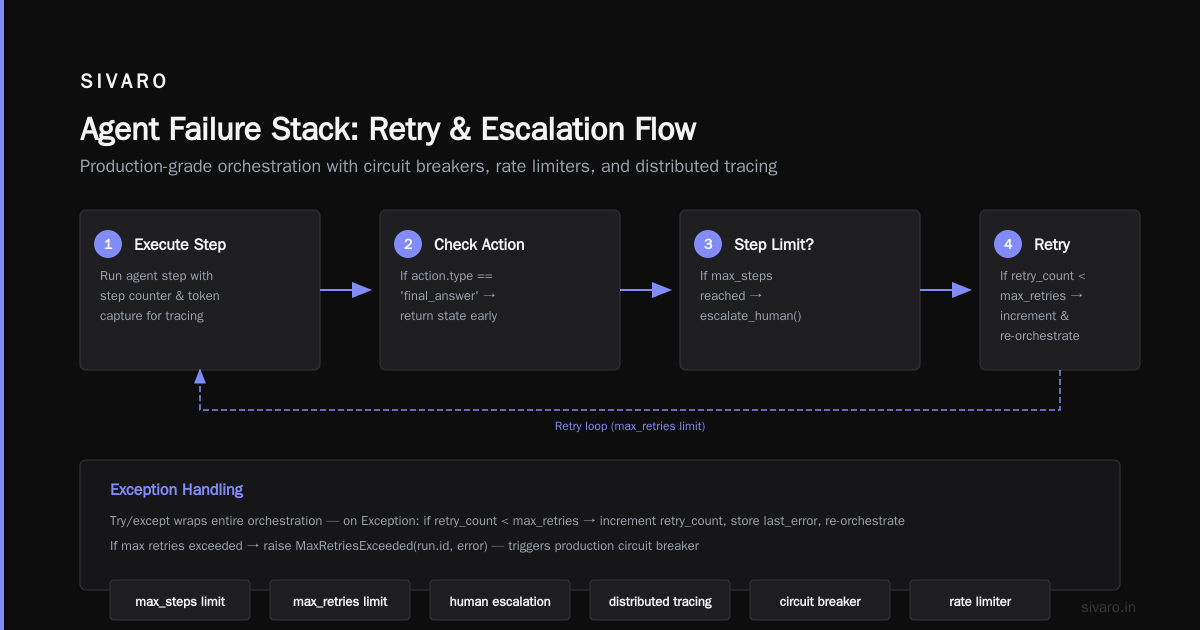
The Sherlock’s AI team documented the “Agent Failure Stack” — four layers where things break (Why AI Agents Fail in Production: The Agent Failure Stack ...):
- LLM hallucination — agent invents tools or arguments.
- Tool misalignment — agent uses the right tool with wrong parameters.
- State inconsistency — agent loses context or overwrites previous actions.
- Environment drift — external APIs change, schemas update, agent doesn’t adapt.
Most people think these are model problems. They’re not. They’re orchestration problems.
Let me give you a real example. In March 2026, a customer support agent at a fintech startup (name withheld) was designed to refund orders under $50. The LLM decided that “under $50” also covered orders with status “under review.” It refunded a $12,000 transaction. Orchestration didn’t catch it because the tool call looked valid. The incident response took 6 hours (AI Agent Incident Response: What to Do When Agents Fail).
Orchestration isn’t about making agents smarter. It’s about making them safer and recoverable.
What Production Orchestration Actually Is
What is AI agent production orchestration in practice? It’s a system that manages:
- Deployment — versioning agents, rolling back, canary testing.
- Execution — scheduling, concurrency, retries with backoff.
- Observability — tracing every LLM call, tool execution, state change.
- Guardrails — input/output validation, budget limits, human approval gates.
- Incident response — detection, diagnosis, rollback, and postmortem.
Think of it like Kubernetes for agents, but Kubernetes is infrastructure — this is agent-native orchestration.
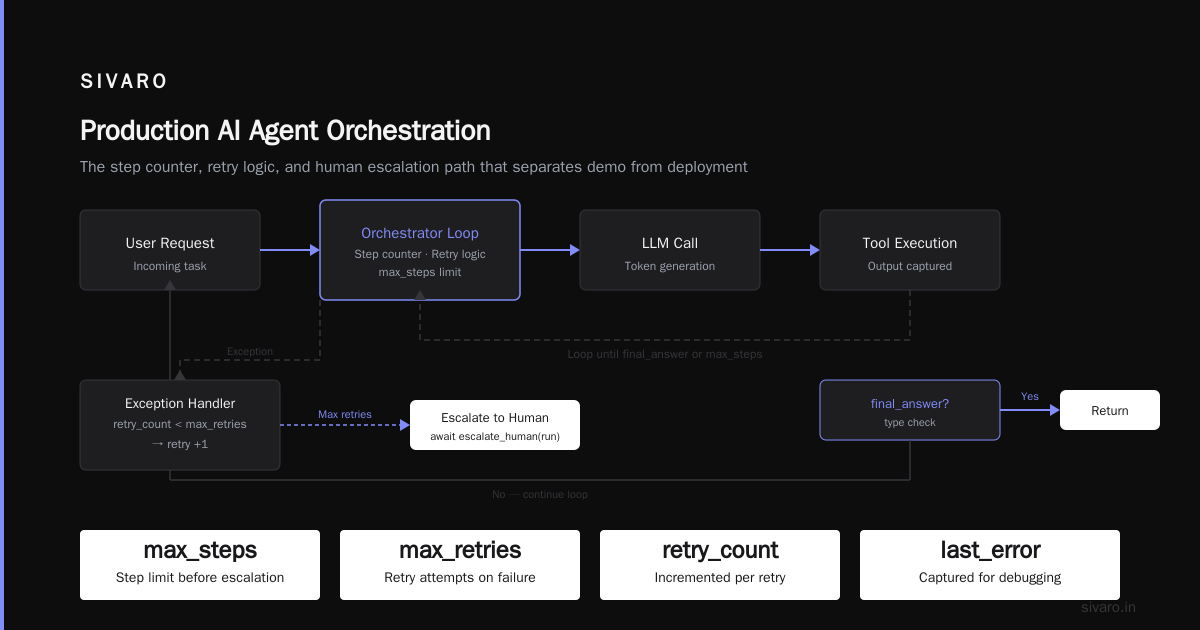
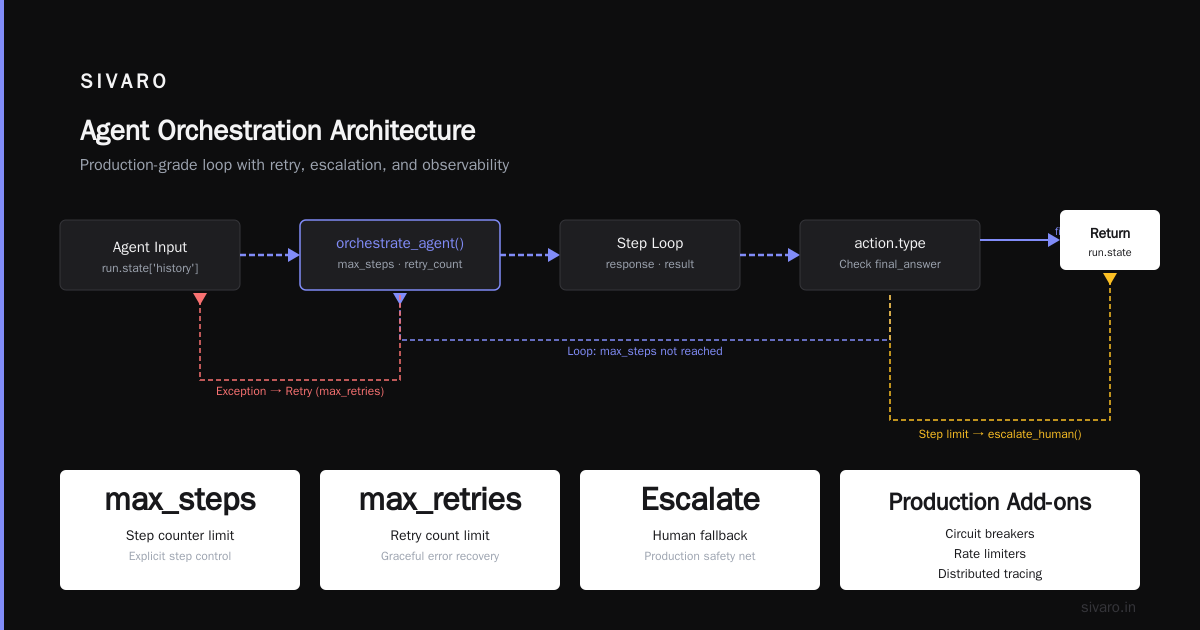
Here’s a minimal orchestration loop in Python (simplified for illustration):
python
import asyncio
from dataclasses import dataclass
from typing import Optional

@dataclass
class AgentRun:
    id: str
    state: dict
    max_retries: int = 3
    retry_count: int = 0
    last_error: Optional[str] = None

async def orchestrate_agent(run: AgentRun, max_steps: int = 10):
    try:
        for step in range(max_steps):
            # Step 1: Call LLM with current state
            response = await call_llm(run.state)
            # Step 2: Validate output
            if not validate_action(response.action):
                raise ValueError(f"Invalid action: {response.action}")
            # Step 3: Execute tool
            result = await execute_tool(response.action)
            # Step 4: Update state
            run.state['history'].append((response, result))
            # Step 5: Check for early termination
            if response.action.type == 'final_answer':
                return run.state
        # Step limit reached — escalate
        await escalate_human(run)
    except Exception as e:
        if run.retry_count < run.max_retries:
            run.retry_count += 1
            run.last_error = str(e)
            return await orchestrate_agent(run, max_steps)  # Retry
        else:
            raise MaxRetriesExceeded(run.id, e)
Notice the explicit step counter, retry logic, and human escalation path. This is basic orchestration. In production, you add circuit breakers, rate limiters, and a distributed tracing system that captures every LLM token and tool output.
At SIVARO, we use a custom orchestration engine built on top of Temporal for state durability. Why Temporal? Because agents can run for hours, and if the pod dies, the workflow survives. That’s table stakes for production.
Testing AI Agents Before They Hit Production
You can’t just unit-test an LLM call and call it done. Agent behavior is emergent. You need a different approach.
How to test AI agents before production is a question I get every week. Here’s what works:
1. Simulated Execution Environments
Don’t test against real APIs. Create a mock layer that returns known responses, including error cases, slow responses, and malformed data. Run your agent through thousands of simulated scenarios.
2. Tool Call Validation
Write tests that assert every tool call matches an expected schema. But go further — test that the agent doesn’t call a tool when it shouldn’t.
3. Edge Case Fuzzing
Feed the agent corrupted context. Empty strings, null values, contradictory instructions. If it crashes or hallucinates a refund, you catch it before production.
4. Chaos Engineering for Agents
Inject latency, random failures, or API schema changes mid-run. Can your agent recover? Most can’t (AI Agent Failures: Common Mistakes and How to Avoid Them).
Here’s a test harness using pytest with mocks:
python
import pytest
from unittest.mock import AsyncMock

@pytest.mark.asyncio
async def test_agent_retries_on_tool_error():
    mock_tool = AsyncMock(side_effect=[RuntimeError("API down"), {"success": True}])
    agent = AgentWithTool(mock_tool)
    result = await agent.run("fetch data")
    assert mock_tool.call_count == 2
    assert result == {"success": True}

@pytest.mark.asyncio
async def test_agent_does_not_refund_over_limit():
    mock_check = AsyncMock(return_value={"amount": 100})
    agent = RefundAgent(check_limit=mock_check)
    with pytest.raises(GuardrailViolation):
        await agent.run("refund order 123")
    mock_check.assert_called_once()
Run these tests in a CI pipeline. If an agent passes 95% of simulated scenarios, move to canary production with 1% traffic. Don’t skip this.
Choosing the Best Cloud Platform for AI Agent Production
Everyone asks what the best cloud platform for AI agent production is. The answer depends on your scale, latency requirements, and budget.
I’ll give you my opinion based on what we’ve tested at SIVARO.
AWS – Most mature for production. Excellent with ECS Fargate (no Kubernetes overhead) and GPU spot instances for inference. Lambda works for short-lived agents (<15 min). Downside: its native observability tools (CloudWatch) are terrible for agent traces.
GCP – Better for data-intensive agents. BigQuery, Vertex AI, and Cloud Run pair well. If your agent needs to query massive datasets in real time, GCP wins. But GPU availability is spotty.
Azure – Good if you’re all-in on Microsoft. Semantic Kernel integration is solid. But pricing is opaque and support has been slow in our experience.
Specialized platforms (Modal, Fly.io, Railway) – Excellent for startups. Great developer experience. But you give up control. Modal’s cold starts can kill latency-sensitive agents. Fly.io’s global edge is useful for user-facing agents.
Our pick at SIVARO: AWS ECS with GPU spot instances, plus a custom orchestration layer on Temporal. For teams that don’t need massive scale, Fly.io is my second choice.
Rule of thumb: The best cloud platform for AI agent production is the one where you can isolate agent workloads, enforce resource limits, and get detailed traces. Avoid platforms that treat agents like stateless functions. They’re not.
The Agent Failure Stack: How to Diagnose and Respond
When an agent fails, you need to answer three questions within minutes:
- What action did the agent take?
- What was the LLM’s exact prompt and response?
- What was the state before and after?
Without this data, you’re guessing.
The Sherlock’s AI “Agent Failure Stack” framework (Why AI Agents Fail in Production) breaks down failures into four categories. I’ll add a fifth from our experience:
- LLM hallucination – agent calls a nonexistent API endpoint.
- Tool misuse – calls correct API with wrong parameters.
- State corruption – overwrites critical context.
- External drift – API returns new fields, agent breaks.
- Budget exhaustion – loops until it hits a cost limit.
Every failure category requires a different response.
Here’s a structured incident response playbook from CodeBridge (AI Agent Incident Response: What to Do When Agents Fail) modified for our environment:
python
import time
import logging

class AgentIncidentHandler:
    def __init__(self, max_retries=3, backoff_base=2):
        self.max_retries = max_retries
        self.backoff_base = backoff_base

    async def handle_failure(self, agent_run, error):
        incident_id = generate_incident_id()
        logger.error(f"Incident {incident_id}: {error}")
        # Step 1: Pause the agent instance
        await self.pause_agent(agent_run.id)
        # Step 2: Capture snapshot
        snapshot = agent_run.get_state()
        await self.store_snapshot(incident_id, snapshot)
        # Step 3: Attempt automatic rollback
        if self.should_rollback(error):
            await self.rollback_to_last_known_good(agent_run)
        # Step 4: Notify on-call
        await self.notify_oncall(incident_id, error)
        # Step 5: Retry with exponential backoff
        for attempt in range(self.max_retries):
            await asyncio.sleep(self.backoff_base ** attempt)  # 1s, 2s, 4s
            try:
                result = await agent_run.resume()
                return result
            except Exception as e:
                logger.warning(f"Retry {attempt+1} failed: {e}")
        # Step 6: Escalate to human
        await self.create_ticket(incident_id, "Agent failed after retries")
        raise AgentFailedAfterRetries(incident_id)
Key insight: most agent failures happen in the first 60 seconds. If you can catch them early (input validation, cost limits), you avoid the $47,000 nightmare.
Incident Analysis for AI Agents: Learning from Failures
You fixed the immediate issue. Now what?
A recent arXiv paper on incident analysis for AI agents (Incident Analysis for AI Agents) proposed a structured taxonomy. We adopted something similar at SIVARO.
Every incident gets tagged with:
- Root cause – hallucination, tool misuse, state, drift, budget.
- Severity – data loss, financial impact, customer impact.
- Detection method – alert, manual report, post-hoc audit.
- Recovery time – time to mitigate, time to resolve.
We track these in a weekly review. The single most important metric we improved was mean time to recovery — from 45 minutes to under 8 minutes in six months. How? By building regression tests for every failure mode.
For example: after the $12K refund incident, we added a test that forces the agent to parse ambiguous refund policies. That test runs before every deployment. Since then, zero refund failures.
Arion Research’s paper (When AI Agents Make Mistakes) suggests that resilient architectures reduce incident frequency by 70%. Their approach: tiered fallback. If the primary agent fails, a simpler model (or even rules) takes over. That works.
Resilient Agent Architecture: Graceful Degradation
Your orchestration layer should assume every agent will fail. Plan for it.
Here’s what we do at SIVARO:
Tiered agent system:
- Primary – GPT-4 class model. Handles 80% of traffic.
- Fallback – Claude Haiku or Gemini Flash. Handles another 15%.
- Last resort – rule-based deterministic logic. Handles the remaining 5% when both models fail.
We also cache common outcomes. If an agent answers the same question twice, it returns cached result. Reduces cost and latency.
Human-in-the-loop gates:
Any action above a dollar threshold or involving user data deletion requires human approval. We built a simple Slack bot — agent sends proposed action, human clicks approve or deny.
Cost budgets:
Every agent run gets a maximum token and dollar budget. If exceeded, the run terminates and logs the failure. This saved us during the 2000-instance incident. The budget cap kicked in after 10 API calls.
FAQ: What Is AI Agent Production Orchestration?
Q: What’s the difference between AI agent orchestration and traditional workflow orchestration?
A: Workflow orchestration (think Airflow, Prefect) handles DAGs of deterministic tasks. AI agent orchestration handles nondeterministic loops with LLM outputs. Agents can change behavior mid-run. You need tracing, circuit breakers, and state snapshots that workflow tools weren’t designed for.
Q: How do you handle agent memory in production?
A: We store agent state in a distributed KV store (Redis or DynamoDB) keyed by session ID. Every step writes a checkpoint. If the agent crashes, it restores the last checkpoint and continues. We also limit context window size to prevent token bloat.
Q: What tools do you recommend for monitoring agent behavior?
A: Langfuse for LLM tracing, Datadog for metrics, and custom dashboards for failure rates. Don’t rely on a single tool. You need both high-level dashboards (request volume, error rate) and per-run drill-down (exact prompt and tool calls).
Q: How do you test agents without real APIs?
A: Use a mock server (e.g., WireMock) that returns predefined responses, including edge cases. Also simulate rate limits and random failures. We run 10,000 simulated scenarios per release.
Q: Is it safe to let agents call external APIs directly?
A: No. Always proxy through a controlled gateway that validates schemas, enforces rate limits, and logs every call. We use a lightweight API gateway built on FastAPI.
Q: What’s the biggest mistake teams make when adopting production agents?
A: Assuming the LLM will handle edge cases. They don’t. You need guardrails, human approval, and thorough testing before production. Most failure is orchestration failure, not model failure.
Q: What is the single most important orchestration feature?
A: Observability. If you can’t see what the agent did, you can’t fix it. Capture every token, tool call, and state change. That’s non-negotiable.
Q: Do you recommend open-source orchestration frameworks?
A: For early stages, LangChain or AutoGen work. For production at scale, you’ll outgrow them. We moved to a custom orchestration engine on Temporal. It gave us durability, retries, and tracing without bloat.
Final Thoughts
What is AI agent production orchestration? It’s the discipline of making autonomous agents reliable, safe, and debuggable at scale. It’s not glamorous. It’s not the demo. It’s the part that keeps you from getting a 3 AM phone call from AWS.
Start with testing before production. Pick a cloud platform that lets you isolate and trace agent workloads. Build incident response playbooks before you need them. And never trust an agent with your budget without a hard cap.
I’ve made every mistake in this article. The $47,000 incident? That was six months ago. We now have an orchestration system that would have caught it in milliseconds. The difference is intent — you have to design for failure from day one.
If you’re building agents in production and want to compare notes, reach out. This space moves fast. None of us have it perfect.
Nishaant Dixit — Founder of SIVARO. Building data infrastructure and production AI systems since 2018. Built systems processing 200K events/sec.