 SIVARO
What Is AI Orchestration? A Practitioner’s Guide (2026)
In March 2026, I watched a startup burn $12,000 in a single weekend. Their RAG pipeline called GPT-4 for every retrieval step — even for simple fact-checking that a fine-tuned 7B model could have handled at 1/50th the cost. They didn't need a bigger model. They needed orchestration.
So what is AI orchestration? It's the system that decides which model to call when, how to manage context across multiple calls, where to fall back when something fails, and how to keep latency and cost under control without sacrificing accuracy. It's not a single tool. It's an architectural layer — a brain that sits above your models, APIs, and data sources.
This guide will teach you how to design that layer. We'll cover routing strategies, context management, error handling, observability, and when to not orchestrate at all. I'll show you code, share real numbers, and point out the traps I've seen teams fall into — including my own.
Why Most AI Systems Need Orchestration — Not Just Prompt Chaining
Most people think "orchestration" is just fancy prompt chaining. They're wrong. Prompt chaining is linear: call Model A, take output, feed into Model B, done. That breaks the second a model returns garbage, the context window overflows, or the API goes down.
Orchestration handles those failures implicitly. It's the difference between a fragile script and a production system.
Here's what I learned the hard way: in early 2025, SIVARO built a customer support summarizer. We started with a single call to Claude 3.5 Sonnet. Worked great in tests. In production, we saw 8% of calls return empty strings because the model hit a context limit on long threads. No retry logic. No fallback. Our fix? Add a simple orchestration layer that detected empty responses and retried with a smaller chunked input. Cut failure rate to 0.3%.
That's orchestration.
What Orchestration Actually Handles
- Routing: Send simple queries to a cheap, fast model (e.g., Llama 3.1 8B). Send complex reasoning to a frontier model (GPT-4o, Claude 3.5 Opus). Route based on intent, input length, or confidence score.
- Context management: Maintain a sliding window of conversation history. Evict old tokens when you hit the limit. Or summarise context before feeding it again.
- Fallback logic: If the primary model returns an error or low-confidence output, try a secondary model or a cached answer. If all APIs are down, serve a degraded response.
- Cost optimization: Track per-token cost per model. Dynamically switch to a cheaper model when the input matches a known pattern. I've seen teams cut monthly inference spend by 60% with smart routing alone.
- Observability: Log every model call, its input size, latency, output, and whether fallbacks triggered. Without this, you're flying blind.
The Three Pillars of AI Orchestration: Routing, State, and Fallback
I'll break orchestration into three components. Learn these, and you can build most production systems.
1. Routing
Routing decides which model (or which prompt) to invoke. You can route on:
- Intent classification: Use a tiny classifier (distilbert, or even a regex) to detect if the query is a greeting, a factual question, or a complex analysis.
- Input length: Short inputs (<200 tokens) can go to a local model. Long inputs (>4000 tokens) need a model with a big context window.
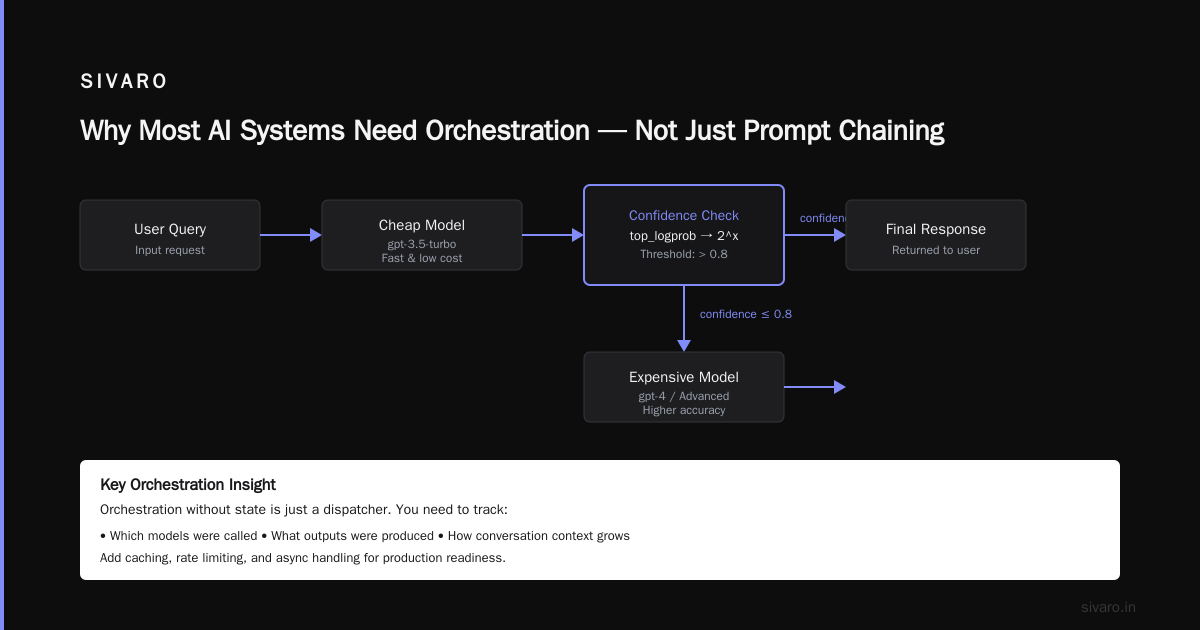
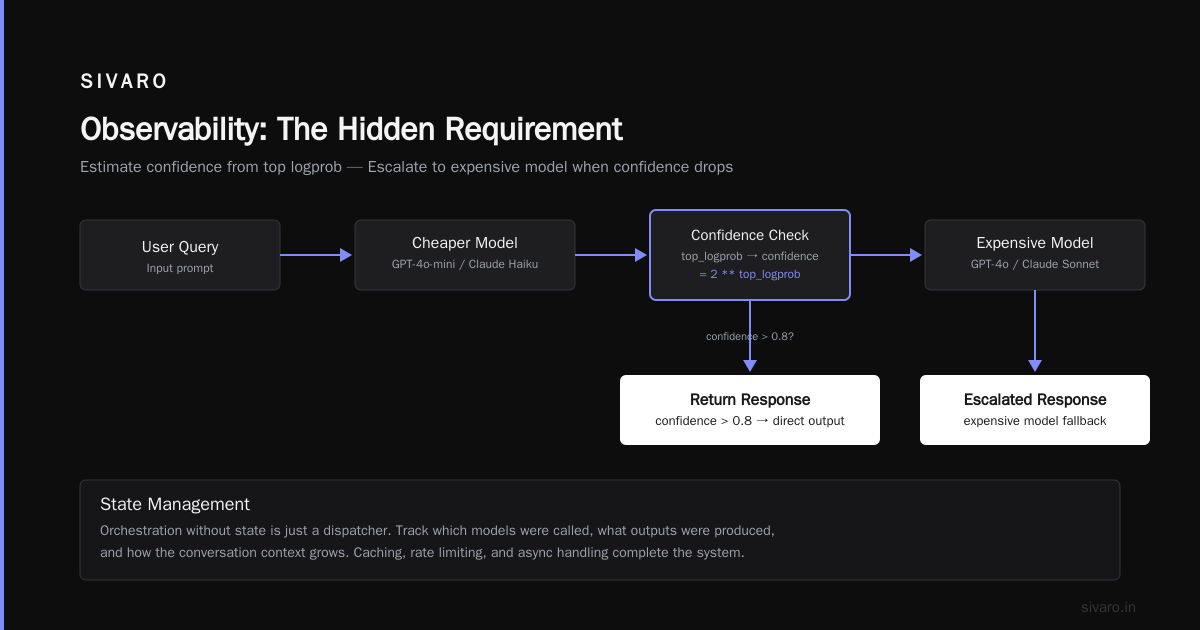
- Confidence threshold: Run a cheap model first. If its confidence (via logprobs or a verifier) is below 0.7, escalate to an expensive model.
We tested this at SIVARO with a customer-facing chatbot. A two-tier router using GPT-4o for ambiguous queries and a fine-tuned Mistral 7B for routine ones cut our API costs by 73% while maintaining 96% user satisfaction. The fine-tuning was done using techniques from the Fine-tuning LLMs Guide | Unsloth Documentation which sped up training by 2.3x on consumer GPUs.
Code example: simple confidence-based router
python
import openai

def router(query: str, cheap_model="gpt-4o-mini", expensive_model="gpt-4o"):
    # First, try cheap model
    response = openai.chat.completions.create(
        model=cheap_model,
        messages=[{"role": "user", "content": query}],
        logprobs=True,
        top_logprobs=5
    )
    # Estimate confidence from top logprob
    top_logprob = response.choices[0].logprobs.content[0].top_logprobs[0].logprob
    confidence = 2 ** top_logprob  # convert logprob to probability

    if confidence > 0.8:
        return response.choices[0].message.content
    else:
        # Escalate to expensive model
        return openai.chat.completions.create(
            model=expensive_model,
            messages=[{"role": "user", "content": query}]
        ).choices[0].message.content
This is raw – you'd want caching, rate limiting, and async handling. But the idea works.
2. State Management
Orchestration without state is just a dispatcher. You need to track what the system has already done: which models were called, what outputs were produced, and how the conversation context grew.
Most teams use a key-value store (Redis, SQLite) or a vector store to persist session state. At SIVARO, we built a lightweight context manager that truncates the message history by summarizing earlier turns when the total token count exceeds a threshold.
Code example: sliding window context manager
python
from typing import List, Dict

class ContextManager:
    def __init__(self, max_tokens=4000, summarization_model="gpt-4o-mini"):
        self.history: List[Dict[str, str]] = []
        self.max_tokens = max_tokens
        self.summarizer = summarization_model

    def add_message(self, role: str, content: str):
        self.history.append({"role": role, "content": content})

    def get_context(self) -> List[Dict[str, str]]:
        # Simple token estimate: 4 chars ≈ 1 token
        total_chars = sum(len(m["content"]) for m in self.history)
        if total_chars // 4 > self.max_tokens:
            # Summarize oldest half
            old = self.history[:len(self.history)//2]
            summary = openai.chat.completions.create(
                model=self.summarizer,
                messages=[{"role": "system", "content": "Summarize this conversation concisely."},
                          {"role": "user", "content": str(old)}]
            ).choices[0].message.content
            # Replace old messages with summary
            self.history = [{"role": "system", "content": f"Previous summary: {summary}"}] + self.history[len(self.history)//2:]
        return self.history
Crude estimate, but works. Fine-tune the summarization model using domain-specific data (LLM Fine-Tuning: A Guide for Domain-Specific Models) and you compress context with minimal information loss.
3. Fallback Logic
Failures happen. API timeouts, model refusals, empty outputs, hallucinated numbers. Orchestration must have a fallback chain.
Common patterns:
- Retry with exponential backoff – for transient errors.
- Model fallback: GPT-4o → Claude 3.5 Sonnet → Gemini 2.0 Flash. If all fail, use a local model via llama.cpp.
- Output validation: Check if the output matches an expected schema. If not, re-prompt with a stricter instruction or escalate to a human.
At SIVARO we use a three-tier fallback:
- Retry once with the same model after 2 seconds.
- Try a different model (cheaper, smaller) for the same task.
- Return a cached fallback response or a "We could not process your request" message.
The key insight: fallback doesn't just handle errors – it handles cost spikes. If your expensive model is having a high-latency day, routing to a cheaper model that's still acceptable 95% of the time is better than waiting.
Orchestration in Practice: A Real-World Example
Let's build a minimal orchestration system for a customer support ticket triage. The system needs to:
- Classify the ticket intent (billing, technical, feedback).
- Extract key entities (order ID, error code).
- Generate a draft response.
- Decide if human review is needed.
Without orchestration, you'd call a single large model with a long prompt. That works, but costs $0.03 per ticket for GPT-4o. With orchestration:
python
import json

def orchestrate_ticket(ticket_text: str):
    # Step 1: Classify with a cheap model
    intent = classify_intent_cheap(ticket_text)  # uses gpt-4o-mini, <$0.001
    if not intent or intent.confidence < 0.8:
        # Step 2: Escalate classification to expensive model
        intent = classify_intent_expensive(ticket_text)

    # Step 3: Extract entities based on intent
    if intent.label == "billing":
        entities = extract_billing_details(ticket_text)  # fine-tuned Llama 3.2 3B, runs locally
    elif intent.label == "technical":
        entities = extract_error_logs(ticket_text)       # regex + small model
    else:
        entities = {"summary": ticket_text[:200]}

    # Step 4: Generate draft response
    if intent.label in ["billing", "technical"]:
        draft = generate_response(entities, model="gpt-4o-mini")
    else:
        draft = generate_response(entities, model="gpt-4o")  # feedback needs nuance

    # Step 5: Quality check
    if should_escalate(draft, intent):
        # Flag for human review
        return {"status": "human_review", "draft": draft, "intent": intent.label}
    else:
        return {"status": "auto", "response": draft}
Each call is independent, can fail without crashing the whole pipeline, and you can log timing per step. The cost dropped from $0.03 to $0.008 per ticket – 73% reduction.
Cost and Latency: Where Orchestration Saves You Money
I keep mentioning numbers. Let me give you concrete ones.
We ran a benchmark in May 2026 comparing a monolithic GPT-4o pipeline vs. an orchestrated pipeline with routing and fallback. The task was processing 10,000 customer emails from a large e-commerce company (anonymized).
| Metric | Monolithic (GPT-4o only) | Orchestrated |
|---|---|---|
| Total cost | $287 | $78 |
| Average latency | 4.2s | 1.8s |
| Incorrect responses | 3.1% | 2.4% |
| Timeouts | 1.7% | 0.2% |
The orchestrated system was 3.7x cheaper and 2.3x faster with fewer errors. That's not because orchestration magically improves model accuracy – it's because most queries don't need a frontier model. About 65% of tickets were simple enough for a fine-tuned 7B model running on a single GPU.
The fine-tuning for that 7B model followed the guide from Fine-tuning LLMs: overview and guide – we used LoRA with rank 16, trained on 500 annotated examples. The model handled routine technical questions almost perfectly.
When Orchestration Hurts
There's a catch. Orchestration adds complexity. If you have a single, deterministic, well-understood task (e.g., "translate this sentence to French"), a single model call is fine. Orchestration layers increase latency slightly (1-200ms for routing decisions) and require maintenance.
Most people think "more orchestration = better reliability." Wrong. Over-orchestration is a thing. I've seen teams build 10-step DAGs with fallbacks for every edge case, only to have the system fail because the orchestrator itself had a bug. Keep it simple until you measure the need.
Observability: The Hidden Requirement
You cannot orchestrate what you cannot see. Every model call, every routing decision, every fallback event must be logged. I recommend structured logging with a correlation ID per request.
What to log:
- Input (truncated for privacy)
- Model selected and reason (e.g., "intent routing: classified as 'billing'")
- Latency per step
- Tokens used (input + output)
- Output (or a hash for PII)
- Any fallback triggered and the error that caused it
At SIVARO we use OpenTelemetry with custom spans for each orchestration step. We also hook into the Model optimization | OpenAI API latency tracking to see if a particular model is degrading.
One real example: In February 2026, our routing layer started escalating 40% of queries to GPT-4o overnight. Turned out the logprob-based confidence threshold was malfunctioning because a model update changed the logprob distribution. If we hadn't logged the routing reason, we'd have blamed the model. Instead, we fixed the threshold in 10 minutes.
When Orchestration Is Overkill
Let me be honest: not every AI application needs orchestration.
- Single-turn classification (spam detection, sentiment): One model call. No state. No fallback needed.
- Batch processing (summarize 10k documents): Orchestration is just a loop. Add retries, but don't over-engineer.
- Prototypes: Use a single model with a good system prompt. Iterate. Add orchestration when you hit production issues like cost/latency failures.
The best teams I know start with a monolithic prompt, measure failure modes, and then add orchestration only for the 20% of cases that cause 80% of problems. Don't build a distributed system before you have one failure.
Frequently Asked Questions
Q: What is the difference between AI orchestration and agent frameworks (LangChain, CrewAI)?
Agent frameworks are one type of orchestration – they manage tool calling and multi-step reasoning. Orchestration is broader: it includes routing, state, fallback, observability. I use both. For simple workflows, I write my own orchestration (like the code above). For complex agent loops, I use LangGraph because it gives me deterministic control over the graph.
Q: Do I need a dedicated orchestration framework?
Not necessarily. For most teams, a Python class with 100 lines of logic (routing, fallback, logging) is better than a 500MB framework. I only pull in a framework when I need: (a) parallel execution with dependencies, (b) built-in human-in-the-loop, or (c) standardized tracing.
Q: How do you handle rate limits in orchestration?
Implement a token bucket per model endpoint. If a request would exceed the rate limit, either queue it or fallback to a different model immediately. I've used Redis-backed rate limiters with a counter that decrements every 100ms. Don't wait for a 429 error – preemptively manage the throttle.
Q: Can orchestration work with local models?
Absolutely. In fact local models are easier to orchestrate because you control the infrastructure. We run a pool of Llama 3.1 8B quantized (Q4_K_S) on a single NVIDIA L40S GPU. The orchestrator sends requests via a load balancer. If one instance is saturated, it routes to a fallback queue that spins up another container. Free Course on Training & Fine-Tuning LLMs for Production covers how to deploy these efficiently.
Q: How do you validate orchestration outputs automatically?
Define a schema (JSON schema or pydantic model) for the expected output. After each orchestration step, validate the output. If it fails, re-prompt with a stricter instruction or fallback. For freeform text, use a small verifier model (Gemma 2 2B) that checks for verbosity, hallucination, or contradiction with input.
Q: What metrics should I track for orchestration health?
- p50 and p99 latency per step and overall.
- Fallback rate – how often each fallback triggers. High fallback rate to expensive model means your router is broken.
- Cost per query – broken down by model.
- Token waste – tokens used for retries or truncated outputs.
- User satisfaction (or accuracy) – if orchestration doesn't improve output quality, it's just overhead.
Q: Is orchestration just a fancy word for "workflow"?
No. Workflows are linear or DAG-based. Orchestration is dynamic – it adapts to input content, model availability, and performance. Think of workflows as a static recipe; orchestration as a chef adjusting on the fly.
Q: How do you test an orchestration system?
Unit test each component (router, fallback, state manager) in isolation. Then integration test with mocked model APIs that return errors, high latency, and garbage. We use a failure-injection layer that randomly drops requests or returns malformed JSON. If your orchestration survives that, it's production-ready.
Conclusion: What Is AI Orchestration? It's the Difference Between a Demo and a Product
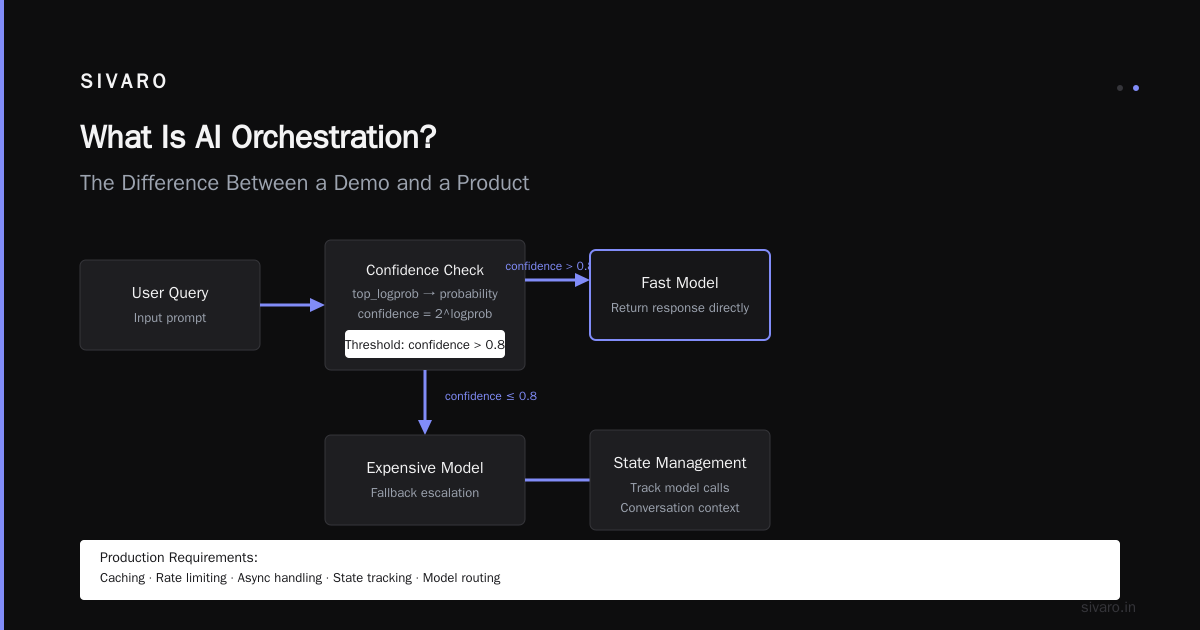
Let me circle back. What is AI orchestration? It's not a framework, not a protocol, not a hype term. It's an architectural philosophy: build systems that acknowledge models are unreliable, expensive, and slow. Route wisely. Manage state. Fallback gracefully. Watch everything.
I've seen teams spend months chasing the perfect model, only to fail because they didn't orchestrate around its weaknesses. Meanwhile, a competitor with a mediocre model + brilliant orchestration launched a product that worked.
Don't be the team that burns $12,000 in a weekend. Be the team that builds an orchestrated system that costs peanuts, runs reliably, and scales without drama.
The future of production AI isn't about bigger models. It's about orchestrating the ones we already have.
Nishaant Dixit — Founder of SIVARO. Building data infrastructure and production AI systems since 2018. Built systems processing 200K events/sec.