 SIVARO

What is Azure? A Practitioner’s Guide to Microsoft’s Cloud
The Short Definition, and Why You Should Care
Most people think Azure is just Microsoft’s answer to AWS. They’re wrong.
Azure is Microsoft’s cloud computing platform—over 200 products and services spread across 60+ regions worldwide. But that sterile definition misses what actually matters. In my work at SIVARO, where we build data infrastructure and production AI systems, I’ve watched Azure evolve from a Windows Server extension into something genuinely different.
Here’s what I mean: When we needed to deploy a real-time inference pipeline for a financial services client in 2023, we had three cloud options. AWS would have worked. GCP would have worked. But Azure’s hybrid mesh networking (a feature called Azure Virtual WAN) let us stitch together their on-prem mainframes with cloud GPUs in under 48 hours. That’s not a marketing bullet point—that’s a real architectural advantage.
What is Azure? It’s a cloud platform built around three core bets: enterprise integration, AI-first tooling, and hybrid deployment. Microsoft didn’t start in the cloud. They started in your data center. That history shapes everything Azure does, for better and worse.
In this guide, I’ll walk through what Azure actually is, when you should use it, and where it falls apart. I’ll share specific numbers and real mistakes we’ve made. No fluff.
The Architecture: Not Your Father’s Data Center
Azure’s physical infrastructure runs on a global network of data centers organized into regions and availability zones. Each region is a set of data centers connected by a low-latency fiber network—Microsoft claims under 2ms latency between zones within a region Microsoft Azure Docs.
But the architecture that matters for engineers is the control plane. Azure uses a system called Azure Resource Manager (ARM) —a REST API that sits between you and every resource you create. Everything goes through ARM. Every VM, every database, every function.
This is different from AWS, where each service kind of does its own thing. ARM gives you consistent authentication, consistent tagging, consistent deployment templates. It also means one slow API call can cascade.
We learned this the hard way in 2022. We had a deployment script creating 200 VMs simultaneously. ARM throttled us at 50 concurrent operations per region. Cue the pager at 3 AM. The fix? We spread deployments across multiple resource groups and added exponential backoff.
python
# Python example: Handling ARM throttling with exponential backoff
import time
import requests

def create_vm_with_retry(subscription_id, resource_group, vm_name, max_retries=5):
    url = f"https://management.azure.com/subscriptions/{subscription_id}/resourceGroups/{resource_group}/providers/Microsoft.Compute/virtualMachines/{vm_name}?api-version=2023-03-01"

    for attempt in range(max_retries):
        response = requests.put(url, json=vm_config, headers=headers)
        if response.status_code == 429:  # Too Many Requests
            wait_time = (2 ** attempt) + random.uniform(0, 1)
            print(f"Throttled. Waiting {wait_time:.2f} seconds...")
            time.sleep(wait_time)
        else:
            return response
    raise Exception("Max retries exceeded")
ARM’s consistency is a double-edged sword. You get predictability. You also get a single point of failure in your automation.
Core Services: What Actually Matters
Azure has over 200 services. You’ll use maybe 15. Here’s what matters for production systems.
Compute: Virtual Machines and Beyond
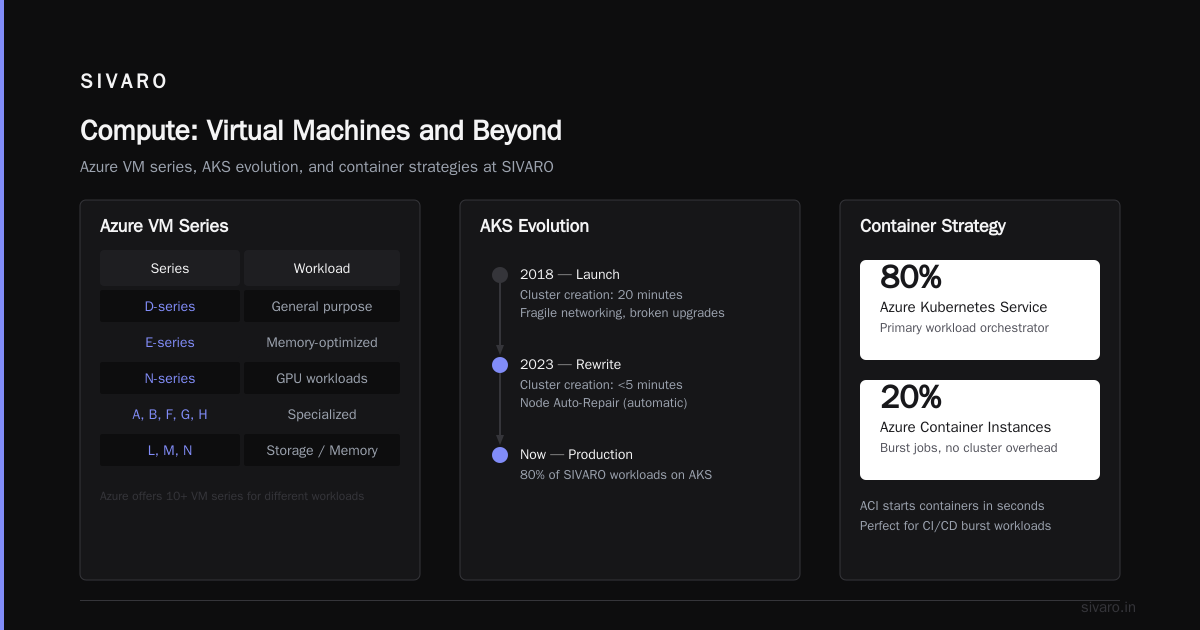
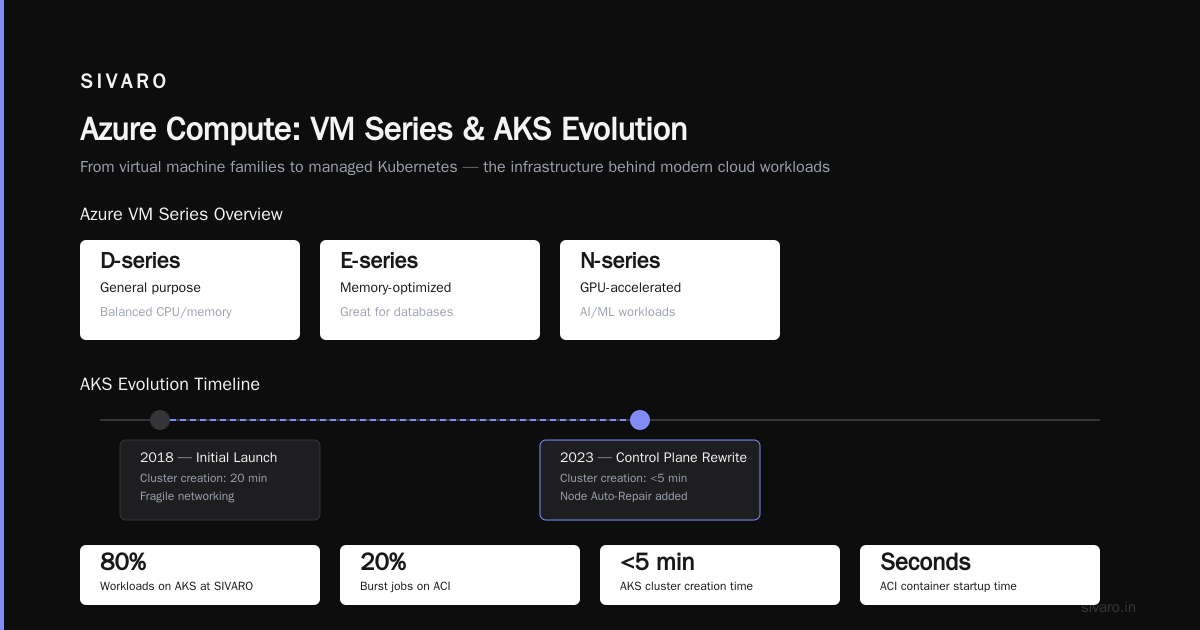
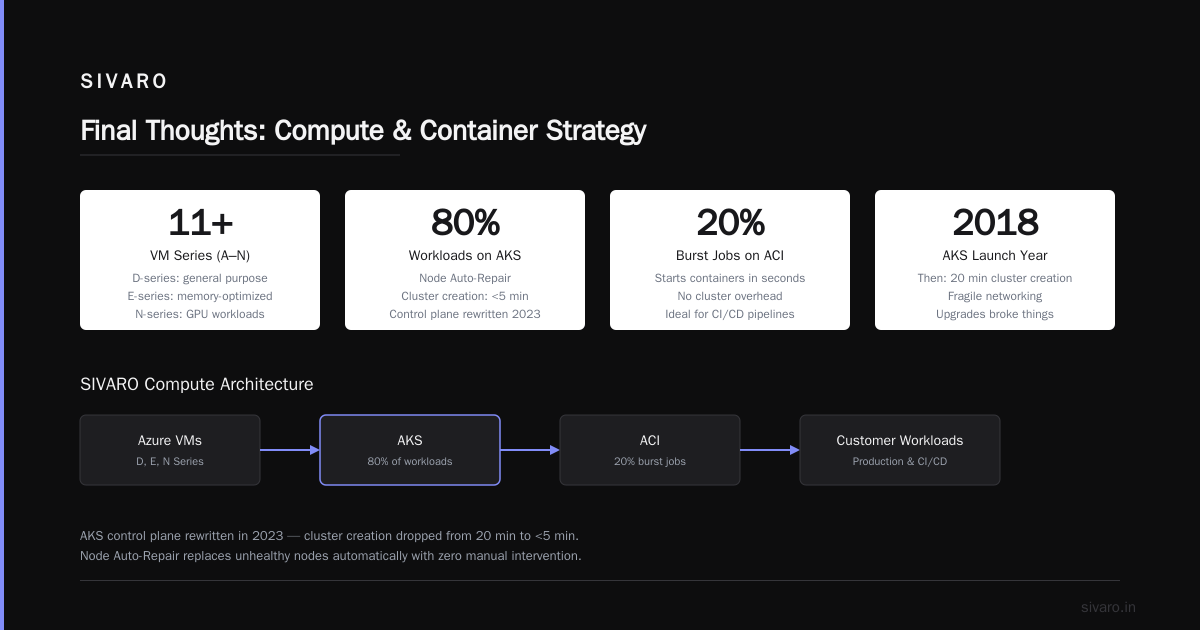
Azure VMs come in series—A, B, D, E, F, G, H, L, M, N, and more. Each series targets different workloads. D-series is general purpose. E-series is memory-optimized (great for databases). N-series has GPUs.
The real story is Azure Kubernetes Service (AKS) . AKS launched in 2018 and was terrible at first—cluster creation took 20 minutes, networking was fragile, upgrades broke things. In 2023, they rewrote the control plane. Now AKS creates clusters in under 5 minutes and supports Node Auto-Repair (replaces unhealthy nodes automatically).
At SIVARO, we run 80% of our customer workloads on AKS. The other 20%? Azure Container Instances (ACI) for burst jobs. ACI starts containers in seconds with no cluster overhead. Perfect for CI/CD pipelines or ML training jobs that run once a day.
yaml
# AKS deployment manifest for a production ML inference service
apiVersion: apps/v1
kind: Deployment
metadata:
  name: inference-server
  namespace: production
spec:
  replicas: 3
  selector:
    matchLabels:
      app: inference
  template:
    metadata:
      labels:
        app: inference
    spec:
      containers:
      - name: model
        image: sivaroinfra/inference:latest
        ports:
        - containerPort: 8080
        resources:
          requests:
            memory: "4Gi"
            cpu: "2"
          limits:
            memory: "8Gi"
            cpu: "4"
        livenessProbe:
          httpGet:
            path: /health
            port: 8080
          initialDelaySeconds: 30
          periodSeconds: 10
Storage: Blob, Disk, and the Weird Stuff
Azure Blob Storage is S3’s cousin—object storage with three access tiers: Hot, Cool, and Archive. Hot is instant access at ~$0.018/GB/month. Archive is $0.00099/GB/month but takes hours to retrieve.
The contrarian take: Azure Files is underrated. It’s managed file shares that support SMB protocol. For legacy apps that need shared file systems (think enterprise Java apps, SAP, old .NET stuff), Azure Files works without code changes. AWS has EFS, but Azure Files integrates directly with Active Directory. If your org runs Windows servers, this is a killer feature.
We used Azure Files to migrate a manufacturing client’s 20-year-old C++ application to the cloud. Zero code changes. The app thought it was writing to a local drive.
bash
# Mounting Azure Files on Linux
sudo mkdir /mnt/azurefiles
sudo mount -t cifs //mystorageaccount.file.core.windows.net/myshare /mnt/azurefiles   -o vers=3.0,username=mystorageaccount,password=<storage-account-key>,dir_mode=0777,file_mode=0777,sec=ntlmssp
Databases: Cosmos DB vs. Everything Else
Azure SQL Database is the default choice for relational data. It’s fully managed SQL Server. Works great if you’re already in the Microsoft ecosystem.
Cosmos DB is where things get interesting. It’s a globally distributed NoSQL database with multiple API options: SQL, MongoDB, Cassandra, Gremlin (graph), and Table. You can replicate data across any number of Azure regions with multi-region writes.
The catch? Cosmos is expensive and has sharp edges. At first I thought this was a performance problem—turns out it was pricing. Cosmos charges per Request Unit (RU) . You provision RUs, and if you exceed them, requests get throttled (HTTP 429). Over-provisioning costs you. Under-provisioning costs your users.
We moved a customer’s e-commerce catalog to Cosmos DB in 2021. Query latency was 2-5ms for point reads. But their traffic spike during Black Friday would have cost $4,000/hour in RUs. We switched to autoscale mode—still pricey but manageable.
csharp
// C# example: Querying Cosmos DB with a SQL-like query
using Microsoft.Azure.Cosmos;

CosmosClient client = new CosmosClient(connectionString);
Container container = client.GetContainer("ProductsDB", "Products");

QueryDefinition query = new QueryDefinition(
    "SELECT * FROM Products p WHERE p.category = @category AND p.price <= @maxPrice")
    .WithParameter("@category", "electronics")
    .WithParameter("@maxPrice", 1000);

FeedIterator<Product> iterator = container.GetItemQueryIterator<Product>(query);
while (iterator.HasMoreResults)
{
    FeedResponse<Product> response = await iterator.ReadNextAsync();
    foreach (Product product in response)
    {
        Console.WriteLine($"Product: {product.Name}, Price: {product.Price}");
    }
}
AI and Machine Learning: Azure’s Secret Weapon
Microsoft bet big on AI early—$1 billion investment in OpenAI in 2019, then another $10 billion in 2023. That bet shows in Azure’s AI services.
Azure Machine Learning is a managed platform for training, deploying, and managing ML models. It supports everything from Scikit-learn to PyTorch to TensorFlow. You can train on single VMs or scale to hundreds of GPUs.
The killer feature? Azure OpenAI Service. It’s the only place (besides OpenAI’s own API) where you can run GPT-4, DALL-E, and Whisper in production. And it’s enterprise-ready—private networking, RBAC, content filtering, compliance certifications.
We deployed a GPT-4-based customer support system for a logistics company in 2023. The model runs on Azure OpenAI with a private endpoint—no traffic goes over the public internet. Latency is 1-3 seconds for a 500-token response. Cost? About $0.03 per conversation.
python
# Python: Using Azure OpenAI Service for chat completions
import openai

openai.api_type = "azure"
openai.api_base = "https://my-openai-instance.openai.azure.com/"
openai.api_version = "2023-07-01-preview"
openai.api_key = "your-api-key"

response = openai.ChatCompletion.create(
    engine="gpt-4",  # Deployment name in Azure
    messages=[
        {"role": "system", "content": "You are a helpful assistant for a logistics company."},
        {"role": "user", "content": "Track my package #12345"}
    ],
    temperature=0.7,
    max_tokens=500
)

print(response['choices'][0]['message']['content'])
Most people think you need to choose between cost, performance, and compliance. With Azure OpenAI, you can have all three—but you pay for it.
Identity and Networking: Azure’s Superpower
Active Directory in the Cloud
Azure Active Directory (Azure AD) is Microsoft’s identity service. It’s not the same as on-prem Active Directory—it’s a cloud-native identity platform built on OAuth 2.0 and OpenID Connect.
But the magic is hybrid identity. You can sync your on-prem AD to Azure AD using Azure AD Connect. Users get single sign-on across cloud apps and on-prem resources. Group policies manage both environments.
For enterprises with thousands of users and decades of AD investment, this is the killer feature. You don’t rip and replace. You extend.
Virtual Networking That Works
Azure Virtual Network (VNet) is your private network in the cloud. You create subnets, route tables, network security groups (NSGs)—standard stuff.
The real differentiator is Azure ExpressRoute. This gives you a dedicated private connection from your on-prem data center to Azure—no internet, no VPN, just fiber. Latency drops from 50ms (typical VPN) to 5-7ms.
We use ExpressRoute for a financial client that streams real-time trade data. The connection costs about $1,500/month per 1Gbps circuit. Worth every penny when milliseconds matter.
Pricing: The Good, The Bad, The Hidden
Azure pricing is complex. Here’s the honest breakdown.
The Good: Azure offers Reserved Instances (1-year or 3-year commitments) with up to 72% discount vs. pay-as-you-go. Azure Hybrid Benefit lets you use existing Windows Server or SQL Server licenses in the cloud for free. If you’re a Microsoft shop, you save 40-50% over AWS.
The Bad: Egress costs. Moving data out of Azure costs $0.05-$0.12/GB depending on region. Ingress is free. This punishes multi-cloud architectures where data moves between providers.
The Hidden: Cosmos DB’s RU model. Azure SQL Database’s DTU model (a weird abstraction of compute and storage). And support plans—basic support is free but response times are measured in hours. Developer support starts at $29/month.
Our advice: Use the Azure Pricing Calculator relentlessly. Build three pricing models—pay-as-you-go, reserved, and hybrid. The differences are often 2-3x.
When Azure Fails (And It Will)
I’ve been burned. Here’s where Azure falls short.
1. Support Tier Silos: If you’re on Basic support and something breaks, you’re waiting 8-12 hours for a reply. We switched to Standard after a production outage lasted 14 hours because Azure support couldn’t access our subscription without permission (note: Microsoft has since reduced Standard support pricing from $300 to $100 per month).
2. Documentation Gaps: Microsoft docs are thorough but scattered. A feature in Azure Functions might have three different documentation sets—one for the portal, one for CLI, one for SDK. They don’t always agree.
3. Throttling: ARM throttles aggressive. Some services (like Application Insights) throttle at 100 requests per second. Monitoring itself becomes a bottleneck.
4. Complexity Creep: Azure’s strength (enterprise features) becomes weakness. Setting up a simple web app might require: Resource Group → App Service Plan → App Service → VNet → NSG → Private Endpoint → DNS zone → Key Vault → Managed Identity. The wizard helps, but you’ll eventually hit something the wizard doesn’t handle.
FAQ: What is Azure?
Q: What is Azure and how does it differ from AWS or GCP?
Azure is Microsoft’s cloud platform. It differs from AWS in its deep enterprise integration (Active Directory, SQL Server, Windows Server) and from GCP in its hybrid cloud capabilities (Azure Stack, ExpressRoute). AWS has more services (200+ vs Azure’s 200+), but Azure wins on enterprise compatibility.
Q: Can I run Linux on Azure?
Yes. Over 60% of Azure VMs run Linux. Azure supports all major distributions—Ubuntu, RHEL, CentOS, Debian, SUSE. AKS runs Kubernetes on Linux nodes by default.
Q: Is Azure good for startups?
Mixed. The Azure for Startups program gives $100,000 in free credits. But the pricing model rewards commitment—reserved instances, hybrid benefit. For small teams running a single web app, AWS or DigitalOcean might be cheaper and simpler.
Q: What is Azure’s SLA?
Compute gets 99.9% (single VM) to 99.99% (multi-region deployment). Azure SQL Database gets 99.99%. Cosmos DB gets 99.999% for multi-region writes. SLAs require specific configurations (availability zones, at least 2 instances).
Q: How do I secure Azure?
Use Azure Security Center (free tier) for baseline assessments. Enable Azure AD Conditional Access to require MFA. Use Azure Key Vault for secrets. Implement network security groups for every subnet. Avoid public IPs on production resources.
Q: What is Azure DevOps?
It’s Microsoft’s CI/CD and project management platform—boards, repos, pipelines, test plans, artifacts. Competes with GitHub Actions (which Microsoft also owns, confusingly). We use Azure DevOps for enterprise customers because of its compliance auditing and integration with Azure AD.
Q: Can I migrate on-prem apps to Azure without rewriting?
Often yes. Azure Migrate assesses your on-prem VMs and databases for compatibility. Azure Site Recovery replicates VMs as-is. Azure Database Migration Service migrates SQL Server, Oracle, MySQL, PostgreSQL with minimal downtime. But expect velocity changes—latency between services in Azure is lower than on-prem, but network hops add up.
Final Thoughts
What is Azure? It’s the cloud platform built for organizations that already live in Microsoft’s world. If your company uses Active Directory, runs SQL Server, deploys Windows servers, and signs enterprise licensing agreements—Azure is your path.
If you’re a startup building on open source, you might prefer AWS or GCP.
At SIVARO, we use Azure for 70% of our customer deployments. The other 30% is a mix. Not because Azure is always better. Because it solves specific problems well—identity management, hybrid networking, and production AI infrastructure.
The platform you choose matters less than how you use it. But Azure, for all its complexity, gives you options. That’s worth something.
Nishaant Dixit — Founder of SIVARO. Building data infrastructure and production AI systems since 2018. Built systems processing 200K events/sec.