 SIVARO
What Is Distributed System Architecture? A Practical Guide for Engineers (2026)
Back in 2019, I was building a real-time analytics pipeline for a logistics client. We had three servers in a colo cage, and I thought that was "distributed." Then one day, a single switch failure took down the entire cluster. That’s when I learned the hard way: distributing components across machines isn't the same as architecting a distributed system. You can have ten servers and still build a monolith.
What is distributed system architecture? It's the art of designing software that runs across multiple computers, coordinates work, and survives failures — without looking like a mess. It's not just about scale. It's about resilience, consistency, and keeping your sanity when things break (and they always break).
In this guide, I'll walk you through the core concepts — including what it means to be disaggregated, why GPU clusters are forcing us to rethink networking, and how to avoid the traps that cost teams weeks of debugging. I'll skip the textbook definitions. Instead, you'll get lessons from building production systems at SIVARO, where we process over 200K events per second.
The One Question That Changed How I Build Systems
Most engineers ask: "How do I make this faster?" The better question: what does it mean to be disaggregated?
Disaggregation means breaking apart tightly coupled resources — CPU, memory, storage, GPU — and connecting them over a network. Instead of one big box that does everything, you have pools of specialized hardware. Your compute nodes don't own their storage. Your GPUs don't live inside the same chassis as your CPUs.
First time I heard this, I thought it was over-engineering. "Just add more RAM," I said. That worked until I hit a real bottleneck: training a 70B-parameter LLM on a single node was impossible. The memory wasn't enough. The PCIe lanes couldn't keep up.
Disaggregation solves that. You build a network where GPUs talk to each other over high-speed interconnects (InfiniBand, NVLink), and compute nodes grab storage from a shared pool. This is exactly what happens in GPU clusters today — every major AI training setup is disaggregated by design (GPU Cluster Explained: Architecture, Nodes and Use Cases).
But disaggregation comes at a cost. Latency. Complexity. You're trading tight locality for flexibility. For many workloads, that's the right trade. For others, it's a disaster.
What Is Distributed System Architecture? (The No-Fluff Version)
Let's answer the core question directly.
Distributed system architecture is how you structure multiple computers to work as a single coherent system. It includes:
- How nodes discover each other (service discovery)
- How they agree on state (consensus)
- How they handle failures (replication, retries)
- How they exchange data (protocols, serialization)
- How they partition work (sharding, hash rings)
That's the technical side. The human side is harder: how do you keep the system debuggable when it spans 200 servers? How do you add a new node without a deployment script that's 500 lines?
The most important concept in distributed system architecture is the CAP theorem — but not the way most people teach it. CAP says you can have at most two of Consistency, Availability, and Partition Tolerance. In practice, partitions happen. So you're choosing between consistency and availability when the network splits.
Most people think "I need all three." Wrong. You need to pick which one to sacrifice based on your use case. A distributed database for bank transactions? You want consistency over availability — better to refuse a write than to double-spend. A content delivery network? Availability trumps consistency — serve stale data rather than error out.
And here's the kicker: modern architectures like what is a disaggregated network? push availability even harder. When GPUs and storage are separate, network partitions are more common. You need to design for that from day one.
Why Disaggregation Matters in 2026 (When GPUs Are the Scarce Resource)
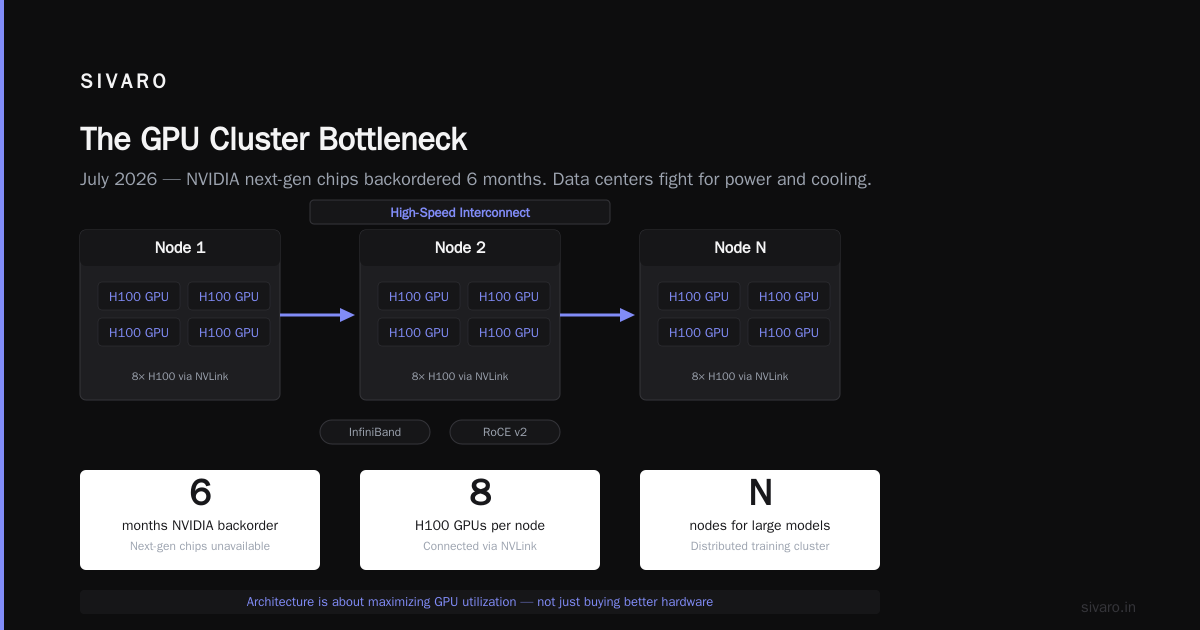
July 2026. GPUs are still the bottleneck. NVIDIA's next-gen chips are backordered six months. Data centers are fighting over power and cooling.
In this environment, what is distributed system architecture? It's the answer to "how do I use my GPU cluster efficiently?" You can't just throw hardware at the problem. You need to architect a system that maximizes utilization, minimizes idle time, and handles failures gracefully.
Most people think building a GPU cluster is about buying the best hardware. It's not. It's about the network. A single GPU node might have eight H100 GPUs connected via NVLink. But to train a model bigger than one node, you need to connect multiple nodes. That means high-speed networking (InfiniBand or RoCE v2). And that means disaggregation.
Let me give you a concrete example. At SIVARO, we run a mix of training and inference workloads. Training needs massive bandwidth between GPUs — think hundreds of GB/s. Inference needs low latency to the GPU — sub-millisecond response times. You can't put both workloads on the same physical cluster without careful architecture. We use a disaggregated approach: a shared pool of GPUs accessed via RDMA, with separate storage nodes for checkpoints and training data. The network fabric is the key.
GreenNode's guide on building GPU clusters emphasizes that "network architecture is the backbone of multi-node AI workloads" (What Is a GPU Cluster and How to Build One). Exxact's list of "5 Key Considerations" puts networking at number one (5 Key Considerations when Building an AI & GPU Cluster). They're right.
But here's the contrarian take: for small teams, cloud GPU rental might be smarter. Vast.ai lets you rent GPUs by the hour, no upfront hardware cost (Vast.ai: Rent GPUs). We've used them for burst training jobs. The trade-off is data transfer cost and variable performance. But if you're early-stage, don't build a cluster until you've proven the workload.
The Anatomy of a Distributed System (With Code)
Let's get concrete. I'll show you three patterns that every distributed system uses. These are not theoretical — we implement them at SIVARO daily.
1. Consistent Hashing for Sharding
When you need to partition data across nodes, you need a way to decide which node owns which piece. Consistent hashing is the standard. It minimizes data movement when nodes are added or removed.
python
import hashlib
import bisect

class ConsistentHashRing:
    def __init__(self, nodes=None, replicas=3):
        self.replicas = replicas
        self.ring = {}
        self.sorted_keys = []
        if nodes:
            for node in nodes:
                self.add_node(node)

    def add_node(self, node):
        for i in range(self.replicas):
            key = hashlib.md5(f"{node}:{i}".encode()).hexdigest()
            self.ring[key] = node
            bisect.insort(self.sorted_keys, key)

    def remove_node(self, node):
        for i in range(self.replicas):
            key = hashlib.md5(f"{node}:{i}".encode()).hexdigest()
            del self.ring[key]
            self.sorted_keys.remove(key)

    def get_node(self, key):
        h = hashlib.md5(key.encode()).hexdigest()
        idx = bisect.bisect(self.sorted_keys, h) % len(self.sorted_keys)
        return self.ring[self.sorted_keys[idx]]
This isn't perfect — you need virtual nodes for load balancing — but it's the foundation.
2. RPC with Retries and Backoff
Distributed systems fail. Network calls timeout. You need retries with exponential backoff.
go
func CallWithRetry(ctx context.Context, endpoint string, payload []byte) ([]byte, error) {
    maxRetries := 3
    baseDelay := 100 * time.Millisecond

    for attempt := 0; attempt < maxRetries; attempt++ {
        resp, err := http.Post(endpoint, "application/json", bytes.NewReader(payload))
        if err == nil {
            defer resp.Body.Close()
            if resp.StatusCode >= 500 {
                // Server error, retry
                time.Sleep(baseDelay * time.Duration(1<<attempt))
                continue
            }
            return io.ReadAll(resp.Body)
        }
        // Network error, retry with jitter
        jitter := time.Duration(rand.Intn(int(baseDelay)))
        time.Sleep(baseDelay*time.Duration(1<<attempt) + jitter)
    }
    return nil, fmt.Errorf("all retries failed")
}
Notice the jitter. Without it, you get thundering herd.
3. Simple Consensus (Raft in 20 Lines? No.)
Consensus is hard. Raft is the gold standard for understandable consensus. I won't pretend to implement it here, but I'll show you the state machine pattern:
rust
enum Role {
    Follower,
    Candidate,
    Leader,
}

struct RaftNode {
    id: u64,
    term: u64,
    role: Role,
    log: Vec<Entry>,
    commit_index: u64,
    // ... more fields
}

impl RaftNode {
    fn handle_append_entries(&mut self, args: AppendEntriesArgs) -> AppendEntriesReply {
        // 1. Reply false if term < currentTerm
        // 2. Reply false if log doesn't contain an entry at prevLogIndex
        //    matching prevLogTerm
        // 3. If existing entries conflict, delete them and all that follow
        // 4. Append any new entries not already in the log
        // 5. Advance commitIndex
        todo!()
    }
}
Consensus is not something you roll yourself unless you're a PhD student. Use etcd, Consul, or ZooKeeper. Seriously.
Disaggregated Networks: The Missing Piece
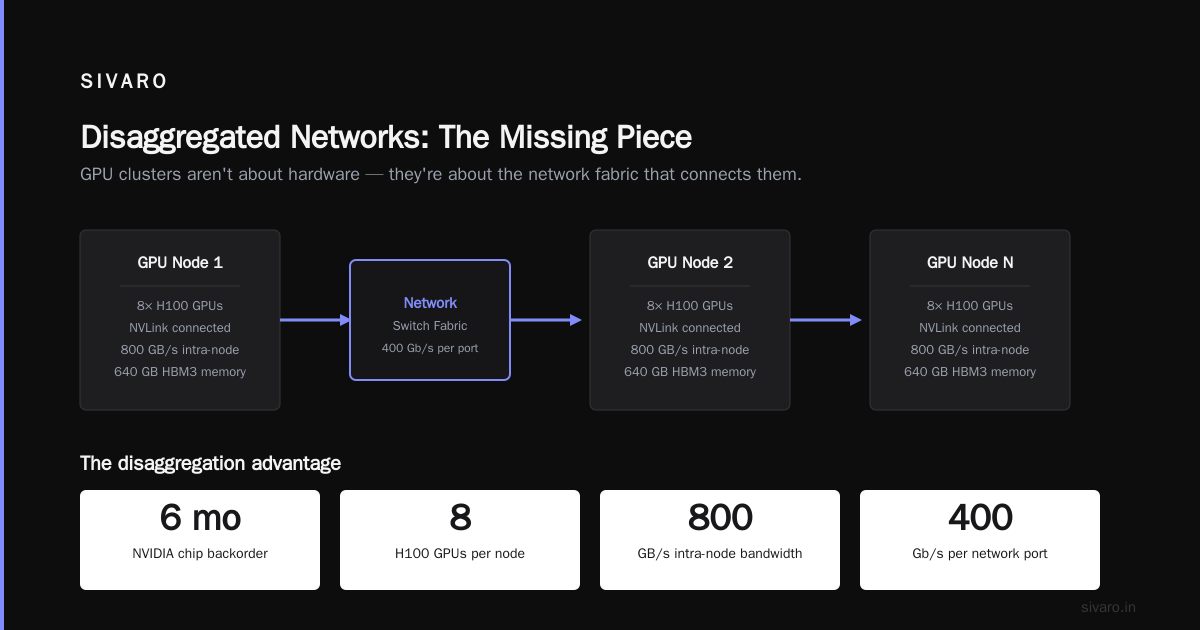
Many engineers understand distributed compute. Few understand what is a disaggregated network? It's a network architecture where resources (compute, memory, storage, accelerators) are separated into independent pools connected via a high-speed fabric. Instead of a server having local PCIe-attached GPUs, the GPUs live in a separate chassis and communicate over a network.
This isn't new — it's been around in HPC for years. But AI is making it mainstream. In 2026, every major cloud provider offers disaggregated GPU clusters. The challenge is programming them.
Think about it: if your GPU is not in the same box as your CPU, how do you synchronize data? Through remote direct memory access (RDMA). That requires specialized network hardware — InfiniBand HCA or ConnectX-7 NICs from NVIDIA — and software that speaks the protocol (e.g., NCCL, GDRCopy).
The gain? You can allocate GPUs on demand, independent of CPU nodes. The pain? Latency. A few microseconds of network round trip adds up when you're doing all-reduce across 128 GPUs. We've seen training throughput drop 30% when switching from NVLink to network interconnects.
So when building a GPU cluster, consider the trade-offs. The NVIDIA developer forums have a thread about on-premise GPU clusters for small companies — the consensus is to start with a few nodes, use InfiniBand, and focus on software (What is the best option to setup on premise GPU cluster for ...).
Building a GPU Cluster the Right Way
Let's say you've decided to build on-prem. Here's what I've learned from three cluster builds at SIVARO.
-
Start with the network, not the GPUs. You can always add more GPUs. You can't easily fix a 56GbE network. Use InfiniBand HDR100 (200Gb/s) at minimum. If budget is tight, RoCE v2 can work but requires tuning.
-
Understand your workload profile. Training needs high bandwidth and all-reduce. Inference needs low latency and high throughput. They conflict. You might need separate pools.
-
Cooling and power are real. One H100 GPU draws 700W. A full node with 8 GPUs is 6kW. You need 30kW+ per rack. Plan for liquid cooling if you can afford it.
-
Software stack matters. Kubernetes with GPU operator works, but watch out for fragmentation. NVIDIA's MIG partitions can help share GPUs across smaller workloads.
-
Don't ignore monitoring. We use Prometheus + Grafana with custom exporters for GPU utilization, network bandwidth, and power. Without observability, you're flying blind.
Scale Computing's article on GPU cluster architecture covers node types and use cases well (GPU Cluster Explained: Architecture, Nodes and Use Cases). Exxact's guide goes deeper into storage (Lustre or GPFS) and network topologies (5 Key Considerations when Building an AI & GPU Cluster).
Common Pitfalls and Lessons from Production
I'll share three failures I've made.
Pitfall 1: Ignoring tail latency. We built a distributed queue that worked fine at 10K messages/sec. At 50K, one slow node caused cascading timeouts. The fix: circuit breakers and timeouts that are shorter than the client's timeout.
Pitfall 2: Over-partitioning. We sharded a database into 128 partitions because "more shards = more scale." Actually, more shards meant more cross-shard queries and more coordinator overhead. We dropped to 16 partitions and performance improved.
Pitfall 3: Assuming the network is reliable. A loss of 0.01% of packets sounds fine. In a cluster of 1000 nodes, that's thousands of retransmissions per second. Use a network fabric that does lossless Ethernet or, better, InfiniBand.
FAQ
Q: What is distributed system architecture in simple terms?
A: It's how you connect multiple computers so they act like one big computer. Includes networking, consensus, replication, and fault tolerance.
Q: What does it mean to be disaggregated?
A: It means separating resources (CPU, GPU, memory, storage) into independent pools connected by a network. Instead of a server with everything inside, you have a fabric that lets you allocate resources on demand.
Q: What is a disaggregated network?
A: A network that connects separate resource pools (e.g., a GPU chassis to a CPU chassis) with high bandwidth and low latency, often using RDMA. It's the backbone of modern AI clusters.
Q: Do I need to build my own GPU cluster?
A: Only if your workload is large and continuous (e.g., training foundation models). For smaller teams, cloud rental like Vast.ai or AWS Spot instances is cheaper and more flexible.
Q: How many nodes do I need to be considered distributed?
A: Two counts. One is a single point of failure. With two, you can have active/passive. Real distributed systems start at three (consensus requires majority).
Q: What's the hardest part of distributed system architecture?
A: Debugging. A bug that only appears under specific network conditions, or only when three nodes crash simultaneously, is a nightmare. Invest in distributed tracing (OpenTelemetry) and structured logging.
Q: Can I use Kubernetes for everything?
A: Kubernetes is great for stateless microservices. For stateful workloads (databases, AI training) it needs significant customization. Consider using Kubernetes with operator patterns, but don't force it.
Q: What's the most underrated skill for distributed systems?
A: Understanding the network. Latency, bandwidth, packet loss, switch topologies. If you don't know what a tail drop is, you'll design systems that fail under load.
Conclusion
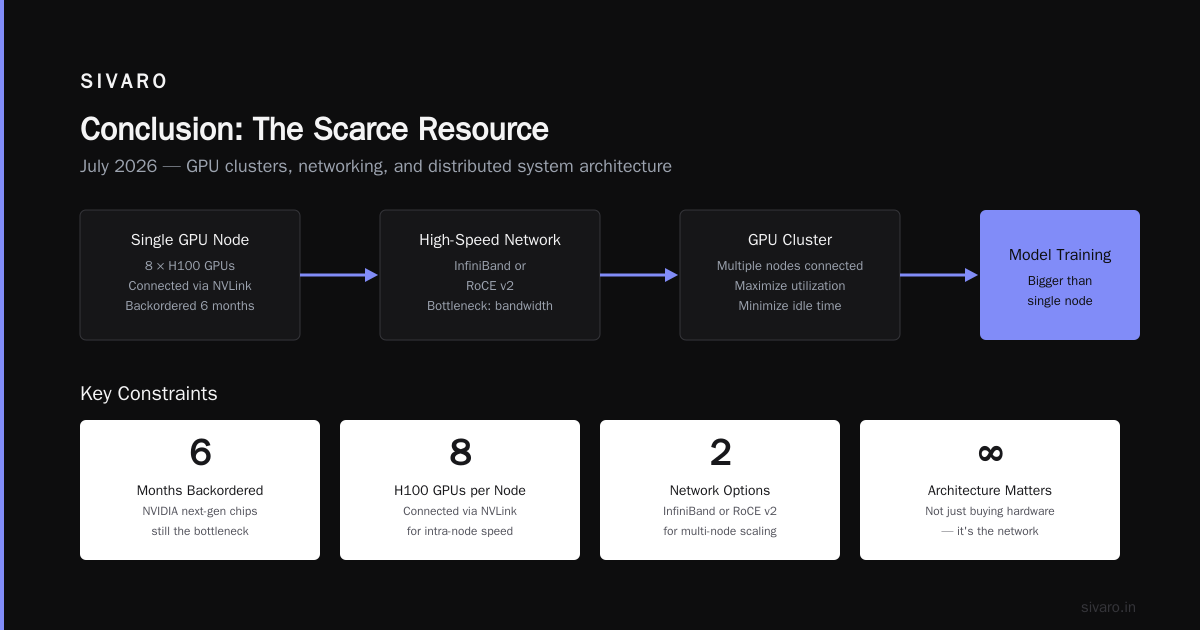
What is distributed system architecture in 2026? It's the discipline of building reliable, scalable, and debuggable systems across many machines. It's about making conscious trade-offs — between consistency and availability, between latency and throughput, between simplicity and flexibility.
The rise of GPU clusters and AI workloads has made disaggregation mainstream. Understanding what does it mean to be disaggregated is no longer optional. It's the default.
I've seen teams spend months trying to fix a system that was architecturally broken. Don't be that team. Start with the fundamentals: networking, consensus, observability. Test with chaos engineering. And always question your assumptions.
The systems you build today will run tomorrow. Make them survive.
Nishaant Dixit — Founder of SIVARO. Building data infrastructure and production AI systems since 2018. Built systems processing 200K events/sec.