 SIVARO
What Is Docker Desktop and Do I Need It?
You're in a meeting, and someone mentions containerizing the microservices migration. Everyone nods. You nod. Then the question lands: "Should we standardize on Docker Desktop?" And you realize you're not entirely sure what Docker Desktop even is anymore, or whether licensing changed again, or if you're supposed to use OrbStack instead.
Three years ago, I sat across from an infrastructure lead at Onfido who'd just been told by legal to stop using Docker Desktop. 700 engineers. Thousands of containers. And their entire onboarding guide was built around it. The fix wasn't a tool swap. It was understanding exactly what Docker Desktop does, what it doesn't, and when you can bypass it entirely.
This is that guide.
The Core of It: What Docker Desktop Actually Is
Docker Desktop is a desktop application that bundles the Docker Engine, a Kubernetes cluster, and a bunch of CLI tools into one package that runs on macOS, Windows, or Linux. It's the official Docker Inc. product designed to get you from zero to running containers in under ten minutes.
Here's the critical insight most people miss: Docker Desktop is not Docker. Docker is the container runtime and the ecosystem around it. Docker Desktop is a commercial wrapper that makes that runtime usable.
And this matters. People confuse losing Docker Desktop with losing Docker. They're different things. Since 2021, Docker has required a paid subscription for Docker Desktop if your company makes more than $10 million in annual revenue or has more than 250 employees. The Docker Engine itself remains open source under Apache 2.0. The desktop app is not.
If you're using Docker Desktop at a company that meets that bar, you're either paying 24 dollars per user per month (for the Pro tier, as of 2026), or you're in a gray zone that legal won't like. And when I say "won't like," I mean Docker has been enforcing this. In 2023 Docker sent audit letters to large organizations, and they've only gotten better at tracking usage.
What You Get With Docker Desktop
Docker Desktop bundles several distinct components into one installed application. When it's on your machine, you get:
- The Docker Engine — the daemon that builds, runs, and manages containers
- A Linux VM — essential on macOS and Windows, because containers are Linux system calls, and your host OS doesn't natively speak that language
- Docker CLI tools — the
dockercommand you actually type into your terminal - A Kubernetes cluster — single-node, good for local k8s testing
- An optional GUI dashboard — handy for inspecting containers, images, and volumes
Newer versions also include Docker Extensions — plugins you can install for things like monitoring, db clients, or service meshes. And the latest releases in 2025 and 2026 have focused heavily on Kubernetes observability because that's where the community has been putting pressure.
The VM is the part that makes Desktop so important on Mac and Windows. Containers run on Linux kernel features like namespaces and cgroups. Your MacOS kernel doesn't support them. So Docker Desktop runs a lightweight Linux VM (typically on Apple's Virtualization.framework or similar) that draws almost no attention until you need heavy workloads.
You can see the problem forming here, can't you?
Why Companies Started Reading the Fine Print
When Docker Inc. changed licensing in August 2021, I initially thought this was a branding problem — turns out it was pricing. The change fundamentally shifted how the largest engineering orgs think about local containerization. A 400-person engineering org at a company like Airbnb was suddenly looking at nearly six-figure annual licensing costs just to have developers run containers on laptops.
Half the team at SIVARO thought it was justified. Docker Desktop genuinely does engineering work; it maintains a bundled Linux VM, manages filesystem sharing, maintains the Docker Engine integration, and handles networking. The other half thought it was a land-grab on an ecosystem that Docker didn't fully control.
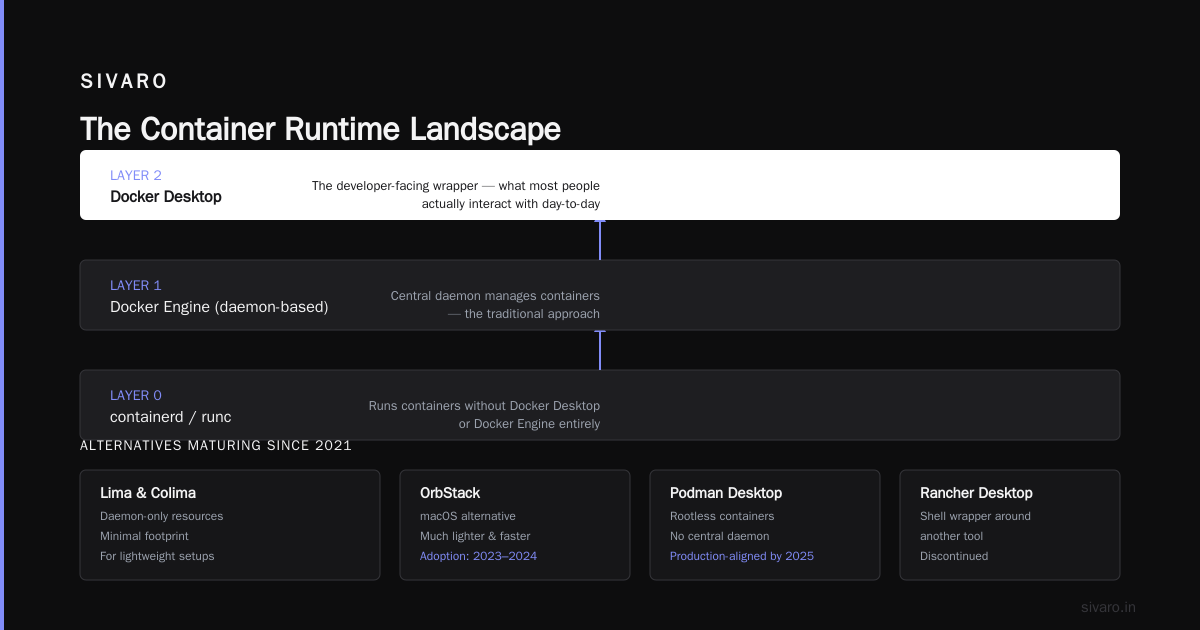
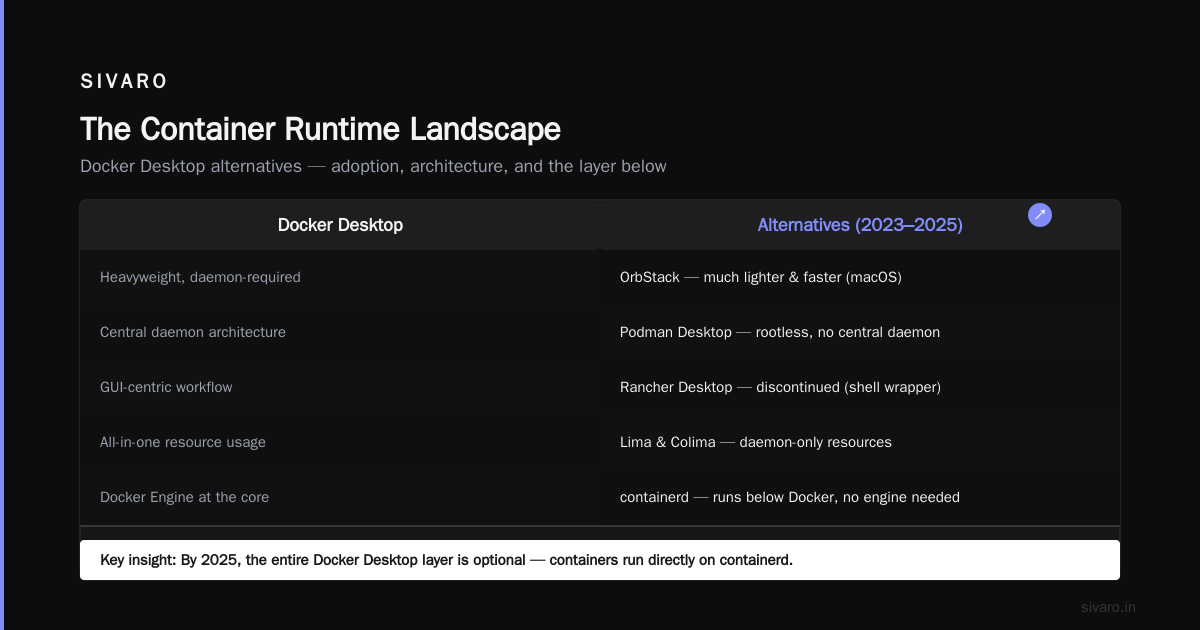
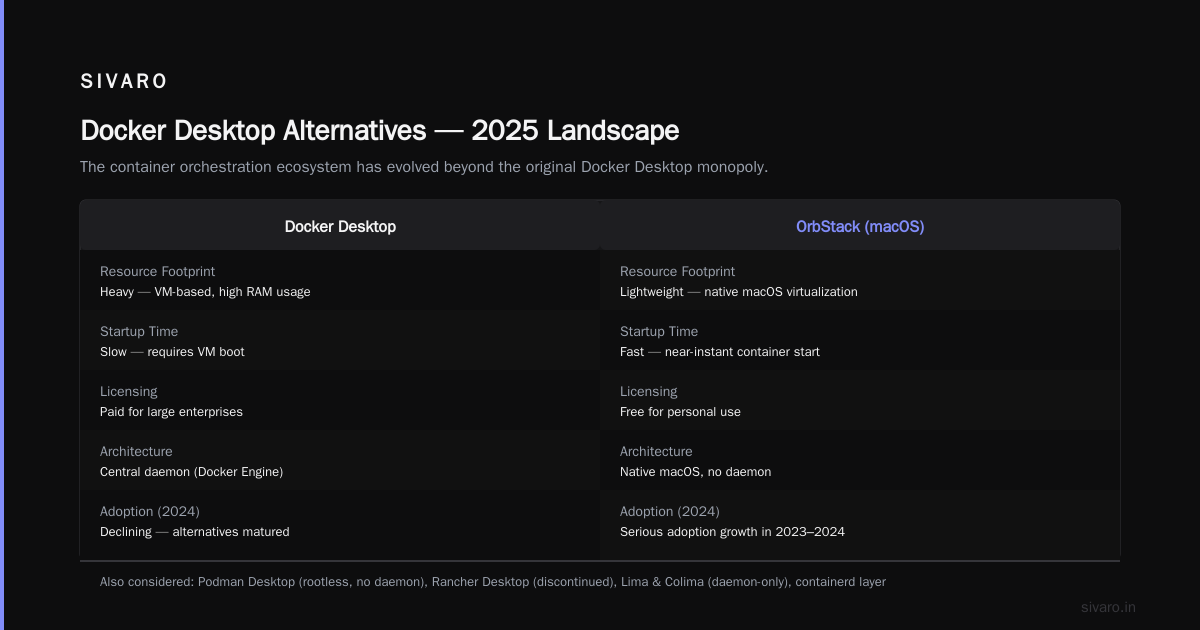
After 2021, several alternatives matured significantly. OrbStack, a much lighter and faster macOS alternative gained serious adoption in 2023 and 2024. Podman Desktop, which runs rootless containers without a central daemon, became a legitimate option for production-aligned teams by 2025. Rancher Desktop, which has now been discontinued and was a shell wrapper around another tool, had its moment. Lima and Colima offered daemon-only resources. And by 2025, the folks who've read the containerd vs. Docker explainers understand there's an entire layer below Docker that runs containers without Docker Desktop, or even Docker Engine for that matter.
The fundamental question became: do we need this tool, or do we need the containers it starts?
A New Architecture Dev Story
Let me take you through a project we built in 2025. We had a client in fintech — call them a payments processor — who had PCR (platform compliance review) demands that forbade installing unlicensed software on corporate laptops. Docker Desktop, being commercial, had to go.
And we still had to develop against a stack of Java 17 services, Apache Kafka, and a Postgres cluster with extensions like PostGIS.
We went with Colima on the engineers' Macs. It runs the same Docker Engine binary — and since the engine on Linux is open source — you get the exact same runtime, just minus the desktop GUI. We paired it with a Makefile-based development workflow that handled container orchestration through Docker Compose natively.
Here's what the minimum setup looked like in a docker-compose.yml:
yaml
services:
  postgres:
    image: postgis/postgis:16-3.4
    ports:
      - "5432:5432"
    environment:
      - POSTGRES_USER=dev
      - POSTGRES_PASSWORD=dev
      - POSTGRES_DB=ledger

  kafka:
    image: bitnami/kafka:3.7
    ports:
      - "9092:9092"
    environment:
      - KAFKA_CFG_NODE_ID=0
      - KAFKA_CFG_PROCESS_ROLES=controller,broker
That local environment worked. 40 engineers, daily verification, zero licensing complaints. The difference nobody anticipated: the onboarding time doubled. Docker Desktop's "just install this one app" is actually a feature. Our Makefiles assumed you knew how to run a specific setup or you had Homebrew installed in a specific path. It turns docs can't replicate a stable interface as easily as I thought.
When Docker Desktop Is the Right Call
But here's my contrarian take: for most non-fintech companies, you should just use Docker Desktop.
Here's why. The tooling around Docker Desktop isn't just a checkbox. The Docker team runs the tightest integration between the GUI and the container lifecycle. Volume mounts work without you thinking about them. Networking between the host and containers is preconfigured. Kubernetes integration is a click, not a 30-minute kubectl setup. If you're in the 2026 startup ecosystem, time to market beats the 24 dollars per month per dev.
The question "what is docker desktop and do i need it" starts to resolve when you say: "Do you need to do anything beyond running containers?"
If you're a frontend engineer at a 30-person startup who needs to spin up a document API locally, Docker Desktop saves you an afternoon. If you're building a custom CI/CD pipeline with Podman and buildah because you're optimizing for host security, you don't need it.
I've seen Docker Desktop win the argument in a specific, recurring scenario at SIVARO: when you work with legacy stacks. I had a client in 2026 running PHP 5.6 and MySQL 5.7 containers for maintenance. Their local environments were a mess of shell scripts. Docker Desktop's dashboard made it painless to see exactly which container from which image was running. The alternatives worked, but the GUI made it obvious.
Docker Desktop in the Context of Interviews
This topic also comes up more than you'd think when interviewing platform engineers. The question of how Docker Desktop components relate to the daemon, the CLI, and the registry is really a lynchpin for deeper questions about containerization architecture. When I interview someone and ask them to explain Docker architecture in an interview setting, I only accept a version that says "there's a client, a daemon, and a registry." Docker Desktop doesn't change that. It just gives you all three locally in one box.
Here's the version I recommend in any professional or interview setting:
- Client — the
dockerCLI you invoke from the terminal - Daemon — the engine on your host that manages images, containers, and networks
- Registry — a remote or local place to store images, like Docker Hub or ECR
Docker Desktop is just the daemon plus a Linux VM plus a GUI.
That mental model helps you debug too. When someone is facing containers that won't start at all, the problem is usually one of these specific layers, and knowing which layer the Desktop product touches gives you a head start.
Debugging From Inside the GUI
Speaking of debugging. If you've ever run into a container that won't start, you'd know the first impulse is to check for logs. But on Desktop, there's a useful intermediate step: the GUI logs.
How to debug a docker container that won't start, in either CLI or GUI fashion:
bash
# See all containers including ones that failed to start
docker ps -a

# Get the exact exit code and any error
docker inspect <container-id> | jq '.[0].State'

# Run the container manually to see output in the foreground
docker run --rm -it <image-name> sh
In Docker Desktop specifically, you can click a container and see the logs inline. The status column in Docker Desktop shows "Exited (1)" with the exit code in red. That immediately tells you the container ran and crashed during startup, versus "Error" or a runtime failure.
Let me give you the workflow I use when a container fails at start:
- Check
docker ps -ato verify the container actually attempted to start - Read
docker logs --tail 100 <container-id>— 80% of exit code 1s are missing environment variables or connection refusals - If logs are empty, inspect the image entrypoint from your
Dockerfile - Run
docker run --entrypoint sh <image>to bypass the app itself and verify the image content is intact
Docker Desktop's dashboard actually surfaces all of this in a clean way. When I'm at a client site with a developer who's new to containers, I point them at the Desktop GUI. It shows events, errors, and container states better than raw CLI output for junior engineers.
Resource Science: Why Docker Desktop Costs You Memory
Docker Desktop, for all its convenience, is a resource hog. Turned on, with a default configuration from 2026, it reserves up to 4 CPU cores and 8 GB of RAM on macOS. There is a slider to reduce that, but the default. Is. Heavy.
The lightweight alternatives (Lima, OrbStack on macOS) run at nearly half the memory footprint. When you have 40 GoLand or IntelliJ instances running simultaneously at a large organization, that's a real cost. The cloud-based alternative — dev containers in GitHub Codespaces — trades your local memory for a monthly cloud bill.
But none of this is a problem if your total industry context means speed-of-startup matters. The hard performance trade-off is real, but the alternative is you spend a day fumbling with Colima resource settings that you can't fix because you, quite frankly, don't know where the config file lives.
Modern Kubernetes Requirements
One more thing that pulled people back into Docker Desktop: Kubernetes. Everyone else still runs k8s on local resources, but Docker Desktop's single-node k8s cluster is the most painless local cluster to turn on. It includes a built-in load balancer simulation that maps to host ports. In 2026, when service mesh and eBPF debugging is all the rage, having a workspace where you can silently install a service mesh on your laptop makes daily problem solving so much easier.
I distinctly remember a team at a logistics company in late 2025 that was adopting Kubernetes for the first time. Their engineers were already tired of the learning curve, and their onboarding guide was 60 pages long. Docker Desktop gave them the instant ability to kubectl get pods and see a working control plane on day one. The other tooling options had at least one speed bump that could take an afternoon.
What Version Should You Choose in August 2026
If you decide Docker Desktop is worth it, pay attention to versions. Current stable releases (as of August 2026) use Docker Engine 27+ and ship with containerd as their default runtime, a change that's been complete since Docker Engine 25. That means even when you run Docker Desktop, you're relying on the containerd runtime underneath, which brings the CNI plugins and better support for Kubernetes workloads.
You should also know: Docker Desktop has a "Developer Preview" channel for features like testcontainers cloud, and a "Stable" channel. Unless you like broken packages on Mondays, stay on stable.
That new container runtime choice — noticeably different from the older runc approach — affects how often you need to restart the Docker daemon and how well you can debug CRI-O vs containerd nuances. Directory loss from old desktop crashes, registration auth flows, everything improved.
So Here's the Verdict: Do You Need It?
If you're a solo developer, a startup under 250 employees, or in any company under $10M in revenue — Docker Desktop is fine. Honestly, for individual developers it's still the best product of its kind. It directly answers "what is docker desktop and do i need it" with: "You need it if you want containers to work in 10 minutes."
If you're at a big company and your legal team has flagged the license, you don't need it. The container runtime is open source. Use colima or a similar approach, keep your local dev workflow, and get your Makefiles organized.
If you work on macOS with a newer Apple Silicon chip, I'd try OrbStack first. Once I tested the two side by side in March 2026, I was surprised how much less RAM OrbStack used during Kafka clusters. It's just slightly ahead on developer experience while staying under the Docker license radar.
FAQ
What is Docker Desktop exactly?
Docker Desktop is a bundled application that includes the Docker Engine, a Linux VM for Mac and Windows, Kubernetes, and a GUI. It runs containers locally with one install, but the desktop app itself is licensed commercially for larger companies.
Do I need Docker Desktop to run containers?
No. The Docker Engine is open source and can run inside a Linux VM, managed through lightweight tools like Lima and Colima (macOS), WSL2 (Windows), or Podman entirely rootless. Docker Desktop only makes it easier to manage them.
Is Docker Desktop free for personal use?
For personal use, yes, Docker Desktop is free even if you work for a big company. The licensing fee applies to medium and large businesses — specifically those over 250 employees and $10M in revenue as of the 2021 policy change.
What's the difference between Docker Desktop and Docker Engine?
Docker Engine is the backend daemon that manages containers. Docker Desktop includes that daemon, plus a Linux VM so it runs on Mac or Windows, plus a GUI, plus Kubernetes, plus a commercial license. You can install the engine alone on Linux or use a VM wrapper.
What are the best Docker Desktop alternatives in 2026?
For macOS, OrbStack is currently the fastest and lightest. For Cross-platform, Podman Desktop has a usable GUI and works rootless. Colima remains the most minimal engine-only approach for developers who just want a CLI.
How do you debug a container that won't start on Docker Desktop?
Start with docker ps -a to see the exit code, then docker logs for stack traces. If the container isn't producing logs, run it interactively with docker run --rm -it <image> sh to bypass the entrypoint. Docker Desktop's GUI also displays previous states and error events.
Nishaant Dixit — Founder of SIVARO. Building data infrastructure and production AI systems since 2018. Built systems processing 200K events/sec.