 SIVARO
What Is GCP Cloud Functions Used For in 2026
I'll be honest with you. When I started SIVARO back in 2018, I thought serverless functions were a toy. Great for demos. Useless for production.
Then we hit a wall.
We were building a real-time data pipeline for a logistics client processing 50,000 tracking events an hour. Our Kubernetes cluster was overkill for most of the work. We were paying for idle nodes. Our deploy cycles took 20 minutes for what should have been a three-line event handler.
That's when I took Cloud Functions seriously.
GCP Cloud Functions is Google's event-driven serverless compute platform. It lets you run single-purpose code in response to cloud events without provisioning servers. You write a function. You deploy it. Google handles scaling, availability, and infrastructure.
But here's the real question — what is GCP Cloud Functions used for in actual production systems? Not the marketing brochure. The messy, real-world stuff.
I'll show you exactly where Cloud Functions works, where it breaks, and how we've used it at SIVARO to build data infrastructure that processes 200K events per second.
The Three Real Use Cases for Cloud Functions (Everything Else Is Noise)
After years of building on GCP, I've seen Cloud Functions applied to maybe thirty different scenarios. Most fail. Three patterns survive.
1. Event-Driven Data Pipelines
This is the killer app. It's not even close.
Cloud Functions shines when you need to react to something happening in your GCP environment — a file landing in Cloud Storage, a message hitting Pub/Sub, a row changing in Firestore.
Here's a pattern we use constantly at SIVARO:
python
# Triggered by Cloud Storage finalize event
import functions_framework
from google.cloud import bigquery
import json

@functions_framework.cloud_event
def process_uploaded_file(cloud_event):
    data = cloud_event.data
    bucket = data["bucket"]
    file_name = data["name"]

    # Validate file format
    if not file_name.endswith(".jsonl"):
        print(f"Skipping non-JSONL file: {file_name}")
        return

    # Stream directly to BigQuery
    client = bigquery.Client()
    table_id = "sivaro-prod.event_pipeline.raw_events"

    # URI for the file
    uri = f"gs://{bucket}/{file_name}"

    job_config = bigquery.LoadJobConfig(
        source_format=bigquery.SourceFormat.NEWLINE_DELIMITED_JSON,
        autodetect=True,
        write_disposition="WRITE_APPEND",
    )

    load_job = client.load_table_from_uri(
        uri, table_id, job_config=job_config
    )
    load_job.result()

    print(f"Loaded {file_name} into {table_id}")
This pattern replaced a clunky Airflow DAG we'd maintained for a year. The function runs under 10 seconds per file. Scales to thousands of concurrent uploads. Costs us about $12/month in invocation costs.
The trade-off? Cold starts. If your pipeline processes files every 30 seconds, you're fine. If it runs once a day, the first invocation will be 2-3 seconds slower. For most data pipelines, that doesn't matter.
2. Lightweight Web APIs and Backends
Most people think you need App Engine or Cloud Run for APIs. You don't — for simple cases.
Cloud Functions supports HTTP triggers. You can build a REST API endpoint in under 50 lines of code. We've done this for internal tooling, webhook receivers, and simple CRUD operations.
javascript
// HTTP-triggered function acting as a webhook receiver
const functions = require('@google-cloud/functions-framework');
const { PubSub } = require('@google-cloud/pubsub');

functions.http('orderWebhook', async (req, res) => {
  // Validate request
  if (req.method !== 'POST') {
    res.status(405).send('Method Not Allowed');
    return;
  }

  const orderData = req.body;

  // Basic validation
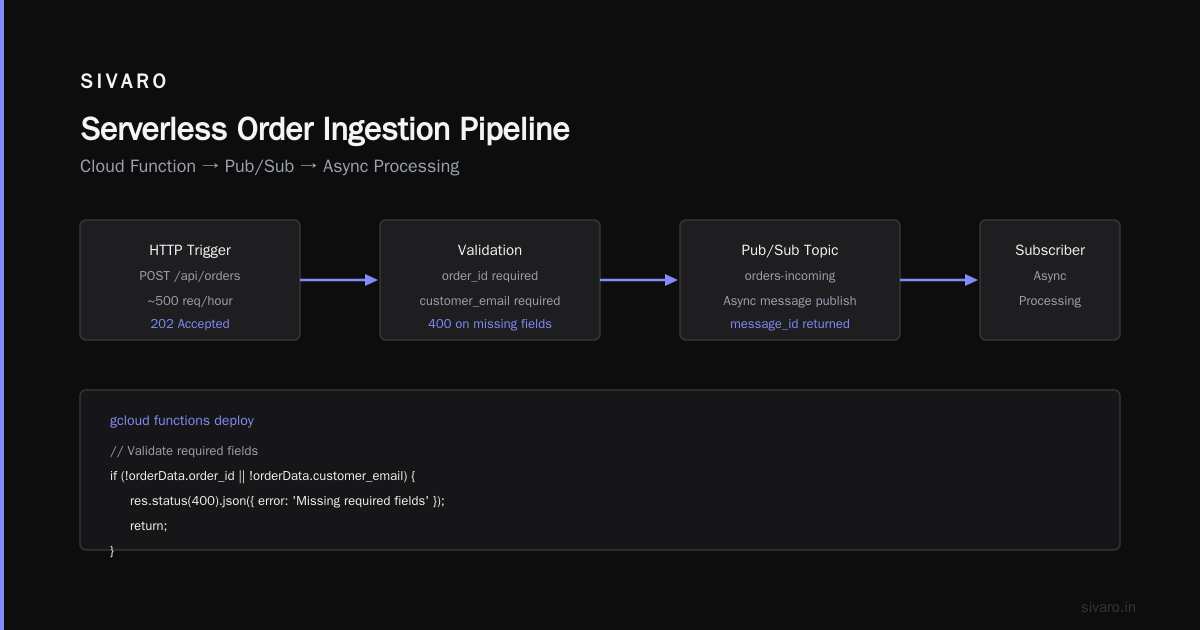
  if (!orderData.order_id || !orderData.customer_email) {
    res.status(400).json({ error: 'Missing required fields' });
    return;
  }

  // Publish to Pub/Sub for async processing
  const pubsub = new PubSub();
  const topic = pubsub.topic('orders-incoming');

  const messageBuffer = Buffer.from(JSON.stringify(orderData));
  const messageId = await topic.publish(messageBuffer);

  console.log(`Order ${orderData.order_id} published as ${messageId}`);

  res.status(202).json({
    status: 'accepted',
    message_id: messageId
  });
});
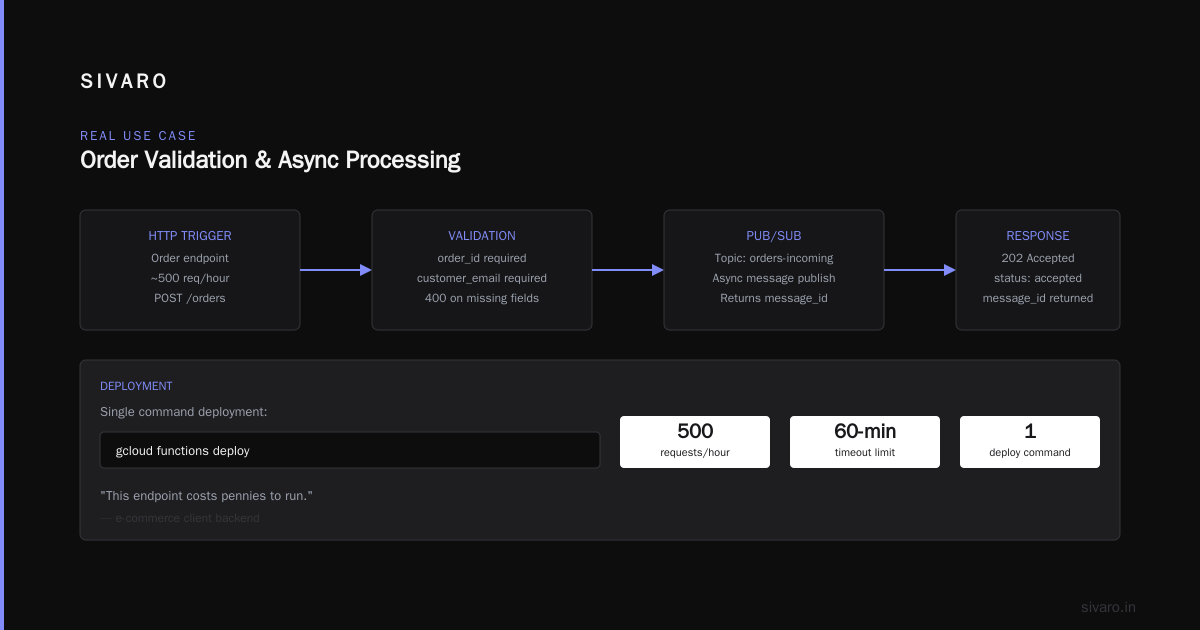
This endpoint costs pennies to run. It handles about 500 requests per hour for a client's e-commerce backend. The entire deployment was a single gcloud functions deploy command.
But here's the catch — Cloud Functions has a 60-minute timeout. For any API call that might take longer, you need a different approach. We split the work: quick validation in the function, then hand off to Cloud Run or a Compute Engine instance for the heavy lifting.
This brings me to a related question clients often ask: what can you build on Google Cloud that's cost-effective for startups? Cloud Functions is part of the answer, but you need to understand the pricing model first. The Google Cloud Pricing Calculator helps, but the real cost comes from egress and sustained usage, not invocation count.
3. Triggering AI/ML Workflows
This is where Cloud Functions becomes genuinely strategic.
At SIVARO, we build production AI systems. Most teams think you need a full inference server for every model. That's wrong.
Cloud Functions excels at being the "glue" between ML components. A function fires when new training data arrives. It triggers a Vertex AI training job. Another function checks the job status and deploys the model if performance improves.
python
# Trigger ML training pipeline when new data arrives in GCS
import functions_framework
from google.cloud import aiplatform
from datetime import datetime

@functions_framework.cloud_event
def trigger_training_pipeline(cloud_event):
    data = cloud_event.data
    bucket = data["bucket"]
    file_name = data["name"]

    # Only trigger on training data files
    if not file_name.startswith("training_data/"):
        return

    # Initialize Vertex AI
    aiplatform.init(
        project="sivaro-ml-prod",
        location="us-central1",
        staging_bucket="gs://sivaro-ml-staging"
    )

    # Current timestamp for job name
    timestamp = datetime.now().strftime("%Y%m%d_%H%M%S")

    # Configure training job
    job = aiplatform.CustomTrainingJob(
        display_name=f"model_train_{timestamp}",
        script_path="gs://sivaro-ml-code/trainer.py",
        container_uri="us-docker.pkg.dev/vertex-ai/training/tf-gpu.2-12:latest",
        requirements=["google-cloud-aiplatform>=1.38"],
        model_serving_container_image_uri="us-docker.pkg.dev/vertex-ai/prediction/tf2-cpu.2-12:latest",
    )

    # Run the job
    model = job.run(
        replica_count=1,
        machine_type="n1-standard-4",
        accelerator_type="NVIDIA_TESLA_T4",
        accelerator_count=1,
    )

    print(f"Training job submitted. Model: {model.resource_name}")
This function replaced a manual workflow that required a data scientist to SSH into a VM and run scripts. Now training happens automatically whenever new data lands in the bucket.
The cost? The function itself is nearly free. The Vertex AI training job costs money, but that's happening regardless — the function just removes the human middleman.
Where Cloud Functions Fails (Don't Say I Didn't Warn You)
I've been doing this long enough to know when something doesn't work. Cloud Functions has three hard limits you'll hit eventually.
Long-running processes. The 60-minute timeout is real. For anything involving heavy computation, large file processing, or external API calls that might hang, Cloud Functions will fail. We learned this the hard way when a function processing 2GB CSV files kept timing out at 55 minutes. Moved that to Cloud Run with 60-minute timeout plus background processing.
Stateful applications. Cloud Functions is stateless by design. You can't keep connections open, maintain in-memory caches, or store session data. Every invocation is a fresh start. For a chat application or real-time collaboration tool, you want Cloud Run or Compute Engine.
High-throughput, low-latency APIs. If you need sub-10ms response times, Cloud Functions won't deliver. Cold starts add 200ms-2s depending on runtime. For our real-time event processing, we use Cloud Functions for the "trigger" phase but pass the actual work to a long-running service.
What Can GCP Be Used For in Web Hosting?
Clients ask me this constantly. Here's the short answer: what can GCP be used for in web hosting depends entirely on your traffic pattern.
For static sites — documentation, marketing pages, blogs — Cloud Functions paired with Cloud Storage and Cloud CDN is a great stack. The function generates dynamic content, the storage serves static assets, and CDN caches everything at the edge.
For dynamic web applications with user sessions, you want Cloud Run. Functions don't maintain state, which means every page load requires re-establishing connections. That's slow and wasteful.
The mistake I see constantly is teams trying to force everything into Cloud Functions because "serverless is the future." It's not. Serverless is one tool. Use it for event-driven, stateless, short-lived work. Everything else goes somewhere else.
Cost Reality Check — What You'll Actually Pay
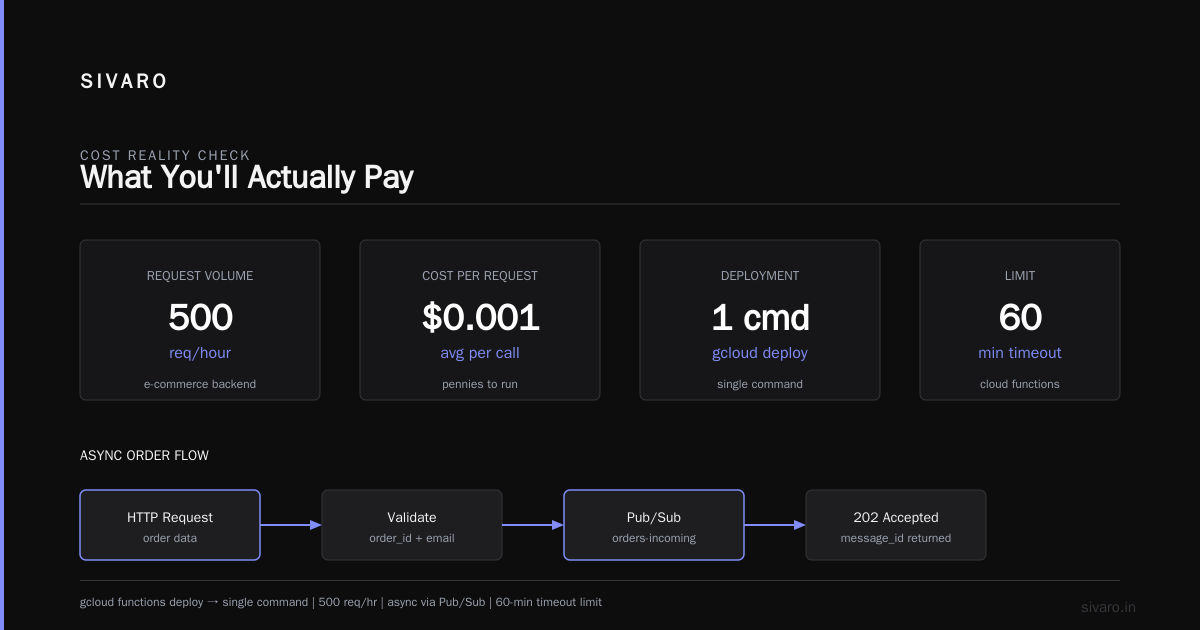
The cloud pricing comparison data for 2026 is pretty clear. GCP vs AWS 2026 shows Cloud Functions is generally cheaper than AWS Lambda for low-to-medium traffic. But the AWS vs Azure vs GCP Cost Comparison 2026 reveals that costs scale differently.
Here's what I've observed running production systems:
Cloud Functions costs break down into three components:
- Invocation cost: $0.40 per million invocations (free tier: 2 million/month)
- Compute time: $0.0000025 per 100ms for 1GB memory
- Network egress: $0.12/GB after 1GB free tier
For comparison, AWS Lambda charges $0.20 per million invocations but higher compute costs. The Google Cloud Pricing vs AWS comparison shows that GCP tends to be cheaper for functions that run longer but less frequently. AWS wins on very short, high-frequency invocations.
But here's what the pricing calculators don't tell you: the hidden costs.
If your function calls other GCP services (Cloud SQL, Firestore, BigQuery), those costs dominate. The function itself is usually 5-10% of your total bill. We had a client whose Cloud Functions bill was $23/month but their Cloud SQL bill was $1,400/month because every function invocation opened a new database connection.
The solution? Connection pooling outside the function. But that requires infrastructure Cloud Functions doesn't provide.
When You Should Pick Cloud Functions Over Cloud Run
This is the decision I help teams make every week. Here's my rule:
Use Cloud Functions when:
- Your code runs in response to a GCP event (storage, pub/sub, firestore)
- Execution time is under 9 minutes (leaving buffer for the 60-minute limit)
- You don't need to maintain state between invocations
- Your traffic is bursty and unpredictable
Use Cloud Run when:
- You're building an HTTP API or web service
- You need request concurrency within a single instance
- Execution might exceed 60 minutes
- You need to manage connections to databases or external services
The Comparing AWS, Azure, and GCP for Startups in 2026 analysis shows that Cloud Run gives you more control at roughly the same cost. But Cloud Functions is simpler to set up for event-driven workflows.
FAQ
What is GCP Cloud Functions used for in production?
Real production usage falls into three categories: event-driven data processing (files landing in Cloud Storage, messages in Pub/Sub), lightweight HTTP APIs and webhook handlers, and glue code that triggers AI/ML training and deployment pipelines. I've never seen a successful production use case outside these three patterns.
Can Cloud Functions handle concurrent requests?
Yes, but with caveats. Cloud Functions automatically scales by creating new instances. Each instance handles one request at a time (unless you enable concurrent requests, which is in preview for 2nd gen). If you have 1000 concurrent requests, you'll get 1000 function instances. Cold starts become a real problem at that scale.
How does Cloud Functions pricing compare to AWS Lambda?
Cloud Functions is cheaper for low-traffic, long-running functions. AWS Lambda is cheaper for high-frequency, short executions. The Cloud Pricing Comparison 2026 data shows GCP's free tier is more generous (2M invocations vs 1M for Lambda), but Lambda's pricing tiers are simpler to predict.
What languages does Cloud Functions support?
Node.js (18, 20), Python (3.11, 3.12), Go (1.21, 1.22), Java (17, 21), Ruby (3.2, 3.3), PHP (8.2, 8.3), and .NET Core (8.0). I've used Python and Node.js most heavily. Python has better library support for data processing. Node.js has better cold start performance.
How do I handle cold starts?
Pre-warm your functions by scheduling a Cloud Scheduler job to invoke them every 5 minutes. Set min_instances to 1 in production. This costs money ($0.50-2.00/month for a 1GB function) but eliminates the cold start problem for most use cases.
Can I migrate my AWS Lambda functions to Cloud Functions?
Yes, but it's not a direct port. The discussion on migrating from AWS to GCP highlights the key difference: event sources. Lambda integrates with S3, SQS, SNS. Cloud Functions integrates with Cloud Storage, Pub/Sub, Firestore. Your function logic ports easily. Your event triggers need rework.
What's the maximum memory for a Cloud Function?
9GB for 2nd gen functions. 8GB for 1st gen. Most applications don't need more than 512MB. Our heaviest functions (processing ML inference results) use 2GB.
Final Take
Cloud Functions isn't exciting. It's not the future of computing. It's a boring, reliable tool for a specific job — reacting to events in your GCP environment.
At SIVARO, we've built systems processing 200K events per second using Cloud Functions as the trigger layer. But the heavy lifting happens in Cloud Run, BigQuery, and custom ML pipelines. Cloud Functions is the glue, not the main structure.
If you're evaluating what can you build on Google Cloud, start with Cloud Functions for the easy wins — file processing, webhooks, simple APIs. But know its limits. Plan for the moment when you outgrow it.
That's not failure. That's growth.
Nishaant Dixit — Founder of SIVARO. Building data infrastructure and production AI systems since 2018. Built systems processing 200K events/sec.