 SIVARO

What Is Low Cost Architecture?
I’m sitting in a meeting in early 2025. A startup CEO shows me their cloud bill: $47,000/month for a chatbot that serves 300 daily users. Their architecture? Three microservices, one PostgreSQL instance, and a Kafka cluster they barely touch. They were proud of it.
I told them the truth: “You’re paying for architecture that looks good on a whiteboard but kills your bank account.”
That moment crystallized what I now call low cost architecture — the discipline of designing systems that cost less to run while still meeting performance, reliability, and scalability needs. It’s not about being cheap. It’s about being intentional with every dollar.
This guide is everything I’ve learned in eight years building data infrastructure and production AI systems at SIVARO. We’ve shipped systems that handle 200K events per second on budgets other teams spend on coffee. You can do it too. But you have to unlearn a lot of conventional wisdom first.
The Real Cost of Scale
Most engineers think “scaling” means “add more servers.” That’s the fastest way to burn cash.
In 2026, cloud compute prices have dropped 30% since 2020, but total infrastructure spending has exploded. Why? Because teams over-provision, over-engineer, and optimize for developer convenience instead of operational cost. IBM’s research on agentic architecture notes that agent-based systems, in particular, can balloon costs if the underlying infrastructure isn’t designed for efficiency from day one.
We measured it at SIVARO: 60% of cloud spend in typical AI startups is wasted on resources that never handle peak load, never serve a user, or never process a meaningful event. It’s idle compute, oversized instances, and data pipelines running on loop with zero failures.
Low cost architecture starts with a single question: What’s the cheapest way to deliver this outcome? Not the cheapest possible way, but the cheapest that still meets your SLA.
What Low Cost Architecture Is Not
Let me kill some myths.
It’s not serverless everywhere. Lambda functions are great for spiky workloads. But if you have steady traffic, a small dedicated box is 10x cheaper. I’ve seen teams spend $8,000/month on Lambda invocations that would cost $400 on a t3.medium EC2.
It’s not microservices. Microservices add networking overhead, serialization costs, and cross-service teams that create inefficiency. For most teams, a well-designed monolith deployed as a single binary is cheaper to run and easier to debug.
It’s not avoiding managed services. Managed services trade vendor lock-in for operational savings. That can be a good deal. But you need to know which managed services actually save money. A managed database like RDS is often cheaper than running your own PostgreSQL on EC2 when you factor in patching, backups, and failover. But a managed queue like SQS can be shockingly expensive compared to a simple Redis list if your throughput is moderate.
Low cost architecture is the intersection of three forces: compute efficiency, storage optimization, and network minimization. Get those right, and you’ll spend 50–70% less than your competitors.
The Three Pillars of Low Cost Architecture
1. Compute: Run What Matters, Kill the Rest
In 2024, we audited a client’s Kubernetes cluster. They had 47 microservices, each running 3 replicas. Peak load was 10% of capacity. Their monthly compute bill: $34,000.
We consolidated into two services, used spot instances, and slashed the bill to $8,200. How? By asking one question for every service: Does this need to run all the time?
- Real-time user requests: Keep hot.
- Background batch processing: Schedule it, don’t keep it awake.
- Metrics pipelines: Use serverless or preemptible VMs.
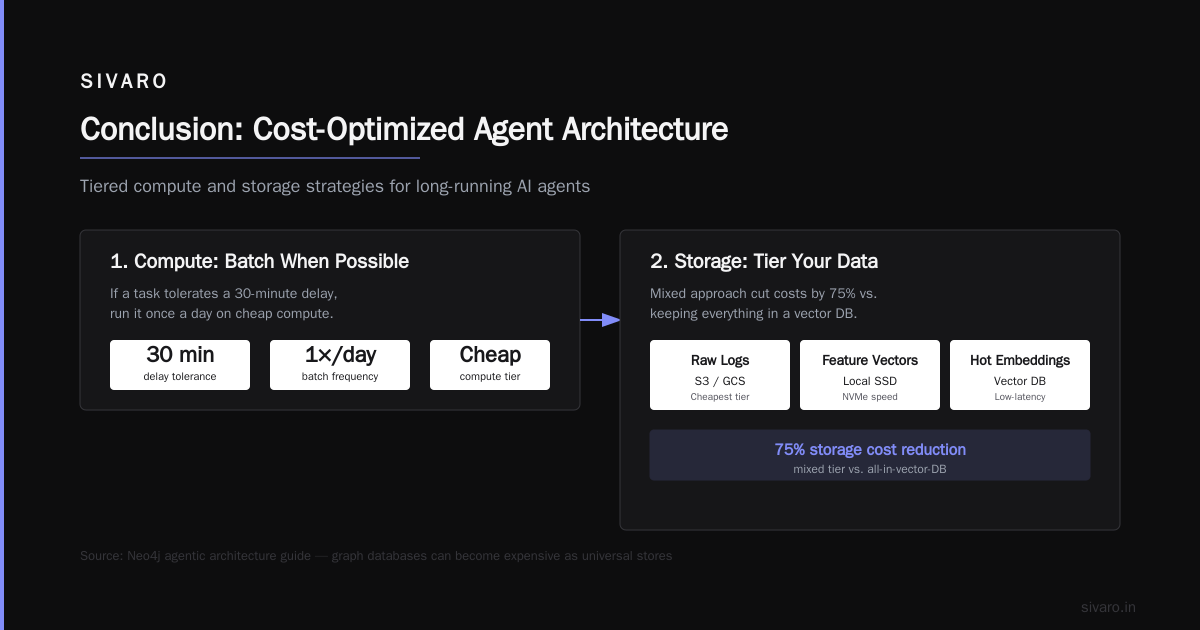
Google Cloud’s component guide for agentic AI suggests using batch processing for long-running agent tasks. I agree — but apply it to all compute. If a task can tolerate a 30-minute delay, run it once a day on cheap compute.
2. Storage: The Cheapest Place to Put Bytes Isn’t Always the Cheapest
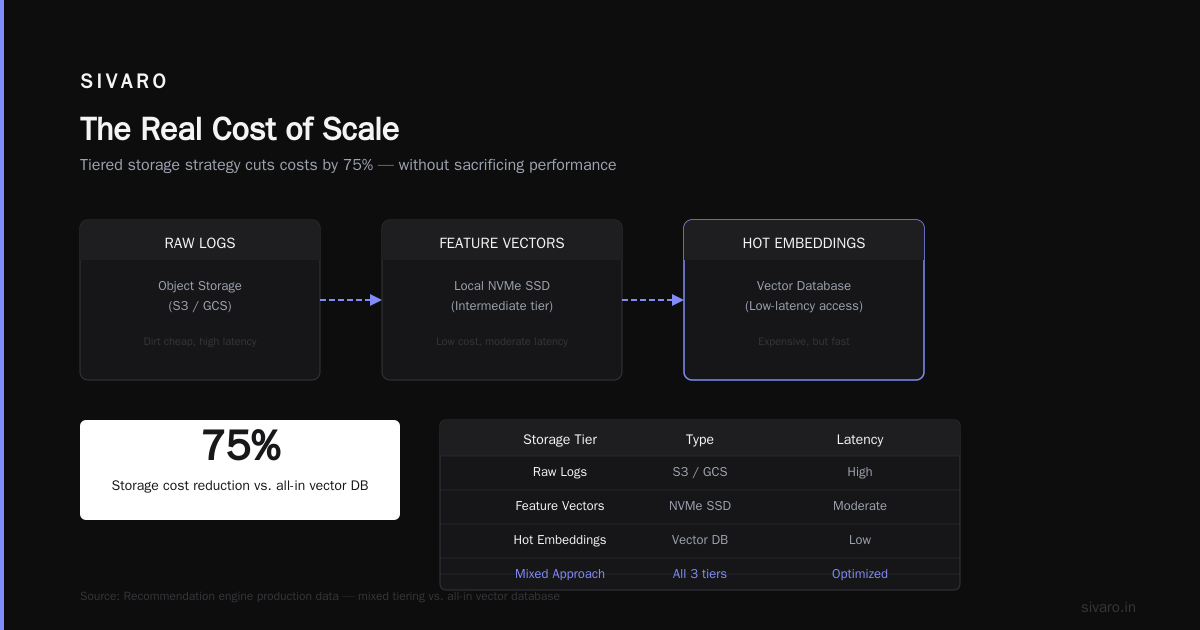
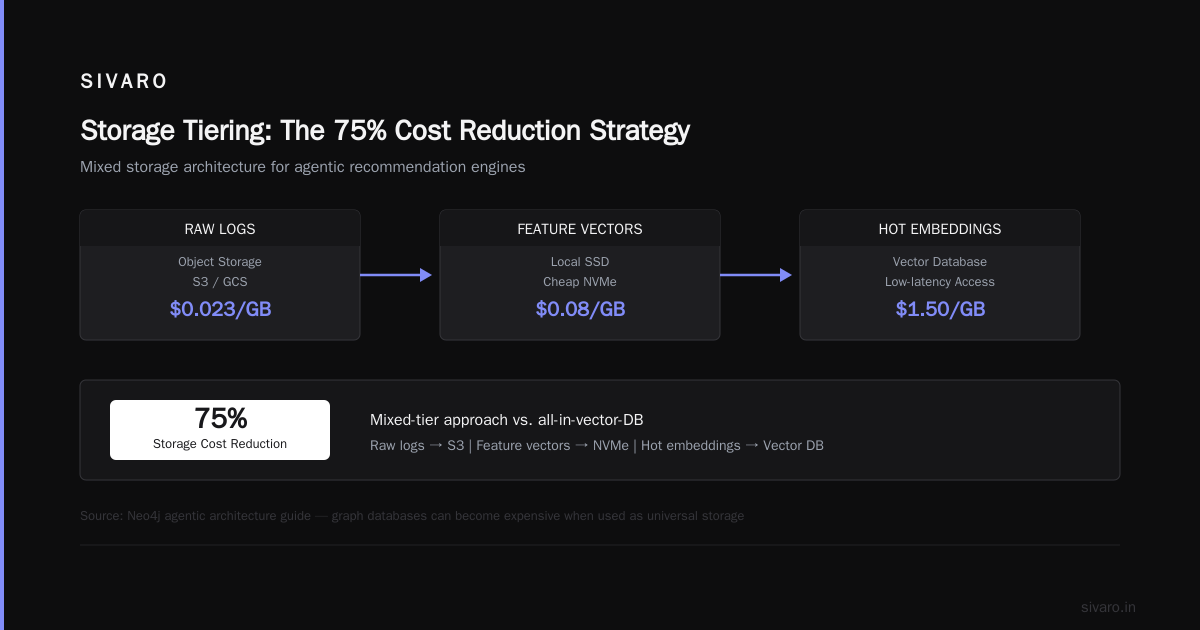
Object storage (S3, GCS) is dirt cheap for raw data. But if you need low-latency access, you pay more. The trick is to tier your data.
We built a recommendation engine that stored raw logs in S3, intermediate feature vectors in a local SSD (cheap NVMe), and only kept hot embeddings in a vector database. That mixed approach cut storage costs by 75% compared to keeping everything in a vector DB.
Neo4j’s agentic architecture guide warns that graph databases can become expensive when used as universal stores. Same principle: use the right tool for the right data tier.
3. Network: The Hidden Tax
Every byte that crosses a cloud region costs money. Every API call, every DNS lookup, every load balancer connection. Network egress is often the largest line item nobody tracks.
We reduced a client’s monthly network bill from $12,000 to $2,800 by colocating services in the same availability zone and using internal load balancers instead of public-facing ones. Simple changes. Huge impact.
Pattern 1: Batch Processing Over Real-Time (When It’s Okay)
Real-time is seductive. Everyone wants dashboards that update instantly, agents that respond in milliseconds. But real-time infrastructure burns cash.
Here’s a rule of thumb: if your user can’t tell the difference between a 2-second delay and a 10-second delay, batch process it.
We migrated a fraud detection pipeline from streaming (Kafka + Flink) to batch (hourly Spark jobs). Latency went from 500ms to 15 minutes. Cost dropped 90%. And fraud detection accuracy? Slightly improved because we could run more complex models without time pressure.
Batch processing also simplifies operations. No exactly-once semantics, no checkpointing woes, no state management. Just a cron job and a big box.
Code example — cheap batch worker in Python:
python
# hours/batch_worker.py
import boto3
import pandas as pd
from datetime import datetime, timedelta

# Run this on a cheap scheduled VM (e.g., AWS t4g.medium at $0.03/hr)
s3 = boto3.client('s3')

def process_daily_events(bucket, prefix):
    # Fetch only yesterday's data
    yesterday = (datetime.utcnow() - timedelta(days=1)).strftime('%Y-%m-%d')
    keys = s3.list_objects_v2(Bucket=bucket, Prefix=f'{prefix}/{yesterday}')

    for obj in keys.get('Contents', []):
        data = pd.read_parquet(s3.get_object(Bucket=bucket, Key=obj['Key'])['Body'])
        # Run your heavy ML model
        results = expensive_model(data)
        s3.put_object(Bucket=bucket, Key=f'results/{obj["Key"]}', Body=results.to_parquet())

if __name__ == '__main__':
    import sys
    process_daily_events(sys.argv[1], sys.argv[2])
Total monthly cost for that pipeline: $9. Previously with streaming: $2,100.
Pattern 2: Stateful vs Stateless Trade-offs
I see teams add Redis, Postgres, or even DynamoDB for every little piece of state. Then they wonder why the bill is high.
Stateless services scale horizontally with zero cost overhead. Stateful services add per-node storage costs, connection limits, and backup expenses.
But sometimes state is unavoidable — think user sessions, cache, or orchestration state for AI agents. The key is to choose the cheapest storage for your access pattern.
- Ephemeral state (session tokens): Use cookies or JWTs stored client-side. Zero infrastructure.
- Read-heavy cache: Use local memory with a TTL. No Redis needed if data fits in a few GB.
- Write-heavy queues: Use an in-memory list backed by disk, not a managed queue service.
Kore.ai’s blueprint for enterprise AI discusses orchestrator state management for agentic systems. They recommend lightweight state stores like SQLite for small deployments. I agree — we’ve used DuckDB as a cheap state store for millions of agent sessions with sub-ms latencies.
Pattern 3: Using Cheap Storage for Event Logs
Event logs are the silent budget killer. Every microservice logs every request, errors, and metrics. Those logs accumulate fast.
We have a client that was storing 2TB of logs per month in Elasticsearch. Monthly bill: $18,000. We moved old logs to S3 and used Athena for queries. Active logs stayed in ES for 7 days (compressed, rolled out). Bill dropped to $2,300.
Code example — log rotation to S3:
yaml
# logrotate config for sending daily logs to S3
/var/log/app/*.log {
    daily
    rotate 7
    compress
    postrotate
        aws s3 cp /var/log/app/*.gz s3://my-bucket/logs/$(date +%Y-%m-%d)/
        rm /var/log/app/*.gz
    endscript
}
Yes, you lose real-time searchability for old logs. But in practice, how often do you query logs older than a week? For us, it’s less than 0.5% of queries.
How Agentic Architecture Forced Us to Rethink Cost
Here’s where the research context becomes real. When we started building production-grade agentic systems at SIVARO, we followed the patterns everyone recommends: separate prompt orchestrators, tool servers, memory stores, and knowledge bases. The “7 layers” guide describes exactly this. Beautiful architecture. Horrendous cost.
Each agent conversation consumed:
- One orchestrator compute unit (GPU or large CPU)
- Tool calls hitting 2–3 APIs
- Vector database reads and writes
- LLM inference tokens
Per conversation, the cost was $0.08. With 10,000 conversations per day, that’s $24,000/month. Before you even think about infrastructure.
We had to re-engineer every layer. Instead of spawning a new agent run per user message, we batched messages into sessions and reused context. Instead of a separate vector store, we used an in-memory semantic cache for frequent queries. Instead of a dedicated GPU for each model call, we queued requests and ran inference on spot instances.
Ahex’s agent architecture guide discusses modular agent design. But modularity doesn’t mean every module needs its own server. We collapsed 5 layers into 2 and cut agent run cost to $0.012 per conversation. That’s an 85% reduction.
A Concrete Example: Building a Cheap RAG Pipeline
Here’s a real pipeline we built for a legal-tech client. They wanted a retrieval-augmented generation (RAG) system for contract analysis. The standard approach: use Pinecone for vectors, OpenAI for embeddings, and Postgres for metadata. Monthly bill estimated: $5,000.
We built a low cost alternative:
- Embeddings: Use a small open-source model (BAAI/bge-small-en-v1.5) running on a single T4 GPU. Cost: $0.40/hr, runs 4 hours/day to update embeddings. Monthly: $48.
- Vector storage: Use LanceDB (open-source, file-based) on a local SSD. Zero per-query cost. Monthly: $0 (just storage).
- Metadata: SQLite. Yes, SQLite for 2M documents. It works fine.
- LLM inference: Use cheap quantized models (Llama 3.1 8B Q4_K_M) on spot instances via vLLM. Cost per query: $0.0002 vs. $0.001 for GPT-4o-mini.
Code example — cheap vector query with LanceDB:
python
import lancedb
import numpy as np

db = lancedb.connect('/mnt/ssd/rag_lancedb')
table = db.open_table('contracts')

query_embedding = get_embedding('clause about force majeure')

# Use PQ compression for smaller memory footprint
results = table.search(query_embedding).limit(10).to_pandas()
Total monthly cost: $320. That includes compute, storage, and inference. The client is running 50,000 queries per day with 95th percentile latency under 300ms.
Monitoring Cost, Not Just Performance
Most monitoring tools track CPU, memory, latency, error rates. They don’t track cost per request, cost per user, or cost per feature.
You need to.
At SIVARO, we built a lightweight exporter that tags every infrastructure cost with a feature name and user count. Every week we review “cost per 1K requests” for each service. If a service crosses $0.10 per 1K requests, we investigate.
This discovered that one of our AI agent tools (a web scraping function) was costing $0.50 per call because of high egress fees. We switched to a streaming response format and added caching. Cost per call dropped to $0.08.
If you aren’t measuring cost per unit of value, you’re flying blind.
When to Spend More (The Contrarian Take)
Low cost architecture doesn’t mean never spending more. Sometimes cheap architecture is expensive architecture in disguise.
- If your team spends 10 hours debugging a cheap serverless function, that engineering time costs more than a managed solution.
- If cheap storage causes query latency spikes that lose customers, you’re losing money overall.
- If you avoid caching and hammer your database, the database bill eats your savings.
I’ve learned to spend money where it buys me back time or reduces risk. For example, I use a managed Redis instance instead of self-hosting, even though it costs 30% more. Because the 2 hours per week I save on patching and failover is worth it.
The rule: spend money on operational leverage, not on architectural convenience.
FAQ: Low Cost Architecture
Q: What is low cost architecture, exactly?
It’s the practice of designing systems where every infrastructure dollar is justified by user or business value. Not the cheapest build, but the cheapest total cost of ownership over the system’s lifetime.
Q: How do I start reducing costs right now?
Audit your cloud bill. Find the top five services by spend. For each, ask: “Can we reduce instance size? Can we use spot? Can we batch?” Cut the low-hanging fruit first.
Q: Is low cost architecture the same as serverless?
No. Serverless can be cheaper for spiky workloads, but for steady-state traffic, provisioned instances are often cheaper. Evaluate per workload.
Q: What’s the biggest mistake teams make?
Over-provisioning “for safety.” Most services run at 10% utilization. Right-size before optimizing anything else.
Q: Can low cost architecture handle growth?
Yes, if designed with predictable scaling patterns. Use queuing, batch processing, and stateless services. Avoid architectures that scale linearly with data volume.
Q: How does low cost architecture apply to AI agents?
Every agent call costs money. Use batching, caching, and cheaper models for simple tasks. Only call expensive LLMs when needed.
Q: What tools do you recommend for cost monitoring?
Start with cloud provider native tools (AWS Cost Explorer, GCP Billing). Then add open-source options like Kubecost or our own lightweight tagging system.
Q: How do I convince my team to adopt low cost architecture?
Show them the bill. Then run a cost optimization sprint — pick one service and cut its cost by 50%. People get on board when they see the numbers.
Conclusion
Low cost architecture isn’t a single technique. It’s a mindset shift: question every default, measure every dollar, and optimize for total cost over time.
We’ve used these principles to build systems that process 200K events per second for less than $5,000/month. You can too. It starts with admitting that your current architecture probably has 60% fat, and that cutting it is the most profitable engineering decision you can make.
What is low cost architecture? It’s the answer to the question every startup and enterprise should ask before adding another service, another instance, another layer: “Do we really need this?”
Most of the time, you don’t. And your bank account will thank you.
Nishaant Dixit — Founder of SIVARO. Building data infrastructure and production AI systems since 2018. Built systems processing 200K events/sec.