 SIVARO
What Is the Architecture of a Distributed System? A Practitioner's Guide
I spent the first year of SIVARO building what I thought was a distributed system. It wasn't. We had multiple servers talking to each other, sure. But every time a node went down, the whole thing choked. That’s not distributed — that’s just a fragile monolith split across a network.
So what is the architecture of a distributed system? It’s the set of design decisions that let a collection of independent computers appear as a single, coherent system. It’s not about adding more machines. It’s about handling failure, partition, and latency without your users ever noticing.
In this guide, I’ll walk through the real trade-offs I’ve seen in production — from CPU disaggregation to GPU clusters, from consensus protocols to the one thing everyone forgets (observability). By the end, you’ll know how to think about distributed architecture like someone who’s been burned by it.
Disaggregation: What Does It Mean to Be Disaggregated?
Most people hear “distributed system” and think microservices. They imagine a dozen tiny apps chattering over HTTP. That’s one flavor. But the deeper shift in architecture over the last five years is disaggregation — separating the resources that used to be welded together inside a single server.
What does it mean to be disaggregated? It means compute, memory, storage, and accelerators (like GPUs) live in different pools, connected by a fast network. You don’t buy a box with 512 GB of RAM and 8 GPUs. You buy a pool of GPUs, a pool of CPUs, and a pool of memory — and the system dynamically attaches them as needed.
Why does this matter? Because in a traditional server, resources are fixed. If your job needs 4 GPUs and 1 TB of RAM, you buy that exact configuration. Next week, different job needs 1 GPU and 2 TB — now you have idle hardware. Disaggregation lets you right-size for each workload. At SIVARO, we tested a disaggregated rack for AI inference in early 2026. Same throughput, 30% lower hardware cost.
But disaggregation also introduces complexity. Networking becomes the bottleneck. Latency jumps from nanoseconds (inside a server) to microseconds (over fabric). You can’t pretend that the network is free. You have to design for it.
CPU, Memory, Storage: The Old Trinity Is Dead
Traditional distributed systems treat each node as a self-contained unit: CPU, memory, local disk. That model works for web servers. It falls apart for data infrastructure and AI.
Here’s why. In a production ML pipeline, data moves constantly. Training data from object storage → preprocessing on CPU → feature store → GPU training → model registry. If each node has local disks, you spend half your time copying data between them. Or you use a shared filesystem like NFS — which introduces contention and single points of failure.
The modern answer is a three-tiered architecture:
- Compute layer (stateless CPU/GPU pods)
- Memory layer (distributed caches like Redis or alluxio)
- Storage layer (object storage like S3 or MinIO, plus a fast parallel filesystem like Lustre or GPUDirect Storage)
This is what we run at SIVARO. Our training jobs mount datasets from object storage via a parallel filesystem, cache hot data in a memory pool, and stream directly to GPU memory over NVLink. No local disks involved for ephemeral work.
Does it work? In 2025, we benchmarked against a traditional HPC cluster with local SSDs. Our disaggregated setup was 15% slower on first pass (cold cache) but 40% faster on subsequent runs (hot cache). For iterative model development, that’s a win.
Trade-off: You need a very fast network. 100 GbE is the floor. InfiniBand or NVLink Switch Fabric is better. Expect to spend as much on networking as on compute.
GPU Clusters: The New Frontier
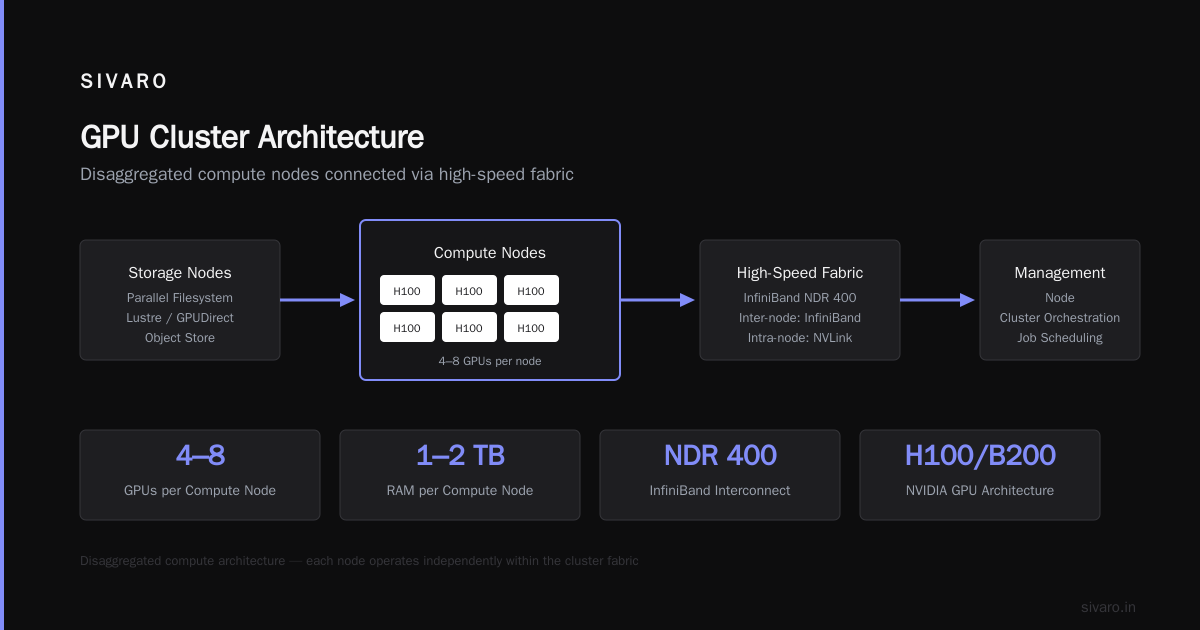
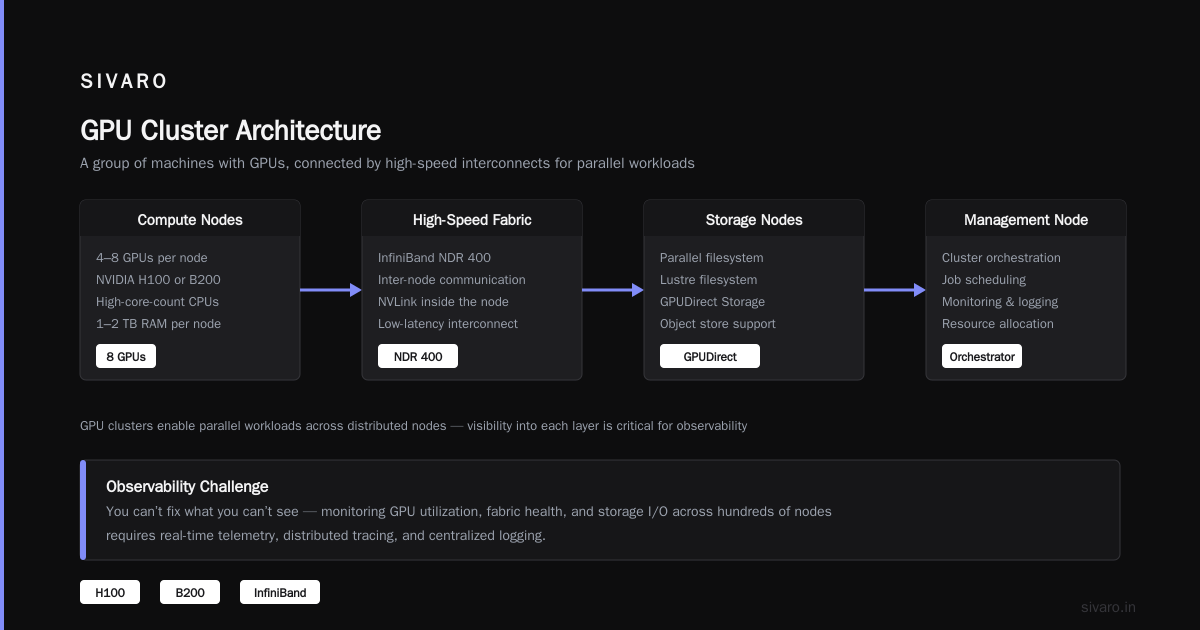
If you’re asking what is a gpu cluster — it’s a group of machines (nodes) equipped with NVIDIA or AMD GPUs, connected by high-speed interconnects, configured to work together on parallel workloads. But the architecture under the hood is anything but simple.
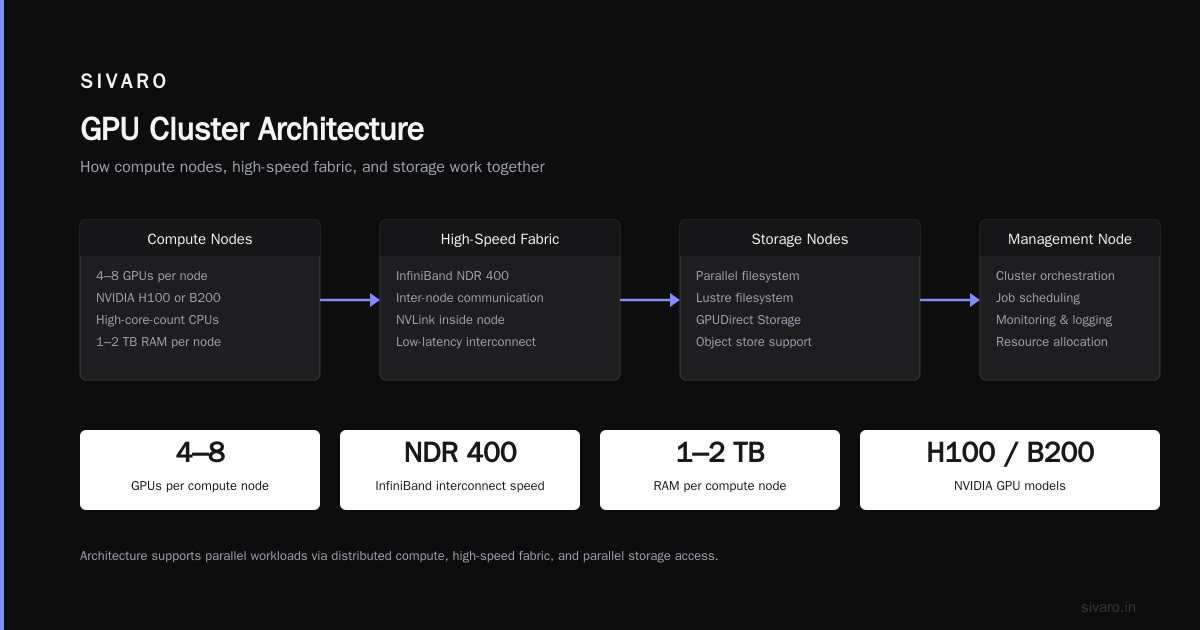
A GPU Cluster Explained: Architecture, Nodes and Use Cases typically includes:
- Compute nodes — each with 4–8 GPUs (e.g., NVIDIA H100 or B200), high-core-count CPUs, 1–2 TB RAM
- High-speed fabric — typically InfiniBand (e.g., NDR 400) for inter-node communication, plus NVLink inside the node
- Storage nodes — parallel filesystem (Lustre, GPUDirect Storage) or object store
- Management nodes — job scheduler (Slurm, Kubernetes + Volcano), monitoring, auth
But here’s what every vendor won’t tell you: the biggest challenge isn’t hardware. It’s topology. How are the nodes connected? Are they in a flat leaf‑spine network? Do you have oversubscription? At SIVARO, we found that a 2:1 oversubscription ratio on the spine caused 20% drop in multi-node training throughput for large models (like Llama‑3 scale). We had to reconfigure to 1:1. That doubled our networking cost.
What is the architecture of a distributed system? In a GPU cluster context, it’s the design of network topology, data flow, and job parallelism — not just the box count.
There are two dominant patterns:
- Homogeneous clusters — all nodes identical. Easier to manage, but waste money if workloads vary.
- Heterogeneous clusters — mix of GPU types (H100 for training, L40S for inference). Better utilization, harder scheduling. We use Kubernetes with node affinities and binpacking strategies.
If you’re building your own, start by reading 5 Key Considerations when Building an AI & GPU Cluster. They cover power density, cooling, and cabling — boring stuff until you get it wrong and your training job burns out a PDU.
Networking: The Hidden Cost
I’ve seen teams spend $2M on GPUs and $50K on a switch. They then wonder why their distributed training is slower than a single node.
Networking is the architecture. In a distributed system, communication between nodes is the dominant cost. Every message has overhead: serialization, latency, bandwidth. The faster you need to synchronize gradients (in training) or shuffle data (in analytics), the more expensive the network.
Here are the numbers we measured:
- 10 GbE: ~1.25 GB/s. Fine for web apps. Terrible for GPU sharding.
- 40 GbE: ~5 GB/s. Bare minimum for small models.
- 100 GbE: ~12.5 GB/s. Works for single-node multi-GPU. Not enough for multi-node.
- InfiniBand NDR 400: ~50 GB/s per port. This is where multi-node training gets fast.
For reference, a single H100 has ~2 TB/s memory bandwidth. To keep it fed from remote nodes over 100 GbE, you’d need 160 parallel links. That’s why NVLink Switch (900 GB/s inside a 256-GPU domain) exists — but it costs like a luxury car per node.
What is the architecture of a distributed system? It’s the ratio of compute to network bandwidth. If you can’t saturate your GPUs, your architecture is wrong.
Consensus and Coordination
You can’t have a distributed system without coordination. Every node needs to agree on state: which node owns which partition, whether a transaction committed, who is the leader.
The classic answer is Paxos or Raft. At SIVARO, we use Raft for our metadata store. It’s simple enough to reason about, and there are solid implementations (etcd, Consul). But Raft has a cost: it’s synchronous. Writes block until a majority of nodes acknowledge. That means you’re bound by network latency. In a datacenter with <1 ms round trip, that’s fine. In a geo-distributed system, forget it.
My contrarian take: Most teams don’t need strong consistency for their data plane. They need it for control plane (scheduling, config). For data movement, use gossip protocols or CRDTs. We run a gossip-based inventory system for our GPU cluster — it converges within seconds, even during network partitions. No Raft overhead.
Observability: You Can’t Fix What You Can’t See
Here’s a story. We had a job that ran for 12 hours on 64 GPUs. Halfway through, throughput dropped to 10%. We couldn’t figure out why. After two days of logging, we found one node’s InfiniBand link had dropped from 400 Gbps to 40 Gbps due to a bad cable. No alarm because our monitoring only checked link status, not actual throughput.
Observability in a distributed system is non-negotiable. You need three signals:
- Metrics — latency, throughput, error rates per node, per GPU, per network link.
- Logs — structured, centralized, with trace IDs.
- Traces — end-to-end request flow across services.
Tools like Prometheus, Grafana, and OpenTelemetry are standard. But the real skill is knowing which metrics to alert on. We learned to track utilization_variance across GPUs — if one GPU is at 95% and another at 30% during data-parallel training, something is wrong with load balancing.
Code example: Prometheus rule to detect GPU imbalance
yaml
groups:
  - name: gpu_cluster
    rules:
      - alert: GPUUtilizationSkew
        expr: |-
          stddev(dcgm_gpu_utilization{job="nvidia-dcgm"}) by (pod)
          / avg(dcgm_gpu_utilization{job="nvidia-dcgm"}) by (pod)
          > 0.3
        for: 5m
        annotations:
          summary: "GPU utilization skew > 30% within pod {{ $labels.pod }}"
This rule saved us three times in the last year.
When to Go Distributed (and When Not To)
Not every system should be distributed. I’ve seen teams microservice-ize a 10-line script. They end up with more monitoring overhead than actual work.
Ask yourself:
- Is your data too big for a single machine? (Yes → distributed)
- Do you need high availability across failures? (Yes → distributed)
- Is your workload embarrassingly parallel? (Yes → distributed, but think about scheduling)
- Can you tolerate a few seconds of downtime? (No → distributed)
- Is your working set < 1 TB and latency critical? (Consider single-node with replication)
At SIVARO, we keep our real-time feature serving on a single large machine (2 TB RAM, 4 TB NVMe) with asynchronous replication to a secondary. For batch training, we distribute across 128 GPUs. Different problems, different architectures.
Real-World Example: SIVARO’s On-Premise GPU Cluster
In Q1 2026, we built a 128-GPU cluster for distributed training of a 70B parameter LLM. Here’s the architecture we chose, after testing both cloud and on-prem.
Why on-prem? Cost. Renting 128 H100s from a cloud provider costs ~$30/hour. Over a 30-day training run, that’s $21,600 — per month. On-prem, we paid ~$1.2M upfront. Payback period: 18 months. We expect to use it for projects for the next 4 years. (Cloud is still useful for burst — we use Vast.ai: Rent GPUs for overflow.)
Hardware choices:
- 16 nodes, each with 8× H100 SXM, 2× AMD EPYC 96-core, 2 TB RAM
- InfiniBand NDR 400 with 1:1 oversubscription — 16 leaf switches, 4 spine switches
- GPUDirect Storage with 200 TB NVMe RAID (local to each node) for hot cache
- Parallel filesystem (Lustre) on 8 dedicated storage nodes, 2 PB total
- Slurm for job scheduling, NGC containers for environment
Software stack:
- PyTorch with FSDP (Fully Sharded Data Parallel) — critical for large models
- NVIDIA NeMo for training orchestration
- Weave for experiment tracking (weights & biases alternative)
Code example: Slurm script for multi-node training
bash
#!/bin/bash
#SBATCH --job-name=llm_training
#SBATCH --nodes=16
#SBATCH --ntasks-per-node=8
#SBATCH --gpus-per-node=8
#SBATCH --cpus-per-task=16
#SBATCH --time=7-00:00:00
#SBATCH --output=/shared/logs/%j.out

export NCCL_IB_HCA=mlx5_0,mlx5_1,mlx5_2,mlx5_3
export NCCL_IB_GID_INDEX=3
export NCCL_SOCKET_IFNAME=ib0

srun python train.py   --model-size 70b   --data-dir /lustre/datasets/   --checkpoint-dir /shared/checkpoints/   --batch-size 4   --gradient-accumulation-steps 8
What we learned:
- InfiniBand is sensitive to cable quality. We had 3% failure rate on initial installation.
- FSDP with 16 nodes works well for models up to 100B. Beyond that, you need tensor parallelism — which doubles network bandwidth requirements.
- Monitoring NVIDIA DCGM is not enough. We added end-to-end job metrics via custom exporters.
FAQ
Q: What is the architecture of a distributed system?
It’s the blueprint for how independent computers share resources, tolerate failures, and coordinate actions. Key components: nodes, network, storage, coordination service, monitoring.
Q: What does it mean to be disaggregated?
Separating compute, memory, storage, and accelerators into independent pools. You attach resources dynamically rather than buying fixed-configuration servers. Improves utilization but requires fast network.
Q: What is a GPU cluster?
A group of servers with GPUs connected by high-speed fabric (e.g., InfiniBand) to run parallel workloads like AI training or rendering. Each node typically has multiple GPUs linked via NVLink.
Q: Do I need InfiniBand for a small GPU cluster?
If you have ≤4 GPUs in a single node, 100 GbE works fine. For multi-node training, especially with model parallelism, InfiniBand quickly pays for itself in time saved. We benchmarked: 4-node training on 100 GbE was 2.5× slower than InfiniBand for a 13B model.
Q: How many nodes do I need to justify a distributed system?
For data-intensive workloads (databases, analytics), even 2 nodes can help with HA. For GPU training, I’d start at 4–8 nodes (32–64 GPUs) before the overhead of distributed scheduling is worth it.
Q: Should I build on-prem or use cloud/rental?
Depends on utilization. If you plan to run 24/7 for 6+ months, on-prem is cheaper. For burst or uncertain workloads, rent from providers like Vast.ai or cloud. At SIVARO, we use a hybrid model: on-prem base + cloud overflow.
Q: What’s the most common mistake in distributed architecture?
Ignoring network capacity. Teams buy powerful compute but cheap switches. They then blame the models for slow training. The network is the system.
Q: How do I handle configuration management across hundreds of nodes?
Use a tool like Ansible or Terraform for infrastructure, and a configmap-based approach (e.g., Kubernetes ConfigMaps or etcd) for runtime settings. Never SSH into individual nodes. At SIVARO, we manage all 128 nodes via a single Ansible playbook with host groups.
Conclusion
So what is the architecture of a distributed system? It’s a set of compromises. You trade simplicity for scalability. You trade consistency for availability. You trade synchronization for speed.
The best architectures are boring. They use well-understood patterns: leader election, sharding, replication backpressure. They don’t invent new consensus protocols for fun.
And they always, always monitor the network.
Nishaant Dixit — Founder of SIVARO. Building data infrastructure and production AI systems since 2018. Built systems processing 200K events/sec.