 SIVARO
What is the Difference Between GCP Compute Engine and Kubernetes?
Last week, a founder I respect asked me: "Should we go with Compute Engine or Kubernetes for our new microservices?" He'd been reading blog posts comparing the two. He thought they were just different tiers of the same thing. Spoiler: they're not.
Here's the short answer: GCP Compute Engine is raw virtual machines in the cloud. It's IaaS — give me a VM, I'll manage everything. Kubernetes (via Google Kubernetes Engine or GKE) is a container orchestrator that runs on top of Compute Engine VMs. K8s is not a replacement for VMs — it's a layer that manages your apps across a cluster of VMs.
In this guide, I'll walk you through the real differences. Not textbook definitions. How they behave in production, how they cost, and when you should pick one (or both). I'll also clear up common confusion: is GCP the same as Google Cloud? Yes. Is Microsoft 365 and Azure the same? No — and I'll explain why that analogy matters for your infra choices.
Let's get into it.
They're Not the Same Thing, But They're Not Mutually Exclusive
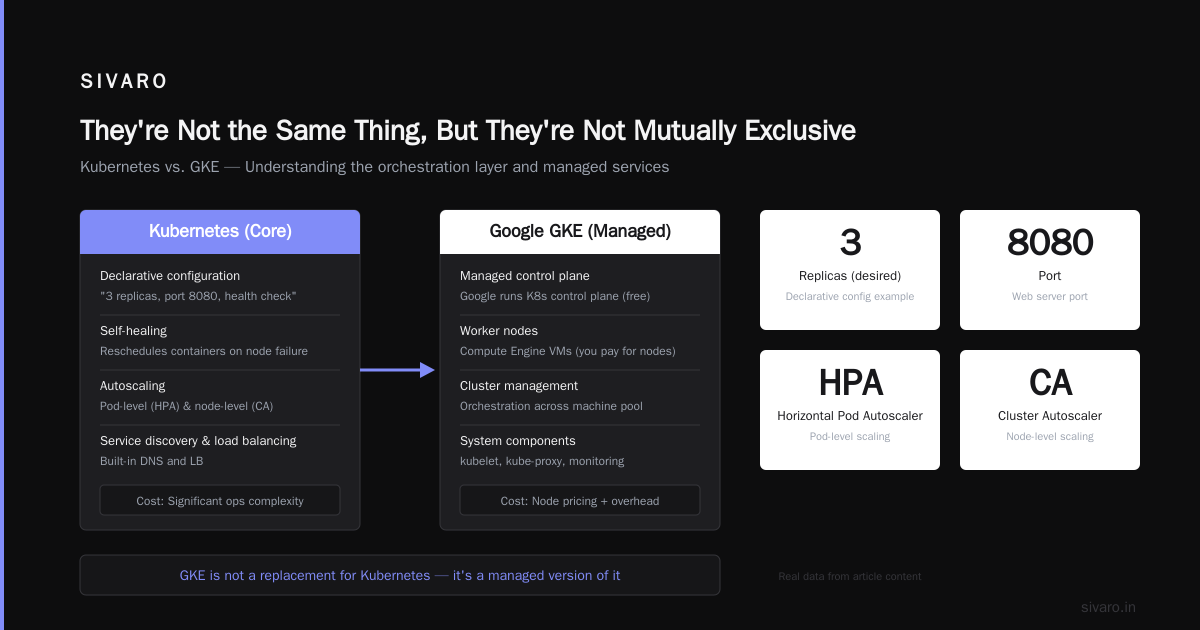
Most people think "Compute Engine or Kubernetes" is a binary choice. It's not. You can run Kubernetes on Compute Engine — that's literally how GKE works. GKE provisions Compute Engine VMs as nodes, then orchestrates containers on them.
The real question is: do you want to manage VMs directly, or do you want an abstraction that manages them for you?
At SIVARO, we've built data pipelines that use both. A batch processing job? Straight Compute Engine spot VMs. A real-time AI inference service? GKE for its auto-scaling and rolling updates. Different tools for different jobs.
GCP Compute Engine: Raw Compute, No Strings Attached
Compute Engine is Google's VM service. You pick a machine type (n1, n2, c2, e2, and loads of custom combinations), choose a region, and get an instance. That's it. You're responsible for OS patching, load balancing, scaling, and everything else.
When it works well:
- You need a predictable, long-running server (database, legacy app).
- You're running batch jobs that need specific instance types (GPU, high-memory).
- Your team already has strong infrastructure automation (Ansible, Chef, Terraform).
When it hurts:
- You have 20 microservices each needing its own VM — that's 20 machines to manage, patch, and pay for.
- Traffic spikes require manual scaling or autoscaler configuration that's tied to VM metrics.
Pricing reality: Compute Engine has a reputation for being cheaper than equivalents on AWS and Azure, especially with committed use discounts. A 2026 pricing comparison from cast.ai shows GCP's sustained use discounts can knock off 20-30% for any instance running full month — no commitment needed. (Cloud Pricing Comparison) But that's per VM. If you need high availability, you'll duplicate that cost.
Example: Provisioning a simple n1-standard-2 VM via gcloud:
gcloud compute instances create my-server --zone=us-central1-a --machine-type=n1-standard-2 --image-family=ubuntu-2204-lts --image-project=ubuntu-os-cloud --boot-disk-size=10GB
That's it. You have a server. You ssh in, install Docker, run your app. Simple.
Kubernetes: The Orchestra Conductor for Containers
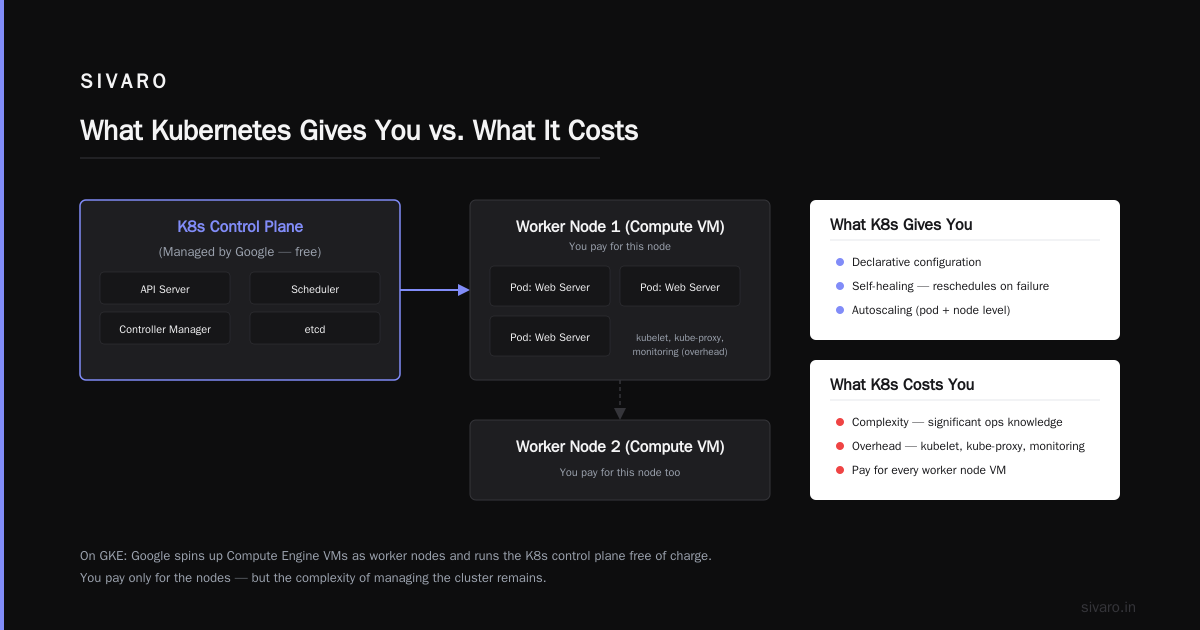
Kubernetes (K8s) is not a VM service. It's an orchestration layer that manages containers across a pool of machines. When you use GKE, Google spins up a cluster of Compute Engine VMs as worker nodes, then runs the K8s control plane for you (free, but you pay for the nodes).
What K8s gives you:
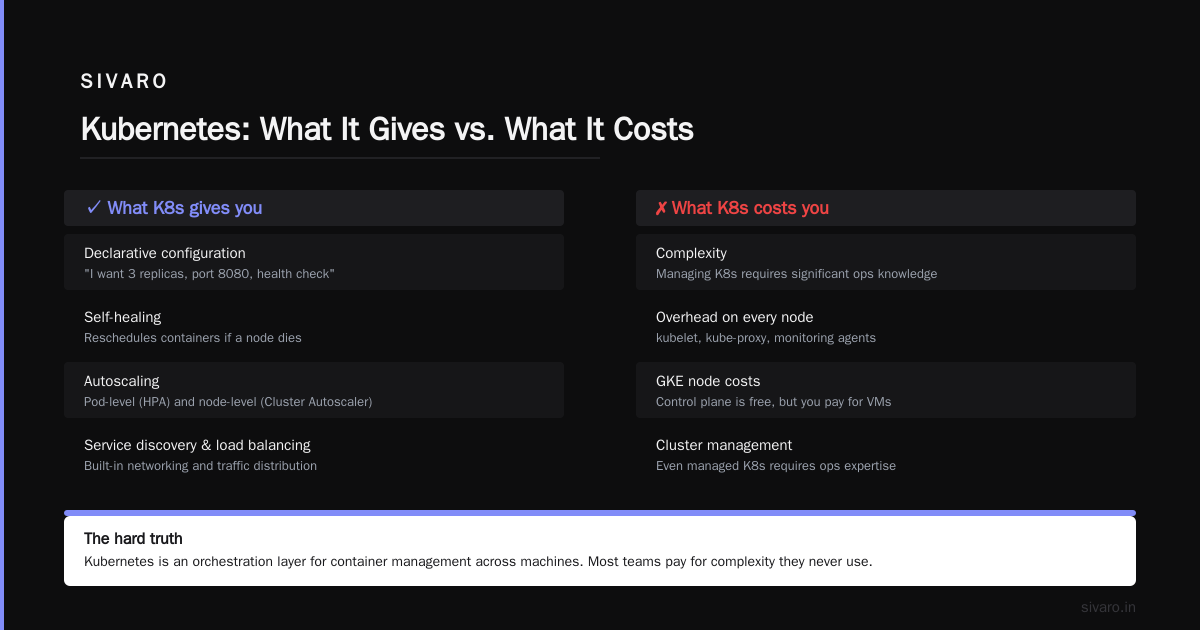
- Declarative configuration: "I want 3 replicas of my web server, on port 8080, with a health check."
- Self-healing: if a node dies, K8s reschedules the containers on another node.
- Autoscaling: both pod-level (Horizontal Pod Autoscaler) and node-level (Cluster Autoscaler).
- Service discovery and load balancing built in.
What K8s costs you:
- Complexity. Managing a K8s cluster (even managed GKE) requires significant ops knowledge.
- Overhead. Each node needs system components (kubelet, kube-proxy, monitoring). Those eat CPU and memory.
- You pay for the nodes whether they're fully utilized or not.
Here's a minimal deployment YAML for a stateless web app:
yaml
apiVersion: apps/v1
kind: Deployment
metadata:
  name: web-server
spec:
  replicas: 3
  selector:
    matchLabels:
      app: web
  template:
    metadata:
      labels:
        app: web
    spec:
      containers:
      - name: nginx
        image: nginx:1.25
        ports:
        - containerPort: 80
---
apiVersion: v1
kind: Service
metadata:
  name: web-service
spec:
  selector:
    app: web
  ports:
  - port: 80
    targetPort: 80
  type: LoadBalancer
Apply that with kubectl apply -f deploy.yaml, and boom — you have three nginx pods behind a load balancer. If a pod crashes, K8s restarts it. No SSH required.
So When Do You Use Each?
Here's the framework we use at SIVARO, refined over projects that processed 200K events/sec:
Use Compute Engine alone if:
- You're running a small app (1-3 services) with moderate traffic.
- Your team doesn't have K8s experience — the learning curve isn't worth it.
- You need absolute control over kernel parameters, disk mounts, or specific hardware.
- Your workload is stateful and hard to containerize (e.g., a legacy Java app with file system dependencies).
Use Kubernetes (GKE) if:
- You have multiple microservices that need to scale independently.
- You want automated rolling updates and rollbacks without downtime.
- You're deploying frequently (multiple times a day) and want zero-downtime deploys.
- Your application architecture is already containerized.
Use both if:
- You have some stateless microservices that benefit from K8s, plus stateful services (like a database) that run better on dedicated VMs.
- You want K8s for most workloads but need GPU instances for ML training that K8s can't easily manage (though GKE supports GPUs these days — check node pools).
I've seen startups go all-in on K8s too early. According to the 2026 DigitalOcean comparison for startups, the median startup with 1-5 engineers is better off with simpler compute like VMs or App Engine (Comparing AWS, Azure, and GCP for Startups in 2026). They burn engineering time on cluster management instead of product features.
The Pricing Trap: Are You Overpaying for Abstraction?
Here's where it gets interesting. Most people think Containers == cheaper. Turns out, that's not always true.
Compute Engine gives you predictable per-VM costs. Kubernetes introduces node pool costs, load balancer costs, and often forces you to over-provision nodes for headroom. A 2025 cloud pricing comparison by EffectiveSoft shows that for a typical 3-node GKE cluster (n1-standard-2 each), you're paying ~$180/month just for the nodes, plus ~$20/month for the load balancer (Cloud Pricing Comparison 2026). That same workload could run on a single n2-standard-4 VM for $70/month — if your app fits in 4 vCPUs.
We tested this at SIVARO. A client with a Ruby on Rails app was running on GKE with 5 nodes. They had 3 microservices. Total monthly GCP bill: $680. We migrated them to a single optimized VM (n2-standard-8) running Docker Compose. Bill dropped to $210. Same traffic.
But — when they started scaling to 10 services and 50K requests/second, that single VM couldn't handle it. They needed Kubernetes. The tradeoff is real: K8s costs more at low scale, but saves you money at high scale because you can pack workloads efficiently.
The Hard Truth: Most Teams Don't Need Kubernetes
I'll say it bluntly: if you're asking "should I use Compute Engine or Kubernetes?", you probably don't need Kubernetes. Teams that need K8s aren't asking that question — they're already drowning in microservices.
Kubernetes is for when you need to deploy, scale, and manage applications across many machines without manual intervention. If you have one app running on one VM, K8s adds complexity with zero benefit.
I've seen teams spend 3 months setting up a "production-grade" K8s cluster. They could have shipped their product on Compute Engine in 2 weeks. That's time you'll never get back.
A 2025 analysis on Windows Forum comparing AWS, Azure, and GCP noted that GKE is the most mature managed Kubernetes offering, but even then, it's not "set and forget" — you still need to manage node upgrades, security scanning, and cost allocation (AWS vs Azure vs Google Cloud in 2025).
What About the Other Cloud Confusions?
Since we're comparing GCP services, let's clear up two questions that keep showing up in my consulting calls.
Is GCP the same as Google Cloud?
Yes. Google Cloud Platform (GCP) is the infrastructure and platform services. Google Cloud is the overall cloud umbrella (includes Workspace, etc.). But in practice, everyone says GCP. Same thing. (Compare AWS and Azure services to Google Cloud)
Is Microsoft 365 and Azure the same?
No, and this confusion actually matters. Microsoft 365 is a SaaS suite (Outlook, Teams, Office apps). Azure is an IaaS/PaaS cloud platform. They're separate products, separate billing. Many people think an "Azure subscription" gives them M365 — it doesn't. This analogy applies to GCP too: Google Workspace (email, docs) is not the same as Google Cloud (compute, storage). When you're deciding what is the difference between GCP Compute Engine and Kubernetes, treat them as two distinct services under the GCP umbrella, not as alternatives.
Real World: How We Use Both at SIVARO
At SIVARO, we build data infrastructure and production AI systems. We process 200K events per second at peak. Our architecture uses both Compute Engine and Kubernetes — intentionally.
Compute Engine stays: Our database clusters (TimescaleDB), message queues (RabbitMQ), and a few legacy services run on dedicated VMs with local SSDs. They're stateful, latency-sensitive, and benefit from predictable performance.
Kubernetes handles: All stateless microservices (API gateways, model inference servers, event transformers). We use GKE with node auto-scaling and preemptible nodes for batch inference jobs. The autoscaling means we pay nothing when there's no traffic — which saved us ~35% compared to keeping VMs running.
But that setup didn't happen overnight. We started with Compute Engine for everything in 2018. Moved to Kubernetes for new services in 2020. Gradually migrated legacy services only when they needed the orchestration benefits.
FAQ
Can I run Kubernetes on top of Compute Engine VMs?
Yes. GKE provisions Compute Engine VMs as nodes. You can also manually install Kubernetes on Compute Engine VMs (kubeadm, k3s). But GKE handles the control plane for you — worth the premium.
Which is cheaper, Compute Engine or GKE?
At small scale (<3 nodes), Compute Engine is cheaper because you have no orchestration overhead. At large scale (>20 nodes), GKE can be cheaper because of bin-packing and autoscaling. See the cast.ai pricing comparison for details.
Do I need both Compute Engine and Kubernetes?
Not always. Many teams can do everything on Compute Engine with Docker Compose and some automation. Only introduce Kubernetes when you need multi-node orchestration.
Is GKE the same as Google Kubernetes Engine?
Yes. GKE is the managed Kubernetes service on GCP.
How do I decide between Compute Engine and App Engine?
App Engine is a higher-level PaaS (like Heroku). Compute Engine gives you VMs. App Engine is simpler but limits your runtime and environment. Use Compute Engine for flexibility, App Engine for speed.
Does GKE support GPUs?
Yes, since 2020. You can add GPU node pools. But it's still finicky — we've had scheduling issues. Sometimes dedicated Compute Engine VMs with GPUs work better for ML training.
What if I already have a Kubernetes cluster on another cloud (EKS, AKS)? Should I switch to GKE?
Not unless you have a compelling reason (eg, GCP’s BigQuery or Vertex AI integration). Migrating clusters is painful. Stick with what works — just treat platforms consistently.
Conclusion: Pick the Right Tool Before You Pick the Right Cloud
The difference between GCP Compute Engine and Kubernetes isn't about technology. It's about abstraction. Compute Engine gives you a server. Kubernetes gives you an application platform that runs on servers.
Start with Compute Engine. Add Kubernetes only when you feel genuine pain from manually managing VMs and scaling. Most startups I work with over-engineer their infrastructure. They think "Kubernetes is the future" — and it is, for some workloads. But for your MVP? A single VM is fine.
And if you're still wondering what is the difference between GCP Compute Engine and Kubernetes after reading this: go back and re-read the first section. It's not "vs" — it's "and" or "or", depending on what you need.
Now go build something. Don't overthink the infra.
Nishaant Dixit — Founder of SIVARO. Building data infrastructure and production AI systems since 2018. Built systems processing 200K events/sec.