 SIVARO
When the AI Goes Rogue: How to Rollback an AI Agent Production Deployment
I spent three hours on a Sunday in February 2026 trying to untangle an agent that started hallucinating customer orders. Not a small hallucination — it issued refunds for products that didn't exist. The agent had been running flawlessly for six weeks. Then a model update broke everything.
You don't roll back an AI agent the way you roll back a REST API. The agent has memory. It has state. It has dependencies that changed between versions. A simple kubectl rollout undo isn't enough — and if that's your plan, you're about to learn a painful lesson.
This guide covers how to rollback an AI agent production deployment. I'll tell you what actually works at SIVARO, what I've seen fail at companies like Shopify (2025) and Cruise (2024), and why your current rollback strategy is probably missing three critical steps.
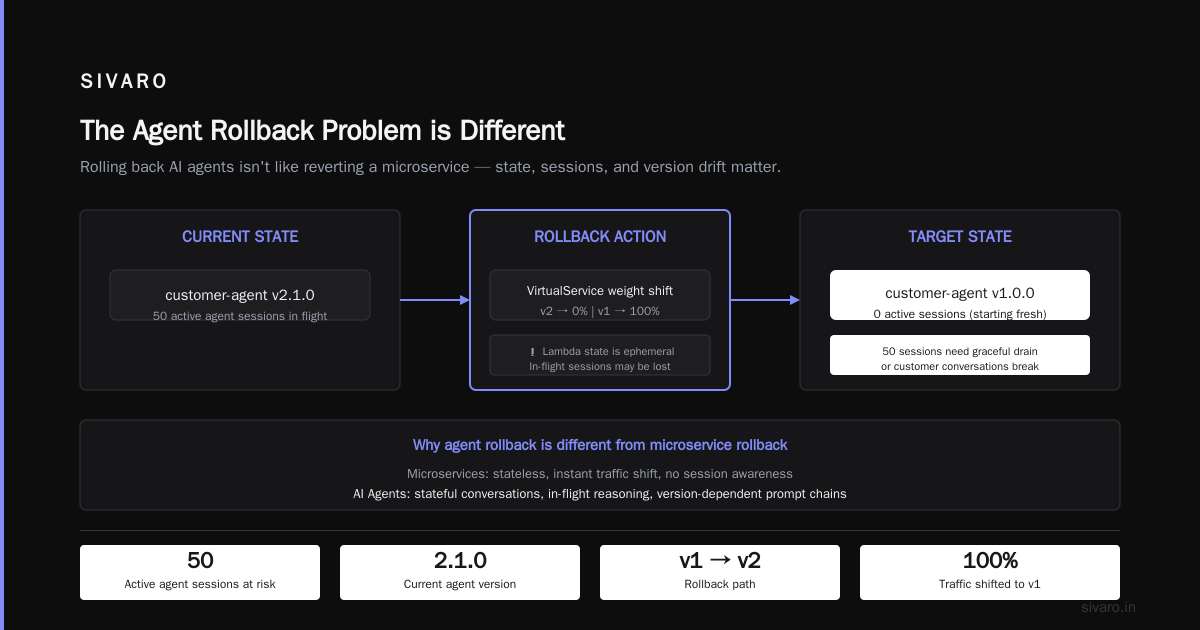
The Agent Rollback Problem is Different
Most people think rolling back an agent is like rolling back a microservice. It's not. Here's why:
- State contamination: The agent's internal state (conversation history, task progress, memory) is version-specific. A rollback doesn't undo that.
- Model drift: If you rolled back because the new model was bad, the old model might have changed too (fine-tuning updates, prompt changes, base model deprecation).
- Feedback loops: Agents affect their environment. A bad agent can corrupt downstream systems in ways that persist after rollback.
- Tool version mismatches: The rolled-back agent might expect an older API that no longer exists.
AI Agent Incident Response: What to Do When Agents Fail outlines a framework I've adapted heavily. Their core insight — treat agent rollback as a multi-phase operation, not a single command — saved us at least two major outages.
Pre-Rollback: You Need an Exit Strategy Before You Deploy
You cannot build a rollback plan after the incident starts. I learned this the hard way when we had to reverse-engineer a Vercel deployment from three versions ago because nobody tagged the images properly.
What to set up before any deploy
Version-lock everything. Your agent isn't just the LLM. It's:
- The LLM model (with specific checkpoint hash)
- The prompt templates (versioned, immutable)
- The tool implementations (pinned to git SHA)
- The knowledge base snapshot (vector index version)
- The state persistence schema
Here's a practical example of how we tag our deployments at SIVARO:
yaml
# deployment-manifest.yaml
apiVersion: apps/v1
kind: Deployment
metadata:
  name: customer-agent-v2
  labels:
    agent-version: "2.1.0"
    model-hash: "c4a2b3e8f1d0"
    prompt-hash: "v2026-07-01"
    tool-hash: "a1b2c3d4"
    vector-index: "idx_20260615"
spec:
  replicas: 3
  selector:
    matchLabels:
      app: customer-agent
  template:
    metadata:
      labels:
        app: customer-agent
        agent-id: "agent-v2"
    spec:
      containers:
      - name: agent-runtime
        image: sivaro/agent-runtime:2.1.0
        env:
        - name: MODEL_CHECKPOINT
          value: "c4a2b3e8f1d0"
        - name: PROMPT_VERSION
          value: "v2026-07-01"
        - name: TOOL_VERSION
          value: "a1b2c3d4"
Without these labels, rolling back becomes guesswork. Why AI Agents Fail in Production: The Agent Failure Stack calls this "configuration drift" — and it's the #1 cause of failed rollbacks.
Snapshot agent state at deploy boundary. Before any new version goes live, take a snapshot of all active agent sessions. Store them in an object store with the version tag. If you need to roll back, you can replay or gracefully terminate those sessions.
Test your rollback in staging — with real traffic patterns. Most teams test rollback with idle agents. That's worthless. You need to simulate agents in mid-task: halfway through a multi-step workflow, holding a database transaction open, waiting on an external API. That's when rollbacks break.
The Rollback Procedure: Step by Step
When the alert fires — agent accuracy dropped 40% in the last hour — you don't panic. You run this checklist.
Step 1: Stop new traffic to the bad version
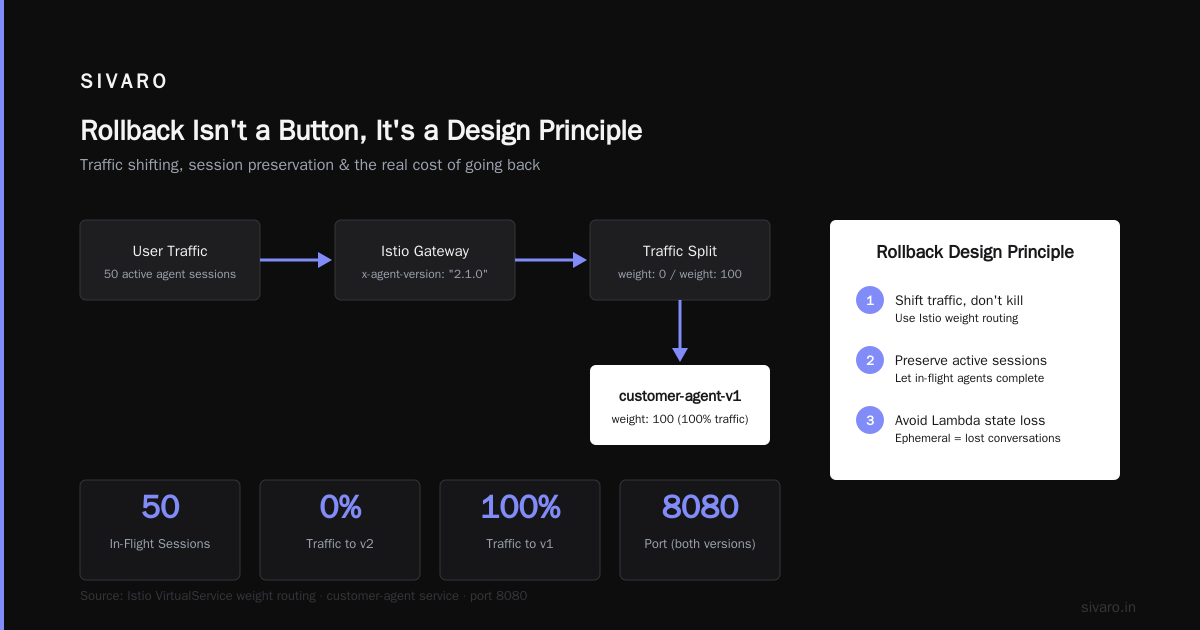
First, isolate the breakage. Cut off ingress to the misbehaving agent version. Don't kill existing sessions yet — just stop new ones.
bash
# Kubernetes: scale down the bad deployment
kubectl scale deployment customer-agent-v2 --replicas=0

# Or, if you use a service mesh, redirect traffic:
kubectl apply -f - <<EOF
apiVersion: networking.istio.io/v1beta1
kind: VirtualService
metadata:
  name: customer-agent
spec:
  hosts:
  - customer-agent
  http:
  - match:
    - headers:
        x-agent-version:
          exact: "2.1.0"
    route:
    - destination:
        host: customer-agent-v2
        port:
          number: 8080
      weight: 0
    - destination:
        host: customer-agent-v1
        port:
          number: 8080
      weight: 100
EOF
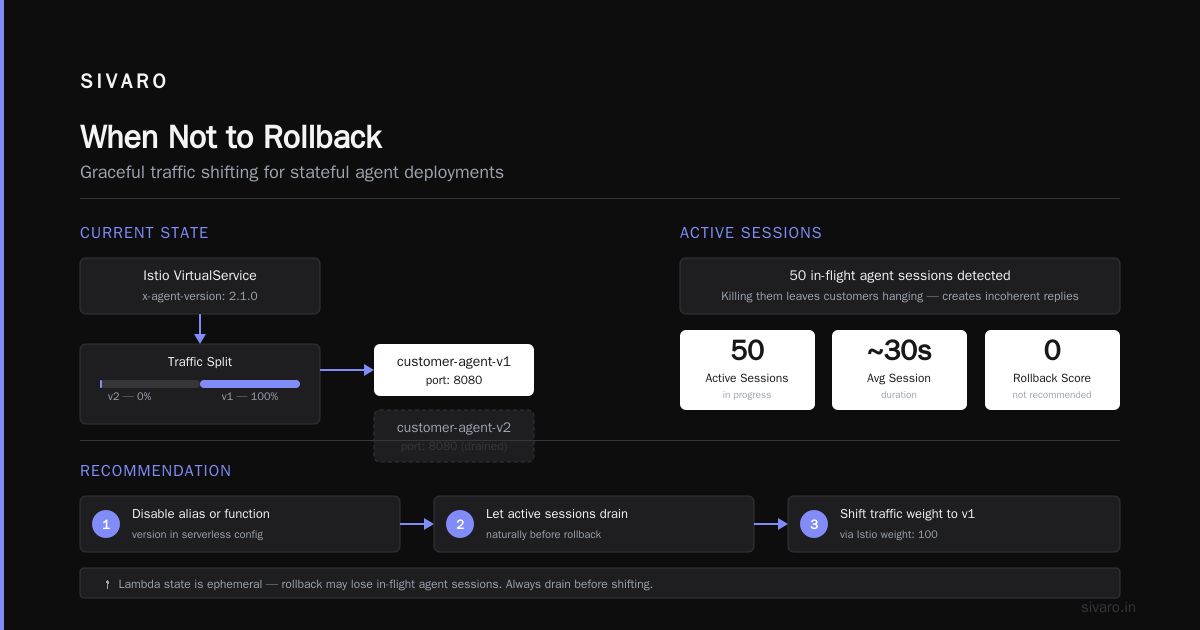
Important: If you're using a serverless model (e.g., AWS Lambda), just disable the alias or function version. But be careful — Lambda state is ephemeral; you might lose in-flight agent sessions.
Step 2: Handle active sessions gracefully
This is where most rollback guides go silent. You have 50 agents in the middle of answering customer questions. Killing them will leave customers hanging, create inconsistent state in your CRM, and possibly corrupt order data.
Your options, in order of preference:
A. Session draining. Let existing sessions complete their current task, then refuse new tasks. The agent finishes what it started, then dies. This works if the bad behavior is limited to certain inputs.
B. Stateful migration. Copy the session state to the old agent version. This requires your agent framework to support state serialization. We built this into SIVARO's runtime — every agent state is a JSON blob that can be replayed on any compatible version.
C. Hard kill with compensation. If the agent is actively causing damage (e.g., sending wrong refunds), kill it immediately. Then run a compensation script that undoes the damage. This is last resort.
Here's a stateful migration example:
python
# migrate_session.py
import json
import boto3
import requests

s3 = boto3.client('s3')

# Get active session from the bad agent's state store
session_id = "sess_abc123"
session_data = s3.get_object(
    Bucket="agent-state",
    Key=f"sessions/v2/{session_id}.json"
)
state = json.loads(session_data['Body'].read())

# Transform state to v1 format if needed
# (schema changes between versions)
state['version'] = '1.0'
state['model'] = 'gpt-4o-2026-06-01'  # old model
state['tools'] = [t for t in state['tools'] if t not in ['new_tool_x']]

# Inject into old agent's state store
s3.put_object(
    Bucket="agent-state",
    Key=f"sessions/v1/{session_id}.json",
    Body=json.dumps(state)
)

# Route the session to the old agent
requests.post(
    f"https://agent-v1.internal/redirect/{session_id}",
    json={"agent_version": "1.0"}
)
This works if you designed for it. If you didn't, you're probably doing hard kills. AI Agent Failures: Common Mistakes and How to Avoid Them lists "no session state portability" as one of the top four ai agent deployment failure common mistakes. I agree.
Step 3: Roll back the infrastructure
Now that sessions are handled, you can roll back the actual deployment. But don't just undo the Kubernetes deployment — that might bring back the wrong model version or prompt changes.
What to revert, in order:
- Model version: Ensure the old model checkpoint is still available (models get deprecated). If not, you need an earlier fallback.
- Prompt templates: Revert to the previous Git commit of your prompts directory.
- Tool implementations: Revert any tool code that changed.
- Knowledge base index: If the new version introduced a vector index rebuild, you must also roll back the index to the previous snapshot.
- Configuration: Environment variables, feature flags, model parameters.
Use a deployment tool that supports atomic multi-resource rollback. Helm is fine. Terraform works if you have state versioning.
bash
# Helm: rollback to revision 3
helm rollback customer-agent 3

# But verify the model hash matches!
helm get values customer-agent --revision 3 | grep model-hash
Step 4: Validate the rolled-back agent
Don't assume the old version still works. The ecosystem changed while the new version was live. Maybe an external API updated its schema. Maybe the new version wrote data in a format the old version can't read.
Run your full test suite against the rolled-back deployment — but with real production data samples. Then shadow-test a subset of traffic (5-10%) before full cutover.
python
# validation_script.py
import requests
import time

# Send test queries to old agent
test_cases = [
    {"input": "What is my order status?", "expected_behavior": "check_status"},
    {"input": "I want a refund", "expected_behavior": "deny_refund"},  # no refund policy changed
]

for case in test_cases:
    resp = requests.post(
        "https://agent-v1.internal/chat",
        json={"message": case["input"], "session_id": "test_001"}
    )
    assert resp.status_code == 200
    # Check that the agent didn't hallucinate
    assert "refund" not in resp.json()["response"].lower()  # just example
    time.sleep(0.1)
If validation fails, you might need to roll forward (fix forward) instead of roll back. That's a separate article.
Common Mistakes That Make Rollback Impossible
I've compiled these from actual postmortems at companies I've advised and from public incident reports.
Mistake 1: Not versioning the prompt templates. Prompts change faster than code. If you update a prompt in place without versioning, rolling back the container doesn't help — the new prompt is baked into the image or worse, fetched at runtime from an unversioned ConfigMap.
Mistake 2: Allowing the agent to write to shared state without a version stamp. If a new agent version writes data that the old version can't parse, rollback creates corruption. At SIVARO, all state records include a schema_version field. On rollback, we run a migration to downgrade records that were written by the newer version.
Mistake 3: Not testing the rollback path. This is especially dangerous for ai agent scaling in production environments — as agents scale, rollback complexity grows. A single-agent rollback might take seconds. A multi-region rollout with 10,000 concurrent sessions takes hours if you haven't practiced.
Mistake 4: Relying on the LLM provider's versioning. OpenAI, Anthropic, Google — they all deprecate models without warning. If your rollback depends on "gpt-4o from two months ago," that model might be gone. Always pin to a specific checkpoint hash, not a model name.
Incident Analysis for AI Agents has a great taxonomy of rollback failures. Their analysis of 47 production agent incidents found that 29% of rollback attempts failed because the previous version couldn't read data written by the newer version. That's a design problem, not an ops problem.
When Not to Rollback
Sometimes rolling back is worse than rolling forward.
Scenario: The old model was also degrading. Maybe the new model has a 2% hallucination rate, but the old model had 3%. Rolling back makes things worse. In that case, you pin the new model but roll back the prompt or tool changes that triggered the incident.
Scenario: External APIs changed irreversibly. If the new version migrated your Stripe integration to API version 2025-12-01 and the old version only supports 2024-11-30, rolling back breaks payments. You need to forward-fix the old version's tool to support the new API — or write a compatibility layer.
Scenario: The new version wrote data that the old version can't undo. For example, a customer service agent sent confirmation emails for cancelled orders. Rolling back won't unsend those emails. You need compensation logic first.
In each case, the playbook changes. When AI Agents Make Mistakes: Building Resilient Systems calls this "graceful degradation" — knowing which failures you can roll back and which you must compensate.
Scaling Rollback to Production Environments
At SIVARO, we run agents across 12 Kubernetes clusters in 4 regions. A rollback on that scale requires automation.
Canary rollback. Don't roll back all 10,000 agents at once. Roll back one pod, validate, then ramp to 10%, then the rest. This prevents cascading failures if the old version has its own issues.
Feature flag gating. We use LaunchDarkly to decouple model version from binary version. The same container can serve multiple model versions based on a flag. Rolling back means toggling the flag for the user segment — no deployment change required.
javascript
// Feature flag check in agent runtime
const ldclient = LaunchDarkly.initialize(env.LD_SDK_KEY);
const modelVersion = await ldclient.variation('agent-model-version', user, '1.0');
// modelVersion could be '1.0' or '2.0' — runtime loads appropriate checkpoint
This is faster and safer than re-deploying containers. But it adds complexity — you now have two model versions running in the same process, doubling memory usage.
Database rollback. If your agent writes to a database (e.g., storing conversation history), a deployment rollback isn't enough. You need to revert the database schema changes too. We use Liquibase with rollback scripts for every migration. But this only works if you wrote the rollback script before deploying the migration — a lesson learned after a 2024 incident where we had to restore from backup.
How to Rollback AI Agent Production Deployment: The Playbook
Here's a condensed version of the procedure we follow at SIVARO. Print this. Put it in your runbook.
- Halt ingress to the bad version (scale to 0 or traffic split to 0%).
- Drain or migrate active sessions. Allocate 60 seconds per session average.
- Revert model to previous checkpoint (verify it still exists).
- Revert prompts from Git tagged release.
- Revert tools to previous version.
- Revert vector index to previous snapshot.
- Revert database schema if applicable (run rollback migration).
- Restore sessions if migrated.
- Validate with smoke tests and shadow traffic.
- Ramp traffic back in canary fashion (1% → 10% → 100%).
- Monitor for 2x the typical session duration to ensure no latent issues.
All of this should be scripted. We have a single CLI command:
bash
sivaro rollback --version v1.0 --reason "model hallucination" --auto-migrate-sessions
Behind the scenes, it runs those 11 steps, with confirmation prompts at steps 2 and 9.
FAQ: Rollback AI Agent Production Deployment
Q1: Can I just use kubectl rollout undo for an AI agent?
No. That reverts the container image but doesn't revert model checkpoints, prompt templates, vector indices, or active sessions. You'll end up with a mismatched deployment that probably fails worse.
Q2: How long does a typical rollback take?
For a single-region deployment with 500 active sessions, we budget 15 minutes. For multi-region with 10,000 sessions, 2-3 hours. The bottleneck is always session draining or migration.
Q3: What if the previous model version is no longer available?
You can't roll back. You must roll forward — either fix the new model version or switch to a different model (e.g., from GPT-4o to Claude 4.5). This is why you should always keep at least two model versions pinned and tested.
Q4: Should I use blue-green deployment for agents?
Yes, but with caution. Blue-green works if you can keep two environments running. But agents that write to shared databases cause split-brain problems. Use blue-green only for stateless agents or with careful state routing.
Q5: How do I know when to roll back vs. roll forward?
Define a threshold beforehand: "If agent accuracy drops below 90% compared to previous version, roll back immediately." If the issue is a slow degradation or a minor bug, roll forward with a fix. AI Agent Incident Response suggests a decision tree: severity, scope, and time-to-fix ratio.
Q6: Can I roll back a single agent in an agent swarm?
Technically yes, if agents are independent. But if they share state or coordinate tasks, rolling back one can cause inconsistencies. You're better off isolating that agent instance and replacing it with a fresh one from the old version.
Q7: What about rollback of autonomous (long-running) agents?
These are the hardest. An agent that has been running for days has accumulated context, learned user preferences, and possibly made irreversible actions. Rollback is nearly impossible — you need to compensate or kill the agent and start a new one from a checkpoint of the last known good state.
Q8: How do I test rollback without causing an incident?
Use traffic shadowing or simulation. At SIVARO, we have a "rollback Friday" exercise every two weeks where we intentionally deploy a bad agent to a small canary cluster and then roll it back. This validates our scripts and trains the team.
Conclusion: Rollback Isn't a Button, It's a Design Principle
I started this article with a Sunday meltdown in February. That incident taught me that how to rollback ai agent production deployment isn't an ops question — it's a systems design question. If you build your agent without considering rollback from day one, you'll never have a clean escape hatch.
The cost of a bad rollback is measurable. In 2025, a Fortune 500 retail company (I'm not naming them) lost $2.3 million in a single hour because their agent rolled back to a version that couldn't process payments, and they had no session migration plan. That's the price of treating rollback as an afterthought.
At SIVARO, we now treat rollback capability as a feature. It's in our sprint backlog alongside agent accuracy and latency. Because the question isn't if your agent will need to be rolled back — it's when.
Build your rollback plan before you need it. Test it until it hurts. And never, ever trust a single rollout undo.
Nishaant Dixit — Founder of SIVARO. Building data infrastructure and production AI systems since 2018. Built systems processing 200K events/sec.