 SIVARO

Why Most Serverless Bills Are Still Too High (And How to Fix It)
I've spent the last four years helping clients cut cloud bills, and I keep seeing the same mistake. Teams move to serverless expecting magic savings, then get shocked when the invoice arrives.
Here's the uncomfortable truth: serverless isn't automatically cheap. It's just differently priced.
The good news? Once you understand how serverless pricing actually works, you can build a cost efficient serverless architecture that genuinely saves 40-70% versus what you're paying now.
This guide walks through everything I've learned — the good, the bad, and the "please don't make this mistake" ugly.
What "Cost Efficient" Actually Means in Serverless
Let's define this properly because most people get it wrong.
Cost efficient serverless architecture isn't about making everything serverless. It's about matching each workload to the cheapest execution model that meets your performance requirements.
That sounds obvious. It's not.
Most teams I meet fall into two camps:
- All-in on Lambda/Functions — paying premium per-invocation pricing for workloads that run 24/7
- All-in on containers — paying for idle capacity
Both are wrong. The right answer is almost always a hybrid.
This connects directly to what we're seeing in the broader ML infrastructure world. As research on deep learning architecture optimization shows, efficiency gains come from matching the tool to the job, not forcing one solution everywhere.
The Pricing Model Trap
Here's what trips up most teams.
Lambda charges you per request and per GB-second of compute. That's great for spiky, low-volume workloads. Terrible for steady-state processing where you're paying per-invocation overhead on top of compute.
I worked with a fintech company in late 2025 that ran their entire ETL pipeline on Lambda. They were processing 40 million events daily. Each event triggered multiple Lambda invocations.
Their bill? $47,000 per month.
We moved the steady-state ETL to ECS Fargate with a simple auto-scaling policy. Kept Lambda for the genuinely event-driven parts. Their bill dropped to $19,000.
Same workload. Same team. Just matched pricing models to workload characteristics.
What Is Cost Efficient Architecture in ML?
This question keeps coming up in my consulting work.
What is cost efficient architecture in ML? It's the same principle but with higher stakes, because ML workloads are compute-hungry and pricing models are more complex.
ML training and inference have fundamentally different patterns:
- Training needs sustained, massive compute → batch, spot instances work great
- Inference can be bursty or steady → serverless functions, dedicated endpoints, or hybrid
The intersection of software and hardware design matters here more than most people realize. Energy-efficient software–hardware co-design isn't theoretical — it's where the biggest cost wins live.
For practical purposes, though, start with the software layer. When aerospike's CPU vs GPU comparison breaks down ML workloads, the pattern is clear: different stages of your pipeline need different compute types. Paying for GPU when a regular CPU instance handles it is like renting a truck to move a backpack.
Whether to Run Containers or Functions
This is the central decision. Here's my framework.
Use Functions (Lambda, Cloud Functions) when:
- Traffic is spiky with long idle periods
- You can tolerate cold starts
- Each invocation is self-contained and short-lived
- You don't want to manage infrastructure at all
Use Containers (Fargate, Cloud Run, etc.) when:
- Workloads run continuously or predictably
- You need consistent performance
- Concurrency patterns are predictable
- You're processing high volumes where per-invocation overhead adds up
The pricing math is brutal when you actually run it.
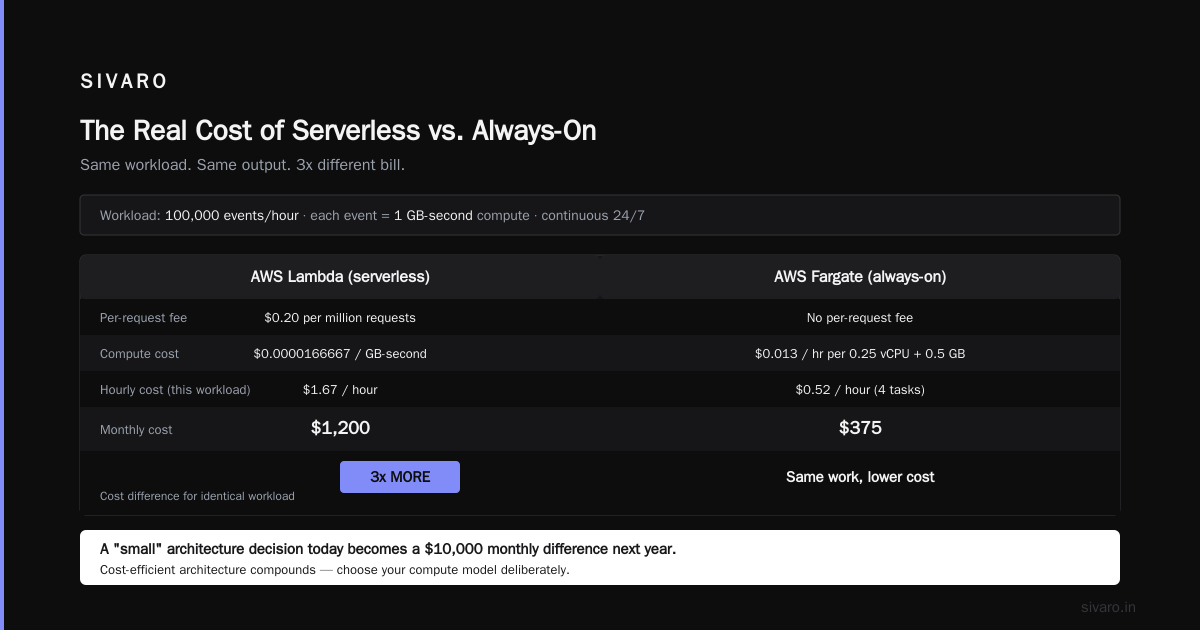
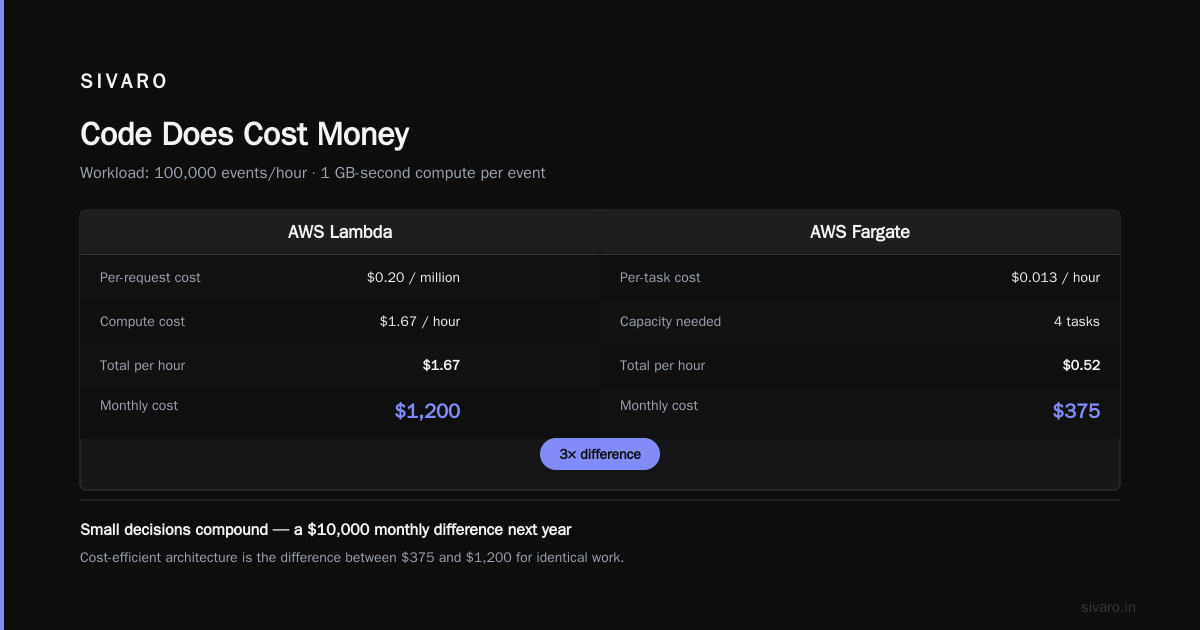
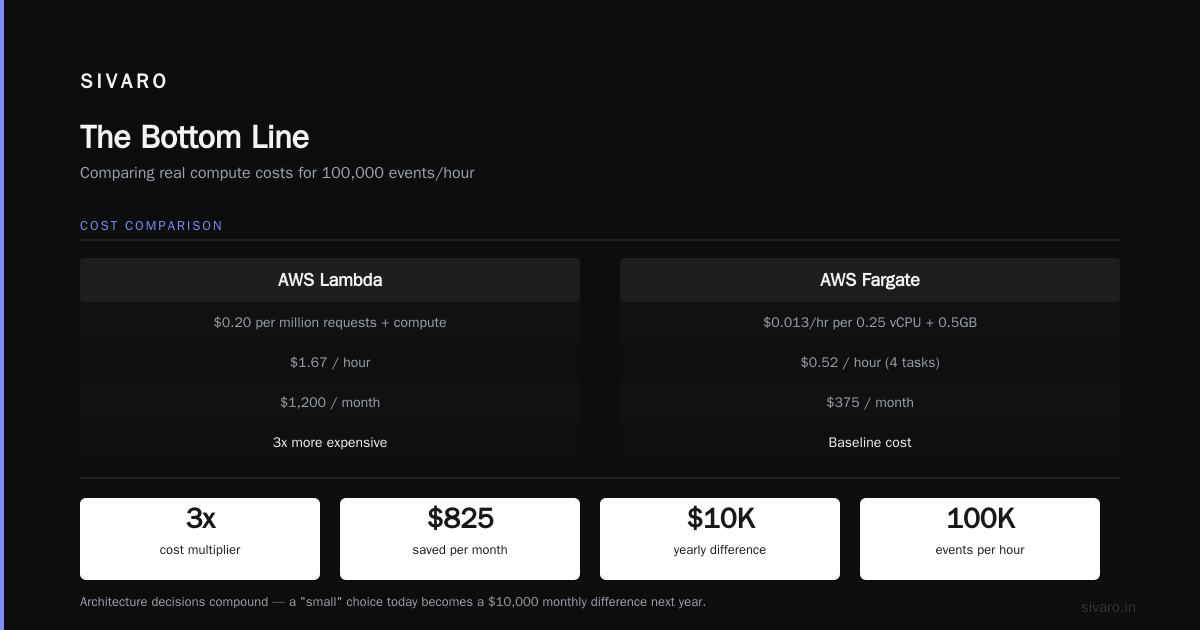
Take a workload processing 100,000 events per hour continuously. Each event needs 1 GB-second of compute.
Lambda pricing (approximate):
- Per request: $0.20 per million → negligible
- Compute: 100,000 events × 1 GB-second × 0.0000166667/GB-second = $1.67/hour
Fargate pricing:
- 0.25 vCPU + 0.5 GB memory → roughly $0.013/hour for the capacity
- Need maybe 4 such tasks to handle the load → $0.52/hour
That's a 3x difference. For the same work.
Now scale that over a month. The Lambda path costs $1,200. The Fargate path costs $375.
Why cost efficient architecture matters for cloud comes down to this: those differences compound fast. A "small" architecture decision today becomes a $10,000 monthly difference next year.
Optimizing Inference Costs
Inference is where I see the biggest wins — and the biggest mistakes.
Most ML teams deploy inference as always-on endpoints. For GPUs, that's incredibly expensive. A single A100 instance runs $3-4 per hour whether it's processing 1 request or 1,000.
The fix? Match your serving pattern to traffic.
Pattern 1: Bursty Inference with Serverless GPU
Many cloud providers now offer GPU-enabled serverless functions. These scale to zero when idle.
Perfect for:
- Dev/test environments
- Demo applications
- Traffic that's genuinely unpredictable
The cold start penalty is real, though. We measured 2-4 seconds on GPU cold starts with AWS Lambda. Fine for some use cases. Fatal for others.
Pattern 2: Hybrid Inference Routing
This is my favorite pattern for production systems.
{
  "routing": {
    "primary": "steady-state-endpoint",
    "burst": "serverless-fallback",
    "condition": "if primary queue depth > 100 or p95 latency > 200ms"
  }
}
Route the steady baseline to reserved capacity. Overflow to serverless. You get predictable performance for the core traffic and pay premium only for the overflow.
Pattern 3: Batching
If your inference doesn't need to be real-time, batch it.
Instead of running inference on-demand for each request, accumulate requests and process them in batches. This is where GPU architecture really matters. GPUs are designed for parallel processing — feeding them one request at a time wastes 90% of their capability.
We helped a recommendation engine company in 2026 batch their inference. Same GPU instance count, 4x throughput. Their per-inference cost dropped from $0.0032 to $0.0008.
The Cold Start Problem
Everyone complains about cold starts. Few actually measure the impact on cost.
Quick reality check: cold starts don't directly increase your bill. But they force you to over-provision to maintain performance.
If 5% of your invocations experience 3-second cold starts and that violates your SLO, you have two options:
- Add provisioned concurrency (paying for idle capacity)
- Accept the degradation or use a different execution model
The "right" answer depends on your workload. If traffic is steady and you need fast responses, don't overthink it — just use a container service with min instances set to handle your baseline. It's cheaper and simpler than Lambda with provisioned concurrency.
How MLOps architecture handles this directly impacts your bill. A good MLOps layer abstracts the "where does this run" decision so you can swap execution models without rewriting code.
Code Does Cost Money
Here's something people forget: the same logic costs different amounts to run depending on how you write it.
This isn't about premature optimization. It's about basic efficiency.
Example 1: Avoid unnecessary Lambda invocations
Instead of:
python
def process_event(event):
    validate(event)
    transform(event)
    [...]
Chain them:
python
def handle_sqs_event(event):
    # validate and transform in one invocation
    validated = validate(event)
    return transform(validated)
Each Lambda invocation has overhead beyond compute — there's a fixed billing duration minimum and per-invocation costs. Reducing invocations from 3 to 1 for the same workflow cuts costs by roughly 60% on that flow.
Example 2: Size your Lambda memory correctly
Lambda charges per GB-second. Memory and CPU scale together.
Our testing showed that a memory-optimized function running 2048 MB completes a compute-heavy task 40% faster than a 512 MB function — but costs 50% more per second.
The thing is, the 2048 MB function finishes so much faster that total cost is actually similar. Sometimes even cheaper.
# profiling suggests:
# 512 MB: 800ms execution → 0.0001024 s-GB → $0.0000017
# 2048 MB: 480ms execution → 0.0002729 s-GB → $0.0000045
# 10240 MB: 280ms execution → 0.0007950 s-GB → $0.0000132
There's a sweet spot. We typically start with 1024 MB and profile from there.
Example 3: Use provisioned concurrency intelligently
yaml
# CloudFormation snippet
ProvisionedConcurrencyConfiguration:
  ProvisionedConcurrentExecutions:
    Fn::If:
      - IsProduction
      - !Ref BaselineConcurrency
      - 0
Provisioned concurrency for production baselines, and keep it off for dev environments. We've seen companies double their Lambda bills just from running provisioned concurrency in dev, where nothing triggers those instances.
Memory, Storage, and Data Transfer
None of this matters if you ignore the hidden costs.
Data transfer between services
AH, the classic mistake. Moving data in and out of Lambda or between regions adds up fast.
Your first question during architecture design should be: "Does the data need to leave the compute environment?"
We worked with an e-commerce company that was pushing inventory updates from DynamoDB to Lambda to Elasticsearch. Every step created data transfer charges.
Restructuring so Lambda reads from DynamoDB streams and writes directly to OpenSearch Serverless cut their data transfer bill by 80%.
Ephemeral storage vs. persistent
Lambda now allows up to 10 GB ephemeral storage. But it's a charging point.
If your functions write temporary files, size that storage intentionally. Don't just set the max because you can.
For anything larger, use /tmp or EFS carefully. EFS adds per-GB-month costs and requires VPC configuration. Weigh that against the compute you save.
The Hybrid Pattern That Works
After dozens of projects, here's the pattern that wins most often:
- API layer: Serverless functions (API Gateway + Lambda)
- Steady-state processing: Fargate or Cloud Run with min capacity
- Burst processing: Serverless with auto-scaling
- Batch processing: Spot instances or preemptible VMs
- ML inference (steady): Dedicated endpoints
- ML inference (bursty): Serverless functions
This matches the fundamental findings in computer architecture research — heterogeneous systems outperform homogeneous ones for diverse workloads. The same principle applies at the infrastructure level.
The key is isolating each component and letting it scale independently. Monolithic architectures force you to provision for the worst case everywhere. Modular lets you match capacity to actual demand per component.
How to Estimate Your Real Costs
Don't trust cloud pricing calculators alone. They miss patterns.
Here's the estimation process we use:
- Profile your traffic: Mean, p50, p95, p99. Separately for each workload.
- Simulate the architecture: Run load tests at 1x, 10x, and 100x expected traffic.
- Measure pricing under load: Look at actual billed metrics, not theoretical.
bash
# Quick AWS cost simulation for Lambda
aws lambda invoke \
  --function-name your-function \
  --payload '{"key":"value"}' \
  --cli-binary-format raw-in-base64-out \
  response.json
Repeat 1000 times. Log the execution time and billed duration. Multiply by your pricing.
You'll be surprised how often the "obvious" choice isn't the cheapest.
The Future (Next 12 Months)
Serverless pricing is changing.
Google Cloud Run introduced composable instances in early 2026. AWS is pushing harder on Lambda SnapStart for Java workloads, cutting cold start overhead. New AI processor architectures are making ML inference on serverless less of a performance sacrifice.
The trend is clear: the pricing gap between "serverless" and "containers" is narrowing. But so is the performance gap. Which means the architectural decision matters more, not less.
Locking yourself into one provider's serverless offering without understanding the alternatives is a costly mistake. Multi-cloud orchestration isn't just for resilience — it's for cost arbitrage.
FAQ
Q: Is serverless always the cheapest option?
No. Serverless is cheapest for spiky, unpredictable workloads with low baseline traffic. For steady-state, high-volume workloads, containers or dedicated instances are typically cheaper.
Q: How much can I actually save with serverless?
Depends entirely on your workload patterns. We've seen 50-80% savings moving from always-on servers to serverless for dev/test environments. For production steady-state workloads, we've seen serverless be 2-3x more expensive than alternatives.
Q: What's the biggest hidden serverless cost?
Data transfer between services. Egress charges, VPC peering costs, and inter-service data movement often dwarf compute costs in architectures with poor data locality.
Q: When should I use provisioned concurrency?
When you need predictable latency under load and your functions have meaningful cold start time. Size it to your baseline — not your peak. Let normal scaling handle surges.
Q: Do I need the same serverless strategy across all providers?
No. Each provider prices differently. AWS Lambda is good for high-volume, low-compute tasks. Google Cloud Run is great for container-based serverless. Azure Functions makes sense if you're all-in on the Microsoft stack. Align with your workload, not the platform's hype. MLOps architecture design can help abstract these differences.
Q: How do I handle ML inference costs in serverless?
Match the compute type to the workload. GPU-based inference needs dedicated endpoints for steady traffic, serverless for bursty. If possible, batch inference with GPU-aware scheduling to maximize utilization. CPU inference on regular instances can be shockingly sufficient for small models.
Q: What's the best way to monitor serverless costs?
Use each provider's native cost explorer, but turn on detailed billing and build custom cost allocation tags. Tag every function, every queue, every bucket. You need to see costs per workload, not just per account.
The Bottom Line
Cost efficient serverless architecture is a discipline, not a tool.
It means measuring your actual workload patterns, understanding pricing models deeply, and being willing to use different execution models for different components.
It means accepting that sometimes the answer is "containers," not "serverless." It means profiling code for cost, not just performance. It means building the architecture to match the pricing model to the workload.
I've seen companies save millions with better architecture. I've also seen companies blow their entire cloud budget by blindly following the "serverless for everything" trend.
The proof is in your bill. Run the experiments. Measure everything. Optimize for your actual workload, not someone else's case study.
And if you need help, SIVARO builds exactly these systems. We're the ones making serverless actually cost-efficient for production workloads.
Nishaant Dixit — Founder of SIVARO. Building data infrastructure and production AI systems since 2018. Built systems processing 200K events/sec.