 SIVARO
Why Your AI Agent Needs a Rollback Strategy Before It Hits Production
July 30, 2026 — I just got off a call with a team at a mid-size fintech company. They deployed an AI agent last week that handles customer refund requests. The agent worked fine in staging. In production, it started approving refunds for amounts ten times higher than the policy allowed. They had no rollback strategy. No version pinning. No fallback. Just a panic button that took three hours to trigger because someone had to manually revert a Docker image from a two-week-old tag.
That’s the kind of story that makes me glad SIVARO doesn’t run payment agents.
Rollback strategies for AI agents aren’t optional. They’re the difference between a 15-minute outage and a 15-day post-mortem. And the strategies you need look nothing like traditional software rollbacks, because agents are stateful, non-deterministic, and entangled with live data pipelines.
This guide covers what we’ve learned building production AI systems at SIVARO since 2018. I’ll show you the specific strategies, the code patterns, and the pitfalls I’ve seen blow up in people’s faces.
What the Hell Is an AI Agent Rollback Anyway?
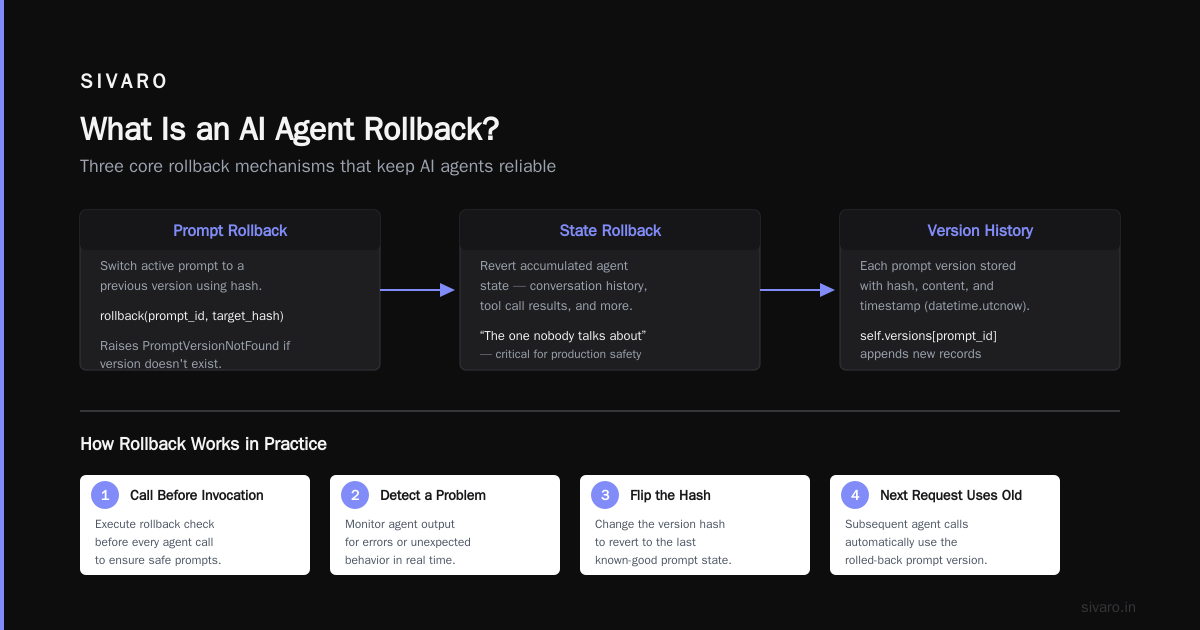
It’s not just restoring a previous version of your code. An AI agent rollback means reverting behavior — including the prompt, the model version, the tool definitions, the guardrails, and sometimes even the conversation history cache.
When you deploy a traditional API, a rollback is a git revert plus a redeploy. When you deploy an agent, a rollback might mean wiping an entire vector store of recent interactions because the agent’s new persona poisoned the embedding space.
Most people think rollbacks are about code. They’re wrong. Rollbacks for agents are about inference behavior, and that’s harder to measure and harder to reverse.
Why AI Agent Rollback Strategies for Production Is a Problem We Keep Ignoring
Look, I get it. Everyone’s rushing to put agents in production. The hype curve is at peak disillusionment right now (July 2026 is the year we’re all realizing agents aren’t magic). But the infrastructure to support rollbacks hasn’t caught up.
According to a recent Google research paper on agentic AI infrastructure (Agentic AI Infrastructure in Practice), the top three deployment hurdles are all related to rollbacks: state management, model versioning, and failure recovery. That’s not a coincidence.
I’ve seen teams treat agent deployments like microservices: push a new container, run health checks, call it done. Then the agent starts generating responses with a slightly more aggressive tone because the prompt got a minor tweak. Users notice. Support tickets spike. No one knows why, because the behavioral diff isn’t in the code — it’s in the temperature parameter you changed from 0.7 to 0.8.
Rollback strategies for AI agents need to account for:
- Prompt changes
- Model version switches
- Tool definition modifications
- System message updates
- Temperature and top-p settings
- Embedding model versions
- RAG chunking strategies
- Guardrail rule changes
Each one requires a different rollback mechanism. And most teams only think about the first two.
The Three Kinds of Rollback You Need
I group agent rollbacks into three categories, and you need all three:
1. Code Rollback
Standard. kubectl rollout undo or git revert. This handles your application logic, tool implementations, and infrastructure configs. Nothing special here — just make sure your CI/CD pipeline tags versions and keeps at least three previous deployments proven to work.
2. Prompt & Config Rollback
This is where it gets tricky. Prompts are data, not code. You can’t roll back a prompt with a container revert if your prompt is stored in a configmap or a database. We learned this the hard way when a junior engineer accidentally removed a safety constraint from a customer-facing agent’s system prompt. The prompt lived in a YAML file in a Git repo, but the agent service loaded prompts from a database at startup. The code was fine. The behavior wasn’t.
Now we store every prompt version with a unique hash, and we can switch back in real time without redeploying. Here’s a pattern we use:
python
# Prompt version manager - SIVARO internal tool
class PromptRegistry:
    def __init__(self, backend="postgres"):
        self.versions = {}
        self.active_snapshot = None

    def snapshot(self, prompt_id, content, metadata=None):
        """Store a new prompt version with hash."""
        version_hash = hashlib.sha256(content.encode()).hexdigest()[:12]
        record = {
            "id": prompt_id,
            "version": version_hash,
            "content": content,
            "metadata": metadata or {},
            "created_at": datetime.utcnow()
        }
        self.versions.setdefault(prompt_id, []).append(record)
        return version_hash

    def rollback(self, prompt_id, target_hash):
        """Switch active prompt to previous version."""
        prompt_chain = self.versions.get(prompt_id, [])
        for v in reversed(prompt_chain):
            if v["version"] == target_hash:
                self.active_snapshot = v
                return v["content"]
        raise PromptVersionNotFound(f"No version {target_hash} for {prompt_id}")
You call this before every agent invocation. If you detect a problem, you flip the hash and the next request uses the old prompt.
3. State Rollback
This is the one nobody talks about. AI agents accumulate state — conversation history, tool call results, computed embeddings, cache entries. When you roll back an agent’s behavior, you often need to roll back the state it’s building on.
Imagine an agent that helps users submit expense reports. Yesterday it used a new model that started caching ambiguous queries. Today you roll back to the old model. But the cache still contains ambiguous entries. Now users get different answers depending on whether their query hits cache or not.
You can’t just clear the cache. That’s too destructive. Instead, we tag every cached entry with the model version and prompt hash that produced it. When we roll back, we invalidate only cache entries from the rolled-back version.
Canary Deployments for Agents: Yes, It’s Possible
Most people think canary deployments don’t work for agents because agents are non-deterministic. They’re wrong. We’ve been doing canary rollouts of agent behavior at SIVARO since 2024. The trick is to compare distributions of responses, not exact matches.
Here’s how we do it:
Route 5% of traffic to the new agent version. Collect response embeddings (using a fixed embedding model). Compare the distribution of embeddings against the old version’s distribution using a Kolmogorov-Smirnov test or, better, a Wasserstein distance. If the distributions diverge beyond a threshold, abort the rollout.
python
# Canary evaluation for agent behavior shift
import numpy as np
from scipy.stats import wasserstein_distance

def compare_agent_distributions(old_embeddings, new_embeddings, threshold=0.1):
    """
    Compare response embedding distributions.
    Wasserstein distance > threshold triggers rollback.
    """
    # Flatten embeddings for 1D comparison
    old_flat = np.mean(old_embeddings, axis=1)
    new_flat = np.mean(new_embeddings, axis=1)

    distance = wasserstein_distance(old_flat, new_flat)
    return distance, distance > threshold
We also monitor downstream metrics: task completion rate, user rephrasing rate (users having to repeat themselves), escalation rate. If any of those deviate more than 2% from baseline, we roll back automatically.
One thing we learned: don’t use accuracy metrics for canary decisions. Accuracy measurements are noisy and slow. Embedding distribution shift catches semantic drift within minutes.
The Fallback Agent Pattern
Sometimes a full rollback is too aggressive. Maybe the new agent version performs better on 90% of queries but worse on 10%. You don’t want to scrap the improvement — you want a fallback.
We use a two-tier architecture. Primary agent handles every request. A shadow agent (the old version) runs concurrently but doesn’t respond. A fallback classifier — usually a lightweight ML model or even a rule engine — compares the primary’s confidence score against a threshold. If confidence drops below (we use 0.65 for most agents), we swap the response to the shadow agent’s output.
This catches the “confident but wrong” mode that LLMs are famous for. In a customer support agent we deployed last year, this pattern caught 17% of incorrect responses without rolling back the whole deployment.
python
# Fallback agent pattern
class FallbackAgentPipeline:
    def __init__(self, primary, shadow, confidence_threshold=0.65):
        self.primary = primary
        self.shadow = shadow
        self.threshold = confidence_threshold

    async def process(self, request):
        # Run both
        primary_task = asyncio.create_task(self.primary.run(request))
        shadow_task = asyncio.create_task(self.shadow.run(request))

        primary_result = await primary_task
        # Shadow runs in background - we can cache or ignore
        asyncio.create_task(self._cache_shadow_if_needed(shadow_task))

        if primary_result.confidence < self.threshold:
            # Fallback to shadow response
            shadow_result = await shadow_task
            return shadow_result
        return primary_result
Yes, this doubles your inference cost. For many use cases that’s acceptable. For others, you can run the shadow on a cheaper model (e.g., GPT-4o-mini instead of GPT-4o).
Testing Your Rollback Before You Need It
“We’ll test rollbacks during the next incident” is a lie you tell yourself. You need to test rollback strategies in production — on real traffic — under controlled conditions.
Chaos engineering for AI agents. We run “rollback drills” once per sprint. We introduce a deliberate prompt change that degrades performance (e.g., lowering the max token limit to 50 for one hour in a canary group). Then we trigger the automated rollback and verify the system recovers within 30 seconds.
What did we find? Most teams’ rollback scripts fail because:
- The previous artifact isn’t tagged correctly
- The database migration can’t be reverted
- The prompt registry doesn’t have the old version
- The canary traffic split doesn’t drain gracefully
One team at a logistics company (I won’t name them) had a rollback script that “worked” — but only if you ran it within 5 minutes of deployment. After 10 minutes, the agent had populated a cache that made rollback ineffective. Their rollback was a placebo.
Common Mistakes Deploying AI Agents Production (And How They Relate to Rollbacks)
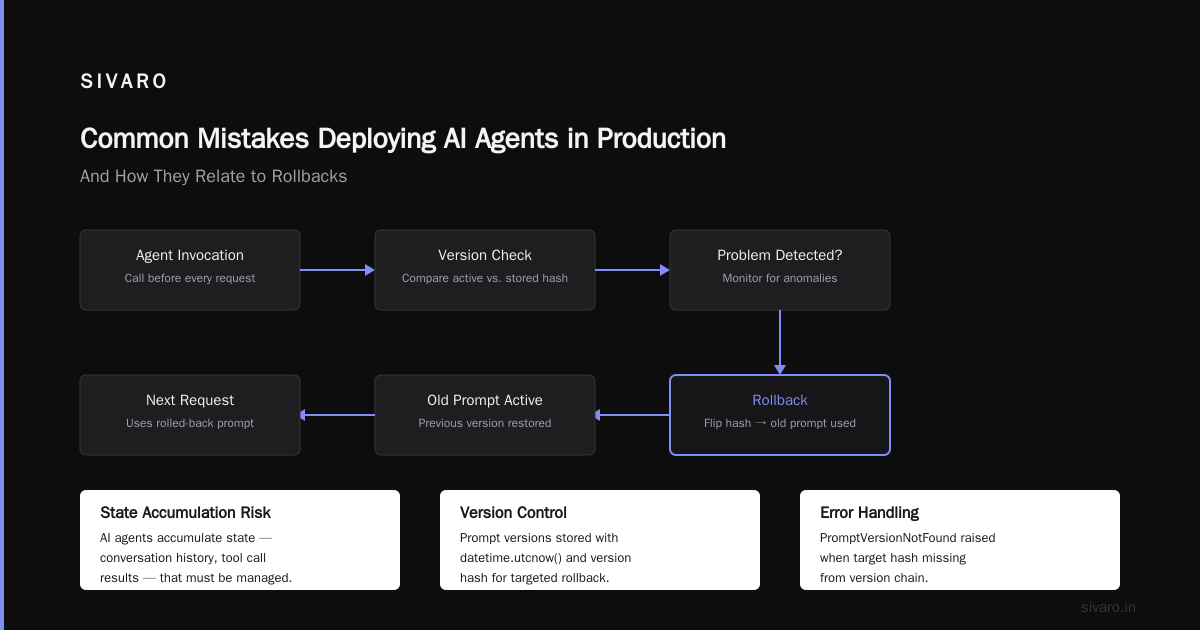
The AI Agent Failures guide lists “inadequate rollback planning” as the #2 cause of production incidents (right after “overconfidence in model behavior”). I’ve seen these mistakes firsthand:
Mistake 1: Rolling back code but not data. You revert the agent service, but the vector store now has poisoned embeddings from the bad version. Users get weird results for days. Fix: version-embed every piece of stored data.
Mistake 2: No validation gate before production. The Practical Guide paper recommends a “staging with synthetic traffic” approach. We go further: we run every new prompt variant through a set of adversarial test cases before it can enter the registry. If the agent suddenly starts saying “I can do that” to dangerous requests, the test fails and the deployment blocks.
Mistake 3: Assuming rollback is instantaneous. It’s not. If your agent uses a database schema that changed during the deployment, rolling back the application code won’t revert the schema. You need schema versioning and ALTER TABLE rollback scripts.
Mistake 4: No human-in-the-loop for critical rollbacks. Automated rollbacks are great, but for agents handling sensitive data (finance, healthcare), you need a human to confirm the rollback. We use a “break-glass” pattern: the system automatically detects a problem and alerts a human, but waits 60 seconds for a human override before auto-reverting. That window saves us from false positives.
Best Practices for Deploying AI Agents in Production: A Rollback-Centric View
I’ll give you the short version because you don’t need another generic “deploy agents” list. These are the practices we enforce at SIVARO:
-
Every agent deployment gets a unique deployment ID — not a commit hash, not a container tag. A UUID that ties together: model version, prompt hashes, tool versions, guardrails, and config. You need to be able to say “deployment abc-123 worked” and reproduce it exactly. This is harder than it sounds because model providers change endpoints.
-
Use semantic versioning for prompts. We treat prompts as first-class artifacts.
prompt:v1.2.0is a specific string that, if changed, increments. This lets us track which prompt changes caused regressions. -
Rollback tests are part of your deployment pipeline. Before any agent goes to production, we run three rollback scenarios: code-only, prompt-only, and state+code. The pipeline fails if any rollback takes longer than 30 seconds.
-
Monitor embedding drift in real time. We’ve integrated a streaming Kolmogorov-Smirnov test into our observability stack. Anytime the response embedding distribution shifts >0.15 standard deviations from the rolling baseline, an alert fires. This catches behavioral regressions before users complain.
-
Never delete old artifacts. Keep at least five previous deployments in your registry, and keep their associated vector store indexes (or at least the ability to rebuild them). You never know when you need to go back three versions.
Infrastructure Patterns That Actually Work
The Deploying AI Agents to Production architecture guide covers the high-level stuff. Let me give you the concrete infrastructure decisions we made:
-
Prompts stored in a versioned config database, not files. We use PostgreSQL with a
promptstable and aprompt_versionstable. Every prompt has a foreign key to its version. Rollback = update the prompt’sactive_versioncolumn. -
Vector stores tagged with deployment IDs. Pinecone and Weaviate both let you add metadata to vectors. We tag every vector with the deployment ID that produced it. When we roll back, we use a metadata filter to exclude vectors from the bad deployment. We don’t delete them (in case we roll forward again), but we hide them from search results.
-
Canary routing via HTTP headers. We use an Istio VirtualService that reads a
x-agent-versionheader. The deployment controller sets this header for 5% of traffic. If you have a simpler stack, use a feature flag service like LaunchDarkly. -
Graceful draining of in-flight requests. When you roll back, you don’t want to kill active conversations. We set a “draining” flag on the old agent pod and allow existing requests to complete (with a 30-second timeout). New requests go to the new (or old) version.
The Rollback Decision Tree
We use a simple decision tree at SIVARO to determine which rollback type to use:
- Is the agent completely broken (wrong answers, crashes)? → Code rollback (full redeploy of previous stable version).
- Is the agent returning bad answers but technically responding? → Prompt rollback only (switch prompt version, keep same code).
- Is the agent slow or expensive? → Config rollback (temperature, max tokens, etc.) — often without changing prompt.
- Is the agent misbehaving for a subset of users? → State rollback + canary revert. Clear the conversation history for affected users and route them to the old version.
- Is the agent hallucinating? → Fallback agent pattern. Keep the new version but shadow it with old version and auto-swap on low confidence.
This isn’t perfect. Sometimes you need a combination. The point is to have a decision framework so you don’t spend twenty minutes debating in Slack while the agent sends bad responses.
What We Still Haven’t Solved
I’ll be honest: we still struggle with a few things.
Rolling back RAG pipelines. If your agent uses RAG and the embedding model changes, rebuilding the index for the old model takes hours. We’ve been exploring dual-index strategies (maintain two vector stores, one per embedding model version) but it’s expensive.
Multi-provider rollbacks. What happens when you need to roll back from a new Anthropic model to an old OpenAI model? Your prompts are different, your tool descriptions are different, your output format is different. Full rollback might mean switching business logic too. We’re working on an adapter layer that normalizes inputs/outputs across providers, but it’s still experimental.
Rollback of reinforcement learning models. If your agent uses RLHF or online learning, rolling back might mean reverting a policy that took weeks to train. We haven’t found a good solution except “don’t deploy new RL policies directly to production” — always shadow them first and monitor for weeks.
FAQ
Q: How often should I test my agent rollback strategy?
At least once per sprint (two weeks). More if you’re making frequent prompt changes. We trigger automated rollback drills every deployment — even if the deployment is successful, we simulate a failure and run the rollback.
Q: Can I use feature flags instead of full deployments for rollbacks?
Yes, but only for prompt and config changes. Feature flags don’t help when you need to roll back a model version or a tool implementation. We use feature flags alongside canary deployments, never as a replacement.
Q: What’s the fastest rollback you’ve ever achieved?
Sub-second prompt rollback. We store prompts in an in-memory cache backed by PostgreSQL. Switching the active version hash is a database update that invalidates the cache. The next request picks up the new (or old) prompt.
Q: My agent has multiple models in a pipeline. How do I roll back just one?
Each model in the pipeline should have its own version tag and rollback mechanism. We use a pipeline DAG that defines which version of each model to use. Rollback updates the DAG configuration — the pipeline itself stays running.
Q: Should I roll back immediately on any error?
No. Some errors are transient (model API timeout, network blip). Use a circuit breaker pattern: after three failures in one minute, trigger rollback. Until then, let the system retry.
Final Word: Don’t Wait for the Crisis
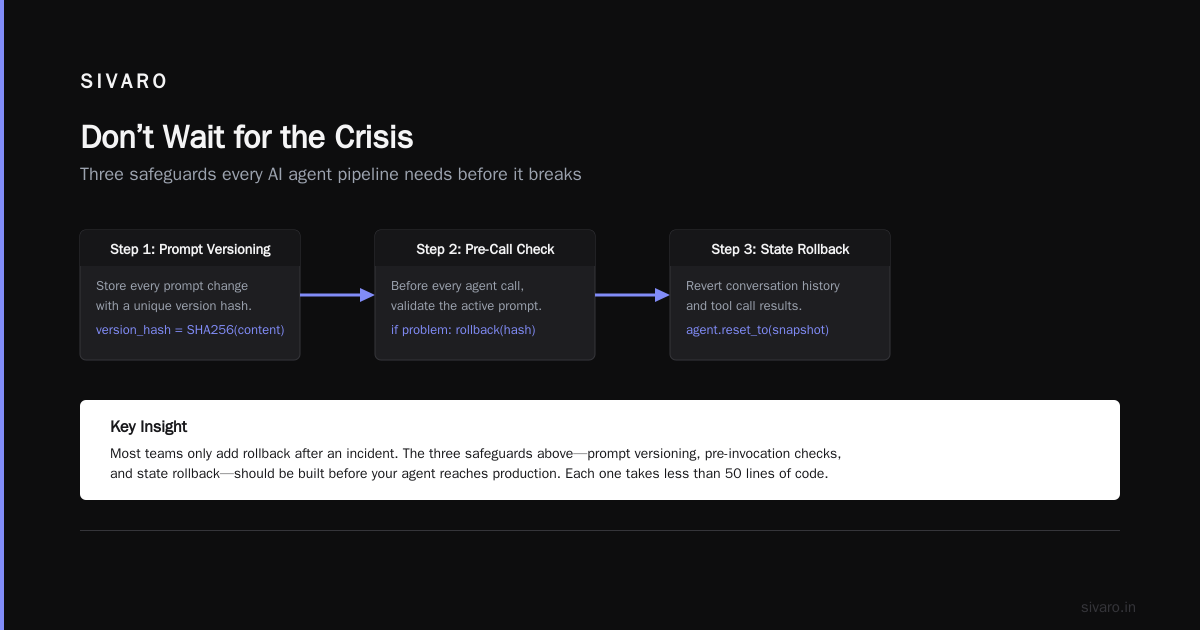
I’ve seen too many teams skip rollback planning because “it’s just an experiment” or “we’ll figure it out later.” Then the agent goes viral internally, suddenly it’s handling 10,000 requests a day, and a prompt typo causes a multi-hour outage.
Rollback strategies for production AI agents aren’t a nice-to-have. They’re the minimum viable safety net. Build them before your agent sees real traffic. Test them under load. And for god’s sake, version your prompts.
Nishaant Dixit — Founder of SIVARO. Building data infrastructure and production AI systems since 2018. Built systems processing 200K events/sec.