 SIVARO

Why Your LLM Inference Server Needs Admission Control (And Autoscaling Won't Save You)
You’ve built the RAG pipeline. You’ve fine-tuned the model. You’ve benchmarked tokens-per-second until you’re blue in the face.
Then production hits. And your GPU cluster turns into a parking lot. Requests pile up. Latency spikes from 200ms to 8 seconds. Your SLO is dead by 10:02 AM on a Tuesday.
I’ve seen this exact movie play out at three different companies this year. The fix isn’t more GPUs. It’s admission control for llm inference requests — the art of saying "no" (or "wait") before your system says it for you, catastrophically.
Let’s break down what this actually is, why your current autoscaling setup is lying to you, and how to implement a circuit breaker that keeps your p99 latency honest.
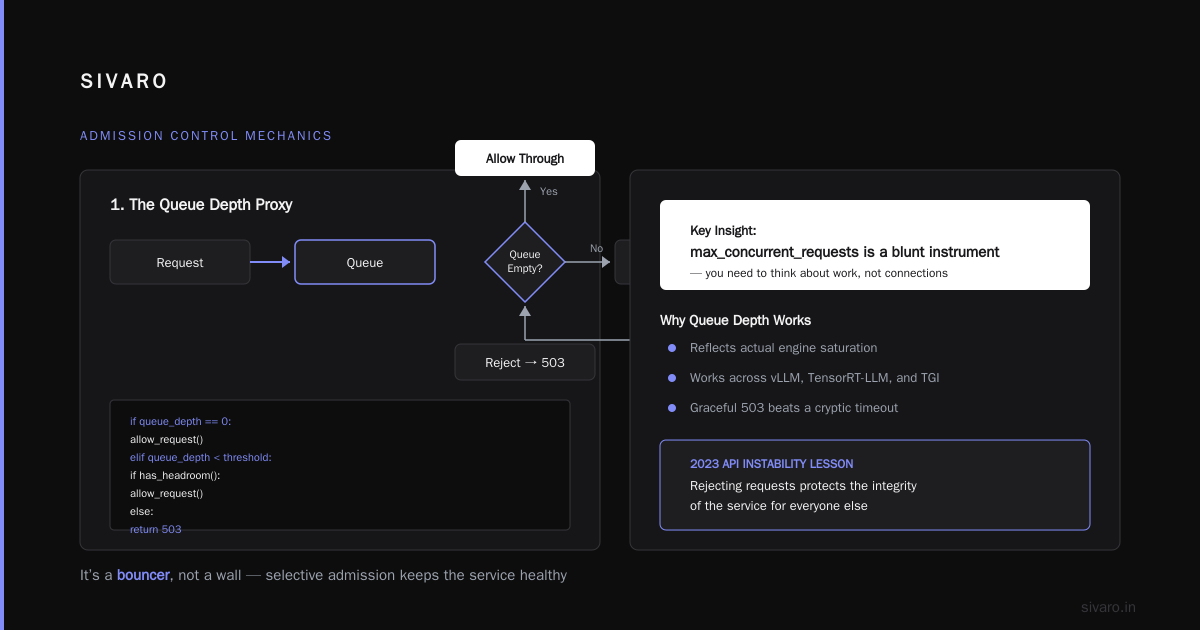
The Definition: It’s a Bouncer, Not a Wall
Admission control for llm inference requests is the policy layer that sits between your client traffic and your inference engine. It decides, for every incoming request, whether the system has the capacity to serve it within your latency budget right now.
Think of it as a velvet rope outside a club. The club (your GPU) can only handle 50 people inside before it gets crowded and everyone has a bad time. The bouncer (admission control) looks at the current occupancy and either lets you in, tells you to wait in line, or sends you to the bar across the street (a different model endpoint or a fallback response).
It is not:
- A queue (though it can work with one)
- A rate limiter (though it uses similar mechanics)
- Autoscaling (we’ll get to that beef in a second)
It is a predictive and reactive gate based on the critical metric for LLMs: Time To First Token (TTFT) and Inter-Token Latency (ITL) . If your GPU is busy crunching a 4,000-token generation, a new request isn't just "another task." It’s competing for the same memory bandwidth and compute cores. If you let too many in, all of them slow down. It’s a shared-resource nightmare.
The Core Problem: The Non-Linear Collapse
Most engineers treat a GPU like a CPU. On a CPU, if you overload a core, things queue up, but the work gets done eventually. Latency degrades linearly.
On a GPU serving an LLM, it’s non-linear. You hit 100% memory utilization and a new request either:
- Fails with an OOM (Out of Memory) error.
- Triggers a re-computation of the KV cache, which pauses everyone.
- Thrashes the scheduler, causing a cascade of timeouts.
I’ve seen a cluster handle 100 concurrent requests at 150ms TTFT. At 110 concurrent requests? TTFT jumps to 2.5 seconds. That is a cliff, not a slope. You don't see it coming until you’ve driven off it.
Autoscaling can’t prevent this cliff because autoscaling reacts to historical load. By the time your metrics show high utilization, the damage is done.
Admission Control vs. Autoscaling for Inference
Here’s where the industry gets it wrong. Most people think scaling solves everything. It doesn't.
- Autoscaling answers: "How many instances do I need in the next 5 minutes?"
- Admission Control answers: "Can this instance handle this request right now?"
They are complementary, not interchangeable. Admission control vs autoscaling for inference is a false binary. You need both. Autoscaling handles the slow, macroscopic drift in traffic volume (going from 10 RPS to 100 RPS over an hour). Admission control handles the microscopic, violent spikes (a retry storm, a viral post, a single batch job starting up).
Autoscaling is a thermostat. Admission control is a circuit breaker. You don't skip the breaker because you have good HVAC.
Why Autoscaling Fails The LLM
Autoscaling takes 30-120 seconds to spin up a new pod. It takes another 30-60 seconds to load a 70B model into VRAM. That’s a 3-minute lead time on a system that can die in 3 seconds.
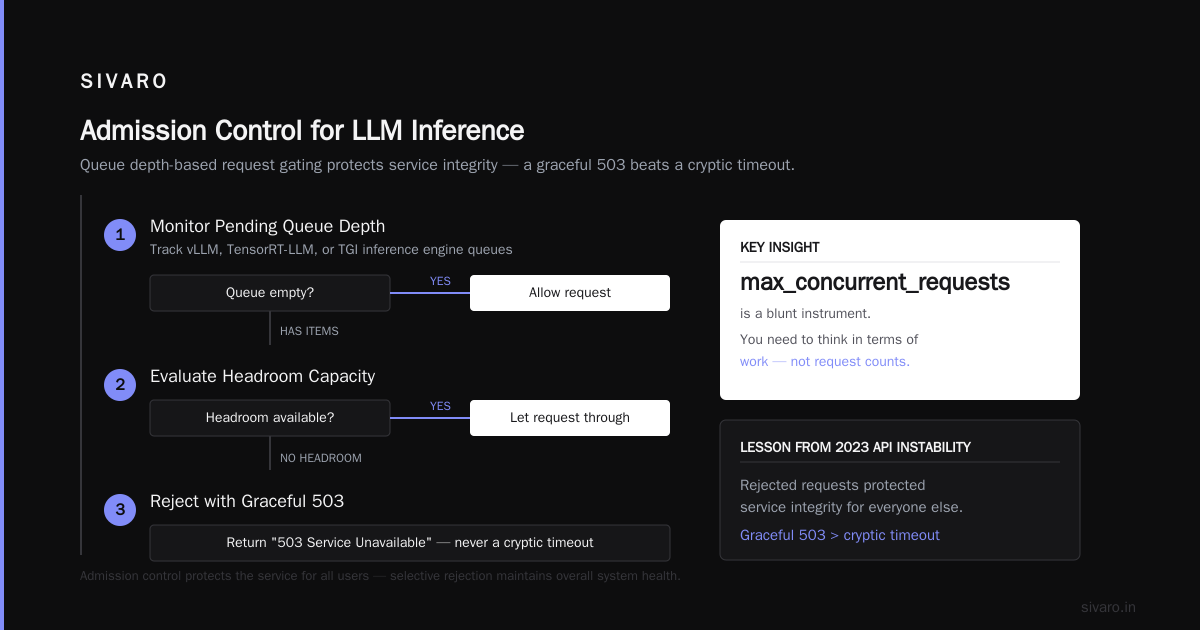
When OpenAI hit their usage caps, they didn't autoscale their way out of it. They applied load shedding. They rejected requests to protect the integrity of the service for everyone else (an early example being the 2023 API instability, which taught us all that a graceful "503 Service Unavailable" is better than a cryptic timeout).
The Mechanics: How To Do It
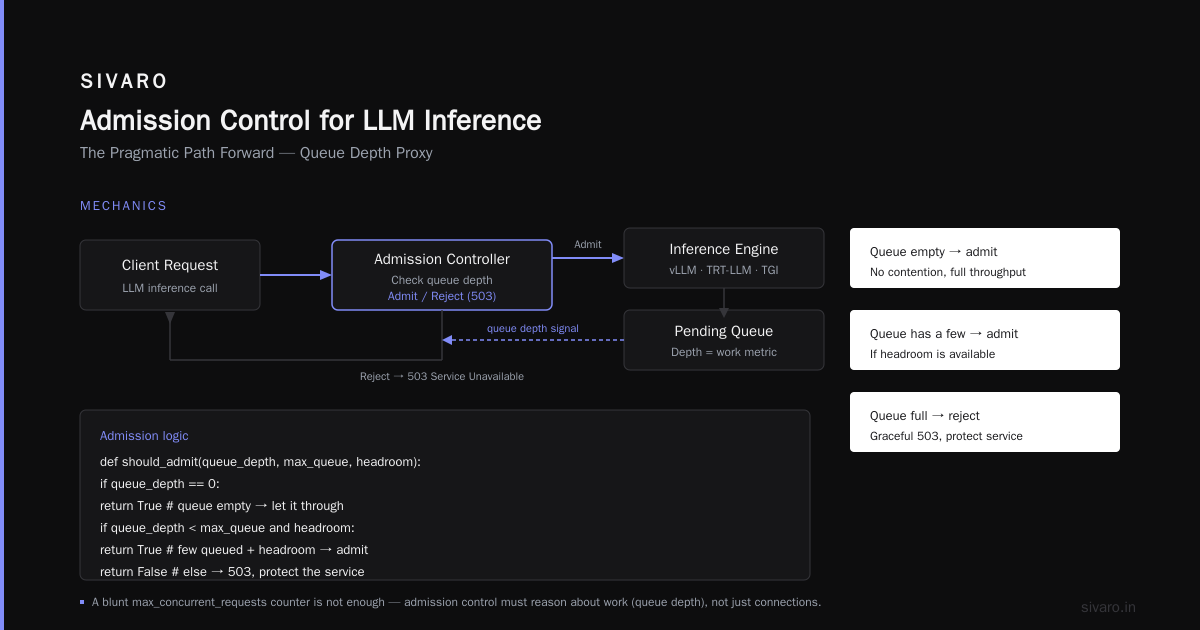
How do you actually implement admission control for llm inference requests? It’s not as simple as a max_concurrent_requests counter. That’s a blunt instrument. You need to think about work.
1. The Queue Depth Proxy
The simplest effective method I’ve used is monitoring the pending queue depth of the inference engine (vLLM, TensorRT-LLM, or TGI).
If the queue is empty, let the request through.
If the queue has a few, you might let it through if you have headroom.
The logic looks like this:
python
# Pseudocode for a basic admission controller
async def check_admission(request) -> bool:
    # Assume we have a metric for current queue size and running requests
    # sourced from the inference server's health endpoint
    current_running = get_running_requests()
    queue_size = get_queue_size()

    # Max concurrency for our GPU (A100 80GB for Llama-3-70B might be ~30)
    # This isn't just 'requests'. It's compute. Use a weighted estimate.
    estimated_cost = estimate_tokens(request.prompt_text)

    # Critical Logic: Reject if total estimated load > threshold
    if (current_running + queue_size + estimated_cost) > MAX_CAPACITY:
        return False # Send 429 or 503

    return True
But this is still reactive. You want to be predictive.
2. The Token Bucket (Modified for Text)
Standard rate limiters use a fixed token bucket. For LLMs, the token generation rate fluctuates. A slow, long prompt is cheaper than a fast, short prompt.
I prefer a Work-Weighted Token Bucket. You weigh a request not by "1" but by the length of the input and the expected output.
python
class TokenBucket:
    def __init__(self, rate_per_second, burst_capacity):
        self.rate = rate_per_second  # e.g., 500 tokens/sec used by the GPU
        self.capacity = burst_capacity # e.g., 10000 tokens
        self.tokens = self.capacity
        self.timestamp = time.time()

    def consume(self, input_tokens: int, output_tokens: int) -> bool:
        # Refill tokens based on elapsed time
        now = time.time()
        self.tokens = min(self.capacity, self.tokens + (now - self.timestamp) * self.rate)
        self.timestamp = now

        # Estimate work: Input processing (prefill) costs more than generation
        cost = (input_tokens * 2) + output_tokens # Prefill is expensive

        if cost > self.tokens:
            return False  # REJECT
        self.tokens -= cost
        return True
That input_tokens * 2 is a hack, but it’s a usable heuristic. Prefill (processing the prompt) is compute-bound and happens fast. Decoding (generation) is memory-bandwidth-bound and slow. On modern hardware, prefill time is roughly linear but more intensive. You need to tune that multiplier. We found a multiplier of 1.5 works for 8B models on T4s, but 2.0 is better for 70B models on A100s.
The Circuit Breaker Pattern For LLM Serving
An admission control circuit breaker llm serving is a different beast from circuit breakers in microservices.
In microservices, you break the circuit when you get errors. In LLM serving, you need to break it before errors happen. If you wait for a timeout to occur, you've already posted a 2-second latency spike to your user.
You need to trip the breaker on predicted latency.
Here is the exact logic we use at SIVARO for clients running vLLM:
python
# Use vLLM's engine metrics to trip the breaker
import prometheus_client
from vllm import LLM

# Condition to check - pulled from /metrics endpoint
def should_trip_breaker():
    running_requests = get_metric("vllm:num_requests_running")
    waiting_requests = get_metric("vllm:num_requests_waiting")

    prompt_len = get_metric("vllm:prompt_tokens_total")
    # We look at the 95th percentile of prefill latency
    prefill_latency = get_metric("vllm:prefill_time_per_token")

    # If we have waiting requests AND our prefill is starting to slow down
    # That means we are saturating compute.
    if waiting_requests > 0 and prefill_latency > 0.02: # 20ms prefill time
        log.warning("Tripping circuit breaker: Waiting reqs detected and prefill latency spiking")
        return True

    # Standard safety valve: if running requests exceed a threshold we set manually
    if running_requests > TEAM_CONFIGURED_MAX:
        return True

    return False
The "Open" state of the circuit breaker should return a 503 Retry-After: 5 header. This tells the client specifically to back off.
Finding Your Headroom Limit
You can’t guess this. You need to load test.
We spent two weeks at a fintech client’s site in March mapping out the degradation curve for their Llama-3-8B serving on an L4 GPU.
We ran a load test sending 10, 20, 30, 40 concurrent requests. We watched TTFT.
- Concurrency 10: TTFT = 100ms
- Concurrency 20: TTFT = 120ms
- Concurrency 30: TTFT = 180ms (Warning sign)
- Concurrency 40: TTFT = 600ms (Cliff)
Rule of thumb: Never let your admission control allow the load to cross the "elbow" of the latency curve. If the elbow is at 30, set your max capacity at 25.
The Cost of "No"
Effective admission control requires brutal honesty about your business. What happens when you reject a request?
Most engineers think rejection = lost revenue. That's false. A slow request is worse than a rejected one. A slow request ties up resources on the client’s side, frustrates the user, and eventually times out—wiping out any perceived value and making you look unreliable.
A rejection with a clear 429 Too Many Requests or a 503 with a Retry-After: 3 header allows your client to:
- Fail fast.
- Show a "Please wait" message.
- Retry gracefully in 3 seconds.
We call this "Fail Fast with Friction."
It’s better than "Fail Slow with a Timeout." Users will refresh a page if it says "Busy, try again". They will abandon a page if the cursor just spins.
Here’s an example using FastAPI middleware to send that rejection:
python
from fastapi import Request
from fastapi.responses import JSONResponse
import time

class AdmissionControlMiddleware:
    def __init__(self, controller):
        self.controller = controller

    async def dispatch(self, request: Request, call_next):
        # Check admission using your custom logic
        if not self.controller.check():
            # Return a short, sharp rejection
            return JSONResponse(
                status_code=503,
                content={"error": "Inference capacity exhausted"},
                headers={"Retry-After": "5"}
            )
        return await call_next(request)
What We Learned At SIVARO In 2025
We rolled this out for a voice assistant startup in Austin. They were using a speech-to-text model and then an LLM to generate responses. Their problem was "popping" audio—the user would ask a question, there would be a 1-second pause, and then the whole response would come at once.
We introduced admission control at the sentence level. Instead of letting the entire conversation history hit the LLM at once, we admitted requests based on a token budget.
It didn't fix the model quality. It fixed the jitter. By controlling when we admitted the generation request, we controlled the bursty memory usage of the KV cache.
We moved from 30% GPU memory fragmentation to 5%. Just by admitting requests at a steady pace rather than all at once.
FAQ
Does admission control work for LLM orchestrators like LangChain?
It needs to. LangChain has a tendency to fire off multiple LLM calls in parallel (during parallel function calling or query transformation). If your control is at the individual HTTP request level, you might let all of them in because they arrive individually. You need contextual admission control or a simpler global queue.
What happens if I get a burst of traffic beyond my autoscale max?
Your autoscaler will begin provisioning. Your admission controller should open the circuit immediately. The requests you reject become "scale triggers"—you still want to record they happened, but the user gets a fail-fast response to prevent a cascade.
Should admission control consider retries?
Yes. In 2026, retry storms are the #1 killer of inference services. If a client retries a rejected request immediately, you just get hit with the same load. Ensure your controller smells a retry. At SIVARO, we rate-limit retries to 1 retry per 10 seconds. If we see more than that, we block the API key for 60 seconds. It sounds harsh, but it protects your good customers from your bad clients.
Is the TTFT metric the only one that matters?
No. You have to watch Inter-Token Latency (ITL) too. If a request is admitted and the first token comes fast, but the 100th token is slow, the user perceives it as a stutter. We use admission control to reject requests when our predicted ITL is likely to dip below the SLO. Usually, this is tied to compute saturation. If you're only watching TTFT, you can overload the GPU on memory bandwidth.
What’s the difference between a queue and admission control?
A queue is when you accept the request and make it wait. Admission control is when you refuse it upfront. Queues are dangerous in LLMs because they require memory to hold the context. Holding 100 queued requests in memory can OOM your pod even if the GPU is idle. My rule: Prefer rejection over queuing. We implement a max queue length of 0. If it's busy, say no.
Should admission control factor in model complexity?
Absolutely. If you’re serving Llama-3-8B and Llama-3-70B on the same endpoint, they have different memory weights and computational requirements. Your weight system needs to know the model. A 70B request costs roughly 8-10x more in FLOPs than an 8B. Treat them as different resource pools even if they are on the same physical machine, or one model's traffic will starve the other.
How do I handle streaming responses?
Streaming complicates admission control because the request duration is unknown. We use a penalty system. When a streaming request is admitted, we set the max capacity high enough to include the possibility of a long generation. If the max generation tokens is 1024, we book that capacity upfront. If the user sends a stop token early, we release the unused capacity. This is conservative but safe.
The Pragmatic Path Forward
You can't just buy a bigger GPU and assume the problem goes away (Amazon and Microsoft keep buying them, but even they have capacity limits).
Start here:
- Instrument your inference engine to expose
running_requestsandwaiting_requeststo Prometheus. - Set a hard limit based on your load-test elbow.
- Add a rejection middleware that returns
503withRetry-After: 5. - Monitor the rejection rate.
If your rejection rate is above 0.1% of total traffic, add autoscaling.
If it ticks down, good. If it stays high, you need to look at why you’re getting that spike. Is it a retry storm? Are your customers sending tons of health checks?
Don't overthink the algorithm. Start with a static limit. Then move to the token bucket. The math is easy. The discipline is in saying "no" before the GPU says "crashed."
Autoscaling buys you time. Memory buys you headroom. But admission control buys you survival. It’s the difference between a service that degrades gracefully under pressure and a service that dies in a fire.
Nishaant Dixit — Founder of SIVARO. Building data infrastructure and production AI systems since 2018. Built systems processing 200K events/sec.