 SIVARO

Your AI Agent Deployment Will Fail. Here's What To Do About It.
You've built an agent that books meetings, writes code, or triages tickets. Demo went great. Your first 100 users love it.
Then it hits production. The thing starts hallucinating API schemas. It gets stuck in retry loops. One rogue action deletes a staging database. Your phone rings at 2 AM.
The ai agent deployment challenges aren't about the model. They're about everything around the model. The plumbing. The permissions. The non-determinism — the fact your agent says something different every run, even with the same prompt.
I'm Nishaant Dixit. I run SIVARO, a product engineering company that's been building data infrastructure and production AI systems since 2018. We've deployed agents for logistics companies, fintech startups, and healthcare vendors. I've made every mistake you're about to make.
This guide is a buying decision. Not for software — for architecture. You're choosing your deployment strategy. Get it wrong and you'll spend months firefighting instead of shipping features.
Let's start with the unpalatable truth.
Why Traditional Deployment Logic Breaks With Agents
Most people think deploying an AI agent is like deploying a microservice. It's not.
A microservice is deterministic. Same input, same output. You can test it, stage it, and roll it back with confidence.
An agent is a continuous decision-maker. It takes actions. It calls tools. It writes to databases. Each step changes the world state. And because it's probabilistic, the same prompt can produce different actions across runs.
That's the core of ai agent deployment challenges: you're not deploying code, you're deploying a capability that exercises judgment. And judgment fails differently than code.
Here's a pattern we see at SIVARO all the time:
A company builds an agent internally. They containerize it. They deploy it behind an API. They say "it's in production."
But they didn't ship a feedback loop. They didn't instrument tool calls. They didn't sandbox the agent's environment.
The agent goes live Monday. By Wednesday, a user has asked it to "clean up the test data." The agent, interpreting this broadly, drops a table in the shared dev environment.
Classic. Preventable. Surgical.
In traditional software, you'd identify the input that caused the failure, write a regression test, and move on. With agents, the "input" is an intent. There's no stack trace. There's no failed assertion. There's just an outcome that's wrong and a decision history you weren't tracking.
So the first decision you'll make isn't about tooling. It's about admitting you need a different deployment paradigm.
Decision 1: To Roll Back, You Need to Know What "Back" Means
Let's talk about ai agent canary deployment vs rollback — because this is where most teams get stuck.
The Canary Approach
A canary deployment for an agent is tricky. With a normal service, you route 5% of traffic to the new version. If it doesn't blow up, you ramp to 100%.
With an agent, the same principle applies, but you have to be more careful about what you're testing.
Here's what we do:
python
# app_config.py
from enum import Enum

class AgentEnv(Enum):
    OBSERVE = "observe"      # Agent runs, actions are logged, not executed
    SANDBOX = "sandbox"      # Agent runs in isolated environment
    SHADOW = "shadow"        # Agent runs real actions on copy of state
    LIVE = "live"            # Full production deployment
Canary mode for agents often means shadow mode — you run the new agent version in parallel with the old one. Both see the same request stream. The new agent's actions are executed against a shadow copy of the state, or they execute for real but are monitored heavily.
The key difference from traditional canaries: you're not just watching response time and error rates. You're watching action quality.
The Problem With Rollback
Rolling back a stateless Docker container is instant — point the load balancer at the old version.
Rolling back an agent is a different beast, because the agent already took actions. Sessions happened. Data was written. A rollback doesn't undo those actions.
So what does rollback actually mean in this context?
I had a client in healthcare (I can't name them) who deployed a billing agent. New version was supposed to handle denials better. Instead, it started claiming an extra digit in claim codes. That's a data corruption bug — a subtle prompt error that came back as malformed numbers.
We caught it in a canary. But here's the thing — the canary had already processed 200 real claims before we caught it. Each one had a wrong code.
Rollback was not an option. The code was stuck in the payer's system. We had to fix up the state, not roll it back.
The lesson: don't plan to roll back. Plan to mitigate.
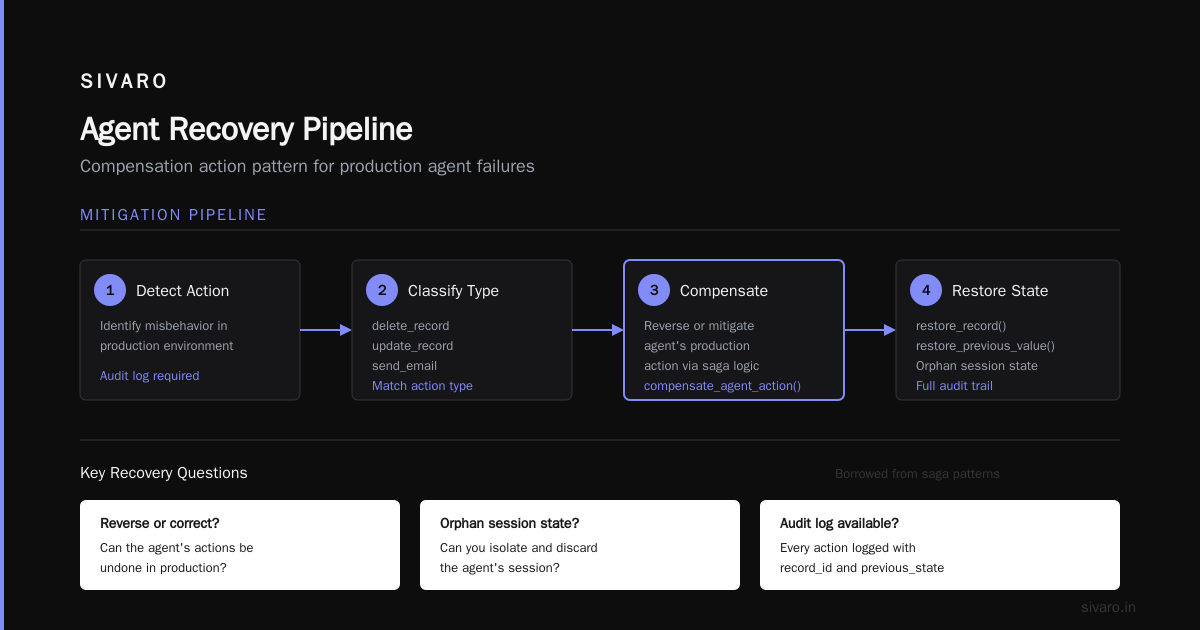
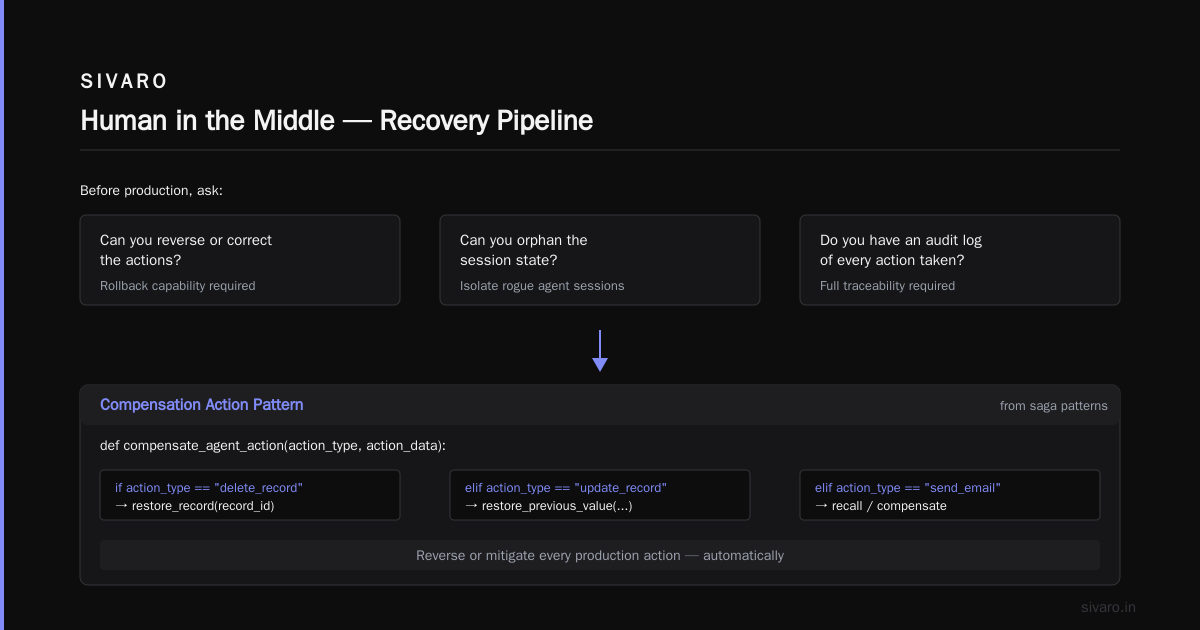
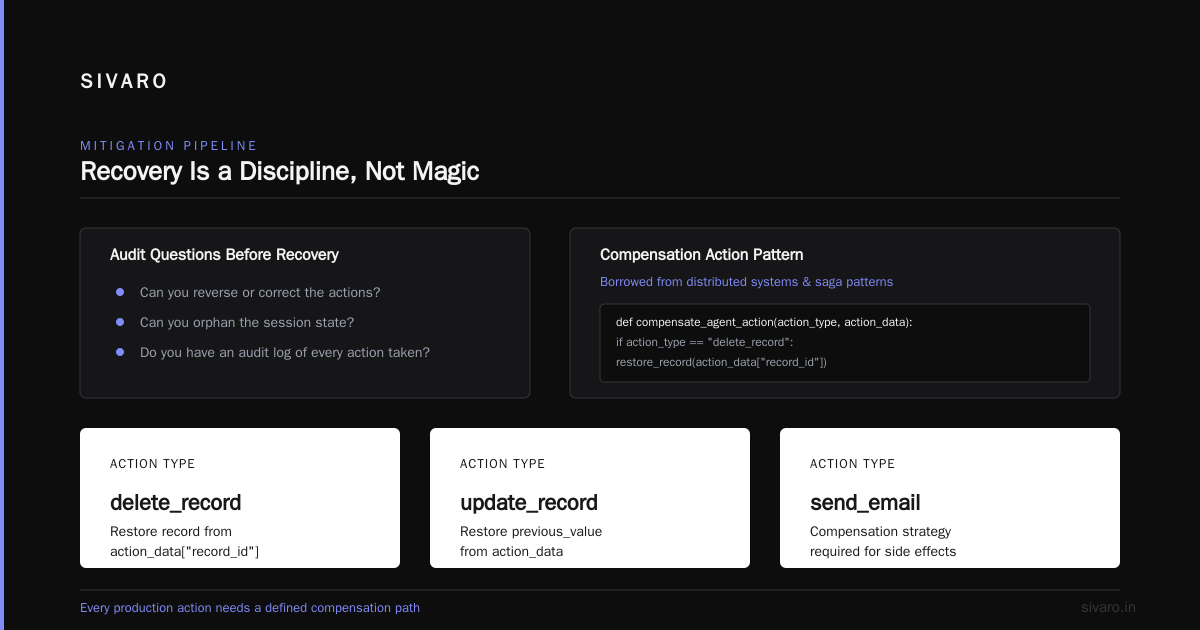
Build a mitigation pipeline. When an agent misbehaves in production, what does recovery look like?
- Can you reverse or correct the actions?
- Can you orphan the session state?
- Do you have an audit log of every action taken?
The best recovery we've used is a compensation action pattern, borrowed from distributed systems and saga patterns:
python
def compensate_agent_action(action_type, action_data):
    """Reverse or mitigate an agent's production action."""
    if action_type == "delete_record":
        restore_record(action_data["record_id"])
    elif action_type == "update_record":
        restore_previous_value(
            record_id=action_data["record_id"],
            previous_value=action_data["previous_state"]
        )
    elif action_type == "send_email":
        revoke_message(action_data["message_id"])
    else:
        log_manual_intervention_required(action_type)
The moral of the canary vs rollback story:
- Canaries are for detection. They tell you early that the agent's behavior is drifting.
- Rollback is only useful for code, not for state. Your true recovery is the compensation layer.
- Versioning an agent is versioning a brain, not a binary. The old "brain" didn't remember what the new one did. So you need traceability to align them.
Decision 2: Your Agent Needs Its Own Environment (Isolation Models)
Because agents interact with external systems, your biggest ai agent deployment challenge is scoping the blast radius.
At SIVARO, we've landed on a three-tier environment model:
Tier 1: The Toy Box
Separate databases, separate third-party sandboxes (like a Stripe test mode). The agent can't reach production even if it tries. This is where we internally test our agent.
Tier 2: The Rehearsal Room
Points at a duplicate of production data that is refreshed regularly. But here's the catch — it's not stale. You're feeding in a copy of real data pipelines and real API endpoints mocked, to test long-running workflows.
Tier 3: The Cockpit
The real production environment. The agent has access. And that leads us to access control.
Static permissions aren't enough. The threat model isn't a malicious agent — it's a misinformed one.
A reasonable request like, "Generate a weekly report for the leadership team," could trigger a sequence of multiple tool calls that, in aggregate, cause a spike in that third-party API.
So apply constraints at multiple levels:
python
# permission_config.yaml
agent:
  model: "gpt-5-turbo"  # Hypothetical example model
  identity: "billing-assistant-v3"

  permissions:
    - action: "read"
      resources: ["internal_data/*"]
      max_frequency_per_min: 120
    - action: "read_write"
      resources: ["internal_data/patients/*"]
      requires_human_approval: true
    - action: "invoke_external_api"
      endpoint: "https://api.claims-processor.com/v2"
      max_calls_per_min: 5
      timeout_seconds: 30
This is a guardrail layer. Treat it as important as the agent's prompt.
If you do not do this, your agent will eventually — and I'm telling you from experience — burn through a vendor budget, or worse, create an unintended charge on a customer's credit card, or mutate the wrong production core table.
At one point we saw a client send 2,000 requests to a language model API in 30 seconds because the agent's code had a while loop that retried forever after receiving a 429. Never let your agent assume infinite retry logic.
Decision 3: The Observability You Need (And Probably Don't Have)
You can't manage what you can't see. But with agents, you have to change what "seeing" means.
Logs just logging prompt/response isn't enough. You need to trace decision chains.
The good news: OpenTelemetry has specs for tracing — treat an agent's run as generating a trace.
The bad news: most tracing tools don't understand the semantic content of what the agent does. They'll give you a trace ID, you'll see "tool_call", but you won't know whether the result was correct.
Here's a more pragmatic observability baseline we push at SIVARO for agents in production:
python
# observability.py
import json

def trace_agent_run(session_id, user_prompt, agent_steps):
    trace = []
    for step in agent_steps:
        trace.append({
            "session_id": session_id,
            "model_thought": step.get("reasoning"),
            "tool_used": step.get("tool_name"),
            "tool_input": step.get("input_data"),
            "tool_output": step.get("output_data"),
            "latency_s": step.get("latency_ms") / 1000,
            "cost_usd": step.get("cost_estimate_usd"),
            "error_flag": step.get("error"),
            "human_review_flag": step.get("needs_approval")
        })
    return json.dumps(trace)
You'll have a lot of data. But what you actually need is a decision dashboard:
- How many sessions fully complete without needing human intervention?
- What percentage of high-severity actions are being flagged for approval?
- What tool calls are failing? Why?
- What's the median cost per completed task? Is it trending up?
At the end of this, you're basically building a monitoring product. It's not infrastructure overhead — it's core to the product itself.
Decision 4: You Need a "Human in the Middle" That Is Actually There
All the hype about autonomous agents — take it with a grain of salt.
We build agents for routing and triage, yes, but when it comes to actions that write data or spend money, you need a human approval step.
"Yes, but that slows the agent down," you say.
Right. Welcome to production reality. The tradeoff is speed for safety, and honestly, there's a zone of safety that's worth the cost of slowness.
The question is where you put the approval point.
Approval gates should have specific configurable rules. In our experience:
- Read-only actions require no approval.
- Low-risk writes (like draft emails or local drafts) require a lightweight click-to-approve.
- High-risk writes (like sending an external email, changing an invoice, deleting something) require a full "paused for human review" state.
Build the agent's execution loop to pause naturally when it hits a gate:
python
# agent_loop.py
result = await agent.run(user_input)

if result.requires_approval:
    await notify_human(
        approver_channel="#agent-approvals",
        message=f"""Action '{result.action}' needs approval.
        Session: {session.id}
        User prompt: {user_input}
        Proposed change summary: {result.change_summary}
        Link to diff: {result.diff_url}"""
    )
    result = await wait_for_approval(session.id)
Here's the reality we've seen — teams that deploy agents without this human-in-the-loop layer don't trust them. They disable them after a month because of that one time the agent sent a slightly-off email to a VIP client.
The teams that get the agent right? They gate first, run, then loosen the gates as they gain confidence.
Don't unleash full autonomy on day one.
Decision 5: The Retry and Self-Healing Loop
Agents fail in ways you won't predict. That's okay. The deployment challenge is designing software around the failures.
What most people implement: the agent will fail to parse a tool output. It will retry. If it fails again, it will hallucinate an alternative. Then it will error out.
You need a loop, not a one-shot.
After any error, you need to feed that error back to the agent as context. In a sense, expose the agent to its own "debugging conversation."
Example pattern for handling tool errors:
python
# handling_tool_errors.py
def execute_with_retry(func, error_types_to_catch, max_retries=2):
    error_messages = []
    for attempt in range(max_retries):
        try:
            return func()
        except error_types_to_catch as e:
            error_messages.append(f"Attempt {attempt}: {e}")
            # The secret sauce - be transparent.
            # LLMs handle errors better when they know the error.
            # We inject a system-level message telling the agent
            # it made a mistake and it should change its behavior.
    raise AgentCapturedError(
        "Failed after retries",
        prior_errors=error_messages
    )

# Setting this in the model invocation
response = model.generate(
    messages=[
        {"role": "system", "content": initial_agent_prompt},
        {"role": "user", "content": user_input},
        # Synthetic message where agent explains its tool call
        *previous_tool_messages,
    ]
)
In other words, don't let the agent hide from itself.
Look at the top ai agent deployment best practices 2025 for self-healing. The pattern everyone is adopting is:
- Fail fast. Don't let an action hang.
- Transparent errors. The AI model sees what happened.
- Error-as-truth. If the agent says, "That environment isn't valid," listen to it. Don't make assumptions.
- Audit if self-healing actually works. If your agent is constantly self-healing from the same failure, that's a permanent bug, not a temporary glitch.
Decision 6: Test Your Agent Before You Trust Your Agent
Let's talk evaluation.
When you deploy a typical service, you might run integration tests. When you deploy an agent, you need to simulate a user conversation and evaluate the entire pathway.
Two testing frameworks that are tangentially relevant:
-
Golden dataset: Have a dataset of past real conversations with the expected ideal set of actions/answers. When you update your agent, run the full dataset through it and measure the "alignment rate" — how many correct actions it did compared to the golden answer.
-
Mutation testing: Twist the user prompts slightly and see if the agent still produces the correct result. For example, add typos or add extra irrelevant background in a prompt.
If you only test with textbook-prompts, your agent will pass. But put a single "hey, wait, what about the last order?" in there and watch the agent suddenly hit the wrong API endpoint.
Here's the problem — none of these tests guarantee behavior in production. But they catch the obvious breakages before they ever reach the canary stage. This is your first line of defense, and most teams skip it. I know companies are skipping it because I've been asked to build deployment pipelines for agents where the source control has no test suite.
FAQ: Quick Answers To Your Deployment Concerns
Q1: What is the biggest difference between deploying an API and deploying an agent?
An API invocation is a deterministic function. An agent invocation is a sequence of decisions, each of which alters the world. That state mutation is the fundamental challenge. For more context, read a recent industry report on AI observability from O'Reilly.
Q2: Is canary deployment for agents actually possible?
It should be mandatory. Run the new version in shadow mode against the same input stream the old one sees, or route real traffic to it in a controlled manner. Compare output quality, not just error rate. We've helped clients introduce iterative rollout strategies at SIVARO that use this pattern.
Q3: How do I handle "undefined" user behavior with my agent?
Set boundaries at the system prompt and the guardrail layer (like the YAML config above). Your first prompt should say "You are only allowed to do X, Y, Z. If the request falls outside those boundaries, respond that you cannot."
Q4: What is the cost of an agent going rogue?
It's not the inference spend. It's the downstream effect of a wrong external action. That's why dependency structure matters. Regarding AI agent deployment challenges, a wrong email to a client may not be a big deal, but deleting a record in a Salesforce production instance is a nightmare.
Q5: Should I use an agent framework like LangChain?
Frameworks accelerate scaffolding, but they don't solve the deployment issue. It doesn't matter if you use LangChain, AutoGen, or a raw OpenAI API call, the infrastructure around it — tracking, gating, authorization — is where you spend your effort Vendor integrations can also create lock-in, check this comparison.
Q6: What does human-in-the-loop look like in a full agent autopilot?
It means your code will eventually pause, raise a flag, and notify a human. That human reviews the steps and approves or denies. Build for exception handling, not the happy path.
Q7: What are the security risks of deploying agents?
The risk isn't the AI model maliciously trying to take over (as much as sci-fi would like that). The risk is prompt injection — when external tool output, like a web page, contains text telling the agent to change state. This is a real issue that has been discussed in context of OWASP Top 10 for LLM applications. Guard against it.
Q8: What is a sign I'm not ready for an AI agent deployment?
You don't have a CI/CD pipeline hooked up to evals. If you're just changing prompts and pushing to prod, you cannot deal with the inherent non-determinism of these systems.
Conclusion: Deployment Is A Test of Discipline, Not Magic
You're not buying a tool. You are buying a new process.
If you go into an ai agent deployment expecting to just add another service, you'll be back to fix it in a month.
The only way this works is if you treat agents like what they are: employees. You need to see what they do. You need to put guardrails on them. You need to know their mistakes. You need a clear separation between "think" and "act."
The goal is not zero errors. The goal is fast recovery and contained damage.
Follow these five pieces of feedback:
- Do canary deployments, but test for behavior not latency.
- Don't plan to rollback on the state layer, plan to mitigate.
- Isolate environments with separate permissions and data stores.
- Have a real human approval gate — don't fake it.
- Instrument everything. Your future self will thank you.
At SIVARO, we build these systems daily. The projects that succeed have architecture that handles when an agent does the wrong thing constructively, not hoping it always does the right thing.
You can build this.
Nishaant Dixit — Founder of SIVARO. Building data infrastructure and production AI systems since 2018. Built systems processing 200K events/sec.