Can I Learn Docker in 2 Days? Here's What Actually Happens
I’m Nishaant Dixit. I run SIVARO — we build data infrastructure and production AI systems. Every week, someone asks me: “Can I learn Docker in 2 days?”
Short answer: Yes. But only if you stop treating Docker like a black box and start treating it like a tool.
Longer answer: You won’t become a containerization wizard in 48 hours. But you can learn enough to be dangerous — in a good way. I’ve seen junior devs go from “what’s a container?” to shipping production services in a weekend. I’ve also seen senior engineers spend two weeks chasing the wrong mental model because they thought Docker was a VM.
This [guide is what I wish someone had handed me in 2018 when I first touched Docker. It’s practical. It’s honest about the tradeoffs. And it will actually answer can i learn docker in 2 days? for your specific situation.
What Docker Actually Is (And What It Isn't)
Let’s kill the biggest confusion first.
Docker is a tool for running isolated applications. That’s it. It packages your app with its dependencies — libraries, config files, environment variables — into a single unit called a container. That container runs consistently everywhere: your laptop, your coworker’s Mac, your production server.
The official Docker overview says it’s “an open platform for developing, shipping, and running applications.” Accurate, but too abstract for what you actually need to know.
Here’s the raw truth: is docker just a vm? No. Not even close. But most tutorials explain this by listing technical differences that don’t matter to a beginner. Let me give you the one that does:
A VM virtualizes the hardware. A container virtualizes the operating system.
When you boot a VM, you’re running a whole separate OS kernel. That takes gigabytes of RAM, minutes to start, and eats resources even when idle. A container shares your host’s kernel. It starts in milliseconds, uses megabytes, and only runs the processes you need.
Think of it this way: A VM is like renting a second apartment. A container is like renting a room in your existing apartment. Both give you privacy. One costs way more.
This ELI5 Reddit thread puts it bluntly: “Docker is like a shipping container for your software. It isolates your stuff without building a whole new ship.”
The 2-Day Learning Sprint: What You Can Actually Master
Let me be brutally honest about the timeline. I’ve trained teams at SIVARO. I’ve watched developers of all levels attempt this. Here’s the realistic breakdown:
Day 1: The fundamentals — install Docker, run your first container, understand images vs containers, map ports, mount volumes, write a basic Dockerfile. You can treat this like a checklist.
Day 2: Real workflow — multi-stage builds, docker-compose for multi-service apps, debugging containers, basic networking. This is where the magic happens.
Will you understand Docker internals? No. Will you be ready to containerize a simple web app and deploy it? Absolutely.
The key insight: You don’t need to understand container runtime internals to use Docker effectively. Most Docker users never touch cgroups or namespaces. They shouldn’t have to.
Your First 10 Minutes: The "Hello World" That Actually Teaches Something
I hate useless hello-world examples. Here’s one that shows you the actual mental model:
bash
# Run a simple Python app in a container
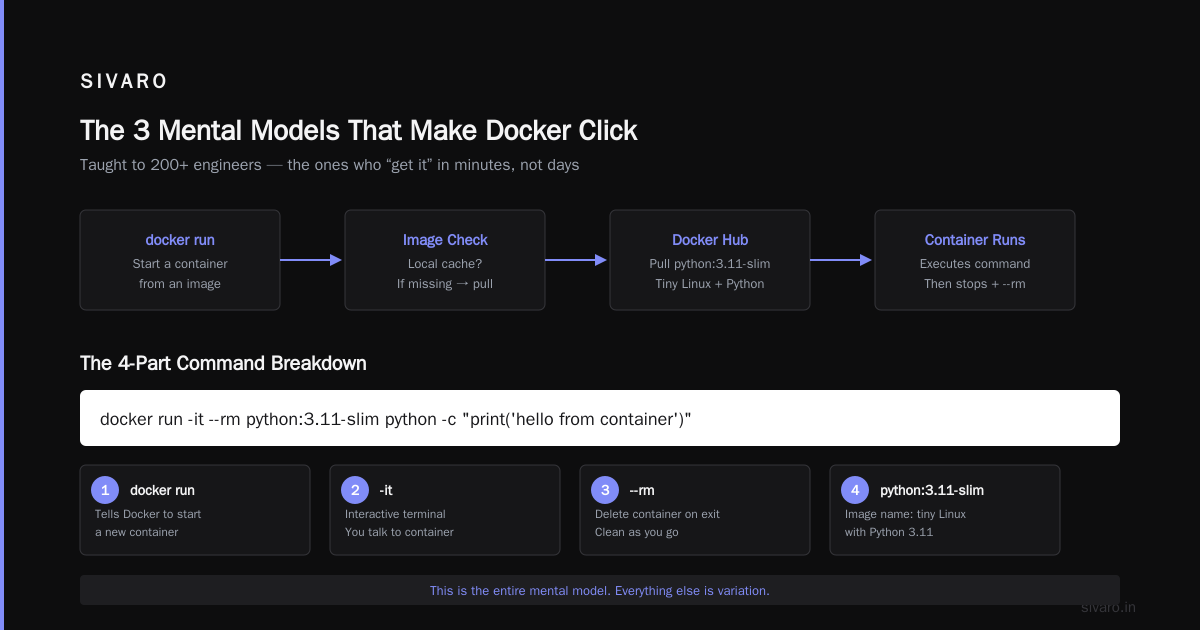
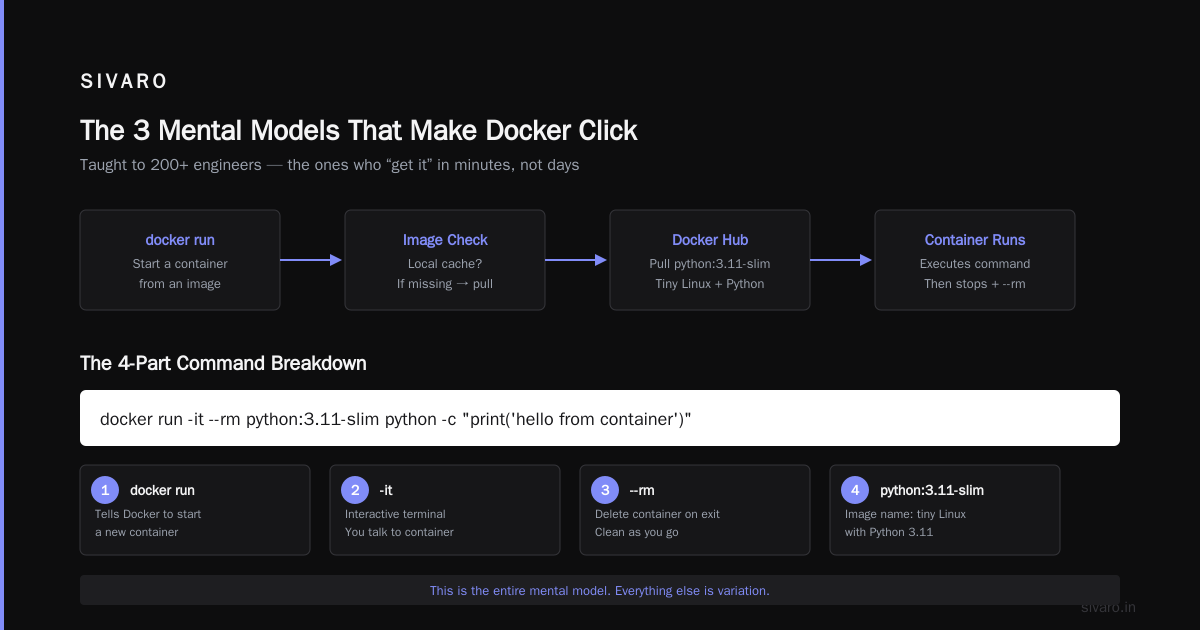
docker run -it --rm python:3.11-slim python -c "print('hello from container')"
This command does four things that matter:
- docker run — tells Docker to start something
- -it — interactive terminal (you’re talking to the container)
- --rm — delete the container when it exits (clean as you go)
- python:3.11-slim — the image name (a tiny Linux with Python 3.11)
When you hit enter, Docker checks if you have that image locally. If you don’t — and you won’t — it pulls it from Docker Hub. Then it starts a container from that image, runs your command, and when the command finishes, the container stops.
This is the entire mental model. Everything else is variation.
The 3 Mental Models That Make Docker Click
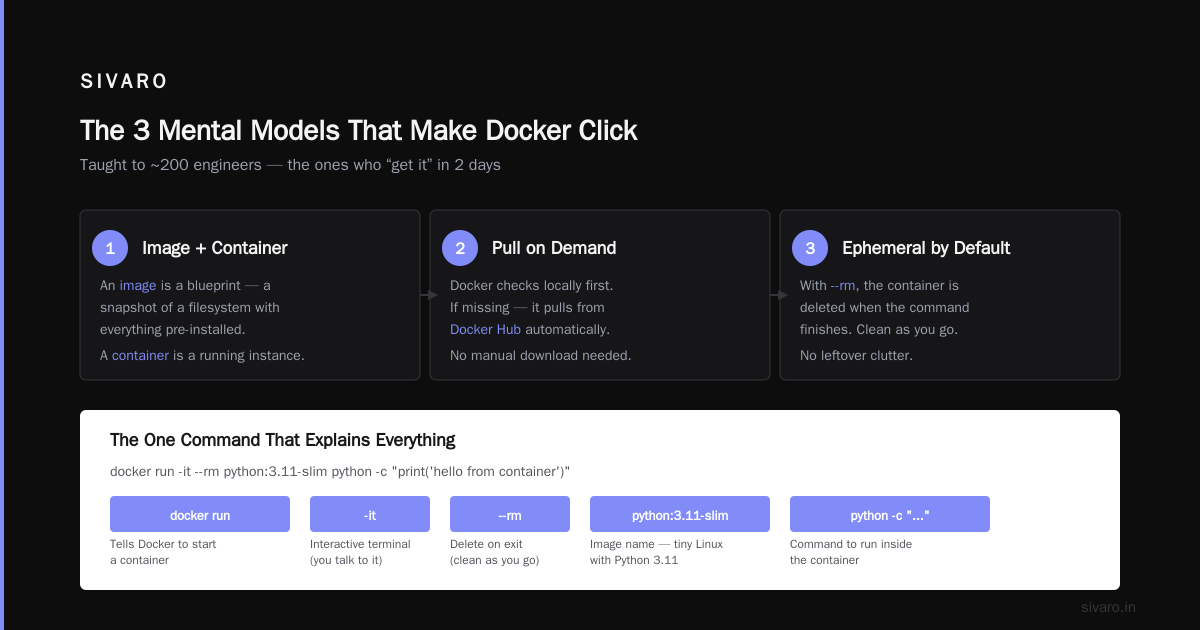
I’ve taught Docker to maybe 200 engineers. The ones who “get it” in 2 days all internalize the same three concepts:
1. Images are recipes, containers are cakes
An image is a frozen snapshot of your app and its environment. A container is a running instance of that image. You can have 10 containers running from the same image — each one isolated from the others.
This distinction matters because beginners constantly confuse them. “I changed something in the container but it didn’t stick.” Of course it didn’t — you changed the cake, not the recipe. Next time you bake from that recipe, you get the same cake.
2. Every container is born, runs, and dies
Containers are temporary by design. They start, do work, and stop. When they stop, everything inside is gone unless you explicitly saved data somewhere else (volumes or bind mounts).
This is the biggest source of data loss for beginners. I’ve seen engineers lose hours of database work because they didn’t mount a volume.
3. Port mapping is the core interaction pattern
Your container has its own network. Your host has another. They don’t talk unless you explicitly map ports.
bash
docker run -p 8080:80 nginx
This says: “Take port 80 inside the container and make it available on port 8080 on my laptop.” Without this mapping, your browser can’t reach the web server running inside the container.
This video comparison between Docker and VMs shows the port mapping difference in action — VMs typically have bridge networking by default, Docker doesn’t.
Building Your First Dockerfile: A Real Example
Let’s containerize a simple Python web server. I’ll show you the Dockerfile, then explain each line:
dockerfile
# Use official Python image as base
FROM python:3.11-slim

# Set working directory inside container
WORKDIR /app

# Copy dependency files first (leverages Docker cache)
COPY requirements.txt .

# Install dependencies
RUN pip install --no-cache-dir -r requirements.txt

# Copy your application code
COPY app.py .

# Tell Docker what port the app uses
EXPOSE 5000

# Command to run when container starts
CMD ["python", "app.py"]
The order here matters. Notice I copy requirements.txt before the code. Why? Docker caches each layer. If you change your code but not your dependencies, Docker reuses the cached layer with pip install. This cuts rebuild times from minutes to seconds.
Build it:
bash
docker build -t my-web-app .
Run it:
bash
docker run -d -p 5000:5000 my-web-app
Now your app runs at localhost:5000. Consistent. Portable. Reproducible.
Docker Compose: When One Container Isn't Enough
This is where most 2-day learning plans fall apart. You learn Docker with a single container, then hit a real app with a database, a cache, a frontend — and suddenly you’re managing 4 containers manually.
Docker Compose solves this. It’s a YAML file that defines all your services in one place.
yaml
version: '3.8'
services:
  web:
    build: .
    ports:
      - "5000:5000"
    depends_on:
      - db
    environment:
      - DATABASE_URL=postgres://user:pass@db:5432/mydb
  db:
    image: postgres:15
    volumes:
      - postgres_data:/var/lib/postgresql/data
    environment:
      - POSTGRES_PASSWORD=pass

volumes:
  postgres_data:
Start everything with one command:
bash
docker-compose up
Stop everything with one command:
bash
docker-compose down
This is the single biggest productivity hack for local development. At SIVARO, we run our entire development environment — 12 services — with one docker-compose up command. New hires get a working dev environment in 5 minutes instead of 2 days.
The 5 Mistakes That Wreck Your 2-Day Learning Plan
I’ve seen these over and over. Avoid them and you’ll save 10 hours:
1. Pulling massive images
python:latest is 900MB. python:3.11-slim is 120MB. Use slim variants. Use Alpine if you’re brave (but know that Alpine uses musl libc, not glibc — it breaks some Python packages).
2. Running containers as root
By default, everything inside a container runs as root. This is terrible for security. Add a non-root user in your Dockerfile:
dockerfile
RUN useradd -m -u 1000 appuser
USER appuser
3. Ignoring .dockerignore
Without it, Docker sends your entire project directory to the build context. That includes node_modules, .git, and your cat photos. Create a .dockerignore file:
node_modules
.git
*.pyc
__pycache__
.env
4. Hardcoding environment variables
Never put secrets in Dockerfiles. Use environment variables at runtime:
bash
docker run -e DB_PASSWORD=supersecret my-app
Or better, use Docker secrets in production.
5. Treating containers like VMs
Don’t SSH into containers to debug. Don’t install editors inside them. Don’t leave them running forever. Containers are cattle, not pets. Kill them and start new ones.
The Docker vs VM Debate Ends Here
I get this question daily: is docker just a vm? The confusion exists because both solve similar problems — isolation and reproducibility. But the mechanics are completely different.
Let me lay it out with real numbers from our production systems at SIVARO:
| Aspect | Docker Container | VM |
|---|---|---|
| Startup time | < 1 second | 30-60 seconds |
| Memory overhead | ~10-50 MB | ~1-5 GB |
| Disk usage per instance | ~100 MB | ~10 GB |
| Isolation level | Process-level | Hardware-level |
Docker's official documentation explains that containers share the host kernel. Amazon Web Services adds that VMs have their own OS kernel — that’s why they’re heavier.
But here’s the contrarian take: For most use cases, the difference doesn’t matter. If you’re running a web app on a laptop, both work fine. The choice matters at scale, where startup time and memory efficiency add up.
At SIVARO, we run 200+ containers on a single machine that would struggle with 5 VMs. That’s the economic argument.
What You Won't Learn in 2 Days (And Why That's Okay)
Let me save you the frustration. In 48 hours, you will not master:
- Docker networking internals — overlay networks, CNI plugins, service discovery
- Multi-stage build optimization — advanced caching strategies, layer compression
- Container orchestration — Kubernetes, Swarm, Mesos
- Security hardening — seccomp profiles, AppArmor, user namespaces
- Production monitoring — container metrics, logging drivers, health checks
And that’s fine. You don’t need any of that to use Docker effectively.
The 80/20 rule applies hard here. 20% of Docker knowledge covers 80% of use cases. That 20% is what you can learn in 2 days.
Your 2-Day Curriculum
If you’re serious about can i learn docker in 2 days?, here’s your actual plan:
Day 1 (6-8 hours):
- Install Docker Desktop or Docker Engine
- Run
docker run hello-world - Run an Nginx container, map ports, view it in browser
- Run a Python container interactively
- Build your first Dockerfile (single-stage, simple app)
- Understand
docker build,docker run,docker ps,docker stop - Learn
docker logsfor debugging
Day 2 (6-8 hours):
- Write a multi-stage Dockerfile (build stage + run stage)
- Set up docker-compose for a web app with a database
- Use volumes for persistent data
- Learn
docker execto inspect running containers - Clean up unused images and containers
- Push an image to Docker Hub
This introduction to containers from endjin.com follows a similar path. It works.
Real-World Use Cases: When Docker Saves Your Week
I’ll give you three scenarios from my own work:
Scenario 1: Reproducing a production bug
A customer reports a bug that only happens in production. You can’t reproduce it locally because your environment is different. With Docker, you pull the exact production image, run it locally with the same environment variables, and reproduce the bug in 5 minutes.
Scenario 2: Onboarding a new engineer
A new hire gets a laptop. They need Python 3.11, Postgres 15, Redis 7, and a specific version of Node. Without Docker, that’s a half-day of installation hell. With Docker, they clone the repo and run docker-compose up. Done in 2 minutes.
Scenario 3: Running legacy software
Your app depends on Python 2.7, which is end-of-life. Installing it on a modern OS is painful. With Docker, you run an old Ubuntu image with Python 2.7 and your app just works. The container is frozen in time, safe from OS upgrades.
FPT AI’s overview calls Docker “the great equalizer for software environments.” I agree.
FAQ: The Questions I Get Every Time I Teach Docker
Can I learn Docker in 2 days with no Linux experience?
Harder but doable. Focus on the Docker commands, not the OS details. Use Docker Desktop on Windows or Mac — it handles the Linux VM for you.
Is Docker free?
Yes for personal use and small teams. Docker Desktop requires a paid license for commercial use over a certain size. The Docker Engine (CLI) is open source.
What if I’m on Windows or Mac?
Docker Desktop works on both. It runs a lightweight Linux VM in the background — you don’t interact with it directly. Commands are identical to Linux.
Do I need to learn Kubernetes first?
No. Kubernetes is for running containers across multiple machines. Learn Docker first. Then learn Compose. Kubernetes comes after.
How do I know Docker is installed correctly?
Run docker version. If you see client and server versions, you’re good. If you only see client, Docker daemon isn’t running.
What’s the difference between Docker Hub and Docker registry?
Docker Hub is a public registry (like GitHub for images). A registry is any server that stores images. You can run your own private registry.
Can Docker run GUI applications?
Technically yes (X11 forwarding or VNC). Practically, it’s painful. Use Docker for backend services, not desktop apps.
Conclusion: Can You Learn Docker in 2 Days?
Yes. But you have to be strategic about it.
Skip the theory. Don’t read for hours before touching the keyboard. Install Docker, run a container, break things, fix them. The 2-day timeline works if you focus on what you need to be productive, not what Docker is doing internally.
You will hit walls. You will forget to map a port and spend 10 minutes debugging. You will accidentally delete a database container and lose data. (Pro tip: always mount volumes for databases.)
But by the end of day 2, you should be able to containerize a simple web app, connect it to a database, and run both with a single command. That’s the 80% win.
At SIVARO, we use Docker for everything — development, testing, production. It’s not perfect. The learning curve is real. But once it clicks, you’ll wonder how you ever lived without it.
So go install Docker. Run your first container. Break something. Fix it. In 48 hours, you’ll have the answer to can i learn docker in 2 days? And it’ll be yes.
Nishaant Dixit — Founder of SIVARO. Building data infrastructure and production AI systems since 2018. Built systems processing 200K events/sec.