Is Kubernetes the Same as AWS?
I was sitting in a conference room in Bangalore, 2021, when a VP of Engineering asked me flat out: "is kubernetes the same as aws?"
He wasn't joking.
His team had been told to "move to the cloud" and someone mentioned Kubernetes. He'd seen them lumped together in the same slide decks, same budget line items, same conference talks. To him, they were the same thing—cloud stuff you buy from Jeff Bezos.
Let me be brutally clear: No. They are not the same.
Kubernetes is an open-source container orchestration system. AWS is a cloud provider. One is software you run. The other is infrastructure you rent. Confusing them is like asking if the engine in your car is the same as the gas station.
But here's where it gets interesting. The confusion exists for a reason. And understanding why people ask this question tells you more about the state of modern infrastructure than any technical comparison ever could.
What Exactly Is Kubernetes Used For?
Let's start with the basics because most explanations are terrible.
Kubernetes (K8s for those of us who can't spell) is a system for running containers across multiple machines. That's it. If you have one machine, you don't need it. If you have ten machines running containers, you might want it. If you have a thousand machines running containers, you probably can't live without it.
Red Hat's definition is decent: "Kubernetes automates operational tasks of container management and includes built-in commands for deploying, rolling out, scaling, and monitoring applications."
But I prefer this: Kubernetes is a distributed systems operating system.
You tell it what you want running ("I want 3 copies of my web server") and it makes that happen. It handles:
- Which machines to put containers on
- Restarting things that die
- Scaling up when traffic spikes
- Connecting containers to each other and the outside world
If you've ever SSH'd into a server at 2 AM to restart a crashed process, Kubernetes is the solution to that specific pain.
Is it the right solution for everyone? The Hacker News thread on "I Didn't Need Kubernetes" has 400+ comments from people who'd argue no. And they're not wrong.
The AWS Confusion
Here's why people conflate them.
AWS launched Elastic Container Service (ECS) in 2014. It was Amazon's way of running containers. Then Kubernetes got popular, and Amazon launched Elastic Kubernetes Service (EKS) in 2018.
So when someone says "we're using AWS to run containers," they could mean:
- EC2 with Docker installed manually
- ECS (the AWS-native way)
- EKS (Kubernetes on AWS)
- Fargate (serverless containers)
- Or some unholy combination
The lines blur. A company running EKS is running Kubernetes on AWS. But the Kubernetes part is the orchestration layer, and AWS is the infrastructure layer. You could run the exact same Kubernetes cluster on Google Cloud, Azure, or your own bare metal.
AWS explicitly says EKS is "a managed Kubernetes service." Not Kubernetes itself. The service.
So is Kubernetes the same as AWS? Only if you think Netflix is the same as the internet. (Speaking of which—**is Netflix using Kubernetes?** Yes, extensively. But they're also running their own custom tools on top. More on that later.)
The Real Question: Do You Need Either?
Here's the uncomfortable truth I tell founders and CTOs: most companies don't need Kubernetes. And plenty don't need AWS either.
Ona's departure from Kubernetes is instructive. They moved back to simpler infrastructure. Their reasoning? "The complexity of Kubernetes wasn't solving any real problems for us."
I've seen this pattern at SIVARO. We've walked into organizations running 3 microservices on a 30-node Kubernetes cluster. The overhead—in terms of ops time, learning curve, and debugging effort—was eating 40% of their engineering budget.
Ask yourself:
- How many services do you run? (If it's under 10, you probably don't need K8s)
- How many engineers do you have? (If it's under 20, the ops overhead might kill you)
- How often do you deploy? (If it's once a week, Docker Compose is fine)
- Do you need to scale to zero? (If yes, look at serverless first)
Here's a simple litmus test: if you can run everything on a single $40/month VPS, you don't need Kubernetes. You don't even need containers. A cron job and a git push will do.
Kubernetes Is a Platform. AWS Is Infrastructure.
This distinction matters more than people admit.
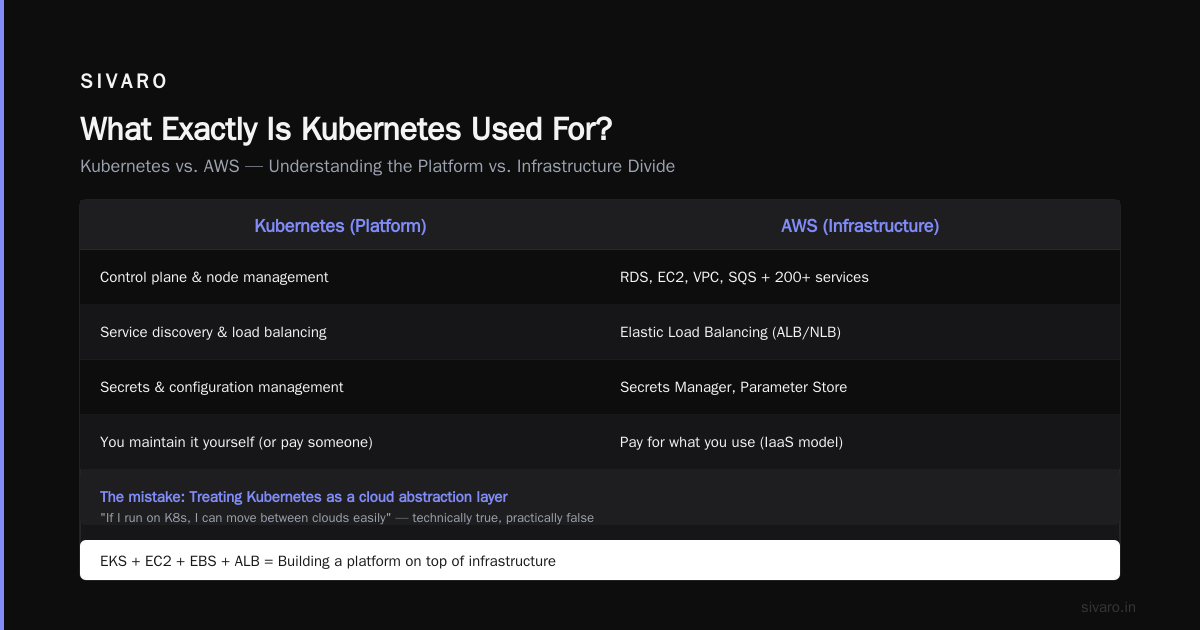
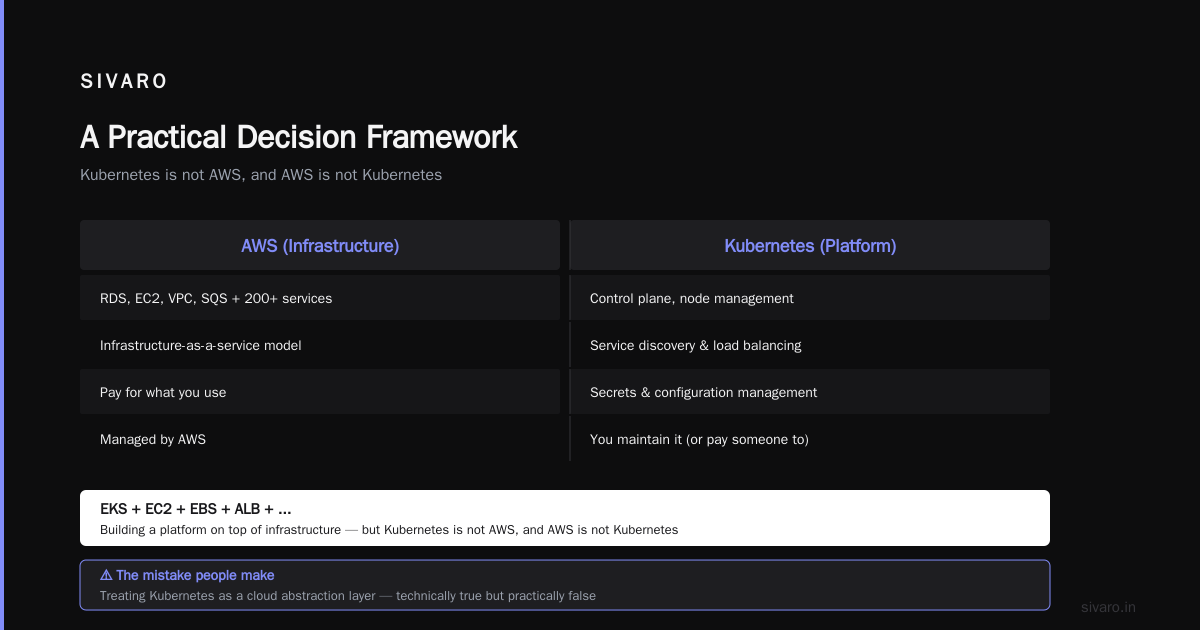
AWS gives you: compute (EC2), storage (S3), databases (RDS), networking (VPC), queues (SQS), and 200+ other services. It's infrastructure-as-a-service. You pay for what you use.
Kubernetes gives you: a control plane, node management, service discovery, load balancing, secrets management, and configuration management. It's a platform for running applications. You maintain it yourself (or pay someone to).
When you combine them (EKS + EC2 + EBS + ALB + ...), you're building a platform on top of infrastructure. But Kubernetes is not AWS, and AWS is not Kubernetes.
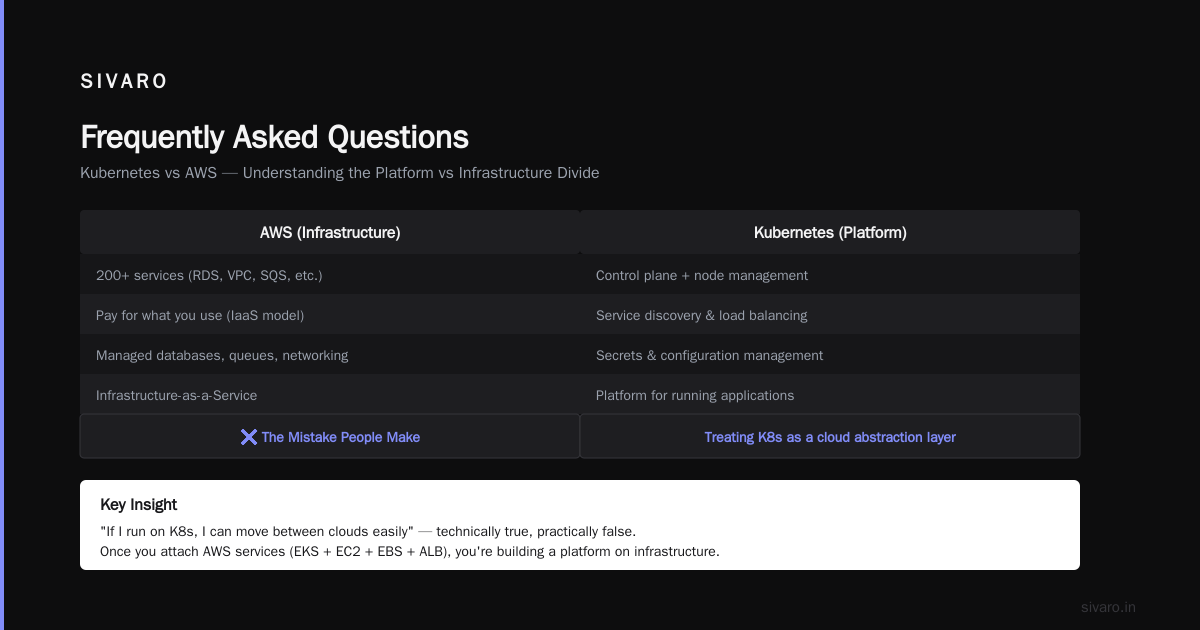
The mistake people make is treating Kubernetes as a cloud abstraction layer. They think "if I run on K8s, I can move between clouds easily." This is technically true but practically false. Once you attach an AWS Load Balancer, S3 storage, RDS database, and SQS queue to your Kubernetes cluster, you're locked into AWS just as much as if you'd used ECS.
Google Cloud's Kubernetes documentation tries to sell the portability angle. And sure, you can move the Kubernetes layer. But your infrastructure dependencies follow you.
The Complexity Spiral
I've built and operated Kubernetes clusters since 2018. Here's what nobody tells you about the learning curve.
First month: "This is amazing. kubectl apply -f deployment.yaml and it just works."
Second month: "Why is my pod not starting? What's a CrashLoopBackOff? What are these events saying?"
Third month: "I need to set up a proper monitoring stack. Prometheus, Grafana, Alertmanager, Loki, Tempo."
Fourth month: "Our etcd cluster is having leader election issues. Also, the CNI plugin is dropping packets."
Fifth month: "We need to rotate TLS certificates. Also, RBAC is misconfigured and nobody can deploy."
Sixth month: "I've become a Kubernetes operator. I no longer write application code."
This is not an exaggeration. The "Why People Hate Kubernetes" article nails the frustration: "Kubernetes is a platform for building platforms. If you don't want to build a platform, you probably don't want Kubernetes."
I'd add: even if you want to build a platform, make sure you have the team to maintain it.
When to Actually Use Kubernetes
I've done this calculation at least 20 times with clients. Here's my current framework:
Use Kubernetes when:
- You have 15+ microservices
- Your team has dedicated DevOps/SRE headcount (at least 2 people)
- You need to run stateful workloads (databases, queues, caches) alongside stateless ones
- Your traffic patterns are unpredictable (bursty scale events)
- You're doing multi-team deployments with different release cadences
Don't use Kubernetes when:
- You're a startup with 3 engineers
- You have 1-5 services
- Your traffic is predictable
- You don't have anyone who understands Linux networking
- You just want to "learn it" (learn Docker Compose first)
At SIVARO, we built a data pipeline processing 200K events/second using Kubernetes. We needed it—the auto-scaling, the self-healing, the ability to run 50 different microservices with different resource profiles, the ability to roll back deployments in 30 seconds.
But for our internal tools? We run them on a single VM with Docker Compose. Because they don't need Kubernetes. And neither do most companies.
Is Netflix Using Kubernetes? (And What That Actually Means)
Yes, Netflix uses Kubernetes. But here's what that doesn't mean.
Netflix runs Kubernetes at massive scale—thousands of nodes, hundreds of thousands of pods. They've contributed heavily to the Kubernetes ecosystem (the CNI plugin, the cluster autoscaler, the cloud provider integrations).
But Netflix also runs:
- Their own custom container runtime (Titus)
- Their own service mesh
- Their own deployment pipeline (Spinnaker)
- Their own monitoring system (Atlas)
- Their own hundreds of internal services
Netflix doesn't "use Kubernetes" the way a startup uses AWS Lambda. Netflix built a platform on top of Kubernetes. And they have a dedicated team of SREs, platform engineers, and infrastructure developers maintaining it.
When someone says "Netflix uses Kubernetes" as a justification for you to use Kubernetes, they're ignoring the 5-year investment and 100-person team that makes it work.
The Reddit thread about why companies adopt Kubernetes has a comment that stuck with me: "We adopted Kubernetes because we wanted to solve organizational problems with technical solutions. It didn't work."
That's the real story.
A Practical Decision Framework
Let me give you something concrete. Here's how I help clients decide.
Step 1: Count your services
If you have 1-3, skip Kubernetes. Use Docker Compose or a simple PaaS.
If you have 4-10, consider a managed container service (AWS ECS, Google Cloud Run, Azure Container Apps). These give you orchestration without the control plane complexity.
If you have 11+, Kubernetes becomes worth evaluating. But start small.
Step 2: Assess your team
Do you have someone who can debug a network policy issue at 3 AM? Do you have someone who understands etcd internals? Do you have someone who can write a custom admission webhook?
If the answer to any of these is "no," you need a managed Kubernetes service (EKS, AKS, GKE) and a support contract. Or you need to hire.
Step 3: Calculate the cost
Kubernetes control planes cost $0.10/hour on EKS. That's ~$73/month. But the real cost is the worker nodes, the load balancers, the persistent volumes, the monitoring infrastructure, and the storage for logs.
A 10-node Kubernetes cluster on AWS costs roughly $2,000-5,000/month in infrastructure. Plus 1-2 FTE DevOps engineers at $150,000+/year each.
Compare that to running 10 services on Heroku or Railway for ~$500/month. The math is brutal for small teams.
Step 4: Be honest about why you want it
Do you want Kubernetes because:
- "It's industry standard"? (Not a good reason)
- "It'll solve our scaling problems"? (Maybe, but you probably have a different bottleneck)
- "We want portability"? (You're not portable—your dependencies lock you in)
- "We need to support 3 development teams with different deploy schedules"? (Now we're talking)
The right reason is organizational, not technical.
Code Examples: The Concrete Stuff
Since we're practitioners, let me show you what I mean with actual code.
Docker Compose (for small teams):
yaml
version: '3.8'
services:
  web:
    build: .
    ports:
      - "80:80"
    environment:
      - DB_HOST=db
    depends_on:
      - db
  db:
    image: postgres:15
    volumes:
      - pgdata:/var/lib/postgresql/data
volumes:
  pgdata:
This deploys. It scales. It works for teams doing <10 services. Don't overthink it.
Kubernetes (for when you need it):
yaml
apiVersion: apps/v1
kind: Deployment
metadata:
  name: web
spec:
  replicas: 3
  selector:
    matchLabels:
      app: web
  template:
    metadata:
      labels:
        app: web
    spec:
      containers:
      - name: web
        image: myapp:1.0.0
        ports:
        - containerPort: 80
        resources:
          requests:
            memory: "256Mi"
            cpu: "250m"
          limits:
            memory: "512Mi"
            cpu: "500m"
---
apiVersion: v1
kind: Service
metadata:
  name: web
spec:
  type: LoadBalancer
  selector:
    app: web
  ports:
  - port: 80
    targetPort: 80
This deploys 3 replicas, exposes them via a load balancer, and defines resource limits. It's more code, more complexity, more moving parts.
The trade-off in action:
bash
# Docker Compose deployment
docker compose up -d
# One command, done.

# Kubernetes deployment
kubectl apply -f deployment.yaml
kubectl apply -f service.yaml
# Two commands, but now you need:
# - A cluster running
# - kubectl configured
# - RBAC permissions
# - Networking setup
# - Probably a dozen other things
The difference in operational overhead is real. Don't ignore it.
Managed Kubernetes vs. Self-Managed
Here's something most articles don't tell you.
AWS EKS handles the control plane. But you still manage:
- Worker nodes (EC2 instances)
- Node groups and scaling
- CNI plugin (networking)
- CSI driver (storage)
- Ingress controller (external traffic)
- Monitoring and logging
- Backups and disaster recovery
- Security patches and upgrades
Managed Kubernetes is a spectrum, not a binary. Even "managed" means "Amazon manages the brain, you manage the body."
At SIVARO, we tested EKS vs. self-managed on bare metal. For our use case (high-throughput data pipelines), self-managed was actually cheaper and more performant. But the operational cost was higher.
Choose based on your constraints. If you have ops bandwidth, self-managed gives you control. If you don't, managed is worth the premium.
The AWS Ecosystem Lock-In
This is where the "is kubernetes the same as aws" question gets dangerous.
Companies adopt Kubernetes thinking they're avoiding lock-in. But then they use:
- AWS Load Balancer Controller (ALB-specific)
- AWS EBS CSI Driver (EBS-specific)
- AWS Secrets Manager CSI Driver (Secrets Manager-specific)
- AWS VPC CNI (VPC-specific)
- AWS IAM Roles for Service Accounts (IAM-specific)
Congratulations. You now have Kubernetes running on AWS, integrated with every AWS service. Moving to Azure or GCP would require rewriting all your infrastructure code.
The lock-in isn't from Kubernetes. It's from your infrastructure dependencies.
Ona's experience echoes this: they found that the cost of maintaining Kubernetes on AWS wasn't justified by the benefits. They moved to simpler infrastructure and saved money.
The lesson? If you're going to use AWS services, you might as well use ECS and Fargate. The lock-in is the same, but the complexity is lower.
The Anti-Pattern: Kubernetes as a Swiss Army Knife
I've seen teams try to solve every problem with Kubernetes.
- Need a queue? Run RabbitMQ on K8s.
- Need a database? Run PostgreSQL on K8s.
- Need caching? Run Redis on K8s.
- Need a file system? Run MinIO on K8s.
Don't get me wrong. You can do all of these. But should you?
Running stateful workloads on Kubernetes is hard. Very hard. The statefulset controller, persistent volume claims, storage classes, volume snapshots—it's a lot of complexity for what should be a simple database connection.
At SIVARO, we run our stateless workloads on Kubernetes and our stateful workloads (databases, queues, caches) on managed services. RDS for Postgres. ElastiCache for Redis. SQS for queues.
This split gives us the best of both worlds: the orchestration benefits of K8s for our application code, and the reliability of managed services for our data.
Conclusion: Stop Asking the Wrong Question
"Is Kubernetes the same as AWS?" is the wrong question.
The right question is: "What problem am I trying to solve, and what is the simplest tool that solves it?"
Kubernetes is not AWS. AWS is not Kubernetes. One is a platform for running containers across machines. The other is a cloud provider selling compute, storage, and networking.
But the fact that you're asking the question tells me something important: you're trying to make sense of the modern infrastructure landscape. And it's confusing. Because the lines are blurry, the marketing is aggressive, and everyone seems to be doing "cloud-native" something.
Here's my advice, direct and hard-won:
Start simple. Use managed services. Avoid Kubernetes until it hurts not to use it. And when you do adopt it, hire people who've been through the pain before. Because they'll tell you the same thing I'm telling you now:
The worst Kubernetes deployment is the one you didn't need. And the best one is invisible—it just runs your code, handles failures, and stays out of your way.
Frequently Asked Questions
What is the difference between Kubernetes and AWS?
Kubernetes is an open-source container orchestration platform. AWS is a cloud computing provider. Kubernetes runs on top of infrastructure like AWS, but you can run it anywhere. One is software, the other is services.
Can I use Kubernetes without AWS?
Absolutely. You can run Kubernetes on Google Cloud (GKE), Azure (AKS), DigitalOcean (DOKS), Vultr, Linode, or your own bare-metal servers. Kubernetes is cloud-agnostic by design.
Is Netflix using Kubernetes?
Yes, Netflix uses Kubernetes extensively as part of their infrastructure, but they've also built custom tooling like their Titus platform. Their use case is massive scale with a dedicated platform engineering team.
What exactly is Kubernetes used for in production?
Production Kubernetes is used to automate deployment, scaling, and management of containerized applications. It handles rolling updates, auto-scaling, service discovery, load balancing, and self-healing (restarting failed containers, rescheduling workloads, replacing unhealthy nodes).
Do small startups need Kubernetes?
Rarely. Most startups with fewer than 20 engineers and fewer than 10 services don't benefit enough from Kubernetes to offset its complexity. Docker Compose, a simple PaaS, or serverless functions are usually [better.
Is Kubernetes hard to learn?
Yes. Expect 3-6 months to reach basic proficiency and 12-18 months to feel comfortable in production. The surface area is enormous: pods, deployments, services, ingress, configmaps, secrets, persistent volumes, RBAC, networking policies, etc.
What is EKS and how is it different from Kubernetes?
Amazon EKS (Elastic Kubernetes Service) is a managed Kubernetes service. It runs the control plane for you (manages the API server, etcd, and scheduler) but you still manage worker nodes, networking, storage, and monitoring. EKS is Kubernetes managed by AWS.
Should I use ECS or EKS?
Use ECS if you want minimal complexity and are okay with AWS lock-in. Use EKS if you need Kubernetes features (advanced scheduling, custom operators, portability) or already have Kubernetes expertise on your team. ECS is simpler and cheaper for most use cases.
Can Kubernetes save me money on AWS?
Sometimes. Kubernetes can improve resource utilization by packing containers more efficiently than manual EC2 management. But the operational overhead and learning costs often outweigh the savings for small teams. Run the math before committing.
Nishaant Dixit — Founder of SIVARO. Building data infrastructure and production AI systems since 2018. Built systems processing 200K events/sec.