GCP security is not a checkbox. It’s a system you have to actively configure, monitor, and sometimes fight. And if you’re asking "how secure is google cloud platform?" — the real answer depends on what you do after you sign up.
In this guide, I’ll walk you through what actually matters: encryption defaults, IAM pitfalls, network design, compliance realities, and how GCP compares to AWS and Azure in 2026. I’ll include real commands and policies. No fluff.
The Shared Responsibility Model – Where GCP Ends and You Begin
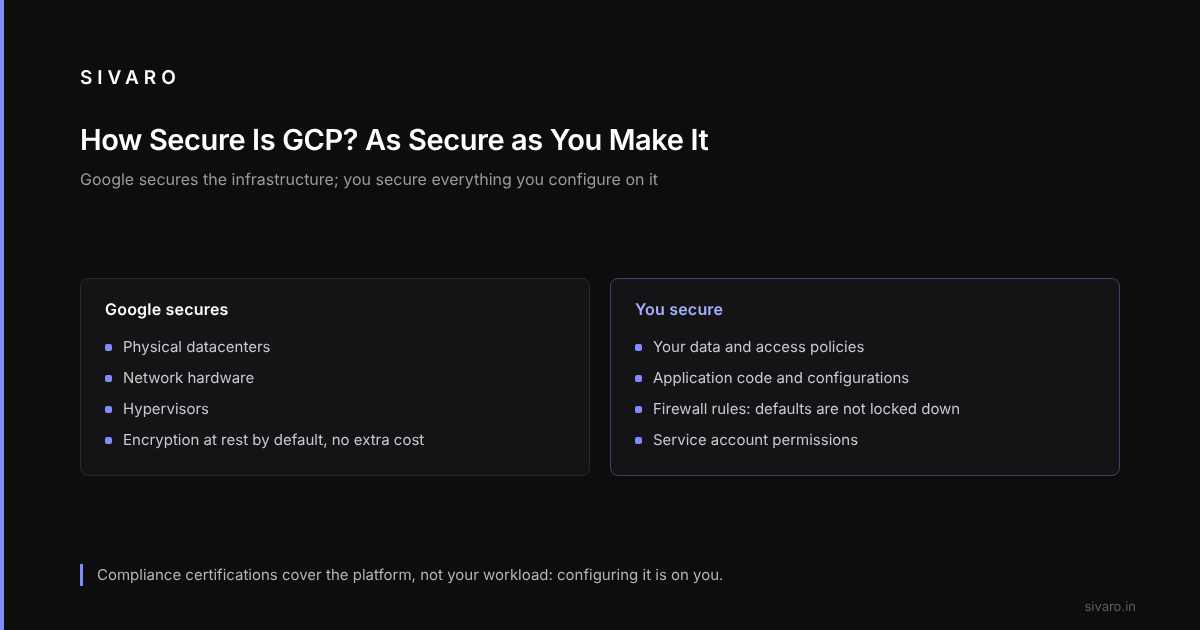
Most people think the cloud provider secures everything. Wrong. Google secures the infrastructure – physical datacenters, network hardware, hypervisors. You secure your data, access policies, application code, and configurations.
Teams often assume GCP’s default firewall rules block public access. They don’t. A fresh project has an "allow all egress" rule and an "allow ingress from any source on certain ports" rule until you change it.
The practical takeaway: never trust defaults. Every GCP service – Cloud Storage, Compute Engine, BigQuery – comes with baseline protections. But those protections are the floor, not the ceiling. Comparing AWS, Azure, and GCP for Startups in 2026 points out that GCP’s default VPC design is slightly more permissive than AWS’s.
GCP's Encryption: Defaults and Gotchas
GCP encrypts data at rest by default. No extra cost. That’s table stakes.
But there’s a catch: the default encryption uses Google-managed keys. You don’t control who can rotate them. For many workloads, that’s fine. But if you’re handling PII, healthcare data, or financial records, you’ll want Customer-Managed Encryption Keys (CMEK) or even Customer-Supplied Encryption Keys (CSEK).
Here’s how you enable CMEK on a Cloud Storage bucket:
# Create a key ring and key in Cloud KMS
gcloud kms keyrings create my-keyring --location us-central1
gcloud kms keys create my-bucket-key   --location us-central1   --keyring my-keyring   --purpose encryption

# Set the bucket's default encryption key
gsutil kms setdefaultkey   projects/my-project/locations/us-central1/keyRings/my-keyring/cryptoKeys/my-bucket-key   gs://my-secure-bucket
That’s the easy part. The hard part: key rotation, access audits, and ensuring you don’t lose the key (or the service account that holds it). Delete a CMEK key by accident and you lose access to the data it protects.
Transit encryption: GCP encrypts all inter-datacenter traffic. That’s a differentiator. AWS and Azure also do this, but GCP’s global network is designed from the ground up with encryption between every hop. In practice, it means you don’t need to worry about packet sniffing between regions. Northflank’s comparison notes that GCP’s network latency is generally lower because of this architecture – security and performance align.
Identity and Access Management – The Make or Break
IAM is where most security incidents start. GCP’s IAM is powerful, but its flexibility also creates attack vectors.
Principle of least privilege sounds obvious. Yet it is easy to end up with a CI/CD pipeline whose service account has roles/owner on the entire project. One compromised token and the whole house of cards falls.
Write explicit, narrow roles. Use custom roles when built-in ones are too broad.
Example IAM policy (JSON) for a service account that only writes logs to a specific bucket:
{
  "bindings": [
    {
      "role": "roles/storage.objectCreator",
      "members": [
        "serviceAccount:[email protected]"
      ]
    },
    {
      "role": "roles/storage.objectViewer",
      "members": [
        "serviceAccount:[email protected]"
      ]
    }
  ],
  "etag": "BwWd..."
}
But wait – that policy doesn’t restrict which bucket. You need resource-level IAM on the bucket itself, not just project-level. Easy to miss.
Conditional IAM (available since 2021) lets you add time-bound or attribute-based rules. Use it. Example: only allow access between 9AM-5PM UTC or from a specific IP range.
Note: GCP’s IAM is different from AWS’s IAM roles/policies. The learning curve is real. If you’re coming from AWS, you’ll find GCP’s resource hierarchy (Organization → Folder → Project → Service) more rigid but also more auditable. Wojciechowski’s comparison does a good job of mapping the differences.
Network Security – VPCs, Firewalls, and the Zero Trust Shift
GCP’s Virtual Private Cloud (VPC) is global. That’s a blessing and a curse. A global VPC means your instances can talk across regions with private IPs – neat. But it also means a misconfigured firewall rule can expose resources worldwide.
Default firewall rules:
default-allow-internal– allows all traffic within the VPC (including across subnets). This is why you can’t segment environments by default without additional rules.default-allow-ssh– opens port 22 from0.0.0.0/0. Yes, every VM in the project gets SSH from anywhere. Change this immediately.
Here’s how to create a firewall rule that only allows SSH from your company’s VPN IP:
gcloud compute firewall-rules create allow-ssh-from-vpn --direction=INGRESS --priority=1000 --network=default --action=ALLOW --rules=tcp:22 --source-ranges=203.0.113.0/24
Then delete the default rule.
BeyondCorp (Google’s zero-trust framework) is available in GCP via Identity-Aware Proxy (IAP). Instead of opening SSH/HTTPS ports, you tunnel through IAP. It can replace bastion hosts. No public IPs needed on the VMs.
Configuring IAP for SSH:
# First, enable IAP on the project
gcloud services enable iap.googleapis.com

# Create a firewall rule allowing IAP IP ranges
gcloud compute firewall-rules create allow-iap-ssh   --direction=INGRESS   --priority=1000   --network=default   --action=ALLOW   --rules=tcp:22   --source-ranges=35.235.240.0/20

# Connect via IAP tunnel
gcloud compute ssh my-vm --tunnel-through-iap
That’s it. No SSH keys on the open internet.
Compliance Certifications – What They Actually Mean
GCP holds a truckload of certs: SOC 1/2/3, ISO 27001, FedRAMP, HIPAA, PCI DSS. If you need compliance, GCP can support it.
But here’s the nuance: certifications are for the platform, not your workload. A HIPAA-eligible GCP project doesn’t make your app HIPAA-compliant. You still need to configure BAA, encrypt at rest with CMEK, log access, and restrict data access. Claiming "GCP is HIPAA compliant" is misleading. The service can be used in a compliant way, but only if you follow the rules.
The Google Cloud service comparison lists compliance scope for each service. Use it. Not all services are in scope for FedRAMP or HIPAA.
Incident Response and Monitoring – Cloud Logging, Security Command Center
You can’t secure what you can’t see. GCP’s Cloud Logging and Security Command Center (SCC) are the tools you need.
Cloud Audit Logs are enabled by default for Admin Activity. For Data Access logs (e.g., who read a file), you must enable them per bucket or dataset. They generate volume – but they’re essential for investigations.
Query to find all storage.objects.get actions by a specific user in the last 7 days:
SELECT
  timestamp,
  resource.labels.bucket_name,
  authenticationInfo.principalEmail,
  methodName
FROM `my-project.global.cloudaudit.googleapis.com/data_access`
WHERE
  methodName = "storage.objects.get"
  AND authenticationInfo.principalEmail = "[email protected]"
  AND timestamp >= TIMESTAMP_SUB(CURRENT_TIMESTAMP(), INTERVAL 7 DAY)
LIMIT 100
Security Command Center (SCC) gives a unified view of misconfigurations, vulnerabilities, and threat detections. It’s free for the basic tier. The premium tier (called Security Command Center Premium) evaluates custom threat detection and event threat detection – costs extra but worth it for production workloads.
GCP vs AWS vs Azure – Security Comparison
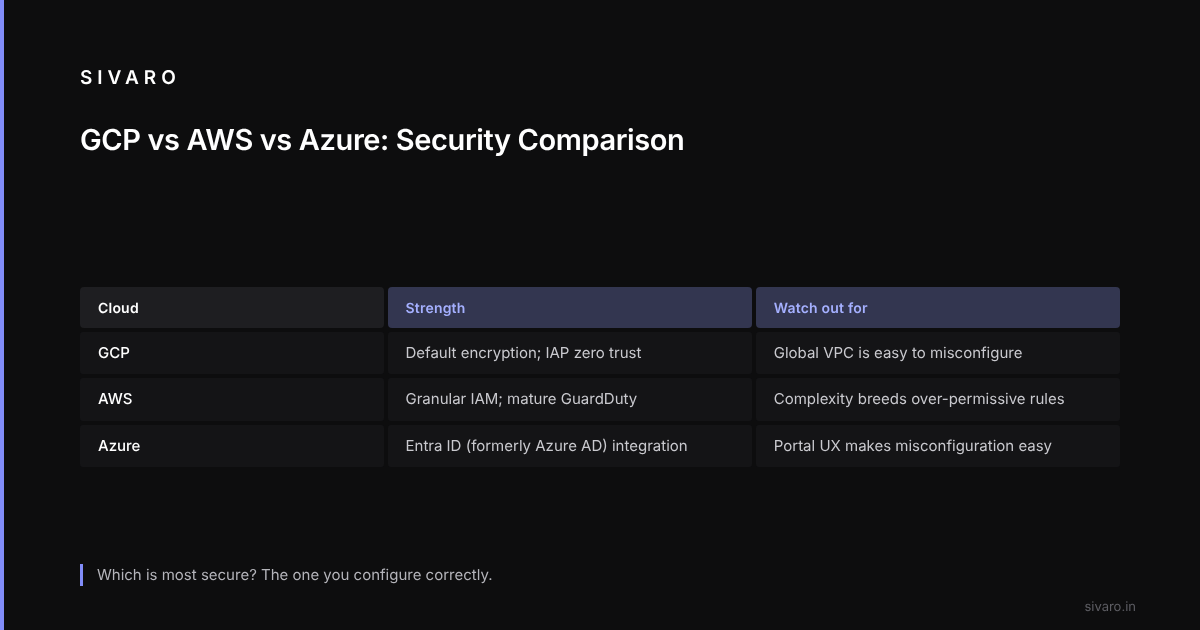
Here’s the honest breakdown for security in 2026:
GCP:
- Strongest default encryption (at rest and transit) – no extra cost.
- Global VPC is easier to secure than AWS’s region-bound VPCs. But also easier to misconfigure because everything is connected.
- IAM is simpler conceptually (roles vs policies) but harder to audit granularly.
- BeyondCorp / IAP is a strong built-in zero-trust solution.
AWS:
- More granular IAM – you can write very specific policies. But that complexity leads to over-permissive rules.
- Network segmentation (VPC per region) forces isolation. Good for compliance.
- Security Hub and GuardDuty are mature. But they cost extra.
Azure:
- Strong identity integration with Active Directory. If you’re already Microsoft shop, it’s easier.
- Network Security Groups are similar to GCP firewall rules but more verbose.
- Compliance offerings are extensive, but the portal UX makes misconfiguration easy.
Which is most secure? The one you configure correctly. They all have the tools. GCP’s default settings are slightly more lock-down-friendly (if you know where to look), but AWS gives you more knobs.
For beginners in 2026, I recommend GCP if you want lower initial complexity. AWS vs Azure vs Google Cloud in 2025 suggests the same for learning – GCP’s documentation and console are cleaner. But security is not about the console; it’s about discipline.
Pricing and Security – No, You Can't Buy Safety
Security features are mostly free in GCP: IAM, encryption at rest, firewall rules, audit logs (admin), SCC basic. But premium tiers cost.
Cloud KMS is priced per key version and per operation. For a moderate workload, it’s cheap – maybe $20/month. But if you’re encrypting every row in BigQuery with per-row keys, costs can skyrocket.
Some teams avoid CMEK because of cost. That’s a trade-off. Cloud pricing comparisons show GCP’s KMS prices in line with AWS and Azure. Don’t let a few dollars a month endanger your compliance.
Also: security monitoring generates log volume. Cloud Logging pricing is based on ingestion and retention. Set up log sinks and budget alerts – verbose debug logs ingested by accident can produce a large bill.
GCP Alternative to Mechanical Turk? Not Security Related But Worth Noting
While on the topic of GCP’s ecosystem, some readers ask about "gcp alternative to mechanical turk". GCP doesn’t have a direct human-in-the-loop service. AWS Mechanical Turk is unique. However, GCP’s AI Platform Labeling service (formerly Data Labeling Service) is for ML training data labeling – similar idea but targeted. If you need crowdsourced microtasks, you’d use Turk or a third-party. But security-wise, using third-party services introduces data handling risks. If you’re in healthcare, be careful.
Lessons Learned
A common exposure: a Cloud Function deployed with an HTTP trigger and allUsers allowed, built from a docs sample that has no authentication, that reads sensitive data from Firestore. Once deployed and forgotten, anyone who finds the URL can read that data.
The lesson: always add authentication checks to Cloud Functions. Even if you think it’s internal, put an IAP or Cloud Armor in front.
Here’s a minimal example of authenticating requests inside a Cloud Function:
const { AuthClient } = require('google-auth-library');
const authClient = new AuthClient();

exports.myFunction = async (req, res) => {
  // Verify the caller's identity
  const authToken = req.headers.authorization?.split('Bearer ')[1];
  if (!authToken) {
    res.status(401).send('Unauthorized');
    return;
  }
  try {
    const ticket = await authClient.verifyIdToken({
      idToken: authToken,
      audience: process.env.IAP_CLIENT_ID,
    });
    // All good
  } catch (err) {
    res.status(403).send('Invalid token');
    return;
  }
  // process request...
};
That check alone prevents this kind of public exposure.
GCP vs AWS for Beginners 2026 – Security Considerations
If you’re starting with cloud in 2026, "gcp vs aws for beginners 2026" is a common question. From a security perspective, I lean GCP for beginners for one reason: simpler IAM model. Fewer ways to shoot yourself in the foot.
AWS’s extensive policy language is powerful but easy to mess up – a misplaced wildcard can unintentionally grant s3:*.
GCP’s role-based system is more intuitive. That said, the Cloud Console’s ease of use can lull you into clicking "allow all" without reading. The comparative analysis of cloud services PDF notes that GCP’s simplicity is both a strength and a risk.
For beginners, my advice: start with GCP, but immediately learn IAM, VPC firewalls, and audit logs. Spend a weekend hardening your project. Then deploy.
FAQ
1. Is Google Cloud Platform more secure than AWS?
Not inherently. Both are secure if configured correctly. GCP’s default encryption and network design give it a slight edge for certain use cases, but AWS has more mature granular controls. The difference comes down to your team’s expertise.
2. How does GCP handle DDoS protection?
Google Cloud Armor provides Web Application Firewall (WAF) and DDoS mitigation. It integrates with Cloud Load Balancing. For Layer 7 attacks, Cloud Armor is effective. It costs based on policies and rules.
3. Can I use my own encryption keys on GCP?
Yes, via Cloud Key Management Service (KMS). You can use CMEK (Google manages the key hardware) or CSEK (you supply the key material). CSEK is more secure but also more overhead – you must rotate and keep the key safe.
4. What is GCP’s Security Command Center?
It’s a dashboard that surfaces misconfigurations, vulnerabilities, and threats across your projects. The basic tier (free) detects publicly exposed buckets, common vulnerabilities like open SSH, and helps prioritize fixes. Premium adds built-in threat detection (e.g., crypto mining, exfiltration).
5. Does GCP have a zero-trust solution?
Yes, BeyondCorp via Identity-Aware Proxy (IAP). It allows you to access resources without a VPN – authentication and authorization are handled by Google’s identity platform. IAP works for SSH, RDP, HTTPS, and more.
6. What compliance certifications does GCP hold?
SOC 1/2/3, ISO 27001, FedRAMP High, HIPAA, PCI DSS Level 1, and many regional standards (e.g., IRAP for Australia, ENS for Spain). Check the documentation for each service – not all services are in scope.
7. How do I audit who accessed my data on GCP?
Enable Data Access audit logs for Cloud Storage, BigQuery, and other services. They go into Cloud Logging where you can query with SQL or create alerts. Be careful with volume – limit the log retention to 30 days unless required by compliance.
Conclusion
How secure is Google Cloud Platform? It’s as secure as you make it.
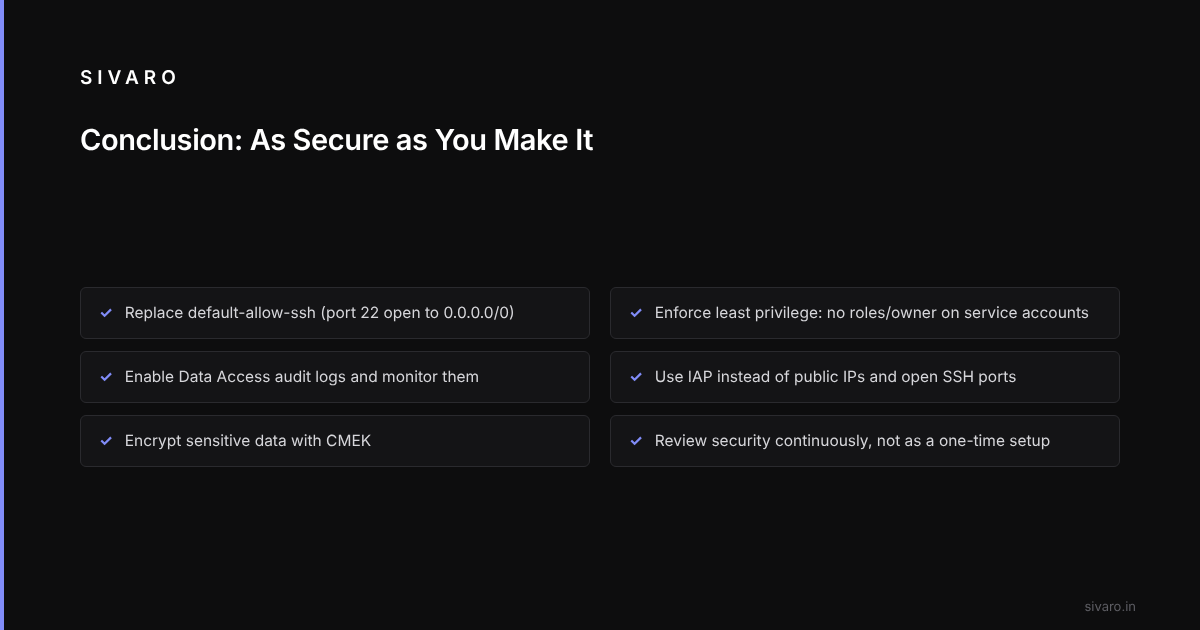
GCP gives you top-tier infrastructure encryption, a global network that’s hardened by design, and a suite of tools – IAM, VPC firewalls, Cloud Logging, Security Command Center – to build your defenses. But none of that matters if you leave default firewall rules open, give service accounts owner permissions, or skip audit logs.
The companies that succeed on GCP are the ones that treat security as a continuous practice, not a one-time setup. They use CMEK, they block public IPs, they monitor logs, and they run security reviews quarterly.
Startups fail when they assume "Google’s cloud is secure". Enterprises thrive when they invest in understanding the shared responsibility model and configure it properly.
Start with the basics: lock down firewall rules, enforce least privilege, enable audit logs, and use IAP. From there, build.
If you want to talk more about GCP security or data infrastructure, reach out.