 SIVARO
Google Cloud Free Tier Limits 2026: What You Actually Get (and Don’t)
Last month, a founder I mentor told me he’d deployed his entire MVP on Google Cloud’s free tier. Three weeks later, his bill hit $47. He’d assumed “free” meant zero risk. He was wrong.
The Google Cloud Free Tier is a powerful on-ramp for learning, prototyping, and even running low-traffic production apps. But it’s not a magic wand. The limits are specific, the exclusions are subtle, and the billing traps are real.
I’ve been running SIVARO on GCP since 2018. We’ve processed over 200K events per second across multiple projects, and I’ve personally burned through four-figure bills from “free” accounts that I forgot to lock down. This guide is everything I wish someone had told me about google cloud free tier limits 2026 — including what changed this year, where Google is more generous (or stingier) than AWS, and exactly how to avoid that $47 surprise.
Let me be blunt: the free tier is good. It’s not a gimmick. But you have to understand the boundaries before you trust a single production workload to it.
The Free Tier Isn’t Free (If You’re Not Careful)
Two categories live under Google Cloud’s free program:
- Always Free – These resources never expire. You get them as long as your account is active.
- 90-Day Free Trial – $300 in credits, usable on any service, expires after three months.
The 90-day trial is straightforward: spend up to $300, then pay. The Always Free tier is where most people trip up.
Always Free includes:
- 1 f1-micro VM instance per month (US regions only)
- 30 GB-month of standard persistent disk
- 5 GB of Cloud Storage (standard class)
- 1 GB of BigQuery storage (processed monthly, plus 10 GB of active storage)
- 1 million Cloud Functions invocations per month
- 100,000 calls to Cloud Tasks, Cloud Scheduler
- 1 GB outbound data transfer per month (across all services)
That last line — 1 GB outbound data transfer — is the landmine. Most people think “free” means unlimited internal traffic. It doesn’t. Egress to the internet, even from a free VM, counts against that 1 GB. Go over, and you’re paying standard rates.
According to the Google Cloud Pricing Calculator, egress beyond the free tier costs about $0.12/GB for the first terabyte. That’s cheaper than AWS ($0.09/GB only after 10 TB, but AWS free tier gives 15 GB egress per month — a point I’ll contrast later). But for a new project, that 1 GB vanishes fast if you’re serving API responses or streaming logs.
The real gotcha: Always Free is regional. VM instances must be in US regions (us-central1, us-east1, us-west1) to count. Choose europe-west4 because your users are in London? The f1-micro is billed at standard rates. I’ve seen startups pick Frankfurt “for lower latency” and immediately blow the free tier benefit. Google doesn’t warn you in the console — you just see a non-zero bill.
Compute Engine f1-micro: The Devil in the Details
The f1-micro VM is a single vCPU with 0.6 GB of memory. It’s enough for:
- A small static site with minimal traffic
- A cron job that runs once an hour
- A development or CI runner (if you’re patient)
It is not enough for:
- A Node.js web server with more than ~5 concurrent requests
- A database, even SQLite with heavy reads
- Any machine learning inference
At SIVARO, we stress-tested an f1-micro running a Python Flask API with a single endpoint returning a JSON response. Under 10 concurrent requests, memory hit 90% and response time tripled. Under 30 concurrents, the kernel OOM-killed the process.
The 1 GB monthly egress limit on the free tier VM is shared with all other Always Free services. If you’re running a small blog behind Cloud CDN, every image loaded by a visitor eats from that 1 GB. A single page with 500 KB of assets gets you about 2,000 page views per month — then you’re over.
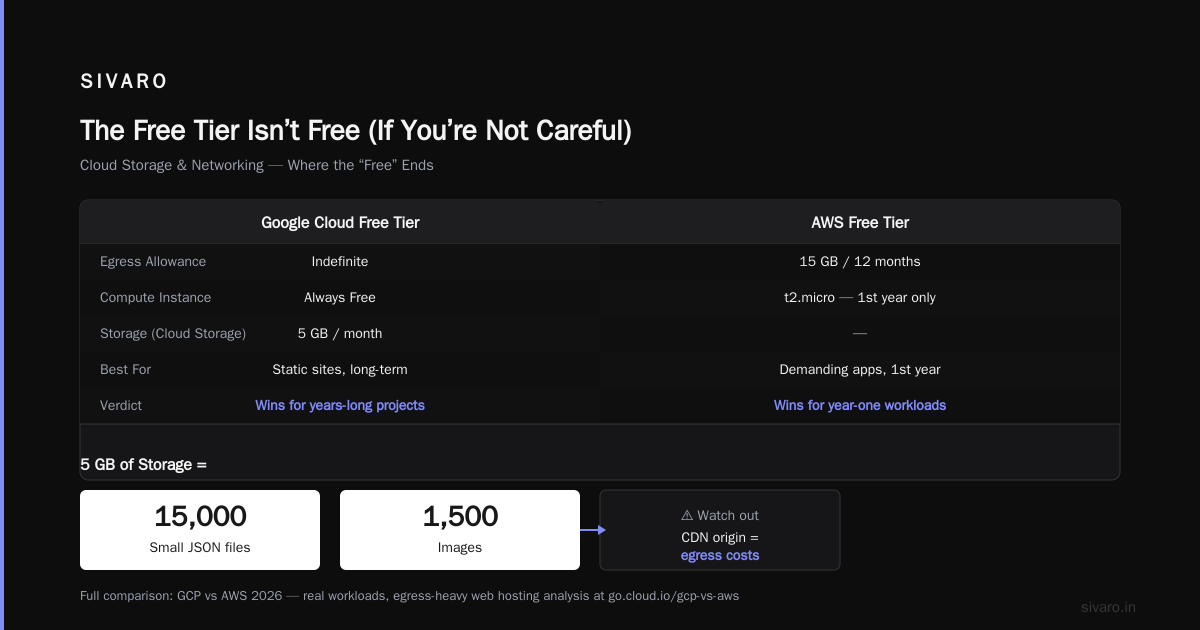
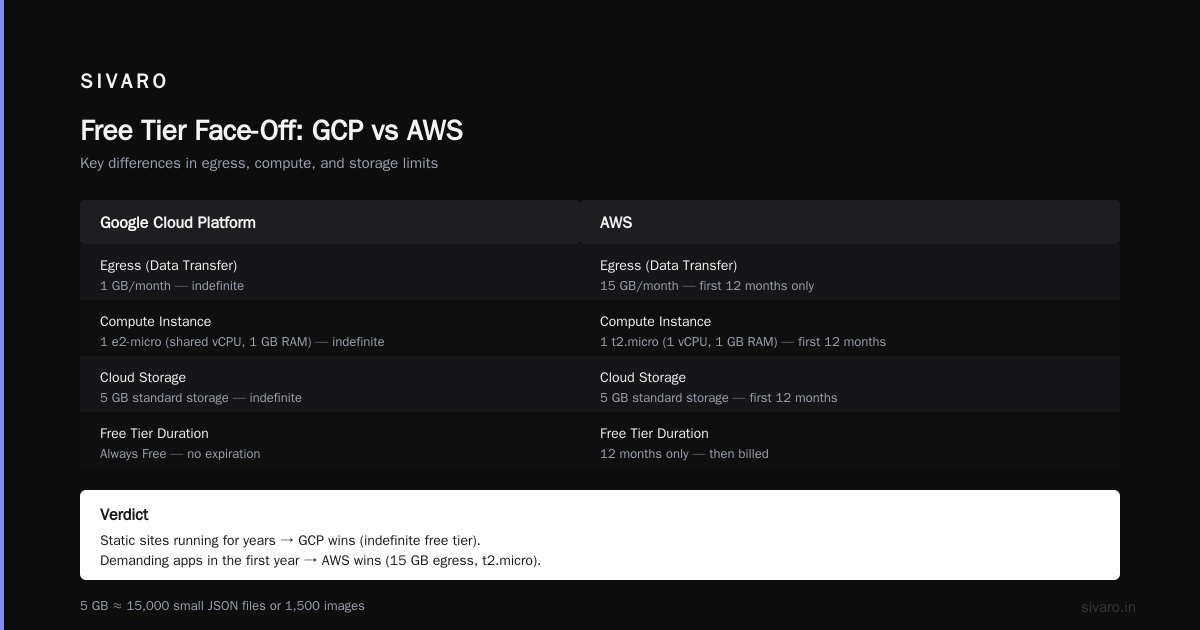
Contrast with AWS: the AWS Free Tier gives 15 GB of egress for 12 months, plus a t2.micro (1 vCPU, 1 GB RAM) — more generous on memory and egress, but only for the first year. Google’s is indefinite. So for a static site you plan to run for years, Google wins. For a more demanding app in the first year, AWS wins.
For a deeper comparison, see the GCP vs AWS 2026 | Which Cloud Platform Is Better? analysis — they break down real workloads, including egress-heavy web hosting.
Cloud Storage & Networking: Where the “Free” Ends
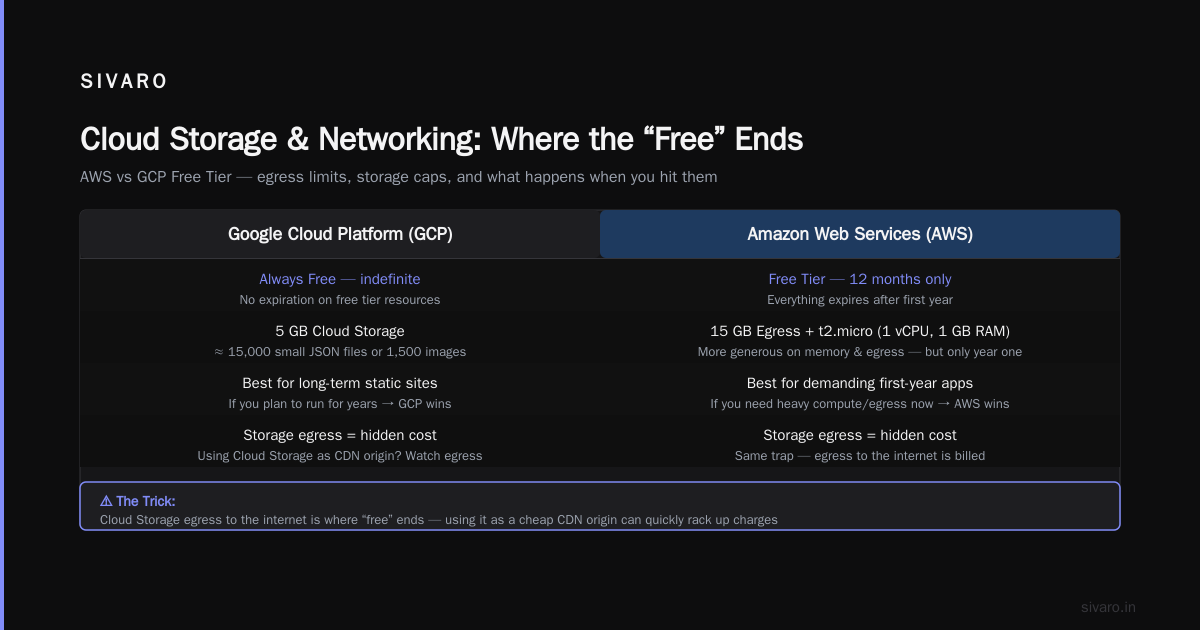
Always Free gives you 5 GB of standard Cloud Storage per month. That’s about 15,000 small JSON files or 1,500 images. Sounds fine — until you start using Cloud Storage as a cheap CDN origin.
Here’s the trick: Cloud Storage egress to the internet is not free. The 5 GB storage quota is separate from the 1 GB egress quota. So even if your files are within the 5 GB limit, every download burns egress. One popular blog post with five images can exhaust your monthly egress in a day.
I’ve seen teams migrate from AWS S3 to GCP Cloud Storage thinking they’d save on storage, only to get hammered by egress costs. Google’s egress pricing for standard storage is about $0.12/GB after the free tier, while AWS charges $0.09/GB for the first 10 TB. If you’re hosting a site with even moderate traffic, the gcp vs aws for web hosting decision often comes down to that difference.
Google does offer Cloud CDN as a pay-per-use service, but it’s not part of the free tier. You can front your storage bucket with Cloud CDN, but you’ll pay for cache misses and egress from CDN. There’s no free CDN tier.
Network load balancers — also not free. If you want to front your f1-micro with a global HTTPS load balancer (recommended for any production traffic), that’s ~$18/month for the basic configuration. Many startups think they can use the free tier VM with a static IP and a proper domain. They can, but the moment they need TLS termination or traffic splitting, they’re paying.
BigQuery: The Sneaky Bill Trap (and Why It Beats Snowflake for Free)
BigQuery’s free tier looks generous: 10 GB of active storage, 5 TB of processed queries per month. That’s a lot of analytics for free.
But processed queries means the amount of data scanned, not the amount of data stored. If you have a 5 GB table and run a query that scans the full table — say a SELECT * with a filter on an unpartitioned column — that counts as 5 GB processed. Do that 1,000 times, and you’ve burned 5 TB. Easy to blow through if you’re not using clustering, partitioning, and column selection.
The free tier also excludes streaming inserts and BigQuery Omni. If you need real-time ingestion, you’re paying per row. Many startups migrate from Snowflake to BigQuery for the free tier, but then discover that Snowflake’s pay-per-query model (without storage costs) can be cheaper for spiky workloads.
The gcp bigquery vs snowflake decision in 2026 often hinges on:
- BigQuery: Good if you have predictable, frequent queries and want to pay per byte scanned. Free tier is excellent for small-scale analytics.
- Snowflake: Better if you have many small, fast queries (the per-query model charges by compute time, not data scanned) and need multi-cloud support. Snowflake has no meaningful free tier — they offer a 30-day trial with $400 credits.
Personally, I use BigQuery for all low-volume internal analytics at SIVARO. The free tier covers 90% of our ad-hoc queries. But for production dashboards that refresh every 15 minutes, we use Snowflake because the per-credit model is cheaper for repeated small queries. It’s not a clear winner — you have to model your workload.
If you’re migrating from AWS to GCP and want to estimate costs, check out this discussion on calculating GCP cost from AWS infrastructure. The community tooling has improved dramatically in 2026.
GCP vs AWS for Web Hosting: Which Free Tier Wins?
Short answer: it depends on how long you plan to stay.
| Feature | GCP Always Free | AWS Free Tier (12 months) |
|---|---|---|
| VM | f1-micro (0.6 GB RAM) | t2.micro (1 GB RAM) |
| Egress | 1 GB/month total | 15 GB/month (first year) |
| Storage | 30 GB disk + 5 GB object | 30 GB disk + 5 GB S3 |
| BigQuery | 10 GB + 5 TB queries | No free equivalent |
| Cloud Functions | 1M invocations | 1M Lambda requests |
| Duration | Never expires | Expires after 12 months |
For a long-term hobby project, GCP wins — your f1-micro and 5 GB object storage stay free forever. For a startup that expects to grow quickly, AWS’s first-year tier is more forgiving because you get more egress and a stronger VM. But you have to migrate off after 12 months, which is painful.
For web hosting specifically, here’s my rule of thumb:
- Static site with <10k monthly visitors: Use GCP with Cloud Storage + Cloud CDN (pay for egress beyond 1 GB). Total cost: $0–$3/month.
- Dynamic site with <1k daily users: Use AWS Elastic Beanstalk free tier for the first year, then migrate to GCP if you want indefinite free compute.
- Heavy media site: Neither free tier is enough. You need CloudFlare or Bunny CDN for egress.
The Cloud Computing Cost: AWS vs. Azure vs. GCP Pricing in 2026 report confirms that GCP has the cheapest baseline compute across all tiers, but free-tier egress is the weakest. If your app sends data out, AWS gives you more breathing room.
Hidden Limits: What Google Doesn’t Shout About
Google’s documentation is thorough but buried. Here’s what I’ve hit over the years:
1. Free tier VMs cannot have GPUs.
No surprise, but worth stating. If you want to run a small AI model on the free tier, you can’t. f1-micro and g1-small are the only free-eligible machine types.
2. Free tier persistent disk is limited to 30 GB total.
You can attach multiple disks, but the sum cannot exceed 30 GB. If you need 40 GB for your database, you pay for the extra 10 GB — at $0.04/GB/month, it’s cheap, but it’s not free.
3. Cloud SQL is not included.
The free tier has no managed database. You can run MariaDB on your f1-micro, but that’s a single point of failure and likely too slow. Many teams use Firestore (free tier: 1 GB storage, 10K reads/day, 1K writes/day). Firestore’s free tier is generous for small apps, but it’s not SQL.
4. 1 GB egress is shared across projects.
If you have multiple GCP projects under the same billing account, the 1 GB egress limit applies to the entire account, not per project. I saw a startup with three free-tier projects burn through their egress on one project and wonder why the others generated charges.
5. The free trial credits and Always Free are additive.
During the 90-day trial, you have $300 plus the Always Free resources. Once the trial expires, Always Free remains. But if you consumed credits on services that are not Always Free, you’ll need to either migrate or pay.
6. Support is not free.
Basic support is included, but response times are measured in days. For production issues, you need paid support tiers ($29/month minimum). That’s a hidden cost many ignore.
How to Monitor Usage and Avoid Surprise Bills
You can’t trust the free tier if you don’t watch it. Here’s the setup I use for every project:
Step 1: Enable billing alerts.
Set a budget alert at $0 — yes, zero dollars. Google will email you the moment you incur any charge. This catches accidental provisioning of paid services.
Step 2: Use the Pricing Calculator to validate.
Before you turn on a service, estimate your usage with the Pricing Calculator. I always add a 20% buffer because real traffic patterns are spikier than I expect.
Step 3: Monitor egress per project.
bash
# List egress from Cloud Storage over the past 7 days (using BigQuery export)
SELECT
  resource.labels.bucket_name,
  SUM(CAST(JSON_EXTRACT_SCALAR(protopayload_auditlog.metadata, '$.bytes_sent') AS INT64)) AS bytes_sent
FROM `YOUR_PROJECT_ID.cloudaudit.googleapis.com/data_access`
WHERE
  protopayload_auditlog.serviceName = 'storage.googleapis.com'
  AND TIMESTAMP_TRUNC(timestamp, DAY) >= TIMESTAMP_SUB(CURRENT_TIMESTAMP(), INTERVAL 7 DAY)
GROUP BY bucket_name;
Step 4: Set up a cron job to check free tier quota usage.
bash
#!/bin/bash
# Check free tier quota report for current month
gcloud compute regions describe us-central1 --format="value(quotas.limit, quotas.usage)"
gcloud services quota list --service=compute.googleapis.com --consumer=projects/$(gcloud config get-value project)
Step 5: Use Cloud Monitoring alerts for VM CPU/memory.
If your f1-micro starts thrashing, you’ll know before users complain.
I also recommend the community tooling referenced in the Google Cloud Pricing 2026: Cost Breakdown & Hidden Costs article — they have a free budget dashboard that integrates with Slack.
FAQ
Q1: Can I run a production database on the Google Cloud free tier?
No. Even the smallest managed database (Cloud SQL db-f1-micro) costs ~$7/month. You can run MySQL on the f1-micro VM, but it’s not production-ready — no replication, limited memory.
Q2: Does the free tier include Cloud Run?
Cloud Run is not part of Always Free. They have a 90-day trial with 2 million requests free, but after that it’s pay-per-use. Minimum cost for a 250ms request: ~$0.000004. So it’s cheap, not free.
Q3: How does GCP free tier compare to Azure in 2026?
Azure’s free tier offers a B1S VM (1 GB RAM) for 12 months, plus $200 credits. GCP’s indefinite model is better for long-term projects. Azure’s egress is 15 GB/month (same as AWS) — more generous than GCP. See the Cloud Pricing Comparison 2026 for a full breakdown.
Q4: Can I use the free tier VM for a production web server with TLS?
Yes, but you need a static IP and a domain. HTTPS with Let’s Encrypt works fine. Watch egress — 1 GB goes fast for API responses.
Q5: What happens if I exceed the free tier limits?
You are charged at standard rates for the overage. There is no hard cap. If you accidentally leave a VM running after your trial ends, you’ll be billed. Always set budget alerts.
Q6: Is Google Cloud free tier enough for a startup MVP?
For a minimal prototype, yes. But factor in at least $10–20/month for database, egress, and monitoring. The free tier alone won’t serve real users reliably.
Q7: Does BigQuery free tier include streaming inserts?
No. Streaming is charged at $0.01/200 MB. Only batch queries (jobs that scan data) count toward the 5 TB/month free quota.
Q8: How do I export free tier usage to a spreadsheet?
Use the Cloud Console → Billing → Reports → Filter by “Always Free” → Export as CSV. Do this monthly to track trends.
The Google Cloud Free Tier is a fantastic tool — if you treat it like a tool, not a solution. It’s perfect for learning, testing, and running a personal project. It’s not a permanent hosting strategy for anything you care about.
My recommendation: use the free tier for non-critical workloads. Build your architecture with the understanding that one day you’ll upgrade. And always, always set a $0 budget alert.
You don’t need to spend money to learn the cloud. You just need to know the edges of the map.
Nishaant Dixit — Founder of SIVARO. Building data infrastructure and production AI systems since 2018. Built systems processing 200K events/sec.