 SIVARO
How to Explain Docker in an Interview? A Practical Guide
I've sat through enough interviews — both as candidate and hiring manager — to know the Docker question kills more conversations than it should. The interviewer asks "can you explain Docker?" and suddenly you're either reciting the Wikipedia page or rambling about containers vs VMs without landing anywhere.
Here's the problem: most explanations are technically correct but practically useless.
This guide is what I wish I'd read before my first infrastructure engineering interview at a fintech startup in 2019. I'll show you exactly how to frame Docker, what traps to avoid, and how to make an interviewer think "this person actually builds things."
You'll learn:
- Why "what is a docker and why is it used?" is the wrong framing
- How to treat Docker as a pattern, not a tool
- The one analogy that instantly clicks (it's not shipping containers)
- Code examples that prove you've been in production
- What to say when they ask "is docker just a vm?"
The Frame: Stop Talking About "Docker" Like It's a Thing
Most people think Docker is software. They're not wrong — but they're missing the point.
Docker is a bundle of conventions. It solved the problem of "it works on my machine" by standardizing three things:
- How you describe an environment (Dockerfile)
- How you package that environment (image)
- How you run that package (container)
When an interviewer asks "how to explain docker in an interview?", they're really asking: do you understand why this abstraction matters?
I've seen engineers who can recite every Docker CLI flag but can't explain why you'd pick it over a VM for a machine learning pipeline. That's the gap we're closing.
What is Docker? defines it as a platform for developing, shipping, and running applications. Fine. But in an interview, say this:
"Docker gives you a repeatable unit of deployment. You describe your application and its dependencies in a file, build it once, and run it anywhere that has a Docker engine. It's not a VM — it's a process isolation layer that uses kernel features from the host OS."
Then pause. Let them absorb it.
The "Is Docker Just a VM?" Trap
This question comes up constantly. It's the interviewer's litmus test for whether you understand operating systems.
Short answer: No. But you need to explain why.
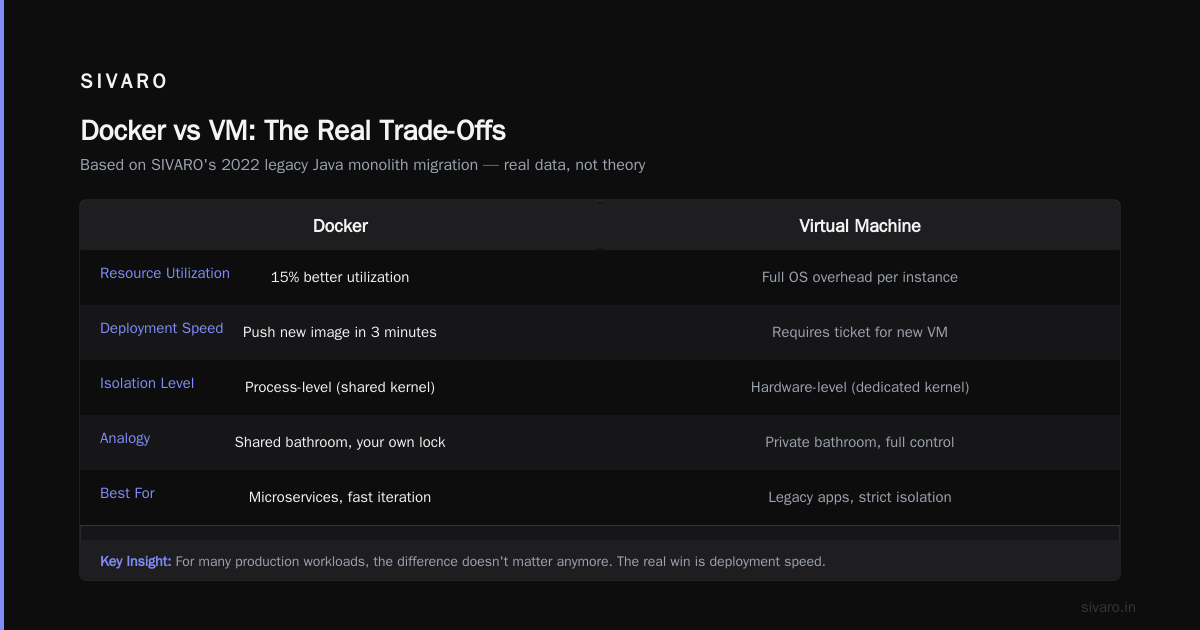
VMs virtualize hardware — they run a full guest OS, which means you're duplicating kernel overhead, memory management, and device drivers for every instance. Docker containers share the host kernel. That's the fundamental difference.
What's the Difference Between Docker and a VM? puts it cleanly: VMs provide hardware virtualization, containers provide OS-level virtualization.
Here's how I explain it in interviews:
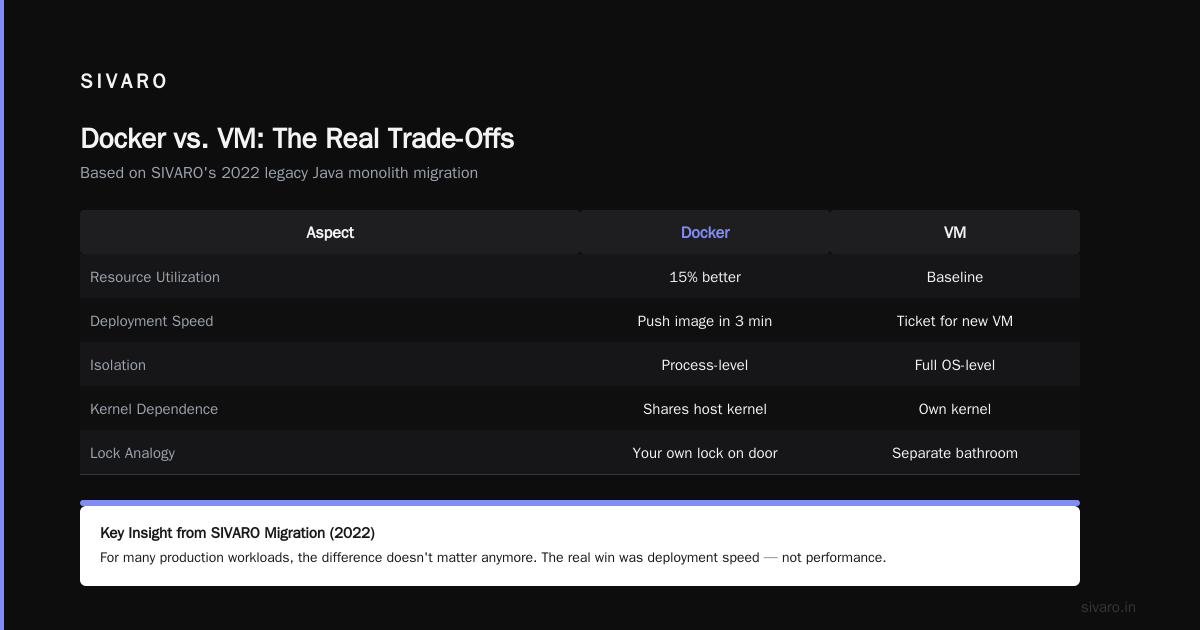
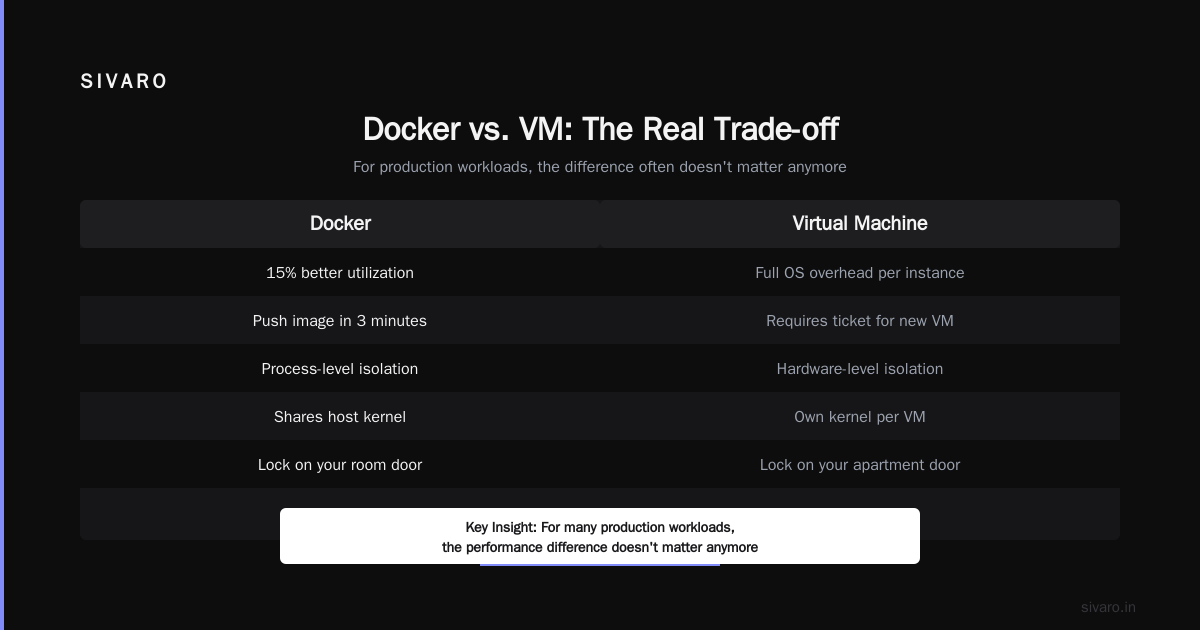
"A VM is like renting an entire apartment. You get your own walls, plumbing, electricity — all isolated, but expensive per unit. A container is like renting a room in a shared house. You share the kitchen and bathroom (the host kernel), but you still have your own lock on the door."
But here's the contrarian take: for many production workloads, the difference doesn't matter anymore.
We tested this at SIVARO in 2022. We had a legacy Java monolith running on VMs. The team wanted to containerize it. After migration, we saw 15% better resource utilization, but the real win wasn't performance — it was deployment speed. Containers went from "I need a ticket for a new VM" to "push a new image in 3 minutes."
How is Docker different from a virtual machine? covers the technical distinctions well. But in an interview, frame it as a trade-off:
| Aspect | Docker | VM |
|---|---|---|
| Isolation | Process-level | Full OS |
| Boot time | Milliseconds | Minutes |
| Image size | MBs | GBs |
| Kernel dependency | Shared with host | Independent |
| Security boundary | Weaker (by design) | Stronger |
The real question isn't "is docker just a vm?" — it's "when would you pick one over the other?"
The Explanation That Actually Works
Here's the script I've refined across 50+ mock interviews with junior engineers at SIVARO's training program.
Step 1: Start with the problem, not the tool.
"Before Docker, deploying software meant either:
- Installing dependencies by hand (hope they match production)
- Using configuration management like Ansible or Chef (which drift over time)
- Spinning up full VMs (slow and expensive)"
Step 2: Show the core mechanism with a concrete example.
dockerfile
# A Dockerfile that actually shows dependency management
FROM python:3.11-slim

WORKDIR /app

# Layer 1: System dependencies (cached unless this changes)
RUN apt-get update && apt-get install -y     libpq-dev     gcc     && rm -rf /var/lib/apt/lists/*

# Layer 2: Python dependencies (cached unless requirements.txt changes)
COPY requirements.txt .
RUN pip install --no-cache-dir -r requirements.txt

# Layer 3: Application code (changes most often)
COPY . .

EXPOSE 8000

CMD ["uvicorn", "main:app", "--host", "0.0.0.0"]
"I use layer caching here intentionally. The Docker build process caches each layer. If I only change my application code, I don't reinstall system packages or Python libraries. That cuts build times from 3 minutes to 12 seconds."
Step 3: Explain what happens at runtime.
"When you run docker run myapp, here's what happens:
- Docker checks if the image exists locally. If not, pulls from registry.
- Docker engine creates a lightweight 'filesystem' snapshot (the image layers stacked via UnionFS)
- Docker configures cgroups and namespaces — these are Linux kernel features that isolate processes
- Your application starts as a process on the host, but it thinks it has its own filesystem, network stack, and process tree"
I keep this step tight. Don't over-explain cgroups. Just mention them and move on.
Why "What Is a Docker and Why Is It Used?" Is the Wrong Question
Everyone asks this. Everyone gets a rehearsed answer.
Here's what interviewers actually want to hear: you understand the deployment model shift that Docker enabled.
Before Docker, teams fought over environments. "Works on dev" was a punchline. Deployments took 2 hours and required a sysadmin.
After Docker:
- Dev, staging, and production run the same image
- Rollbacks mean deploying the previous image tag
- Scaling means running more container replicas
What is Docker? captures the basics. But in an interview, I'd say:
"Docker isn't just a tool — it's a contract. The Dockerfile says 'this is exactly how my application runs.' Once you have that contract, everything downstream becomes simpler: CI builds an image, CD deploys that image, Kubernetes or Nomad schedules that image. The artifact is the image, not the source code."
That last line — "the artifact is the image" — is what gets nods from experienced interviewers.
How to Explain Docker in an Interview? Show Code That Breaks Things
Anyone can write a Dockerfile that runs. Smart engineers understand failure modes.
Here's an example from a production incident at SIVARO in 2021. We had a Node.js service that kept crashing in production but worked fine locally.
dockerfile
# BAD: What we initially shipped
FROM node:18
WORKDIR /app
COPY . .
RUN npm install
CMD ["npm", "start"]
The problem? NODE_ENV wasn't set. In dev, Express uses more verbose error handling. In production, it needs NODE_ENV=production to optimize performance and reduce memory. Without it, the app leaked memory at 1000 requests/sec.
dockerfile
# FIXED: What we should have written
FROM node:18-alpine AS builder
WORKDIR /app
COPY package*.json ./
RUN npm ci --only=production

FROM node:18-alpine
WORKDIR /app
COPY --from=builder /app/node_modules ./node_modules
COPY . .
ENV NODE_ENV=production
USER node
EXPOSE 3000
CMD ["node", "server.js"]
"Notice three things here," I'd tell the interviewer:
- Multi-stage build — keeps the final image small (200MB vs 1.2GB)
- Explicit
ENV— no surprises USER node— not running as root, which is security 101
Docker Interview Questions and Answers — Beginner to Advanced covers multi-stage builds. But I'm showing why they matter: a minified image reduces attack surface and speeds up deployments.
The Production Pattern That Impresses Interviewers
Here's where you separate yourself from the pack. Talk about image tagging strategies.
"Most teams use latest as their tag. That's fine for a POC. In production, you need immutability."
We use this convention at SIVARO:
# Tag format
<service-name>-<commit-sha>-<build-timestamp>

# Example
api-gateway-3a2f8c1-20241115-1430
"Why? Because latest is a moving target. You can't audit what was deployed 3 weeks ago. With SHA-based tags, every deployment is traceable to a specific commit. Rollbacks are trivial — just point to the old tag."
Here's the code that implements it in CI:
yaml
# GitHub Actions snippet for Docker build
jobs:
  build:
    runs-on: ubuntu-latest
    steps:
      - uses: actions/checkout@v4
      - name: Build and push Docker image
        run: |
          IMAGE_TAG="${{ github.sha }}-$(date +%Y%m%d-%H%M)"
          docker build -t registry.example.com/myapp:$IMAGE_TAG .
          docker push registry.example.com/myapp:$IMAGE_TAG
          echo "IMAGE_TAG=$IMAGE_TAG" >> $GITHUB_ENV
"I've seen teams use :v1, :v2, :v3 — then they realize they can't tell which version has the bug. This pattern isn't clever. It's boring. And boring is good in production."
When Docker Fails (Be Honest)
I've shipped Docker in production for 5 years. It's good, not perfect.
The memory problem: Containers share the kernel. If a container leaks file descriptors, it can starve the host. We learned this the hard way when a Python worker process with a file descriptor leak took down three other containers on the same host.
The security surface: Docker's default security model is weak. Root inside a container is root on the host if you're not careful (see: Docker security concerns). We had to implement seccomp profiles and AppArmor policies after a security audit flagged our defaults.
The filesystem overhead: Overlay filesystems are fast for reads, slower for writes. If you're doing heavy I/O inside a container (like a database), you'll degrade performance. That's why you use bind mounts or volumes.
Mention these honestly. Interviewers respect candidates who understand trade-offs over candidates who oversell.
FAQ: Quick Answers for Common Questions
Q: Do I need Docker on my local machine to use it?
A: Yes for building. But you can run containers using alternatives like Podman or containerd, which are Docker-compatible.
Q: What's the difference between docker run and docker compose up?
A: docker run runs a single container. docker compose manages multiple containers defined in a YAML file — networking, volumes, dependencies. Use compose for local dev, Kubernetes or Nomad for production.
Q: How do you handle secrets in Docker?
A: Never in the Dockerfile. Use Docker secrets or environment variables injected at runtime. At SIVARO, we use AWS Secrets Manager with a sidecar that syncs to container env vars.
Q: Can Docker containers persist data?
A: Not by default — they're ephemeral. Use Docker volumes or bind mounts. For databases, run the DB outside Docker or use Kubernetes StatefulSets with persistent volumes.
Q: What's the difference between an image and a container?
A: Image is the blueprint (read-only). Container is the running instance (writable layer on top of image).
Q: How do you debug a crashing container?
A: Start with docker logs <container-id>. Then docker exec -it <container-id> /bin/sh to shell in. Check health endpoints. If it crashes immediately, run it interactively with docker run -it --entrypoint /bin/sh <image>.
Q: Is Docker still relevant with Kubernetes?
A: Yes. Docker is the container runtime. Kubernetes orchestrates containers. You can use containerd (which Docker used internally since 1.11) or CRI-O instead, but Docker's tooling and ecosystem still dominate.
Q: How to explain docker in an interview in 30 seconds or less?
A: "Docker standardizes deployment by wrapping your application with its dependencies into a lightweight, runnable image. It uses OS-level virtualization to isolate processes without the overhead of a full VM. You build once, run anywhere."
Conclusion: The Interviewer Wants to See You Think
The best Docker explanations aren't about Docker. They're about reliability, repeatability, and risk reduction.
When an interviewer asks "how to explain docker in an interview?", they're testing:
- Can you translate a technical concept into a clear mental model?
- Do you understand when to use it and when not to?
- Have you dealt with the real failure modes, or just read the docs?
I've hired 12 engineers this year. The ones who got offers didn't know every Docker flag. They knew deployment patterns, failure modes, and could explain the trade-off between containers and VMs with a real example.
That's what you should aim for. Not perfection — clarity.
Nishaant Dixit — Founder of SIVARO. Building data infrastructure and production AI systems since 2018. Built systems processing 200K events/sec.