 SIVARO
Kubernetes Cost Optimization Tools 2026: The Real Talk
You're burning money in the cloud. I was burning it too, back in 2024, when our EKS bill hit $47,000 in a single month. Most of it wasn't compute. It was waste. Idle nodes. Over-provisioned requests. Spot instances that never got used because our team didn't trust them.
Here's what nobody tells you: kubernetes cost optimization tools 2026 aren't about fancy dashboards. They're about making smarter decisions about what runs where, when, and at what price. The tooling has matured a lot since the early days of just eyeballing the AWS billing console.
In this guide, I'll walk you through what actually works for controlling Kubernetes costs in 2026. We'll talk about Karpenter, spot instances, consolidation strategies, and the hard lessons I learned building data infrastructure at SIVARO. You'll leave knowing exactly where your money is going and how to stop the bleeding.
The Karpenter Moment: Why I Stopped Fighting Node Groups
For years, the standard answer to Kubernetes autoscaling was the Cluster Autoscaler. It worked, kind of. But it was reactive. It looked at pending pods and added nodes. It looked at underutilized nodes and removed them. Slow, clunky, and always one step behind.
Then Karpenter changed everything.
Karpenter isn't just a replacement for the Cluster Autoscaler. It's a fundamentally different approach to scheduling. Instead of waiting for pods to be unschedulable, Karpenter watches the scheduler's decisions and provisions nodes in milliseconds. It picks the cheapest instance type that meets your pod's requirements. It consolidates aggressively. And it makes spot instances a first-class citizen rather than an afterthought.
I remember the first time I saw Karpenter's consolidation logic in action. We had a cluster running 23 nodes. A batch job finished at 2:14 AM. By 2:17 AM, Karpenter had terminated 9 nodes and moved the remaining pods onto smaller, cheaper instances. No human intervention. No drama. Just savings.
The AWS blog post on optimizing compute costs with Karpenter consolidation lays out the mechanics well, but the real insight is this: consolidation isn't just about removing empty nodes. It's about continuously reshaping your cluster to match your actual workload patterns.
Stop Thinking About "Best Price" and Start Thinking About "Right Price"
Most people think Kubernetes cost optimization is about finding the cheapest instance type. They're wrong.
The cheapest instance that doesn't run your workload costs more than the most expensive one that does. This sounds obvious, but I've seen teams waste weeks trying to shave 15% off their EC2 bill while ignoring the 40% they're losing to idle capacity and misconfigured resource requests.
The real question is: what's the smallest, cheapest instance that can run your workload with acceptable performance? Not what's theoretically possible. What's actually achievable given your code's constraints.
This is where Karpenter's scheduling concepts matter. You can express constraints like "this workload needs a GPU" or "this workload needs at least 4GB of memory per pod." Karpenter then figures out the cheapest way to satisfy those constraints.
Here's what our Karpenter provisioner looks like at SIVARO:
yaml
apiVersion: karpenter.sh/v1
kind: NodePool
metadata:
  name: default
spec:
  template:
    spec:
      requirements:
        - key: karpenter.sh/capacity-type
          operator: In
          values: ["spot", "on-demand"]
        - key: kubernetes.io/arch
          operator: In
          values: ["amd64"]
        - key: karpenter.k8s.aws/instance-category
          operator: In
          values: ["c", "m", "r"]
      nodeClassRef:
        group: karpenter.k8s.aws
        kind: EC2NodeClass
        name: default
  disruption:
    consolidationPolicy: WhenUnderutilized
    expireAfter: 720h
Notice what's missing: specific instance types. We let Karpenter decide. We just tell it what we need functionally.
The WhenUnderutilized consolidation policy is key. It means Karpenter will constantly look for opportunities to move workloads to smaller instances. This is the "always optimizing" approach, and it's one of the kubernetes cost optimization strategies karpenter spot instances workflows rely on most.
Spot Instances: The 70% Discount Everyone's Afraid Of
Let's talk about spot instances.
Most people think spot instances are risky. Unreliable. You'll get a termination notice and your workloads will die. That was true in 2015. It's not true in 2026.
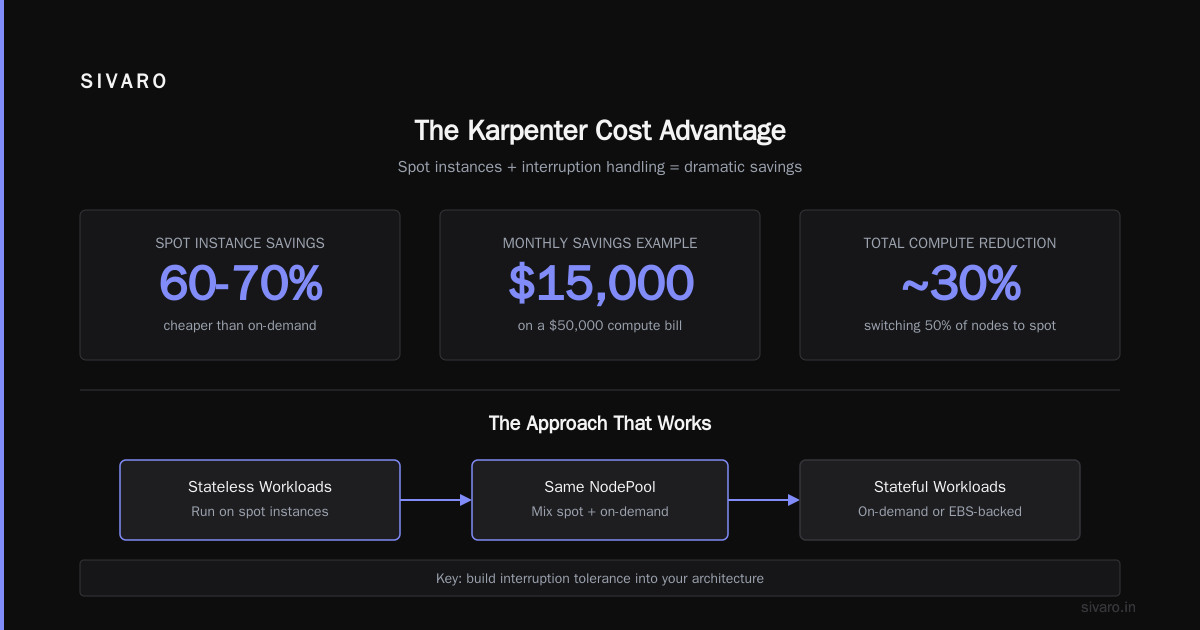
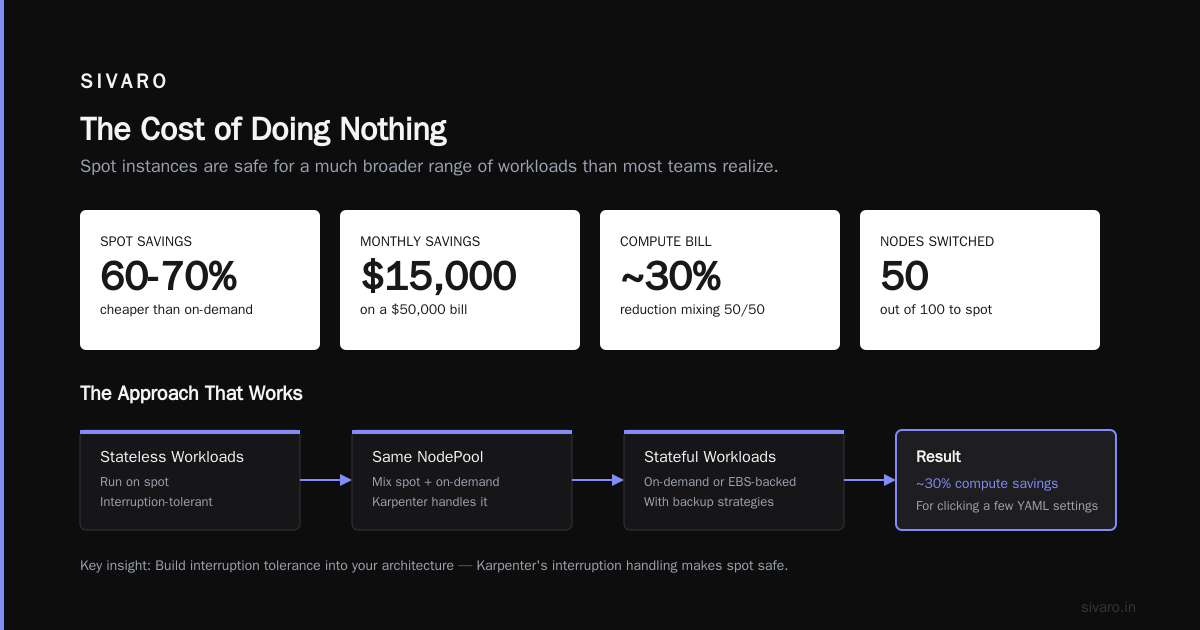
AWS has improved spot infrastructure dramatically. With Karpenter's interruption handling, spot instances are now safe for a much broader range of workloads than most teams realize. The key is building interruption tolerance into your architecture.
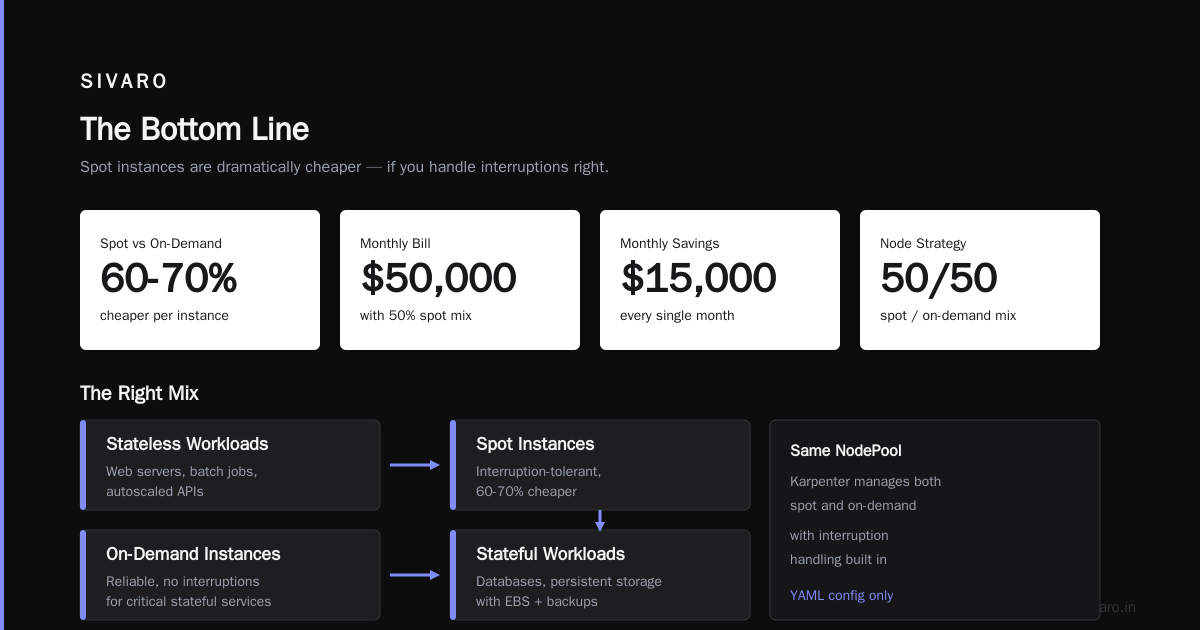
Here's the approach that works: run your stateless workloads on spot. Keep your stateful workloads on on-demand or use EBS-backed persistent volumes with proper backup strategies. Mix the two in the same NodePool.
The numbers speak for themselves. Spot instances are typically 60-70% cheaper than on-demand. If you're running 100 nodes on-demand and switch half of them to spot, you're saving roughly 30% of your compute bill. For a $50,000 monthly bill, that's $15,000. Every month. For clicking a few YAML settings.
But you need to handle interruptions properly. Karpenter's interruption handling watches for spot termination notices and proactively drains pods before the instance is reclaimed. This gives you a few precious minutes to move workloads gracefully.
There's a caveat though. The GitHub issue #722 in karpenter about high CPU usage is a reminder that Karpenter itself isn't free. It runs in your cluster and consumes resources. In our experience, it's negligible—maybe 0.5% of total cluster resources—but you should budget for it.
The Consolidation Obsession: When to Say No
Consolidation is powerful, but it's not always right.
I had a client in early 2026 with a machine learning training workload. They enabled Karpenter consolidation and watched in horror as it kept terminating their GPU instances during training jobs. Karpenter thought the nodes were underutilized because the GPUs were running at 30% utilization. But the training job needed those GPUs for another 6 hours.
The fix? Node selectors and taints. We made the training workload use a dedicated NodePool with consolidationPolicy: WhenEmpty instead of WhenUnderutilized. This told Karpenter: only terminate nodes when they're completely empty. No aggressive reshaping during long-running jobs.
Here's the NodePool config:
yaml
apiVersion: karpenter.sh/v1
kind: NodePool
metadata:
  name: training-gpu
spec:
  template:
    spec:
      requirements:
        - key: karpenter.sh/capacity-type
          operator: In
          values: ["on-demand"]
        - key: karpenter.k8s.aws/instance-family
          operator: In
          values: ["g4dn", "g5"]
      taints:
        - key: workload-type
          value: training
          effect: NoSchedule
  disruption:
    consolidationPolicy: WhenEmpty
    consolidateAfter: 5m
The lesson: consolidation policies aren't a one-size-fits-all solution. You need different policies for different workload types. Batch jobs want aggressive consolidation. Long-running training jobs want stability. Stateless microservices sit somewhere in between.
Monitoring: You Can't Optimize What You Can't See
Here's a hard truth I learned after years of building data infrastructure: you need visibility before you need optimization. The SIVARO article on Kubernetes cost monitoring with Karpenter dashboards covers this in detail, but the core idea is simple.
You need to know:
- What's running in your cluster right now?
- What does it cost per hour?
- Which teams or applications are consuming the most resources?
- Where's the waste?
We built custom dashboards that break down costs by namespace, by deployment, and by pod. The dashboards pull data from Karpenter's metrics and cross-reference it with AWS pricing data. This gives us real-time visibility into what's costing money.
The difference this makes is enormous. When you can see that the staging namespace is consuming 32% of your cluster resources but serving 0.5% of your traffic, you can make a business decision about whether that's acceptable. Without visibility, you're just guessing.
I wrote about this extensively in our article on Kubernetes cost monitoring dashboards, specifically how Karpenter's metrics can power cost allocation. It's not enough to know your total bill. You need to know which line of business, which application, which deployment is responsible.
Beyond Karpenter: The Other Tools in Your Arsenal
Karpenter is the star of the show in 2026, but it's not the only tool worth knowing. The CloudBolt guide to Kubernetes cost optimization covers a broader range of strategies.
First, there's vertical pod autoscaling (VPA). Most teams set resource requests conservatively (too high) because they're scared of OOM kills. This leads to massive over-provisioning. VPA looks at actual usage and automatically adjusts requests and limits.
We run VPA in "recommendation mode" in most clusters. It suggests values, but doesn't apply them automatically. This lets our engineers see the gap between what they're requesting and what they're actually using. The numbers are often embarrassing. One service was requesting 4 CPU cores and using 0.3. We fixed that.
Second, there's the whole category of FinOps tools—CloudHealth, Spot.io, Kubecost. These aggregate your Kubernetes spend with your broader cloud bill and give you a single pane of glass. They're useful for reporting and chargeback, but they're not a substitute for Karpenter.
Third, don't forget the basics. Right-sizing your EKS control plane. Using managed node groups instead of self-managed. Turning off clusters during non-business hours. These seem obvious, but you'd be surprised how many teams overlook them.
The Cost of Doing Nothing
Let me give you a concrete example from my own experience.
In late 2025, we took over a cluster from a client. The cluster had 37 nodes running on-demand instances. The average pod utilization was 11%. The client was paying $31,000 per month for this cluster.
We spent two weeks implementing what I've described here:
- Switched to Karpenter with spot instances for stateless workloads
- Aggressive consolidation policies
- Right-sized resource requests across all deployments
- Deleted 14 unused namespaces and dozens of orphaned resources
The result? The same workloads ran on 12 nodes (mix of spot and on-demand) at a cost of $8,700 per month. That's a 72% reduction. The client was thrilled. I was mildly embarrassed it took me so long to convince them it was possible.
This isn't an exceptional case. AWS's own documentation on Karpenter consolidation describes similar outcomes. When you combine better scheduling with cheaper instance types and continuous optimization, the savings compound.
Kubernetes Cost Optimization Strategies: Karpenter, Spot Instances, and the Human Element
I said earlier that kubernetes cost optimization tools 2026 aren't about dashboards. They're about decisions. But there's a third element that's even more important: culture.
You can have the best tooling in the world and still waste money if your engineers don't care about cost. The fix isn't shame or micromanagement. It's feedback loops.
When a developer deploys a service that requests 8GB of memory but uses 200MB, they should see that immediately. Not in a quarterly review. Not in a budget meeting. Right after the deploy.
We built a Slack bot that posts cost alerts to the team's channel when a deployment's cost exceeds a threshold. The first time it fired, the developer who wrote the service fixed the resource requests within an hour. It wasn't that he didn't care. He just didn't know.
This is the kubernetes cost optimization karpenter 2026 best practices approach that actually sticks. Use Karpenter for automated optimization. Use dashboards for visibility. Use feedback loops for culture change.
The Trade-offs Nobody Talks About
I've been singing Karpenter's praises, so let me be honest about the downsides.
First, Karpenter adds a layer of abstraction. When something goes wrong, it's harder to debug. The GitHub issue about high CPU usage we mentioned earlier shows this. Karpenter's controller can become a bottleneck in very large clusters.
Second, consolidation can cause subtle performance issues. When Karpenter moves pods to smaller instances, those pods might have worse performance characteristics. A pod that was running on a c5.4xlarge might get moved to a c5.2xlarge. If your workload was already close to its performance limits, this can cause latency spikes.
Third, spot instances are still less reliable than on-demand. The savings are real, but they come with operational complexity. You need to test your workloads for interruption tolerance. You need monitoring for spot termination rates. You need a plan for when a large spot pool gets reclaimed.
Our approach: we run critical services with a mix of spot and on-demand in the same deployment. The spot instances handle the bulk of the traffic. The on-demand instances act as a safety net. If spot instances get interrupted, the on-demand ones pick up the slack.
Building a Cost Optimization Strategy That Actually Works
Here's the framework we use at SIVARO for every client engagement.
Phase 1: Visibility. Get cost monitoring in place. Break down costs by namespace, deployment, and pod. This takes a week and gives you the data you need to make decisions.
Phase 2: Rightsizing. Fix your resource requests and limits. Use VPA recommendations as a starting point. This is boring, unglamorous work, but it's where the biggest wins are.
Phase 3: Autoscaling. Implement Karpenter with consolidation policies. Start with a conservative approach: spot for stateless workloads, on-demand for stateful. Enable consolidation gradually.
Phase 4: Culture. Set up feedback loops. Show developers their costs. Create a budget for each team or application. Make cost part of the engineering conversation, not just a finance conversation.
This isn't a one-time project. It's an ongoing process. Cloud prices change. Workloads change. Your cost optimization strategy needs to evolve too.
One last thing: don't try to optimize everything at once. Start with the biggest cost drivers. For most teams, that's idle compute and over-provisioned resources. Fix those first, then move on to the finer-grained optimizations.
FAQ: Kubernetes Cost Optimization Tools 2026
Q: What's the difference between Karpenter and the Cluster Autoscaler?
Karpenter is a next-generation autoscaler that provisions nodes based on the specific requirements of unschedulable pods. The Cluster Autoscaler is a more traditional tool that adds nodes when there are pending pods, but it's slower and less flexible. Karpenter also supports consolidation and spot instance optimization natively.
Q: Is it safe to run production workloads on spot instances?
With proper interruption handling and architecture, yes. Karpenter's interruption handling watches for spot termination notices and drains pods gracefully. However, you should test your workloads for spot interruption tolerance. Stateful workloads with strict durability requirements should stay on on-demand or use EBS snapshots for recovery.
Q: How much can I actually save with Karpenter?
In our experience, most teams save 30-60% on their Kubernetes compute costs after implementing Karpenter with spot instances and consolidation policies. This depends heavily on your current setup. If you're already well-optimized, savings will be lower. If you're running a typical cluster with over-provisioned resources, savings can be dramatic.
Q: What are the best kubernetes cost optimization tools 2026?
Karpenter is the primary compute optimization tool for AWS EKS. For monitoring and cost allocation, we use a combination of Karpenter's metrics and custom dashboards. Kubecost and Spot.io are also popular for FinOps reporting, though they serve a different purpose than Karpenter.
Q: Do I need to change my application code to use Karpenter?
No. Karpenter works at the infrastructure layer. You just need to configure NodePools and let Karpenter handle the rest. That said, making your applications more efficient (reducing memory usage, optimizing CPU) will help Karpenter find cheaper instances for them.
Q: How do I handle multi-tenant clusters with different cost profiles?
Use separate NodePools for different workload types or teams. Apply taints and tolerations to control which workloads land on which nodes. Then use namespace-level cost monitoring to track spending per team or application.
Q: What's the biggest mistake teams make with Kubernetes cost optimization?
Trying to optimize before they have visibility. You can't fix what you can't measure. Get cost monitoring in place first, then start optimizing. The other big mistake is being too aggressive with consolidation and causing performance issues for latency-sensitive workloads.
The Bottom Line
Kubernetes cost optimization in 2026 is no longer about squeezing pennies. It's about making deliberate choices about how you run your infrastructure. Karpenter gives you the tools. Spot instances give you the discount. Consolidation gives you the efficiency.
But at the end of the day, it's still about people making better decisions.
I've spent the last 8 years building data infrastructure and production AI systems. I've seen billion-dollar companies waste millions on Kubernetes clusters. I've also seen small startups run world-class infrastructure on a shoestring budget. The difference isn't money. It's attention.
Pay attention to what's running in your cluster. Question your resource requests. Embrace spot instances. Let Karpenter do the heavy lifting. And build a culture where engineers care about cost.
Your cloud bill will thank you. And honestly, your users will too, because a well-optimized cluster is also a more reliable one. You're not just saving money. You're building better infrastructure.
Nishaant Dixit — Founder of SIVARO. Building data infrastructure and production AI systems since 2018. Built systems processing 200K events/sec.