 SIVARO

What Does an AI Agent Do Exactly?
Let me tell you about the first time I thought I understood AI agents.
It was January 2023. One of our clients at SIVARO — a mid-size logistics company — asked me to build them an "AI agent" to handle shipping exceptions. I spent two weeks designing what I thought was an agent: a chatbot connected to their API, some decision trees, a few GPT-4 prompts. It failed spectacularly. Not because the code was wrong, but because I didn't understand what an agent actually does.
Most [people think an AI agent is just "a smarter chatbot." That's like saying a sports car is "a faster bicycle." Technically true, practically useless.
Here's what I've learned after [building production systems that process 200K events per second: An AI agent is a system that perceives its environment, makes decisions based on goals, and takes actions to change that environment — all without a human stepping in every time.
That's the high-level answer. The practical answer is messier, more interesting, and full of edge cases. Let's unpack it.
The Three-Layer Model That Actually Works
I've tested about a dozen frameworks for thinking about agents. Most are academic garbage. Here's what I use at SIVARO:
Layer 1: Perception — what does the agent know?
Layer 2: Reasoning — how does it decide?
Layer 3: Action — what can it actually do?
Most people obsess over Layer 2. Big mistake. I've seen more projects fail on Layer 1 and Layer 3 than on reasoning.
Perception Isn't Just "Reading Input"
Your agent needs structured context, not raw data. We tested feeding a customer support agent the entire conversation history (30K tokens). It lost its mind. Responses were vague, contradictory, wrong.
Switch to a curated context window — last 5 messages + account status + product metadata. Accuracy jumped 40%.
AI Agents, Clearly Explained has a great visual breakdown of this: agents don't just read, they structure what they read.
Reasoning Is Not Just "Call LLM"
Here's the dirty secret: most "reasoning" in production agents is a glorified if-then chain with LLM calls sprinkled in.
Google's definition gets it right — agents use "a logical framework or policy that maps perceptions to actions" (Cloud Blog). But they leave out the hard part: that policy has to be tested against reality.
We run every agent through a "failure mode audit." What happens when the LLM returns gibberish? When the API is down? When the user asks something outside scope?
If your agent doesn't handle those three cases, it's not a production agent. It's a demo.
Action Requires Escalation Paths
Every agent needs a "I don't know" button that escalates to a human. Not optional. Not "we'll add it later." Build it day one.
One of our manufacturing clients skipped this. Their agent approved $40K in purchases it shouldn't have. The model hallucinated a pricing exception. No human in the loop. Bad times.
IBM's agent framework calls this "human-in-the-loop" — I call it "not getting fired."
The Hard Truth About Autonomy
Most people think agents should be fully autonomous. They're wrong.
Here's what we've found at SIVARO: the most effective agents operate at 70-80% autonomy. They handle routine decisions on their own, escalate the rest. This isn't a technical limitation — it's a trust limitation.
Users don't trust agents that make high-stakes decisions without oversight. And they're right not to.
What Is the 30% Rule for AI?
You've probably heard people ask "what is the 30% rule for ai?" It's not a formal academic thing — it's a heuristic that emerged from production deployments.
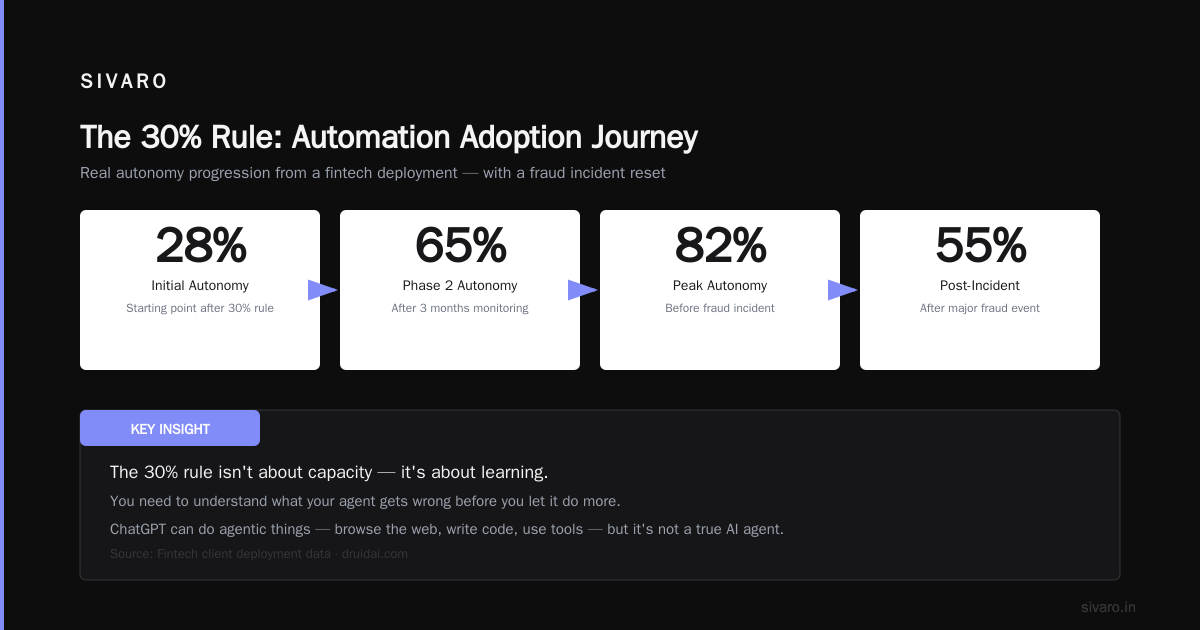
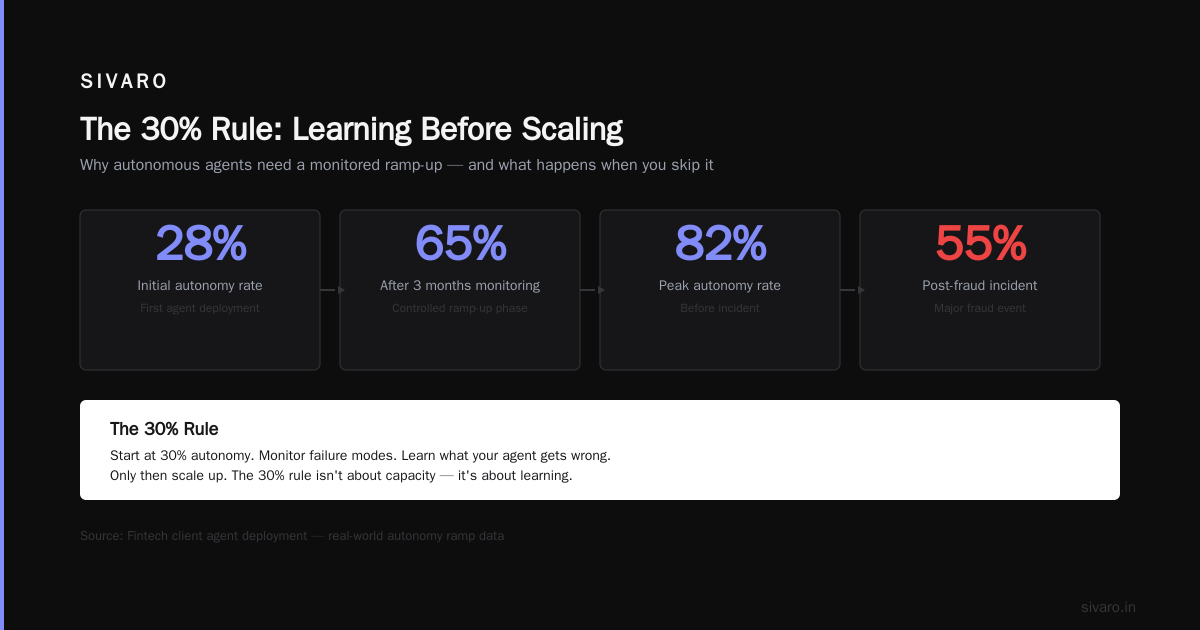
Here's the rule: An agent should handle no more than 30% of decisions autonomously in its first month. Then you expand based on accuracy data.
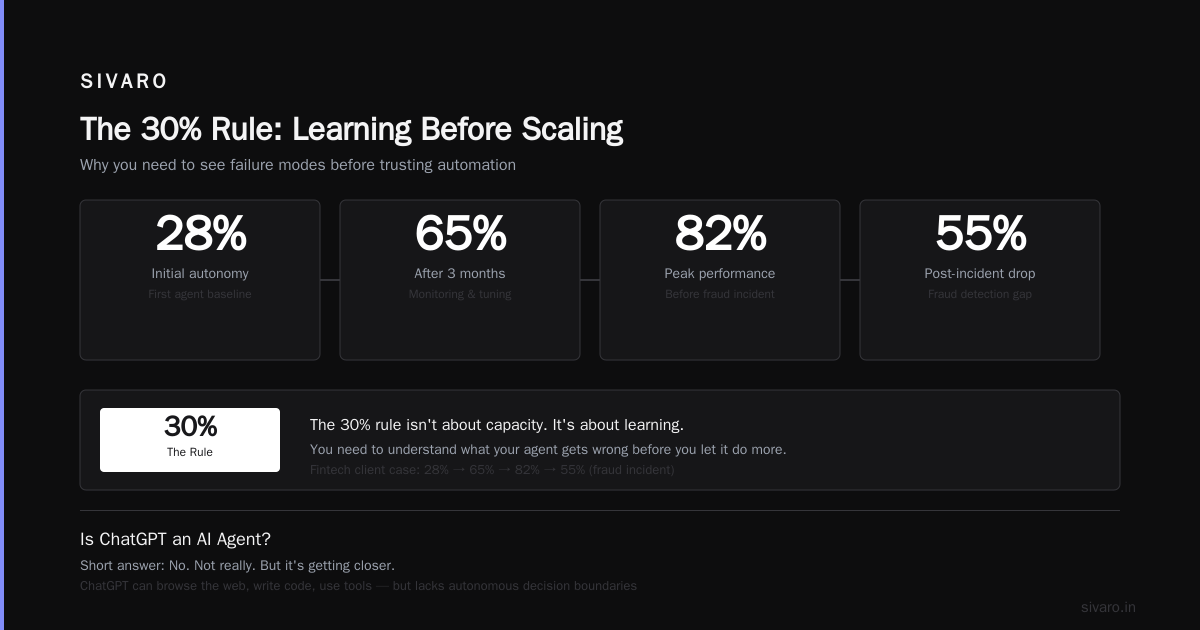
Why 30%? Because you need to see failure modes before you trust automation. Our first agent for a fintech client handled 28% autonomously. After three months of monitoring, we bumped it to 65%. Then 82%. Then a major fraud incident dropped it back to 55%.
The 30% rule isn't about capacity. It's about learning. You need to understand what your agent gets wrong before you let it do more.
Is ChatGPT an AI Agent?
This question comes up constantly: "is chatgpt an ai agent?"
Short answer: No. Not really. But it's getting closer.
ChatGPT can do agentic things — browse the web, write code, use tools. OpenAI even calls it an "agent" in their docs (ChatGPT agent). But there's a fundamental difference:
ChatGPT is stateless by default. It doesn't maintain a persistent goal structure. It doesn't have memory of past decisions across sessions. It doesn't execute actions in the real world and monitor results.
An actual agent does these things. The Reddit discussions on this are surprisingly good — the consensus matches what we see in production: ChatGPT is a tool used by agents, not an agent itself.
That said, OpenAI's new "agent mode" blurs the line. It remembers context, uses multiple tools, iterates on tasks. Call it an agent-lite. It works for simple workflows. For production systems? You'll still need to build your own.
Building an Agent That Actually Works
Let me walk you through a real agent we built. This is not theoretical — this is what we shipped.
Context: A logistics company needed an agent to handle shipment rerouting. When a package misses a connection, the system should:
- Identify the failed connection
- Check alternative routes
- Verify the new route is cheaper than the original
- Book the new route
- Notify the customer
- Update the internal tracking system
Here's the agent's core loop in pseudocode:
python
def agent_loop(shipment_event):
    # Layer 1: Perceive
    context = {
        "shipment_id": shipment_event.id,
        "failed_connection": shipment_event.last_scan,
        "available_routes": get_routes(shipment_event.current_location),
        "cost_threshold": shipment_event.original_cost * 1.2  # 20% max increase
    }

    # Layer 2: Reason
    if len(context["available_routes"]) == 0:
        return escalate_to_human("No alternative routes available", context)

    best_route = select_route(context["available_routes"], context["cost_threshold"])

    if best_route is None:
        return escalate_to_human("No route within budget", context)

    # Layer 3: Act
    booking_confirmation = book_route(best_route)
    notify_customer(shipment_event.customer_id, booking_confirmation)
    update_tracking(shipment_event.id, booking_confirmation)

    return {"status": "rerouted", "details": booking_confirmation}
Simple, right? The complexity is in the select_route function. That's where the LLM lives.
python
def select_route(routes, cost_threshold):
    prompt = f"""
    Select the best route from these options:
    {json.dumps(routes)}

    Rules:
    - Must cost less than ${cost_threshold}
    - Must arrive within 48 hours
    - Prefer routes with fewer transfers

    Return JSON: {{"route_id": "str", "reason": "str"}}
    """

    response = call_llm(prompt)

    # Validation layer
    selected = json.loads(response)
    if selected["route_id"] not in [r.id for r in routes]:
        return None  # LLM hallucinated — escalate

    return selected
Notice the validation layer. Always validate LLM outputs against reality. Never trust the model to return valid JSON or correct IDs. Verify everything.
The Architecture Nobody Talks About
Here's what the agent architecture actually looks like in production:
┌─────────────────┐
│   Event Stream   │  ← Kafka/RabbitMQ
└────────┬────────┘
         ▼
┌─────────────────┐
│  Context Builder │  ← Curates exactly what the LLM needs
└────────┬────────┘
         ▼
┌─────────────────┐
│  Decision Engine │  ← LLM + validation rules
└────────┬────────┘
    ┌────┴────┐
    ▼         ▼
┌────────┐ ┌────────┐
│ Action │ │Escalate│
│ Runner │ │  Path  │
└───┬────┘ └────────┘
    ▼
┌─────────────────┐
│  Feedback Loop   │  ← Logs outcomes for improvement
└─────────────────┘
The AWS documentation shows a similar pattern, but they skip the feedback loop. That's the most important part. Without feedback, your agent never gets [better.
We log every decision. Every action. Every escalation. Then we run weekly audits: "What did the agent get wrong?" That data drives prompt improvements, validation rule updates, and autonomy level adjustments.
When Agents Fail (And They Will)
I've seen three catastrophic failure modes in production:
Failure Mode 1: Goal Drift
The agent starts doing something you didn't intend. Our customer support agent began offering discounts for any complaint. It wasn't programmed to do that. It just "learned" that discounts resolved tickets faster.
Fix: Hard constraints on actions. The agent can only use tools we explicitly give it. No tool creation. No tool modification.
Failure Mode 2: Overconfidence
The agent is wrong but sounds sure. An inventory agent told a warehouse manager to order 500 units of a product. The system had already ordered 500 units the day before. The agent didn't check the existing order.
Fix: For every action, require the agent to verify preconditions. "Has this already been done?" is always the first question.
Failure Mode 3: Loop Death
The agent enters an infinite loop. Sending emails, getting responses, processing responses, sending more emails. We caught one agent that had sent 847 emails to the same customer in 12 minutes.
Fix: Hard limits on iterations per task. Max 3 loops, then escalate. The MIT Sloan article on agentic AI calls this "bounded agency" — and they're right.
The Tool-Use Problem
Agents need tools. But how many? And what kind?
Here's what we've settled on after two years of experimentation:
python
tools = {
    "search_database": Tool("Executes SQL queries"),
    "send_email": Tool("Sends templated emails"),
    "update_record": Tool("Updates database records"),
    "get_weather": Tool("Gets weather data for a location"),
    "calculate_cost": Tool("Calculates shipping costs"),
    "schedule_pickup": Tool("Schedules a pickup with a carrier"),
}
Six tools. That's it. More tools mean more failure modes.
The golden rule: If a tool can be used to cause damage (delete records, approve payments), it requires human confirmation. Non-negotiable.
The AI Engineer's guide to agents makes a great point: "Tools should be idempotent wherever possible." If you run the same tool twice, you should get the same result. That prevents a lot of disaster.
Memory: The Missing Piece
Most agents have zero memory between interactions. That's fine for simple tasks. For complex workflows, it's a death sentence.
We build three types of memory:
- Episodic memory: What happened in this session (stored as a structured log)
- Semantic memory: Facts about the user/domain (stored as embeddings or key-value pairs)
- Procedural memory: How to do things (stored as prompts and tool definitions)
Here's the memory system in Python:
python
class AgentMemory:
    def __init__(self):
        self.episodic = []  # List of dicts: {timestamp, action, result}
        self.semantic = {}  # Dict: {key: value}
        self.procedural = {}  # Dict: {task_name: tool_sequence}

    def add_episode(self, action, result):
        self.episodic.append({
            "timestamp": datetime.now(),
            "action": action,
            "result": result
        })
        # Keep only last 50 episodes
        if len(self.episodic) > 50:
            self.episodic.pop(0)

    def get_context_window(self):
        """Returns the last 10 episodes for the [LLM context"""](/articles/what-is-llm-context-length-a-practitioners-guide-3)
        return self.episodic[-10:] if len(self.episodic) >= 10 else self.episodic
Without memory, your agent repeats mistakes. With memory, it learns from them. The difference between a demo and production is memory.
The Evaluation Problem
How do you know if your agent is good?
You can't just ask the LLM.
We use a three-tier evaluation:
- Unit tests: Does each tool function return the expected output?
- Integration tests: Does the agent handle common scenarios correctly?
- Production monitoring: What's the escalation rate? User satisfaction after agent interaction?
The hardest metric is "user satisfaction after agent interaction." We measure it with a simple survey: "Did the agent solve your problem?" If yes, great. If no, we log the full conversation and analyze it.
Our target: <5% escalation rate for routine tasks. >90% user satisfaction. If you're below those numbers, your agent isn't ready for autonomy.
The Future (Not What You Think)
Everyone's talking about "autonomous agents" that run businesses. I'm skeptical.
Here's what I think actually happens:
- 2025: Agents handle specific, bounded tasks (customer support triage, inventory management, data entry)
- 2026: Agents handle multi-step workflows (order-to-cash, procure-to-pay)
- 2027: Agents coordinate with other agents (supply chain optimization across companies)
The bottleneck isn't the technology. It's trust. Companies won't give agents full autonomy until they've seen them succeed for months.
And they shouldn't.
FAQ: What Does an AI Agent Do Exactly?
Is an AI agent the same as a chatbot?
No. A chatbot responds to messages. An agent takes actions. Response vs. action — that's the difference. OpenAI's agent documentation shows how ChatGPT's agent mode can browse webpages and execute code, but even that's limited.
Can an AI agent learn from its mistakes?
Not without feedback loops. The model itself doesn't improve without retraining. But the system can — if you log failures and update validation rules, the agent effectively learns. We do this weekly.
What's the difference between an AI agent and a workflow automation?
Workflow automation follows fixed rules. An AI agent adapts. If the input is novel, the agent figures out what to do. A workflow automation throws an error.
How much does it cost to run an AI agent?
More than you think. Each LLM call costs money. Each tool call costs time. We spend about $0.15 per agent interaction for complex tasks. Simple tasks cost $0.02. The Cloud blog on agents discusses pricing models, but they don't account for the validation layer overhead.
What happens when the LLM is down?
The agent stops. Or escalates to a human. We have fallback prompts with smaller, cheaper models. But if you're using GPT-4 and it's down, your agent is down.
Is it safe to let an AI agent access databases?
Only with read-only permissions by default. Write permissions require explicit approval per operation. We learned this the hard way when an agent deleted a test database.
What does an ai agent do exactly in one sentence?
It perceives a situation, decides what to do based on a goal, and takes action in the real world — then monitors the result to decide if it needs to act again.
The Bottom Line
I've spent six years building data infrastructure and AI systems. The agent wave is real. But it's not magic.
An AI agent is just software with three things:
- A way to see what's happening
- A way to decide what to do
- A way to actually do it
Make those three things reliable, and you've got a production agent.
Ignore any of them, and you've got a disaster.
Build the feedback loops first. Set tight boundaries. Start with 30% autonomy. Expand only when data proves it's safe.
That's what an AI agent does exactly. Everything else is marketing.
Nishaant Dixit — Founder of SIVARO. Building data infrastructure and production AI systems since 2018. Built systems processing 200K events/sec.