What Exactly Is Kubernetes Used For?
Keyword: What Exactly Is Kubernetes Used For?
Kubernetes isn't a single thing. It's a contradiction.
I've spent the last six years building production systems at SIVARO — data pipelines, AI inference stacks, infrastructure that has to survive the real world. Kubernetes came up in every architecture conversation. Often with a religious fervor I found... suspicious.
So what exactly is Kubernetes used for? Let me strip away the marketing.
It's an orchestrator for containerized applications. That's the polite definition. The real one: it's a system that schedules workloads across a cluster of machines, handles failures, scales services up and down, and tries to make distributed systems feel like a single computer. Kubernetes started as Google's internal cluster manager Borg, open-sourced in 2014. Google Cloud runs over 30 billion container deployments per week. That's the scale it was built for.
But here's the thing I learned the hard way: you don't need Google scale. Most companies don't. And pretending they do is why people get burned.
By the end of this, you'll know exactly when Kubernetes solves your problems — and when it creates new ones. I'll show you the code. I'll tell you where we almost failed. And I'll answer the question everyone's asking: why are people moving away from Kubernetes?
Because the answer isn't what you think.
The Job Kubernetes Actually Does
Let me describe a problem you've probably faced.
You have a web service. Maybe a Python API. Runs fine on your laptop. You deploy it to a server. Then the server dies at 3 AM. You wake up, SSH in, restart it. It happens again. You set up a cron job to restart the process every hour. Hacky, but it works.
Then you add a second service. A background worker. They need to talk to each other. One needs environment variables the other doesn't. Configuration becomes a mess. You try Docker. Now each service runs in a container. Better isolation. But Docker doesn't tell the containers to restart when they crash. Doesn't distribute them across multiple machines. Doesn't scale them when traffic spikes.
That's the gap Kubernetes fills.
Kubernetes places containers onto machines (nodes) in a cluster. It watches them. If a container crashes, Kubernetes restarts it. If a node fails, Kubernetes moves the containers to healthy nodes. If traffic doubles, Kubernetes spins up more copies. It's a robot sysadmin that never sleeps.
Here's the minimal example to see it work:
yaml
apiVersion: apps/v1
kind: Deployment
metadata:
  name: api-server
spec:
  replicas: 3
  selector:
    matchLabels:
      app: api
  template:
    metadata:
      labels:
        app: api
    spec:
      containers:
      - name: server
        image: my-api:v2.1
        ports:
        - containerPort: 8080
        resources:
          requests:
            memory: "256Mi"
            cpu: "250m"
          limits:
            memory: "512Mi"
            cpu: "500m"
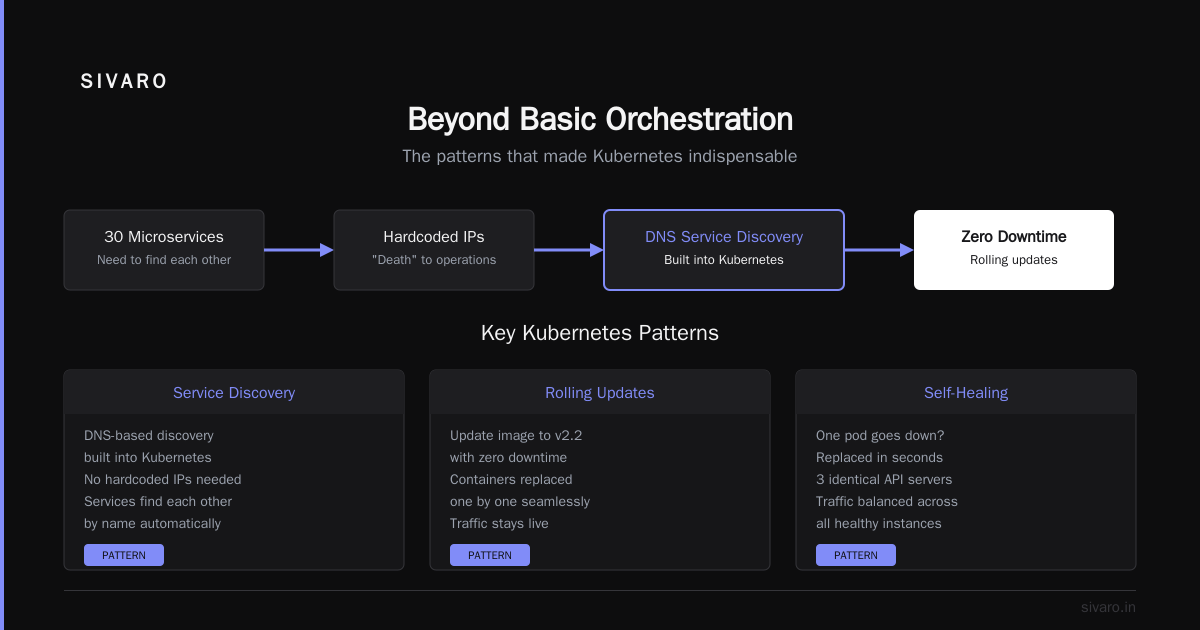
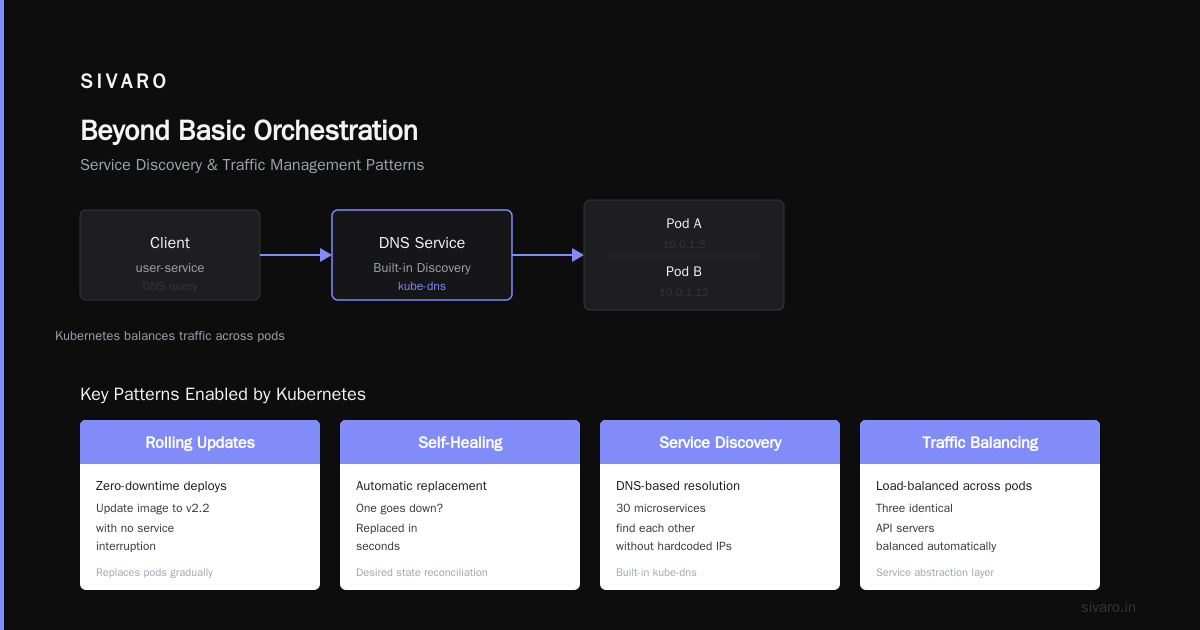
Save that as deployment.yaml. Run kubectl apply -f deployment.yaml. You now have three identical API servers. Kubernetes balances traffic across them. One goes down? It's replaced in seconds. You can update the image to v2.2 with zero downtime using rolling updates.
That's the basic job. But it's not why Kubernetes took over the world.
Beyond Basic Orchestration
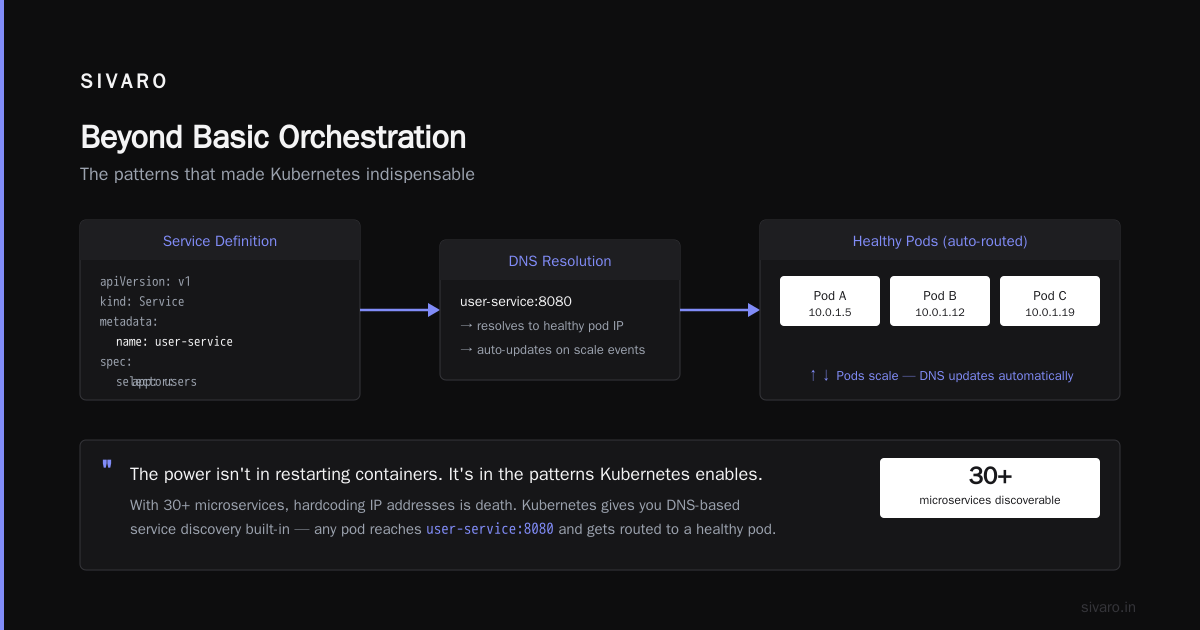
The power isn't in restarting containers. It's in the patterns Kubernetes enables.
Service Discovery
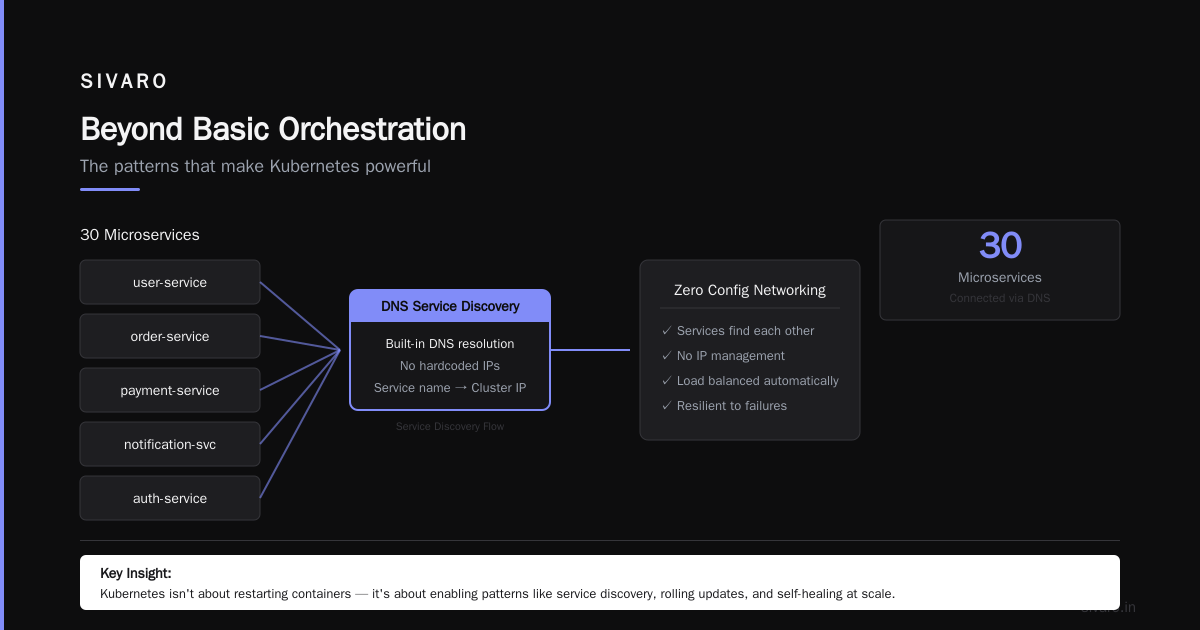
When you have 30 microservices, they need to find each other. Hardcoding IP addresses is death. Kubernetes gives you DNS-based service discovery built-in.
yaml
apiVersion: v1
kind: Service
metadata:
  name: user-service
spec:
  selector:
    app: users
  ports:
    - port: 8080
      targetPort: 8080
Any pod in the cluster can reach user-service:8080 and get routed to a healthy pod. If pods scale up or down, Kubernetes updates the DNS records automatically. You don't think about networking.
Configuration Management
Hardcoding configs in Docker images meant rebuilding images for every environment. Stupid. Kubernetes has ConfigMaps and Secrets:
yaml
apiVersion: v1
kind: ConfigMap
metadata:
  name: app-config
data:
  database_url: "postgres://db.internal:5432"
  log_level: "debug"
---
apiVersion: v1
kind: Secret
metadata:
  name: db-creds
type: Opaque
stringData:
  password: "s3cur3-p4ss"
Mount them as environment variables or files. Change config without rebuilding a single image. This alone saves hours of DevOps pain.
Rolling Updates
Deploying new code should not require downtime. Kubernetes handles this with finesse:
bash
kubectl set image deployment/api-server server=my-api:v2.2
kubectl rollout status deployment/api-server
Kubernetes spins up new pods with the new image, waits for them to pass health checks, then kills old pods. One at a time. No dropped requests. If v2.2 crashes, kubectl rollout undo snaps back to v2.1 in seconds.
Where We See Kubernetes Succeed
At SIVARO, we've deployed Kubernetes in environments ranging from 5-node clusters to 500-node fleets. The sweet spot is clear.
Yelp runs over 500 services on Kubernetes, handling 100 million+ API requests daily. Their engineering blog details how Kubernetes reduced deployment time from hours to minutes. That's a real win.
Adidas migrated to Kubernetes in 2019. They reported 50% faster time-to-market for new features and improved resource utilization from 40% to 70%+ (Red Hat). That's money saved.
The pattern: organizations with 10+ services, fluctuating traffic, and multiple teams benefit most. Kubernetes enforces consistency across teams. Every service deploys the same way, scales the same way, fails the same way.
The Dark Side
I've sold Kubernetes hard. Now let me tell you the parts that keep me up at night.
Complexity is a feature, not a bug — for the wrong reasons. A production cluster requires: etcd (distributed database), kube-apiserver, kube-scheduler, kube-controller-manager, kubelet, kube-proxy, container runtime, CNI plugin (networking), CSI driver (storage), ingress controller, metrics server, DNS addon, dashboard. That's fourteen components minimum. Each can fail in interesting ways.
Upgrade pain. Cluster upgrades are terrifying. I've seen version upgrades break CNI plugins, which broke all networking, which caused a 45-minute outage. The official upgrade process says: "Don't skip minor versions." So upgrading from 1.23 to 1.28 requires five sequential upgrades. That's not a feature, it's a tax.
Resource overhead. Kubernetes isn't free. The control plane components consume CPU and memory. For small clusters, overhead can be 20-30% of total resources. For a 3-node cluster with 8GB RAM each, you lose roughly one node to the platform itself.
Debugging hell. Try debugging a pod that's stuck in CrashLoopBackOff. The logs might be cryptic. The pod might not have logs at all if it crashed before logging initialized. You'll stare at kubectl describe pod output, trying to understand why the liveness probe failed when it worked five minutes ago.
Why Are People Moving Away from Kubernetes?
I've seen the trend. Every month, another blog post titled "Why we left Kubernetes." It's real. But the reasons aren't what you'd expect.
It's not that Kubernetes is bad. It's that Kubernetes is overused.
Companies with 2-3 services run Kubernetes with 5 nodes. They spend 60% of their time managing the cluster instead of building features. They're not doing Google-scale orchestration. They're doing overkill.
This isn't theoretical. The team at Avassa documented their decision not to use Kubernetes at the edge. Their reasoning: the operational complexity didn't justify the benefit for small, embedded deployments. They needed something simpler. They built it.
The other reason: skill scarcity. Kubernetes specialists are expensive. If your team can't manage etcd backups, cluster networking, and RBAC, you're in for a world of pain. I've seen startups burn through 3-month sprint cycles just to get a Kubernetes cluster into production.
The third reason: cost. Managed Kubernetes services (EKS, AKS, GKE) reduce operational burden but increase direct cost. Running Kubernetes yourself saves money but costs time. Neither is cheap.
When Not to Use Kubernetes
This is the rare honest advice you won't hear from vendors.
Don't use Kubernetes if:
- You have fewer than 5 services.
- Your traffic is predictable.
- You have 1-2 developers managing infrastructure.
- Your application is a monolith that deploys once a month.
- Your team has no Kubernetes experience and a tight deadline.
- You're running less than 50 containers total.
Instead, use: Docker Compose, Nomad, or a simple VM deployment script. One of our clients runs 12 services on a single $40/month VM with no orchestration. It's been running for 3 years without issue. They saved ~$45,000 in infrastructure costs.
Do use Kubernetes if:
- You have 10+ services that need to scale independently.
- You need zero-downtime deployments frequently.
- Your traffic spikes unpredictably.
- You have multiple teams deploying independently.
- You're running 100+ containers across 5+ nodes.
- You need to run on-premises and in cloud simultaneously.
Practical Architecture: How We Do It at SIVARO
I'll show you what works for us. We process 200K events/second across AI inference pipelines. Here's our cluster architecture:
Cluster: production-1 (Amazon EKS)
├── Control plane (managed)
├── Node group: gpu-inference
│   ├── 10 x p4d.24xlarge (8x A100 GPUs)
│   └── Taints: nvidia.com/gpu=true
├── Node group: cpu-services
│   ├── 20 x c6i.8xlarge
│   └── Standard workloads
├── Node group: storage
│   └── 5 x i3en.6xlarge (NVMe SSDs)
└── Addons:
    ├── Prometheus + Grafana (monitoring)
    ├── Istio (service mesh)
    ├── Karpenter (auto-scaling)
    └── Velero (backup)
Key lessons:
Use managed control planes. EKS and GKE abstract away etcd and API server management. Worth every penny. We estimate it saves 20 hours/month of operations work.
Taint your nodes. GPU workloads should never land on CPU nodes. CPU services should never block GPU pods. Learn tolerations and node affinity early.
Autoscale aggressively. Karpenter provisions instances in under 60 seconds. Our traffic spikes 5x during business hours. Without auto-scaling, we'd waste $30K/month on idle capacity.
Monitor everything. We use Prometheus recording rules to alert on pod restart loops, high memory pressure, OOM kills. Every cluster has a runbook. Every incident gets a postmortem.
The Skill You Really Need
Kubernetes is not about YAML files. It's about understanding distributed systems.
The people who succeed with Kubernetes know: networking, storage, security, observability, failure modes. They know what happens when etcd runs out of disk space. They know why kubectl drain is terrifying. They know how to debug a networking issue where pods can't resolve DNS.
You can't YAML your way out of a fundamental architecture problem. Kubernetes operationalizes good patterns but doesn't create them. If your application is poorly designed, Kubernetes will make your failures scale beautifully.
FAQ: Common Questions Answered Honestly
Q: Do I need Kubernetes for a simple web app?
Absolutely not. Use a single VM or Docker Compose. You'll save months of learning and thousands in infrastructure.
Q: What's the difference between Kubernetes and Docker Swarm?
Kubernetes won the ecosystem war. Docker Swarm is simpler but less powerful. If you need edge cases (GPU scheduling, custom resource definitions, multi-cluster federation), Kubernetes supports them. (Red Hat has a good comparison.)
Q: How hard is it to learn Kubernetes?
Painful. Expect 3-6 months before you're comfortable in production. The learning curve is steep because you're learning distributed systems fundamentals, not just an API.
Q: Can I run Kubernetes on my laptop?
Yes. Minikube or kind (Kubernetes in Docker) spin up local clusters. They're great for learning but don't simulate production networking or failure modes.
Q: Why are people moving away from Kubernetes?
Overcomplexity for small workloads. Cost of management. Skill shortage. Kubernetes is a power tool. You don't use a chainsaw to cut bread. (Avassa's article explores this in depth.)
Q: What's the easiest way to start?
Use a managed service. EKS with eksctl or GKE Autopilot. Don't build from scratch. Don't try to understand everything before deploying. Start with a simple web service. Add complexity when you hit problems.
Q: How do I handle stateful workloads?
Carefully. Databases in Kubernetes work but require PersistentVolumeClaims, StatefulSets, and careful backup strategies. Our rule: stateless first. Stateful when necessary.
Q: Is Kubernetes secure?
Out of the box, no. Pod security standards, network policies, RBAC, secret rotation — all must be configured. A default Kubernetes cluster is like a default Linux install with no firewall and password "admin". (Commvault covers security patterns.)
The Bottom Line
Kubernetes is a tool for coordinating containers at scale. It's not magic. It doesn't solve bad architecture. It doesn't replace good engineering. It operationalizes patterns that were previously painful to implement manually.
For the right problems — 10+ services, fluctuating traffic, multiple teams, zero-downtime requirements — Kubernetes is transformative. It reduces deployment time from hours to seconds. It makes failure handling predictable. It enforces consistency.
For small problems, it's dead weight. The complexity tax outweighs the benefits.
The real skill is knowing which problem you have. And being honest about it.
Nishaant Dixit — Founder of SIVARO. Building data infrastructure and production AI systems since 2018. Built systems processing 200K events/sec.